מחברי ידע

מחברי ידע משלימים את הכוונות המוגדרות. הם מנתחים מסמכי ידע (למשל, שאלות נפוצות או מאמרים) כדי למצוא תשובות אוטומטיות. כדי להגדיר אותם, מגדירים בסיסי ידע, שהם אוספים של מסמכי ידע.

אתם יכולים להפעיל מאגרי ידע לסוכן שלכם, כדי שכל הבקשות לזיהוי כוונות יוכלו למצוא תשובות אוטומטיות באמצעות מאגרי הידע שלכם. אפשר גם לציין בבקשות detect intent (זיהוי כוונת המשתמש) בנפרד מאגר ידע אחד או יותר.

בדרך כלל, סוכן שמשתמש במחברי ידע משתמש גם בכוונה מוגדרת. מחברי ידע מציעים פחות דיוק ושליטה בתשובות בהשוואה לכוונות. צריך להגדיר את הכוונות כך שיטפלו בבקשות מורכבות של משתמשים, ולאפשר למחברים של מקורות מידע לטפל בבקשות פשוטות.

רשימת השפות הנתמכות מופיעה בעמודה Knowledge Connectors בחומר העזר בנושא שפות.

מגבלות

התכונה 'מחברי ידע' זמינה רק בglobal אזור.

הפעלת תכונות בגרסת בטא

מוודאים שתכונות בטא מופעלות:

  1. עוברים אל מסוף Dialogflow ES.
  2. בוחרים נציג תמיכה.
  3. לוחצים על לחצן ההגדרות לצד שם הסוכן.
  4. גוללים למטה בכרטיסייה כללי ומוודאים שהאפשרות תכונות בגרסת בטא מופעלת.
  5. אם ביצעתם שינויים, לוחצים על שמירה.

יצירת מאגר ידע ומסמך

פועלים לפי ההוראות במאמר איך ליצור מאגרי ידע כדי ליצור מאגר ידע ומסמך.

הגדרות של מחברי ידע

אתם יכולים להפעיל או להשבית בסיסי ידע עבור הסוכן שלכם. מאגרי ידע שמופעלים ייכללו בכל הבקשות להתאמת כוונות שלא מציינות מאגרי ידע. כדי להפעיל או להשבית את מאגרי הידע:

  1. עוברים אל מסוף Dialogflow ES.
  2. בוחרים נציג תמיכה.
  3. בסרגל הצד הימני, לוחצים על ידע.
  4. בוחרים מהרשימה מאגר ידע אחד או יותר.
  5. לוחצים על הפעלה או על השבתה.

אם ביטוי של משתמש קצה תואם גם לישות, אפשר לציין עד כמה אתם מעדיפים תוצאות ידע:

  1. גוללים למטה לקטע שינוי ההעדפה לגבי תוצאות ידע.
  2. מזיזים את פס ההזזה מהצד החלש יותר (עדיפות לכוונת המשתמש) לצד החזק יותר (עדיפות לידע). מידע נוסף זמין בקטע זיהוי תגובות של כוונות בהמשך המאמר.

הגדרת התשובות

כברירת מחדל, מאגר הידע מוגדר עם תשובה אחת של ברירת מחדל, שמכילה את התשובה הכי מתאימה מתוך מאגר הידע. אפשר לשנות את התשובה הזו ולהוסיף הודעות תשובה עשירות. תשובות ממאגר הידע יכולות לכלול עד שלוש תשובות לכל מאגר ידע, ואפשר להפנות לתשובות האלה בתשובות שהגדרתם. כדי להוסיף תשובות:

  1. בדף Knowledge, לוחצים על שם מאגר הידע.
  2. גוללים למטה לקטע תשובות ומוסיפים תשובות לפי הצורך:
    1. כשמגדירים את התגובה הראשונה, משתמשים ב-$Knowledge.Question[1] וב-$Knowledge.Answer[1] במקום שבו רוצים שהשאלה והתשובה יופיעו.
    2. האינדקס של $Knowledge.Question ושל $Knowledge.Answer מתחיל ב-1, לכן צריך להגדיל את האינדקס הזה כשמוסיפים עוד תשובות.
  3. כשמסיימים לערוך, לוחצים על שמירה.

כשמגדירים תגובות, כדאי לקחת בחשבון את הנקודות הבאות:

  • אם מספר התשובות המוגדרות גדול ממספר התשובות התואמות N של מחבר הידע, יוחזרו רק N תשובות.
  • בהתחשב בכך שהדיוק עשוי להיות נמוך יותר מאשר התאמה לכוונות שהוגדרו באופן מפורש, מומלץ להחזיר למשתמשים שלוש תשובות כשאפשר.

דוגמה:
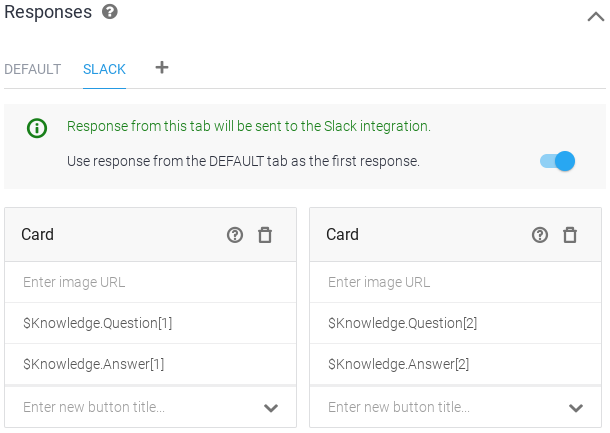
צילום מסך של שילוב מחבר ידע

זיהוי כוונת המשתמש באמצעות מאגר ידע

כששולחים בקשה לזיהוי כוונת המשתמש, אפשר לציין בסיס ידע אחד או יותר לתשובה אפשרית. אם מציינים בבקשה בסיסי ידע באופן מפורש, ההגדרה של בסיסי ידע שמופעלים ומושבתים לא רלוונטית.

הדוגמאות הבאות מראות איך להשתמש במסוף Dialogflow, ב-API בארכיטקטורת REST (כולל שורת פקודה) או בספריות לקוח כדי לזהות כוונות (Intents). כדי להשתמש ב-API, מפעילים את method ‏detectIntent בסוג Sessions.

ממשק משתמש באינטרנט

אתם יכולים לקיים אינטראקציה עם הסוכן ולקבל תשובות מחיבור הידע באמצעות סימולטור Dialogflow:

  1. פועלים לפי השלבים שלמעלה כדי להפעיל מאגר מידע.
  2. פועלים לפי השלבים שלמעלה כדי להגדיר את התשובות.
  3. מקלידים 'איך נרשמים?' בסימולטור.

REST

מבצעים קריאה ל-detectIntent בסוג Sessions ומציינים את מאגר הידע בשדה queryParams.

לפני שמשתמשים בנתוני הבקשה, צריך להחליף את הנתונים הבאים:

  • PROJECT_ID: מזהה הפרויקט ב-GCP
  • KNOWLEDGE_BASE_ID: מזהה מאגר הידע

ה-method של ה-HTTP וכתובת ה-URL:

POST https://dialogflow.googleapis.com/v2beta1/projects/PROJECT_ID/agent/sessions/123456789:detectIntent

תוכן בקשת JSON:

{
 "queryInput": {
   "text": {
     "text": "How do I sign up?",
     "languageCode": "en-US"
   }
 },
 "queryParams": {
   "knowledgeBaseNames": ["projects/PROJECT_ID/knowledgeBases/KNOWLEDGE_BASE_ID"]
 }
}

כדי לשלוח את הבקשה צריך להרחיב אחת מהאפשרויות הבאות:

אתם אמורים לקבל תגובת JSON שדומה לזו:

{
  ...
  "queryResult": {
    "queryText": "How do I sign up?",
    "parameters": {},
    "allRequiredParamsPresent": true,
    "fulfillmentText": "Sign up for Cloud Storage by turning on the Cloud Storage service in the Google Cloud Platform Console.",
    "intent": {
      "name": "projects/my-gcp-project/agent/intents/487c7242-a769-408a-a339-47b95e10dac4",
      "displayName": "Knowledge.KnowledgeBase.MzkzNTAyMDE3NDQxNDk3MDg4MA"
    },
    "intentDetectionConfidence": 0.99371547,
    "languageCode": "en-us",
    "knowledgeAnswers": {
      "answers": [
        {
          "answer": "Sign up for Cloud Storage by turning on the Cloud Storage service in the Google Cloud Platform Console.",
          "matchConfidenceLevel": "HIGH",
          "matchConfidence": 0.99371547
        },
        {
          "answer": "Certain types of content are not allowed on this service; please refer to the Terms of Services and Platform Policies for details. If you believe a piece of content is in violation of our policies, report it here (select See more products, then Google Cloud Storage and Cloud Bigtable).",
          "matchConfidenceLevel": "LOW",
          "matchConfidence": 0.0012244871
        },
        {
          "answer": "From the Cloud Storage documentation click \"Send feedback\" near the top right of the page. This will open a feedback form. Your comments will be reviewed by the Cloud Storage team.",
          "matchConfidenceLevel": "LOW",
          "matchConfidence": 0.0011537358
        }
      ]
    }
  }
}

Java

כדי לבצע אימות ב-Dialogflow CX, צריך להגדיר את Application Default Credentials. מידע נוסף זמין במאמר הגדרת אימות לסביבת פיתוח מקומית.


import com.google.api.gax.rpc.ApiException;
import com.google.cloud.dialogflow.v2beta1.DetectIntentRequest;
import com.google.cloud.dialogflow.v2beta1.DetectIntentResponse;
import com.google.cloud.dialogflow.v2beta1.KnowledgeAnswers;
import com.google.cloud.dialogflow.v2beta1.KnowledgeAnswers.Answer;
import com.google.cloud.dialogflow.v2beta1.QueryInput;
import com.google.cloud.dialogflow.v2beta1.QueryParameters;
import com.google.cloud.dialogflow.v2beta1.QueryResult;
import com.google.cloud.dialogflow.v2beta1.SessionName;
import com.google.cloud.dialogflow.v2beta1.SessionsClient;
import com.google.cloud.dialogflow.v2beta1.TextInput;
import com.google.common.collect.Maps;
import java.io.IOException;
import java.util.List;
import java.util.Map;

public class DetectIntentKnowledge {

  // DialogFlow API Detect Intent sample with querying knowledge connector.
  public static Map<String, KnowledgeAnswers> detectIntentKnowledge(
      String projectId,
      String knowledgeBaseName,
      String sessionId,
      String languageCode,
      List<String> texts)
      throws IOException, ApiException {
    // Instantiates a client
    Map<String, KnowledgeAnswers> allKnowledgeAnswers = Maps.newHashMap();
    try (SessionsClient sessionsClient = SessionsClient.create()) {
      // Set the session name using the sessionId (UUID) and projectID (my-project-id)
      SessionName session = SessionName.of(projectId, sessionId);
      System.out.println("Session Path: " + session.toString());

      // Detect intents for each text input
      for (String text : texts) {
        // Set the text and language code (en-US) for the query
        TextInput.Builder textInput =
            TextInput.newBuilder().setText(text).setLanguageCode(languageCode);
        // Build the query with the TextInput
        QueryInput queryInput = QueryInput.newBuilder().setText(textInput).build();

        QueryParameters queryParameters =
            QueryParameters.newBuilder().addKnowledgeBaseNames(knowledgeBaseName).build();

        DetectIntentRequest detectIntentRequest =
            DetectIntentRequest.newBuilder()
                .setSession(session.toString())
                .setQueryInput(queryInput)
                .setQueryParams(queryParameters)
                .build();
        // Performs the detect intent request
        DetectIntentResponse response = sessionsClient.detectIntent(detectIntentRequest);

        // Display the query result
        QueryResult queryResult = response.getQueryResult();

        System.out.format("Knowledge results:\n");
        System.out.format("====================\n");
        System.out.format("Query Text: '%s'\n", queryResult.getQueryText());
        System.out.format(
            "Detected Intent: %s (confidence: %f)\n",
            queryResult.getIntent().getDisplayName(), queryResult.getIntentDetectionConfidence());
        System.out.format(
            "Fulfillment Text: '%s'\n",
            queryResult.getFulfillmentMessagesCount() > 0
                ? queryResult.getFulfillmentMessages(0).getText()
                : "Triggered Default Fallback Intent");
        KnowledgeAnswers knowledgeAnswers = queryResult.getKnowledgeAnswers();
        for (Answer answer : knowledgeAnswers.getAnswersList()) {
          System.out.format(" - Answer: '%s'\n", answer.getAnswer());
          System.out.format(" - Confidence: '%s'\n", answer.getMatchConfidence());
        }

        KnowledgeAnswers answers = queryResult.getKnowledgeAnswers();
        allKnowledgeAnswers.put(text, answers);
      }
    }
    return allKnowledgeAnswers;
  }
}

Node.js

כדי לבצע אימות ב-Dialogflow CX, צריך להגדיר את Application Default Credentials. מידע נוסף זמין במאמר הגדרת אימות לסביבת פיתוח מקומית.

// Imports the Dialogflow client library
const dialogflow = require('@google-cloud/dialogflow').v2beta1;
// Instantiate a DialogFlow client.
const sessionClient = new dialogflow.SessionsClient();

/**
 * TODO(developer): Uncomment the following lines before running the sample.
 */
// const projectId = 'ID of GCP project associated with your Dialogflow agent';
// const sessionId = `user specific ID of session, e.g. 12345`;
// const languageCode = 'BCP-47 language code, e.g. en-US';
// const knowledgeBaseId = `the ID of your KnowledgeBase`;
// const query = `phrase(s) to pass to detect, e.g. I'd like to reserve a room for six people`;

// Define session path
const sessionPath = sessionClient.projectAgentSessionPath(
  projectId,
  sessionId
);
const knowledgeBasePath =
  'projects/' + projectId + '/knowledgeBases/' + knowledgeBaseId + '';

// The audio query request
const request = {
  session: sessionPath,
  queryInput: {
    text: {
      text: query,
      languageCode: languageCode,
    },
  },
  queryParams: {
    knowledgeBaseNames: [knowledgeBasePath],
  },
};

const responses = await sessionClient.detectIntent(request);
const result = responses[0].queryResult;
console.log(`Query text: ${result.queryText}`);
console.log(`Detected Intent: ${result.intent.displayName}`);
console.log(`Confidence: ${result.intentDetectionConfidence}`);
console.log(`Query Result: ${result.fulfillmentText}`);
if (result.knowledgeAnswers && result.knowledgeAnswers.answers) {
  const answers = result.knowledgeAnswers.answers;
  console.log(`There are ${answers.length} answer(s);`);
  answers.forEach(a => {
    console.log(`   answer: ${a.answer}`);
    console.log(`   confidence: ${a.matchConfidence}`);
    console.log(`   match confidence level: ${a.matchConfidenceLevel}`);
  });
}

Python

כדי לבצע אימות ב-Dialogflow CX, צריך להגדיר את Application Default Credentials. מידע נוסף זמין במאמר הגדרת אימות לסביבת פיתוח מקומית.

def detect_intent_knowledge(
    project_id, session_id, language_code, knowledge_base_id, texts
):
    """Returns the result of detect intent with querying Knowledge Connector.

    Args:
    project_id: The GCP project linked with the agent you are going to query.
    session_id: Id of the session, using the same `session_id` between requests
              allows continuation of the conversation.
    language_code: Language of the queries.
    knowledge_base_id: The Knowledge base's id to query against.
    texts: A list of text queries to send.
    """
    from google.cloud import dialogflow_v2beta1 as dialogflow

    session_client = dialogflow.SessionsClient()

    session_path = session_client.session_path(project_id, session_id)
    print("Session path: {}\n".format(session_path))

    for text in texts:
        text_input = dialogflow.TextInput(text=text, language_code=language_code)

        query_input = dialogflow.QueryInput(text=text_input)

        knowledge_base_path = dialogflow.KnowledgeBasesClient.knowledge_base_path(
            project_id, knowledge_base_id
        )

        query_params = dialogflow.QueryParameters(
            knowledge_base_names=[knowledge_base_path]
        )

        request = dialogflow.DetectIntentRequest(
            session=session_path, query_input=query_input, query_params=query_params
        )
        response = session_client.detect_intent(request=request)

        print("=" * 20)
        print("Query text: {}".format(response.query_result.query_text))
        print(
            "Detected intent: {} (confidence: {})\n".format(
                response.query_result.intent.display_name,
                response.query_result.intent_detection_confidence,
            )
        )
        print("Fulfillment text: {}\n".format(response.query_result.fulfillment_text))
        print("Knowledge results:")
        knowledge_answers = response.query_result.knowledge_answers
        for answers in knowledge_answers.answers:
            print(" - Answer: {}".format(answers.answer))
            print(" - Confidence: {}".format(answers.match_confidence))

זיהוי תגובות לכוונות

התשובה לשיטת detectIntent מסוג Sessions היא DetectIntentResponse. יש כמה גורמים שמשפיעים על האופן שבו שדות התשובה מאוכלסים.

אם יש התאמה פוטנציאלית גם לכוונת מוגדרת וגם למאגר ידע, המערכת משתמשת במידת הביטחון של כל התאמה ובהעדפה של תוצאות ידע (ראו הגדרות של מחברי ידע) כדי לקבוע איזו התאמה היא ההתאמה שנבחרה. ההתאמה שנבחרה מאוכלסת בשדה DetectIntentResponse.queryResult, והתאמות פוטנציאליות אחרות מאוכלסות בשדה DetectIntentResponse.alternativeQueryResults. שני השדות האלה מכילים הודעות QueryResult.

אם מאגר ידע מספק התאמה פוטנציאלית:

  • המאפיין QueryResult.knowledgeAnswers מאוכלס ברשימה של תשובות פוטנציאליות לשאלות, מסודרות לפי רמת סמך יורדת להתאמה.
  • אם הוגדרו תשובות עשירות למאגר הידע, QueryResult.fulfillmentMessages מלא בהודעות של תשובות עשירות.

כשמבצעים בקשה לזיהוי כוונת המשתמש, יכול להיות שהשאילתה למאגר הידע תיכשל. במקרה כזה, הכוונות המוגדרות ייבחרו, כך שהבקשה הכוללת לזיהוי כוונות לא תיכשל. אפשר למצוא מידע על שגיאות בשאילתות ידע בשדה DetectIntentResponse.alternativeQueryResults[i].diagnosticInfo.

ניהול מאגרי ידע

מידע נוסף על ניהול בסיסי ידע