


本指南介绍了如何使用 webhook,以便您的代理能够更加动态地运行。 Cloud Functions 因其简单性而被用于托管 webhook,但您也可以通过许多其他方式托管 webhook 服务。此示例还使用了 Go 编程语言,但您可以使用Cloud Functions 支持的任何语言。您无需修改本指南中的代码。
示例网络钩子代码会执行以下操作:
- 从网络钩子请求中读取参数值。
- 将参数值写入网络钩子响应。
- 在 Webhook 响应中提供文本响应。
准备工作
如果您不打算使用 Webhook,则可以跳过此快速入门。
在阅读本指南之前,请先完成以下事项:
创建 Cloud Function
您可以使用 Google Cloud 控制台(查看文档,打开控制台)创建 Cloud Functions 函数。如需为本指南创建函数,请执行以下操作:
- 请务必确保您的 Dialogflow CX 代理和函数位于同一项目中。 这是 Dialogflow CX 安全访问您的函数的最简单方式。如需选择项目,请前往项目选择器。
- 前往 Cloud Functions 概览页面。
- 点击创建函数,然后设置以下字段:
- 环境:第 1 代
- 函数名称:shirts-agent-webhook
- 区域:如果您为代理指定了区域,请使用同一区域。
- HTTP 触发器类型:HTTP
- 网址:点击此处的复制按钮并保存该值。 配置网络钩子时,您需要使用此网址。
- 身份验证:需要进行身份验证
- 需要 HTTPS:已选中
- 点击保存。
- 点击下一步(您不需要特殊的运行时、构建、连接或安全设置)。
- 设置以下字段:
- 运行时:选择最新的 Go 运行时。
- 源代码:内嵌编辑器
- 入口点:HandleWebhookRequest
将代码替换为以下内容:
// Package cxwh contains an example Dialogflow CX webhook
package cxwh

import (
	"encoding/json"
	"fmt"
	"log"
	"net/http"
)

type fulfillmentInfo struct {
	Tag string `json:"tag"`
}

type sessionInfo struct {
	Session    string         `json:"session"`
	Parameters map[string]any `json:"parameters"`
}

type text struct {
	Text []string `json:"text"`
}

type responseMessage struct {
	Text text `json:"text"`
}

type fulfillmentResponse struct {
	Messages []responseMessage `json:"messages"`
}

// webhookRequest is used to unmarshal a WebhookRequest JSON object. Note that
// not all members need to be defined--just those that you need to process.
// As an alternative, you could use the types provided by the Dialogflow protocol buffers:
// https://pkg.go.dev/google.golang.org/genproto/googleapis/cloud/dialogflow/cx/v3#WebhookRequest
type webhookRequest struct {
	FulfillmentInfo fulfillmentInfo `json:"fulfillmentInfo"`
	SessionInfo     sessionInfo     `json:"sessionInfo"`
}

// webhookResponse is used to marshal a WebhookResponse JSON object. Note that
// not all members need to be defined--just those that you need to process.
// As an alternative, you could use the types provided by the Dialogflow protocol buffers:
// https://pkg.go.dev/google.golang.org/genproto/googleapis/cloud/dialogflow/cx/v3#WebhookResponse
type webhookResponse struct {
	FulfillmentResponse fulfillmentResponse `json:"fulfillmentResponse"`
	SessionInfo         sessionInfo         `json:"sessionInfo"`
}

// confirm handles webhook calls using the "confirm" tag.
func confirm(request webhookRequest) (webhookResponse, error) {
	// Create a text message that utilizes the "size" and "color"
	// parameters provided by the end-user.
	// This text message is used in the response below.
	t := fmt.Sprintf("You can pick up your order for a %s %s shirt in 5 days.",
		request.SessionInfo.Parameters["size"],
		request.SessionInfo.Parameters["color"])

	// Create session parameters that are populated in the response.
	// The "cancel-period" parameter is referenced by the agent.
	// This example hard codes the value 2, but a real system
	// might look up this value in a database.
	p := map[string]any{"cancel-period": "2"}

	// Build and return the response.
	response := webhookResponse{
		FulfillmentResponse: fulfillmentResponse{
			Messages: []responseMessage{
				{
					Text: text{
						Text: []string{t},
					},
				},
			},
		},
		SessionInfo: sessionInfo{
			Parameters: p,
		},
	}
	return response, nil
}

// handleError handles internal errors.
func handleError(w http.ResponseWriter, err error) {
	w.WriteHeader(http.StatusInternalServerError)
	fmt.Fprintf(w, "ERROR: %v", err)
}

// HandleWebhookRequest handles WebhookRequest and sends the WebhookResponse.
func HandleWebhookRequest(w http.ResponseWriter, r *http.Request) {
	var request webhookRequest
	var response webhookResponse
	var err error

	// Read input JSON
	if err = json.NewDecoder(r.Body).Decode(&request); err != nil {
		handleError(w, err)
		return
	}
	log.Printf("Request: %+v", request)

	// Get the tag from the request, and call the corresponding
	// function that handles that tag.
	// This example only has one possible tag,
	// but most agents would have many.
	switch tag := request.FulfillmentInfo.Tag; tag {
	case "confirm":
		response, err = confirm(request)
	default:
		err = fmt.Errorf("Unknown tag: %s", tag)
	}
	if err != nil {
		handleError(w, err)
		return
	}
	log.Printf("Response: %+v", response)

	// Send response
	if err = json.NewEncoder(w).Encode(&response); err != nil {
		handleError(w, err)
		return
	}
}
点击部署。
等待状态指示器显示函数已成功部署。 在等待期间,检查您刚刚部署的代码。 代码注释描述了重要细节。
创建 webhook
现在,网络钩子已作为 Cloud Functions 函数存在,接下来您需要将此网络钩子与代理相关联。如需为代理创建 Webhook,请执行以下操作:
- 打开 Dialogflow CX 控制台。
- 选择您的 Google Cloud 项目。
- 选择您的代理。
- 选择管理标签页。
- 点击网络钩子。
- 点击创建。
- 填写以下字段:
- 显示名称:shirts-agent-webhook
- Webhook 网址:提供您在创建函数时保存的网络钩子网址。
- 子类型:标准。
- 所有其他字段均使用默认值。
- 点击保存。
使用 Webhook
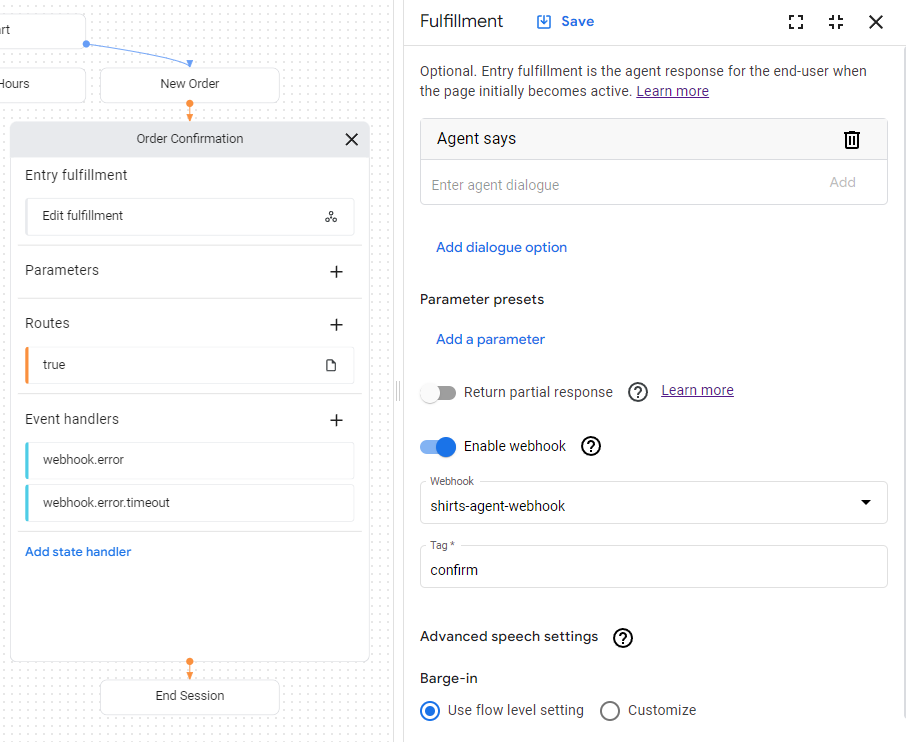
现在,代理可以使用网络钩子了,接下来您将在 fulfillment 中使用该网络钩子。订单确认页面包含一个 fulfillment 条目,该条目目前具有静态文本响应。如需更新 fulfillment 以使用您的 webhook,请执行以下操作:
- 选择构建标签页。
- 点击订单确认页面,以展开代理构建器图表中的相应页面。
- 点击页面上的条目履单字段,打开履单面板。
- 删除智能体说标题下的现有文本回答。 当您将光标悬停在文字上时,系统会显示删除 delete 按钮。
- 点击启用 Webhook。
- 从 Webhook 下拉菜单中选择
shirts-agent-webhook选项。 - 在标记字段中输入
confirm。 - 点击保存。
- 关闭履单面板。
已部署的网络钩子代码会发送一个响应,该响应会创建一个名为 cancel-period 的参数。更新代理,以在同一订单确认页面的最终代理响应中引用此参数:
- 点击带有
true条件的路线条件,打开路线面板。 - 向下滚动到路由面板的实现部分,然后在代理说标题下添加以下文本响应:
You can cancel your order within $session.params.cancel-period days. Goodbye. - 点击保存。
- 关闭路线面板。

在模拟器中测试代理
您的代理和网络钩子已准备好通过模拟器进行测试:
- 点击 Test Agent。
- 输入
I want to buy a large red shirt,然后按 Enter 键。
由于您同时提供了尺寸和颜色,因此代理获得了创建衬衫订单所需的一切信息,可以直接转到订单确认页面。

下面介绍了代理的回答:
| 响应 | 说明 |
|---|---|
| 好的,我们开始创建新订单吧。 | 当新订单页面变为活跃状态时,系统会调用条目 fulfillment。此响应是由此 fulfillment 触发的。 |
| 您选择了大号红色衬衫。 | 当新订单页面的所有表单参数都已提供时,系统会调用检查表单完成情况的条件路由。此响应是由相应路线的 fulfillment 触发的。此路由也会转换到订单确认页面。 |
| 您可以在 5 天内为这款大尺寸红色衬衫下订单。 | 订单确认页面的条目 fulfillment 会调用 webhook。查看网络钩子代码中的 confirm 函数。该函数会创建此文本响应,并使用 webhook 请求中提供的参数。 |
| 您可以在 2 天内取消订单。再见。 | 订单确认页面具有一个条件始终为 true 的条件路由。此响应由相应路由的 fulfillment 触发。请注意,该响应使用了网络钩子在网络钩子响应中设置的参数。 |