


生成器使用 Google 最新的生成式大语言模型 (LLM) 和您提供的提示,在运行时生成智能体行为和回答。 可用模型由 Vertex AI 提供。
借助生成器,您可以直接从 Dialogflow CX 调用 LLM,而无需创建自己的外部 webhook。您可以将生成器配置为执行通常要求 LLM 执行的任何操作。
生成器非常擅长执行摘要、参数提取、数据 转换等任务,请参阅以下示例。
限制
此功能适用于任何 Dialogflow CX 语言的智能体,但可用模型可能具有更严格的语言限制。 如需了解详情,请参阅 Vertex AI。
了解生成器概念
Vertex AI 文档 包含在为 Dialogflow CX 创建生成器时需要了解的重要信息:
定义生成器
如需创建生成器,请执行以下操作:
- 转到 Dialogflow CX 控制台。
- 选择您的 Google Cloud 项目。
- 选择智能体。
- 点击管理 标签页。
- 点击生成器 。
- 点击新建 。
- 为生成器输入描述性显示名称。
- 按照 概念中的说明输入文本提示、模型和控制项。
- 点击保存 。
在响应过程中,文本提示会在运行时发送到生成模型。 提示应是清晰的问题或请求,以便模型生成令人满意的回答。
您可以通过在字词前添加 $ 将字词标记为占位符,使提示具有上下文。您稍后会将这些生成器提示占位符与 fulfillment 中的会话参数相关联,并且在执行期间,这些占位符会替换为会话参数值。

有一些特殊的生成器提示占位符不需要与会话参数相关联。 这些内置生成器提示占位符是
| 术语 | 定义 |
|---|---|
$conversation |
智能体与用户之间的对话,不包括用户的最后一句话以及智能体随后的话语。 |
$last-user-utterance |
用户的最后一句话。 |
在 fulfillment 中使用生成器
您可以在 fulfillment 期间使用生成器(在路由、 事件处理程序、 参数等中)。
前往 Fulfillment 窗格的生成器 部分并将其展开。 然后,点击添加生成器 。现在,您可以选择预定义的生成器,也可以就地定义新的生成器。
选择生成器后,您需要将提示的生成器提示占位符与会话参数相关联。 为此,您需要定义输出参数 ,该参数将包含生成器执行后的结果。在 输出参数 字段中输入输出参数的 名称,例如
things-to-do。此输出参数将写入会话参数,您可以在日后引用该参数。
然后,您可以使用输出参数在日后引用生成器结果
,例如在智能体回答中:
I'd recommend doing $session.params.things-to-do。
如需详细了解参数格式和用法,请参阅 参数文档。
测试生成器
您可以在模拟器中直接测试生成器功能。
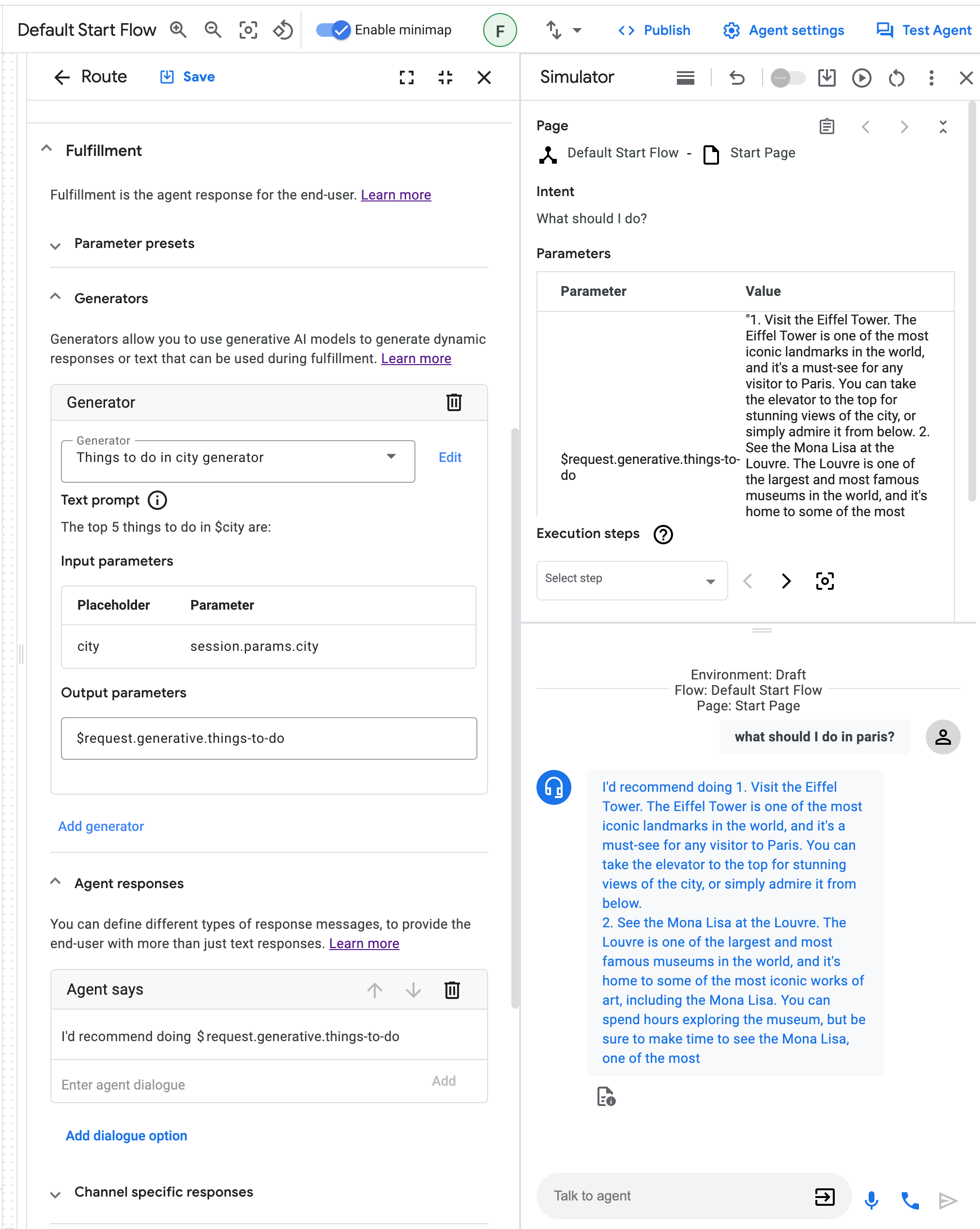
示例
本部分提供了生成器的使用场景示例。由于生成器是一种基于大语言模型 (LLM) 的生成技术,因此您使用以下示例提示的个人结果可能与此处记录的输出不同。Google 返回的所有提示结果都是尽力而为。
内容摘要
此示例展示了如何总结内容。
提示:
Your goal is to summarize a given text.

Text:
$text

A concise summary of the text in 1 or 2 sentences is:
对话摘要
此示例展示了如何提供对话摘要。
提示:
You are an expert at summarizing conversations between a User and an Agent.
When providing the summary, always start with "Dear $email_address, the conversation summary is as follows:"
Provide a summary in a few bullet points.
Try to be as brief as possible with each bullet point,
only noting the key points of the conversation.
Output the summary in markdown format.

Conversation:
$conversation

Summary:
已解析的提示:
对于示例对话,发送到生成模型的已解析提示可能是:
You are an expert at summarizing conversations between a User and an Agent.
When providing the summary, always start with "Dear joe@example.com conversation summary is as follows:"
Provide a summary in a few bullet points.
Try to be as brief as possible with each bullet point,
only noting the key points of the conversation.
Output the summary in markdown format.

Conversation:
Agent: Good day! What can I do for you today?
User: Hi, which models can I use in Dialogflow CX's generators?
Agent: You can use all models that Vertex AI provides!
User: Thanks, thats amazing!

Summary:
Markdown 格式设置
此示例展示了如何以 Markdown 格式设置文本。
# Instructions

You are presented with a text and your goal is to apply markdown formatting to text.

**NOTE:** Do not change the meaning of the text, only the formatting.

# Example

## Text

Generators allow you to use Googles latest generative models to format text,
or to create a summaries, or even to write code. What an amazing feature.

## Text in Markdown

*Generators* allow you to use Google's latest generative models to

*   format text
*   create a summaries
*   write code

What an amazing feature.

# Your current task

## Text

$text

## Text in Markdown
问答
这一系列示例展示了如何使用生成器回答问题。
首先,您可以直接依赖生成模型的内部知识来回答问题。但请注意,模型只会根据其训练数据中的信息提供回答。无法保证回答的真实性或时效性。
使用自我知识进行问答的提示
Your goal is to politely reply to a human with an answer to their question.

The human asked:
$last-user-utterance

You answer:
使用提供的信息进行问答的提示
不过,如果您希望模型根据您提供的信息回答,只需将其添加到提示中即可。如果您要提供的信息不多(例如小型餐厅菜单或公司联系信息),则此方法有效。
# Instructions

Your goal is to politely answer questions about the restaurant menu.
If you cannot answer the question because it's not related to the restaurant
menu or because relevant information is missing from the menu, you politely
decline to answer.

# Restaurant menu:

## Starters
Salat 5$

## Main dishes
Pizza 10$

## Desserts
Ice cream 2$

# Examples

Question: How much is the pizza?
Answer: The pizza is 10$.

Question: I want to order the ice cream.
Answer: We do have ice cream! However, I can only answer questions about the menu.

Question: Do you have spaghetti?
Answer: I'm sorry, we do not have spaghetti on the menu.

# Your current task

Question: $last-user-utterance
Answer:
使用动态提供的信息进行问答的提示
通常,您希望模型根据其回答的信息太多,无法简单地粘贴到提示中。在这种情况下,您可以将生成器连接到信息检索系统(例如数据库或搜索引擎),以根据查询动态检索信息。您只需将该系统的输出保存到参数中,并将其连接到提示中的占位符即可。
# Instructions

Your goal is to politely answer questions based on the provided information.
If you can't answer the question given the provided information, you politely
decline to answer.

# Provided information:
$information

Question: $last-user-utterance
Answer:
代码生成
此示例展示了如何使用生成器编写代码!请注意,在这种情况下,使用专门经过训练以生成代码的生成模型是有意义的。
提示
# Instructions:

Your goal is to write code in a given programming language solving a given problem.

Problem to solve:
$problem

Programming language:
$programming-language

# Solution:
升级到人工代理
此示例展示了如何处理升级到人工代理的情况。提示中的最后两条说明可防止模型过于冗长。
提示:
# Instructions:

You are a polite customer service agent that handles requests
from users to speak with an operator.

Based on the $last-user-utterance,
respond to the user appropriately about their request to speak with an operator.
Always be polite and assure the user that you
will do your best to help their situation.

Do not ask the user any questions.
Do not ask the user if there is anything you can do to help them.

# Answer:
搜索查询生成
此示例展示了如何优化用户提供的 Google 搜索查询。
提示:
# Instructions:

You are an expert at Google Search and using "Google Fu"
to build concise search terms that provide the highest quality results.
A user will provide an example query,
and you will attempt to optimize this to be the best Google Search query possible.

# Example:

User: when was covid-19 first started and where did it originated from?
Agent: covid-19 start origin

# Your task:

User: $text
Agent:
客户信息检索
此示例展示了如何执行信息检索和搜索以字符串或 JSON 格式提供的数据。这些格式通常由 Dialogflow CX 会话参数使用。
提示:
You are a database engineer and specialize in extracting information
from both structured and unstructured data formats like CSV, SQL, JSON,
and also plain text.

Given a $user_db, extract the information requested
by the user from the $last-user-utterance

EXAMPLE:
user_db: {'customer_name': 'Patrick', 'balance': '100'}
User: What is my current account balance?
Agent: Your current balance is 100.

Begin!

user_db: $user_db
User: $last-user-utterance
Agent:
更新 JSON 对象
此示例展示了如何接受来自用户(或 webhook)的输入 JSON 对象,然后根据用户的请求操作该对象。
提示:
You are an expert Software Engineer
that specializes in the JSON object data structure.

Given some user $update_request and existing $json_object,
you will modify the $json_object based on the user's $update_request.

EXAMPLE:
json_object = { "a": 1, "b": 123 }
User: Add a new key/value pair to my JSON
Agent: What do you want to add?
User: c: cat
Agent: { "a": 1, "b": 123, "c": "cat"}

json_object = {"accounts": [{"username": "user1", "account_number": 12345}, {"username": "user2", "account_number": 98765}], "timestamp": "2023-05-25", "version":"1.0"}
User: Add a new value for user1
Agent: What do you want to add?
User: birthday, 12/05/1982
Agent: {"accounts": [{"username": "user1", "account_number": 12345, "birthday": "12/05/1982"}, {"username": "user2", "account_number": 98765}], "timestamp": "2023-05-25", "version":"1.0"}

json_object = $json_object
User: Add a new key value to my db
Agent: What do you want to add?
User: $last-user-utterance
Agent:
Codelab
另请参阅生成器 Codelab。
问题排查
如果您想调试该功能,可以在 Dialogflow 控制台模拟器中检查已解析的大语言模型 (LLM) 输入提示:
点击原始回答 按钮:
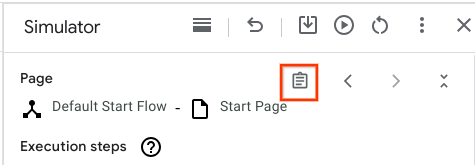
找到 “Generators LLM Inputs” 字段。将这些字段作为纯文本读取,并检查 LLM 输入是否合理。如果任何短语包含
$,请检查模拟器输入,并明确提示中的$是否是故意的(例如,price is $10中的$可能是故意的,而visit $city可能不是故意的,可能意味着误用或 bug)。如果您看不到“Generative LLM Inputs”字段, 请与支持团队联系。