


O conector do BigQuery para Apache Spark permite que cientistas de dados combinem o poder do mecanismo SQL perfeitamente escalonável com os recursos de machine learning do Apache Spark. Neste tutorial, mostramos como usar o Serviço gerenciado para Apache Spark, o BigQuery e a ML do Apache Spark para realizar machine learning em um conjunto de dados.
Objetivos
Usar a regressão linear para criar um modelo de peso de nascimento como uma função de cinco fatores:- semanas de gestação
- idade da mãe
- idade do pai
- ganho de peso da mãe durante a gravidez
- escala de Apgar
Use as seguintes ferramentas:
- BigQuery, para preparar a tabela de entrada de regressão linear, que é gravada no projeto Google Cloud
- Python, para consultar e gerenciar dados no BigQuery
- Apache Spark, para acessar a tabela de regressão linear resultante
- Spark ML, para criar e avaliar o modelo
- Job do PySpark do Serviço Gerenciado para Apache Spark para invocar funções do ML do Spark
Custos
Neste documento, você vai usar os seguintes componentes faturáveis do Google Cloud:
- Compute Engine
- Managed Service for Apache Spark
- BigQuery
Para gerar uma estimativa de custo baseada na projeção de uso deste tutorial, use a calculadora de preços.
Antes de começar
Um cluster do Serviço Gerenciado para Apache Spark tem os componentes do Spark, incluindo o Spark ML, instalados. Para configurar um cluster do Serviço Gerenciado para Apache Spark e executar o código neste exemplo, você precisará fazer (ou ter feito) o seguinte:
- Faça login na sua conta do Google Cloud . Se você começou a usar o Google Cloud, crie uma conta para avaliar o desempenho de nossos produtos em situações reais. Clientes novos também recebem US$ 300 em créditos para executar, testar e implantar cargas de trabalho.
-
In the Google Cloud console, on the project selector page, select or create a Google Cloud project.
Roles required to select or create a project
- Select a project: Selecting a project doesn't require a specific IAM role—you can select any project that you've been granted a role on.
-
Create a project: To create a project, you need the Project Creator role
(
roles/resourcemanager.projectCreator), which contains theresourcemanager.projects.createpermission. Learn how to grant roles.
Enable the Dataproc, BigQuery, Compute Engine APIs.
Roles required to enable APIs
To enable APIs, you need the Service Usage Admin IAM role (
roles/serviceusage.serviceUsageAdmin), which contains theserviceusage.services.enablepermission. Learn how to grant roles.-
Instale a CLI do Google Cloud.
-
Ao usar um provedor de identidade (IdP) externo, primeiro faça login na CLI gcloud com sua identidade federada.
-
Para inicializar a CLI gcloud, execute o seguinte comando:
gcloud init -
In the Google Cloud console, on the project selector page, select or create a Google Cloud project.
Roles required to select or create a project
- Select a project: Selecting a project doesn't require a specific IAM role—you can select any project that you've been granted a role on.
-
Create a project: To create a project, you need the Project Creator role
(
roles/resourcemanager.projectCreator), which contains theresourcemanager.projects.createpermission. Learn how to grant roles.
Enable the Dataproc, BigQuery, Compute Engine APIs.
Roles required to enable APIs
To enable APIs, you need the Service Usage Admin IAM role (
roles/serviceusage.serviceUsageAdmin), which contains theserviceusage.services.enablepermission. Learn how to grant roles.-
Instale a CLI do Google Cloud.
-
Ao usar um provedor de identidade (IdP) externo, primeiro faça login na CLI gcloud com sua identidade federada.
-
Para inicializar a CLI gcloud, execute o seguinte comando:
gcloud init - Crie um cluster do Serviço Gerenciado para Apache Spark no seu projeto. Seu cluster precisa executar uma versão do Serviço Gerenciado para Apache Spark com Spark 2.0 ou superior, incluindo bibliotecas de machine learning.
Criar um subconjunto de dados de natalidade do BigQuery
Nesta seção, você cria um conjunto de dados no projeto e uma tabela no conjunto de dados para que queira copiar um subconjunto de dados da taxa de natalidade do conjunto de dados natality do BigQuery disponível publicamente. Posteriormente, neste tutorial, você usará os dados do subconjunto nesta tabela para prever o peso de nascimento como uma função da idade materna, da idade paterna e das semanas de gestação.
É possível criar o subconjunto de dados usando o console Google Cloud ou executando um script Python na máquina local.
Console
Crie um conjunto de dados no projeto.
- Acesse a IU da Web do BigQuery.
- No painel de navegação esquerdo, clique no nome do projeto e em CRIAR CONJUNTO DE DADOS.
- Na caixa de diálogo Criar conjunto de dados:
- Em ID do conjunto de dados, digite "natality_regression".
- Em Local de dados, escolha um
local
para o conjunto de dados. O local do valor padrão é
US multi-region. Depois que um conjunto de dados é criado, o local não pode ser alterado. - Em Validade da tabela padrão, escolha uma das seguintes opções:
- Nunca (padrão): você deve excluir a tabela manualmente.
- Número de dias: a tabela será excluída após o número de dias especificado a partir da data de criação.
- Para Criptografia, escolha uma das seguintes opções:
- Google-owned and Google-managed encryption key (padrão).
- Chave gerenciada pelo cliente: consulte Como proteger dados com chaves do Cloud KMS.
- Clique em Criar conjunto de dados.
Execute uma consulta no conjunto de dados de natalidade pública e salve os resultados da consulta em uma nova tabela no conjunto de dados.
- Copie e cole a seguinte consulta no Editor de Consultas e
clique em Executar.
CREATE OR REPLACE TABLE natality_regression.regression_input as
SELECT
weight_pounds,
mother_age,
father_age,
gestation_weeks,
weight_gain_pounds,
apgar_5min
FROM
`bigquery-public-data.samples.natality`
WHERE
weight_pounds IS NOT NULL
AND mother_age IS NOT NULL
AND father_age IS NOT NULL
AND gestation_weeks IS NOT NULL
AND weight_gain_pounds IS NOT NULL
AND apgar_5min IS NOT NULL
- Depois que a consulta for concluída (em aproximadamente um minuto), os resultados serão salvos como uma tabela do BigQuery "regression_input" no conjunto de dados
natality_regressiondo seu projeto.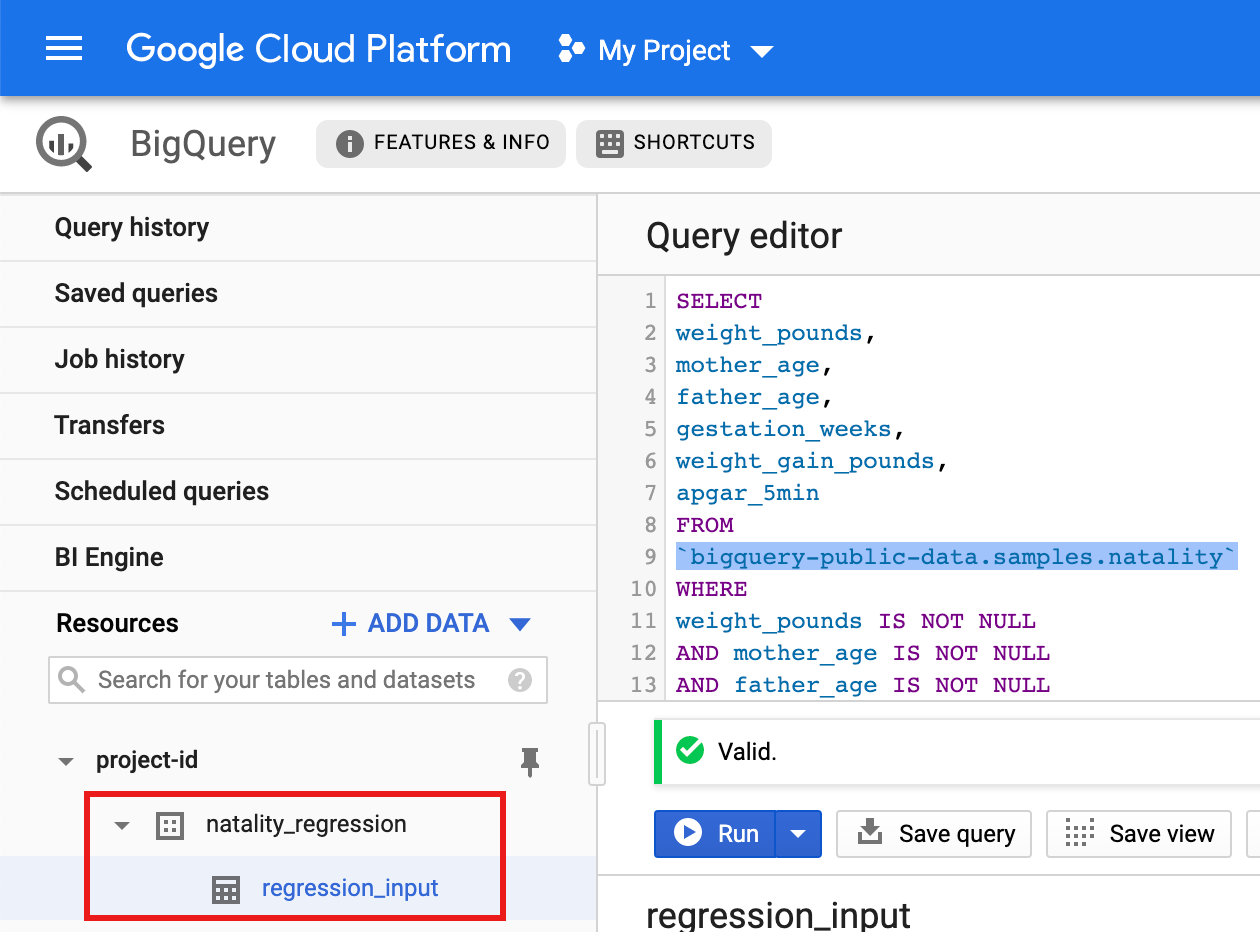
- Copie e cole a seguinte consulta no Editor de Consultas e
clique em Executar.
Python
Antes de testar este exemplo, siga as instruções de configuração do Python no Guia de início rápido do Serviço Gerenciado para Apache Spark: como usar bibliotecas de cliente. Para mais informações, consulte a documentação de referência da API Python do Serviço gerenciado para Apache Spark.
Para autenticar o Serviço gerenciado para Apache Spark, configure o Application Default Credentials. Para mais informações, consulte Configurar a autenticação para um ambiente de desenvolvimento local.
Consulte Como configurar um ambiente de desenvolvimento do Python para ver instruções sobre como instalar o Python e a biblioteca de cliente do Google Cloud para Python (necessária para executar o código). É recomendado instalar e usar um
virtualenvdo Python.Copie e cole o código
natality_tutorial.pyabaixo em um shellpythonna máquina local. Pressione a tecla<return>no shell para executar o código e criar um conjunto de dados "natality_regression" do BigQuery no seu projeto padrão doGoogle Cloud com uma tabela "regression_input" preenchida com um subconjunto dos dadosnatalitypúblicos.Confirme a criação do conjunto de dados
natality_regressione da tabelaregression_input.
Executar uma regressão linear
Nesta seção, você vai executar uma regressão linear do PySpark enviando
o job ao Serviço Gerenciado para Apache Spark usando o console Google Cloud
ou executando o comando gcloud em um terminal local.
Console
Copie e cole o seguinte código em um novo arquivo
natality_sparkml.pyna máquina local."""Run a linear regression using Apache Spark ML. In the following PySpark (Spark Python API) code, we take the following actions: * Load a previously created linear regression (BigQuery) input table into our Cloud Dataproc Spark cluster as an RDD (Resilient Distributed Dataset) * Transform the RDD into a Spark Dataframe * Vectorize the features on which the model will be trained * Compute a linear regression using Spark ML """ from pyspark.context import SparkContext from pyspark.ml.linalg import Vectors from pyspark.ml.regression import LinearRegression from pyspark.sql.session import SparkSession # The imports, above, allow us to access SparkML features specific to linear # regression as well as the Vectors types. # Define a function that collects the features of interest # (mother_age, father_age, and gestation_weeks) into a vector. # Package the vector in a tuple containing the label (`weight_pounds`) for that # row. def vector_from_inputs(r): return (r["weight_pounds"], Vectors.dense(float(r["mother_age"]), float(r["father_age"]), float(r["gestation_weeks"]), float(r["weight_gain_pounds"]), float(r["apgar_5min"]))) sc = SparkContext() spark = SparkSession(sc) # Read the data from BigQuery as a Spark Dataframe. natality_data = spark.read.format("bigquery").option( "table", "natality_regression.regression_input").load() # Create a view so that Spark SQL queries can be run against the data. natality_data.createOrReplaceTempView("natality") # As a precaution, run a query in Spark SQL to ensure no NULL values exist. sql_query = """ SELECT * from natality where weight_pounds is not null and mother_age is not null and father_age is not null and gestation_weeks is not null """ clean_data = spark.sql(sql_query) # Create an input DataFrame for Spark ML using the above function. training_data = clean_data.rdd.map(vector_from_inputs).toDF(["label", "features"]) training_data.cache() # Construct a new LinearRegression object and fit the training data. lr = LinearRegression(maxIter=5, regParam=0.2, solver="normal") model = lr.fit(training_data) # Print the model summary. print("Coefficients:" + str(model.coefficients)) print("Intercept:" + str(model.intercept)) print("R^2:" + str(model.summary.r2)) model.summary.residuals.show()
Copie o arquivo
natality_sparkml.pylocal para um bucket do Cloud Storage no seu projeto.gcloud storage cp natality_sparkml.py gs://bucket-name
Execute a regressão na página Enviar um job do Serviço Gerenciado para Apache Spark.
No campo Arquivo principal python, insira o URI
gs://do bucket do Cloud Storage no qual sua cópia do arquivonatality_sparkml.pyestá localizada.Selecione
PySparkcomo o Tipo de job.Insira
gs://spark-lib/bigquery/spark-bigquery-latest_2.12.jarno campo Arquivos Jar. Isso torna o conector spark-bigquery disponível para o aplicativo PySpark no ambiente de execução para permitir a leitura de dados do BigQuery em um Spark DataFrame.Preencha os campos código da tarefa, Região e Cluster.
Clique em Enviar para executar o job no cluster.
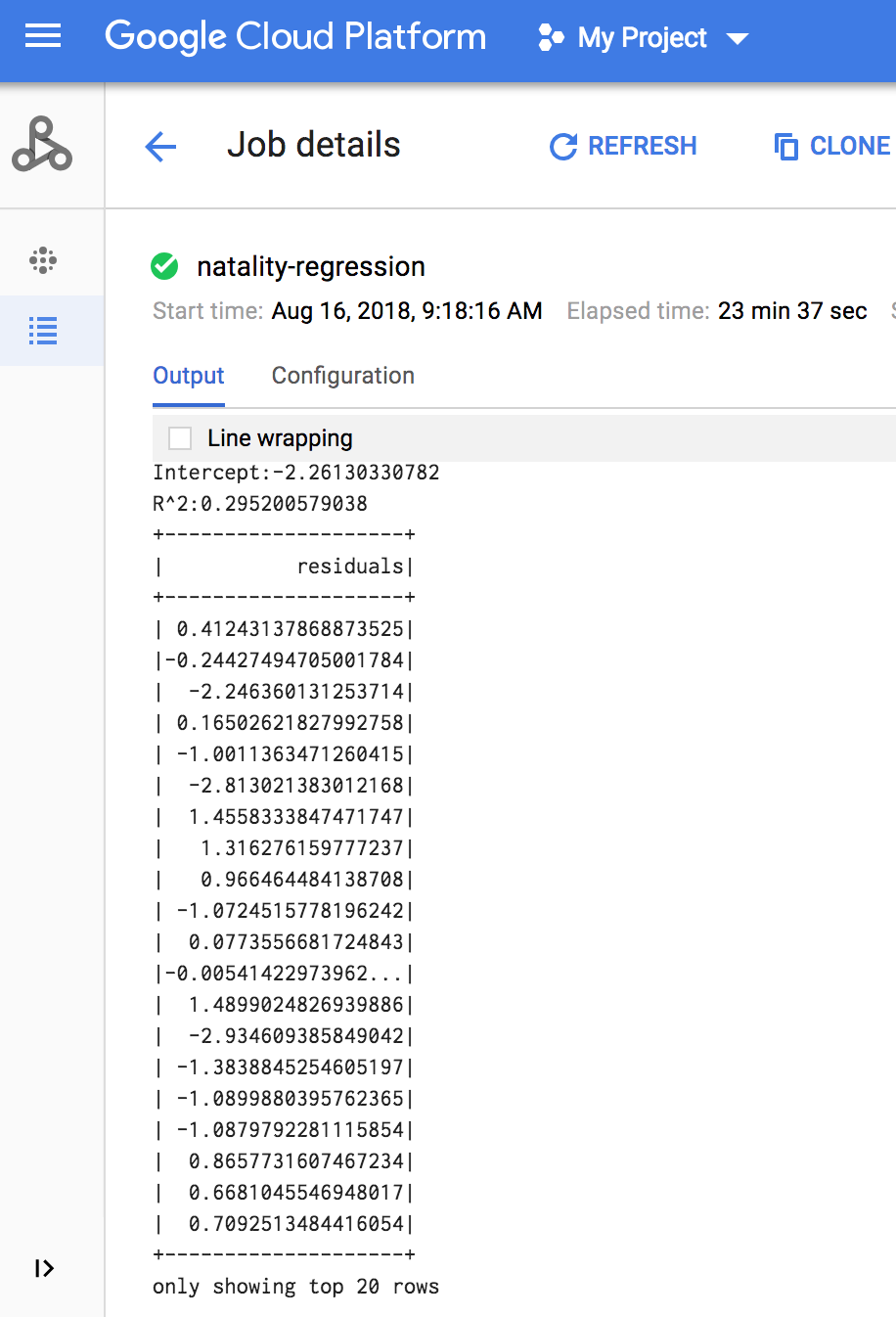
Quando o job é concluído, o resumo do modelo de saída de regressão linear aparece na janela de detalhes do job do Serviço Gerenciado para Apache Spark.
gcloud
Copie e cole o seguinte código em um novo arquivo
natality_sparkml.pyna máquina local."""Run a linear regression using Apache Spark ML. In the following PySpark (Spark Python API) code, we take the following actions: * Load a previously created linear regression (BigQuery) input table into our Cloud Dataproc Spark cluster as an RDD (Resilient Distributed Dataset) * Transform the RDD into a Spark Dataframe * Vectorize the features on which the model will be trained * Compute a linear regression using Spark ML """ from pyspark.context import SparkContext from pyspark.ml.linalg import Vectors from pyspark.ml.regression import LinearRegression from pyspark.sql.session import SparkSession # The imports, above, allow us to access SparkML features specific to linear # regression as well as the Vectors types. # Define a function that collects the features of interest # (mother_age, father_age, and gestation_weeks) into a vector. # Package the vector in a tuple containing the label (`weight_pounds`) for that # row. def vector_from_inputs(r): return (r["weight_pounds"], Vectors.dense(float(r["mother_age"]), float(r["father_age"]), float(r["gestation_weeks"]), float(r["weight_gain_pounds"]), float(r["apgar_5min"]))) sc = SparkContext() spark = SparkSession(sc) # Read the data from BigQuery as a Spark Dataframe. natality_data = spark.read.format("bigquery").option( "table", "natality_regression.regression_input").load() # Create a view so that Spark SQL queries can be run against the data. natality_data.createOrReplaceTempView("natality") # As a precaution, run a query in Spark SQL to ensure no NULL values exist. sql_query = """ SELECT * from natality where weight_pounds is not null and mother_age is not null and father_age is not null and gestation_weeks is not null """ clean_data = spark.sql(sql_query) # Create an input DataFrame for Spark ML using the above function. training_data = clean_data.rdd.map(vector_from_inputs).toDF(["label", "features"]) training_data.cache() # Construct a new LinearRegression object and fit the training data. lr = LinearRegression(maxIter=5, regParam=0.2, solver="normal") model = lr.fit(training_data) # Print the model summary. print("Coefficients:" + str(model.coefficients)) print("Intercept:" + str(model.intercept)) print("R^2:" + str(model.summary.r2)) model.summary.residuals.show()
Copie o arquivo
natality_sparkml.pylocal para um bucket do Cloud Storage no seu projeto.gcloud storage cp natality_sparkml.py gs://bucket-name
Envie o job Pyspark para o Serviço Gerenciado para Apache Spark executando o comando
gcloud, mostrado abaixo, em uma janela de terminal na máquina local.- O valor da sinalização --jars torna o conector spark-bigquery disponível
para o jobv do PySpark no ambiente de execução para permitir a leitura de
dados do BigQuery em um Spark DataFrame.
gcloud dataproc jobs submit pyspark \
    gs://your-bucket/natality_sparkml.py \
    --cluster=cluster-name \
    --region=region \
    --jars=gs://spark-lib/bigquery/spark-bigquery-with-dependencies_SCALA_VERSION-CONNECTOR_VERSION.jar
- O valor da sinalização --jars torna o conector spark-bigquery disponível
para o jobv do PySpark no ambiente de execução para permitir a leitura de
dados do BigQuery em um Spark DataFrame.
A saída de regressão linear (resumo do modelo) é exibida na janela do terminal quando o job é concluído.
<<< # Print the model summary.
... print "Coefficients:" + str(model.coefficients)
Coefficients:[0.0166657454602,-0.00296751984046,0.235714392936,0.00213002070133,-0.00048577251587]
<<< print "Intercept:" + str(model.intercept)
Intercept:-2.26130330748
<<< print "R^2:" + str(model.summary.r2)
R^2:0.295200579035
<<< model.summary.residuals.show()
+--------------------+
|           residuals|
+--------------------+
| -0.7234737533344147|
|  -0.985466980630501|
| -0.6669710598385468|
|  1.4162434829714794|
|-0.09373154375186754|
|-0.15461747949235072|
| 0.32659061654192545|
|  1.5053877697929803|
|  -0.640142797263989|
|   1.229530260294963|
|-0.03776160295256...|
| -0.5160734239126814|
| -1.5165972740062887|
|  1.3269085258245008|
|  1.7604670124710626|
|  1.2348130901905972|
|   2.318660276655887|
|  1.0936947030883175|
|  1.0169768511417363|
| -1.7744915698181583|
+--------------------+
only showing top 20 rows.
Limpar
Depois de concluir o tutorial, você pode limpar os recursos que criou para que eles parem de usar a cota e gerar cobranças. Nas seções a seguir, você aprenderá a excluir e desativar esses recursos.
Exclua o projeto
O jeito mais fácil de evitar cobranças é excluindo o projeto que você criou para o tutorial.
Para excluir o projeto:
- No console Google Cloud , acesse a página Gerenciar recursos.
- Na lista de projetos, selecione o projeto que você quer excluir e clique em Excluir .
- Na caixa de diálogo, digite o ID do projeto e clique em Encerrar para excluí-lo.
Excluir o cluster do Serviço Gerenciado para Apache Spark
Consulte Excluir um cluster.