

為什麼要自動驗證網域?
雖然 Cloud Channel API 可讓您大規模佈建 Google Workspace 授權,但客戶仍須採取下列動作來啟用服務。
- 接受服務條款
- 驗證網域擁有權
- 設定 MX 記錄
新建立的客戶首次存取管理控制台 (admin.google.com) 時,會看到引導式需求程序。
如果您能以程式輔助方式存取網域的 DNS 記錄 (例如您將網域轉售給客戶),即可自動執行步驟 2 和 3,提高啟用率,因為這些步驟通常需要轉售客戶具備技術知識。
本程式碼研究室說明如何使用 Site Verification API 實作這項自動化功能。
事前準備
請務必完成 API 設定程式碼研究室,設定Google Cloud 專案並建立服務帳戶,以便呼叫 Cloud Channel API。
建議您在本程式碼研究室中使用測試版 Partner Sales Console。
此外,本程式碼研究室也假設您已完成 Workspace 端對端佈建程式碼研究室。
總覽
驗證 Google Workspace 授權的網域需要進行多項 API 呼叫。
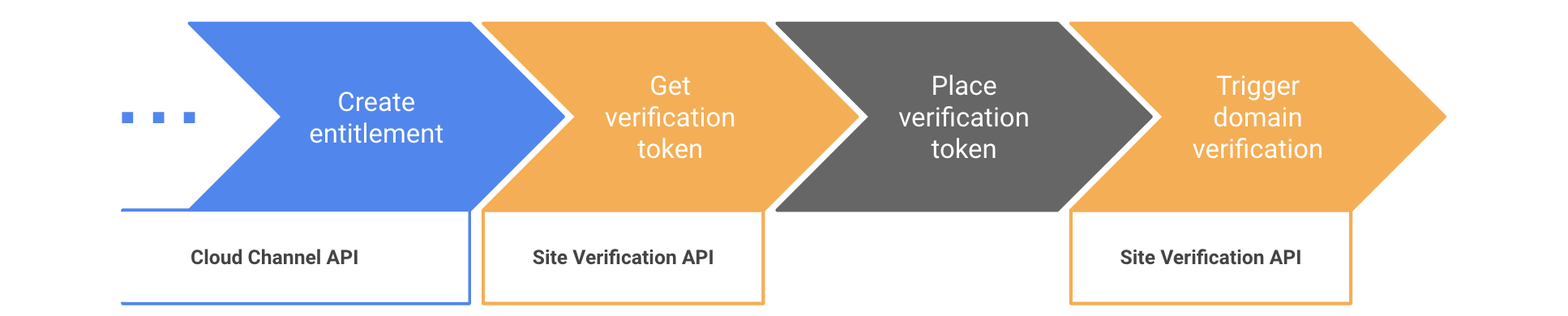
網站驗證 API 並非專為經銷商設計,網域驗證是各種 Google 產品 (例如 Search Console、Google Ads 等) 使用的信號。本文所述程序會將經銷商網域的超級管理員設為網域「擁有者」,並將客戶的第一位管理員設為共同擁有者。如要進一步瞭解這些概念,請參閱「開始使用 Site Verification API」頁面。
步驟 1:準備使用 Site Verification API
- 前往 Google Cloud 控制台的「API Library」(API 程式庫) 專區,然後啟用 Site Verification API。
- 使用經銷商網域的超級管理員帳戶,前往網域層級委派頁面。
- 在服務帳戶的資料列中,按一下「編輯」。
- 在「OAuth Scopes」(OAuth 範圍) 欄位中輸入
https://www.googleapis.com/auth/siteverification。 - 按一下 [授權]。
- 安裝 Site Verification API 用戶端程式庫。
步驟 2:取得驗證權杖
本程式碼研究室將著重於最常見的網域驗證方式:使用 TXT
DNS 記錄。Site Verification API 支援其他驗證方法。
如要擷取將做為 TXT 記錄放置的權杖,您需要取得 type=INET_DOMAIN 和 verificationMethod=DNS_TXT 的權杖。
在下列程式碼中,請使用您的資訊填入這些變數。
jsonKeyFile: 您建立服務帳戶時產生的 JSON 金鑰檔案路徑。resellerAdminUser: 經銷商網域超級管理員的電子郵件地址。customerDomain:終端客戶的網域。如果您在測試 Partner Sales Console 上執行本程式碼研究室,請確保網域符合網域名稱慣例。
C#
使用下列匯入項目:
using Google.Apis.Auth.OAuth2;
using Google.Apis.Services;
using Google.Apis.SiteVerification.v1;
using Google.Apis.SiteVerification.v1.Data;
建立 API 用戶端並擷取權杖:
// Set up credentials with user impersonation
ICredential credential = GoogleCredential.FromFile(jsonKeyFile)
                             .CreateScoped("https://www.googleapis.com/auth/siteverification")
                             .CreateWithUser(resellerAdminUser);

// Create the API service
var verificationService = new SiteVerificationService(new BaseClientService.Initializer{
    HttpClientInitializer = credential,
});

// Fetch the token
var request = new SiteVerificationWebResourceGettokenRequest {
  VerificationMethod = "DNS_TXT",
  Site = new SiteVerificationWebResourceGettokenRequest.SiteData {
    Type = "INET_DOMAIN",
    Identifier = customerDomain
  }
};
var response = verificationService.WebResource.GetToken(request).Execute();
string token = response.Token;
Console.WriteLine("Site Verification token: " + token);
Go
使用下列匯入項目:
import (
  "context"
  "fmt"
  "os"

  "golang.org/x/oauth2/google"
  "google.golang.org/api/option"
  "google.golang.org/api/siteverification/v1"
)
建立 API 用戶端並擷取權杖:
ctx := context.Background()

// Set up credentials with user impersonation
jsonKey, _ := os.ReadFile(jsonKeyFile)
jwt, _ := google.JWTConfigFromJSON(jsonKey, "https://www.googleapis.com/auth/siteverification")
jwt.Subject = resellerAdminUser
tokenSource := jwt.TokenSource(ctx)

// Create the API Service
verificationService, _ := siteverification.NewService(ctx, option.WithTokenSource(tokenSource))

// Fetch the token
req := &siteverification.SiteVerificationWebResourceGettokenRequest{
  Site: &siteverification.SiteVerificationWebResourceGettokenRequestSite{
    Type:       "INET_DOMAIN",
    Identifier: customerDomain,
  },
  VerificationMethod: "DNS_TXT",
}
res, _ := verificationService.WebResource.GetToken(req).Do()
token := res.Token
fmt.Println("Site verification token: " + token)
Java
使用下列匯入項目:
import com.google.auth.http.HttpCredentialsAdapter;
import com.google.auth.oauth2.GoogleCredentials;
import com.google.auth.oauth2.ServiceAccountCredentials;
import com.google.api.client.googleapis.javanet.GoogleNetHttpTransport;
import com.google.api.client.json.jackson2.JacksonFactory;
import com.google.api.services.siteVerification.SiteVerification;
import com.google.api.services.siteVerification.SiteVerificationScopes;
import com.google.api.services.siteVerification.model.SiteVerificationWebResourceGettokenRequest;
import com.google.api.services.siteVerification.model.SiteVerificationWebResourceGettokenResponse;
import com.google.api.services.siteVerification.model.SiteVerificationWebResourceResource;
import java.io.FileInputStream;
import java.util.Arrays;
建立 API 用戶端並擷取權杖:
// Set up credentials with user impersonation
FileInputStream jsonKeyFileSteam = new FileInputStream(JSON_KEY_FILE);
GoogleCredentials credentials = ServiceAccountCredentials.fromStream(jsonKeyFileSteam)
                                    .createScoped("https://www.googleapis.com/auth/siteverification")
                                    .createDelegated(RESELLER_ADMIN_USER);

// Create the API service
SiteVerification verificationService = new SiteVerification.Builder(
    GoogleNetHttpTransport.newTrustedTransport(),
    JacksonFactory.getDefaultInstance(),
    new HttpCredentialsAdapter(credentials)).build();

// Fetch the token
SiteVerificationWebResourceGettokenRequest request =
    new SiteVerificationWebResourceGettokenRequest()
        .setVerificationMethod("DNS_TXT")
        .setSite(new SiteVerificationWebResourceGettokenRequest.Site()
            .setType("INET_DOMAIN")
            .setIdentifier(CUSTOMER_DOMAIN));
SiteVerificationWebResourceGettokenResponse response =
    verificationService.webResource().getToken(request).execute();
String token = response.getToken();
System.out.println("Site Verification token: " + token);
Node.js
使用下列匯入項目:
const {google} = require('googleapis');
建立 API 用戶端並擷取權杖:
// Set up credentials with user impersonation
const authJWT = new JWT({
  keyFile: jsonKeyFile,
  scopes: ['https://www.googleapis.com/auth/siteverification'],
  subject: resellerAdminUser,
});

// Create the API service
const verificationService = google.siteVerification({version: 'v1', auth: authJWT});

// Fetch the token
const { data } = await verificationService.webResource.getToken({
  requestBody: {
    site: {
      type: 'INET_DOMAIN',
      identifier: customerDomain,
    },
    verificationMethod: 'DNS_TXT',
  }
});
const token = data.token;
console.log(`Site Verification token: ${token}`);
PHP
建立 API 用戶端並擷取權杖:
// Set up credentials with user impersonation
$client = new Google_Client();
$client->setAuthConfig($JSON_KEY_FILE);
$client->setSubject($RESELLER_ADMIN_USER);
$client->setScopes('https://www.googleapis.com/auth/siteverification');

// Create the API service
$verificationService = new Google_Service_SiteVerification($client);

// Fetch the token
$request = new Google_Service_SiteVerification_SiteVerificationWebResourceGettokenRequest([
  'verificationMethod' => 'DNS_TXT',
  'site' => [
    'type' => 'INET_DOMAIN',
    'identifier' => $CUSTOMER_DOMAIN
  ]
]);
$response = $verificationService->webResource->getToken($request);
$token = $response->token;
print 'Site Verification token: ' . $token . PHP_EOL;
Python
使用下列匯入項目:
from google.oauth2 import service_account
from apiclient.discovery import build
建立 API 用戶端並擷取權杖:
# Set up credentials with user impersonation
credentials = service_account.Credentials.from_service_account_file(
    JSON_KEY_FILE, scopes=["https://www.googleapis.com/auth/siteverification"])
credentials_delegated = credentials.with_subject(RESELLER_ADMIN_USER)

# Create the API service
verification_service = build(serviceName="siteVerification", version="v1",
    credentials=credentials_delegated)

# Fetch the token
response = verification_service.webResource().getToken(
  body={
    "site": {
      "type": "INET_DOMAIN",
      "identifier": CUSTOMER_DOMAIN
    },
    "verificationMethod": "DNS_TXT"
  }).execute()
token = response["token"]
print("Site Verification token: " + token)
步驟 3:放置驗證權杖
編寫程式碼,在客戶網域的 DNS 記錄中新增權杖做為 TXT 記錄。
如果是新網域,現在是設定 Gmail MX 記錄的好時機。
步驟 4:觸發網域驗證
將權杖設為 TXT 記錄後,即可呼叫 Site Verification API 觸發驗證。方法是呼叫 webResource.insert()。
如果找不到預期權杖,呼叫就會失敗並傳回 400 錯誤。您可以實作指數輪詢重試策略,直到呼叫成功為止,以彌補 DNS 傳播延遲。
如果呼叫傳回時沒有錯誤,Site Verification API 會將網域視為已驗證,且 webResource 的 owners 欄位中的任何電子郵件都是已驗證擁有者。
驗證狀態大約需要 3 小時,才會套用到客戶的 Google Workspace 帳戶。您可以將客戶的管理員 (在您呼叫 provisionCloudIdentity 時建立) 設為 webResource 的 owner,強制立即傳播狀態。
C#
// Set the customer's admin user as an owner to make sure the domain
// verification status is instantly propagated to the Workspace account
string[] owners = { "admin@" + customerDomain };

var resource = new SiteVerificationWebResourceResource {
  Site = new SiteVerificationWebResourceResource.SiteData {
    Type = "INET_DOMAIN",
    Identifier = customerDomain
  },
  Owners = owners
};

resource = verificationService.WebResource.Insert(resource, "DNS_TXT").Execute();
Console.WriteLine("=== Domain has been verified");
Go
// Set the customer's admin user as an owner to make sure the domain
// verification status is instantly propagated to the Workspace account
resource := &siteverification.SiteVerificationWebResourceResource{
  Site: &siteverification.SiteVerificationWebResourceResourceSite{
    Type:       "INET_DOMAIN",
    Identifier: customerDomain,
  },
  Owners: []string{"admin@" + customerDomain},
}
resource, err := verificationService.WebResource.Insert("DNS_TXT", resource).Do()
if err != nil {
  fmt.Println(err)
} else {
  fmt.Println("=== Domain has been verified")
}
Java
// Set the customer's admin user as an owner to make sure the domain
// verification status is instantly propagated to the Workspace account
SiteVerificationWebResourceResource resource =
    new SiteVerificationWebResourceResource()
        .setSite(new SiteVerificationWebResourceResource.Site()
            .setIdentifier(CUSTOMER_DOMAIN)
            .setType("INET_DOMAIN"))
        .setOwners(Arrays.asList("admin@" + CUSTOMER_DOMAIN));

resource = verificationService.webResource().insert("DNS_TXT", resource).execute();
System.out.println("=== Domain has been verified");
Node.js
// Set the customer's admin user as an owner to make sure the domain
// verification status is instantly propagated to the Workspace account
await verificationService.webResource.insert({
  verificationMethod: 'DNS_TXT',
  requestBody: {
    site: {
      type: 'INET_DOMAIN',
      identifier: customerDomain,
    },
    owners: [`admin@${customerDomain}`],
  }
});
console.log('=== Domain has been verified');
PHP
// Set the customer's admin user as an owner to make sure the domain
// verification status is instantly propagated to the Workspace account
$resource = new Google_Service_SiteVerification_SiteVerificationWebResourceResource([
  'site' => [
    'type' => 'INET_DOMAIN',
    'identifier' => $CUSTOMER_DOMAIN,
  ],
  'owners' => ['admin@' . $CUSTOMER_DOMAIN]
]);

$resource = $verificationService->webResource->insert('DNS_TXT', $resource);
print '=== Domain has been verified' . PHP_EOL;
Python
# Set the customer's admin user as an owner to make sure the domain
# verification status is instantly propagated to the Workspace account
resource = verification_service.webResource().insert(
  verificationMethod="DNS_TXT",
  body={
    "site": {
      "type": "INET_DOMAIN",
      "identifier": CUSTOMER_DOMAIN
    },
    "owners": ["admin@" + CUSTOMER_DOMAIN]
  }).execute()
print("=== Domain has been verified")