מחיקת רשויות אישורים

בעזרת Certificate Authority Service אפשר למחוק רשות אישורים (CA) קיימת. רשות האישורים נמחקת באופן סופי אחרי תקופת חסד של 30 יום מתחילת תהליך המחיקה. אחרי תקופת החסד, שירות CA מוחק באופן סופי את רשות האישורים ואת כל הארטיפקטים המקוננים, כמו אישורים ורשימות של אישורים שבוטלו (CRL).

משאבים Google Cloud בניהול הלקוח ששימשו את רשות האישורים שנמחקה, כמו קטגוריות של Cloud Storage או מפתחות של Cloud Key Management Service, לא נמחקים. מידע נוסף על משאבים בניהול Google ומשאבים בניהול הלקוח זמין במאמר בנושא ניהול משאבים.

לא נחייב אתכם על רשות אישורים שנמחקה במהלך תקופת החסד. עם זאת, אם תשחזרו את ה-CA, תחויבו לפי רמת החיוב של ה-CA על הזמן שבו ה-CA היה במצב DELETED.

לפני שמתחילים

  • מוודאים שיש לכם את התפקיד 'מנהל תפעול של שירות CA' (roles/privateca.caManager) או 'אדמין של שירות CA' (roles/privateca.admin) בניהול הזהויות והרשאות הגישה (IAM). מידע נוסף על התפקידים המוגדרים מראש ב-IAM עבור CA Service זמין במאמר בקרת גישה באמצעות IAM.

    במאמר הקצאת תפקיד יחיד מוסבר איך מקצים תפקיד ב-IAM.

  • צריך לוודא שרשות האישורים עומדת בתנאים הבאים:

    • רשות האישורים לא יכולה להכיל אישורים פעילים. אישור נחשב פעיל אם מתקיימים התנאים הבאים:

    • התאריכים 'מתאריך' ו 'עד תאריך' באישור תקפים.

    • האישור לא בוטל.

    • המכשיר או המערכת שמשתמשים באישור סומכים על רשות האישורים (CA) שהנפיקה את האישור.

    לפני שמוחקים את רשות האישורים, צריך לוודא שכל האישורים הפעילים שהונפקו על ידי רשות האישורים בוטלו. אי אפשר לבטל אישורים מ-CA שנמחק.

מחיקת רשות אישורים

כדי להתחיל את המחיקה של רשות האישורים:

המסוף

  1. נכנסים לדף Certificate authorities במסוף Google Cloud .

    אל 'רשויות אישורים'

  2. ברשימת רשויות האישורים, בוחרים את רשות האישורים שרוצים למחוק.
  3. לוחצים על מחיקה. מופיעה תיבת הדו-שיח Delete Certificate Authority.
  4. אופציונלי: מסמנים את התיבות הבאות אם התנאים חלים עליכם:
    • מחיקת ה-CA הזה, גם אם יש אישורים פעילים

      האפשרות הזו מאפשרת לכם למחוק רשות אישורים עם אישורים פעילים. מחיקה של CA עם אישורים פעילים עלולה לגרום לכשל באתרים, באפליקציות או במערכות שמסתמכים על האישורים האלה. מומלץ לבטל את כל האישורים הפעילים שהונפקו על ידי רשות אישורים (CA) לפני שמוחקים את רשות האישורים.

    • דילוג על תקופת החסד של 30 יום ומחיקה מיידית של רשות האישורים הזו

      תקופת החסד של 30 יום מאפשרת לכם לבטל את כל האישורים שהונפקו על ידי רשות האישורים הזו, ולוודא שאף מערכת לא תלויה ברשות האישורים הזו. מומלץ להשתמש באפשרות הזו רק בסביבות שאינן סביבות ייצור או בסביבות בדיקה, כדי למנוע הפסקות זמניות פוטנציאליות בשירות ואובדן נתונים.

  5. לוחצים על אישור.

gcloud

  1. בודקים את מצב הרשות להנפקת אישורים כדי לוודא שהיא מושבתת. אפשר למחוק רק רשויות אישורים שנמצאות במצב DISABLED.

    gcloud privateca roots describe CA_ID --pool=POOL_ID --location=LOCATION --format="value(state)"
    

    מחליפים את מה שכתוב בשדות הבאים:

    • CA_ID: המזהה הייחודי של רשות האישורים
    • POOL_ID: השם של מאגר רשויות האישורים שמכיל את רשות האישורים
    • LOCATION: המיקום של מאגר אישורי ה-CA. רשימה מלאה של המיקומים זמינה במאמר מיקומים.

    מידע נוסף על הפקודה gcloud privateca roots describe זמין במאמר gcloud privateca roots describe.

  2. אם רשות האישורים לא מושבתת, מריצים את הפקודה הבאה כדי להשבית אותה.

    gcloud privateca roots disable CA_ID --pool=POOL_ID --location=LOCATION
    

    מידע נוסף על הפקודה gcloud privateca roots disable זמין במאמר gcloud privateca roots disable.

  3. למחוק את רשות האישורים.

    gcloud privateca roots delete CA_ID --pool=POOL_ID --location=LOCATION
    

    אפשר למחוק את רשות האישורים גם אם יש לה אישורים פעילים, אם כוללים את הדגל --ignore-active-certificates בפקודה gcloud.

    מידע נוסף על הפקודה gcloud privateca roots delete זמין במאמר gcloud privateca roots delete.

  4. כשמופיעה בקשה, מאשרים שרוצים למחוק את רשות האישורים.

    אחרי האישור, רשות האישורים מתוזמנת למחיקה ומתחילה תקופת החסד של 30 יום. הפקודה מחזירה את התאריך והשעה הצפויים שבהם רשות האישורים תימחק.

        Deleted Root CA [projects/PROJECT_ID/locations/us-west1/caPools/POOL_ID/certificateAuthorities/CA_ID] can be undeleted until 2020-08-14T19:28:39Z.
    

המשך

כדי לבצע אימות ב-CA Service, צריך להגדיר את Application Default Credentials. מידע נוסף זמין במאמר הגדרת אימות לסביבת פיתוח מקומית.

import (
	"context"
	"fmt"
	"io"

	privateca "cloud.google.com/go/security/privateca/apiv1"
	"cloud.google.com/go/security/privateca/apiv1/privatecapb"
)

// Delete a Certificate Authority from the specified CA pool.
// Before deletion, the CA must be disabled or staged and must not contain any active certificates.
func deleteCa(w io.Writer, projectId string, location string, caPoolId string, caId string) error {
	// projectId := "your_project_id"
	// location := "us-central1"	// For a list of locations, see: https://cloud.google.com/certificate-authority-service/docs/locations.
	// caPoolId := "ca-pool-id"		// The id of the CA pool under which the CA is present.
	// caId := "ca-id"				// The id of the CA to be deleted.

	ctx := context.Background()
	caClient, err := privateca.NewCertificateAuthorityClient(ctx)
	if err != nil {
		return fmt.Errorf("NewCertificateAuthorityClient creation failed: %w", err)
	}
	defer caClient.Close()

	fullCaName := fmt.Sprintf("projects/%s/locations/%s/caPools/%s/certificateAuthorities/%s",
		projectId, location, caPoolId, caId)

	// Check if the CA is disabled or staged.
	// See https://pkg.go.dev/cloud.google.com/go/security/privateca/apiv1/privatecapb#GetCertificateAuthorityRequest.
	caReq := &privatecapb.GetCertificateAuthorityRequest{Name: fullCaName}
	caResp, err := caClient.GetCertificateAuthority(ctx, caReq)
	if err != nil {
		return fmt.Errorf("GetCertificateAuthority failed: %w", err)
	}

	if caResp.State != privatecapb.CertificateAuthority_DISABLED &&
		caResp.State != privatecapb.CertificateAuthority_STAGED {
		return fmt.Errorf("you can only delete disabled or staged Certificate Authorities. %s is not disabled", caId)
	}

	// Create the DeleteCertificateAuthorityRequest.
	// Setting the IgnoreActiveCertificates to True will delete the CA
	// even if it contains active certificates. Care should be taken to re-anchor
	// the certificates to new CA before deleting.
	// See https://pkg.go.dev/cloud.google.com/go/security/privateca/apiv1/privatecapb#DeleteCertificateAuthorityRequest.
	req := &privatecapb.DeleteCertificateAuthorityRequest{
		Name:                     fullCaName,
		IgnoreActiveCertificates: false,
	}

	op, err := caClient.DeleteCertificateAuthority(ctx, req)
	if err != nil {
		return fmt.Errorf("DeleteCertificateAuthority failed: %w", err)
	}

	if caResp, err = op.Wait(ctx); err != nil {
		return fmt.Errorf("DeleteCertificateAuthority failed during wait: %w", err)
	}

	if caResp.State != privatecapb.CertificateAuthority_DELETED {
		return fmt.Errorf("unable to delete Certificate Authority. Current state: %s", caResp.State.String())
	}

	fmt.Fprintf(w, "Successfully deleted Certificate Authority: %s.", caId)
	return nil
}

Java

כדי לבצע אימות ב-CA Service, צריך להגדיר את Application Default Credentials. מידע נוסף זמין במאמר הגדרת אימות לסביבת פיתוח מקומית.


import com.google.api.core.ApiFuture;
import com.google.cloud.security.privateca.v1.CertificateAuthority.State;
import com.google.cloud.security.privateca.v1.CertificateAuthorityName;
import com.google.cloud.security.privateca.v1.CertificateAuthorityServiceClient;
import com.google.cloud.security.privateca.v1.DeleteCertificateAuthorityRequest;
import com.google.longrunning.Operation;
import java.io.IOException;
import java.util.concurrent.ExecutionException;

public class DeleteCertificateAuthority {

  public static void main(String[] args)
      throws InterruptedException, ExecutionException, IOException {
    // TODO(developer): Replace these variables before running the sample.
    // location: For a list of locations, see:
    // https://cloud.google.com/certificate-authority-service/docs/locations
    // poolId: The id of the CA pool under which the CA is present.
    // certificateAuthorityName: The name of the CA to be deleted.
    String project = "your-project-id";
    String location = "ca-location";
    String poolId = "ca-pool-id";
    String certificateAuthorityName = "certificate-authority-name";
    deleteCertificateAuthority(project, location, poolId, certificateAuthorityName);
  }

  // Delete the Certificate Authority from the specified CA pool.
  // Before deletion, the CA must be disabled and must not contain any active certificates.
  public static void deleteCertificateAuthority(
      String project, String location, String poolId, String certificateAuthorityName)
      throws IOException, ExecutionException, InterruptedException {
    // Initialize client that will be used to send requests. This client only needs to be created
    // once, and can be reused for multiple requests. After completing all of your requests, call
    // the `certificateAuthorityServiceClient.close()` method on the client to safely
    // clean up any remaining background resources.
    try (CertificateAuthorityServiceClient certificateAuthorityServiceClient =
        CertificateAuthorityServiceClient.create()) {
      // Create the Certificate Authority Name.
      CertificateAuthorityName certificateAuthorityNameParent =
          CertificateAuthorityName.newBuilder()
              .setProject(project)
              .setLocation(location)
              .setCaPool(poolId)
              .setCertificateAuthority(certificateAuthorityName)
              .build();

      // Check if the CA is enabled.
      State caState =
          certificateAuthorityServiceClient
              .getCertificateAuthority(certificateAuthorityNameParent)
              .getState();
      if (caState == State.ENABLED) {
        System.out.println(
            "Please disable the Certificate Authority before deletion ! Current state: " + caState);
        return;
      }

      // Create the DeleteCertificateAuthorityRequest.
      // Setting the setIgnoreActiveCertificates() to true, will delete the CA
      // even if it contains active certificates. Care should be taken to re-anchor
      // the certificates to new CA before deleting.
      DeleteCertificateAuthorityRequest deleteCertificateAuthorityRequest =
          DeleteCertificateAuthorityRequest.newBuilder()
              .setName(certificateAuthorityNameParent.toString())
              .setIgnoreActiveCertificates(false)
              .build();

      // Delete the Certificate Authority.
      ApiFuture<Operation> futureCall =
          certificateAuthorityServiceClient
              .deleteCertificateAuthorityCallable()
              .futureCall(deleteCertificateAuthorityRequest);
      Operation response = futureCall.get();

      if (response.hasError()) {
        System.out.println("Error while deleting Certificate Authority !" + response.getError());
        return;
      }

      // Check if the CA has been deleted.
      caState =
          certificateAuthorityServiceClient
              .getCertificateAuthority(certificateAuthorityNameParent)
              .getState();
      if (caState == State.DELETED) {
        System.out.println(
            "Successfully deleted Certificate Authority : " + certificateAuthorityName);
      } else {
        System.out.println(
            "Unable to delete Certificate Authority. Please try again ! Current state: " + caState);
      }
    }
  }
}

Python

כדי לבצע אימות ב-CA Service, צריך להגדיר את Application Default Credentials. מידע נוסף זמין במאמר הגדרת אימות לסביבת פיתוח מקומית.

import google.cloud.security.privateca_v1 as privateca_v1


def delete_certificate_authority(
    project_id: str, location: str, ca_pool_name: str, ca_name: str
) -> None:
    """
    Delete the Certificate Authority from the specified CA pool.
    Before deletion, the CA must be disabled and must not contain any active certificates.

    Args:
        project_id: project ID or project number of the Cloud project you want to use.
        location: location you want to use. For a list of locations, see: https://cloud.google.com/certificate-authority-service/docs/locations.
        ca_pool_name: the name of the CA pool under which the CA is present.
        ca_name: the name of the CA to be deleted.
    """

    caServiceClient = privateca_v1.CertificateAuthorityServiceClient()
    ca_path = caServiceClient.certificate_authority_path(
        project_id, location, ca_pool_name, ca_name
    )

    # Check if the CA is enabled.
    ca_state = caServiceClient.get_certificate_authority(name=ca_path).state
    if ca_state != privateca_v1.CertificateAuthority.State.DISABLED:
        print(
            "Please disable the Certificate Authority before deletion ! Current state:",
            ca_state,
        )
        raise RuntimeError(
            f"You can only delete disabled Certificate Authorities. "
            f"{ca_name} is not disabled!"
        )

    # Create the DeleteCertificateAuthorityRequest.
    # Setting the ignore_active_certificates to True will delete the CA
    # even if it contains active certificates. Care should be taken to re-anchor
    # the certificates to new CA before deleting.
    request = privateca_v1.DeleteCertificateAuthorityRequest(
        name=ca_path, ignore_active_certificates=False
    )

    # Delete the Certificate Authority.
    operation = caServiceClient.delete_certificate_authority(request=request)
    result = operation.result()

    print("Operation result", result)

    # Get the current CA state.
    ca_state = caServiceClient.get_certificate_authority(name=ca_path).state

    # Check if the CA has been deleted.
    if ca_state == privateca_v1.CertificateAuthority.State.DELETED:
        print("Successfully deleted Certificate Authority:", ca_name)
    else:
        print(
            "Unable to delete Certificate Authority. Please try again ! Current state:",
            ca_state,
        )

איך בודקים את תאריך התפוגה של רשות אישורים שנמחקה

כדי לראות מתי רשות אישורים תימחק באופן סופי:

המסוף

  1. לוחצים על הכרטיסייה CA pool manager (ניהול מאגרים של רשויות אישורים).
  2. לוחצים על השם של מאגר רשויות האישורים שכלל את רשות האישורים שמחקתם.

תאריך התפוגה של רשות האישורים מופיע בטבלה בדף מאגר רשויות האישורים.
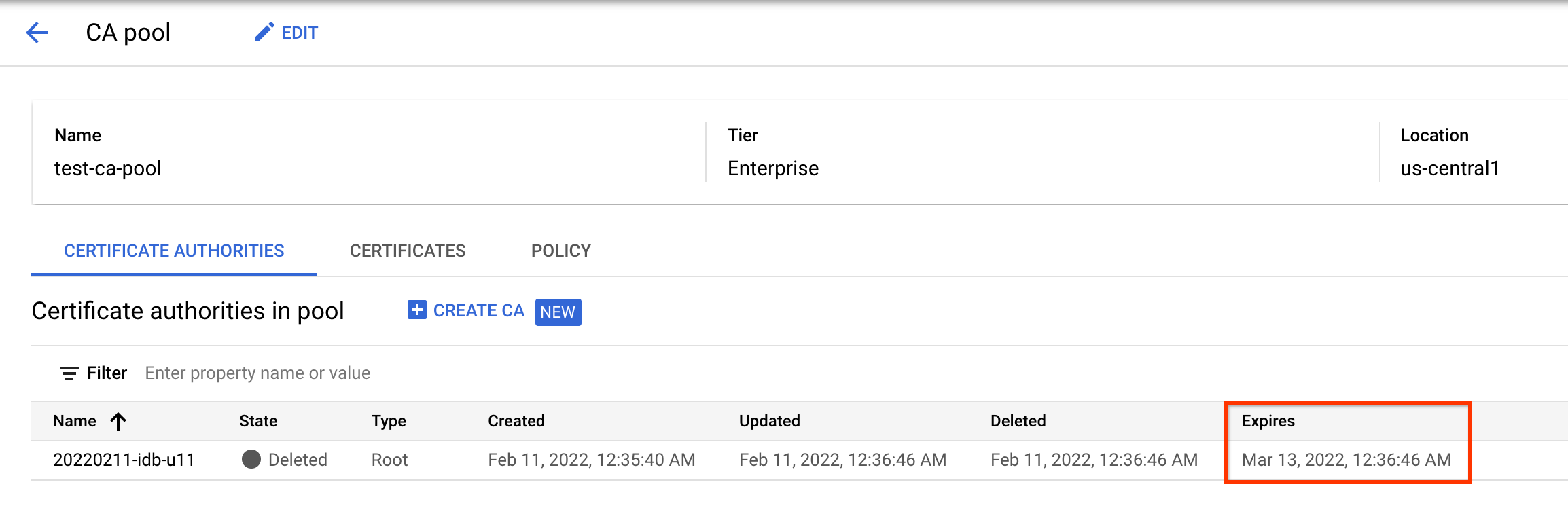
לראות את תאריך התפוגה של רשות אישורים שנמחקה.

gcloud

כדי לבדוק את זמן המחיקה הצפוי של רשות אישורים, מריצים את הפקודה הבאה:

gcloud privateca roots describe CA_ID \
    --pool=POOL_ID \
    --location=LOCATION \
    --format="value(expireTime.date())"

מחליפים את מה שכתוב בשדות הבאים:

  • CA_ID: השם של רשות האישורים
  • POOL_ID: השם של מאגר רשויות האישורים שהכיל את רשות האישורים
  • LOCATION: המיקום של מאגר אישורי ה-CA. כאן מפורטת רשימת המיקומים המלאה.

הפקודה מחזירה את התאריך והשעה הצפויים כששירות CA מוחק את ה-CA.

2020-08-14T19:28:39

כדי לוודא שרשות האישורים נמחקה באופן סופי, מריצים את הפקודה הבאה:

gcloud privateca roots describe CA_ID --pool=POOL_ID --location=LOCATION

אם רשות האישורים נמחקת בהצלחה, הפקודה מחזירה את השגיאה הבאה.

ERROR: (gcloud.privateca.roots.describe) NOT_FOUND: Resource 'projects/PROJECT_ID/locations/LOCATION/caPools/POOL_ID/certificateAuthorities/CA_ID' was not found

המאמרים הבאים