

Migrate from Aerospike to Bigtable
This document guides you through the process of migrating data from Aerospike to Bigtable. It describes how to use open-source tools, such as the adapter library, to perform the migration.
Before you begin the migration, familiarize yourself with Bigtable for Aerospike users.
Migration overview
You can migrate your data from Aerospike to Bigtable with minimal or zero downtime.
The following diagram outlines the migration steps:
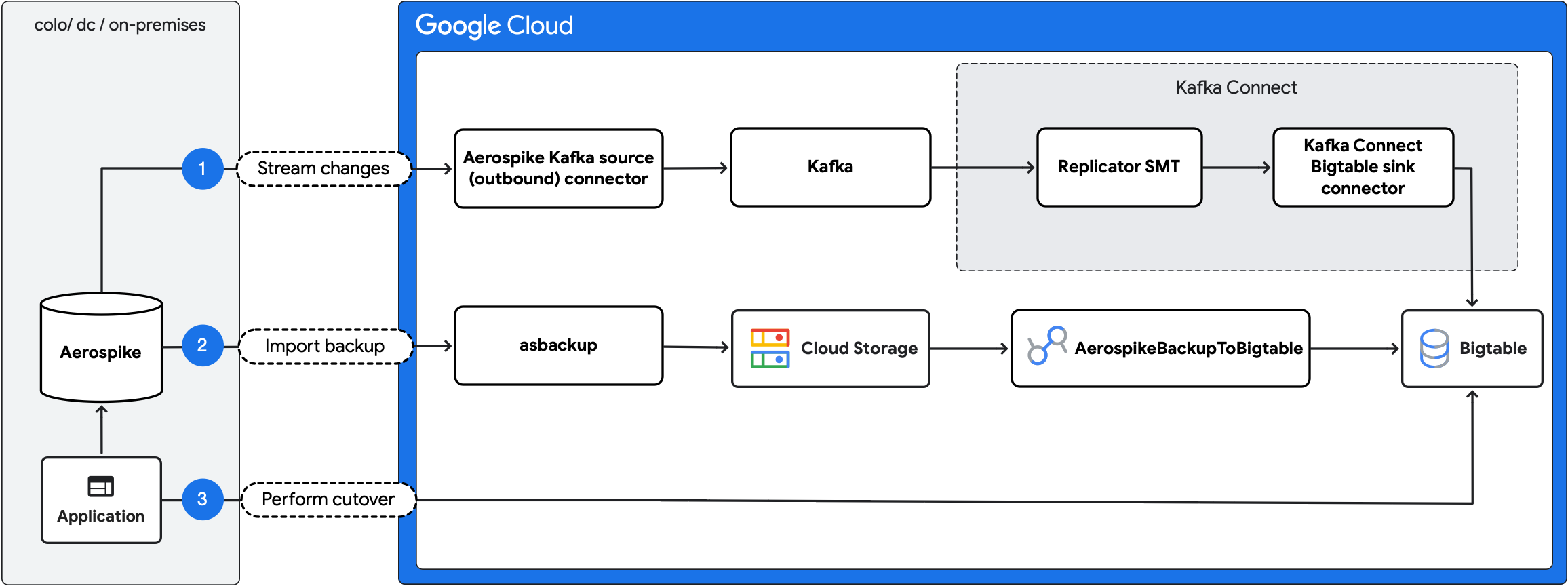
- Stream ongoing changes: replicate ongoing updates from Aerospike to Bigtable using the Aerospike Kafka source (outbound) connector and Kafka Connect Bigtable sink connector.
- Import backup: create an Aerospike backup and import it into Bigtable using the
AerospikeBackupToBigtableDataflow job. - Perform cutover: move the application traffic to Bigtable.
Migration scope and compatibility
Because Bigtable operates on raw bytes rather than typed bins, the migration process involves mapping Aerospike capabilities and features to compatible Bigtable structures. The adapter library provides the tools necessary to achieve structural compatibility and address gaps, such as object serialization. However, certain features, such as user-defined functions (UDFs), can't be migrated because of fundamental differences between the systems.
The following table summarizes how the migration process handles Aerospike capabilities.
| Feature | Support | Description |
|---|---|---|
| Aerospike Hybrid Memory Architecture (HMA) | Supported | Migrated either to the SSD storage tier or to the in-memory tier. The Bigtable Enterprise Plus edition provides access to in-memory storage for latency-sensitive workloads that require sub-millisecond response times similar to Aerospike performance. |
Scalars (Int, Float, String, Bool) |
Supported | Migrated to Bigtable cells. |
| Lists and maps | Supported | Maps must have string keys. Lists and maps are serialized into separate columns by the adapter library. |
| Secondary indexes | Partially supported | Not migrated directly. Must be re-implemented as asynchronous secondary indexes. |
| Record-level time to live (TTL) | Supported | Configured at the column-family level or simulated per cell in Bigtable. |
| UDFs | Not supported | Custom server-side logic must be moved to the client-side application. |
| HyperLogLog | Not supported | Not supported in the migration process. |
| GeoJSON | Not supported | Not supported in the migration process. |
| Record keys | Not supported | Record keys are not migrated directly. Instead, the migration uses the record digest as the row key. |
Before you begin
Before you start the migration, complete the following preparatory steps to reduce risk and ensure a smooth transition:
- Validate your data: confirm that the Aerospike deployment doesn't rely on unsupported data types, secondary indexes, or UDFs. As a safeguard, you can import a representative subset of your data into Bigtable and validate the schema design.
- Provision infrastructure: set up the services required for the migration pipeline: Bigtable, Kafka, and Kafka Connect.
- Capacity planning: provision Bigtable with sufficient capacity to handle the expected workload. Select a region close to the existing Aerospike cluster. For guidance on estimating the required resources, see Understand Bigtable performance.
- Storage tier: for workloads that require sub-millisecond response times, consider using the Bigtable in-memory tier. This tier stores data in RAM to provide the highest performance for read-heavy or latency-sensitive applications. For more information, see In-memory tier overview.
- Configure access and networking: assign appropriate Identity and Access Management (IAM) roles and ensure network connectivity.
- Enable monitoring and error reporting: configure observability for the new environment, including logging, metrics, and alerting.
- Benchmark baseline performance: record current system performance to provide a reference for validating it after the migration.
- Create backups: create a complete backup of your Aerospike data.
- Run a test migration: validate the setup in a staging environment before you attempt a production migration.
Migrate data
Complete the following steps to migrate your data from Aerospike to Bigtable.
Initiate the change stream
When you enable the Aerospike change stream, the Aerospike Kafka source (outbound) connector starts publishing the Aerospike record updates to a Kafka topic. Ensure that Kafka has enough storage capacity to buffer the changes and configure the connector to output data in JSON format.
The following is an example Kafka connector configuration:
  service:
    port: <port_to_run_on>

  producer-props:
    bootstrap.servers:
      - <kafka_host>

  format:
    mode: json
    metadata-key: metadata

  routing:
    mode: static
    destination: <kafka_topic>
Communication with Kafka using the Aerospike Kafka source (outbound) connector requires Aerospike Cross-Datacenter Replication (XDR), which asynchronously replicates cluster changes over higher-latency links. XDR is available only in the Aerospike Enterprise Edition. If you use the Aerospike Community Edition, switch to the Enterprise Edition or perform an offline migration using only the AerospikeBackupToBigtable Dataflow job.
An example configuration for XDR in Aerospike looks as follows:
  xdr {
      dc aerospike-kafka-source {
              connector true
              node-address-port <aerospike_connect_host> <aerospike_connect_port>
              namespace <your_namespace_to_replicate> {
              }
      }
  }
Export data from Aerospike
After you initiate the change stream, generate a backup of the existing Aerospike dataset. Use the asbackup command-line tool to create backups from an Aerospike database cluster. Some updates might appear in both the backup and the change stream, which is expected and doesn't affect the migration. To allow parallel imports during restore, split backups into multiple files.
Import data to Bigtable
To import backed up data to Bigtable, do the following:
- Upload the backup to a Cloud Storage bucket.
- Run the
AerospikeBackupToBigtableDataflow job to import the backup into Bigtable. If the backup is split across multiple files, the job processes them in parallel. To handle the increased write load and maintain optimal throughput, provision additional Bigtable resources.
Apply the record updates to Bigtable
After you import the backup to Bigtable, apply the buffered record updates in Kafka to Bigtable using the Kafka Connect Bigtable sink connector.
Translate messages into compatible format
Aerospike migration tools include the Replicator SMT, which runs within Kafka Connect. The replicator translates messages published by the Aerospike Kafka source (outbound) connector into a format compatible with the target sink that writes the records to Bigtable. The translation is required because the sink expects data in a specific format that differs from how Aerospike streams changes.
The following table helps you estimate the machine resources required to achieve a given throughput:
| Record structure | Throughput | p99 latency |
|---|---|---|
| Flat | Up to 3,700 records per second per vCPU | 300 ms |
| Nested | Up to 2,600 records per second per vCPU | 300 ms |
These estimates assume that the JSON-serialized records are 1 KB in size. Parsing time increases with the complexity of message structures, which means that nested objects stored in Aerospike records take longer to parse.
You can use the consumer_lag metric to verify how many messages are in the processing queue and measure replication lag. When the sink works through the backlog of messages on the topic, the consumer lag decreases until it stabilizes near zero, at which point the sink processes Aerospike updates in near real time, making you ready for the cutover. You can use the sink-record-active-count to verify the number of already processed messages.
Ingest messages with Kafka Connect Bigtable sink connector
The Kafka Connect Bigtable sink connector ingests messages from Kafka to Bigtable. When you configure the connector, set insert.mode to REPLACE_IF_NEWEST to ensure that the record written into the target row in Bigtable is the most recent. For more information, see Kafka Connect Bigtable sink connector configuration.
The following table provides guidance on the latency introduced and the compute resources required for different workloads:
| Record structure | Throughput | p99 latency |
|---|---|---|
| Flat | Up to 3,700 records per second per vCPU | 74 ms |
| Nested | Up to 3,700 records per second per vCPU | 100 ms |
These estimates assume that the JSON-serialized records are 1 KB in size. The reported latency is the processing time in the sink. Assume an additional overhead for making a write request to Bigtable of approximately 600 ms.
Switch to Bigtable
Switch the application to use Bigtable as the primary database.
To ensure read-your-writes consistency, temporarily shut down the application until the replication lag reaches zero. This ensures that no mutations are lost and that data reads reflect the most recent state.
For example, a mutation applied in Aerospike just before cutover might not be replicated to Bigtable yet, causing stale reads. To prevent this scenario, keep the application offline until the consumer_lag and sink-record-active-count metrics reach 0. After all pending changes propagate, restart the application with Bigtable as the primary database.
While a live migration can avoid downtime, it comes with the following constraints:
- Mutations applied in Bigtable aren't replicated back to Aerospike.
- Mutations originating from Aerospike might appear in Bigtable with a delay.
- Delayed mutations from Aerospike can overwrite more recent updates in Bigtable.
Verify the deployment
After the deployment, validate application performance by reviewing metrics such as error rates, latency, and cost. You can also perform data integrity checks.
Monitoring and observability
Monitor the following metrics throughout the migration:
- Total lag: calculated as Kafka consumer lag plus the
sink-record-active-count. These metrics indicate how far behind Bigtable is from Aerospike. A stable lag value is required before you reroute traffic to Bigtable. - CPU and memory utilization: monitor the CPU and memory utilization of all change stream pipeline components.
- Kafka storage capacity: monitor capacity for self-managed Kafka deployments. If storage fills up, new events can't be buffered, causing migration failure.
- Application error rates: monitor error rates and the error outputs of all change stream pipeline elements.
Limitations
The following sections outline the limitations to consider when migrating data from Aerospike to Bigtable.
Data consistency during migration
When you use the asbackup tool to generate the Aerospike backup, records modified during the backup process might be excluded because the backup process doesn't support atomic backups. This limitation doesn't impact correctness because all changes appear in the change stream.
During the backup import to Bigtable, each row is written with a last update time (LUT) timestamp of 0.
Updates from the change stream are applied on top of the imported backup. Rows written from the stream use the LUT value as the Bigtable row timestamp. The sink configuration makes the update with a newer timestamp overwrite an older one. This ensures that any change replayed from the stream overwrites the corresponding row.
Use of LUT
The migration process uses Aerospike XDR to replicate changes and relies on LUT for conflict resolution. Because LUTs are based on the node's system clock, they might not be strictly monotonic. As a result, a stale record might occasionally have a newer LUT and overwrite a more recent record. Additionally, the Aerospike Kafka source (outbound) connector might not preserve the exact message order when publishing to Kafka. As a result, the LUT serves as the authoritative version marker, ensuring that only records with the latest LUT are applied to Bigtable.
If a record is updated after you start the change stream but before you generate the backup, the backup might capture the newer version while the stream contains an older version. This older version might temporarily overwrite the newer one. However, when the subsequent stream event with the correct LUT arrives, the latest version is restored. To prevent inconsistencies, wait to perform the cutover until replication stabilizes and the oldest unprocessed message in the pipeline is newer than the backup.
Data validation
The migration pipeline doesn't perform checksumming of data in transit. If you require end-to-end data integrity checks, you must implement validation.
Troubleshooting
The following sections describe common errors that might occur during the migration process and provide guidance on how to resolve them.
Backup import errors
During the import of the Aerospike backup into Bigtable, you might encounter the following errors:
| Error type | Cause | Solution |
|---|---|---|
| Corrupted backup file | Backup files are unreadable or contain corrupted records. The import job fails. | Inspect affected files for integrity issues. If unrecoverable, generate a new backup and repeat the import. |
| Bigtable write failures | Bigtable connectivity or service issues occur. The import doesn't fail. | Failed records are exported to an error output file in JSON format. Reapply them manually or retry the full import job. |
| Unsupported data | The backup contains entries that can't be imported into Bigtable. The import doesn't fail. | Unsupported data, such as UDFs, is reported as warnings in job logs. Review the logs to verify unsupported entries. |
After the backup import is complete and invalid records are addressed, you can proceed to apply the change stream.
Change stream errors
During the change stream application, failures might occur at the following levels:
- Replicator SMT errors: SMT fails to transform the data produced by Aerospike.
- Sink errors: events can't be applied to Bigtable.
In both cases, failed events are redirected to a dedicated Kafka topic. You can log the events for auditing or process them using custom recovery logic.
What's next
- Learn how to design your Bigtable schema.
- Read about how to start your Migration to Google Cloud.
- Understand which strategies you have for transferring big datasets.