


Trigger Zendesk
Il trigger Zendesk è un trigger evento connettore che ti consente di richiamare un'integrazione in base agli eventi Zendesk a cui hai eseguito la sottoscrizione nella connessione Zendesk.
Prima di iniziare
Se prevedi di creare o configurare una nuova connessione per il trigger Zendesk, assicurati di disporre del seguente ruolo IAM nel progetto:
- Connector Admin (
roles/connectors.admin)
Per informazioni sulla concessione dei ruoli, consulta Gestire l'accesso.
Concedi i seguenti ruoli IAM al account di servizio che vuoi utilizzare per il trigger Zendesk:
- Application Integration Invoker (
roles/integrations.integrationInvoker)
Per informazioni sulla concessione di ruoli a un account di servizio, vedi Gestire l'accesso ai service account.
Aggiungere il trigger Zendesk
Per aggiungere un trigger Zendesk all'integrazione, segui questi passaggi:
- Nella console Google Cloud , vai alla pagina Integrazione di applicazioni.
- Nel menu di navigazione, fai clic su Integrazioni.
Viene visualizzata la pagina Elenco integrazioni, che elenca tutte le integrazioni disponibili nel progetto Google Cloud.
- Seleziona un'integrazione esistente o fai clic su Crea integrazione per crearne una nuova.
Se stai creando una nuova integrazione:
- Inserisci un nome e una descrizione nel riquadro Crea integrazione.
- Seleziona una regione per l'integrazione.
- Seleziona un account di servizio per l'integrazione. Puoi modificare o aggiornare i dettagli del account di servizio di un'integrazione in qualsiasi momento dal riquadro Riepilogo integrazione nella barra degli strumenti dell'integrazione.
- Fai clic su Crea.
L'integrazione appena creata si apre nell'editor integrazioni.
- Nella barra di navigazione dell'editor dell'integrazione, fai clic su Attivatori per visualizzare l'elenco degli attivatori disponibili.
- Fai clic sull'elemento Trigger Zendesk e posizionalo nell'Editor integrazioni.
Per configurare il trigger Zendesk, puoi utilizzare una connessione Zendesk esistente disponibile in Integration Connectors o crearne una nuova utilizzando l'opzione di creazione della connessione in linea.
Configurare il trigger Zendesk utilizzando una connessione esistente
Puoi configurare il trigger Zendesk utilizzando una connessione Zendesk esistente in Integration Connectors. Tieni presente che l'attivatore Zendesk è un attivatore di eventi del connettore, pertanto puoi utilizzare solo una connessione Zendesk con l'iscrizione agli eventi abilitata per configurare l'attivatore.
Per informazioni su come configurare un trigger Zendesk utilizzando una nuova connessione Zendesk, vedi Configurare il trigger Zendesk utilizzando una nuova connessione.
Per configurare un trigger Zendesk utilizzando una connessione Zendesk esistente, segui questi passaggi:
- Fai clic sull'elemento Trigger Zendesk nell'Editor integrazioni per aprire il riquadro di configurazione del trigger.
- Fai clic su Configura trigger.
- Fornisci i seguenti dettagli di configurazione nella pagina Editor attivatore eventi connettore:
- Regione:seleziona la regione della connessione Zendesk.
- Connessione:seleziona la connessione Zendesk che vuoi utilizzare.
L'Application Integration mostra solo le connessioni Zendesk attive e con una sottoscrizione di eventi abilitata.
- Tipo di abbonamento all'evento:seleziona il tipo di abbonamento all'evento che attiva l'integrazione. Per informazioni sui tipi di abbonamento agli eventi supportati per questo trigger, consulta Tipi di abbonamento agli eventi supportati.
- Service account: seleziona un account di servizio con i ruoli IAM richiesti per il trigger Zendesk.
- Fai clic su Fine per completare la configurazione dell'attivatore e chiudere la pagina.
Configurare il trigger Zendesk utilizzando una nuova connessione
Per configurare il trigger Zendesk utilizzando una nuova connessione Zendesk, segui questi passaggi:
- Fai clic sull'elemento Trigger Zendesk nell'Editor integrazioni per aprire il riquadro di configurazione del trigger.
- Fai clic su Configura trigger.
- Ignora il campo Regione.
- Fai clic su Connessione e seleziona l'opzione Crea connessione dal menu a discesa.
- Completa i seguenti passaggi nel riquadro Crea connessione:
- Nel passaggio Posizione, scegli la posizione per la nuova connessione Zendesk:
- Regione:seleziona una regione dall'elenco a discesa.
- Fai clic su Avanti.
- Nel passaggio Dettagli connessione, fornisci i dettagli della nuova connessione Zendesk:
- Versione del connettore:scegli una versione disponibile del connettore Zendesk dall'elenco a discesa.
- Nome connessione:inserisci un nome per la connessione Zendesk.
- (Facoltativo) Descrizione : inserisci una descrizione per la connessione.
- (Facoltativo) Attiva Cloud Logging:seleziona questa casella di controllo per archiviare tutti i dati di log della connessione.
- Service account: seleziona un account di servizio con i ruoli IAM richiesti per la connessione Zendesk.
- Attiva abbonamento agli eventi:seleziona questa opzione per creare e attivare un nuovo abbonamento agli eventi per la connessione Zendesk. Puoi attivare solo gli abbonamenti agli eventi o includere anche entità, operazioni e azioni di connessione.
- (Facoltativo) Espandi Impostazioni avanzate per configurare le impostazioni del nodo di connessione.
Per saperne di più sulle impostazioni del nodo di connessione per Zendesk, consulta la documentazione relativa alla connessione Zendesk.
- (Facoltativo) Fai clic su + Aggiungi etichetta per aggiungere un'etichetta alla connessione sotto forma di coppia chiave-valore.
- Fai clic su Avanti.
-
Nel passaggio Destinazioni, fornisci i dettagli dell'istanza Zendesk:
- Tipo di destinazione:seleziona Indirizzo host.
- Host:inserisci il nome host o l'indirizzo IP della tua istanza Zendesk.
- Fai clic su Avanti.
-
Nel passaggio Autenticazione, fornisci i dettagli di autenticazione per l'istanza Zendesk:
- Seleziona il tipo di autenticazione che preferisci e inserisci i dettagli pertinenti per accedere all'URL host Zendesk fornito.
Per capire come configurare questi tipi di autenticazione, consulta Configurare l'autenticazione.
- Fai clic su Avanti.
- Seleziona il tipo di autenticazione che preferisci e inserisci i dettagli pertinenti per accedere all'URL host Zendesk fornito.
-
Nel passaggio Dettagli abbonamento agli eventi, fornisci i dettagli dell'istanza Zendesk in cui verranno creati gli abbonamenti agli eventi.
- Tipo di destinazione:seleziona Indirizzo host.
- Host: inserisci l'URL di registrazione della tua istanza Zendesk. Verranno create sottoscrizioni agli eventi per questo URL.
- Nome utente:inserisci il nome utente per accedere all'URL di registrazione fornito.
- Password:seleziona il secret di Secret Manager contenente la password associata al nome utente.
- Versione del secret:seleziona una versione del secret.
- Abilita arricchimento dei dati:seleziona questa casella di controllo se vuoi che il trigger Zendesk recuperi il payload completo dell'evento dall'istanza Zendesk. Per esempi, vedi Output del trigger.
- Fai clic su Avanti.
- Rivedi: rivedi i dettagli della connessione Zendesk forniti.
- Fai clic su Crea per completare la creazione di una nuova connessione Zendesk.
- Nel passaggio Posizione, scegli la posizione per la nuova connessione Zendesk:
- Tipo di abbonamento all'evento:seleziona il tipo di abbonamento all'evento che attiva l'integrazione. Per informazioni sui tipi di abbonamento agli eventi supportati per questo trigger, consulta Tipi di abbonamento agli eventi supportati.
- Fai clic su Fine e chiudi la pagina.
Output trigger
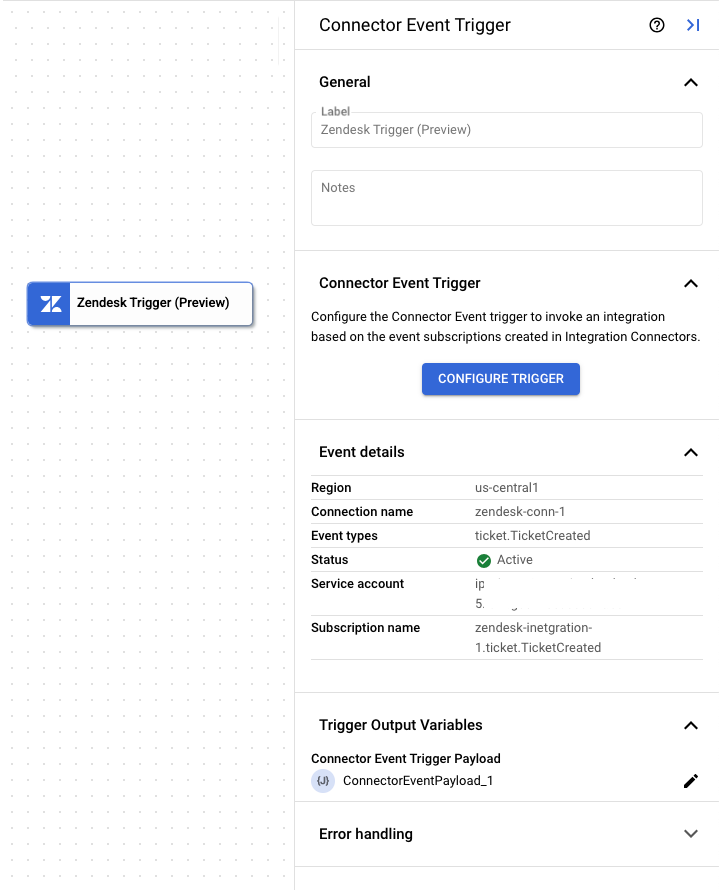
L'attivatore Zendesk richiede un paio di minuti per completare la configurazione della sottoscrizione agli eventi. Puoi visualizzare lo stato dell'iscrizione all'evento nel riquadro di configurazione del trigger in Dettagli iscrizione all'evento.
Il trigger Zendesk indica lo stato di un abbonamento a un evento utilizzando i seguenti stati:
Creating: indica che il trigger è l'iscrizione all'iscrizione agli eventi.Active: indica che l'attivatore è stato iscritto correttamente a un'iscrizione agli eventi.Error: indica che si è verificato un problema con l'iscrizione agli eventi configurata.
Oltre allo stato dell'abbonamento agli eventi, la sezione Dettagli abbonamento agli eventi mostra anche altri dettagli, come la regione di connessione, il nome della connessione, il nome dell'abbonamento agli eventi e altro ancora.
L'immagine seguente mostra un layout di esempio del riquadro di configurazione del trigger Zendesk:
Variabile di output del trigger
Per ogni evento, l'attivatore Zendesk genera una variabile di output ConnectorEventPayload che puoi utilizzare nelle attività downstream. La variabile di output è in formato JSON e contiene lo schema del payload di output di Zendesk.
Esempio 1: payload di output per l'evento Zendesk: Assegnazione agente modificata
  {
    "description": "The root schema of event that has occurred in Zendesk.",
    "type": "object",
    "properties": {
        "data": {
    "description": "",
    "type": "object",
    "properties": {
        "accountId": {
            "description": "Zendesk account ID.",
            "type": "number",
            "readOnly": false
        },
        "integration_key": {
            "description": "Integration Key retrieved from ZIS bundle.",
            "type":  "string",
            "readOnly": false
        },
        "subdomain": {
            "description": "Account subdomain.",
            "type":  "string",
            "readOnly": false
        },
        "input": {
            "description": "Contains information about events changes.",
            "type": "object",
            "properties": {
                "ticket_event": {
                    "description": "Type of event is ticket event.",
                    "type": "object",
                    "properties": {
                        "meta": {
                            "description": "Metadata about the ticket.",
                            "type": "object",
                            "properties": {
                                "version": {
                                    "description": "Event version",
                                    "type":  ["string", "null"]
                                },
                                "occurred_at": {
                                    "description": "Timestamp when the event occurred.",
                                    "type":  "string"
                                },
                                "ref": {
                                    "description": "Reference ID",
                                    "type":  ["string", "null"]
                                },
                                "sequence": {
                                    "description": "Sequence of Occurrence",
                                    "type": "object",
                                    "properties": {
                                        "id": {
                                            "description": "",
                                            "type":  ["string", "null"]
                                        },
                                        "position": {
                                            "description": "",
                                            "type": ["number","null"]
                                        },
                                        "total": {
                                            "description": "",
                                            "type": ["number","null"]
                                        }
                                    }
                                }
                            }
                        },
                        "type": {
                            "description": "Type of Ticket Event ",
                            "type":  "string"
                        },
                        "previous": {
                            "description": "Previous ID",
                            "type": ["number","null"]
                        },
                        "current": {
                            "description": "Current ID",
                            "type": ["number","null"]
                        },
                        "ticket": {
                            "description": "Properties related to the ticket",
                            "type": "object",
                            "properties": {
                                "id": {
                                    "description": "Ticket ID",
                                    "type": "number"
                                },
                                "created_at": {
                                    "description": "Timestamp of ticket creation.",
                                    "type":  "string"
                                },
                                "updated_at": {
                                    "description": "Timestamp of ticket updation.",
                                    "type":  "string"
                                },
                                "type": {
                                    "description": "Type of ticket",
                                    "type":  ["string", "null"]
                                },
                                "priority": {
                                    "description": "Priority of ticket.",
                                    "type":  ["string", "null"]
                                },
                                "status": {
                                    "description": "Status of the ticket.",
                                    "type":  ["string", "null"]
                                },
                                "requester_id": {
                                    "description": "ID of the ticket requestor.",
                                    "type": ["number","null"]
                                },
                                "submitter_id": {
                                    "description": "ID of the ticket submitter.",
                                    "type": ["number","null"]
                                },
                                "assignee_id": {
                                    "description": "ID of the ticket assignee.",
                                    "type": ["number","null"]
                                },
                                "organization_id": {
                                    "description": "ID of the organization ticket belongs to.",
                                    "type": ["number","null"]
                                },
                                "group_id": {
                                    "description": "ID of the group ticket belongs to.",
                                    "type": ["number","null"]
                                },
                                "brand_id": {
                                    "description": "ID of the brand ticket belongs to",
                                    "type": ["number","null"]
                                },
                                "form_id": {
                                    "description": "ID of the form associated with the ticket.",
                                    "type": ["number","null"]
                                },
                                "external_id": {
                                    "description": "",
                                    "type":  ["string", "null"]
                                },
                                "tags": {
                                    "description": "Tags associated with the ticket.",
                                    "type": "array",
                                    "items": {
                                        "description": "",
                                        "type":  ["string", "null"]
                                    }
                                },
                                "via": {
                                    "description": "Channel via which change was made.",
                                    "type": "object",
                                    "properties": {
                                        "channel": {
                                            "description": "",
                                            "type":  "string"
                                        }
                                    }
                                }
                            }
                        }
                    }
                }
            },
            "readOnly": false
        }
    }
}
}
}
Esempio 2: payload di output arricchito di dati per l'evento Zendesk: Assegnazione agente modificata
{ "description": "The root schema of event that has occurred in Zendesk.", "type": "object", "properties": { "data": { "description": "", "type": "object", "properties": { "accountId": { "description": "Zendesk account ID.", "type": "number", "readOnly": false }, "integration_key": { "description": "Integration Key retrieved from ZIS bundle.", "type": "string", "readOnly": false }, "subdomain": { "description": "Account subdomain.", "type": "string", "readOnly": false }, "input": { "description": "Contains information about events changes.", "type": "object", "properties": { "ticket_event": { "description": "Type of event is ticket event.", "type": "object", "properties": { "meta": { "description": "Metadata about the ticket.", "type": "object", "properties": { "version": { "description": "Event version", "type": [ "string", "null" ] }, "occurred_at": { "description": "Timestamp when the event occurred.", "type": "string" }, "ref": { "description": "Reference ID", "type": [ "string", "null" ] }, "sequence": { "description": "Sequence of Occurrence", "type": "object", "properties": { "id": { "description": "", "type": [ "string", "null" ] }, "position": { "description": "", "type": [ "number", "null" ] }, "total": { "description": "", "type": [ "number", "null" ] } } } } }, "type": { "description": "Type of Ticket Event ", "type": "string" }, "previous": { "description": "Previous ID", "type": [ "number", "null" ] }, "current": { "description": "Current ID", "type": [ "number", "null" ] }, "ticket": { "description": "Properties related to the ticket", "type": "object", "properties": { "id": { "description": "Ticket ID", "type": "number" }, "created_at": { "description": "Timestamp of ticket creation.", "type": "string" }, "updated_at": { "description": "Timestamp of ticket updation.", "type": "string" }, "type": { "description": "Type of ticket", "type": "string" }, "priority": { "description": "Priority of ticket.", "type": [ "string", "null" ] }, "status": { "description": "Status of the ticket.", "type": [ "string", "null" ] }, "requester_id": { "description": "ID of the ticket requestor.", "type": [ "number", "null" ] }, "submitter_id": { "description": "ID of the ticket submitter.", "type": [ "number", "null" ] }, "assignee_id": { "description": "ID of the ticket assignee.", "type": [ "number", "null" ] }, "organization_id": { "description": "ID of the organization ticket belongs to.", "type": [ "number", "null" ] }, "group_id": { "description": "ID of the group ticket belongs to.", "type": [ "number", "null" ] }, "brand_id": { "description": "ID of the brand ticket belongs to", "type": [ "number", "null" ] }, "form_id": { "description": "ID of the form associated with the ticket.", "type": [ "number", "null" ] }, "external_id": { "description": "", "type": [ "string", "null" ] }, "tags": { "description": "Tags associated with the ticket.", "type": "array", "items": { "description": "", "type": [ "string", "null" ] } }, "via": { "description": "Channel via which change was made.", "type": "object", "properties": { "channel": { "description": "", "type": "string" } } } } } } } }, "readOnly": false } } }, "context-data": { "description": "", "type": "object", "properties": { "Id": { "type": "number", "readOnly": false, "description": "Automatically assigned when the ticket is created." }, "Subject": { "type": [ "string", "null" ], "readOnly": false, "description": "The value of the subject field for this ticket. When used in WHERE clause: The text in the ticket subject" }, "RawSubject": { "type": [ "string", "null" ], "readOnly": false, "description": "The dynamic content placeholder, if present, or the subject value, if not." }, "Description": { "type": [ "string", "null" ], "readOnly": false, "description": "The first comment on the ticket. When used in WHERE clause: The text in the tickets description and comments" }, "Type": { "type": [ "string", "null" ], "readOnly": false, "description": "The type of this ticket. Possible values: problem, incident, question or task." }, "Priority": { "type": [ "string", "null" ], "readOnly": false, "description": "The urgency with which the ticket should be addressed. Possible values: urgent, high, normal, low." }, "Status": { "type": [ "string", "null" ], "readOnly": false, "description": "The state of the ticket. Possible values: new, open, pending, hold, solved, closed." }, "Recipient": { "type": [ "string", "null" ], "readOnly": false, "description": "The original recipient e-mail address of the ticket." }, "HasIncidents": { "type": [ "boolean", "null" ], "readOnly": false, "description": "Is true of this ticket has been marked as a problem, false otherwise." }, "DueAt": { "type": [ "string", "null" ], "readOnly": false, "description": "If this is a ticket of type task it has a due date. Due date format uses ISO 8601 format." }, "RequesterId": { "type": [ "number", "null" ], "readOnly": false, "description": "The user who requested this ticket." }, "SubmitterId": { "type": [ "number", "null" ], "readOnly": false, "description": "The user who submitted the ticket. The submitter always becomes the author of the first comment on the ticket. " }, "AssigneeId": { "type": [ "number", "null" ], "readOnly": false, "description": "The agent currently assigned to the ticket." }, "OrganizationId": { "type": [ "string", "null" ], "readOnly": false, "description": "The organization of the requester. You can only specify the ID of an organization associated with the requester." }, "GroupId": { "type": [ "number", "null" ], "readOnly": false, "description": "The group this ticket is assigned to. When used in WHERE clause: The assigned agents group name." }, "CollaboratorIds": { "type": [ "string", "null" ], "readOnly": false, "description": "The ids of users currently cc-ed on the ticket." }, "FollowerIds": { "type": [ "string", "null" ], "readOnly": false, "description": "Agents currently following the ticket." }, "ForumTopicId": { "type": [ "number", "null" ], "readOnly": false, "description": "The topic this ticket originated from, if any." }, "ProblemId": { "type": [ "number", "null" ], "readOnly": false, "description": "For tickets of type incident, the ID of the problem the incident is linked to." }, "ExternalId": { "type": [ "string", "null" ], "readOnly": false, "description": "An id you can use to link Zendesk Support tickets to local records." }, "FollowupIds": { "type": [ "string", "null" ], "readOnly": false, "description": "Closed tickets only. The ids of the followups created from this ticket." }, "ViaFollowupSourceId": { "type": [ "string", "null" ], "readOnly": false, "description": "POST requests only. The id of a closed ticket when creating a follow-up ticket.." }, "MacroIds": { "type": [ "string", "null" ], "readOnly": false, "description": "POST requests only. List of macro IDs to be recorded in the ticket audit." }, "TicketFormId": { "type": [ "number", "null" ], "readOnly": false, "description": "Enterprise only. The id of the ticket form to render for the ticket." }, "BrandId": { "type": [ "number", "null" ], "readOnly": false, "description": "Enterprise only. The id of the brand this ticket is associated with." }, "Tags": { "type": [ "string", "null" ], "readOnly": false, "description": "The array of tags applied to this ticket." }, "ViaChannel": { "type": [ "string", "null" ], "readOnly": false, "description": "This tells you how the ticket or event was created. Examples: web, mobile, rule, system." }, "ViaSource": { "type": [ "string", "null" ], "readOnly": false, "description": "The tickets source. " }, "CustomFields": { "type": [ "string", "null" ], "readOnly": false, "description": "Custom fields for the ticket.The values of custom field are set and get dynamically" }, "SatisfactionRating": { "type": [ "string", "null" ], "readOnly": false, "description": "The satisfaction rating of the ticket, if it exists, or the state of satisfaction, offered or unoffered." }, "SharingAgreementIds": { "type": [ "string", "null" ], "readOnly": false, "description": "The ids of the sharing agreements used for this ticket." }, "AllowChannelback": { "type": [ "boolean", "null" ], "readOnly": false, "description": "Is false if channelback is disabled, true otherwise. Only applicable for channels framework ticket." }, "IsPublic": { "type": [ "boolean", "null" ], "readOnly": false, "description": "Is true if any comments are public, false otherwise." }, "CreatedAt": { "type": [ "string", "null" ], "readOnly": false, "description": "When this record was created." }, "UpdatedAt": { "type": [ "string", "null" ], "readOnly": false, "description": "When this record last got updated." }, "Url": { "type": [ "string", "null" ], "readOnly": false, "description": "The API url of this ticket." }, "View_Id": { "type": [ "number", "null" ], "readOnly": false, "description": "The view that tickets belong to." }, "User_Id": { "type": [ "number", "null" ], "readOnly": false, "description": "The user that tickets belong to." }, "Assignee": { "type": [ "string", "null" ], "readOnly": false, "description": "The assigned agent or other entity. You can specify none, me, user name (full name or partial), email address, user ID, or phone number" }, "GroupName": { "type": [ "string", "null" ], "readOnly": false, "description": "The assigned agents group name." }, "Requester": { "type": [ "string", "null" ], "readOnly": false, "description": "The ticket requester. You can specify none, me, user name (full name or partial), email address, user ID, or phone number." }, "Submitter": { "type": [ "string", "null" ], "readOnly": false, "description": "The ticket submitter. This may be different than the requester if the ticket was submitted by an agent on behalf of the requester. You can specify none, me, user name (full name or partial), email address, user ID, or phone number. ." }, "Brand": { "type": [ "string", "null" ], "readOnly": false, "description": "Search for a specific Brand on a ticket." }, "Via": { "type": [ "string", "null" ], "readOnly": false, "description": "The tickets source, which can be any of the following:mail, api, phone, etc." }, "Commenter": { "type": [ "string", "null" ], "readOnly": false, "description": "People who have added comments to tickets. You can specify none, me, user name (full name or partial), email address, user ID, or phone number." }, "Cc": { "type": [ "string", "null" ], "readOnly": false, "description": "People who have been CCd on tickets. You can specify none, me, user name (full name or partial), email address, user ID, or phone number." }, "HasAttachment": { "type": [ "boolean", "null" ], "readOnly": false, "description": "Search for all tickets with or without attachments using true or false." }, "Ticket status": { "type": [ "string", "null" ], "readOnly": false } } } } }
Visualizzare le iscrizioni agli eventi
Per visualizzare e gestire tutti gli abbonamenti agli eventi associati a una connessione in Integration Connectors:
- Vai alla pagina Integration Connectors > Connections (Connettori di integrazione > Connessioni).
- Fai clic sulla connessione per cui vuoi visualizzare gli abbonamenti.
- Fai clic sulla scheda Abbonamenti agli eventi.
Vengono visualizzate tutte le iscrizioni agli eventi per la connessione.
Modifica trigger Zendesk
Puoi modificare un trigger Zendesk per cambiare o aggiornare la configurazione della connessione e i dettagli dell'abbonamento agli eventi.
Per modificare un trigger Zendesk:
- Fai clic sull'elemento Trigger Zendesk nell'Editor integrazioni per aprire il riquadro di configurazione del trigger.
- Fai clic su Configura trigger Zendesk.
- Nella pagina Editor trigger evento connettore, segui questi passaggi:
- Per mantenere l'abbonamento agli eventi configurato in precedenza, fai clic su Mantieni, altrimenti fai clic su Elimina.
- Aggiorna la configurazione della connessione e i dettagli dell'iscrizione agli eventi in base alle tue preferenze.
- Fai clic su Fine.
Puoi visualizzare i dettagli aggiornati della connessione e della sottoscrizione agli eventi nel riquadro di configurazione del trigger in Dettagli sottoscrizione agli eventi.
Tipi di abbonamento agli eventi supportati
Puoi utilizzare il trigger Zendesk per richiamare un'integrazione per i seguenti tipi di iscrizione agli eventi:
| Tipi di sottoscrizione agli eventi | Descrizione |
|---|---|
organization.ExternalChanged
|
L'ID esterno di un'organizzazione è cambiato. |
organization.OrganizationCreated
|
Viene creata un'organizzazione. |
organization.TagsChanged
|
I tag di un'organizzazione sono stati modificati. |
ticket.AgentAssignmentChanged
|
Un ticket viene riassegnato a un altro agente dell'assistenza. |
ticket.AttachmentLinkedToComment
|
Un allegato è collegato a un commento del ticket nell'assistenza. |
ticket.AttachmentRedactedFromComment
|
Un allegato viene oscurato da un commento esistente in un ticket. |
ticket.BrandChanged
|
Il brand è stato modificato. Un brand è un'identità rivolta ai clienti che può essere rappresentata da più prodotti o servizi o da più brand di proprietà dell'azienda. |
ticket.CcsChanged
|
Gli utenti sono stati aggiunti o rimossi da un ticket. |
ticket.CommentAdded
|
Un commento viene aggiunto quando viene creata o aggiornata una ticket di assistenza. |
ticket.CommentMadePrivate
|
Un commento privato viene aggiunto a una ticket di assistenza. |
ticket.CommentRedacted
|
Parole o stringhe sono state rimosse definitivamente da un commento del ticket. |
ticket.DescriptionChanged
|
La descrizione viene modificata in un ticket. |
ticket.ExternalIdChanged
|
L'ID ticket esterno viene modificato. |
ticket.FollowersChanged
|
I follower sono stati modificati in un ticket. |
ticket.GroupAssignmentChanged
|
Un ticket viene riassegnato a un altro gruppo di agenti. |
ticket.MarkedAsSpam
|
Un ticket viene contrassegnato come spam. |
ticket.OrganizationChanged
|
L'organizzazione viene modificata nel ticket. |
ticket.PriorityChanged
|
La priorità viene modificata in un ticket. |
ticket.ProblemLinkChanged
|
L'ID problema associato a un ticket di tipo incidente viene modificato. |
ticket.RequesterChanged
|
Il richiedente di un ticket viene modificato. |
ticket.StatusChanged
|
Lo stato di un ticket viene modificato. |
ticket.SubjectChanged
|
L'oggetto di un ticket viene modificato. |
ticket.SubmitterChanged
|
Il mittente di un ticket viene modificato. |
ticket.TagsChanged
|
I tag sono stati modificati in un ticket. |
ticket.TaskDueAtChanged
|
La data e l'ora di scadenza dell'attività in un ticket vengono modificate. |
ticket.TicketCreated
|
Viene creato un ticket di assistenza. |
ticket.TicketFormChanged
|
Il modulo viene modificato nel ticket. |
ticket.TicketMerged
|
Un ticket viene unito a un altro. |
ticket.TicketPermanentlyDeleted
|
Un ticket viene eliminato definitivamente. |
ticket.TicketSoftDeleted
|
Un ticket viene eliminato in modo che non sia visibile a nessun utente, inclusi gli amministratori che utilizzano l'interfaccia del prodotto o l'API. |
ticket.TicketTypeChanged
|
Un tipo di biglietto viene modificato. |
ticket.TicketUndeleted
|
Un ticket viene ripristinato. |
user.CustomRoleChanged
|
Il ruolo personalizzato di un utente è stato modificato. |
user.ExternalidChanged
|
L'ID esterno di un utente è stato modificato. |
user.LastLoginChanged
|
L'ora dell'ultimo accesso di un utente è stata modificata. |
user.OnlyPrivateCommentsChanged
|
La capacità di un utente di creare commenti pubblici è cambiata. |
user.TageChanged
|
I tag di un utente sono stati modificati. |
userTimeZoneChanged
|
Il fuso orario di un utente è cambiato. |
user.UserAliasChanged
|
L'alias di un utente è stato modificato. |
user.UserCreated
|
Viene creato un utente. |
user.UserDetailsChanged
|
I dettagli di un utente sono stati modificati. |
user.UserGroupAdded
|
Un utente viene aggiunto a un gruppo. |
user.UserGroupRemoved
|
Un utente viene rimosso da un gruppo. |
user.UserIdentityChanged
|
L'identità di un utente è stata modificata. |
user.UserIdentityCreated
|
Viene creata l'identità di un utente. |
user.UserIdentityRemoved
|
L'identità di un utente viene eliminata. |
user.UserActiveChanged
|
Lo stato attivo di un utente è cambiato. |
user.UserMerged
|
Un utente viene unito a un altro utente. |
user.UserNameChanged
|
Il nome di un utente è stato modificato. |
user.UserNotesChanged
|
Le note di un utente sono state modificate. |
user.UserOrganizationAdded
|
Un utente viene aggiunto a un'organizzazione. |
user.UserOrganizationRemoved
|
Un utente viene rimosso da un'organizzazione. |
user.UserPhotoChanged
|
La foto di un utente è stata modificata. |
user.UserRoleChanged
|
Il ruolo di un utente è stato modificato. |
Quote e limiti
Per informazioni su quote e limiti, consulta Quote e limiti.
Passaggi successivi
- Scopri di più su tutte le attività e gli attivatori.
- Scopri come testare e pubblicare un'integrazione.
- Scopri di più sulla gestione degli errori.
- Scopri di più sui log di esecuzione dell'integrazione.