


טריגר Zendesk
הטריגר של Zendesk הוא טריגר של אירוע מחבר שמאפשר להפעיל שילוב על סמך אירועים של Zendesk שנרשמתם אליהם בחיבור שלכם ל-Zendesk.
לפני שמתחילים
אם אתם מתכננים ליצור או להגדיר חיבור חדש לטריגר Zendesk, ודאו שיש לכם את תפקיד ה-IAM הבא בפרויקט:
- אדמין של מחבר (
roles/connectors.admin)
מידע על הקצאת תפקידים מופיע במאמר ניהול הגישה.
מקצים לחשבון השירות שרוצים להשתמש בו בשביל הטריגר של Zendesk את תפקידי ה-IAM הבאים:
- Application Integration Invoker (
roles/integrations.integrationInvoker)
במאמר ניהול הגישה לחשבונות שירות מוסבר איך נותנים לחשבון שירות תפקיד.
הוספת הטריגר של Zendesk
כדי להוסיף טריגר של Zendesk לשילוב:
- נכנסים לדף Application Integration במסוף Google Cloud .
- בתפריט הניווט, לוחצים על Integrations (שילובים).
מוצגת רשימה של כל השילובים שזמינים בפרויקט Google Cloud בדף Integrations List.
- בוחרים שילוב קיים או לוחצים על יצירת שילוב כדי ליצור שילוב חדש.
אם יוצרים שילוב חדש:
- מזינים שם ותיאור בחלונית יצירת שילוב.
- בוחרים אזור לשילוב.
- בוחרים חשבון שירות לאינטגרציה. אפשר לשנות או לעדכן את פרטי חשבון השירות של שילוב בכל שלב מחלונית סיכום השילוב בסרגל הכלים של השילוב.
- לוחצים על יצירה.
השילוב החדש שנוצר ייפתח בכלי השילובים.
- בסרגל הניווט של כלי העריכה של השילוב, לוחצים על טריגרים כדי לראות את רשימת הטריגרים הזמינים.
- לוחצים על הרכיב Zendesk trigger (טריגר של Zendesk) וגוררים אותו למיקום הרצוי בכלי לעריכת שילובים.
כדי להגדיר את הטריגר של Zendesk, אפשר להשתמש בחיבור Zendesk קיים שזמין ב-Integration Connectors, או ליצור חיבור Zendesk חדש באמצעות האפשרות ליצירת חיבור מוטבע.
הגדרת טריגר של Zendesk באמצעות חיבור קיים
אתם יכולים להגדיר את הטריגר של Zendesk באמצעות חיבור Zendesk קיים ב-Integration Connectors. שימו לב: הטריגר של Zendesk הוא טריגר של אירוע בחיבור, ולכן אפשר להשתמש בחיבור Zendesk רק אם מופעלת בו הרשמה לאירועים כדי להגדיר את הטריגר.
מידע על הגדרת טריגר של Zendesk באמצעות חיבור חדש ל-Zendesk זמין במאמר הגדרת טריגר של Zendesk באמצעות חיבור חדש
כדי להגדיר טריגר של Zendesk באמצעות חיבור קיים ל-Zendesk, מבצעים את השלבים הבאים:
- לוחצים על הרכיב Zendesk trigger (טריגר של Zendesk) בכלי לעריכת שילובים כדי לפתוח את חלונית הגדרת הטריגר.
- לוחצים על Configure trigger (הגדרת הטריגר).
- בדף Connector Event Trigger Editor (עורך טריגרים של אירועים של מחבר), מזינים את פרטי ההגדרה הבאים:
- אזור: בוחרים את האזור של חיבור Zendesk.
- חיבור: בוחרים את החיבור ל-Zendesk שרוצים להשתמש בו.
ב-Application Integration מוצגים רק חיבורים פעילים ל-Zendesk שמופעל בהם מינוי לאירועים.
- סוג המינוי לאירועים: בוחרים את סוג המינוי לאירועים שמפעיל את השילוב. מידע על סוגי המינויים לאירועים שנתמכים בטריגר הזה זמין במאמר סוגי מינויים לאירועים שנתמכים.
- חשבון שירות: בוחרים חשבון שירות עם תפקידי ה-IAM הנדרשים להפעלת הטריגר של Zendesk.
- לוחצים על סיום כדי להשלים את הגדרת הטריגר ולסגור את הדף.
הגדרת טריגר של Zendesk באמצעות חיבור חדש
כדי להגדיר את הטריגר של Zendesk באמצעות חיבור חדש ל-Zendesk, פועלים לפי השלבים הבאים:
- לוחצים על הרכיב Zendesk trigger (טריגר של Zendesk) בכלי לעריכת שילובים כדי לפתוח את חלונית הגדרת הטריגר.
- לוחצים על Configure trigger (הגדרת הטריגר).
- מדלגים על השדה אזור.
- לוחצים על Connection (חיבור) ובוחרים באפשרות Create Connection (יצירת חיבור) מהתפריט הנפתח.
- מבצעים את השלבים הבאים בחלונית Create Connection (יצירת חיבור):
- בשלב מיקום, בוחרים את המיקום של החיבור החדש ל-Zendesk:
- אזור: בוחרים אזור מהרשימה הנפתחת.
- לוחצים על הבא.
- בשלב Connection Details (פרטי החיבור), מזינים את הפרטים של החיבור החדש ל-Zendesk:
- גרסת המחבר: בוחרים גרסה זמינה של מחבר Zendesk מהרשימה הנפתחת.
- שם החיבור: מזינים שם לחיבור Zendesk.
- (אופציונלי) תיאור: מזינים תיאור לקישור.
- (אופציונלי) הפעלת Cloud Logging: מסמנים את התיבה הזו כדי לאחסן את כל נתוני היומן של החיבור.
- חשבון שירות: בוחרים חשבון שירות עם תפקידי ה-IAM הנדרשים לחיבור Zendesk.
- הפעלת הרשמה לאירועים: בוחרים באפשרות הזו כדי ליצור ולהפעיל הרשמה חדשה לאירועים עבור החיבור ל-Zendesk. אתם יכולים להפעיל רק מינויים לאירועים, או לכלול גם ישויות, פעולות ופעילויות של חיבורים.
- (אופציונלי) מרחיבים את הגדרות מתקדמות כדי להגדיר את ההגדרות של צומת החיבור.
מידע נוסף על הגדרות צומת החיבור ל-Zendesk זמין במסמכי התיעוד בנושא חיבור ל-Zendesk.
- (אופציונלי) לוחצים על + הוספת תווית כדי להוסיף תווית לקישור בצורה של צמד מפתח/ערך.
- לוחצים על הבא.
-
בשלב יעדים, מזינים את פרטי המכונה ב-Zendesk:
- סוג היעד: בוחרים באפשרות כתובת המארח.
- מארח: מזינים את שם המארח או את כתובת ה-IP של מופע Zendesk.
- לוחצים על הבא.
-
בשלב אימות, מזינים את פרטי האימות של מופע Zendesk:
- בוחרים את סוג האימות הרצוי ומזינים את הפרטים הרלוונטיים כדי לגשת לכתובת ה-URL של המארח ב-Zendesk.
כדי להבין איך להגדיר את סוגי האימות האלה, אפשר לעיין במאמר בנושא הגדרת אימות.
- לוחצים על הבא.
- בוחרים את סוג האימות הרצוי ומזינים את הפרטים הרלוונטיים כדי לגשת לכתובת ה-URL של המארח ב-Zendesk.
-
בשלב Event subscription details (פרטי המינוי לאירועים), מציינים את הפרטים של מופע Zendesk שבו ייצרו את המינויים לאירועים.
- סוג היעד: בוחרים באפשרות כתובת המארח.
- מארח: מזינים את כתובת ה-URL של הרישום של המכונה ב-Zendesk. יווצרו מינויים לאירועים עבור כתובת ה-URL הזו.
- שם משתמש: מזינים את שם המשתמש כדי לגשת לכתובת אתר לרישום לאירוע שצוינה.
- סיסמה: בוחרים את הסוד ב-Secret Manager שמכיל את הסיסמה שמשויכת לשם המשתמש.
- גרסת סוד: בוחרים גרסת סוד.
- הפעלת העשרה של נתונים: מסמנים את התיבה הזו אם רוצים שהטריגר של Zendesk יאחזר את מטען הנתונים המלא של האירוע ממופע Zendesk. דוגמאות מפורטות בקטע פלט של טריגר.
- לוחצים על הבא.
- בדיקה: בודקים את פרטי החיבור ל-Zendesk שסופקו.
- לוחצים על יצירה כדי להשלים את יצירת החיבור החדש ל-Zendesk.
- בשלב מיקום, בוחרים את המיקום של החיבור החדש ל-Zendesk:
- סוג המינוי לאירועים: בוחרים את סוג המינוי לאירועים שמפעיל את השילוב. מידע על סוגי המינויים לאירועים שנתמכים בטריגר הזה זמין במאמר סוגי מינויים לאירועים שנתמכים.
- לוחצים על סיום וסוגרים את הדף.
פלט של טריגר
תהליך ההגדרה של מינוי לאירועים באמצעות הטריגר של Zendesk נמשך כמה דקות. אפשר לראות את הסטטוס של המינוי לאירוע בחלונית ההגדרה של הטריגר, בקטע פרטי המינוי לאירוע.
הטריגר Zendesk מציין את הסטטוס של מינוי לאירוע באמצעות המצבים הבאים:
-
Creating: מציין שהטריגר נרשם למינוי האירוע. -
Active: מציין שהטריגר נרשם בהצלחה למינוי לאירוע. -
Error: מציין שיש בעיה במינוי לאירועים שהוגדר.
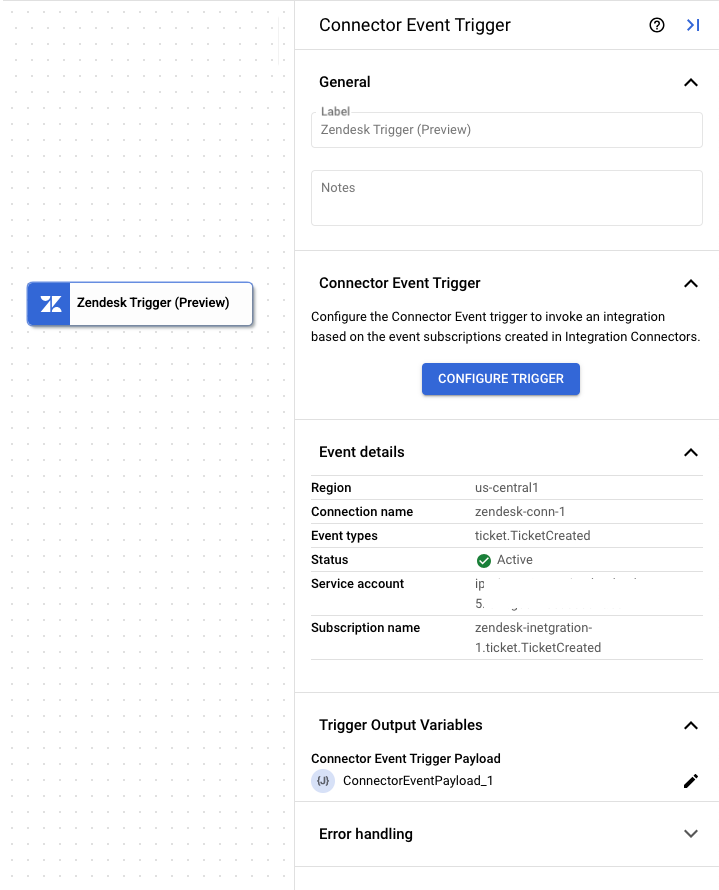
בנוסף לסטטוס המינוי לאירוע, בקטע Event Subscription details (פרטי המינוי לאירוע) מוצגים גם פרטים אחרים כמו אזור החיבור, שם החיבור, שם המינוי לאירוע ועוד.
בתמונה הבאה מוצגת דוגמה לפריסה של חלונית ההגדרות של טריגר Zendesk:
משתנה הפלט של הטריגר
לכל אירוע, הטריגר של Zendesk יוצר משתנה פלט ConnectorEventPayload שאפשר להשתמש בו במשימות הבאות. משתנה הפלט הוא בפורמט JSON ומכיל את סכימת המטען הייעודי (payload) של Zendesk.
דוגמה 1: מטען ייעודי (payload) של פלט לאירוע Zendesk: Agent Assignment Changed
  {
    "description": "The root schema of event that has occurred in Zendesk.",
    "type": "object",
    "properties": {
        "data": {
    "description": "",
    "type": "object",
    "properties": {
        "accountId": {
            "description": "Zendesk account ID.",
            "type": "number",
            "readOnly": false
        },
        "integration_key": {
            "description": "Integration Key retrieved from ZIS bundle.",
            "type":  "string",
            "readOnly": false
        },
        "subdomain": {
            "description": "Account subdomain.",
            "type":  "string",
            "readOnly": false
        },
        "input": {
            "description": "Contains information about events changes.",
            "type": "object",
            "properties": {
                "ticket_event": {
                    "description": "Type of event is ticket event.",
                    "type": "object",
                    "properties": {
                        "meta": {
                            "description": "Metadata about the ticket.",
                            "type": "object",
                            "properties": {
                                "version": {
                                    "description": "Event version",
                                    "type":  ["string", "null"]
                                },
                                "occurred_at": {
                                    "description": "Timestamp when the event occurred.",
                                    "type":  "string"
                                },
                                "ref": {
                                    "description": "Reference ID",
                                    "type":  ["string", "null"]
                                },
                                "sequence": {
                                    "description": "Sequence of Occurrence",
                                    "type": "object",
                                    "properties": {
                                        "id": {
                                            "description": "",
                                            "type":  ["string", "null"]
                                        },
                                        "position": {
                                            "description": "",
                                            "type": ["number","null"]
                                        },
                                        "total": {
                                            "description": "",
                                            "type": ["number","null"]
                                        }
                                    }
                                }
                            }
                        },
                        "type": {
                            "description": "Type of Ticket Event ",
                            "type":  "string"
                        },
                        "previous": {
                            "description": "Previous ID",
                            "type": ["number","null"]
                        },
                        "current": {
                            "description": "Current ID",
                            "type": ["number","null"]
                        },
                        "ticket": {
                            "description": "Properties related to the ticket",
                            "type": "object",
                            "properties": {
                                "id": {
                                    "description": "Ticket ID",
                                    "type": "number"
                                },
                                "created_at": {
                                    "description": "Timestamp of ticket creation.",
                                    "type":  "string"
                                },
                                "updated_at": {
                                    "description": "Timestamp of ticket updation.",
                                    "type":  "string"
                                },
                                "type": {
                                    "description": "Type of ticket",
                                    "type":  ["string", "null"]
                                },
                                "priority": {
                                    "description": "Priority of ticket.",
                                    "type":  ["string", "null"]
                                },
                                "status": {
                                    "description": "Status of the ticket.",
                                    "type":  ["string", "null"]
                                },
                                "requester_id": {
                                    "description": "ID of the ticket requestor.",
                                    "type": ["number","null"]
                                },
                                "submitter_id": {
                                    "description": "ID of the ticket submitter.",
                                    "type": ["number","null"]
                                },
                                "assignee_id": {
                                    "description": "ID of the ticket assignee.",
                                    "type": ["number","null"]
                                },
                                "organization_id": {
                                    "description": "ID of the organization ticket belongs to.",
                                    "type": ["number","null"]
                                },
                                "group_id": {
                                    "description": "ID of the group ticket belongs to.",
                                    "type": ["number","null"]
                                },
                                "brand_id": {
                                    "description": "ID of the brand ticket belongs to",
                                    "type": ["number","null"]
                                },
                                "form_id": {
                                    "description": "ID of the form associated with the ticket.",
                                    "type": ["number","null"]
                                },
                                "external_id": {
                                    "description": "",
                                    "type":  ["string", "null"]
                                },
                                "tags": {
                                    "description": "Tags associated with the ticket.",
                                    "type": "array",
                                    "items": {
                                        "description": "",
                                        "type":  ["string", "null"]
                                    }
                                },
                                "via": {
                                    "description": "Channel via which change was made.",
                                    "type": "object",
                                    "properties": {
                                        "channel": {
                                            "description": "",
                                            "type":  "string"
                                        }
                                    }
                                }
                            }
                        }
                    }
                }
            },
            "readOnly": false
        }
    }
}
}
}
דוגמה 2: מטען ייעודי (payload) של פלט עם נתונים מועשרים לאירוע Zendesk: Agent Assignment Changed (השינוי בהקצאת הסוכן)
{ "description": "The root schema of event that has occurred in Zendesk.", "type": "object", "properties": { "data": { "description": "", "type": "object", "properties": { "accountId": { "description": "Zendesk account ID.", "type": "number", "readOnly": false }, "integration_key": { "description": "Integration Key retrieved from ZIS bundle.", "type": "string", "readOnly": false }, "subdomain": { "description": "Account subdomain.", "type": "string", "readOnly": false }, "input": { "description": "Contains information about events changes.", "type": "object", "properties": { "ticket_event": { "description": "Type of event is ticket event.", "type": "object", "properties": { "meta": { "description": "Metadata about the ticket.", "type": "object", "properties": { "version": { "description": "Event version", "type": [ "string", "null" ] }, "occurred_at": { "description": "Timestamp when the event occurred.", "type": "string" }, "ref": { "description": "Reference ID", "type": [ "string", "null" ] }, "sequence": { "description": "Sequence of Occurrence", "type": "object", "properties": { "id": { "description": "", "type": [ "string", "null" ] }, "position": { "description": "", "type": [ "number", "null" ] }, "total": { "description": "", "type": [ "number", "null" ] } } } } }, "type": { "description": "Type of Ticket Event ", "type": "string" }, "previous": { "description": "Previous ID", "type": [ "number", "null" ] }, "current": { "description": "Current ID", "type": [ "number", "null" ] }, "ticket": { "description": "Properties related to the ticket", "type": "object", "properties": { "id": { "description": "Ticket ID", "type": "number" }, "created_at": { "description": "Timestamp of ticket creation.", "type": "string" }, "updated_at": { "description": "Timestamp of ticket updation.", "type": "string" }, "type": { "description": "Type of ticket", "type": "string" }, "priority": { "description": "Priority of ticket.", "type": [ "string", "null" ] }, "status": { "description": "Status of the ticket.", "type": [ "string", "null" ] }, "requester_id": { "description": "ID of the ticket requestor.", "type": [ "number", "null" ] }, "submitter_id": { "description": "ID of the ticket submitter.", "type": [ "number", "null" ] }, "assignee_id": { "description": "ID of the ticket assignee.", "type": [ "number", "null" ] }, "organization_id": { "description": "ID of the organization ticket belongs to.", "type": [ "number", "null" ] }, "group_id": { "description": "ID of the group ticket belongs to.", "type": [ "number", "null" ] }, "brand_id": { "description": "ID of the brand ticket belongs to", "type": [ "number", "null" ] }, "form_id": { "description": "ID of the form associated with the ticket.", "type": [ "number", "null" ] }, "external_id": { "description": "", "type": [ "string", "null" ] }, "tags": { "description": "Tags associated with the ticket.", "type": "array", "items": { "description": "", "type": [ "string", "null" ] } }, "via": { "description": "Channel via which change was made.", "type": "object", "properties": { "channel": { "description": "", "type": "string" } } } } } } } }, "readOnly": false } } }, "context-data": { "description": "", "type": "object", "properties": { "Id": { "type": "number", "readOnly": false, "description": "Automatically assigned when the ticket is created." }, "Subject": { "type": [ "string", "null" ], "readOnly": false, "description": "The value of the subject field for this ticket. When used in WHERE clause: The text in the ticket subject" }, "RawSubject": { "type": [ "string", "null" ], "readOnly": false, "description": "The dynamic content placeholder, if present, or the subject value, if not." }, "Description": { "type": [ "string", "null" ], "readOnly": false, "description": "The first comment on the ticket. When used in WHERE clause: The text in the tickets description and comments" }, "Type": { "type": [ "string", "null" ], "readOnly": false, "description": "The type of this ticket. Possible values: problem, incident, question or task." }, "Priority": { "type": [ "string", "null" ], "readOnly": false, "description": "The urgency with which the ticket should be addressed. Possible values: urgent, high, normal, low." }, "Status": { "type": [ "string", "null" ], "readOnly": false, "description": "The state of the ticket. Possible values: new, open, pending, hold, solved, closed." }, "Recipient": { "type": [ "string", "null" ], "readOnly": false, "description": "The original recipient e-mail address of the ticket." }, "HasIncidents": { "type": [ "boolean", "null" ], "readOnly": false, "description": "Is true of this ticket has been marked as a problem, false otherwise." }, "DueAt": { "type": [ "string", "null" ], "readOnly": false, "description": "If this is a ticket of type task it has a due date. Due date format uses ISO 8601 format." }, "RequesterId": { "type": [ "number", "null" ], "readOnly": false, "description": "The user who requested this ticket." }, "SubmitterId": { "type": [ "number", "null" ], "readOnly": false, "description": "The user who submitted the ticket. The submitter always becomes the author of the first comment on the ticket. " }, "AssigneeId": { "type": [ "number", "null" ], "readOnly": false, "description": "The agent currently assigned to the ticket." }, "OrganizationId": { "type": [ "string", "null" ], "readOnly": false, "description": "The organization of the requester. You can only specify the ID of an organization associated with the requester." }, "GroupId": { "type": [ "number", "null" ], "readOnly": false, "description": "The group this ticket is assigned to. When used in WHERE clause: The assigned agents group name." }, "CollaboratorIds": { "type": [ "string", "null" ], "readOnly": false, "description": "The ids of users currently cc-ed on the ticket." }, "FollowerIds": { "type": [ "string", "null" ], "readOnly": false, "description": "Agents currently following the ticket." }, "ForumTopicId": { "type": [ "number", "null" ], "readOnly": false, "description": "The topic this ticket originated from, if any." }, "ProblemId": { "type": [ "number", "null" ], "readOnly": false, "description": "For tickets of type incident, the ID of the problem the incident is linked to." }, "ExternalId": { "type": [ "string", "null" ], "readOnly": false, "description": "An id you can use to link Zendesk Support tickets to local records." }, "FollowupIds": { "type": [ "string", "null" ], "readOnly": false, "description": "Closed tickets only. The ids of the followups created from this ticket." }, "ViaFollowupSourceId": { "type": [ "string", "null" ], "readOnly": false, "description": "POST requests only. The id of a closed ticket when creating a follow-up ticket.." }, "MacroIds": { "type": [ "string", "null" ], "readOnly": false, "description": "POST requests only. List of macro IDs to be recorded in the ticket audit." }, "TicketFormId": { "type": [ "number", "null" ], "readOnly": false, "description": "Enterprise only. The id of the ticket form to render for the ticket." }, "BrandId": { "type": [ "number", "null" ], "readOnly": false, "description": "Enterprise only. The id of the brand this ticket is associated with." }, "Tags": { "type": [ "string", "null" ], "readOnly": false, "description": "The array of tags applied to this ticket." }, "ViaChannel": { "type": [ "string", "null" ], "readOnly": false, "description": "This tells you how the ticket or event was created. Examples: web, mobile, rule, system." }, "ViaSource": { "type": [ "string", "null" ], "readOnly": false, "description": "The tickets source. " }, "CustomFields": { "type": [ "string", "null" ], "readOnly": false, "description": "Custom fields for the ticket.The values of custom field are set and get dynamically" }, "SatisfactionRating": { "type": [ "string", "null" ], "readOnly": false, "description": "The satisfaction rating of the ticket, if it exists, or the state of satisfaction, offered or unoffered." }, "SharingAgreementIds": { "type": [ "string", "null" ], "readOnly": false, "description": "The ids of the sharing agreements used for this ticket." }, "AllowChannelback": { "type": [ "boolean", "null" ], "readOnly": false, "description": "Is false if channelback is disabled, true otherwise. Only applicable for channels framework ticket." }, "IsPublic": { "type": [ "boolean", "null" ], "readOnly": false, "description": "Is true if any comments are public, false otherwise." }, "CreatedAt": { "type": [ "string", "null" ], "readOnly": false, "description": "When this record was created." }, "UpdatedAt": { "type": [ "string", "null" ], "readOnly": false, "description": "When this record last got updated." }, "Url": { "type": [ "string", "null" ], "readOnly": false, "description": "The API url of this ticket." }, "View_Id": { "type": [ "number", "null" ], "readOnly": false, "description": "The view that tickets belong to." }, "User_Id": { "type": [ "number", "null" ], "readOnly": false, "description": "The user that tickets belong to." }, "Assignee": { "type": [ "string", "null" ], "readOnly": false, "description": "The assigned agent or other entity. You can specify none, me, user name (full name or partial), email address, user ID, or phone number" }, "GroupName": { "type": [ "string", "null" ], "readOnly": false, "description": "The assigned agents group name." }, "Requester": { "type": [ "string", "null" ], "readOnly": false, "description": "The ticket requester. You can specify none, me, user name (full name or partial), email address, user ID, or phone number." }, "Submitter": { "type": [ "string", "null" ], "readOnly": false, "description": "The ticket submitter. This may be different than the requester if the ticket was submitted by an agent on behalf of the requester. You can specify none, me, user name (full name or partial), email address, user ID, or phone number. ." }, "Brand": { "type": [ "string", "null" ], "readOnly": false, "description": "Search for a specific Brand on a ticket." }, "Via": { "type": [ "string", "null" ], "readOnly": false, "description": "The tickets source, which can be any of the following:mail, api, phone, etc." }, "Commenter": { "type": [ "string", "null" ], "readOnly": false, "description": "People who have added comments to tickets. You can specify none, me, user name (full name or partial), email address, user ID, or phone number." }, "Cc": { "type": [ "string", "null" ], "readOnly": false, "description": "People who have been CCd on tickets. You can specify none, me, user name (full name or partial), email address, user ID, or phone number." }, "HasAttachment": { "type": [ "boolean", "null" ], "readOnly": false, "description": "Search for all tickets with or without attachments using true or false." }, "Ticket status": { "type": [ "string", "null" ], "readOnly": false } } } } }
הצגת מינויים לאירועים
כדי לראות ולנהל את כל המינויים לאירועים שמשויכים לחיבור ב-Integration Connectors, פועלים לפי השלבים הבאים:
- עוברים לדף Integration Connectors > Connections.
- לוחצים על החיבור שרוצים לראות את המינויים שלו.
- לוחצים על הכרטיסייה מינויים לאירועים.
כאן מוצגים כל המינויים לאירועים של החיבור.
עריכת טריגר של Zendesk
אתם יכולים לערוך טריגר של Zendesk כדי לשנות או לעדכן את הגדרות החיבור ואת פרטי המינוי לאירועים.
כדי לערוך טריגר של Zendesk:
- לוחצים על הרכיב Zendesk trigger (טריגר של Zendesk) בכלי לעריכת שילובים כדי לפתוח את חלונית הגדרת הטריגר.
- לוחצים על Configure Zendesk trigger (הגדרת טריגר של Zendesk).
- בדף Connector Event Trigger Editor (עורך טריגרים של אירועים במחבר), מבצעים את הפעולות הבאות:
- כדי לשמור את המינוי הקודם לאירועים, לוחצים על שמירה. אחרת, לוחצים על מחיקה.
- מעדכנים את הגדרות החיבור ואת פרטי המינוי לאירועים לפי הצורך.
- לוחצים על סיום.
אפשר לראות את פרטי החיבור וההרשמה לאירועים המעודכנים בחלונית ההגדרות של הטריגר, בקטע פרטי הרשמה לאירועים.
סוגי מינויים לאירועים שנתמכים
אתם יכולים להשתמש בטריגר Zendesk כדי להפעיל שילוב עבור סוגי המינויים הבאים לאירועים:
| סוגי מינויים לאירועים | תיאור |
|---|---|
organization.ExternalChanged
|
המזהה החיצוני של הארגון השתנה. |
organization.OrganizationCreated
|
נוצר ארגון. |
organization.TagsChanged
|
התגים של הארגון השתנו. |
ticket.AgentAssignmentChanged
|
כרטיס מוקצה מחדש לנציג תמיכה אחר. |
ticket.AttachmentLinkedToComment
|
קובץ מצורף מקושר לתגובה לכרטיס תמיכה. |
ticket.AttachmentRedactedFromComment
|
קובץ מצורף נערך מתגובה קיימת בכרטיס. |
ticket.BrandChanged
|
המותג משתנה. מותג הוא זהות שפונה ללקוחות, ויכול להיות מיוצג על ידי כמה מוצרים או שירותים, או על ידי כמה מותגים שנמצאים בבעלות החברה. |
ticket.CcsChanged
|
משתמשים נוספו לכרטיס או הוסרו ממנו. |
ticket.CommentAdded
|
תגובה מתווספת כשיוצרים או מעדכנים כרטיס תמיכה. |
ticket.CommentMadePrivate
|
נוספה תגובה פרטית לכרטיס תמיכה. |
ticket.CommentRedacted
|
מילים או מחרוזות הוסרו באופן סופי מתגובה בכרטיס. |
ticket.DescriptionChanged
|
התיאור משתנה בכרטיס. |
ticket.ExternalIdChanged
|
המזהה החיצוני של הכרטיס השתנה. |
ticket.FollowersChanged
|
השתנו העוקבים בכרטיס. |
ticket.GroupAssignmentChanged
|
כרטיס מוקצה מחדש לקבוצה אחרת של נציגים. |
ticket.MarkedAsSpam
|
כרטיס סומן כספאם. |
ticket.OrganizationChanged
|
הארגון משתנה בכרטיס. |
ticket.PriorityChanged
|
העדיפות משתנה בכרטיס. |
ticket.ProblemLinkChanged
|
מזהה הבעיה שמשויך לכרטיס מסוג אירוע השתנה. |
ticket.RequesterChanged
|
המשתמש ששלח את הבקשה לכרטיס תמיכה משתנה. |
ticket.StatusChanged
|
הסטטוס של הכרטיס משתנה. |
ticket.SubjectChanged
|
הנושא של הכרטיס משתנה. |
ticket.SubmitterChanged
|
המשתמש ששלח את הכרטיס משתנה. |
ticket.TagsChanged
|
התגים בכרטיס שונו. |
ticket.TaskDueAtChanged
|
התאריך ושעת היעד של המשימה בכרטיס משתנים. |
ticket.TicketCreated
|
נוצר כרטיס תמיכה. |
ticket.TicketFormChanged
|
הטופס משתנה בכרטיס. |
ticket.TicketMerged
|
כרטיס משולב עם כרטיס אחר. |
ticket.TicketPermanentlyDeleted
|
כרטיס יימחק באופן סופי. |
ticket.TicketSoftDeleted
|
הכרטיס נמחק כך שהוא לא גלוי לאף משתמש, כולל אדמינים שמשתמשים בממשק המוצר או ב-API. |
ticket.TicketTypeChanged
|
סוג הכרטיס משתנה. |
ticket.TicketUndeleted
|
כרטיס לא נמחק. |
user.CustomRoleChanged
|
תפקיד מותאם אישית של משתמש השתנה. |
user.ExternalidChanged
|
המזהה החיצוני של משתמש השתנה. |
user.LastLoginChanged
|
השתנה הזמן של הכניסה האחרונה של משתמש. |
user.OnlyPrivateCommentsChanged
|
היכולת של משתמשים לכתוב תגובות גלויות לכולם השתנתה. |
user.TageChanged
|
התגים של משתמש השתנו. |
userTimeZoneChanged
|
אזור הזמן של משתמש השתנה. |
user.UserAliasChanged
|
כינוי של משתמש השתנה. |
user.UserCreated
|
נוצר משתמש. |
user.UserDetailsChanged
|
הפרטים של משתמש השתנו. |
user.UserGroupAdded
|
משתמש נוסף לקבוצה. |
user.UserGroupRemoved
|
משתמש הוסר מקבוצה. |
user.UserIdentityChanged
|
הזהות של משתמש השתנתה. |
user.UserIdentityCreated
|
נוצרת זהות של משתמש. |
user.UserIdentityRemoved
|
הזהות של המשתמש נמחקת. |
user.UserActiveChanged
|
הסטטוס הפעיל של משתמש השתנה. |
user.UserMerged
|
משתמש מוזג עם משתמש אחר. |
user.UserNameChanged
|
השם של משתמש השתנה. |
user.UserNotesChanged
|
הערות של משתמש שונו. |
user.UserOrganizationAdded
|
משתמש מתווסף לארגון. |
user.UserOrganizationRemoved
|
משתמש מוסר מארגון. |
user.UserPhotoChanged
|
התמונה של משתמש השתנתה. |
user.UserRoleChanged
|
התפקיד של משתמש השתנה. |
מכסות ומגבלות
מידע על מכסות ומגבלות זמין במאמר מכסות ומגבלות.
המאמרים הבאים
- מידע על כל המשימות והטריגרים
- איך בודקים ומפרסמים שילוב
- מידע נוסף על טיפול בשגיאות
- מידע נוסף על יומני ביצוע של שילובים