

AlloyDB for PostgreSQL is a fully managed, PostgreSQL-compatible database service. It pairs a Google-built database engine with a cloud-based, multi-node architecture to deliver enterprise-grade performance, reliability, and availability for your most demanding applications.
Use cases for AlloyDB
AlloyDB provides a scalable alternative to self-managed, standard PostgreSQL. Use AlloyDB if you want to spend less time managing infrastructure and more time building applications.
AlloyDB is designed for demanding workloads, including:
- Hybrid Transactional and Analytical Processing (HTAP): run complex analytical queries against your live transactional data without impacting performance or availability.
- Low-latency AI applications: build generative AI applications by leveraging AlloyDB AI, which integrates vector search and machine learning model invocation directly into the database engine, removing the need for high-latency external data movement.
- Enterprise-grade mission-critical workloads: deploy applications that require the highest levels of performance, reliability, and availability, supported by a disaggregated compute and storage architecture that spans multiple availability zones.
What AlloyDB provides
AlloyDB offers many services so you don't have to build and maintain them yourself. You can focus on your data and let AlloyDB handle the following operations:
- Backups: protect your data with on-demand and automated scheduled backups, and a continuous recovery system that enables point-in-time recovery.
- High availability: ensure service continuity through redundant nodes located in different zones, with automatic failover between them.
- Resource management: optimize performance and efficiency with systems that automatically allocate and release memory and storage as needed.
- Query optimization: improve database performance using an index advisor that suggests schema improvements and a columnar engine that accelerates analytical queries.
- Security and encryption: protect data at rest using Google's default encryption or customer-managed encryption keys (CMEK), and manage access using integrated Google Cloud Identity and Access Management (IAM).
Database administration
AlloyDB manages the underlying infrastructure of your database, such as automated backups, security patches, and resource allocation. However, AlloyDB is not a standalone database administration tool. You still need administrative tools to manage the schemas, data, and users within your databases.
You can use the following tools to connect to and manage your databases:
- AlloyDB Studio: a web-based tool built directly into the Google Cloud console that lets you explore and manage your data using an interactive SQL interface.
- PostgreSQL clients: because AlloyDB is fully PostgreSQL-compatible, you can use standard administrative clients and command-line tools, such as psql and pgAdmin, to work with your database.
AlloyDB pricing
AlloyDB uses a consumption-based pricing model, meaning you are billed for the resources you use. AlloyDB pricing varies based on your configuration settings and depends on the following factors:
- Instance resources: the machine type (number of vCPUs and amount of RAM) selected for your primary and read pool instances.
- Storage: the amount of data stored in your cluster's flexible storage layer.
- Networking: the amount of network egress traffic from your instances.
For more detailed information, see the AlloyDB for PostgreSQL pricing.
How AlloyDB works
An application connects to AlloyDB instances using standard PostgreSQL protocols.
Under the surface, AlloyDB uses a disaggregated architecture and a hierarchy of resources designed to maximize availability and performance.
Architectural difference from standard PostgreSQL
Traditional PostgreSQL couples the database engine that processes queries with storage on the same server. AlloyDB uses a disaggregated architecture, where compute and storage layers are separate and scale independently.
- Compute: virtual machines, or nodes, that process your queries.
- Storage: a cloud-native, distributed storage engine that persists your data across multiple availability zones and scales automatically as your data grows.
AlloyDB resource hierarchy
AlloyDB organizes its resources into three levels: clusters, instances, and nodes.
The following diagram illustrates the AlloyDB resource hierarchy, featuring a cluster scaled with a primary instance and multiple load-balanced read pool instances:
- Cluster: a top-level resource that acts as a logical container for your databases, logs, and other metadata within a region. You can create multiple clusters in the same project and region.
- Instance: a cluster contains one or more instances. An instance provides the connection point for your applications.
- Node: an instance is powered by one or more nodes. A node is a virtual machine (VM) dedicated to running the database engine.
What is an AlloyDB instance?
An AlloyDB instance is the access point for your database. Each instance has a private, static IP address in your VPC. When your application sends a query to this IP address, the instance routes the request to its underlying nodes for processing.
AlloyDB uses two types of instances:
Primary instance: provides read and write access to your data. Every cluster has exactly one primary instance. A primary instance can be either highly available (HA) or basic.
Highly available: contains two nodes, an active node and a standby node, located in different zones for automatic failover.
Basic instance: contains a single node for non-production environments that don't require high availability. A basic instance has only one node, with no standby node. For more information, see Reduce costs using basic instances.
Read pool instance: provides read-only access to scale your workloads. You can add one or more read pool instances, each containing up to 20 nodes total across the cluster. AlloyDB automatically load-balances requests across the nodes in a read pool.
Key features
AlloyDB distinguishes itself from a stock PostgreSQL installation in a number of ways beyond the vertical and horizontal scaling advantages inherent in the multi-node architecture described earlier. The following sections take a deeper look at key features of AlloyDB.
Automatic and adaptive database features
The fully PostgreSQL-compatible database engine that powers every AlloyDB node has several features that continuously analyze the structure and frequency of the queries that your instances handle, using this information to suggest schema improvements or automatically apply optimizations:
An index advisor helps you find opportunities to optimize your database schema using new indexes based on your usage patterns.
A columnar engine can accelerate the performance of analytical queries by storing data in memory using a columnar format. This lets AlloyDB use advanced processing techniques to efficiently scan a large amount of table data when needed.
An adaptive variation of the PostgreSQL stale-data autovacuum feature automatically adjusts vacuum-related parameters to best suit the shape of your workload.
Automatic memory and storage management systems take advantage of the Google-built, cloud-based environment that AlloyDB runs on, continuously allocating and releasing memory and storage as needed to keep your cluster running with optimal performance and resource efficiency.
High availability
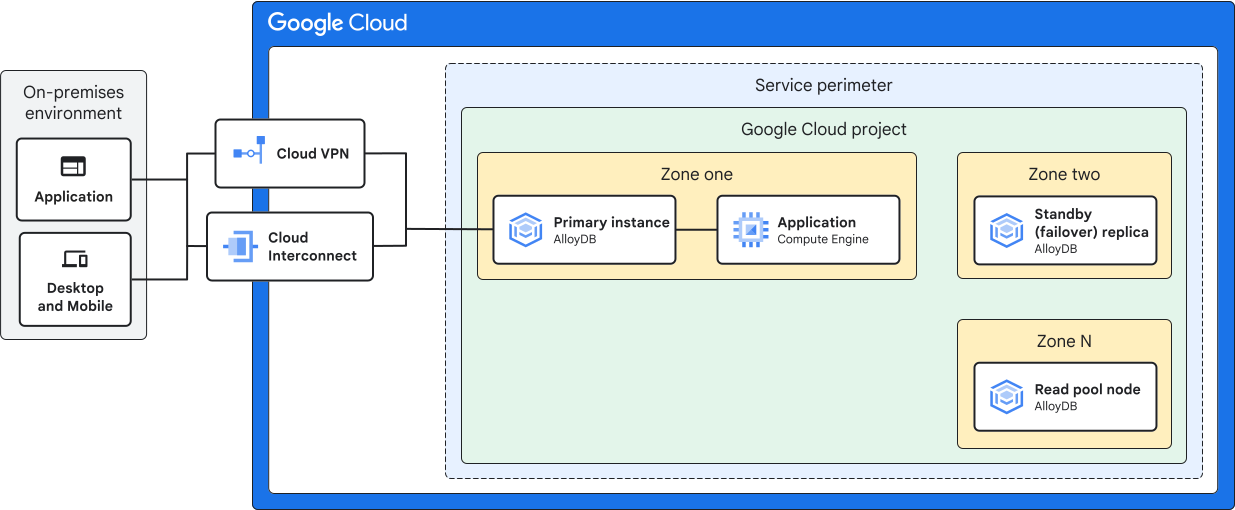
By default, an AlloyDB cluster offers availability (HA) through its primary instance's redundant nodes, located in two different zones, with automatic failover.
Clusters operating in non-production environments that don't require HA can optionally use basic, single-zone primary instances instead.
Adding read pool instances containing at least two nodes creates further load-balanced, multi-zonal, high-availability access points to your data. All read pool instances run independently of the primary instance.
For more information about region-specific considerations, see Geography and regions.
Data backup and disaster recovery
AlloyDB features a continuous backup and recovery system that lets you create a new cluster based on any point in time within an adjustable retention period. This lets you recover quickly from data-loss accidents.
In addition, AlloyDB can create and store complete backups of your cluster's data, either on demand or on a regular schedule. At any time, you can restore from a backup to a new AlloyDB cluster that contains all the data from the original cluster at the moment of the backup's creation.
For more information, see About backups.
As a further method of disaster recovery, you can achieve cross-region replication by creating secondary clusters in separate Google Cloud regions. AlloyDB asynchronously streams data from a designated primary cluster to each of its secondary clusters. At any time, you can promote a secondary cluster into a primary cluster, or perform a cross-region failover (Preview) to automatically maintain your replication topology during an outage.
For more information, see About cross-region replication.
Security and access control
You can configure a cluster to require connection with the secure AlloyDB Auth Proxy, which uses Google Cloud Identity Access and Management (IAM) for access control. For more information, see Authorization.
AlloyDB uses the standard PostgreSQL user role system for authentication, introducing a handful of additional roles specific to AlloyDB. For more information, see Manage AlloyDB user roles.
Encryption
AlloyDB protects all data at rest using Google's encryption methods by default. If you instead need to encrypt your data using a key that you provide, then you can specify a customer-managed encryption key (CMEK) when creating a cluster. AlloyDB then uses the CMEK key to encrypt all data written to that cluster.
CMEK also applies to backups. You can specify a CMEK key when creating an on-demand backup, configuring a backup schedule, or restoring from a backup.
For more information, see About CMEK.
Maintenance and updates
Over the life of an AlloyDB cluster, two kinds of updates can occur:
- System updates: Google periodically performs system updates to ensure that the underlying hardware and software are reliable, secure, and performing optimally. These updates include security patches, operating system upgrades, and minor PostgreSQL server version updates.
- Configuration updates: these are changes that you perform manually to your cluster or instances to meet changing workload demands. Examples include resizing the vCPU and memory count of an instance or modifying database flags.
AlloyDB maintenance operations are designed to be non-disruptive. This is accomplished by preparing replacement servers and quickly swapping them with the active servers when ready. During this process, primary instances typically experience less than a second of downtime, while read pools remain continuously available. Any active connections to the database are momentarily dropped, but you can continue using your database normally throughout the process.
If you want to apply an update immediately even if it means a longer downtime, you can use the FORCE_APPLY database flag.
AlloyDB AI
AlloyDB AI integrates a suite of AI and ML features directly into your AlloyDB database. Historically, building AI applications required complex data pipelines and ETL processes to move data from operational databases to specialized AI/ML platforms. This method led to challenges such as increased latency from data transfer, higher operational overhead from managing different systems, and duplicate storage. By integrating AI capabilities directly into the database, AlloyDB AI removes the need for extensive external data movement.
To facilitate the development of AI applications, AlloyDB AI provides the following extensions:
vector(a version ofpgvectorcustomized for AlloyDB AI): stores and indexes vector embeddings for semantic search. Supports running hybrid queries and similarity searches. To get started with vector search, see Perform a vector search.alloydb_scann: provides high-performance approximate nearest-neighbor search by implementing a highly efficient nearest-neighbor index powered by the ScaNN algorithm. For more information, see Create a ScaNN index.google_ml_integration: provides access to the AI functions, which enables ML model invocation from AlloyDB for tasks such as generating embeddings, semantic ranking, AI-based filters and joins, and text generation and summarization. Model endpoint management allows registration and invocation of AI models, including external models by OpenAI or Anthropic. For more information, see Register a model endpoint and Evaluate semantic queries with AI operators.alloydb_ai_nl: Enables interaction with your database using natural language. It enables application developers to generate accurate and secure SQL queries in response to end-user natural language questions, enabling non-SQL users to access data. For more information, see Natural language overview.
For a list of use cases for AlloyDB AI capabilities, see Build generative AI applications.
Extension support
AlloyDB includes support for a number of popular PostgreSQL extensions. For the full list, see Supported database extensions.
A self-hosted alternative: AlloyDB Omni
As an alternative to running AlloyDB within Google Cloud, Google offers AlloyDB Omni. This streamlined, downloadable edition of AlloyDB lets you run its powerful database engine on your own Linux-based computing environment, wherever that might be.
To explore deployment options, codelabs, and manage subscriptions in the Google Cloud console, go to the AlloyDB Omni console page.
For more information, see AlloyDB Omni overview.