

To run real-time queries of analytical data alongside your operational data
without building complex pipelines, you can use lakehouse federation in
AlloyDB for PostgreSQL. Powered by the bigquery_fdw extension, AlloyDB
routes your queries to BigQuery to access live data and open formats
like Apache Iceberg through BigLake external tables, eliminating the need for
complex ETL (extract, transform, load) migrations.
Benefits of lakehouse federation
The lakehouse federation approach offers the following benefits:
- Zero ETL: query analytical data directly without building or maintaining complex pipelines.
- Familiar syntax: use standard PostgreSQL syntax to query BigQuery data.
- Real-time insights: access fresh data alongside your operational tables.
- Offload compute: use the BigQuery distributed engine for heavy lifting through pushdown optimization.
- Authorized access: to ensure that only authorized service accounts can query external data, use Identity and Access Management (IAM) for centralized access control.
Use cases
Lakehouse federation supports the following business and technical use cases:
- Hybrid transactional and analytical processing (HTAP) workloads: You can query real-time operational data in AlloyDB and historical or analytical data in BigQuery or Cloud Storage simultaneously without impacting transactional performance.
- Real-time insights without brittle pipelines: You can avoid the latency and failure modes of traditional ETL processes. Access fresh analytical data instantly to make business decisions based on the most up-to-date information.
- Data materialization for agentic workflows: You can materialize external analytical data into AlloyDB to use the AlloyDB columnar engine and AlloyDB AI capabilities. This enables high-performance vector searches, machine learning embeddings, and advanced AI-driven agentic workflows on your federated data.
Architecture and data flow
The following diagram shows the flow of data and component interactions when you use lakehouse federation:
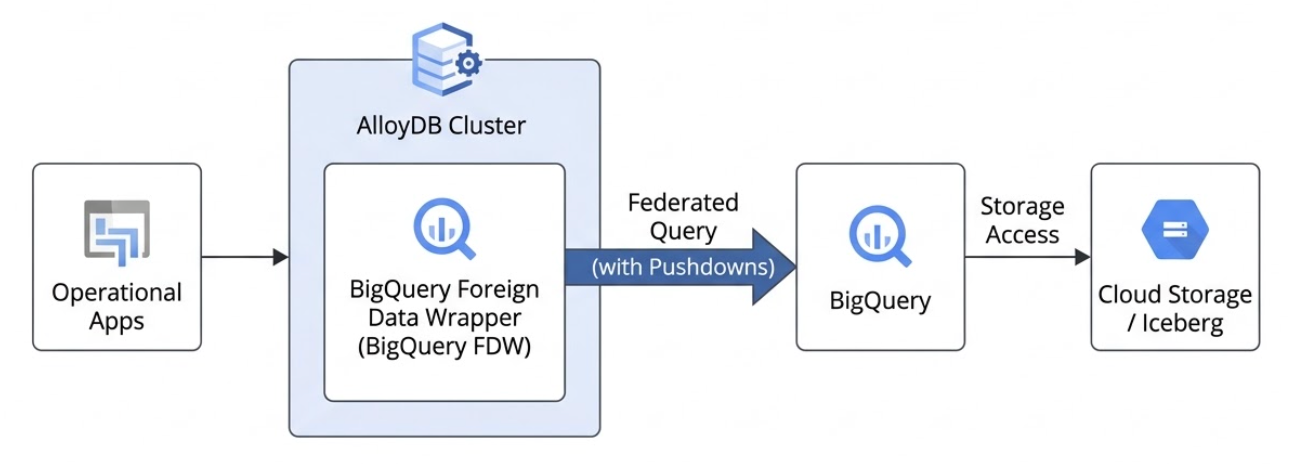
The following describes the data flow process for lakehouse federation in AlloyDB:
- Query submission: you submit a standard PostgreSQL query to your AlloyDB instance.
- Query planning and optimization: the AlloyDB query planner identifies tables that are mapped to external BigQuery datasets using the BigQuery foreign data wrapper (FDW).
- Pushdown optimization: AlloyDB optimizes the query by pushing down specific filters and aggregations directly to BigQuery. This ensures that the network only transfers the relevant, filtered rows or pre-aggregated summaries.
- Execution and retrieval: BigQuery executes its portion of the query—directly scanning BigQuery built-in storage or reading Apache Iceberg tables stored in Cloud Storage—and streams the resulting dataset back to AlloyDB.
- Final processing and response: AlloyDB combines the external data with any local operational tables, completes any remaining query processing, and returns the final result to your application.
Data type considerations for federated queries
When you query an external BigQuery table from
AlloyDB using lakehouse federation, the AlloyDB
query planner interprets the BigQuery data types as corresponding
PostgreSQL data types. Understanding these mappings is crucial for writing
correct queries and for the foreign table definitions used by the bigquery_fdw
extension.
If a BigQuery data type doesn't have a direct mapping or requires
special handling, you might need to use explicit CAST functions within your
queries or create a view in BigQuery that presents the data with
compatible types.
For a list of supported data types and their corresponding PostgreSQL types, see Data type mappings.
Security and access control
Access to BigQuery data from AlloyDB is managed through IAM. You must grant specific IAM roles to the AlloyDB cluster service account to define which datasets and tables can be queried. This helps ensure that federated queries adhere to your organization's centralized data governance policies without compromising security. For more information, see Required roles.
Pushdown
You can use filter and aggregate pushdown techniques, which speed up queries and reduce costs by filtering or summarizing data in BigQuery before it's moved or processed by AlloyDB. This approach minimizes network traffic and memory usage, letting you analyze massive datasets quickly and efficiently without exceeding resource limits.
Filter pushdown
Filter pushdown, also known as predicate pushdown, is an optimization
technique that moves the filtering of data as close to the storage layer as
possible by moving your query filters (using the WHERE clause) from
AlloyDB down to BigQuery.
With filter pushdown, you can use SQL queries with a WHERE clause to access a subset
of data from the remote table. This data can also be materialized on a local table
or attached as a local partition to a PostgreSQL table.
Supported operations for filter pushdown include the following:
- Standard comparison operators:
=,<,>,<=,>=,<> - Logical operators:
AND,OR, andNOT - Pattern matching:
LIKEandNOT LIKE - Null checks:
IS NULLandIS NOT NULL - In-list evaluation:
INandNOT IN
Aggregate pushdown
Aggregate pushdown is an advanced database optimization that performs
calculations—for example, SUM, COUNT, AVG, or GROUP BY—as
close to the storage layer as possible. This pushdown evaluates summary functions
directly in BigQuery, which can significantly reduce the number
of rows returned to AlloyDB.
Supported operations for aggregate pushdown include the following:
SUMCOUNTAVGMINMAX
Limit pushdown
Limit pushdown (which includes OFFSET pushdown) is an optimization technique that moves the LIMIT and OFFSET clauses of your query from AlloyDB to BigQuery.
This allows BigQuery to return only the specific subset of rows requested, which significantly reduces network traffic and query latency.
Limit pushdown is automatically applied whenever possible. Make sure that the following conditions are met:
- The query doesn't use the
WITH TIESoption in theFETCH FIRSTclause. - The
LIMITandOFFSETexpressions are basic constants or expressions that can be evaluated remotely.
BigQuery cost and billing
The BigQuery foreign data wrapper depends on the following:
- BigQuery compute pricing
- BigQuery Storage API pricing
For information, see BigQuery pricing.
Runtime projects
In BigQuery, you can store your data in one project and execute your queries in a different project. The project that executes the queries and accrues the compute costs is known as the runtime project (or billing project).
Separating your runtime project from your data storage project allows you to isolate compute costs to specific cost centers, manage quotas independently, and control expenditure across different workloads without moving the underlying data.
When you configure AlloyDB to access BigQuery data, you can specify a runtime project at the server level (applying to all associated foreign tables) or at the individual table level. If you don't specify a runtime project, AlloyDB defaults to using the project that owns the data.
Limitations
AlloyDB and BigQuery might use different default collations, which can result in data ordering or string comparison results that differ between the two systems. For example, the default PostgreSQL collation in versions 15, 16 and 17 might handle case sensitivity differently during sorting than BigQuery's default collation, which strictly evaluates strings based on their Unicode code points.
For any part of a query executed remotely on BigQuery, the collation follows BigQuery's settings. To reduce collation conflicts, consider using the
C.UTF-8collation without ICU in AlloyDB and the default (empty) collation in BigQuery.Queries that return a large amount of data from BigQuery, after the pushdown, aren't optimized.
When you create a foreign table, AlloyDB doesn't actively validate the existence or schema of the remote BigQuery table.
If a federated query requires reading a large amount of data—for example, if filter pushdowns can't be applied—the query might fail due to BigQuery API response size limits. BigQuery maximum response size limits still apply. For more information about these limits, see Quotas and limits.
PostgreSQL supports greater precision for intermediate computations, whereas BigQuery strictly controls decimal precision. This difference can result in precision loss or overflow errors during complex calculations. For more information, see Decimal types.
Database Migration Service doesn't support migrating foreign tables created using the
bigquery_fdwextension. As a workaround, you can either exclude the foreign tables from your migration job or you can drop them before starting the migration, and then recreate them on the destination AlloyDB cluster after the migration is complete.When you query foreign tables using the
bigquery_fdwextension, BigQuery evaluates data access permissions based on the AlloyDB cluster service account. Even if database users sign in using IAM database authentication, their individual IAM user permissions aren't checked against the remote BigQuery tables. For information, see Grant AlloyDB access to the BigQuery dataset.