

Optimized functions let you use a smaller, faster proxy model to process most of your queries, and then fall back to a larger LLM only when necessary. This approach reduces operational costs and improves query responsiveness. Optimized functions minimize the use of LLMs for row-by-row classification or filtering tasks, which can be better handled by the proxy model.
AlloyDB AI functions like ai.if() can have high latency due to
remote calls to large language models (LLMs). Optimized functions address
this latency issue by using smaller, locally-trained proxy models to process
your queries. These models are trained on a sample of your data, using the LLM's
output as the source of truth.
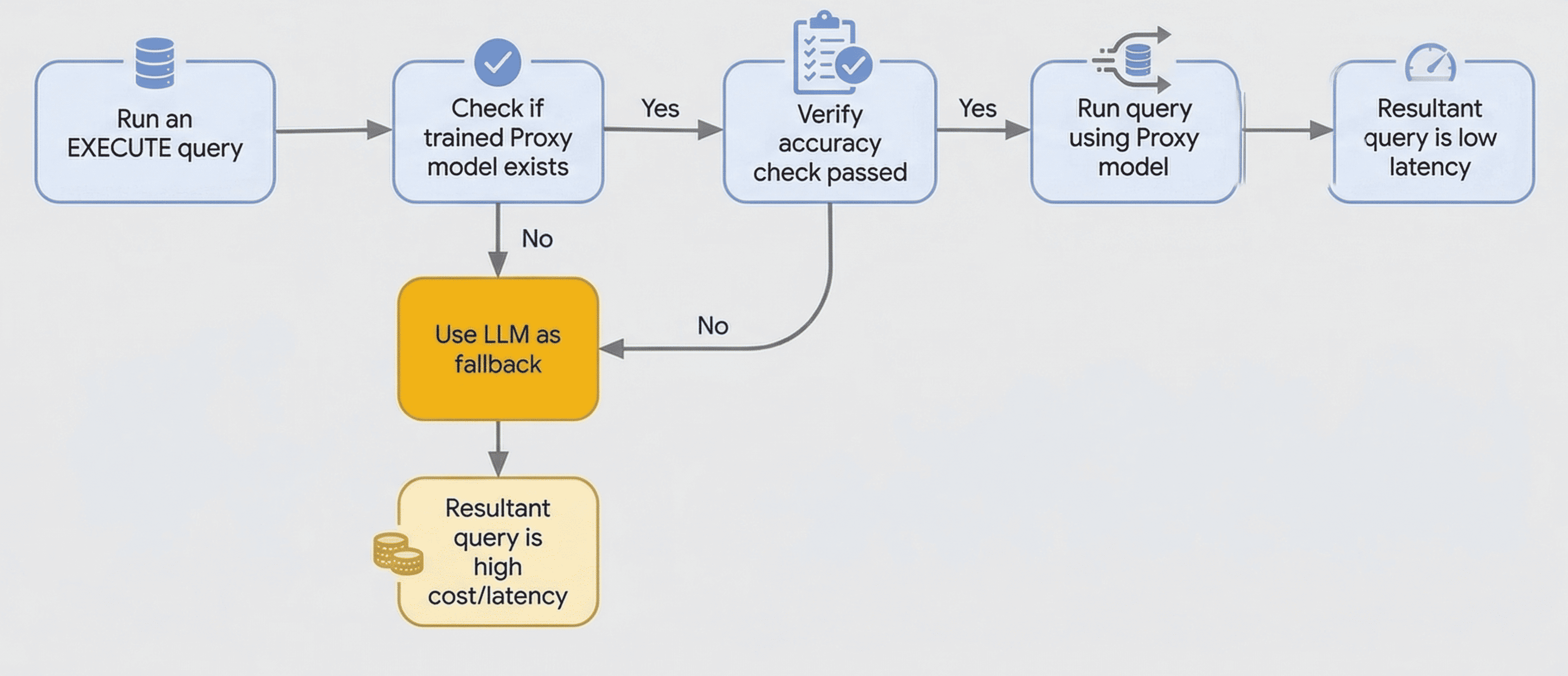
Accuracy checks are performed at runtime on a sample of rows using the LLM. To perform this check, AlloyDB uses the LLM to generate labels for the sample rows and compares them with the proxy model's predictions to verify accuracy. If the accuracy check fails, the query falls back to using the LLM.
When you use an optimized function, AlloyDB does the following:
- Trains a proxy model: AlloyDB trains a lightweight proxy
model on a sample of your data. This happens in the background when you use
the
PREPAREstatement withai.if()function to train the model for optimized queries. - Executes the query: when you use the
EXECUTEstatement, AlloyDB uses the trained proxy model to process the query locally. - Falls back to the LLM: if the accuracy of the model is low, or if AlloyDB can't find a model, AlloyDB automatically falls back to using the LLM.
Before you begin
Before you use the optimized functions, do the following:
- Connect to your database using psql or
AlloyDB Studio as the
postgresuser or as a user that has access to the table where the data resides. Verify that the
google_ml_integrationextension is installed and available on version 1.5.8 or higher.SELECT extversion FROM pg_extension WHERE extname = 'google_ml_integration'; extversion ------------ 1.5.8 (1 row)Configure AlloyDB to work with Gemini Enterprise Agent Platform. For more information, see Integrate your database with Agent Platform.
Ensure that the following database flags are enabled. For more information, see Configure an instance's database flags.
google_ml_integration.enable_model_supportgoogle_ml_integration.enable_ai_query_enginegoogle_ml_integration.enable_cost_optimized_ai_functions
Generate embeddings for the table that you want to query. For more information, see Generate and manage automatic embeddings for tables.
Consider the following:
- The source data column must be of type
TEXTorVARCHAR. - The embedding column that provides input to the optimized AI function
must be of type
REAL[]orVECTOR. - Optimized functions are available only in regions where Agent Platform generative models are available. For a list of available regions, see Deployments and endpoints.
- The source data column must be of type
Use optimized functions
To use an optimized function, use the PREPARE and EXECUTE statements
with the ai.if() function. The following is an example of how to use an optimized function:
Create a
restaurant_reviewstable. Thereviewcolumn that holds the source data is of typeTEXT, and thereview_embeddingcolumn used for queries is of typeVECTOR(768).CREATE TABLE restaurant_reviews ( id SERIAL, name VARCHAR(64), city VARCHAR(64), review TEXT, review_embedding VECTOR(768) );Use a
PREPAREstatement with theai.if()function to indicate that the query must use an optimized function. This statement triggers the asynchronous training of the model in the background.The model is trained only under the following conditions:
- There is exactly one
ai.if()function in the query. ai.if()is not inside a subquery.
PREPARE positive_reviews_query AS SELECT r.name, r.city FROM restaurant_reviews r WHERE ai.if('Is the following a positive review? Review: ' || r.review, r.review_embedding) GROUP BY r.name, r.city HAVING COUNT(*) > 500;- There is exactly one
Run the query using the
EXECUTEstatement. Because thePREPAREstatement is specific to the current session, you must runEXECUTEstatement on the same connection:EXECUTE positive_reviews_query;conn2=> SELECT r.name, r.city FROM restaurant_reviews r WHERE ai.if('Is the following a positive review? Review: ' || r.review, r.review_embedding) GROUP BY r.name, r.city HAVING COUNT(*) > 500;The trained proxy model isn't used if any of the following conditions are met:
- The content or embedding column referenced in
ai.if()changes. Both columns must belong to the same table. - The prompt provided to the content column changes.
- The structure of the query changes, resulting in a different
query_id. - The query fails to meet the accuracy check threshold at the beginning of the query.
In these cases, the query falls back to using the LLM, and AlloyDB returns a warning.
- The content or embedding column referenced in
Optional. To disable the accuracy validation check for the entire database environment, which is required because accuracy checks are also performed during model training, run the following command.
ALTER DATABASE DATABASE_NAME SET google_ml_integration.runtime_accuracy_check = off;Replace
DATABASE_NAMEwith the name of your database.
Retrain a proxy model
If your underlying table data changes significantly, you can retrain the proxy
model by running the PREPARE statement again. Re-preparing a query
replaces the existing proxy model by initiating a new training request.
Limitations
If you change the source content column, the embedding column, or the prompt
supplied to ai.if() function, you must issue a new PREPARE statement.
AlloyDB trains the optimized function to approximate the
behavior of a unique combination of prompt and input data.