

This document provides an overview of the high availability (HA) configuration for AlloyDB for PostgreSQL instances. To configure a new instance for HA or enable HA on an existing instance, see View cluster and instance settings.
An HA configuration ensures continued operations even after failure events. While zonal instances may experience extended downtime during failure events, with HA, your data remains available to client applications.
Primary and secondary instances
An AlloyDB primary instance configured with high availability includes an active node and a standby node, which are located in different zones. For storage, AlloyDB uses a regional log persistor to store database write-ahead logs (WAL) and AlloyDB's regional storage service to store data blocks. The instance's IP address routes traffic to the active node using a load balancer.
When processing writes, the AlloyDB database first writes WAL to its regional log persistor on the active node and then asynchronously transfers the logs to AlloyDB's regional log processing servers, which materialize the logs into data blocks for long-term storage. AlloyDB then cleans up the logs that are successfully processed.
The following diagram shows the high availability architecture.
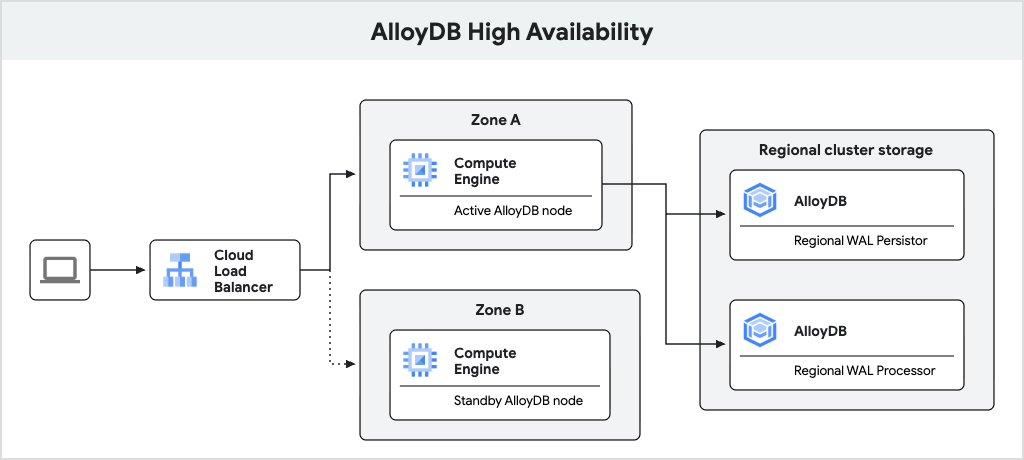
Fig. 1. High availability architecture.
Failover
If the active node becomes unavailable, AlloyDB automatically fails over the primary instance to its standby node, which becomes the new active node. The load balancer recognizes the new active node and begins routing traffic to it. After a failover, the new active node remains active even after the original node comes back online. No data loss occurs during failover due to synchronous WAL writes to the regional log persistor.
The following diagram shows the traffic flow after failover.
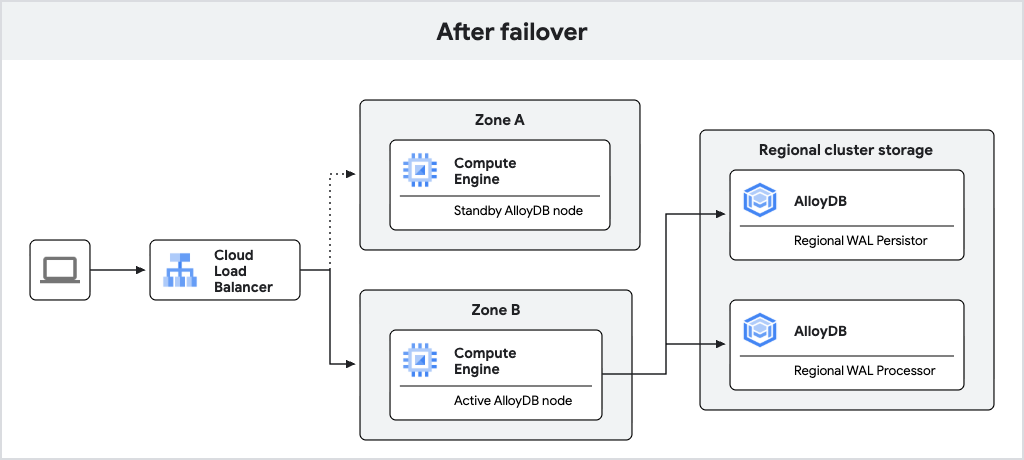
Fig. 2. Traffic flow after failover.
A failover occurs in the following sequence of events:
- The active node or zone fails. The AlloyDB health monitoring system periodically checks whether the active node is healthy. If the health monitoring system fails multiple checks, it initiates failover. This detection can take up to 30 seconds.
- The database starts on the standby node and begins accepting connections. This typically takes less than 30 seconds.
- The standby node is promoted to primary. Using the instance's static IP address, the new primary node begins serving data, and client queries succeed after a reconnect.
- AlloyDB recreates a standby node in the previously active zone. This standby node is then ready for future failovers.
Requirements
For AlloyDB to allow failover, the configuration must meet these requirements:
- The primary instance must be in a normal operating state (not stopped or undergoing maintenance).
- The standby zone and standby node must both be healthy.
New architecture
Newly created AlloyDB instances with PostgreSQL 18 provide improved failover using the hot standby feature.
With the hot standby feature, AlloyDB runs the standby node as a replica. During failover, this replica can transition to a read-write mode faster, reducing downtime. Additionally, the replication enables warm caches, which helps ensure consistent query performance after failover.
The following diagram shows the high availability architecture with the hot
standby included.
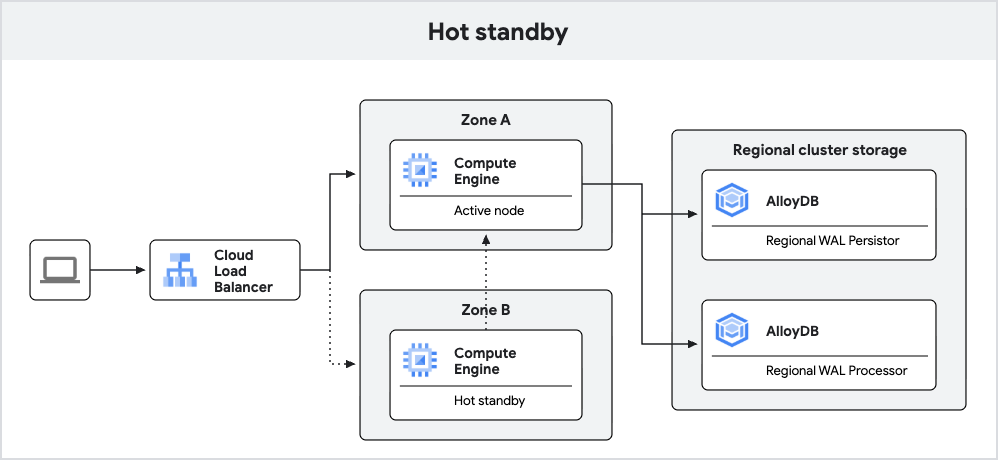
Fig. 3. Hot standby.
Read pools
Read pool instances with two or more nodes are highly available. Nodes are distributed evenly across zones, creating resilience to failure events. In case of failure events like a node or zone failure, a regional load balancer routes traffic to the remaining healthy nodes, ensuring no downtime for your clients.
Read pools stay online during a primary instance failover. WAL replication from the primary instance pauses temporarily during failover and resumes automatically after the primary instance is recovered.
What's next
- Fail over a primary or secondary instance manually.
- Test a primary instance for high availability.
- Reduce costs using basic instances.