

About peering connections
This page provides an overview of administering VPC Network Peering connections.
Peering connection
A peering connection connects two Virtual Private Cloud (VPC) networks. To establish a peering connection, each side separately creates a peering configuration that references the other network.
You initiate the request to connect to another VPC network by
creating a peering configuration. After the other network has a corresponding
configuration to peer with your network, the peering connection is established
and the peering state is changed to ACTIVE in both networks. The peering state
remains INACTIVE if the other network doesn't have a matching peering
configuration, indicating that your network isn't connected to
the other one.
Creating a peering connection doesn't grant you any Identity and Access Management roles on the
other VPC network. For example, if you have the Compute Network
Admin role
(roles/compute.networkAdmin) or the Compute Security Admin role
(roles/compute.securityAdmin) for one network, you don't become a network
administrator or a security administrator for the other network.
After the peering connection is established, the two VPC networks always exchange IPv4 subnet routes that use private IPv4 address ranges. For more information about route exchange options, see the following:
- Options for exchanging subnet routes
- Options for exchanging static routes
- Options for exchanging dynamic routes
Connection mode
The connection mode determines how a peering connection is administered. VPC Network Peering supports two connection modes:
- Independent mode (default)
- Consensus mode
For standard deployments, independent mode is generally preferred. However, for deployments supporting a critical service where accidental deletion of the peering connection would cause a service outage, we recommend using consensus mode. This mode requires agreement from both networks and prevents unilateral changes to the effective status of the peering connection.
When creating a peering connection, both peering configurations must specify the same connection mode: either independent or consensus.
To change the peering mode of an existing connection from independent to consensus, both peering configurations must be updated. Changing the connection mode from consensus to independent isn't supported.
Independent mode
When a peering connection is in independent mode (default), either network can update or delete the connection at any time. You can optionally restrict this behavior by updating the connection mode to consensus.
Consensus mode
Consensus mode prevents accidental, unilateral changes to network behavior. When a peering connection is in consensus mode, every request to update or delete the peering connection requires agreement from both networks.
Configure consensus mode for a connection
You can configure a new or existing peering connection to use consensus mode
by setting the update_strategy parameter:
- New connection. Both networks must set the update strategy
to
CONSENSUS. If the update strategy isn't specified, the connection is created in independent mode. Existing connection. Both networks must change the update strategy to
CONSENSUS. Until both values match, the effective update strategy remainsINDEPENDENTand unilateral update and deletion requests are permitted.Pending requests to update the connection mode don't cause downtime, and the connection remains active while the request is in progress.
Additionally, to configure consensus mode for a connection, each route exchange option in your configuration must have the same value as the complementary flag in the peer configuration. If the values for the following flags don't match, the request to create or update the connection is rejected.
For example, if your network imports custom routes, the peer network must export custom routes. If any of these values don't match for an existing connection, either network can update them before or when changing the connection mode.
To cancel a pending request to configure consensus mode for an existing
connection, the requesting network must reset the update strategy to
INDEPENDENT.
For more information, see
Create a peering connection in consensus mode
and Update a connection to consensus
mode.
Update a connection in consensus mode
Either side of a peering connection can submit an update request. A pending update request doesn't cause downtime, and the connection remains active. If a deletion request is in progress, all update requests (including accepting or canceling a pending update request) are rejected.
To update a peering connection configured with consensus mode, the local network
administrator first updates the local configuration. Then, the peer network
administrator must make a complementary update to the peer configuration.
For example, if you update the --export-custom-routes flag to true, the
peer network must set the --import-custom-routes flag to true. The effective
status of the peering connection doesn't change until the peer network updates
the corresponding configuration.
After the local peering configuration is updated, neither side of the connection can submit further update requests until the initial update is accepted or canceled. Partial updates aren't supported—if a request updates multiple parameters, all of them must be accepted or canceled. To cancel an update, the the requesting network resets each modified parameter to its previous value.
The following diagram shows how the status of a peering connection changes when an update request is submitted.
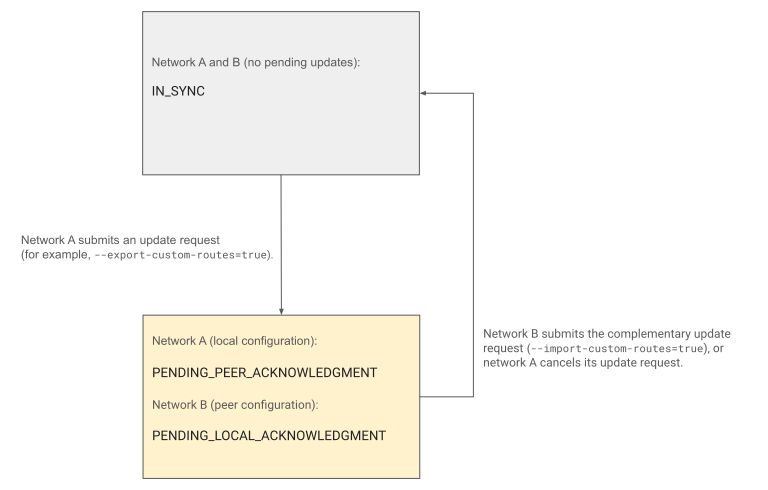
In the preceding diagram, after network A submits the update request, the update
status of the connection changes from IN_SYNC to PENDING_PEER_ACKNOWLEDGMENT
in the local configuration and to PENDING_LOCAL_ACKNOWLEDGMENT in the peer
configuration.
To return to the IN_SYNC status, network B must make the complementary change
or network A must cancel its request. For more information about these
connection statuses, see Connection status.
To update a peering connection, see Update a connection (consensus mode).
Delete a connection in consensus mode
To delete a peering connection in consensus mode, both sides of the connection must submit a deletion request. You can cancel a deletion request either before or after it is accepted by the peer network.
The following conditions apply to deletion requests:
- If an update request is pending, you can still delete the peering connection.
- If a deletion request is pending, all update requests, including accepting or canceling a pending update, are rejected. To complete a pending update, you must first cancel the deletion request.
For more information, see Delete a connection (consensus mode).
Connection status
The gcloud compute networks describe command
shows both the effective status of a peering connection and your local
peering configuration.
You can view the effective connection status by examining the
peerings.connectionStatus field. The following table describes its available
configuration statuses. The
checkmark indicates that the field is
available.
| Field | Independent mode | Consensus mode | Description |
|---|---|---|---|
trafficConfiguration |
Shows the effective route exchange options of the peering connection. | ||
updateStrategy |
Shows the effective connection mode: either INDEPENDENT
or CONSENSUS. |
||
consensusState.deleteStatus |
|
||
consensusState.updateStatus |
|
To list all peering configurations in a Google Cloud project, see List peering connections.
What's next
- To create and manage VPC Network Peering connections, see Set up and manage VPC Network Peering.