

About accessing regional and multi-regional Google APIs through endpoints
This page provides an overview of using Private Service Connect endpoints to access regional endpoints and multi-regional endpoints for supported Google APIs.
Consider using regional endpoints or multi-regional endpoints if you want to ensure that in-transit data remains in a particular region or multi-region. For more information, see Google Cloud API endpoint overview.
For information about other Private Service Connect configurations, see Private Service Connect overview.
Features and compatibility
This table summarizes the features that are supported by endpoints that are used to access regional endpoints for Google APIs.
| Configuration | Details |
|---|---|
| Consumer configuration (endpoint) | |
| Global reachability | If global access is enabled |
| Cloud Interconnect traffic | |
| Cloud VPN traffic | |
| Access through VPC Network Peering | |
| Connection propagation through NCC | |
| DNS configuration | Manual DNS configuration |
| IP version | IPv4 or IPv6 |
| Producer | |
| Supported services | Supported regional Google APIs |
Specifications
- Public hostnames for regional endpoints have the following formats:
SERVICE.REGION.rep.DOMAIN. Public hostnames for multi-regional endpoints have the following format:
SERVICE.MULTI_REGION.rep.DOMAIN.We recommend using the public hostnames to specify the target service in your Private Service Connect endpoint configuration.
The subnet that you specify when you create an endpoint is a regular subnet. The IP address assigned to the endpoint is a regional internal IP address.
By default, endpoints can be accessed only by clients that are in the same region and the same VPC network (or Shared VPC network) as the endpoint. For information about making endpoints available in other regions, see Global access.
For information about creating this configuration in a Shared VPC network, see Shared VPC.
Architecture
Private Service Connect endpoints that have a regional endpoint or multi-regional endpoint target point to a service attachment that has been created by Google to direct traffic to the service.
- Regional endpoints: Traffic is routed to the regional service endpoint in the same region as the Private Service Connect endpoint.
- Multi-regional endpoints: The Private Service Connect
endpoint is regional (created in a specific region, such as
us-central1), but the target is multi-regional (such asus). Traffic from the regional Private Service Connect endpoint is load balanced to a regional frontend. The regional frontend can be located in any of the regions associated with the multi-regional destination.
Clients in the same region as the endpoint can send traffic to the endpoint. You can also access the endpoint from connected networks in the same region. If you want to access the endpoint from other regions, configure global access.
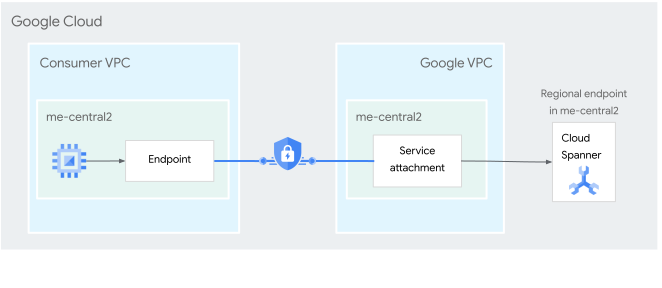
Figure 1. An endpoint lets service consumers send traffic from the consumer's VPC network to regional service endpoints for supported Google APIs through a service attachment that is managed by Google (click to enlarge).
Global access
When you create an endpoint, you can configure global access. Global access lets clients in other regions access the endpoint. The endpoint is also accessible from connected networks.
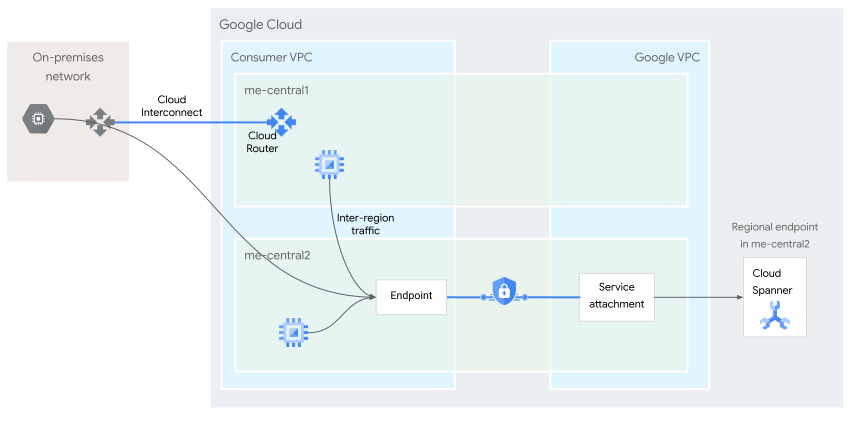
Figure 2. An endpoint with global access enabled can be accessed by clients in another region, including by clients in connected networks (click to enlarge).
Supported regions and services
For a list of supported regions and services, see Regional service endpoints.
DNS configuration and resolution
When you create a Private Service Connect endpoint that targets a
regional or multi-regional endpoint, you must create a DNS record in a private
DNS zone to send
requests to it. For example, if you create a
Private Service Connect endpoint that targets
storage.us-east1.rep.googleapis.com, you must create a private DNS record for
the hostname storage.us-east1.rep.googleapis.com that points to the IP address
of your Private Service Connect endpoint.
If a client looks up storage.us-east1.rep.googleapis.com and that hostname
doesn't exist in a private DNS zone, the query is forwarded to Google's public
DNS servers. The public DNS servers respond with the public IP address of the
regional or multi-regional
endpoint,
not the internal IP address of the Private Service Connect
endpoint IP address.
If you're accessing the Private Service Connect endpoint from clients in hybrid networks, additional configuration is needed so that the hybrid clients can correctly resolve the hostname of the Private Service Connect endpoint. For more information, see Access endpoints from hybrid networks.
Shared VPC
Service Project Admins can create Private Service Connect endpoints in Shared VPC service projects that use IP addresses from Shared VPC networks.
In general, we recommend that you create forwarding rules and their corresponding address resources in the same Google Cloud project. Using the same project helps to avoid issues when a project is deleted.
If you're creating an endpoint in a service project and using a reserved static IP address in the configuration, use or create an address resource in the service project. The address resource can reference an IP address from a subnet in the host project, or from the service project, if it contains subnets.
We don't recommend using an address resource from a host project to create an endpoint in a service project.
You must use the gcloud CLI or the API to create an endpoint in a service project, and this configuration requires additional permissions.
For more information, see Create a regional Private Service Connect endpoint in a Shared VPC service project.
Pricing
For pricing information, see Virtual Private Cloud pricing.
Quotas
See the Number of Regional Endpoints per project per region quota in Quotas and limits.
What's next
- Create a Private Service Connect endpoint to access regional or multi-regional Google APIs.
- Learn more about Private Service Connect.