偵測圖片屬性

「圖片屬性」功能會偵測圖片的一般屬性,例如主色。

峇里島圖片
圖片來源Unsplash 的 Jeremy Bishop

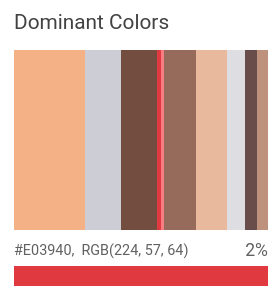
偵測到的主要顏色:

在峇里島圖片中偵測到的主要顏色

圖片屬性偵測要求

設定 Google Cloud 專案和驗證

偵測本機圖片中的圖片屬性

您可以使用 Vision API 對本機圖片檔執行特徵偵測。

如果是 REST 要求,請在要求主體中,以 base64 編碼字串的形式傳送圖片檔案內容。

如果是 gcloud 和用戶端程式庫要求,請在要求中指定本機圖片的路徑。

ColorInfo 欄位不會攜帶用於解讀 RGB 值的絕對色域資訊 (例如 sRGB、Adobe RGB、DCI-P3、BT.2020 等)。應用程式預設應採用 sRGB 色域。

REST

使用任何要求資料之前,請先修改下列項目的值:

  • BASE64_ENCODED_IMAGE:二進位圖片資料的 Base64 表示法 (ASCII 字串)。這個字串應類似下列字串:
    • /9j/4QAYRXhpZgAA...9tAVx/zDQDlGxn//2Q==
    詳情請參閱「base64 編碼」主題。
  • RESULTS_INT:(選填) 要傳回的結果整數值。如果省略 "maxResults" 欄位及其值,API 會傳回預設值 (10 個結果)。這個欄位不適用於下列特徵類型:TEXT_DETECTIONDOCUMENT_TEXT_DETECTIONCROP_HINTS
  • PROJECT_ID: Google Cloud 專案 ID。

HTTP 方法和網址:

POST https://vision.googleapis.com/v1/images:annotate

JSON 要求內文:

{
  "requests": [
    {
      "image": {
        "content": "BASE64_ENCODED_IMAGE"
      },
      "features": [
        {
          "maxResults": RESULTS_INT,
          "type": "IMAGE_PROPERTIES"
        },
      ]
    }
  ]
}

如要傳送要求,請選擇以下其中一個選項:

curl

將要求主體儲存在名為 request.json 的檔案中,然後執行下列指令:

curl -X POST \
-H "Authorization: Bearer $(gcloud auth print-access-token)" \
-H "x-goog-user-project: PROJECT_ID" \
-H "Content-Type: application/json; charset=utf-8" \
-d @request.json \
"https://vision.googleapis.com/v1/images:annotate"

PowerShell

將要求主體儲存在名為 request.json 的檔案中,然後執行下列指令:

$cred = gcloud auth print-access-token
$headers = @{ "Authorization" = "Bearer $cred"; "x-goog-user-project" = "PROJECT_ID" }

Invoke-WebRequest `
-Method POST `
-Headers $headers `
-ContentType: "application/json; charset=utf-8" `
-InFile request.json `
-Uri "https://vision.googleapis.com/v1/images:annotate" | Select-Object -Expand Content

如果要求成功,伺服器會傳回 200 OK HTTP 狀態碼與 JSON 格式的回應。

回覆:

Go

在試用這個範例之前,請先按照「使用用戶端程式庫的 Vision 快速入門導覽課程」中的 Go 設定說明操作。詳情請參閱 Vision Go API 參考文件

如要向 Vision 進行驗證,請設定應用程式預設憑證。詳情請參閱「為本機開發環境設定驗證機制」。


// detectProperties gets image properties from the Vision API for an image at the given file path.
func detectProperties(w io.Writer, file string) error {
	ctx := context.Background()

	client, err := vision.NewImageAnnotatorClient(ctx)
	if err != nil {
		return err
	}

	f, err := os.Open(file)
	if err != nil {
		return err
	}
	defer f.Close()

	image, err := vision.NewImageFromReader(f)
	if err != nil {
		return err
	}
	props, err := client.DetectImageProperties(ctx, image, nil)
	if err != nil {
		return err
	}

	fmt.Fprintln(w, "Dominant colors:")
	for _, quantized := range props.DominantColors.Colors {
		color := quantized.Color
		r := int(color.Red) & 0xff
		g := int(color.Green) & 0xff
		b := int(color.Blue) & 0xff
		fmt.Fprintf(w, "%2.1f%% - #%02x%02x%02x\n", quantized.PixelFraction*100, r, g, b)
	}

	return nil
}

Java

在試用這個範例之前,請先按照使用用戶端程式庫的 Vision API 快速入門導覽課程中的 Java 設定操作說明進行操作。詳情請參閱 Vision API Java 參考文件


import com.google.cloud.vision.v1.AnnotateImageRequest;
import com.google.cloud.vision.v1.AnnotateImageResponse;
import com.google.cloud.vision.v1.BatchAnnotateImagesResponse;
import com.google.cloud.vision.v1.ColorInfo;
import com.google.cloud.vision.v1.DominantColorsAnnotation;
import com.google.cloud.vision.v1.Feature;
import com.google.cloud.vision.v1.Image;
import com.google.cloud.vision.v1.ImageAnnotatorClient;
import com.google.protobuf.ByteString;
import java.io.FileInputStream;
import java.io.IOException;
import java.util.ArrayList;
import java.util.List;

public class DetectProperties {
  public static void detectProperties() throws IOException {
    // TODO(developer): Replace these variables before running the sample.
    String filePath = "path/to/your/image/file.jpg";
    detectProperties(filePath);
  }

  // Detects image properties such as color frequency from the specified local image.
  public static void detectProperties(String filePath) throws IOException {
    List<AnnotateImageRequest> requests = new ArrayList<>();

    ByteString imgBytes = ByteString.readFrom(new FileInputStream(filePath));

    Image img = Image.newBuilder().setContent(imgBytes).build();
    Feature feat = Feature.newBuilder().setType(Feature.Type.IMAGE_PROPERTIES).build();
    AnnotateImageRequest request =
        AnnotateImageRequest.newBuilder().addFeatures(feat).setImage(img).build();
    requests.add(request);

    // Initialize client that will be used to send requests. This client only needs to be created
    // once, and can be reused for multiple requests. After completing all of your requests, call
    // the "close" method on the client to safely clean up any remaining background resources.
    try (ImageAnnotatorClient client = ImageAnnotatorClient.create()) {
      BatchAnnotateImagesResponse response = client.batchAnnotateImages(requests);
      List<AnnotateImageResponse> responses = response.getResponsesList();

      for (AnnotateImageResponse res : responses) {
        if (res.hasError()) {
          System.out.format("Error: %s%n", res.getError().getMessage());
          return;
        }

        // For full list of available annotations, see http://g.co/cloud/vision/docs
        DominantColorsAnnotation colors = res.getImagePropertiesAnnotation().getDominantColors();
        for (ColorInfo color : colors.getColorsList()) {
          System.out.format(
              "fraction: %f%nr: %f, g: %f, b: %f%n",
              color.getPixelFraction(),
              color.getColor().getRed(),
              color.getColor().getGreen(),
              color.getColor().getBlue());
        }
      }
    }
  }
}

Node.js

在試用這個範例之前,請先按照「使用用戶端程式庫的 Vision 快速入門導覽課程」中的 Node.js 設定說明操作。詳情請參閱 Vision Node.js API 參考文件

如要向 Vision 進行驗證,請設定應用程式預設憑證。詳情請參閱「為本機開發環境設定驗證機制」。

const vision = require('@google-cloud/vision');

// Creates a client
const client = new vision.ImageAnnotatorClient();

/**
 * TODO(developer): Uncomment the following line before running the sample.
 */
// const fileName = 'Local image file, e.g. /path/to/image.png';

// Performs property detection on the local file
const [result] = await client.imageProperties(fileName);
const colors = result.imagePropertiesAnnotation.dominantColors.colors;
colors.forEach(color => console.log(color));

Python

在試用這個範例之前,請先按照「使用用戶端程式庫的 Vision 快速入門導覽課程」中的 Python 設定說明操作。詳情請參閱 Vision Python API 參考文件

如要向 Vision 進行驗證,請設定應用程式預設憑證。詳情請參閱「為本機開發環境設定驗證機制」。

def detect_properties(path):
    """Detects image properties in the file."""
    from google.cloud import vision

    client = vision.ImageAnnotatorClient()

    with open(path, "rb") as image_file:
        content = image_file.read()

    image = vision.Image(content=content)

    response = client.image_properties(image=image)
    props = response.image_properties_annotation
    print("Properties:")

    for color in props.dominant_colors.colors:
        print(f"fraction: {color.pixel_fraction}")
        print(f"\tr: {color.color.red}")
        print(f"\tg: {color.color.green}")
        print(f"\tb: {color.color.blue}")
        print(f"\ta: {color.color.alpha}")

    if response.error.message:
        raise Exception(
            "{}\nFor more info on error messages, check: "
            "https://cloud.google.com/apis/design/errors".format(response.error.message)
        )

其他語言

C#:請按照用戶端程式庫頁面上的 C# 設定操作說明完成相關步驟,然後參閱「.NET 適用的 Vision 參考文件」。

PHP:請按照用戶端程式庫頁面上的 PHP 設定操作說明完成相關步驟,然後參閱「PHP 適用的 Vision 參考文件」。

Ruby:請按照用戶端程式庫頁面上的 Ruby 設定操作說明完成相關步驟,然後參閱「Ruby 適用的 Vision 參考文件」。

偵測遠端圖片的圖片屬性

您可以透過 Vision API,對位於 Cloud Storage 或網路上的遠端圖片檔案執行特徵偵測。如要傳送遠端檔案要求,請在要求內文中指定檔案的網址或 Cloud Storage URI。

ColorInfo 欄位不會攜帶用於解讀 RGB 值的絕對色域資訊 (例如 sRGB、Adobe RGB、DCI-P3、BT.2020 等)。應用程式預設應採用 sRGB 色域。

REST

使用任何要求資料之前,請先修改下列項目的值:

  • CLOUD_STORAGE_IMAGE_URI:Cloud Storage bucket 中有效圖片檔案的路徑。您至少必須具備檔案的讀取權限。範例:
    • gs://cloud-samples-data/vision/image_properties/bali.jpeg
  • RESULTS_INT:(選填) 要傳回的結果整數值。如果省略 "maxResults" 欄位及其值,API 會傳回預設值 (10 個結果)。這個欄位不適用於下列特徵類型:TEXT_DETECTIONDOCUMENT_TEXT_DETECTIONCROP_HINTS
  • PROJECT_ID: Google Cloud 專案 ID。

HTTP 方法和網址:

POST https://vision.googleapis.com/v1/images:annotate

JSON 要求內文:

{
  "requests": [
    {
      "image": {
        "source": {
          "gcsImageUri": "CLOUD_STORAGE_IMAGE_URI"
        }
      },
      "features": [
        {
          "maxResults": RESULTS_INT,
          "type": "IMAGE_PROPERTIES"
        },
      ]
    }
  ]
}

如要傳送要求,請選擇以下其中一個選項:

curl

將要求主體儲存在名為 request.json 的檔案中,然後執行下列指令:

curl -X POST \
-H "Authorization: Bearer $(gcloud auth print-access-token)" \
-H "x-goog-user-project: PROJECT_ID" \
-H "Content-Type: application/json; charset=utf-8" \
-d @request.json \
"https://vision.googleapis.com/v1/images:annotate"

PowerShell

將要求主體儲存在名為 request.json 的檔案中,然後執行下列指令:

$cred = gcloud auth print-access-token
$headers = @{ "Authorization" = "Bearer $cred"; "x-goog-user-project" = "PROJECT_ID" }

Invoke-WebRequest `
-Method POST `
-Headers $headers `
-ContentType: "application/json; charset=utf-8" `
-InFile request.json `
-Uri "https://vision.googleapis.com/v1/images:annotate" | Select-Object -Expand Content

如果要求成功,伺服器會傳回 200 OK HTTP 狀態碼與 JSON 格式的回應。

回覆:

Go

在試用這個範例之前,請先按照「使用用戶端程式庫的 Vision 快速入門導覽課程」中的 Go 設定說明操作。詳情請參閱 Vision Go API 參考文件

如要向 Vision 進行驗證,請設定應用程式預設憑證。詳情請參閱「為本機開發環境設定驗證機制」。


// detectProperties gets image properties from the Vision API for an image at the given file path.
func detectPropertiesURI(w io.Writer, file string) error {
	ctx := context.Background()

	client, err := vision.NewImageAnnotatorClient(ctx)
	if err != nil {
		return err
	}

	image := vision.NewImageFromURI(file)
	props, err := client.DetectImageProperties(ctx, image, nil)
	if err != nil {
		return err
	}

	fmt.Fprintln(w, "Dominant colors:")
	for _, quantized := range props.DominantColors.Colors {
		color := quantized.Color
		r := int(color.Red) & 0xff
		g := int(color.Green) & 0xff
		b := int(color.Blue) & 0xff
		fmt.Fprintf(w, "%2.1f%% - #%02x%02x%02x\n", quantized.PixelFraction*100, r, g, b)
	}

	return nil
}

Java

在試用這個範例之前,請先按照「使用用戶端程式庫的 Vision 快速入門導覽課程」中的 Java 設定說明操作。詳情請參閱 Vision Java API 參考文件

如要向 Vision 進行驗證,請設定應用程式預設憑證。詳情請參閱「為本機開發環境設定驗證機制」。


import com.google.cloud.vision.v1.AnnotateImageRequest;
import com.google.cloud.vision.v1.AnnotateImageResponse;
import com.google.cloud.vision.v1.BatchAnnotateImagesResponse;
import com.google.cloud.vision.v1.ColorInfo;
import com.google.cloud.vision.v1.DominantColorsAnnotation;
import com.google.cloud.vision.v1.Feature;
import com.google.cloud.vision.v1.Image;
import com.google.cloud.vision.v1.ImageAnnotatorClient;
import com.google.cloud.vision.v1.ImageSource;
import java.io.IOException;
import java.util.ArrayList;
import java.util.List;

public class DetectPropertiesGcs {

  public static void detectPropertiesGcs() throws IOException {
    // TODO(developer): Replace these variables before running the sample.
    String filePath = "gs://your-gcs-bucket/path/to/image/file.jpg";
    detectPropertiesGcs(filePath);
  }

  // Detects image properties such as color frequency from the specified remote image on Google
  // Cloud Storage.
  public static void detectPropertiesGcs(String gcsPath) throws IOException {
    List<AnnotateImageRequest> requests = new ArrayList<>();

    ImageSource imgSource = ImageSource.newBuilder().setGcsImageUri(gcsPath).build();
    Image img = Image.newBuilder().setSource(imgSource).build();
    Feature feat = Feature.newBuilder().setType(Feature.Type.IMAGE_PROPERTIES).build();
    AnnotateImageRequest request =
        AnnotateImageRequest.newBuilder().addFeatures(feat).setImage(img).build();
    requests.add(request);

    // Initialize client that will be used to send requests. This client only needs to be created
    // once, and can be reused for multiple requests. After completing all of your requests, call
    // the "close" method on the client to safely clean up any remaining background resources.
    try (ImageAnnotatorClient client = ImageAnnotatorClient.create()) {
      BatchAnnotateImagesResponse response = client.batchAnnotateImages(requests);
      List<AnnotateImageResponse> responses = response.getResponsesList();

      for (AnnotateImageResponse res : responses) {
        if (res.hasError()) {
          System.out.format("Error: %s%n", res.getError().getMessage());
          return;
        }

        // For full list of available annotations, see http://g.co/cloud/vision/docs
        DominantColorsAnnotation colors = res.getImagePropertiesAnnotation().getDominantColors();
        for (ColorInfo color : colors.getColorsList()) {
          System.out.format(
              "fraction: %f%nr: %f, g: %f, b: %f%n",
              color.getPixelFraction(),
              color.getColor().getRed(),
              color.getColor().getGreen(),
              color.getColor().getBlue());
        }
      }
    }
  }
}

Node.js

在試用這個範例之前,請先按照「使用用戶端程式庫的 Vision 快速入門導覽課程」中的 Node.js 設定說明操作。詳情請參閱 Vision Node.js API 參考文件

如要向 Vision 進行驗證,請設定應用程式預設憑證。詳情請參閱「為本機開發環境設定驗證機制」。

// Imports the Google Cloud client libraries
const vision = require('@google-cloud/vision');

// Creates a client
const client = new vision.ImageAnnotatorClient();

/**
 * TODO(developer): Uncomment the following lines before running the sample.
 */
// const bucketName = 'Bucket where the file resides, e.g. my-bucket';
// const fileName = 'Path to file within bucket, e.g. path/to/image.png';

// Performs property detection on the gcs file
const [result] = await client.imageProperties(
  `gs://${bucketName}/${fileName}`
);
const colors = result.imagePropertiesAnnotation.dominantColors.colors;
colors.forEach(color => console.log(color));

Python

在試用這個範例之前,請先按照「使用用戶端程式庫的 Vision 快速入門導覽課程」中的 Python 設定說明操作。詳情請參閱 Vision Python API 參考文件

如要向 Vision 進行驗證,請設定應用程式預設憑證。詳情請參閱「為本機開發環境設定驗證機制」。

def detect_properties_uri(uri):
    """Detects image properties in the file located in Google Cloud Storage or
    on the Web."""
    from google.cloud import vision

    client = vision.ImageAnnotatorClient()
    image = vision.Image()
    image.source.image_uri = uri

    response = client.image_properties(image=image)
    props = response.image_properties_annotation
    print("Properties:")

    for color in props.dominant_colors.colors:
        print(f"frac: {color.pixel_fraction}")
        print(f"\tr: {color.color.red}")
        print(f"\tg: {color.color.green}")
        print(f"\tb: {color.color.blue}")
        print(f"\ta: {color.color.alpha}")

    if response.error.message:
        raise Exception(
            "{}\nFor more info on error messages, check: "
            "https://cloud.google.com/apis/design/errors".format(response.error.message)
        )

gcloud

如要執行圖片屬性偵測,請使用 gcloud ml vision detect-image-properties 指令,如下列範例所示:

gcloud ml vision detect-image-properties gs://cloud-samples-data/vision/image_properties/bali.jpeg

其他語言

C#:請按照用戶端程式庫頁面上的 C# 設定操作說明完成相關步驟,然後參閱「.NET 適用的 Vision 參考文件」。

PHP:請按照用戶端程式庫頁面上的 PHP 設定操作說明完成相關步驟,然後參閱「PHP 適用的 Vision 參考文件」。

Ruby:請按照用戶端程式庫頁面上的 Ruby 設定操作說明完成相關步驟,然後參閱「Ruby 適用的 Vision 參考文件」。

試試看

請試試下方的圖片屬性偵測功能。你可以使用已指定的圖片 (gs://cloud-samples-data/vision/image_properties/bali.jpeg),也可以指定自己的圖片。選取「Execute」傳送要求。

峇里島圖片
圖片來源Unsplash 的 Jeremy Bishop

要求主體:

{
  "requests": [
    {
      "features": [
        {
          "maxResults": 10,
          "type": "IMAGE_PROPERTIES"
        }
      ],
      "image": {
        "source": {
          "imageUri": "gs://cloud-samples-data/vision/image_properties/bali.jpeg"
        }
      }
    }
  ]
}

開啟 Google APIs Explorer 並傳送要求

  1. 如要開啟 Google APIs Explorer,請按一下「試用!」

  2. 選用。修改現有要求主體。

  3. 如要傳送要求,請按一下「執行」