

Chirp 3 是最新一代的 Google 多語言自動語音辨識 (ASR) 專用生成模型,可根據意見回饋和使用體驗滿足使用者需求。Chirp 3 的準確度和速度都優於先前的 Chirp 模型,並提供說話者區分和自動語言偵測功能。
模型詳細資料
Chirp 3:語音轉錄功能僅適用於 Speech-to-Text API V2。
型號 ID
使用 API 時,只要在辨識要求中指定適當的模型 ID,或在 Google Cloud 控制台中指定模型名稱,即可像使用其他模型一樣使用 Chirp 3:轉錄。在辨識中指定適當的 ID。
| 型號 | 型號識別碼 |
|---|---|
| Chirp 3 | chirp_3 |
API 方法
並非所有辨識方法都支援相同的語言可用性組合,因為 Speech-to-Text API V2 提供 Chirp 3,因此支援下列辨識方法:
| API 版本 | API 方法 | 支援 |
|---|---|---|
| V2 | Speech.StreamingRecognize (適合串流和即時音訊) | 有權限 |
| V2 | Speech.Recognize (適用於短於一分鐘的音訊) | 有權限 |
| V2 | Speech.BatchRecognize (一般適用於 1 分鐘到 1 小時的長音訊,但如果啟用字詞層級的時間戳記,則最長可達 20 分鐘) | 有權限 |
區域可用性
Chirp 3 目前在下列 Google Cloud 區域推出,未來將擴大適用範圍:
| Google Cloud 可用區 | 發布準備完成度 |
|---|---|
us (multi-region) |
正式發布版 |
eu (multi-region) |
正式發布版 |
asia-northeast1 |
正式發布版 |
asia-southeast1 |
GA |
asia-south1 |
預先發布版 |
europe-west2 |
預先發布版 |
europe-west3 |
預先發布版 |
northamerica-northeast1 |
預先發布版 |
如要查看各轉錄模型支援的 Google Cloud 區域、語言和語言代碼,以及功能,請按照本文說明使用 Locations API。
語音轉錄功能支援的語言
Chirp 3 支援下列語言的StreamingRecognize、Recognize 和 BatchRecognize 語音轉錄:
| 語言 | BCP-47 Code |
上線準備 |
| 卡達隆尼亞文 (西班牙) | ca-ES | GA |
| 簡體中文 | cmn-Hans-CN | GA |
| 克羅埃西亞文 (克羅埃西亞) | hr-HR | GA |
| 丹麥文 (丹麥) | da-DK | GA |
| 荷蘭文 (荷蘭) | nl-NL | GA |
| 英文 (澳洲) | en-AU | GA |
| 英文 (英國) | en-GB | GA |
| 英文 (印度) | en-IN | GA |
| 英文 (美國) | en-US | GA |
| 芬蘭文 (芬蘭) | fi-FI | GA |
| 法文 (加拿大) | fr-CA | GA |
| 法文 (法國) | fr-FR | GA |
| 德文 (德國) | de-DE | GA |
| 希臘文 (希臘) | el-GR | GA |
| 北印度文 (印度) | hi-IN | GA |
| 義大利文 (義大利) | it-IT | GA |
| 日文 (日本) | ja-JP | GA |
| 韓文 (韓國) | ko-KR | GA |
| 波蘭文 (波蘭) | pl-PL | GA |
| 葡萄牙文 (巴西) | pt-BR | GA |
| 葡萄牙文 (葡萄牙) | pt-PT | GA |
| 羅馬尼亞文 (羅馬尼亞) | ro-RO | GA |
| 俄文 (俄羅斯) | ru-RU | GA |
| 西班牙文 (西班牙) | es-ES | GA |
| 西班牙文 (美國) | es-US | GA |
| 瑞典文 (瑞典) | sv-SE | GA |
| 土耳其文 (土耳其) | tr-TR | GA |
| 烏克蘭文 (烏克蘭) | uk-UA | GA |
| 越南文 (越南) | vi-VN | GA |
| 阿拉伯文 | ar-XA | 預先發布版 |
| 阿拉伯文 (阿爾及利亞) | ar-DZ | 預先發布版 |
| 阿拉伯文 (巴林) | ar-BH | 預先發布版 |
| 阿拉伯文 (埃及) | ar-EG | 預先發布版 |
| 阿拉伯文 (以色列) | ar-IL | 預先發布版 |
| 阿拉伯文 (約旦) | ar-JO | 預先發布版 |
| 阿拉伯文 (科威特) | ar-KW | 預先發布版 |
| 阿拉伯文 (黎巴嫩) | ar-LB | 預先發布版 |
| 阿拉伯文 (茅利塔尼亞) | ar-MR | 預先發布版 |
| 阿拉伯文 (摩洛哥) | ar-MA | 預先發布版 |
| 阿拉伯文 (阿曼) | ar-OM | 預先發布版 |
| 阿拉伯文 (卡達) | ar-QA | 預先發布版 |
| 阿拉伯文 (沙烏地阿拉伯) | ar-SA | 預先發布版 |
| 阿拉伯文 (巴勒斯坦國) | ar-PS | 預先發布版 |
| 阿拉伯文 (敘利亞) | ar-SY | 預先發布版 |
| 阿拉伯文 (突尼西亞) | ar-TN | 預先發布版 |
| 阿拉伯文 (阿拉伯聯合大公國) | ar-AE | 預先發布版 |
| 阿拉伯文 (葉門) | ar-YE | 預先發布版 |
| 亞美尼亞文 (亞美尼亞) | hy-AM | 預先發布版 |
| 孟加拉文 (孟加拉) | bn-BD | 預先發布版 |
| 孟加拉文 (印度) | bn-IN | 預先發布版 |
| 保加利亞文 (保加利亞) | bg-BG | 預先發布版 |
| 緬甸文 (緬甸) | my-MM | 預先發布版 |
| 中庫德文 (伊拉克) | ar-IQ | 預先發布版 |
| 中文,粵語 (繁體,香港) | yue-Hant-HK | 預先發布版 |
| 繁體中文 (台灣) | cmn-Hant-TW | 預先發布版 |
| 捷克文 (捷克共和國) | cs-CZ | 預先發布版 |
| 英文 (菲律賓) | en-PH | 預先發布版 |
| 愛沙尼亞文 (愛沙尼亞) | et-EE | 預先發布版 |
| 菲律賓文 (菲律賓) | fil-PH | 預先發布版 |
| 古吉拉特文 (印度) | gu-IN | 預先發布版 |
| 希伯來文 (以色列) | iw-IL | 預先發布版 |
| 匈牙利文 (匈牙利) | hu-HU | 預先發布版 |
| 印尼文 (印尼) | id-ID | 預先發布版 |
| 卡納達文 (印度) | kn-IN | 預先發布版 |
| 高棉文 (柬埔寨) | km-KH | 預先發布版 |
| 寮文 (寮國) | lo-LA | 預先發布版 |
| 拉脫維亞文 (拉脫維亞) | lv-LV | 預先發布版 |
| 立陶宛文 (立陶宛) | lt-LT | 預先發布版 |
| 馬來文 (馬來西亞) | ms-MY | 預先發布版 |
| 馬拉雅拉姆文 (印度) | ml-IN | 預先發布版 |
| 馬拉地文 (印度) | mr-IN | 預先發布版 |
| 尼泊爾文 (尼泊爾) | ne-NP | 預先發布版 |
| 挪威文 (挪威) | no-NO | 預先發布版 |
| 波斯文 (伊朗) | fa-IR | 預先發布版 |
| 旁遮普文 (古爾穆基文,印度) | pa-Guru-IN | 預先發布版 |
| 塞爾維亞文 (塞爾維亞) | sr-RS | 預先發布版 |
| 斯洛伐克文 (斯洛伐克) | sk-SK | 預先發布版 |
| 斯洛維尼亞文 (斯洛維尼亞) | sl-SI | 預先發布版 |
| 西班牙文 (墨西哥) | es-MX | 預先發布版 |
| 史瓦西里文 | sw | 預先發布版 |
| 泰米爾文 (印度) | ta-IN | 預先發布版 |
| 泰盧固文 (印度) | te-IN | 預先發布版 |
| 泰文 (泰國) | th-TH | 預先發布版 |
| 烏茲別克文 (烏茲別克) | uz-UZ | 預先發布版 |
說話者分段標記功能支援的語言
Chirp 3 僅支援BatchRecognize和Recognize的轉錄和說話者辨識功能,支援語言如下:
| 語言 | BCP-47 代碼 |
| 中文 (簡體,中國) | cmn-Hans-CN |
| 德文 (德國) | de-DE |
| 英文 (英國) | en-GB |
| 英文 (印度) | en-IN |
| 英文 (美國) | en-US |
| 西班牙文 (西班牙) | es-ES |
| 西班牙文 (美國) | es-US |
| 法文 (加拿大) | fr-CA |
| 法文 (法國) | fr-FR |
| 北印度文 (印度) | hi-IN |
| 義大利文 (義大利) | it-IT |
| 日文 (日本) | ja-JP |
| 韓文 (韓國) | ko-KR |
| 葡萄牙文 (巴西) | pt-BR |
功能支援與限制
Chirp 3 支援下列功能:
| 功能 | 說明 | 推出階段 |
|---|---|---|
| 自動加上標點符號 | 由模型自動生成,可選擇停用。 | GA |
| 自動大寫 | 由模型自動生成,可選擇停用。 | GA |
| 語句層級時間戳記 | 由模型自動生成。僅適用於 Speech.StreamingRecognize |
GA |
| 說話者分段標記 | 自動識別單一聲道音訊樣本中的不同說話者。僅適用於 Speech.BatchRecognize |
GA |
| 語音調整 (偏誤) | 以詞組或字詞的形式向模型提供提示,提高特定字詞或專有名詞的辨識準確度。 | GA |
| 不限語言的音訊轉錄 | 自動推斷並轉錄最常用的語言。 | GA |
Chirp 3 不支援下列功能:
| 功能 | 說明 |
|---|---|
| 字詞層級時間戳記 | 由模型自動生成,可選擇啟用,但預期會造成部分轉錄品質下降。僅適用於Speech.Recognize和Speech.BatchRecognize |
| 字詞層級信賴度分數 | API 會傳回值,但並非真正的信心分數。 |
使用 Chirp 3 轉錄
瞭解如何使用 Chirp 3 執行轉錄工作。
執行串流語音辨識
Python
import os

from google.cloud.speech_v2 import SpeechClient
from google.cloud.speech_v2.types import cloud_speech
from google.api_core.client_options import ClientOptions

PROJECT_ID = os.getenv("GOOGLE_CLOUD_PROJECT")
REGION = "us"

def transcribe_streaming_chirp3(
   audio_file: str
) -> cloud_speech.StreamingRecognizeResponse:
   """Transcribes audio from audio file stream using the Chirp 3 model of Google Cloud Speech-to-Text v2 API.

   Args:
       audio_file (str): Path to the local audio file to be transcribed.
           Example: "resources/audio.wav"

   Returns:
       cloud_speech.RecognizeResponse: The response from the Speech-to-Text API V2 containing
       the transcription results.
   """

   # Instantiates a client
   client = SpeechClient(
       client_options=ClientOptions(
           api_endpoint=f"{REGION}-speech.googleapis.com",
       )
   )

   # Reads a file as bytes
   with open(audio_file, "rb") as f:
       content = f.read()

   # In practice, stream should be a generator yielding chunks of audio data
   chunk_length = len(content) // 5
   stream = [
       content[start : start + chunk_length]
       for start in range(0, len(content), chunk_length)
   ]
   audio_requests = (
       cloud_speech.StreamingRecognizeRequest(audio=audio) for audio in stream
   )

   recognition_config = cloud_speech.RecognitionConfig(
       auto_decoding_config=cloud_speech.AutoDetectDecodingConfig(),
       language_codes=["en-US"],
       model="chirp_3",
   )
   streaming_config = cloud_speech.StreamingRecognitionConfig(
       config=recognition_config
   )
   config_request = cloud_speech.StreamingRecognizeRequest(
       recognizer=f"projects/{PROJECT_ID}/locations/{REGION}/recognizers/_",
       streaming_config=streaming_config,
   )

   def requests(config: cloud_speech.RecognitionConfig, audio: list) -> list:
       yield config
       yield from audio

   # Transcribes the audio into text
   responses_iterator = client.streaming_recognize(
       requests=requests(config_request, audio_requests)
   )
   responses = []
   for response in responses_iterator:
       responses.append(response)
       for result in response.results:
           print(f"Transcript: {result.alternatives[0].transcript}")

   return responses
執行同步語音辨識
Python
import os

from google.cloud.speech_v2 import SpeechClient
from google.cloud.speech_v2.types import cloud_speech
from google.api_core.client_options import ClientOptions

PROJECT_ID = os.getenv("GOOGLE_CLOUD_PROJECT")
REGION = "us"

def transcribe_sync_chirp3(
   audio_file: str
) -> cloud_speech.RecognizeResponse:
   """Transcribes an audio file using the Chirp 3 model of Google Cloud Speech-to-Text V2 API.
   Args:
       audio_file (str): Path to the local audio file to be transcribed.
           Example: "resources/audio.wav"
   Returns:
       cloud_speech.RecognizeResponse: The response from the Speech-to-Text API containing
       the transcription results.
   """

   # Instantiates a client
   client = SpeechClient(
       client_options=ClientOptions(
           api_endpoint=f"{REGION}-speech.googleapis.com",
       )
   )

   # Reads a file as bytes
   with open(audio_file, "rb") as f:
       audio_content = f.read()

   config = cloud_speech.RecognitionConfig(
       auto_decoding_config=cloud_speech.AutoDetectDecodingConfig(),
       language_codes=["en-US"],
       model="chirp_3",
   )

   request = cloud_speech.RecognizeRequest(
       recognizer=f"projects/{PROJECT_ID}/locations/{REGION}/recognizers/_",
       config=config,
       content=audio_content,
   )

   # Transcribes the audio into text
   response = client.recognize(request=request)

   for result in response.results:
       print(f"Transcript: {result.alternatives[0].transcript}")

   return response
執行批次語音辨識
Python
import os

from google.cloud.speech_v2 import SpeechClient
from google.cloud.speech_v2.types import cloud_speech
from google.api_core.client_options import ClientOptions

PROJECT_ID = os.getenv("GOOGLE_CLOUD_PROJECT")
REGION = "us"

def transcribe_batch_3(
   audio_uri: str,
) -> cloud_speech.BatchRecognizeResults:
   """Transcribes an audio file from a Google Cloud Storage URI using the Chirp 3 model of Google Cloud Speech-to-Text v2 API.
   Args:
       audio_uri (str): The Google Cloud Storage URI of the input audio file.
           E.g., gs://[BUCKET]/[FILE]
   Returns:
       cloud_speech.RecognizeResponse: The response from the Speech-to-Text API containing
       the transcription results.
   """

   # Instantiates a client
   client = SpeechClient(
       client_options=ClientOptions(
           api_endpoint=f"{REGION}-speech.googleapis.com",
       )
   )

   config = cloud_speech.RecognitionConfig(
       auto_decoding_config=cloud_speech.AutoDetectDecodingConfig(),
       language_codes=["en-US"],
       model="chirp_3",
   )

   file_metadata = cloud_speech.BatchRecognizeFileMetadata(uri=audio_uri)

   request = cloud_speech.BatchRecognizeRequest(
       recognizer=f"projects/{PROJECT_ID}/locations/{REGION}/recognizers/_",
       config=config,
       files=[file_metadata],
       recognition_output_config=cloud_speech.RecognitionOutputConfig(
           inline_response_config=cloud_speech.InlineOutputConfig(),
       ),
   )

   # Transcribes the audio into text
   operation = client.batch_recognize(request=request)

   print("Waiting for operation to complete...")
   response = operation.result(timeout=120)

   for result in response.results[audio_uri].transcript.results:
       print(f"Transcript: {result.alternatives[0].transcript}")

   return response.results[audio_uri].transcript
使用 Chirp 3 功能
透過程式碼範例,瞭解如何使用最新功能:
執行不限語言的轉錄作業
Chirp 3 可自動辨識音訊中使用的主要語言並轉錄成文字,這對多語言應用程式來說至關重要。如要達成這個目標,請按照程式碼範例所示設定 language_codes=["auto"]:
Python
import os

from google.cloud.speech_v2 import SpeechClient
from google.cloud.speech_v2.types import cloud_speech
from google.api_core.client_options import ClientOptions

PROJECT_ID = os.getenv("GOOGLE_CLOUD_PROJECT")
REGION = "us"

def transcribe_sync_chirp3_auto_detect_language(
   audio_file: str
) -> cloud_speech.RecognizeResponse:
   """Transcribes an audio file and auto-detect spoken language using Chirp 3.
   Please see https://cloud.google.com/speech-to-text/docs/encoding for more
   information on which audio encodings are supported.
   Args:
       audio_file (str): Path to the local audio file to be transcribed.
           Example: "resources/audio.wav"
   Returns:
       cloud_speech.RecognizeResponse: The response from the Speech-to-Text API containing
       the transcription results.
   """
   # Instantiates a client
   client = SpeechClient(
       client_options=ClientOptions(
           api_endpoint=f"{REGION}-speech.googleapis.com",
       )
   )

   # Reads a file as bytes
   with open(audio_file, "rb") as f:
       audio_content = f.read()

   config = cloud_speech.RecognitionConfig(
       auto_decoding_config=cloud_speech.AutoDetectDecodingConfig(),
       language_codes=["auto"],  # Set language code to auto to detect language.
       model="chirp_3",
   )

   request = cloud_speech.RecognizeRequest(
       recognizer=f"projects/{PROJECT_ID}/locations/{REGION}/recognizers/_",
       config=config,
       content=audio_content,
   )

   # Transcribes the audio into text
   response = client.recognize(request=request)

   for result in response.results:
       print(f"Transcript: {result.alternatives[0].transcript}")
       print(f"Detected Language: {result.language_code}")

   return response
執行語言限制的轉錄作業
Chirp 3 可以自動辨識及轉錄音訊檔案中的主要語言。您也可以根據預期的特定語言代碼設定條件,例如:["en-US", "fr-FR"],將模型資源集中在最有可能的語言,以取得更可靠的結果,如以下程式碼範例所示:
Python
import os

from google.cloud.speech_v2 import SpeechClient
from google.cloud.speech_v2.types import cloud_speech
from google.api_core.client_options import ClientOptions

PROJECT_ID = os.getenv("GOOGLE_CLOUD_PROJECT")
REGION = "us"

def transcribe_sync_3_auto_detect_language(
   audio_file: str
) -> cloud_speech.RecognizeResponse:
   """Transcribes an audio file and auto-detect spoken language using Chirp 3.
   Please see https://cloud.google.com/speech-to-text/docs/encoding for more
   information on which audio encodings are supported.
   Args:
       audio_file (str): Path to the local audio file to be transcribed.
           Example: "resources/audio.wav"
   Returns:
       cloud_speech.RecognizeResponse: The response from the Speech-to-Text API containing
       the transcription results.
   """
   # Instantiates a client
   client = SpeechClient(
       client_options=ClientOptions(
           api_endpoint=f"{REGION}-speech.googleapis.com",
       )
   )

   # Reads a file as bytes
   with open(audio_file, "rb") as f:
       audio_content = f.read()

   config = cloud_speech.RecognitionConfig(
       auto_decoding_config=cloud_speech.AutoDetectDecodingConfig(),
       language_codes=["en-US", "fr-FR"],  # Set language codes of the expected spoken locales
       model="chirp_3",
   )

   request = cloud_speech.RecognizeRequest(
       recognizer=f"projects/{PROJECT_ID}/locations/{REGION}/recognizers/_",
       config=config,
       content=audio_content,
   )

   # Transcribes the audio into text
   response = client.recognize(request=request)

   for result in response.results:
       print(f"Transcript: {result.alternatives[0].transcript}")
       print(f"Detected Language: {result.language_code}")

   return response
執行轉錄和說話者分段標記
使用 Chirp 3 執行轉錄和說話者辨識工作。
Python
import os

from google.cloud.speech_v2 import SpeechClient
from google.cloud.speech_v2.types import cloud_speech
from google.api_core.client_options import ClientOptions

PROJECT_ID = os.getenv("GOOGLE_CLOUD_PROJECT")
REGION = "us"

def transcribe_batch_chirp3(
   audio_uri: str,
) -> cloud_speech.BatchRecognizeResults:
   """Transcribes an audio file from a Google Cloud Storage URI using the Chirp 3 model of Google Cloud Speech-to-Text V2 API.
   Args:
       audio_uri (str): The Google Cloud Storage URI of the input
         audio file. E.g., gs://[BUCKET]/[FILE]
   Returns:
       cloud_speech.RecognizeResponse: The response from the
         Speech-to-Text API containing the transcription results.
   """

   # Instantiates a client.
   client = SpeechClient(
       client_options=ClientOptions(
           api_endpoint=f"{REGION}-speech.googleapis.com",
       )
   )

   config = cloud_speech.RecognitionConfig(
       auto_decoding_config=cloud_speech.AutoDetectDecodingConfig(),
       language_codes=["en-US"],  # Use "auto" to detect language.
       model="chirp_3",
       features=cloud_speech.RecognitionFeatures(
           # Enable diarization by setting empty diarization configuration.
           diarization_config=cloud_speech.SpeakerDiarizationConfig(),
       ),
   )

   file_metadata = cloud_speech.BatchRecognizeFileMetadata(uri=audio_uri)

   request = cloud_speech.BatchRecognizeRequest(
       recognizer=f"projects/{PROJECT_ID}/locations/{REGION}/recognizers/_",
       config=config,
       files=[file_metadata],
       recognition_output_config=cloud_speech.RecognitionOutputConfig(
           inline_response_config=cloud_speech.InlineOutputConfig(),
       ),
   )

   # Creates audio transcription job.
   operation = client.batch_recognize(request=request)

   print("Waiting for transcription job to complete...")
   response = operation.result(timeout=120)

   for result in response.results[audio_uri].transcript.results:
       print(f"Transcript: {result.alternatives[0].transcript}")
       print(f"Detected Language: {result.language_code}")
       print(f"Speakers per word: {result.alternatives[0].words}")

   return response.results[audio_uri].transcript
透過模型調整功能提高準確率
Chirp 3 可透過模型調整機制,提升特定音訊的轉錄準確度。您可以提供特定字詞和詞組的清單,提高模型辨識這些字詞和詞組的機率。這項功能特別適合處理特定領域的詞彙、專有名詞或獨特的詞彙。
Python
import os

from google.cloud.speech_v2 import SpeechClient
from google.cloud.speech_v2.types import cloud_speech
from google.api_core.client_options import ClientOptions

PROJECT_ID = os.getenv("GOOGLE_CLOUD_PROJECT")
REGION = "us"

def transcribe_sync_chirp3_model_adaptation(
   audio_file: str
) -> cloud_speech.RecognizeResponse:
   """Transcribes an audio file using the Chirp 3 model with adaptation, improving accuracy for specific audio characteristics or vocabulary.
   Args:
       audio_file (str): Path to the local audio file to be transcribed.
           Example: "resources/audio.wav"
   Returns:
       cloud_speech.RecognizeResponse: The response from the Speech-to-Text API containing
       the transcription results.
   """

   # Instantiates a client
   client = SpeechClient(
       client_options=ClientOptions(
           api_endpoint=f"{REGION}-speech.googleapis.com",
       )
   )

   # Reads a file as bytes
   with open(audio_file, "rb") as f:
       audio_content = f.read()

   config = cloud_speech.RecognitionConfig(
       auto_decoding_config=cloud_speech.AutoDetectDecodingConfig(),
       language_codes=["en-US"],
       model="chirp_3",
       # Use model adaptation
       adaptation=cloud_speech.SpeechAdaptation(
         phrase_sets=[
             cloud_speech.SpeechAdaptation.AdaptationPhraseSet(
                 inline_phrase_set=cloud_speech.PhraseSet(phrases=[
                   {
                       "value": "alphabet",
                   },
                   {
                         "value": "cell phone service",
                   }
                 ])
             )
         ]
       )
   )

   request = cloud_speech.RecognizeRequest(
       recognizer=f"projects/{PROJECT_ID}/locations/{REGION}/recognizers/_",
       config=config,
       content=audio_content,
   )

   # Transcribes the audio into text
   response = client.recognize(request=request)

   for result in response.results:
       print(f"Transcript: {result.alternatives[0].transcript}")

   return response
啟用降噪器
Chirp 3 可減少背景噪音,提升音訊品質。啟用內建降噪器,即可改善在吵雜環境中的通話品質。
設定 denoiser_audio=true 可有效減少背景音樂或噪音,例如雨聲和街上車流聲。
Python
 import os

 from google.cloud.speech_v2 import SpeechClient
 from google.cloud.speech_v2.types import cloud_speech
 from google.api_core.client_options import ClientOptions

 PROJECT_ID = os.getenv("GOOGLE_CLOUD_PROJECT")
 REGION = "us"

def transcribe_sync_chirp3_with_timestamps(
   audio_file: str
) -> cloud_speech.RecognizeResponse:
   """Transcribes an audio file using the Chirp 3 model of Google Cloud Speech-to-Text v2 API, which provides word-level timestamps for each transcribed word.
   Args:
       audio_file (str): Path to the local audio file to be transcribed.
           Example: "resources/audio.wav"
   Returns:
       cloud_speech.RecognizeResponse: The response from the Speech-to-Text API containing
       the transcription results.
   """

   # Instantiates a client
   client = SpeechClient(
       client_options=ClientOptions(
           api_endpoint=f"{REGION}-speech.googleapis.com",
       )
   )

   # Reads a file as bytes
   with open(audio_file, "rb") as f:
       audio_content = f.read()

   config = cloud_speech.RecognitionConfig(
       auto_decoding_config=cloud_speech.AutoDetectDecodingConfig(),
       language_codes=["en-US"],
       model="chirp_3",
       denoiser_config={
           denoise_audio: True,
           snr_threshold: 0.0, # snr_threshold is deprecated in Chirp3; set to 0.0 to maintain compatibility.
       }
   )

   request = cloud_speech.RecognizeRequest(
       recognizer=f"projects/{PROJECT_ID}/locations/{REGION}/recognizers/_",
       config=config,
       content=audio_content,
   )

   # Transcribes the audio into text
   response = client.recognize(request=request)

   for result in response.results:
       print(f"Transcript: {result.alternatives[0].transcript}")

   return response
在 Google Cloud 控制台中使用 Chirp 3
- 註冊 Google Cloud 帳戶並建立專案。
- 前往 Google Cloud 控制台的「Speech」頁面。
- 如果 API 尚未啟用,請啟用 API。
請確認您有 STT 控制台 Workspace。如果沒有工作區,請建立工作區。
前往轉錄稿頁面,然後按一下「新增轉錄稿」。
開啟「工作區」下拉式選單,然後按一下「新工作區」,建立語音轉錄工作區。
在「建立新工作區」導覽側欄中,按一下「瀏覽」。
按一下即可建立新的值區。
輸入值區名稱,然後按一下「繼續」。
按一下「建立」建立 Cloud Storage 值區。
建立值區後,按一下「選取」即可選取要使用的值區。
按一下「建立」,完成 Speech-to-Text API V2 控制台的工作區建立作業。
轉錄實際音訊。
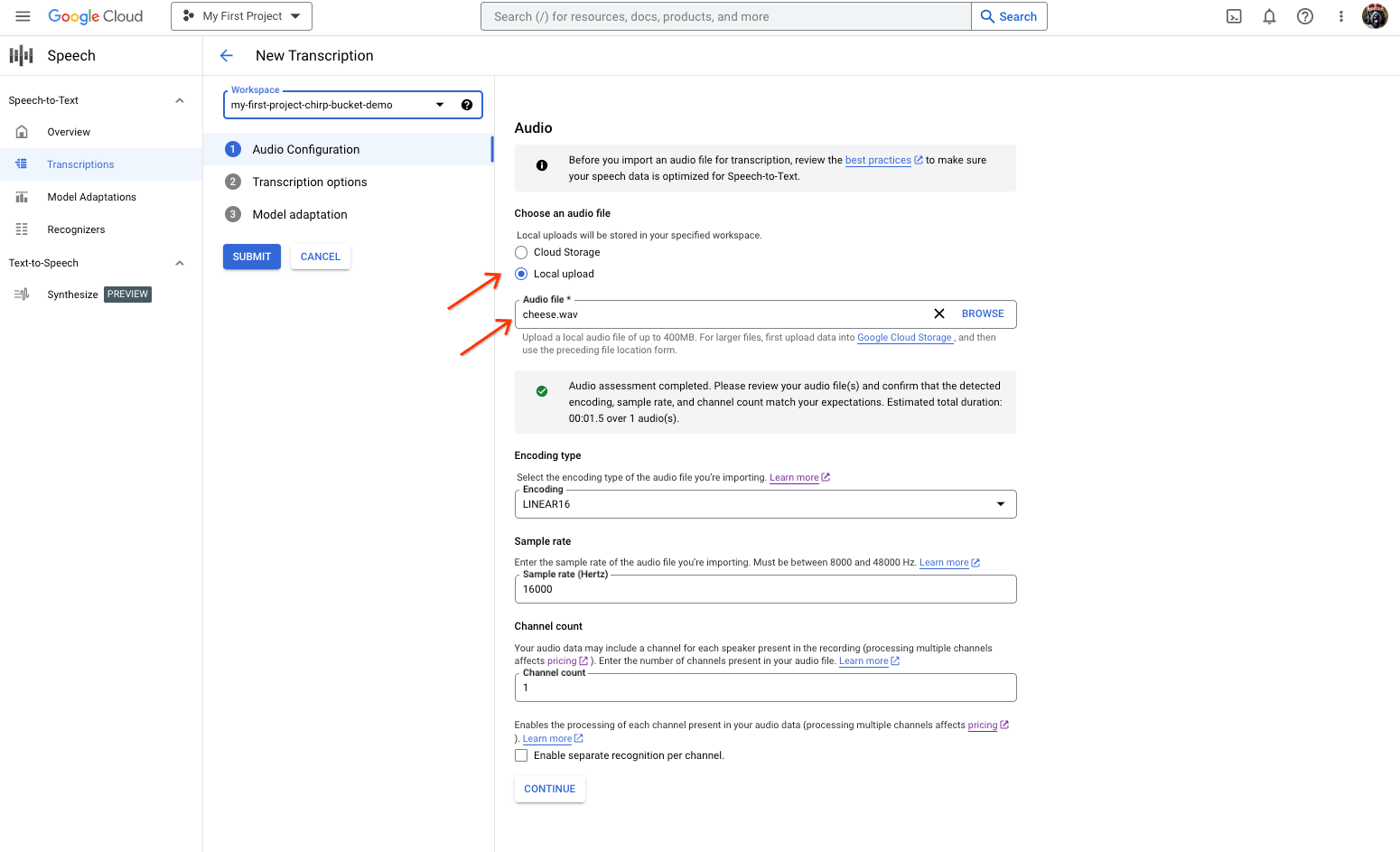
「語音轉文字」轉錄稿建立頁面,顯示檔案選取或上傳畫面。 在「New Transcription」(新轉錄內容)頁面中,透過上傳 (「Local upload」(本機上傳)) 或指定現有的 Cloud Storage 檔案 (「Cloud storage」(Cloud Storage)),選取音訊檔案。
按一下「繼續」,前往「轉錄選項」。
從先前建立的辨識器中,選取您打算用於 Chirp 辨識的口語語言。
在模型下拉式選單中,選取「chirp_3」chirp_3。
在「辨識器」下拉式選單中,選取新建立的辨識器。
按一下「提交」,使用
chirp_3執行第一次辨識要求。
查看 Chirp 3 的轉錄結果。
在「轉錄稿」頁面中,按一下轉錄稿名稱即可查看結果。
在「轉錄稿詳細資料」頁面中查看轉錄結果,並視需要透過瀏覽器播放音訊。