

When integrating Secure Source Manager with other CI/CD solutions, the recommended approach often depends on your network environment. A private network integration ensures that your entire CI/CD solution: from code repository to build, artifact storage, and deployment tooling all remain within a secure private network.
A private network architecture uses these key features:
- Secure Source Manager
- Private Service Connect
- Cloud Build private pools
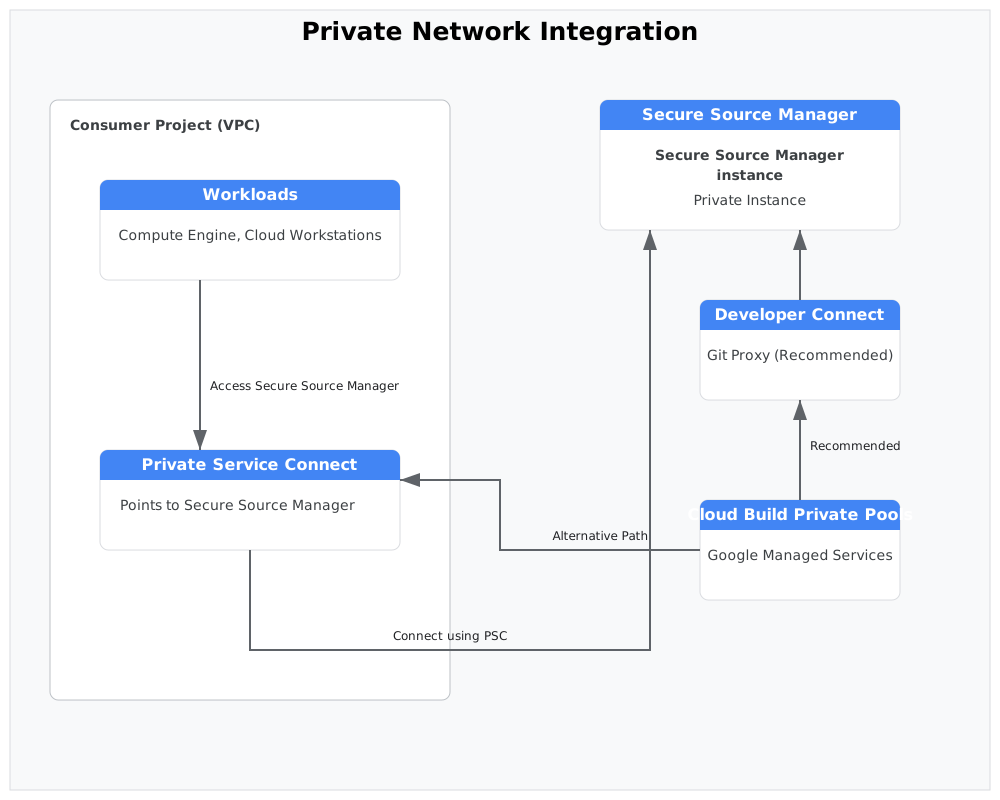
Recommended workflow: Developer Connect
For most users setting up a private network integration between Secure Source Manager and Cloud Build, Developer Connect is the recommended choice due to its simplicity.
While Developer Connect Git proxies use IAM for access control, the proxy endpoint exists on the public internet. For a defense-in-depth approach that keeps all endpoints on a private network, use VPC Service Controls to restrict access to the proxy endpoint.
For step-by-step instructions on setting up this integration, see Integrate Secure Source Manager with Cloud Build using Developer Connect.
Alternative workflow: Cloud Build private pools
If specific requirements prevent you from exposing a Git proxy, even one protected by IAM and VPC Service Controls, then use an alternative setup to connect Secure Source Manager to Cloud Build through a Private Service Connect endpoint and Cloud Build private pools.
For step-by-step instructions on setting up this integration, see Connect Cloud Build to a Private Service Connect instance.