

Cloud Run is a fully managed application platform for running your code, function, or container on top of Google's highly scalable infrastructure.
You can deploy code written in any programming language on Cloud Run if you can build a container image from it. In fact, building container images is optional. If you're using Go, Node.js, Python, Java, .NET, Ruby, or a supported framework you can use the source-based deployment option that builds the container for you, using the best practices for the language you're using.
Google has built Cloud Run to work well together with other services on Google Cloud, so you can build full-featured applications.
In short, Cloud Run lets developers spend their time writing their code, and very little time operating, configuring, and scaling their Cloud Run service. You don't have to create a cluster or manage infrastructure to be productive with Cloud Run.
Services, jobs, worker pools, and instances: four ways to run your code
On Cloud Run, your code can run as a service, job, worker pool, or instance. All of these resource types run sandboxed container instances in the same execution environment and can integrate with Google Cloud services.
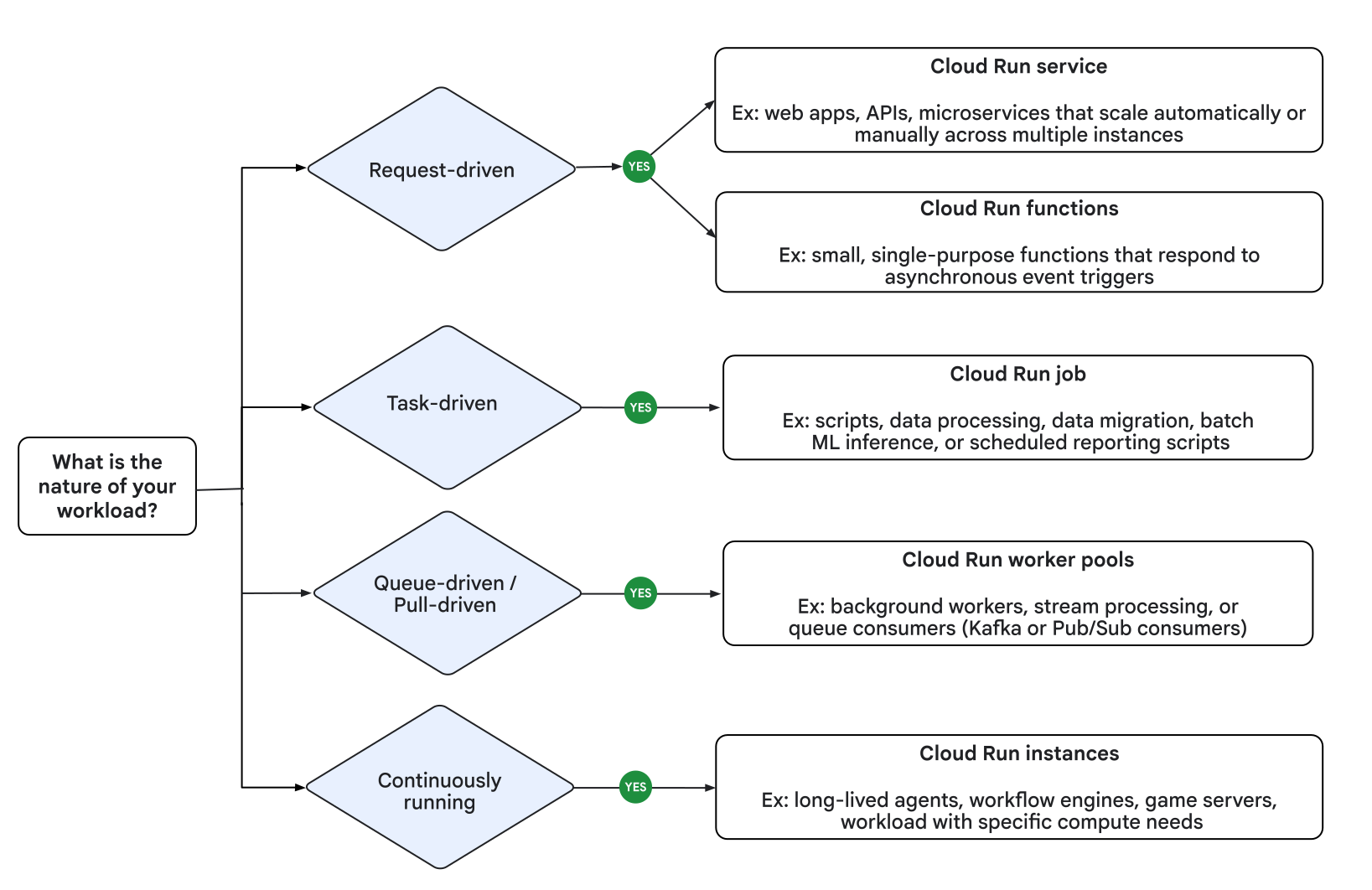
The following table provides a high-level look at the options provided by each Cloud Run resource type.
| Resource | Description |
|---|---|
| Service | Responds to HTTP requests sent to a unique and stable endpoint, using stateless container instances that support both dynamic autoscaling and manual scaling, also responds to events and functions. |
| Job | Executes parallelizable tasks that are executed manually, or on a schedule, and run to completion. |
| Worker pool | Handles always-on background workloads such as workloads from message queues (Kafka, Pub/Sub, RabbitMQ). |
| Instance | Runs long-lived workloads that need a singleton runtime environment. |
Cloud Run services
A Cloud Run service provides the infrastructure you need to run a reliable HTTPS endpoint. To use this service, you must ensure your code listens on a TCP port and handles incoming HTTP requests.
The following diagram illustrates how a Cloud Run service runs multiple container instances to process web requests and events from a client:

A standard service includes the following features:
- Unique HTTPS endpoint for every service
- Every Cloud Run service has an HTTPS endpoint on a unique subdomain of the
*.run.appdomain – and you can configure custom domains as well. Cloud Run manages TLS for you and supports WebSockets, HTTP/2 (end-to-end), and gRPC (end-to-end). - Fast request-based auto scaling
- Cloud Run rapidly scales out to handle all incoming requests or to handle increased CPU utilization outside requests if the billing setting is set to instance-based billing. A service can rapidly scale out to one thousand instances, or even more if you request a quota increase. If demand decreases, Cloud Run removes idle containers. If you're concerned about costs or overloading downstream systems, you can limit the maximum number of instances.
- Optional manual scaling
- By default, Cloud Run automatically scales to more instances to handle more traffic, but you can override this behavior by using manual scaling to control scaling behavior.
- Built-in traffic management
To reduce the risk of deploying a new revision, Cloud Run supports performing a gradual rollout, including routing incoming traffic to the latest revision, rolling back to a previous revision, and splitting traffic to multiple revisions at the same time.
For example, you can start with sending 1% of requests to a new revision, and increase that percentage while monitoring telemetry.
- Public and private services
A Cloud Run service can be reachable from the internet, or you can restrict access in these ways:
- Specify an access policy using Cloud Identity and Access Management (IAM).
- Use ingress settings to restrict network access. This is useful if you want to allow only internal traffic from the VPC and internal services.
- Allow only authenticated users with Identity-Aware Proxy (IAP).
You can serve cacheable assets from an edge location closer to clients by fronting a Cloud Run service with a Content Delivery Network (CDN), such as Firebase Hosting and Cloud CDN.
Scale to zero and minimum instances
By default, if billing is set to instance-based billing, Cloud Run adds and removes instances automatically to handle all incoming requests or to handle increased CPU utilization outside requests.
Scale to zero
If there are no incoming requests to your service, even the last remaining instance will be removed. This behavior is commonly referred to as scale to zero.
When a new request arrives for a service with no active instances, Cloud Run creates a new instance. This process can increase the response time for these initial requests, depending on how quickly your container becomes ready to handle traffic.
Change scaling behavior
You can modify this default behavior using one of the following methods:
- Minimum instances: Configure Cloud Run to keep a minimum amount of instances active so that your service doesn't scale to zero.
- Manual scaling: Use manual scaling to maintain more control over the scaling behavior of your service.
Pay-per-use pricing for services
Scale to zero is attractive for economic reasons since you're charged for the CPU and memory allocated to an instance with a granularity of 100ms. If you don't configure minimum instances, you're not charged if your service is not used. There is a generous free-tier. Refer to pricing for more information.
There are two billing settings you can enable:
- Request-based
- If an instance is not processing requests, you're not charged. You pay a per-request fee.
- Instance-based
- You're charged for the entire lifetime of an instance. There's no per-request fee.
There is a generous free-tier. Refer to pricing for more information, and refer to Billing settings to learn how to enable request-based or instance-based billing for your service.
A disposable container file system
Instances on Cloud Run are disposable. Every container has an in-memory, writable file system overlay, which doesn't persist if the container shuts down. Cloud Run determines when to stop sending request to an instance and shut it down, for example when scaling in.
To receive a warning when Cloud Run is about to shut down an
instance, your application can trap the SIGTERM signal. This enables your code
to flush local buffers and persist local data to an external datastore.
To persist files permanently, integrate with Cloud Storage or mount a network file system (NFS).
When to use Cloud Run services
Cloud Run services are great for code that handles requests, events, or functions. Example use cases include:
- Websites and web applications
- Build your web app using your favorite stack, access your SQL database, and render dynamic HTML pages.
- APIs and microservices
- You can build a REST API, a GraphQL API, or private microservices communicating over HTTP or gRPC.
- Streaming data processing
- Cloud Run services can receive messages from Pub/Sub push subscriptions and events from Eventarc.
- Asynchronous workloads
- Cloud Run functions can respond to asynchronous events, such as a message on a Pub/Sub topic, a change in a Cloud Storage bucket, or a Firebase event.
- AI inference
- Cloud Run services, with or without GPU configured, can host AI workloads such as inference models and model training.
Cloud Run jobs
If your code performs work and then stops, for example by using a script, you can use a Cloud Run job to run your code. You can execute a job from the command line by using the Google Cloud CLI, by scheduling a recurring job, or by running it as part of a workflow.
Array jobs are a faster way to run jobs
A job can start a single instance to run your code — that's a common way to run a script or a tool.
However, you can also use an array job, starting many identical, independent instances in parallel. Array jobs are a faster way to process jobs that can be split into multiple independent tasks.
The following diagram shows how a job with seven tasks takes longer run sequentially than the same job when four instances can process independent tasks in parallel:
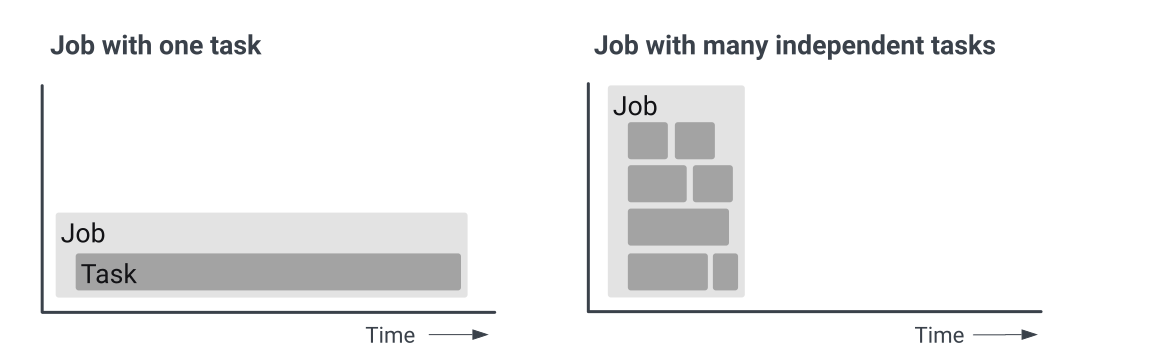
For example, if you are resizing and cropping 1,000 images from Cloud Storage, processing them consecutively is slower than processing them in parallel with many instances, with Cloud Run managing auto scaling.
When to use Cloud Run jobs
Cloud Run jobs are well-suited to run code that performs work (a job) and quits when the work is done. Here are a few examples:
- Script or tool
- Run a script to perform database migrations or other operational tasks.
- Array job
- Perform highly parallelized processing of all files in a Cloud Storage bucket.
- Scheduled job
- Create and send invoices at regular intervals, or save the results of a database query as XML and upload the file every few hours.
- AI workloads
- Cloud Run jobs with or without GPU configured can host AI workloads such as batch inferencing, fine tuning models, and model training.
Cloud Run worker pools
Worker pools are designed for workloads that don't rely on handling HTTP requests. They provide a flexible and scalable pool of compute resources tailored for continuous, non-HTTP, pull-based background processing. The following key characteristics define how worker pools operate:
Worker pools don't automatically scale. Manually scale the number of instances that your Cloud Run worker pool requires to handle its workload. To start and remain active, your workload must have at least one instance. If you set the minimum instances to
0, the worker instance won't start, even if the deployment is successful.To dynamically adjust instances based on real-time demand, create your own autoscaler. For an example, see Autoscale your Kafka consumer workloads.
Worker pools manage rollouts by splitting instances between revisions, instead of splitting traffic. For example, for a worker pool with four instances, you can allocate 25% (one instance) to a new revision, and 75% (three instances) to a stable revision.
Worker pools support Direct VPC egress and ingress, and don't have a load-balanced endpoint or URL. For more information on metadata server (MDS) support and retrieving the private IP addresses of your worker pool instance, see the Container runtime contract.
Cloud Run only charges you for the duration your worker pool instances run.
When to use Cloud Run worker pools
Worker pools don't require public HTTP endpoints. This makes your network safer and simplifies your application code. You also don't need to manage ports for health checks. The following use cases apply to worker pools:
Pull-based workloads: deploy a workload to pull messages from a queue for handling. For example, Kafka Consumer, Pub/Sub pull, and RabbitMQ.
The following diagram shows use cases for deploying worker pools for pull-based workloads:

In a Pub/Sub use case, an autoscaled Cloud Run subscriber pulls messages from a Pub/Sub subscription. In a Kafka use case, an autoscaled Cloud Run consumer pulls messages from a Kafka topic.
Generic non-request workloads: run a container-based workload that isn't intended to handle inbound requests.
Cloud Run instances
A Cloud Run instance is designed for workloads that require a stable, continuous, and individually addressable singleton runtime, rather than request-driven horizontal scaling.
Unlike a service, which can have multiple container instances and be configured for autoscaling or manual scaling, a Cloud Run instance is only one instance.
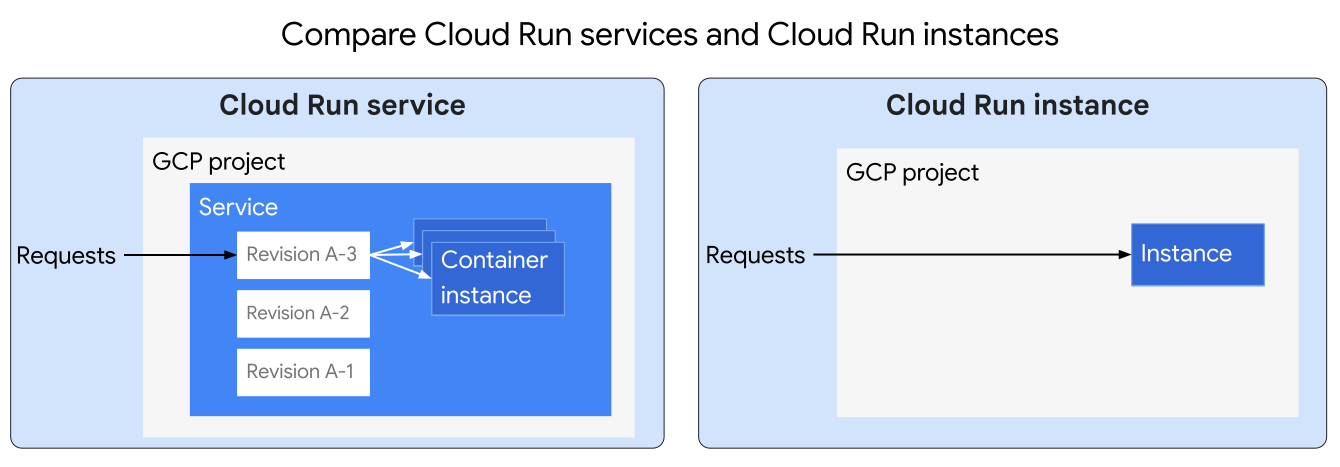
A Cloud Run instance includes the following characteristics:
- Individually manageable: you can create, update, and delete each instance individually, start and stop the instance, and monitor the executions.
- Individually addressable: each instance is assigned a unique URL.
- Long-lived: the instance can run uninterrupted for hours or days, or even longer if it is configured to restart automatically after periodic infrastructure updates (every 1 to 2 weeks).
- Fast creation: the instance is provisioned and running in approximately 20 seconds or less.
When to use Cloud Run instances
Cloud Run instances are designed for persistent, singleton compute workloads designed for running agentic workloads and non-AI workflows. Example use cases include:
- Long-lived AI agents and AI workflow engines
- Build long-running background agents that execute multi-step execution plans, run asynchronous coding assistants, or manage stateful workflows that require a single-instance environment.
- Long-lived, serverless compute
- Deploy lightweight, always-on servers, similar to a Virtual Private Server (VPS) that run continuously. This is ideal if you want workloads that don't require autoscaling or handle web-scale traffic, and you want to prioritize lower cost and singleton longevity over high availability.
- Developer environments and debugging loops
- Deploy dedicated environments to debug container processes remotely, sync code changes, and troubleshoot crashes without automatic container termination.
Google Cloud integrations
Cloud Run integrates with the broader ecosystem of Google Cloud, which lets you to build full-featured applications.
Essential integrations include:
- Data storage
- Cloud Run integrates with Cloud SQL (managed MySQL, PostgreSQL, and SQL Server), Memorystore (managed Redis and Memcached), Firestore, Spanner, Cloud Storage, and more. Refer to Data storage for a complete list.
- Logging and error reporting
- Cloud Logging automatically ingests container logs. If there are exceptions in the logs, Error Reporting aggregates them, and then notifies you. The following languages are supported: Go, Java, Node.js, PHP, Python, Ruby, and .NET.
- Service identity
- Every Cloud Run revision is linked to a service account, and the Google Cloud client libraries transparently use this service account to authenticate with Google Cloud APIs.
- Continuous delivery
- If you store your source code in GitHub, you can configure Cloud Run to automatically deploy new commits.
- Private networking
- Cloud Run instances can reach resources in the Virtual Private Cloud (VPC) network through the Serverless VPC Accessconnector. This is how your service can connect with Compute Engine virtual machines, or products based on Compute Engine such as Google Kubernetes Engine or Memorystore.
- Google Cloud APIs
- Your service's code transparently authenticates with Google Cloud APIs. This includes the AI and Machine Learning APIs, such as the Cloud Vision API, Speech-to-Text API, AutoML Natural Language API, Cloud Translation API, and many more.
- Background tasks
- You can schedule code to run later or immediately after returning a web request. Cloud Run works well together with Cloud Tasks to provide scalable and reliable asynchronous execution.
Refer to Connecting to Google Cloud services for a list of the many Google Cloud services that work well with Cloud Run.
Code is running in a container image
While being familiar with containers is not necessary to deploy your code to a Cloud Run, your code always ends up running in sandboxed container instances.
In case you're not familiar with containers, here's a short conceptual introduction.
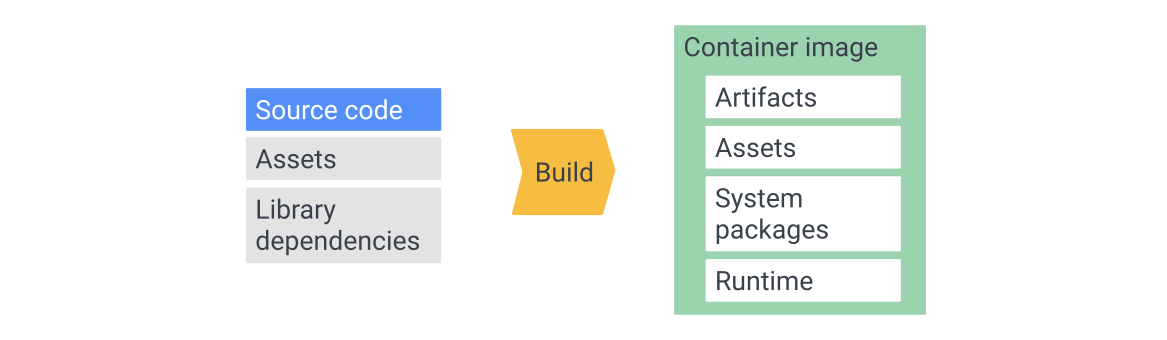
As the diagram shows, you use source code, assets, and library dependencies to build a container image. This image is a package containing everything your service needs to run, including build artifacts, assets, system packages, and optionally a runtime. Containerized applications are inherently portable and run anywhere a container can run. Build artifacts include compiled binaries or script files, and runtimes include the Node.js JavaScript runtime or a Java virtual machine.
Advanced practitioners value the fact that Cloud Run doesn't impose extra burdens on running code, and you can run any binary on Cloud Run.
If you want more convenience or want to delegate containerizing applications to Google, Cloud Run integrates with the open source Google Cloud's buildpacks to offer a source-based deployment.
What's next
- Deploy a Cloud Run service
- Create and execute a Cloud Run job
- Learn how to execute jobs on a schedule
- Deploy a worker pool
- Deploy a Cloud Run instance
- Explore the resource model
- Read more about the container runtime contract