

Cloud Run labels are key-value pairs that are applied to Cloud Run jobs. This page shows how to set, modify, and delete labels on your Cloud Run jobs.
Possible uses include:
- Cost allocation and billing breakdowns.
- Identify resources used by individual teams or cost centers.
- Distinguish deployment environments (prod, staging, qa, or test).
- Identify owners and state labels.
- Filter logs in Logging.
Labels usage rules
The following rule applies to the use of labels set on a Cloud Run job:
Only valid Google Cloud labels can be used on Cloud Run.
Labels for billing data and logging
Cloud Billing and Cloud Logging only receive labels that are specified in
the spec.template.metadata.labels attribute in YAML, or under template in
Terraform. If you configure labels using the
Google Cloud console or
Google Cloud CLI, Cloud Run adds the labels to both metadata.labels
and spec.template.metadata.labels attributes.
Required roles
To get the permissions that you need to configure Cloud Run jobs, ask your administrator to grant you the following IAM roles:
- Cloud Run Developer (
roles/run.developer) on the Cloud Run job - Service Account User (
roles/iam.serviceAccountUser) on the service identity
For a list of IAM roles and permissions that are associated with Cloud Run, see Cloud Run IAM roles and Cloud Run IAM permissions. If your Cloud Run job interfaces with Google Cloud APIs, such as Cloud Client Libraries, see the service identity configuration guide. For more information about granting roles, see deployment permissions and manage access.
Set or modify labels
You can use Google Cloud console, Google Cloud CLI, YAML, or Terraform to set a label on a Cloud Run job.
Console
In the Google Cloud console, go to the Cloud Run Jobs page:
Check the checkbox at the left of the job you are setting the label on.
Make sure the Info Panel at the far right is toggled on (Show Info Panel).
Click Labels to display the labels pane.
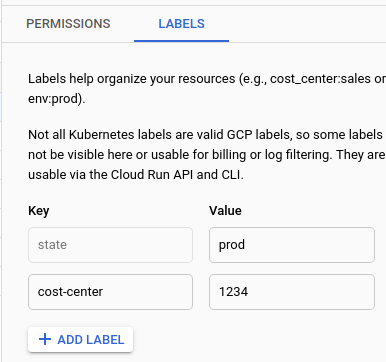
To edit an existing label key value, locate the label and change the Value.
To set a new label on the service, click Add Label and supply the key and the value.
Click Save
gcloud
To set a label on a new job:
gcloud run jobs create JOB_NAME --image IMAGE_URL --labels KEY=VALUE
Replace the following:
- JOB_NAME with the name of your job.
- KEY with the name of your label key.
- VALUE with the value for the key.
IMAGE_URL: a reference to the container image—for example,us-docker.pkg.dev/cloudrun/container/job:latest.
To set a label on an existing job:
gcloud run jobs update JOB_NAME --labels KEY=VALUE
To create more than one label, supply a comma delimited list of key/value pairs.
gcloud run jobs update JOB_NAME --labels KEY1=VALUE1,KEY2=VALUE2
YAML
If you are creating a new job, skip this step. If you are updating an existing job, download its YAML configuration:
gcloud run jobs describe JOB_NAME --format export > job.yaml
Update the
labelsattributes in two places:apiVersion: run.googleapis.com/v1 kind: Job metadata: labels: LABEL: VALUE spec: template: metadata: labels: LABEL: VALUE
Replace the following:
- LABEL with the name of the label.
- VALUE with the chosen value.
You can also specify more configuration such as environment variables or memory limits.
Cloud Run only propagates labels set in the
spec.template.metadata.labelsattribute to Cloud Billing and Cloud Logging.Update the existing job configuration:
gcloud run jobs replace job.yaml
Terraform
To learn how to apply or remove a Terraform configuration, see Basic Terraform commands.
Add the following to agoogle_cloud_run_v2_job
resource in your Terraform configuration:resource "google_cloud_run_v2_job" "default" {
name = "JOB_NAME"
location = "REGION"
template {
template {
containers {
image = "us-docker.pkg.dev/cloudrun/container/job"
}
}
labels = {
"LABEL":"VALUE"
}
}
labels = {
"LABEL":"VALUE"
}
}
Replace the following:
- JOB_NAME: the name of your Cloud Run job.
- REGION: the Google Cloud region. For example,
europe-west1. - LABEL: the name of the label.
- VALUE: the chosen value.
Cloud Run only propagates labels set under template to
Cloud Billing and Cloud Logging.
List jobs by label
You can list jobs by label using a Google Cloud CLI filter:
gcloud run jobs list --filter metadata.labels.LABEL=VALUE
Replace the following:
- LABEL: the name of the label
- VALUE: the value to include in your filtered list
Delete a label on a job
To clear all labels from a job:
gcloud run jobs update JOB --clear-labels
To delete specific labels from a service, supply a comma delimited list of keys:
gcloud run jobs update JOB --remove-labels LABEL
Replace the following:
- JOB: the name of your Cloud Run job
- LABEL: the name of your label