

Express links on ambient networking let you connect a source Cloud Run service to a destination Cloud Run service in the same project and region without writing authentication code in your application or configuring a service mesh.
When a Cloud Run service calls another Identity and Access Management (IAM)-protected Cloud Run service, the request must include an OpenID Connect (OIDC) ID token so that the destination can verify the caller's identity and permissions. Without an express link, you must either write service-to-service authentication code in your application to fetch and attach tokens from the metadata server, or configure Cloud Service Mesh resources such as a Virtual Private Cloud (VPC) network, backend services, and routing rules. An express link offloads this authentication and routing work to the fully managed ambient sidecar container, keeping your application code portable and focused on business logic.
Use cases
You can use express links for the following scenarios:
- Offload service-to-service authentication from application code: connect a calling Cloud Run service to an IAM-protected destination Cloud Run service over plain HTTP. The ambient sidecar automatically fetches and injects the source service's OIDC ID token and encrypts the request over HTTPS.
- Abstract destination URLs with custom hostnames: configure a custom
hostname on the express link using the
--matches-hostnameflag so that your source application sends requests to a logical address, such ashttp://my-backend, instead of hardcoding the destination's deterministic URL. If the destination service changes, you can recreate the express link to point to the new destination without modifying or redeploying your source application code. - Simplify point-to-point service calls without a service mesh: get automatic credential injection between Cloud Run services without provisioning a VPC network, network endpoint groups, backend services, or Cloud DNS records required by Cloud Service Mesh.
The following table compares the steps to set up authenticated service-to-service communication without and with an express link:
| Step | Without an express link | With an express link |
|---|---|---|
| 1. Deploy the destination service | Deploy the destination Cloud Run service with IAM authentication required (--no-allow-unauthenticated). |
Same. |
| 2. Grant invoker permission | Grant the Cloud Run Invoker (roles/run.invoker) role on the destination service to the source service's service account. |
Same. |
| 3. Configure the outbound request | Write code in your source application to fetch an OIDC ID token for the destination URL and attach it to the Authorization: Bearer header over HTTPS. |
Send a plain http:// request to the destination URL or custom hostname with no authentication code in your source application. |
| 4. Deploy the source service | Deploy the source Cloud Run service. | Deploy the source Cloud Run service with ambient networking enabled, and then create an express link between the deployed source and destination services. |
Architecture
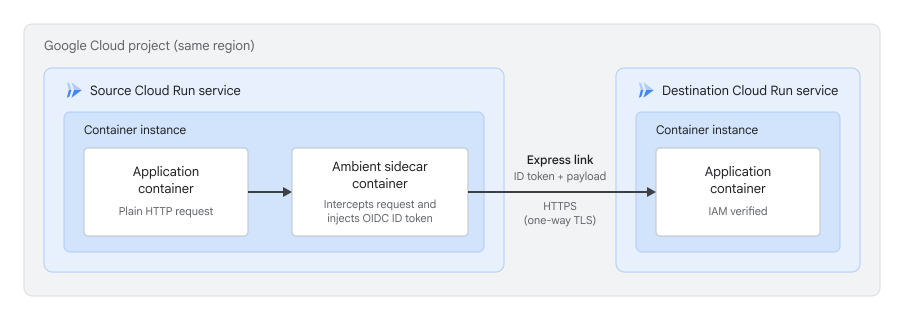
When you enable ambient networking on a source Cloud Run service and create an express link, Cloud Run configures the fully managed Envoy sidecar container running alongside your application container in each container instance.
When your application sends a plain HTTP request to the destination service's deterministic URL or to a custom hostname that you configure on the express link, the ambient sidecar container automatically does the following:
- Intercepts outbound HTTP requests destined for the target service.
- Fetches an OIDC ID token for the source service's
service account and injects it into
the
Authorizationheader. - Encrypts and forwards the request over HTTPS (one-way TLS) to the destination Cloud Run service, which verifies the caller's IAM permissions.
Network connectivity and data plane
An express link configures outbound request interception and credential injection in the ambient sidecar, but it doesn't replace the underlying network path between your services. You must still make sure that your source service can reach the destination service's ingress path:
- Destination ingress set to All: no VPC network or outbound egress configuration is required on your source service.
- Destination ingress set to Internal or Internal and Cloud Load Balancers: you must route outbound traffic from your source service through an authorized VPC network using Direct VPC egress or a Serverless VPC Access connector with Private Google Access enabled. For more information, see Receive requests from other Cloud Run services.
Before you begin
- Sign in to your Google Cloud account. If you're new to Google Cloud, create an account to evaluate how our products perform in real-world scenarios. New customers also get $300 in free credits to run, test, and deploy workloads.
-
In the Google Cloud console, on the project selector page, select or create a Google Cloud project.
Roles required to select or create a project
- Select a project: Selecting a project doesn't require a specific IAM role—you can select any project that you've been granted a role on.
-
Create a project: To create a project, you need the Project Creator role
(
roles/resourcemanager.projectCreator), which contains theresourcemanager.projects.createpermission. Learn how to grant roles.
-
Verify that billing is enabled for your Google Cloud project.
-
In the Google Cloud console, on the project selector page, select or create a Google Cloud project.
Roles required to select or create a project
- Select a project: Selecting a project doesn't require a specific IAM role—you can select any project that you've been granted a role on.
-
Create a project: To create a project, you need the Project Creator role
(
roles/resourcemanager.projectCreator), which contains theresourcemanager.projects.createpermission. Learn how to grant roles.
-
Verify that billing is enabled for your Google Cloud project.
Enable the Cloud Run, Network Services, and Traffic Director APIs, if any are not already enabled.
Roles required to enable APIs
To enable APIs, you need the
serviceusage.services.enablepermission. If you created the project, then you likely already have this permission through the Owner role (roles/owner). Otherwise, you can get this permission through the Service Usage Admin role (roles/serviceusage.serviceUsageAdmin). Learn how to grant roles.- Ensure that you have an existing source Cloud Run service and an existing destination Cloud Run service in the same project and region.
- Ensure that
ambient networking is
enabled with the
globalscope on your source Cloud Run service. For example, rungcloud beta run services update SOURCE_SERVICE --ambient-networking --ambient-scope=global --region=REGION, remembering to first increase your service's CPU and memory limits. -
Read the Cloud Run pricing page for ambient networking sidecar usage. Billing for ambient features isn't enforced during Preview.
Required roles
To get the permissions that you need to configure express links, ask your administrator to grant you the following IAM roles:
-
Configure the express link:
Cloud Run Developer (
roles/run.developer) and Service Account User (roles/iam.serviceAccountUser) on the project -
Manage express link resources:
Network Services Admin (
roles/networkservices.admin) on the project
For more information about granting roles, see Manage access to projects, folders, and organizations.
You might also be able to get the required permissions through custom roles or other predefined roles.
The source Cloud Run service's service identity must also have the following roles on the project:
- Traffic Director Client (
roles/trafficdirector.client) - Cloud Trace Agent (
roles/cloudtrace.agent)
To grant these roles to the service identity, use gcloud:
gcloud projects add-iam-policy-binding PROJECT_ID \
    --member="serviceAccount:RUN_CLIENT_SA@PROJECT_ID.iam.gserviceaccount.com" \
    --role="roles/trafficdirector.client"

gcloud projects add-iam-policy-binding PROJECT_ID \
    --member="serviceAccount:RUN_CLIENT_SA@PROJECT_ID.iam.gserviceaccount.com" \
    --role="roles/cloudtrace.agent"
Replace the following:
- PROJECT_ID: your Google Cloud project ID.
- RUN_CLIENT_SA: the name of the service account attached to your source Cloud Run service.
If the Cloud Run service identity lacks these roles, the Cloud Run service still deploys, but features that depend on ambient networking don't work. This behavior differs from Cloud Service Mesh, where the Cloud Run service fails to deploy when missing the required roles.
Limitations
The following limitations apply to express links:
- Only Cloud Run services are supported as source and destination resources. Cloud Run jobs, worker pools, and instances aren't supported.
- Cross-project and cross-region configurations aren't supported. The source Cloud Run service and destination Cloud Run service must be in the same project and region.
- Express links require
ambient networking
with the
globalscope on the source service. If the source service uses theregionalscope, creating the express link succeeds, but traffic isn't routed. - You must create the source and destination Cloud Run services before you create the express link. Out-of-order creation isn't supported. If you delete a destination service, the express link can continue to show and serve the stale configuration until you delete or recreate the express link.
- You can't update the source service, destination service, or custom hostname
of an existing express link in place. The
gcloud beta network-services express-links updatecommand only updates the express link description. To change the routing configuration, delete and recreate the express link. - Destination Cloud Run services must have the
default
run.appURL enabled, even if you use custom URLs, custom domains, or configure a custom hostname with the--matches-hostnameflag. - Requests sent to the destination's
non-deterministic URL
aren't intercepted and fail with a
403 Forbiddenerror. If the destination service has no deterministic URL because the combined service name and project number exceed 63 characters, you must specify--matches-hostnameor express link creation fails with aCloud Run Service name is too longerror. - When you view the full status of an express link, only destination service information is returned. Details about the source Cloud Run revisions and negotiated authentication might be missing or show stale data. This doesn't affect how the express link routes or authenticates traffic.
- Source Cloud Run services configured with Agent Identity and mTLS-bound tokens aren't supported.
- Source Cloud Run services configured to route outbound traffic through Agent Gateway on Cloud Run and Secure Web Proxy aren't supported. Express links require the global ambient networking scope, while Agent Gateway requires the regional scope.
- If an outbound request from the source service already includes an
Authorizationheader, the express link forwards the request with that header unchanged and doesn't inject a token. Automatic token injection into theX-Serverless-Authorizationheader isn't supported. - Traffic generated from Cloud Run sandbox containers isn't supported.
- You can't use express links to forward traffic to destination Cloud Run services that are secured by Identity-Aware Proxy.
- Each express link supports one destination Cloud Run service, and you can create up to 5,000 express links per project.
Configure an express link
To connect your Cloud Run services, create an express link specifying the source service and the destination service, and then grant the Cloud Run Invoker role on the destination service.
Connect to another Cloud Run service
To connect a source Cloud Run service to a destination Cloud Run service, create an express link using gcloud or YAML.
gcloud
Use the gcloud beta network-services express-links create
command to create an express link:
gcloud beta network-services express-links create EXPRESS_LINK_NAME \
    --location=global \
    --source-services=//run.googleapis.com/projects/PROJECT_ID/locations/REGION/services/SOURCE_SERVICE \
    --destination-services=//run.googleapis.com/projects/PROJECT_ID/locations/REGION/services/DESTINATION_SERVICE
Replace the following:
- EXPRESS_LINK_NAME: a name for your express link.
- PROJECT_ID: your Google Cloud project ID.
- REGION: the region where your Cloud Run services are deployed.
- SOURCE_SERVICE: the name of the source Cloud Run service.
- DESTINATION_SERVICE: the name of the destination Cloud Run service.
After the command completes, it can take up to 2 minutes for routing configuration to propagate to running source service instances.
By default, the express link intercepts only requests sent to the
destination service's
deterministic URL, not
its non-deterministic URL. To use a custom hostname, pass the hostname
without a scheme in the
--matches-hostname="HOSTNAME" flag, such as
--matches-hostname="DESTINATION_SERVICE", and send
requests from your source application to
http://HOSTNAME. Specifying
--matches-hostname replaces the deterministic URL instead of
adding to it.
YAML
Create a configuration file, for example,
express-link.yaml:name: "projects/PROJECT_ID/locations/global/expressLinks/EXPRESS_LINK_NAME" source: services: - "//run.googleapis.com/projects/PROJECT_ID/locations/REGION/services/SOURCE_SERVICE" destination: services: - "//run.googleapis.com/projects/PROJECT_ID/locations/REGION/services/DESTINATION_SERVICE"
Replace the following:
- PROJECT_ID: your Google Cloud project ID.
- REGION: the region where your services are deployed.
- EXPRESS_LINK_NAME: a name for your express link.
- SOURCE_SERVICE: the name of the source Cloud Run service.
- DESTINATION_SERVICE: the name of the destination Cloud Run service.
Import the YAML file using the
gcloud beta network-services express-links importcommand:gcloud beta network-services express-links import EXPRESS_LINK_NAME \ --location=global \ --source=YAML_FILENAME.yaml
Replace the following:
- EXPRESS_LINK_NAME: a name for your express link.
- YAML_FILENAME: the name of your YAML file.
Grant invoker permissions on the destination service
To let the source service invoke an IAM-protected destination service, grant the
Cloud Run Invoker
(roles/run.invoker) role to the source service's service account on the
destination Cloud Run service. This is required for
authentication to work in the data plane.
gcloud run services add-iam-policy-binding DESTINATION_SERVICE \
    --member="serviceAccount:SOURCE_SA@PROJECT_ID.iam.gserviceaccount.com" \
    --role="roles/run.invoker" \
    --region=REGION
Replace the following:
- DESTINATION_SERVICE: the name of the destination Cloud Run service.
- SOURCE_SA: the name of the service account attached to your source Cloud Run service.
- PROJECT_ID: your Google Cloud project ID.
- REGION: the region where your destination service is deployed.
Verify the express link status
To view the basic configuration of your express link, use the
gcloud beta network-services express-links describe command:
gcloud beta network-services express-links describe EXPRESS_LINK_NAME \
    --location=global
To view the full status of the express link, including connectionStatus
(active route type, matched hostnames, and source revision URI) and
cloudRunSourceInfo (configured authentication methods and VPC
network), include ?view=EXPRESS_LINK_VIEW_FULL# in the resource name:
gcloud beta network-services express-links describe 'EXPRESS_LINK_NAME?view=EXPRESS_LINK_VIEW_FULL#' \
    --location=global
Replace EXPRESS_LINK_NAME with the name of your express link. Keep
the single quotes and the trailing # character when querying the full view.
Delete or recreate an express link
To remove an express link and stop automatic credential injection and traffic
interception from the source service, use the
gcloud beta network-services express-links delete
command:
gcloud beta network-services express-links delete EXPRESS_LINK_NAME \
    --location=global
Replace EXPRESS_LINK_NAME with the name of your express link.
To point an existing express link to a different destination service or change
the --matches-hostname setting, delete the express link with the preceding
command, and then create a new express link with the
updated configuration.
What's next
- Learn how to configure ambient networking for Cloud Run services.
- Learn about Agent Gateway on Cloud Run.
- Learn about service-to-service authentication in Cloud Run.
- Learn how to restrict network endpoint ingress for Cloud Run services.