

Ambient networking brings a simplified resource networking experience built into Cloud Run. It gives your resources a fully managed data plane to remove the operational burden of building and maintaining custom proxies. It also abstracts service mesh concepts, so you get advanced networking features without learning or configuring a mesh.
When you enable ambient networking, traffic passes through unchanged by default so that your existing HTTP and TCP traffic continues to work. Enabling ambient networking on its own doesn't change how your resource behaves. As a foundation, ambient networking lets you opt in to the capabilities described in the following section.
Use cases
Ambient networking is the foundation for advanced networking capabilities in Cloud Run. After you enable ambient networking, you can opt in to the following features:
- Agent Gateway on Cloud Run: govern agent traffic with access and security policies that your organization manages centrally.
- Express links: route traffic to other Cloud Run services. The ambient sidecar injects the right credentials for you, so you can call a destination over plain HTTP and remove authentication code from your application.
Architecture
Ambient networking runs a fully managed Envoy sidecar container inside each container instance of your Cloud Run resource, alongside your application container. The sidecar intercepts the instance's network traffic and applies the routing and security policy that Cloud Run distributes to it.
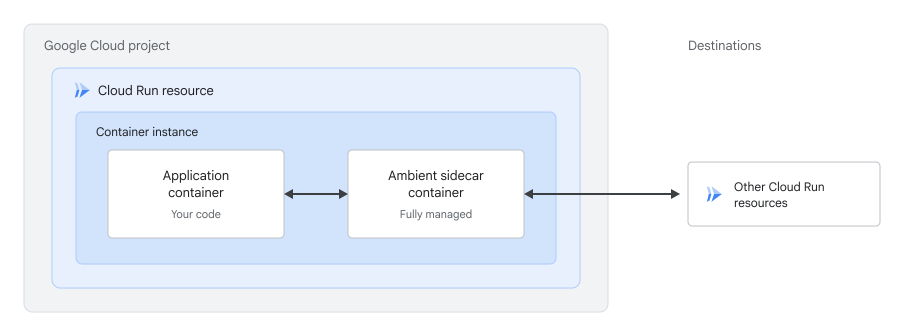
Ambient networking scopes
Ambient networking supports a global scope and a regional scope. The scope determines whether the sidecar connects to a global or regional routing plane:
- Regional (default): Cloud Run connects the sidecar to a regional routing plane, limiting routing and security policies to destinations within your service's region. This scope supports data residency (DRZ) requirements for data at rest, in use, and in transit. If you don't specify a scope, ambient networking uses the regional scope.
- Global: Cloud Run connects the sidecar to a global routing plane, allowing it to route traffic to destinations in any region.
Each feature that uses ambient networking requires a specific scope:
| Feature | Global scope | Regional scope |
|---|---|---|
| Agent Gateway on Cloud Run | Not supported | Supported |
| Express links | Supported | Not supported |
Limitations
The following limitations apply to ambient networking:
- UDP traffic isn't supported. Ambient networking only supports HTTP and TCP traffic.
- Inbound requests don't support end-to-end HTTP/2. For details, see Known issues.
- The regional scope doesn't support VPC networks that resolve
*.googleapis.comto Private Google Access IP addresses. For details, see Known issues. - The first generation execution environment isn't supported. If you don't specify an execution environment, Cloud Run uses the second generation.
- Container instances take longer to start. For details, see Known issues.
Before you begin
- Sign in to your Google Cloud account. If you're new to Google Cloud, create an account to evaluate how our products perform in real-world scenarios. New customers also get $300 in free credits to run, test, and deploy workloads.
-
In the Google Cloud console, on the project selector page, select or create a Google Cloud project.
Roles required to select or create a project
- Select a project: Selecting a project doesn't require a specific IAM role—you can select any project that you've been granted a role on.
-
Create a project: To create a project, you need the Project Creator role
(
roles/resourcemanager.projectCreator), which contains theresourcemanager.projects.createpermission. Learn how to grant roles.
-
Verify that billing is enabled for your Google Cloud project.
-
In the Google Cloud console, on the project selector page, select or create a Google Cloud project.
Roles required to select or create a project
- Select a project: Selecting a project doesn't require a specific IAM role—you can select any project that you've been granted a role on.
-
Create a project: To create a project, you need the Project Creator role
(
roles/resourcemanager.projectCreator), which contains theresourcemanager.projects.createpermission. Learn how to grant roles.
-
Verify that billing is enabled for your Google Cloud project.
Enable the Cloud Run, Network Services, and Traffic Director APIs, if any are not already enabled.
Roles required to enable APIs
To enable APIs, you need the
serviceusage.services.enablepermission. If you created the project, then you likely already have this permission through the Owner role (roles/owner). Otherwise, you can get this permission through the Service Usage Admin role (roles/serviceusage.serviceUsageAdmin). Learn how to grant roles.-
Increase your Cloud Run resource's CPU limit by 1 vCPU and its memory limit by 1 GiB. If the new CPU limit isn't a supported value, use the next higher supported value. The ambient sidecar shares your container instance's CPU and memory, so this increase makes sure that your application keeps the resources that it needs.
-
Read the Cloud Run pricing page for ambient networking sidecar usage. Billing for ambient features isn't enforced during Preview.
Required roles
To get the permissions that you need to configure and deploy Cloud Run services, ask your administrator to grant you the following IAM roles:
- Cloud Run Developer (
roles/run.developer) on the Cloud Run service - Service Account User (
roles/iam.serviceAccountUser) on the service identity
If you are deploying a service or function from source code, you must also have additional roles granted to you on your project and Cloud Build service account.
The Cloud Run resource's service identity must also have the following roles:
- Traffic Director Client (
roles/trafficdirector.client) - Cloud Trace Agent (
roles/cloudtrace.agent)
To grant these roles to the service identity, use gcloud:
gcloud projects add-iam-policy-binding PROJECT_ID \
    --member="serviceAccount:RUN_CLIENT_SA@PROJECT_ID.iam.gserviceaccount.com" \
    --role="roles/trafficdirector.client"

gcloud projects add-iam-policy-binding PROJECT_ID \
    --member="serviceAccount:RUN_CLIENT_SA@PROJECT_ID.iam.gserviceaccount.com" \
    --role="roles/cloudtrace.agent"
Replace the following:
- PROJECT_ID: your Google Cloud project ID.
- RUN_CLIENT_SA: the name of the service account attached to your Cloud Run service.
If the service identity lacks these roles, the Cloud Run resource still deploys, but features that use ambient networking don't work.
For a list of IAM roles and permissions that are associated with Cloud Run, see Cloud Run IAM roles and Cloud Run IAM permissions. If your Cloud Run service interfaces with Google Cloud APIs, such as Cloud Client Libraries, see the service identity configuration guide. For more information about granting roles, see deployment permissions and manage access.
Configure ambient networking
Configure ambient networking by using gcloud or a YAML file.
gcloud
To enable ambient networking on a new service, pass the
--ambient-networkingflag and, optionally, the--ambient-scopeflag:gcloud beta run deploy SERVICE \ --image=IMAGE_URL \ --ambient-networking \ --ambient-scope=SCOPE \ --region=REGION
To enable ambient networking on an existing service, pass the same flags to the
gcloud beta run services updatecommand, which deploys a new revision with ambient networking enabled:gcloud beta run services update SERVICE \ --ambient-networking \ --ambient-scope=SCOPE \ --region=REGION
To disable ambient networking, pass the
--no-ambient-networkingflag:gcloud beta run services update SERVICE \ --no-ambient-networking \ --region=REGION
Replace the following:
- SERVICE: the name of your Cloud Run service.
IMAGE_URL: a reference to the container image, for example,us-docker.pkg.dev/cloudrun/container/hello:latest. If you use Artifact Registry, the repository REPO_NAME must already be created. The URL follows the format ofLOCATION-docker.pkg.dev/PROJECT_ID/REPO_NAME/PATH:TAG.- SCOPE: the ambient networking scope, either
globalorregional. - REGION: the region for your service.
YAML
If you are creating a new service, skip this step. If you are updating an existing service, download its YAML configuration:
gcloud run services describe SERVICE --format export > service.yaml
Add the
run.googleapis.com/ambient-networkingannotation and, optionally, therun.googleapis.com/ambient-scopeannotation:spec: template: metadata: annotations: run.googleapis.com/ambient-networking: 'true' run.googleapis.com/ambient-scope: SCOPE
Replace SCOPE with the ambient networking scope, either
globalorregional. To disable ambient networking, setrun.googleapis.com/ambient-networkingto'false'and remove therun.googleapis.com/ambient-scopeannotation.Create or update the service using the following command:
gcloud run services replace service.yaml
The
gcloud run services replacecommand defaults to usingservice.yamlfile if present.
View ambient networking settings
To view the current ambient networking settings for your Cloud Run service:
Console
In the Google Cloud console, go to the Cloud Run Services page:
Click the service to open the Service details page.
Click the Networking tab.
In the Ambient networking card, view the Scope setting.
gcloud
Use the following command:
gcloud beta run services describe SERVICE \
   --region=REGION
Locate the
run.googleapis.com/ambient-networkingandrun.googleapis.com/ambient-scopeannotations in the returned configuration.
What's next
- Learn about Agent Gateway on Cloud Run.
- Learn how to configure Agent Platform features for Cloud Run.
- Learn about service-to-service authentication in Cloud Run.
- Learn how to trace requests with Cloud Trace.
- Learn how to configure express links to connect and authenticate Cloud Run services with other Cloud Run services.