

This page highlights use cases for hosting AI agents on Cloud Run.
AI agents are autonomous software entities that use LLM-powered systems to perceive, decide, and act to achieve goals. As more autonomous agents are built, their ability to communicate and collaborate becomes crucial.
For an introduction to AI agents, see What is an AI agent.
Choose a Cloud Run resource
Depending on your agentic design, you can run your agent container as one of the following Cloud Run resource types:
- Services: Best for stateless, request-driven agents that handle variable user traffic, benefit from autoscaling, and can scale to zero when idle. Examples include chatbot APIs and web API backends.
- Instances: Best for dedicated, stateful always-on singleton agent loops requiring VM-like lifecycle state commands. Examples include personal agents like OpenClaw and Hermes.
- Worker pools: Best for running background, distributed agent fleets that consume tasks from message queues, such as Kafka or Pub/Sub, and scale horizontally without exposing public HTTP endpoints.
- Jobs: Best for run-to-completion agent workflows, such as batch evaluations, large-scale data ingestion pipelines, or scheduled sync scripts.
Choose your agent framework
Before you deploy your agent to Cloud Run, choose and set up your agent framework locally or on your development platform. Examples of agent frameworks include Agent Development Kit (ADK), Dify, LangGraph, and n8n.
On Cloud Run, your code typically runs as a service or instance. Both of these resource types run sandboxed container instances in the same execution environment and integrate with Google Cloud services.
AI agent on Cloud Run architecture
A typical AI agent architecture deployed on Cloud Run can involve several components from Google Cloud as well as from outside of Google Cloud. The following architecture shows an example of implementing an AI agent as a Cloud Run service to orchestrate a set of asynchronous tasks and provide information through multiple request-response interactions.
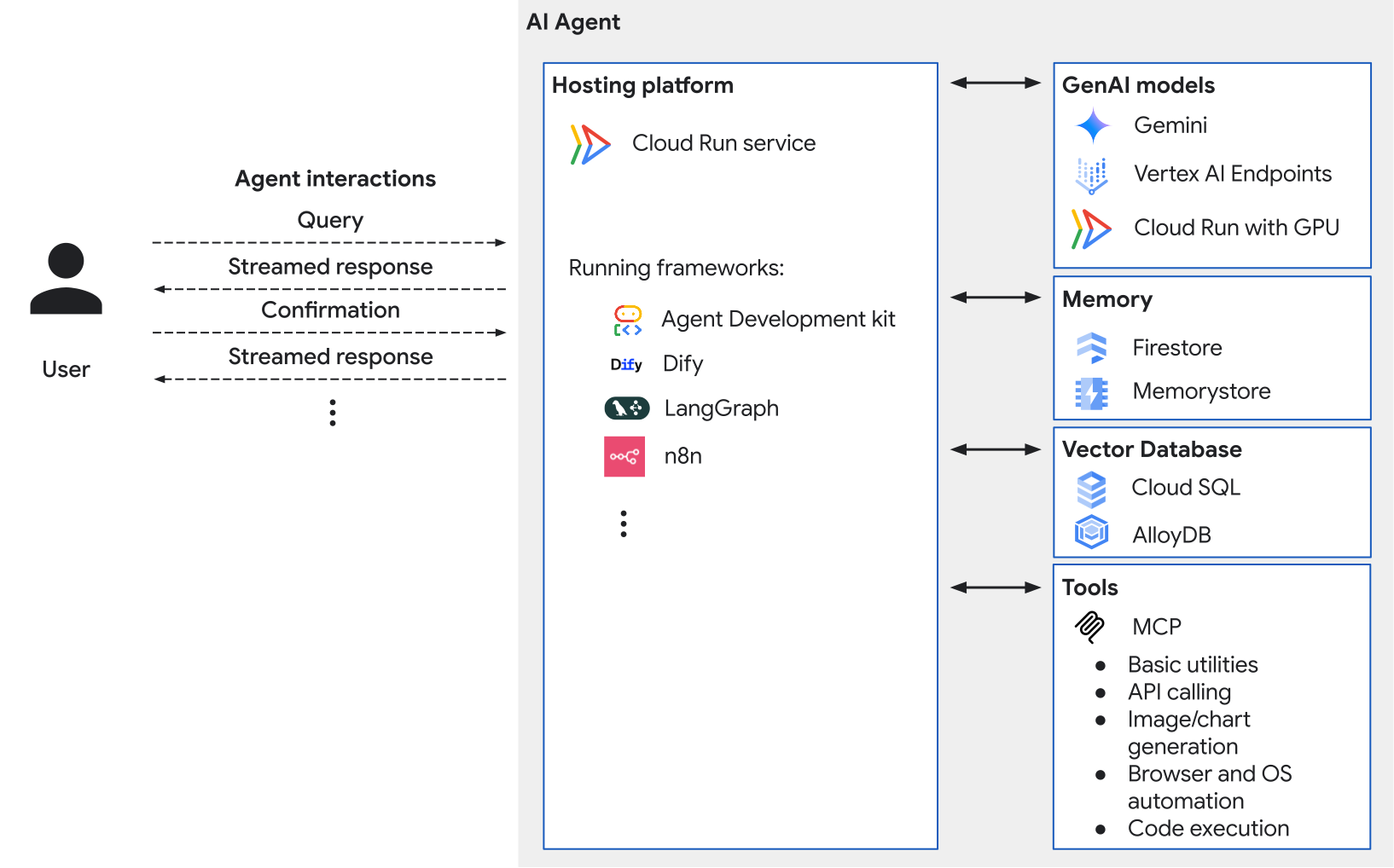
The diagram shows the following:
Hosting platform: A Cloud Run service is a scalable API endpoint for your application's core logic. It efficiently manages multiple concurrent users through automatic, on-demand, and rapid scaling of instances. Cloud Run offers the following benefits:
- Supports running any agent framework to build different types of agents and agentic architectures.
- Provides built-in features for managing your agent. For example, Cloud Run provides a built-in service identity that you can use as the agent identity for calling Google Cloud APIs with secure and automatic credentials.
- Supports connecting your agent framework to other services. You can connect your agent to first-party or third-party tools deployed on Cloud Run. For example, to gain visibility into your agent's tasks and executions, you can deploy and use tools like Langfuse and Arize.
Agent interactions: Cloud Run supports streaming HTTP responses back to the user, and WebSockets for real-time interactions.
GenAI models: The orchestration layer calls models for reasoning capabilities. These models can be hosted on services, such as the following:
- Gemini API for Google's generative AI models.
- Vertex AI endpoints for custom models or other foundation models.
- GPU-enabled-Cloud Run service for your own fine-tuned models.
Memory: Agents often need memory to retain context and learn from past interactions. You can use the following services:
- Memorystore for Redis for short-term memory.
- Firestore for long-term memory, such as storing the conversational history or remembering the user's preferences based on raw data.
- Agent Runtime Memory Bank for long-term personalized memory. This feature automatically extracts from the user's conversational history to remember and update the user's preferences over time. Note that you need to create at least one Agent Engine instance to use this feature with Cloud Run.
Vector database: For Retrieval-Augmented Generation (RAG) or fetching structured data, use a vector database to query specific entity information or perform a vector search over embeddings. Use the
pgvectorextension with the following services:Tools: The orchestrator uses tools to perform specific tasks to interact with external services, APIs, or websites. This can include:
- Model Context Protocol (MCP): Use this standardized protocol to communicate with external tools that are executed through an MCP server.
- Basic utilities: Precise math calculations, time conversions, or other similar utilities.
- API calling: Make calls to other internal or third-party APIs (read or write access).
- Image or chart generation: Quickly and effectively create visual content.
- Browser and OS automation: Run a headless or a full graphical Operating System within container instances to allow the agent to browse the web, extract information from websites, or perform actions using clicks and keyboard input.
- Code execution: Execute code in a secure environment with multi-layered sandboxing, with minimal or no IAM permissions.
- Agent Runtime Code Execution: Execute code in a secure, isolated, and managed sandbox environments that supports file input and output, less than one second code execution, and long-lived memory. Note that you need to create at least one Agent Runtime instance to use this feature in Cloud Run.
What's next
- Build and deploy agents on Cloud Run:
- Watch Build AI agents on Cloud Run.
- Try the codelab for learning how to build and deploy a LangChain app to Cloud Run.
- Learn how to deploy Agent Development Kit (ADK) to Cloud Run.
- Learn how to Create and manage Cloud Run instances.
- Try the codelab for using an MCP server on Cloud Run with an ADK agent.
- Try the codelab for deploying your ADK agent to Cloud Run with GPU.
- Find ready-to-use agent samples in ADK (ADK) samples.
- Host Model Context Protocol (MCP) servers on Cloud Run.