

The Google Cloud resource hierarchy is a way to organize your resources into a tree structure. This hierarchy helps you manage resources at scale, but it models only a few business dimensions, including organization structure, regions, workload types, and cost centers. The hierarchy lacks the flexibility to layer multiple business dimensions together.
Tags provide a way to create annotations for resources, and in some cases conditionally allow or deny policies based on whether a resource has a specific tag. You can use tags and conditional enforcement of policies for fine-grained control across your resource hierarchy.
Tags and labels
Labels are a separate way to create annotations for resources. The following table lists some of the differences between tags and labels:
| Tags | Labels | |
|---|---|---|
| Resource structure | Tag keys, tag values, and tag bindings are all discrete resources | Not a resource in itself, but metadata for resources |
| Definition | Defined at the organization or project level | Defined by each resource |
| Access control | Management and attachment of tags requires Identity and Access Management (IAM) roles | Attachment of labels requires IAM roles, which vary based on the service resource |
| Prerequisite for attachment | The tag key and tag value must be defined before a tag can be attached to a resource | No prerequisites for attachment |
| Inheritance | Tag bindings are inherited by children of the resource in the Google Cloud hierarchy | Not inherited by children of the resource |
| Deletion requirements | Tags can't be deleted unless no tag bindings for that tag exist | Can be removed from a resource at any time |
| Naming requirements | Requirements for tag values and tag keys | Requirements for labels |
| Key-value name length | 256 characters maximum | 63 characters maximum |
| Allow and deny policy support | Tags can be referenced by allow policy conditions and deny policy conditions | No allow and deny policy support |
| Organization policy support | Tags on some resources can be referenced by organization policy conditional constraints | No organization policy support |
| Cloud Billing integration | Perform chargebacks, audits, and other cost allocation analysis, export Cloud Billing cost data to BigQuery | Filter resources by label in Cloud Billing, export Cloud Billing data to BigQuery |
For more information about labels, see Creating and managing labels.
Semantic tags
A semantic tag is a key-value pair that provides meaningful metadata for your resources with strong, standardized semantics backed by OpenTelemetry (OTel) conventions.
You can use semantic tags with App Hub resources. When you set attributes on services and workloads in App Hub, App Hub automatically replicates them as read-only system semantic tags on the direct underlying resources.
System semantic tags are read-only. You can't edit or remove these system tags directly by using Tags API or the Google Cloud console. Tag management occurs within App Hub.
App Hub replicated semantic tags
If you use App Hub, the Environment and Criticality attributes set
on your services or workloads are automatically replicated as read-only system
semantic tags under the dedicated namespace google:AppHub.
Supported system tags include:
google:AppHub/environment: values derived from App Hub, for examplePRODUCTIONorSTAGING.google:AppHub/criticality: values derived from App Hub, for exampleMISSION_CRITICALorHIGH.
Surfacing App Hub context as system tags ensures that downstream services, such as the Google Cloud console consume authoritative metadata to enforce governance and security policies without the risks associated with manual configuration.
For more information about managing semantic tags, see View and manage semantic tags.
The Semantic Catalog
The Semantic Catalog provides a list of available semantics and their mapping to OpenTelemetry (OTel) backed attributes. You can browse this catalog in the Google Cloud console or view details using APIs.
For more information about accessing the catalog, see View the Semantic Catalog.
| Semantics key | OTel attribute key | Semantics value | OTel attribute value |
|---|---|---|---|
ENVIRONMENT |
deployment.environment.name |
PRODUCTION |
production |
STAGING |
staging |
||
TEST |
test |
||
DEVELOPMENT |
development |
||
CRITICALITY |
service.criticality |
MISSION_CRITICAL |
critical |
HIGH |
high |
||
MEDIUM |
medium |
||
LOW |
low |
Limitations of semantic tags
Semantic tags have the following limitations:
- Custom bindings: You can't directly bind
ENVIRONMENTorCRITICALITYsemantic tags to resources or Resource Manager nodes (projects, folders, or organizations) through Tags API. - User-defined semantics: Promoting your existing tags to semantic tags isn't supported.
- Direct resources only: Synchronization applies only to direct resources registered in App Hub. It doesn't propagate to nested or indirect resources within a service or workload (for example, individual VMs in a MIG).
Creating tags
Tags are structured as a key-value pair. A tag key resource can be created under
your organization or project resources, and tag values are resources that
are attached to a key—for example, a tag key environment with values
production and development.
Tag administration
Administrators can control the usage of tags by restricting who can create, update, delete, and attach tags to resources. They can select an individual tag to make edits, such as to add or remove values, and update the description. This allows for fine-grained control of your tags.
Tags optionally have a description that is displayed when information about the tag is retrieved. The description helps users who attach the tag to the resource understand the tag's purpose.
In a parent project or organization, each tag key must be unique. This ensures that each tag value, when bound to a resource, creates a unique pairing with its tag key.
Policies and tags
You can use tags and IAM conditions together to:
After you create a tag value, you can bind the tag value to resources. You can then create IAM policies with conditions that identify resources based on whether a tag key has been bound to the resource. For information about using tags and IAM conditions, see Tags and conditional access.
Impact of tag changes
If you use tags to conditionally grant or deny access or to scope organization policies, then binding or unbinding a tag from a resource can change the impact of these policies.
For example, suppose you have a group of developers who need to manage Compute Engine instances, but only those used for development:
- Tag definitions: You have a tag key
123456789012/envwith valuesdevandprod. - Conditional access: You grant the Compute Instance Admin role
(
roles/compute.instanceAdmin) to the developer group. You add a condition to the role binding that allows access only if the resource has the tagenv: dev. - Effects of changes:
- Binding tags: You attach the tag
env: devto an instance. The conditional role binding now grants developers access to manage the instance. - Unbinding tags: Later, the same instance is promoted to production.
You unbind the
env: devtag and bind theenv: prodtag. The conditional role binding no longer grants developers access to manage this instance.
- Binding tags: You attach the tag
In general, tag changes take effect within 2 minutes. However, changes can potentially take up to 7 minutes to fully propagate across the system. This propagation delay applies to how quickly access is granted or revoked, or how quickly an organization policy takes effect after a tag binding or unbinding.
Enforcement of mandatory tags using organization policies
You can enforce mandatory tags on resources by using a custom organization policy. When you enforce mandatory tags, you can only create resources that comply with your organization's tagging policies; that is, resources are bound with the tag values for the mandatory tag keys specified in the policy. For more information, see Set up a custom constraint to enforce tags.
Enforcement of mandatory tags is supported for the following resource types:
- Resource Manager projects and folders
- Filestore instances
- AlloyDB for PostgreSQL cluster and backup resources
- Workflows workflow
- Compute Engine resources:
- Instances
- Disks
- External Vpn Gateways
- Vpn Gateways
- Target Vpn Gateways
- Vpn Tunnels
- Interconnects
- Interconnect Attachments
- Backend Services
- Regional Backend Services
- Backend Buckets
- VPC resources:
- Networks
- Subnetworks
- Firewall rules
- Routes
Tag inheritance
When a tag value is attached to a resource, by default, all descendants of the resource inherit the same tag value. You can override an inherited tag value on a descendant resource. To override an inherited tag value, bind a different tag value to the descendant resource. The different tag value must use the same tag key as the inherited tag value.
For example, suppose that you apply the tag environment: development to a
folder, and the folder has two child folders named team-a and team-b.
You can also apply a different tag, environment: test, to the
team-b folder. As a result, projects and other resources in the
team-a folder inherit the tag environment: development, and projects and
other resources in the team-b folder inherit the tag environment: test:
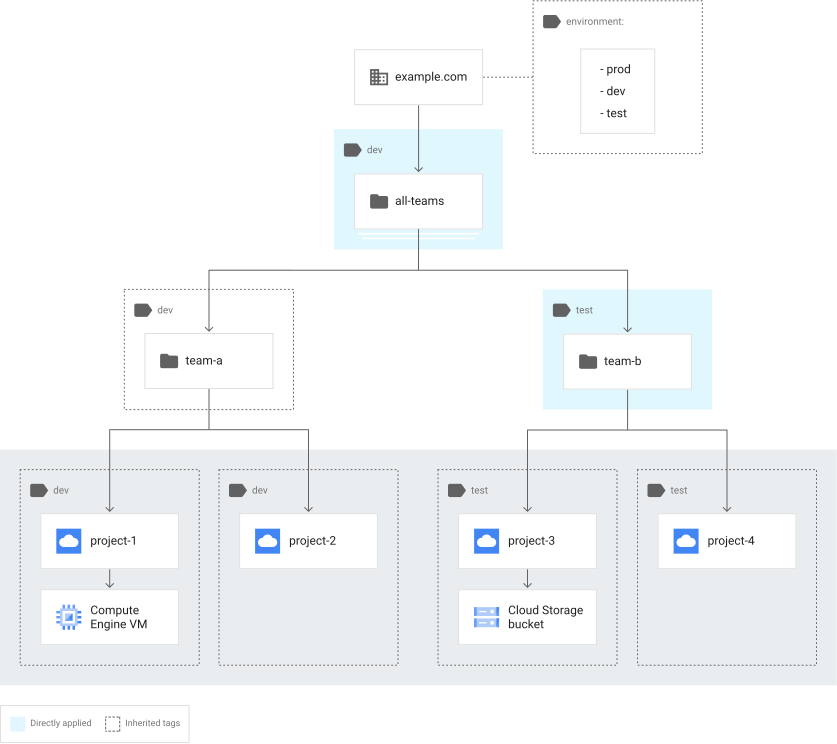
If you remove the environment: test tag from the team-b folder, then that
folder and its resources inherit the tag environment: development.
All of the tags that are both attached to and inherited by a resource are collectively called the effective tags. The effective tags for a resource are a combination of the tags directly attached to it, as well as all tags attached to all of the resource's ancestors throughout the hierarchy.
When using tags with IAM conditions, we recommend that you create a safe default tag value for each tag key used by your IAM conditions. Apply the safe default tag value by binding that tag value to your organization so that it is inherited by all resources within the organization. Only change the tag value by explicitly overriding inherited bindings on relevant resources.
For example, suppose you have an IAM condition that depends on
the tag value on for the enforcement tag key, and the tag key also has an
off tag value. Bind the tag value enforcement: off to the organization to
create a safe default that's inherited by all resources within the organization.
Only bind the tag value enforcement: on to selected resources within the
organization.
You can then write policies that address the enforcement tag key, with
conditions that affect a resource if it is enforcement: on or
enforcement: off, and a safe case if it is enforcement: default. If the
enforcement tag key is ever removed from a resource, the resource can then inherit
the tag value for enforcement from its parent resource. If no parent resource
has the enforcement tag key, the resource inherits enforcement: default
from the organization resource.
Using a safe default tag can help, but to prevent unintended behaviors, we recommend that you review the tags and policies with conditions in place before moving your resources or removing tags.
Deleting tag keys and values
Before you can delete a tag value, you must delete all resource bindings that use the tag value.
Protecting tag values from deletion
You can create an additional layer of protection for your tag values by attaching a tag hold to a tag value. A tag hold, like a tag binding, prevents a user from deleting the tag value.
Some resources automatically create a tag hold on each tag value attached to the resource. This tag hold must be removed before you can delete the tag value.
What's next
- For more information about how to use tags, read the Creating and managing tags page.
- For information about using tags with Compute Engine, see Manage tags for resources.
- For information about using secure tags for firewall policies, see Create and manage secure tags.