


ייצוא המלצות אל BigQuery
סקירה כללית
באמצעות BigQuery Export, אתם יכולים לראות תמונות מצב יומיות של ההמלצות לארגון שלכם. הפעולה הזו מתבצעת באמצעות שירות העברת נתונים ל-BigQuery. במאמר Recommenders אפשר לראות אילו ממליצים נכללים היום בייצוא ל-BigQuery.
BigQuery Export תומך באפשרויות הבאות:
ייצוא של המלצות ותובנות לגבי כל הפרויקטים, התיקיות וחשבונות החיוב של הארגון (כולל המלצות ותובנות ברמת הארגון)
ייצוא של מחירים מוסכמים במקום מחירים רגילים להמלצות לחיסכון בעלויות.
לפני שמתחילים
לפני שיוצרים העברת נתונים להמלצות, צריך לבצע את השלבים הבאים:
- מאשרים את ההרשאה של שירות העברת הנתונים ל-BigQuery לניהול העברת הנתונים. אם אתם משתמשים בממשק האינטרנט של BigQuery כדי ליצור את ההעברה, אתם צריכים לאפשר את הצגת החלונות הקופצים מ-
console.cloud.google.comבדפדפן כדי שתוכלו לראות את ההרשאות. פרטים נוספים זמינים במאמר בנושא הפעלת שירות העברת נתונים ל-BigQuery. - יוצרים
מערך נתונים ב-BigQuery לאחסון הנתונים.
- העברת הנתונים מתבצעת באותו אזור שבו נוצר מערך הנתונים. אחרי שיוצרים את מערך הנתונים ואת ההעברה, אי אפשר לשנות את המיקום.
- קבוצת הנתונים תכיל תובנות והמלצות מכל האזורים בעולם. לכן, במהלך התהליך, המערכת תצרף את כל הנתונים האלה לאזור גלובלי. אם יש לכם חששות לגבי מיקום הנתונים, תוכלו לפנות אל Google Cloud Customer Care.
- אם מיקום מערך הנתונים הושק לאחרונה, יכול להיות שיהיה עיכוב בזמינות של נתוני הייצוא הראשוניים.
תמחור
ייצוא המלצות אל BigQuery זמין לכל הלקוחות של Recommender, בהתאם לרמת התמחור של Recommender.
ההרשאות הנדרשות
במהלך הגדרת העברת הנתונים, אתם צריכים את ההרשאות הבאות ברמת הפרויקט שבו אתם יוצרים העברת נתונים:
-
bigquery.transfers.update– מאפשר ליצור את ההעברה -
bigquery.datasets.update– מאפשר לעדכן פעולות במערך הנתונים של היעד -
resourcemanager.projects.update– מאפשר לבחור פרויקט שבו רוצים לאחסן את הנתונים המיוצאים -
pubsub.topics.list– מאפשר לבחור נושא Pub/Sub כדי לקבל התראות לגבי הייצוא
נדרשת ההרשאה הבאה ברמת הארגון. הארגון הזה תואם לארגון שעבורו מוגדר הייצוא.
-
recommender.resources.export– מאפשר ייצוא של המלצות ל-BigQuery
כדי לייצא מחירים מוסכמים להמלצות לחיסכון בעלויות, צריך את ההרשאות הבאות:
-
billing.resourceCosts.get at project level– מאפשר לייצא מחירים מוסכמים להמלצות ברמת הפרויקט -
billing.accounts.getSpendingInformation at billing account level– מאפשר לייצא מחירים מוסכמים להמלצות ברמת החשבון לחיוב
בלי ההרשאות האלה, ההמלצות לחיסכון בעלויות ייצאו עם מחירים רגילים במקום עם מחירים שסוכמו.
מתן הרשאות
צריך להקצות את התפקידים הבאים בפרויקט שבו יוצרים את העברת הנתונים:
- תפקיד BigQuery admin –
roles/bigquery.admin - תפקיד בעלי הפרויקט –
roles/owner - תפקיד Project Owner –
roles/owner - תפקיד צפייה בפרויקט –
roles/viewer - תפקיד עריכת פרויקטים –
roles/editor - התפקיד Billing Account Administrator –
roles/billing.admin - התפקיד Billing Account Costs Manager –
roles/billing.costsManager - התפקיד Billing Account Viewer –
roles/billing.viewer
כדי לאפשר לכם ליצור העברה ולעדכן פעולות במערך הנתונים של היעד, אתם צריכים להקצות את התפקיד הבא:
יש כמה תפקידים שכוללים הרשאות לבחירת פרויקט לאחסון נתוני הייצוא ולבחירת נושא Pub/Sub לקבלת התראות. כדי לקבל את שתי ההרשאות האלה, אפשר להקצות את התפקיד הבא:
יש כמה תפקידים שכוללים את ההרשאה billing.resourceCosts.get לייצוא מחירים שסוכמו להמלצות ברמת הפרויקט לחיסכון בעלויות. אתם יכולים להעניק כל אחד מהתפקידים האלה:
יש כמה תפקידים שכוללים את ההרשאה billing.accounts.getSpendingInformation לייצוא של מחירים שסוכמו בהסכם לקבלת המלצות לחיסכון בעלויות ברמת החשבון לחיוב. אתם יכולים להעניק כל אחד מהתפקידים האלה:
צריך להקצות את התפקיד הבא ברמת הארגון:
- התפקיד Recommendations Exporter (
roles/recommender.exporter) במסוף Google Cloud .
אפשר גם ליצור תפקידים בהתאמה אישית שכוללים את ההרשאות הנדרשות.
יצירת העברת נתונים להמלצות
עוברים לטופס BigQuery Export של Active Assist.
בוחרים פרויקט יעד לאחסון נתוני ההמלצות.
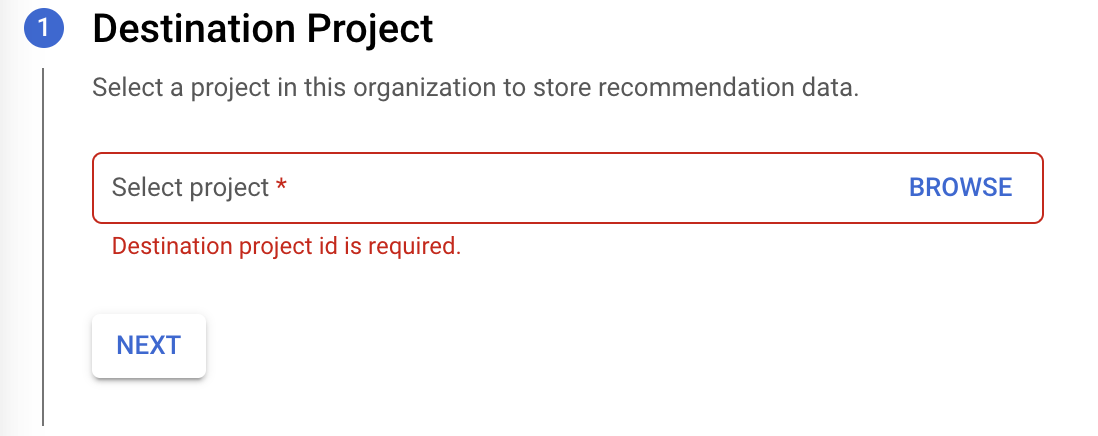
לוחצים על הבא.
לוחצים על Enable APIs כדי להפעיל את ממשקי ה-API של BigQuery לייצוא. התהליך עשוי להימשך כמה שניות. בסיום, לוחצים על המשך.
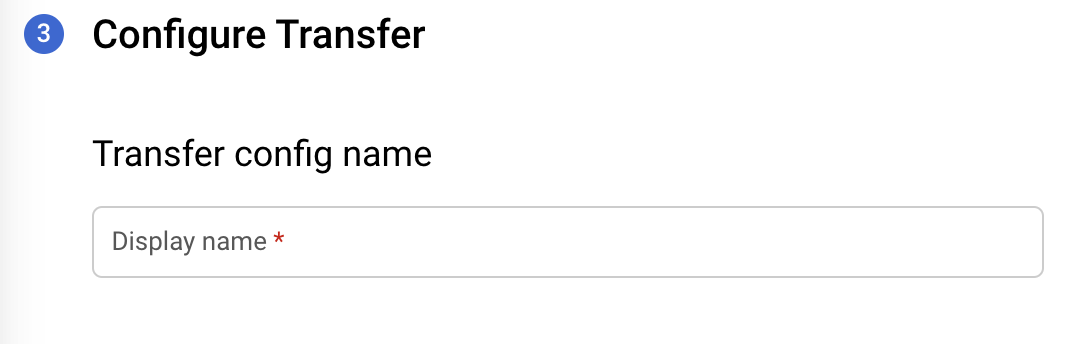
בטופס Configure Transfer (הגדרת העברה), מזינים את הפרטים הבאים:
בקטע שם הגדרת ההעברה, בשדה שם מוצג, מזינים שם להעברה. שם ההעברה יכול להיות כל ערך שיאפשר לכם לזהות בקלות את ההעברה אם תצטרכו לשנות אותה בהמשך.
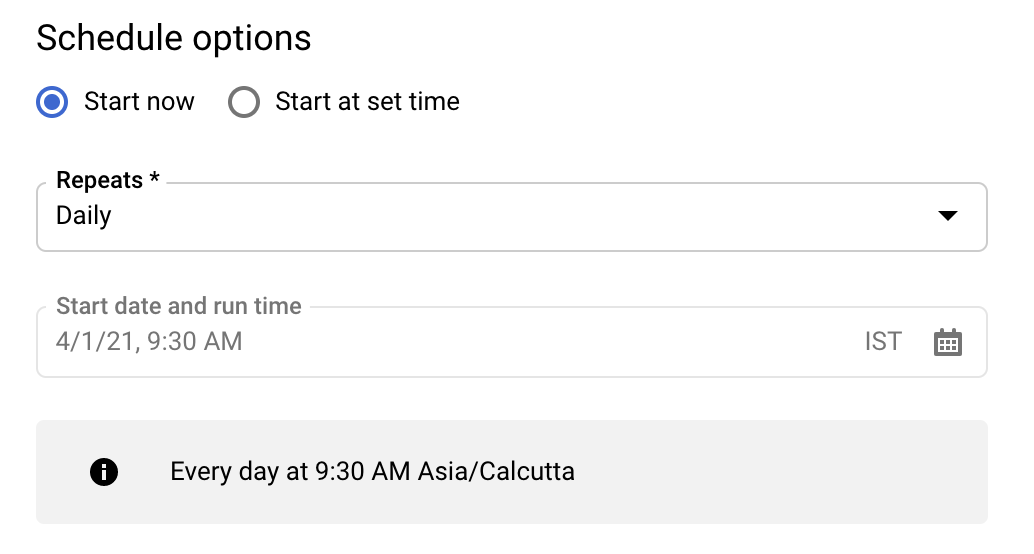
בקטע Schedule options, בשדה Schedule, משאירים את ערך ברירת המחדל (Start now) או לוחצים על Start at a set time.
בקטע חזרה, בוחרים את התדירות שבה רוצים להפעיל את ההעברה.
- יומי (ברירת מחדל)
- שבועי
- כל חודש
- בהתאמה אישית
- על פי דרישה
בשדה תאריך ושעת ההתחלה של ההרצה, מזינים את התאריך והשעה שבהם רוצים להתחיל את ההעברה. אם בוחרים באפשרות Start now (התחלה מיידית), האפשרות הזו מושבתת.
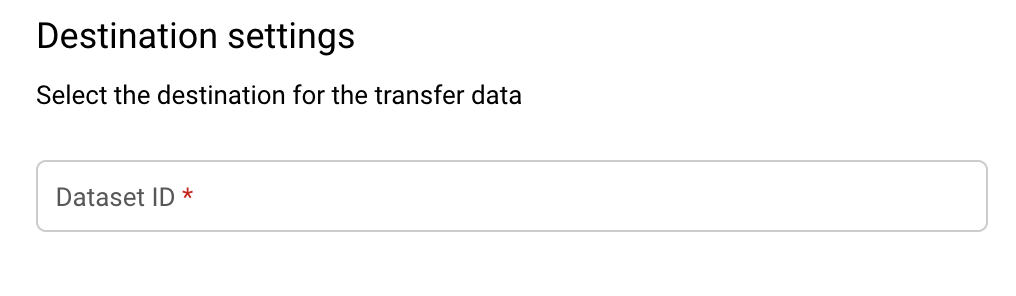
בקטע הגדרות יעד, בשדה מערך נתונים של היעד, בוחרים את מזהה מערך הנתונים שיצרתם לאחסון הנתונים.
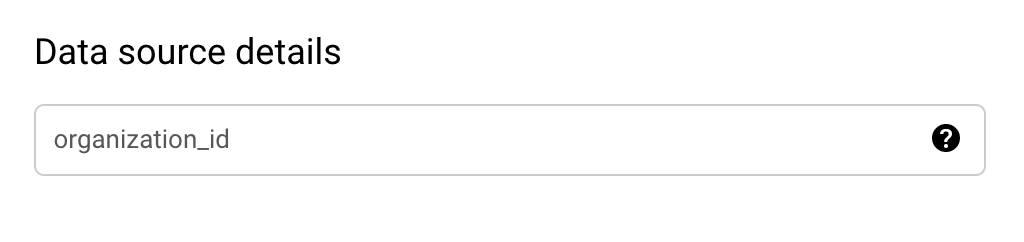
בקטע פרטי מקור הנתונים:
ערך ברירת המחדל של organization_id הוא הארגון שמוצגות לו כרגע ההמלצות. אם רוצים לייצא המלצות לארגון אחר, אפשר לשנות את ההגדרה הזו בחלק העליון של המסוף בתצוגת הארגון.
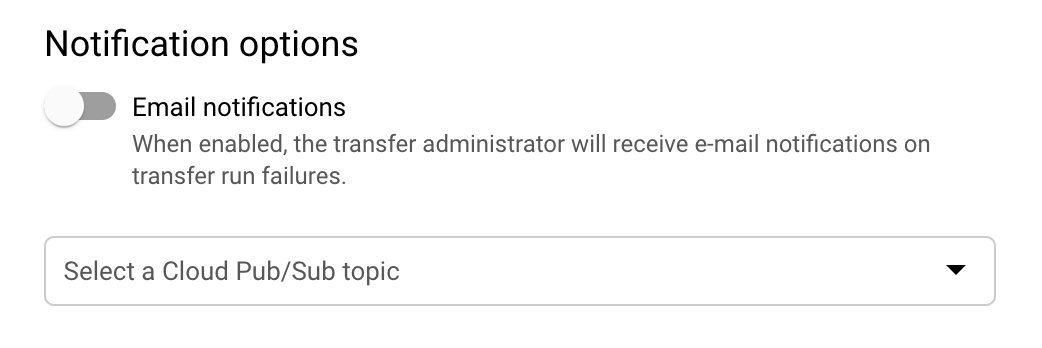
(אופציונלי) בקטע אפשרויות להתראות:
- לוחצים על המתג כדי להפעיל את ההתראות באימייל. אם מפעילים את האפשרות הזו, האדמין של ההעברה מקבל התראה באימייל כשהרצת העברה נכשלת.
- בקטע Select a Pub/Sub topic, בוחרים את שם הנושא או לוחצים על Create a topic. באמצעות האפשרות הזו אפשר להגדיר התראות על הפעלת Pub/Sub להעברה.
לוחצים על יצירה כדי ליצור את ההעברה.
לוחצים על אישור בחלון הקופץ של בקשת ההסכמה.
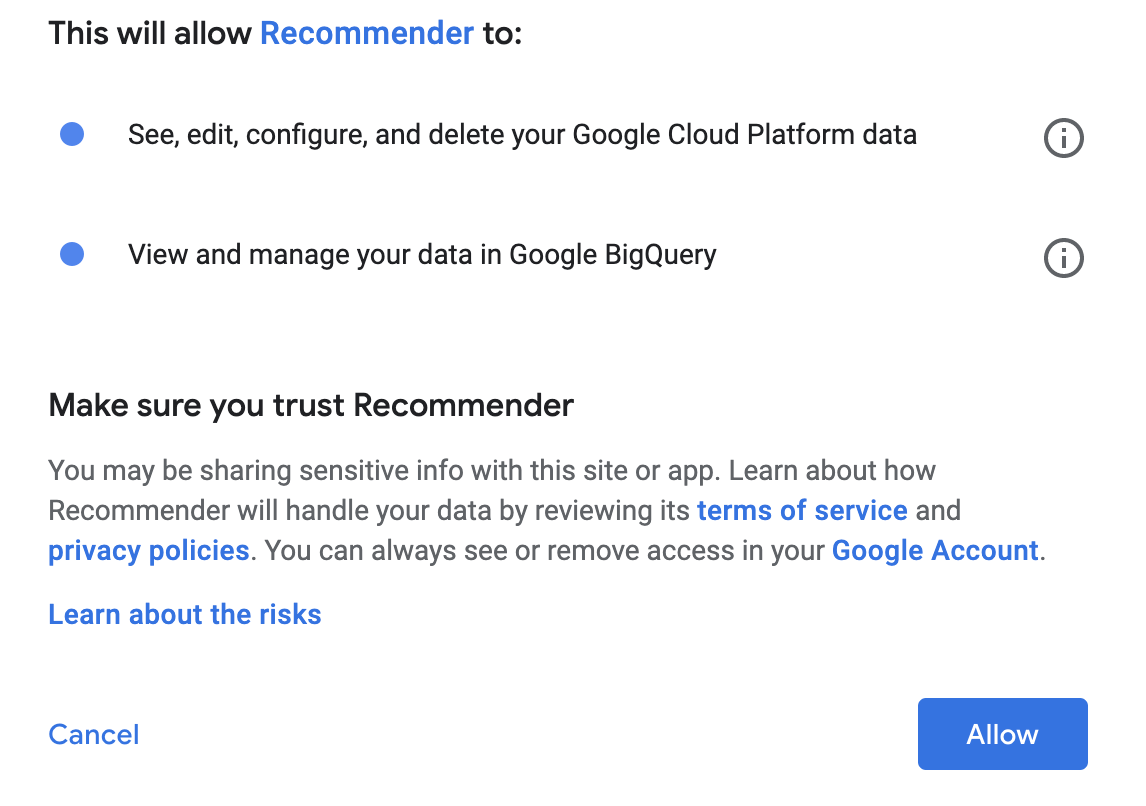
אחרי שיוצרים את ההעברה, המערכת מחזירה אתכם אל Active Assist. אפשר ללחוץ על הקישור כדי לגשת לפרטי ההגדרה של ההעברה. אפשר גם לגשת להעברות באופן הבא:
נכנסים לדף BigQuery במסוף Google Cloud .
לוחצים על העברות נתונים. תוכלו לראות את כל העברות הנתונים הזמינות.
צפייה בהיסטוריית ההרצה של העברה
כדי לראות את היסטוריית ההרצה של העברה:
נכנסים לדף BigQuery במסוף Google Cloud .
לוחצים על העברות נתונים. תוכלו לראות את כל העברות הנתונים הזמינות.
לוחצים על ההעברה לבעלות המתאימה ברשימה.
ברשימת ההעברות שמוצגת בכרטיסייה היסטוריית ההרצות, בוחרים את ההעברה שרוצים לראות את הפרטים שלה.
מוצג החלונית פרטי ההפעלה של העברת ההפעלה הספציפית שבחרתם. חלק מפרטי ההרצה האפשריים שמוצגים:
- ההעברה נדחתה כי נתוני המקור לא זמינים.
- עבודה שמציינת את מספר השורות שיוצאו לטבלה
- חסרות הרשאות למקור נתונים, ולכן צריך לתת הרשאות ואז לתזמן מילוי חוסרים.
מתי הנתונים שלכם מיוצאים?
כשיוצרים העברת נתונים, הייצוא הראשון מתבצע תוך יומיים. אחרי הייצוא הראשון, משימות הייצוא יפעלו בקצב שביקשתם בזמן ההגדרה. התנאים הבאים חלים:
תהליך הייצוא של נתונים מיום מסוים (D) מייצא את הנתונים של סוף היום (D) למערך הנתונים ב-BigQuery, והוא מסתיים בדרך כלל עד סוף היום הבא (D+1). תהליך הייצוא מתבצע לפי אזור הזמן PST, ולכן יכול להיות שיופיע עיכוב נוסף באזורי זמן אחרים.
המשימה של הייצוא היומי לא מופעלת עד שכל הנתונים לייצוא זמינים. כתוצאה מכך, יכולים להיות שינויים, ולפעמים עיכובים, ביום ובשעה שבהם מערך הנתונים מתעדכן. לכן, עדיף להשתמש בתמונת המצב האחרונה של הנתונים שזמינה, במקום להסתמך על טבלאות עם תאריכים ספציפיים.
תהליך הייצוא מעביר את הנתונים האחרונים שזמינים לכל אזור. כלומר, יכול להיות הבדל בתאריך האחרון שבו ההמלצות זמינות לאזורים שונים.
הודעות סטטוס נפוצות בייצוא
מידע על הודעות סטטוס נפוצות שמוצגות כשמייצאים המלצות ל-BigQuery.
למשתמש אין את ההרשאה הנדרשת
ההודעה הבאה מופיעה כשאין למשתמש את ההרשאה הנדרשת recommender.resources.export. תוצג ההודעה הבאה:
User does not have required permission "recommender.resources.export". Please, obtain the required permissions for the datasource and try again by triggering a backfill for this date
כדי לפתור את הבעיה, צריך להעניק את תפקיד ה-IAM roles/recommender.exporter ל-user/service account שהגדיר את הייצוא ברמת הארגון, עבור הארגון שהוגדר עבורו הייצוא. אפשר להעניק את ההרשאה באמצעות פקודות gcloud הבאות:
במקרה של משתמש:
gcloud organizations add-iam-policy-binding *<organization_id>* --member='user:*<user_name>*' --role='roles/recommender.exporter'במקרה של חשבון שירות:
gcloud organizations add-iam-policy-binding *<organization_id>* --member='serviceAccount:*<service_acct_name>*' --role='roles/recommender.exporter'
ההעברה נדחתה כי נתוני המקור לא זמינים
ההודעה הבאה מופיעה כשההעברה מתוזמנת מחדש כי נתוני המקור עדיין לא זמינים. זו לא שגיאה. המשמעות היא שצינורות הייצוא של היום עדיין לא הושלמו. ההעברה תופעל מחדש בזמן המתוזמן החדש, ותצליח אחרי שצינורות הייצוא יושלמו. תוצג ההודעה הבאה:
Transfer deferred due to source data not being available
לא נמצאו נתוני מקור
ההודעה הבאה מופיעה כשצינורות הייצוא מסיימים את הפעולה, אבל לא נמצאו המלצות או תובנות לגבי הארגון שהוגדר עבורו הייצוא. תוצג ההודעה הבאה:
Source data not found for 'recommendations_export$<date>'insights_export$<date>
ההודעה הזו מופיעה מהסיבות הבאות:
- המשתמש הגדיר את הייצוא לפני פחות מיומיים. במדריך ללקוחות מצוין שיש עיכוב של יום אחד לפני שהייצוא יהיה זמין.
- אין המלצות או תובנות שזמינות לארגון שלהם לגבי היום הספציפי. יכול להיות שזה המצב בפועל, או שהצינורות הופעלו לפני שכל ההמלצות או התובנות היו זמינות לאותו יום.
הצגת טבלאות להעברה
כשמייצאים המלצות ל-BigQuery, מערך הנתונים מכיל שתי טבלאות שמחולקות למחיצות לפי תאריך:
- recommendations_export
- insight_export
מידע נוסף על טבלאות וסכימות זמין במאמרים יצירה ושימוש בטבלאות והגדרת סכימה.
כדי לראות את הטבלאות של העברת נתונים:
נכנסים לדף BigQuery במסוף Google Cloud . לדף BigQuery
לוחצים על העברות נתונים. תוכלו לראות את כל העברות הנתונים הזמינות.
לוחצים על ההעברה לבעלות המתאימה ברשימה.
לוחצים על הכרטיסייה הגדרה ואז על מערך הנתונים.
בחלונית Explorer מרחיבים את הפרויקט ובוחרים מערך נתונים. התיאור והפרטים מופיעים בחלונית הפרטים. הטבלאות של מערך נתונים מופיעות עם שם מערך הנתונים בחלונית Explorer.
תזמון של מילוי חוסרים
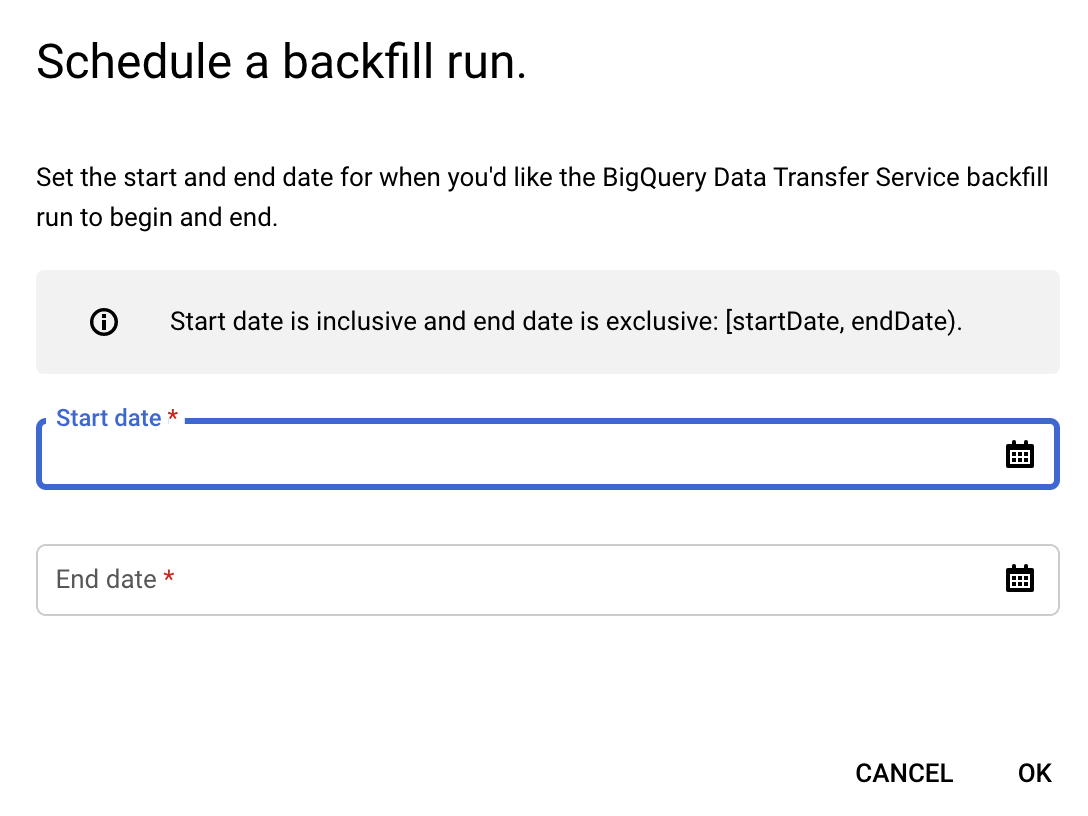
אפשר לייצא המלצות לתאריך בעבר (אם התאריך הזה מאוחר יותר מהתאריך שבו הארגון הצטרף לייצוא) על ידי תזמון של מילוי חוסרים (backfill). כדי לתזמן מילוי חוסרים:
נכנסים לדף BigQuery במסוף Google Cloud .
לוחצים על העברות נתונים.
בדף העברות, לוחצים על ההעברה הרלוונטית ברשימה.
לוחצים על תזמון מילוי חוסרים.
בתיבת הדו-שיח Schedule backfill, בוחרים את תאריך ההתחלה ואת תאריך הסיום.
מידע נוסף על עבודה עם העברות זמין במאמר עבודה עם העברות.
ייצוא סכימה
טבלת ייצוא ההמלצות:
schema:
   fields:
     - name: cloud_entity_type
       type: STRING
       description: |
         Represents what cloud entity type the recommendation was generated for - eg: project number, billing account
     - name: cloud_entity_id
       type: STRING
       description: |
         Value of the project number or billing account id
     - name: name
       type: STRING
       description: |
         Name of recommendation. A project recommendation is represented as
         projects/[PROJECT_NUMBER]/locations/[LOCATION]/recommenders/[RECOMMENDER_ID]/recommendations/[RECOMMENDATION_ID]
     - name: location
       type: STRING
       description: |
         Location for which this recommendation is generated
     - name: recommender
       type: STRING
       description: |
         Recommender ID of the recommender that has produced this recommendation
     - name: recommender_subtype
       type: STRING
       description: |
           Contains an identifier for a subtype of recommendations produced for the
           same recommender. Subtype is a function of content and impact, meaning a
           new subtype will be added when either content or primary impact category
           changes.
           Examples:
           For recommender = "google.iam.policy.Recommender",
           recommender_subtype can be one of "REMOVE_ROLE"/"REPLACE_ROLE"
     - name: target_resources
       type: STRING
       mode: REPEATED
       description: |
         Contains the fully qualified resource names for resources changed by the
         operations in this recommendation. This field is always populated. ex:
         [//cloudresourcemanager.googleapis.com/projects/foo].
     - name: description
       type: STRING
       description: |
         Required. Free-form human readable summary in English.
         The maximum length is 500 characters.
     - name: last_refresh_time
       type: TIMESTAMP
       description: |
         Output only. Last time this recommendation was refreshed by the system that created it in the first place.
     - name: primary_impact
       type: RECORD
       description: |
         Required. The primary impact that this recommendation can have while trying to optimize
         for one category.
       schema:
         fields:
         - name: category
           type: STRING
           description: |
             Category that is being targeted.
             Values can be the following:
               CATEGORY_UNSPECIFIED:
                 Default unspecified category. Do not use directly.
               COST:
                 Indicates a potential increase or decrease in cost.
               SECURITY:
                 Indicates a potential increase or decrease in security.
               PERFORMANCE:
                 Indicates a potential increase or decrease in performance.
               RELIABILITY:
                 Indicates a potential increase or decrease in reliability.
         - name: cost_projection
           type: RECORD
           description: Optional. Use with CategoryType.COST
           schema:
             fields:
             - name: cost
               type: RECORD
               description: |
                 An approximate projection on amount saved or amount incurred.
                 Negative cost units indicate cost savings and positive cost units indicate
                 increase. See google.type.Money documentation for positive/negative units.
               schema:
                 fields:
                 - name: currency_code
                   type: STRING
                   description: The 3-letter currency code defined in ISO 4217.
                 - name: units
                   type: INTEGER
                   description: |
                     The whole units of the amount. For example if `currencyCode` is `"USD"`,
                     then 1 unit is one US dollar.
                 - name: nanos
                   type: INTEGER
                   description: |
                     Number of nano (10^-9) units of the amount.
                     The value must be between -999,999,999 and +999,999,999 inclusive.
                     If `units` is positive, `nanos` must be positive or zero.
                     If `units` is zero, `nanos` can be positive, zero, or negative.
                     If `units` is negative, `nanos` must be negative or zero.
                     For example $-1.75 is represented as `units`=-1 and `nanos`=-750,000,000.
             - name: cost_in_local_currency
               type: RECORD
               description: |
                 An approximate projection on amount saved or amount incurred in the local currency.
                 Negative cost units indicate cost savings and positive cost units indicate
                 increase. See google.type.Money documentation for positive/negative units.
               schema:
                 fields:
                 - name: currency_code
                   type: STRING
                   description: The 3-letter currency code defined in ISO 4217.
                 - name: units
                   type: INTEGER
                   description: |
                     The whole units of the amount. For example if `currencyCode` is `"USD"`,
                     then 1 unit is one US dollar.
                 - name: nanos
                   type: INTEGER
                   description: |
                     Number of nano (10^-9) units of the amount.
                     The value must be between -999,999,999 and +999,999,999 inclusive.
                     If `units` is positive, `nanos` must be positive or zero.
                     If `units` is zero, `nanos` can be positive, zero, or negative.
                     If `units` is negative, `nanos` must be negative or zero.
                     For example $-1.75 is represented as `units`=-1 and `nanos`=-750,000,000.
             - name: duration
               type: RECORD
               description: Duration for which this cost applies.
               schema:
                 fields:
                 - name: seconds
                   type: INTEGER
                   description: |
                     Signed seconds of the span of time. Must be from -315,576,000,000
                     to +315,576,000,000 inclusive. Note: these bounds are computed from:
                     60 sec/min * 60 min/hr * 24 hr/day * 365.25 days/year * 10000 years
                 - name: nanos
                   type: INTEGER
                   description: |
                     Signed fractions of a second at nanosecond resolution of the span
                     of time. Durations less than one second are represented with a 0
                     `seconds` field and a positive or negative `nanos` field. For durations
                     of one second or more, a non-zero value for the `nanos` field must be
                     of the same sign as the `seconds` field. Must be from -999,999,999
                     to +999,999,999 inclusive.
             - name: pricing_type_name
               type: STRING
               description: |
                     A pricing type can either be based on the price listed on GCP (LIST) or a custom
                     price based on past usage (CUSTOM).
         - name: reliability_projection
           type: RECORD
           description: Optional. Use with CategoryType.RELIABILITY
           schema:
             fields:
             - name: risk_types
               type: STRING
               mode: REPEATED
               description: |
                 The risk associated with the reliability issue.
                   RISK_TYPE_UNSPECIFIED:
                     Default unspecified risk. Do not use directly.
                   SERVICE_DISRUPTION:
                     Potential service downtime.
                   DATA_LOSS:
                     Potential data loss.
                   ACCESS_DENY:
                     Potential access denial. The service is still up but some or all clients
                     can not access it.
             - name: details_json
               type: STRING
               description: |
                 Additional reliability impact details that is provided by the recommender in JSON
                 format.
     - name: state
       type: STRING
       description: |
             Output only. The state of the recommendation:
               STATE_UNSPECIFIED:
                 Default state. Do not use directly.
               ACTIVE:
                 Recommendation is active and can be applied. Recommendations content can
                 be updated by Google.
                 ACTIVE recommendations can be marked as CLAIMED, SUCCEEDED, or FAILED.
               CLAIMED:
                 Recommendation is in claimed state. Recommendations content is
                 immutable and cannot be updated by Google.
                 CLAIMED recommendations can be marked as CLAIMED, SUCCEEDED, or FAILED.
               SUCCEEDED:
                 Recommendation is in succeeded state. Recommendations content is
                 immutable and cannot be updated by Google.
                 SUCCEEDED recommendations can be marked as SUCCEEDED, or FAILED.
               FAILED:
                 Recommendation is in failed state. Recommendations content is immutable
                 and cannot be updated by Google.
                 FAILED recommendations can be marked as SUCCEEDED, or FAILED.
               DISMISSED:
                 Recommendation is in dismissed state.
                 DISMISSED recommendations can be marked as ACTIVE.
     - name: ancestors
       type: RECORD
       description: |
         Ancestry for the recommendation entity
       schema:
         fields:
         - name: organization_id
           type: STRING
           description: |
             Organization to which the recommendation project
         - name: folder_ids
           type: STRING
           mode: REPEATED
           description: |
             Up to 5 levels of parent folders for the recommendation project
     - name: associated_insights
       type: STRING
       mode: REPEATED
       description: |
         Insights associated with this recommendation. A project insight is represented as
         projects/[PROJECT_NUMBER]/locations/[LOCATION]/insightTypes/[INSIGHT_TYPE_ID]/insights/[insight_id]
     - name: recommendation_details
       type: STRING
       description: |
         Additional details about the recommendation in JSON format.
       schema:
            - name: overview
              type: RECORD
              description: Overview of the recommendation in JSON format
            - name: operation_groups
              type: OperationGroup
              mode: REPEATED
              description: Operations to one or more Google Cloud resources grouped in such a way
              that, all operations within one group are expected to be performed
              atomically and in an order. More here: https://cloud.google.com/recommender/docs/key-concepts#operation_groups
                  - name: operations
                    type: Operation
                    description: An Operation is the individual action that must be performed as one of the atomic steps in a suggested recommendation. More here: https://cloud.google.com/recommender/docs/key-concepts?#operation
            - name: state_metadata
              type: map with key: STRING, value: STRING
              description: A map of STRING key, STRING value of metadata for the state, provided by user or automations systems.
            - name: additional_impact
              type: Impact
              mode: REPEATED
              description: Optional set of additional impact that this recommendation may have when
              trying to optimize for the primary category. These may be positive
              or negative. More here: https://cloud.google.com/recommender/docs/key-concepts?#recommender_impact
     - name: priority
       type: STRING
       description: |
         Priority of the recommendation:
           PRIORITY_UNSPECIFIED:
             Default unspecified priority. Do not use directly.
           P4:
             Lowest priority.
           P3:
             Second lowest priority.
           P2:
             Second highest priority.
           P1:
             Highest priority.
טבלת ייצוא התובנות:
schema:
  - fields:
      - name: cloud_entity_type
        type: STRING
        description: |
          Represents what cloud entity type the recommendation was generated for - eg: project number, billing account
      - name: cloud_entity_id
        type: STRING
        description: |
          Value of the project number or billing account id
      - name: name
        type: STRING
        description: |
          Name of recommendation. A project recommendation is represented as
          projects/[PROJECT_NUMBER]/locations/[LOCATION]/recommenders/[RECOMMENDER_ID]/recommendations/[RECOMMENDATION_ID]
      - name: location
        type: STRING
        description: |
          Location for which this recommendation is generated
      - name: insight_type
        type: STRING
        description: |
          Recommender ID of the recommender that has produced this recommendation
      - name: insight_subtype
        type: STRING
        description: |
            Contains an identifier for a subtype of recommendations produced for the
            same recommender. Subtype is a function of content and impact, meaning a
            new subtype will be added when either content or primary impact category
            changes.
            Examples:
            For recommender = "google.iam.policy.Recommender",
            recommender_subtype can be one of "REMOVE_ROLE"/"REPLACE_ROLE"
      - name: target_resources
        type: STRING
        mode: REPEATED
        description: |
          Contains the fully qualified resource names for resources changed by the
          operations in this recommendation. This field is always populated. ex:
          [//cloudresourcemanager.googleapis.com/projects/foo].
      - name: description
        type: STRING
        description: |
          Required. Free-form human readable summary in English.
          The maximum length is 500 characters.
      - name: last_refresh_time
        type: TIMESTAMP
        description: |
          Output only. Last time this recommendation was refreshed by the system that created it in the first place.
      - name: category
        type: STRING
        description: |
          Category being targeted by the insight. Can be one of:
          Unspecified category.
          CATEGORY_UNSPECIFIED = Unspecified category.
          COST = The insight is related to cost.
          SECURITY = The insight is related to security.
          PERFORMANCE = The insight is related to performance.
          MANAGEABILITY = The insight is related to manageability.
          RELIABILITY = The insight is related to reliability.;
      - name: state
        type: STRING
        description: |
              Output only. The state of the recommendation:
                STATE_UNSPECIFIED:
                  Default state. Do not use directly.
                ACTIVE:
                  Recommendation is active and can be applied. Recommendations content can
                  be updated by Google.
                  ACTIVE recommendations can be marked as CLAIMED, SUCCEEDED, or FAILED.
                CLAIMED:
                  Recommendation is in claimed state. Recommendations content is
                  immutable and cannot be updated by Google.
                  CLAIMED recommendations can be marked as CLAIMED, SUCCEEDED, or FAILED.
                SUCCEEDED:
                  Recommendation is in succeeded state. Recommendations content is
                  immutable and cannot be updated by Google.
                  SUCCEEDED recommendations can be marked as SUCCEEDED, or FAILED.
                FAILED:
                  Recommendation is in failed state. Recommendations content is immutable
                  and cannot be updated by Google.
                  FAILED recommendations can be marked as SUCCEEDED, or FAILED.
                DISMISSED:
                  Recommendation is in dismissed state.
                  DISMISSED recommendations can be marked as ACTIVE.
      - name: ancestors
        type: RECORD
        description: |
          Ancestry for the recommendation entity
        schema:
          fields:
          - name: organization_id
            type: STRING
            description: |
              Organization to which the recommendation project
          - name: folder_ids
            type: STRING
            mode: REPEATED
            description: |
              Up to 5 levels of parent folders for the recommendation project
      - name: associated_recommendations
        type: STRING
        mode: REPEATED
        description: |
          Insights associated with this recommendation. A project insight is represented as
          projects/[PROJECT_NUMBER]/locations/[LOCATION]/insightTypes/[INSIGHT_TYPE_ID]/insights/[insight_id]
      - name: insight_details
        type: STRING
        description: |
          Additional details about the insight in JSON format
          schema:
            fields:
            - name: content
              type: STRING
              description: |
                A struct of custom fields to explain the insight.
                Example: "grantedPermissionsCount": "1000"
            - name: observation_period
              type: TIMESTAMP
              description: |
                Observation period that led to the insight. The source data used to
                generate the insight ends at last_refresh_time and begins at
                (last_refresh_time - observation_period).
          - name: state_metadata
            type: STRING
            description: |
              A map of metadata for the state, provided by user or automations systems.
      - name: severity
        type: STRING
        description: |
          Severity of the insight:
            SEVERITY_UNSPECIFIED:
              Default unspecified severity. Do not use directly.
            LOW:
              Lowest severity.
            MEDIUM:
              Second lowest severity.
            HIGH:
              Second highest severity.
            CRITICAL:
              Highest severity.
שאילתות לדוגמה
אפשר להשתמש בשאילתות לדוגמה הבאות כדי לנתח את הנתונים המיוצאים.
צפייה בחיסכון בעלויות של המלצות שמשך ההמלצה שלהן מוצג בימים
SELECT name, recommender, target_resources,
  case primary_impact.cost_projection.cost.units is null
       when true then round(primary_impact.cost_projection.cost.nanos * power(10,-9),2)
       else
       round( primary_impact.cost_projection.cost.units +
       (primary_impact.cost_projection.cost.nanos * power(10,-9)), 2)
   end
   as dollar_amt,
   primary_impact.cost_projection.duration.seconds/(60*60*24) as duration_in_days
FROM `<project>.<dataset>.recommendations_export`
WHERE DATE(_PARTITIONTIME) = "<date>"
and primary_impact.category = "COST"
הצגת רשימת התפקידים ב-IAM שלא נעשה בהם שימוש
SELECT *
FROM `<project>.<dataset>.recommendations_export`
WHERE DATE(_PARTITIONTIME) = "<date>"
and recommender = "google.iam.policy.Recommender"
and recommender_subtype = "REMOVE_ROLE"
הצגת רשימה של תפקידים שהוקצו וצריך להחליף אותם בתפקידים עם פחות הרשאות
SELECT *
FROM `<project>.<dataset>.recommendations_export`
WHERE DATE(_PARTITIONTIME) = "<date>"
and recommender = "google.iam.policy.Recommender"
and recommender_subtype = "REPLACE_ROLE"
איך רואים תובנות לגבי המלצה
SELECT recommendations.name as recommendation_name,
insights.name as insight_name,
recommendations.cloud_entity_id,
recommendations.cloud_entity_type,
recommendations.recommender,
recommendations.recommender_subtype,
recommendations.description,
recommendations.target_resources,
recommendations.recommendation_details,
recommendations.state,
recommendations.last_refresh_time as recommendation_last_refresh_time,
insights.insight_type,
insights.insight_subtype,
insights.category,
insights.description,
insights.insight_details,
insights.state,
insights.last_refresh_time as insight_last_refresh_time
FROM `<project>.<dataset>.recommendations_export` as recommendations,
   `<project>.<dataset>.insights_export` as insights
WHERE DATE(recommendations._PARTITIONTIME) = "<date>"
and DATE(insights._PARTITIONTIME) = "<date>"
and insights.name in unnest(recommendations.associated_insights)
הצגת המלצות לפרויקטים ששייכים לתיקייה ספציפית
השאילתה הזו מחזירה תיקיות ברמה העליונה עד חמש רמות מהפרויקט.
SELECT *
FROM `<project>.<dataset>.recommendations_export`
WHERE DATE(_PARTITIONTIME) = "<date>"
and "<folder_id>" in unnest(ancestors.folder_ids)
צפייה בהמלצות לגבי התאריך האחרון שזמין לייצוא עד כה
DECLARE max_date TIMESTAMP;

SET max_date = (
  SELECT MAX(_PARTITIONTIME) FROM
  `<project>.<dataset>.recommendations_export`
  );

SELECT *
FROM `<project>.<dataset>.recommendations_export`
WHERE _PARTITIONTIME = max_date
שימוש ב-Sheets כדי לחקור נתונים ב-BigQuery
במקום להריץ שאילתות ב-BigQuery, אתם יכולים לגשת למיליארדי שורות של נתוני BigQuery מתוך הגיליון האלקטרוני שלכם, לנתח אותם, להציג אותם באופן חזותי ולשתף אותם באמצעות התכונה 'גיליונות מקושרים' – מחבר נתוני BigQuery החדש. למידע נוסף, אפשר לקרוא את המאמר איך מתחילים לעבוד עם נתוני BigQuery ב-Google Sheets.
הגדרת הייצוא באמצעות שורת הפקודה של BigQuery ו-API בארכיטקטורת REST
-
אפשר לקבל את ההרשאות הנדרשות לניהול זהויות והרשאות גישה (IAM) דרך מסוףGoogle Cloud או שורת הפקודה.
- Command Line for Service Accounts
- שורת פקודה למשתמשים:
לדוגמה, כדי להשתמש בשורת הפקודה כדי לקבל את ההרשאה recommender.resources.export ברמת הארגון לחשבון השירות:
gcloud organizations add-iam-policy-binding *<organization_id>* --member=serviceAccount:*<service_acct_name>*' --role='roles/recommender.exporter' רישום פרויקט כמקור נתונים ב-BigQuery
Datasource to use: 6063d10f-0000-2c12-a706-f403045e6250יוצרים את הייצוא:
שימוש בשורת הפקודה של BigQuery:
bq mk \
--transfer_config \
--project_id=project_id \
--target_dataset=dataset_id \
--display_name=name \
--params='parameters' \
--data_source=data_source \
--service_account_name=service_account_name
כאשר:
- project_id הוא מזהה הפרויקט.
- dataset הוא המזהה של מערך נתוני היעד להגדרת ההעברה.
- name הוא השם המוצג של הגדרת ההעברה. שם ההעברה יכול להיות כל ערך שיאפשר לכם לזהות בקלות את ההעברה אם תצטרכו לשנות אותה בהמשך.
- parameters מכיל את הפרמטרים של הגדרת ההעברה שנוצרה בפורמט JSON. כדי לייצא המלצות ותובנות ל-BigQuery Export, צריך לספק את organization_id של הארגון שרוצים לייצא עבורו את ההמלצות והתובנות. פורמט הפרמטרים: '{"organization_id":"<org id>"}'
- data_source מקור הנתונים לשימוש: '6063d10f-0000-2c12-a706-f403045e6250'
- service_account_name הוא שם חשבון השירות שמשמש לאימות הייצוא. חשבון השירות צריך להיות בבעלות אותו חשבון
project_idששימש ליצירת ההעברה, וצריכות להיות לו כל ההרשאות הנדרשות שמפורטות למעלה.
ניהול ייצוא קיים דרך ממשק המשתמש או שורת הפקודה של BigQuery:
הערה – הייצוא מתבצע בשם המשתמש שהגדיר את החשבון, ללא קשר למי שיעדכן את הגדרות הייצוא בעתיד. לדוגמה, אם הייצוא מוגדר באמצעות חשבון שירות, ומאוחר יותר משתמש אנושי מעדכן את הגדרות הייצוא דרך ממשק המשתמש של שירות העברת נתונים ל-BigQuery, הייצוא ימשיך לפעול כחשבון השירות. במקרה הזה, בדיקת ההרשאה 'recommender.resources.export' מתבצעת עבור חשבון השירות בכל פעם שהייצוא מופעל.