


借助 OpenTelemetry 跟踪,您可以识别和跟踪各种 Pub/Sub 客户端库操作(例如批处理、租约管理和流控制)的延迟时间。收集此信息有助于您调试客户端库问题。
OpenTelemetry 跟踪的一些潜在用例包括:
- 您的服务发布延迟时间高于正常水平。
- 您收到的消息重新传送次数过多。
- 对订阅者客户端的回调函数进行更改后,处理时间比平时长。
准备工作
在配置 OpenTelemetry 之前,请完成以下任务:
- 使用其中一个 客户端 库设置 Pub/Sub。
- 安装 OpenTelemetry SDK 并设置跟踪记录导出器和跟踪器提供程序。
- 启用 Cloud Trace API。
- 了解如何读取 Cloud Observability 跟踪记录。
所需的角色
为确保服务帐号具有将跟踪记录导出到 Cloud Trace 所需的 权限, 请让您的管理员为服务帐号授予项目的 以下 IAM 角色:
如果未能向正确的主账号授予这些角色,可能会导致权限错误。-
全部:
Cloud Trace Agent (
roles/cloudtrace.agent)
如需详细了解如何授予角色,请参阅管理对项目、文件夹和组织的访问权限。
这些预定义角色包含 将跟踪记录导出到 Cloud Trace 所需的权限。如需查看所需的确切权限,请展开所需权限部分:
所需权限
将跟踪记录导出到 Cloud Trace 需要以下权限:
-
全部:
cloudtrace.traces.patch
您的管理员也可以使用自定义角色或其他预定义角色为服务帐号授予这些权限。
OpenTelemetry 跟踪工作流
如需设置 OpenTelemetry 跟踪,您可以使用 Pub/Sub 客户端库和 OpenTelemetry SDK。使用 SDK 时,您必须先设置跟踪记录导出器和跟踪器提供程序,然后才能连接到 Pub/Sub 库。在某些库中,设置跟踪器提供程序是可选的。
跟踪记录导出器。OpenTelemetry SDK 使用跟踪记录导出器来确定将跟踪记录发送到何处。
跟踪器提供程序。Pub/Sub 客户端库使用跟踪器提供程序来创建跟踪记录。
以下步骤简要介绍了如何设置跟踪:
- 实例化 Cloud Trace OpenTelemetry 导出器。
- 如果需要,请使用 OpenTelemetry SDK 实例化并注册跟踪器提供程序。
- 使用“启用 OpenTelemetry 跟踪”选项配置客户端。
- 使用 Pub/Sub 客户端库发布消息。
跟踪功能的工作原理
对于发布的每条消息,客户端库都会创建一个新的跟踪记录。此跟踪记录表示消息的整个生命周期,从您发布消息的那一刻到消息被确认的那一刻。跟踪记录封装了操作时长、父 span 和子 span 以及关联的 span 等信息。
跟踪记录由根 span 及其对应的子 span 组成。这些 span 表示客户端库在处理消息时所做的工作。每条消息跟踪记录都包含以下内容:
- 对于发布 。流控制、排序键调度、批处理以及发布 RPC 的长度。
- 对于订阅 。并发控制、排序键调度和租约管理。
为了将信息从发布端传播到订阅端,客户端库会在发布端注入跟踪记录专用属性。只有在启用跟踪记录且以 googclient_ 前缀开头时,上下文传播机制才会启用。
发布带有跟踪记录的消息
以下代码示例展示了如何使用 Pub/Sub 客户端库和 OpenTelemetry SDK 启用跟踪记录。在此示例中,跟踪记录结果会导出到 Cloud Trace。
注意事项
实例化跟踪器提供程序时,您可以使用 OpenTelemetry SDK 配置采样率。此比率决定了 SDK 应采样多少跟踪记录。较低的采样率有助于降低结算费用,并防止 您的服务超出 Cloud Trace span 配额。
Go
import (
	"context"
	"fmt"
	"io"

	"cloud.google.com/go/pubsub/v2"
	"go.opentelemetry.io/otel"
	"google.golang.org/api/option"

	texporter "github.com/GoogleCloudPlatform/opentelemetry-operations-go/exporter/trace"
	"go.opentelemetry.io/otel/sdk/resource"
	sdktrace "go.opentelemetry.io/otel/sdk/trace"
	semconv "go.opentelemetry.io/otel/semconv/v1.26.0"
)

// publishOpenTelemetryTracing publishes a single message with OpenTelemetry tracing
// enabled, exporting to Cloud Trace.
func publishOpenTelemetryTracing(w io.Writer, projectID, topicID string, sampling float64) error {
	// projectID := "my-project-id"
	// topicID := "my-topic"
	ctx := context.Background()

	exporter, err := texporter.New(texporter.WithProjectID(projectID),
		// Disable spans created by the exporter.
		texporter.WithTraceClientOptions(
			[]option.ClientOption{option.WithTelemetryDisabled()},
		),
	)
	if err != nil {
		return fmt.Errorf("error instantiating exporter: %w", err)
	}

	resources := resource.NewWithAttributes(
		semconv.SchemaURL,
		semconv.ServiceNameKey.String("publisher"),
	)

	// Instantiate a tracer provider with the following settings
	tp := sdktrace.NewTracerProvider(
		sdktrace.WithBatcher(exporter),
		sdktrace.WithResource(resources),
		sdktrace.WithSampler(
			sdktrace.ParentBased(sdktrace.TraceIDRatioBased(sampling)),
		),
	)

	defer tp.ForceFlush(ctx) // flushes any pending spans
	otel.SetTracerProvider(tp)

	// Create a new client with tracing enabled.
	client, err := pubsub.NewClientWithConfig(ctx, projectID, &pubsub.ClientConfig{
		EnableOpenTelemetryTracing: true,
	})
	if err != nil {
		return fmt.Errorf("pubsub: NewClient: %w", err)
	}
	defer client.Close()

	// client.Publisher can be passed a topic ID (e.g. "my-topic") or
	// a fully qualified name (e.g. "projects/my-project/topics/my-topic").
	// If a topic ID is provided, the project ID from the client is used.
	// Reuse this publisher for all publish calls to send messages in batches.
	publisher := client.Publisher(topicID)
	result := publisher.Publish(ctx, &pubsub.Message{
		Data: []byte("Publishing message with tracing"),
	})
	if _, err := result.Get(ctx); err != nil {
		return fmt.Errorf("pubsub: result.Get: %w", err)
	}
	fmt.Fprintln(w, "Published a traced message")
	return nil
}
C++
// Create a few namespace aliases to make the code easier to read.
namespace gc = ::google::cloud;
namespace otel = gc::otel;
namespace pubsub = gc::pubsub;

// This example uses a simple wrapper to export (upload) OTel tracing data
// to Google Cloud Trace. More complex applications may use different
// authentication, or configure their own OTel exporter.
auto project = gc::Project(project_id);
auto configuration = otel::ConfigureBasicTracing(project);

auto publisher = pubsub::Publisher(pubsub::MakePublisherConnection(
    pubsub::Topic(project_id, topic_id),
    // Configure this publisher to enable OTel tracing. Some applications may
    // chose to disable tracing in some publishers or to dynamically enable
    // this option based on their own configuration.
    gc::Options{}.set<gc::OpenTelemetryTracingOption>(true)));

// After this point, use the Cloud Pub/Sub C++ client library as usual.
// In this example, we will send a few messages and configure a callback
// action for each one.
std::vector<gc::future<void>> ids;
for (int i = 0; i < 5; i++) {
  auto id = publisher.Publish(pubsub::MessageBuilder().SetData("Hi!").Build())
                .then([](gc::future<gc::StatusOr<std::string>> f) {
                  auto id = f.get();
                  if (!id) {
                    std::cout << "Error in publish: " << id.status() << "\n";
                    return;
                  }
                  std::cout << "Sent message with id: (" << *id << ")\n";
                });
  ids.push_back(std::move(id));
}
// Block until the messages are actually sent.
for (auto& id : ids) id.get();
Python
在尝试此示例之前,请按照《快速入门:使用客户端库》中的 Python 设置说明进行操作。 如需了解详情,请参阅 Pub/Sub Python API 参考文档。
from opentelemetry import trace
from opentelemetry.sdk.trace import TracerProvider
from opentelemetry.sdk.trace.export import (
    BatchSpanProcessor,
)
from opentelemetry.exporter.cloud_trace import CloudTraceSpanExporter
from opentelemetry.sdk.trace.sampling import TraceIdRatioBased, ParentBased

from google.cloud.pubsub_v1 import PublisherClient
from google.cloud.pubsub_v1.types import PublisherOptions

# TODO(developer)
# topic_project_id = "your-topic-project-id"
# trace_project_id = "your-trace-project-id"
# topic_id = "your-topic-id"

# In this sample, we use a Google Cloud Trace to export the OpenTelemetry
# traces: https://cloud.google.com/trace/docs/setup/python-ot
# Choose and configure the exporter for your set up accordingly.

sampler = ParentBased(root=TraceIdRatioBased(1))
trace.set_tracer_provider(TracerProvider(sampler=sampler))

# Export to Google Trace.
cloud_trace_exporter = CloudTraceSpanExporter(
    project_id=trace_project_id,
)
trace.get_tracer_provider().add_span_processor(
    BatchSpanProcessor(cloud_trace_exporter)
)

# Set the `enable_open_telemetry_tracing` option to True when creating
# the publisher client. This in itself is necessary and sufficient for
# the library to export OpenTelemetry traces. However, where the traces
# must be exported to needs to be configured based on your OpenTelemetry
# set up. Refer: https://opentelemetry.io/docs/languages/python/exporters/
publisher = PublisherClient(
    publisher_options=PublisherOptions(
        enable_open_telemetry_tracing=True,
    ),
)

# The `topic_path` method creates a fully qualified identifier
# in the form `projects/{project_id}/topics/{topic_id}`
topic_path = publisher.topic_path(topic_project_id, topic_id)
# Publish messages.
for n in range(1, 10):
    data_str = f"Message number {n}"
    # Data must be a bytestring
    data = data_str.encode("utf-8")
    # When you publish a message, the client returns a future.
    future = publisher.publish(topic_path, data)
    print(future.result())

print(f"Published messages to {topic_path}.")
TypeScript
/**
 * TODO(developer): Uncomment these variables before running the sample.
 */
// const topicNameOrId = 'YOUR_TOPIC_OR_ID';
// const data = 'Hello, world!";

// Imports the Google Cloud client library
import {PubSub} from '@google-cloud/pubsub';

// Imports the OpenTelemetry API
import {NodeTracerProvider} from '@opentelemetry/sdk-trace-node';
import {diag, DiagConsoleLogger, DiagLogLevel} from '@opentelemetry/api';
import {SimpleSpanProcessor} from '@opentelemetry/sdk-trace-base';

// To output to the console for testing, use the ConsoleSpanExporter.
// import {ConsoleSpanExporter} from '@opentelemetry/sdk-trace-base';

// To output to Cloud Trace, import the OpenTelemetry bridge library.
import {TraceExporter} from '@google-cloud/opentelemetry-cloud-trace-exporter';

import {Resource} from '@opentelemetry/resources';
import {SEMRESATTRS_SERVICE_NAME} from '@opentelemetry/semantic-conventions';

// Enable the diagnostic logger for OpenTelemetry
diag.setLogger(new DiagConsoleLogger(), DiagLogLevel.DEBUG);

// Log spans out to the console, for testing.
// const exporter = new ConsoleSpanExporter();

// Log spans out to Cloud Trace, for production.
const exporter = new TraceExporter();

// Build a tracer provider and a span processor to do
// something with the spans we're generating.
const provider = new NodeTracerProvider({
  resource: new Resource({
    [SEMRESATTRS_SERVICE_NAME]: 'otel publisher example',
  }),
});
const processor = new SimpleSpanProcessor(exporter);
provider.addSpanProcessor(processor);
provider.register();

// Creates a client; cache this for further use.
const pubSubClient = new PubSub({enableOpenTelemetryTracing: true});

async function publishMessage(topicNameOrId: string, data: string) {
  // Publishes the message as a string, e.g. "Hello, world!"
  // or JSON.stringify(someObject)
  const dataBuffer = Buffer.from(data);

  // Cache topic objects (publishers) and reuse them.
  const publisher = pubSubClient.topic(topicNameOrId);

  const messageId = await publisher.publishMessage({data: dataBuffer});
  console.log(`Message ${messageId} published.`);

  // The rest of the sample is in service to making sure that any
  // buffered Pub/Sub messages and/or OpenTelemetry spans are properly
  // flushed to the server side. In normal usage, you'd only need to do
  // something like this on process shutdown.
  await publisher.flush();
  await processor.forceFlush();
  await new Promise(r => setTimeout(r, OTEL_TIMEOUT * 1000));
}
Node.js
/**
 * TODO(developer): Uncomment these variables before running the sample.
 */
// const topicNameOrId = 'YOUR_TOPIC_OR_ID';
// const data = 'Hello, world!";

// Imports the Google Cloud client library
const {PubSub} = require('@google-cloud/pubsub');

// Imports the OpenTelemetry API
const {NodeTracerProvider} = require('@opentelemetry/sdk-trace-node');
const {diag, DiagConsoleLogger, DiagLogLevel} = require('@opentelemetry/api');
const {SimpleSpanProcessor} = require('@opentelemetry/sdk-trace-base');

// To output to the console for testing, use the ConsoleSpanExporter.
// import {ConsoleSpanExporter} from '@opentelemetry/sdk-trace-base';

// To output to Cloud Trace, import the OpenTelemetry bridge library.
const {
  TraceExporter,
} = require('@google-cloud/opentelemetry-cloud-trace-exporter');

const {Resource} = require('@opentelemetry/resources');
const {
  SEMRESATTRS_SERVICE_NAME,
} = require('@opentelemetry/semantic-conventions');

// Enable the diagnostic logger for OpenTelemetry
diag.setLogger(new DiagConsoleLogger(), DiagLogLevel.DEBUG);

// Log spans out to the console, for testing.
// const exporter = new ConsoleSpanExporter();

// Log spans out to Cloud Trace, for production.
const exporter = new TraceExporter();

// Build a tracer provider and a span processor to do
// something with the spans we're generating.
const provider = new NodeTracerProvider({
  resource: new Resource({
    [SEMRESATTRS_SERVICE_NAME]: 'otel publisher example',
  }),
});
const processor = new SimpleSpanProcessor(exporter);
provider.addSpanProcessor(processor);
provider.register();

// Creates a client; cache this for further use.
const pubSubClient = new PubSub({enableOpenTelemetryTracing: true});

async function publishMessage(topicNameOrId, data) {
  // Publishes the message as a string, e.g. "Hello, world!"
  // or JSON.stringify(someObject)
  const dataBuffer = Buffer.from(data);

  // Cache topic objects (publishers) and reuse them.
  const publisher = pubSubClient.topic(topicNameOrId);

  const messageId = await publisher.publishMessage({data: dataBuffer});
  console.log(`Message ${messageId} published.`);

  // The rest of the sample is in service to making sure that any
  // buffered Pub/Sub messages and/or OpenTelemetry spans are properly
  // flushed to the server side. In normal usage, you'd only need to do
  // something like this on process shutdown.
  await publisher.flush();
  await processor.forceFlush();
  await new Promise(r => setTimeout(r, OTEL_TIMEOUT * 1000));
}
Java
import com.google.api.core.ApiFuture;
import com.google.cloud.opentelemetry.trace.TraceConfiguration;
import com.google.cloud.opentelemetry.trace.TraceExporter;
import com.google.cloud.pubsub.v1.Publisher;
import com.google.protobuf.ByteString;
import com.google.pubsub.v1.PubsubMessage;
import com.google.pubsub.v1.TopicName;
import io.opentelemetry.api.OpenTelemetry;
import io.opentelemetry.sdk.OpenTelemetrySdk;
import io.opentelemetry.sdk.resources.Resource;
import io.opentelemetry.sdk.trace.SdkTracerProvider;
import io.opentelemetry.sdk.trace.export.SimpleSpanProcessor;
import io.opentelemetry.sdk.trace.export.SpanExporter;
import io.opentelemetry.sdk.trace.samplers.Sampler;
import io.opentelemetry.semconv.ResourceAttributes;
import java.io.IOException;
import java.util.concurrent.ExecutionException;
import java.util.concurrent.TimeUnit;

public class OpenTelemetryPublisherExample {
  public static void main(String... args) throws Exception {
    // TODO(developer): Replace these variables before running the sample.
    String projectId = "your-project-id";
    String topicId = "your-topic-id";

    openTelemetryPublisherExample(projectId, topicId);
  }

  public static void openTelemetryPublisherExample(String projectId, String topicId)
      throws IOException, ExecutionException, InterruptedException {
    Resource resource =
        Resource.getDefault().toBuilder()
            .put(ResourceAttributes.SERVICE_NAME, "publisher-example")
            .build();

    // Creates a Cloud Trace exporter.
    SpanExporter traceExporter =
        TraceExporter.createWithConfiguration(
            TraceConfiguration.builder().setProjectId(projectId).build());

    SdkTracerProvider sdkTracerProvider =
        SdkTracerProvider.builder()
            .setResource(resource)
            .addSpanProcessor(SimpleSpanProcessor.create(traceExporter))
            .setSampler(Sampler.alwaysOn())
            .build();

    OpenTelemetry openTelemetry =
        OpenTelemetrySdk.builder().setTracerProvider(sdkTracerProvider).buildAndRegisterGlobal();

    TopicName topicName = TopicName.of(projectId, topicId);

    Publisher publisher = null;
    try {
      // Create a publisher instance with the created OpenTelemetry object and enabling tracing.
      publisher =
          Publisher.newBuilder(topicName)
              .setOpenTelemetry(openTelemetry)
              .setEnableOpenTelemetryTracing(true)
              .build();

      String message = "Hello World!";
      ByteString data = ByteString.copyFromUtf8(message);
      PubsubMessage pubsubMessage = PubsubMessage.newBuilder().setData(data).build();

      // Once published, returns a server-assigned message id (unique within the topic)
      ApiFuture<String> messageIdFuture = publisher.publish(pubsubMessage);
      String messageId = messageIdFuture.get();
      System.out.println("Published message ID: " + messageId);
    } finally {
      if (publisher != null) {
        // When finished with the publisher, shutdown to free up resources.
        publisher.shutdown();
        publisher.awaitTermination(1, TimeUnit.MINUTES);
      }
    }
  }
}
接收带有跟踪记录的消息
Go
import (
	"context"
	"fmt"
	"io"
	"sync/atomic"
	"time"

	"cloud.google.com/go/pubsub/v2"
	texporter "github.com/GoogleCloudPlatform/opentelemetry-operations-go/exporter/trace"
	"go.opentelemetry.io/otel"
	"go.opentelemetry.io/otel/sdk/resource"
	sdktrace "go.opentelemetry.io/otel/sdk/trace"
	semconv "go.opentelemetry.io/otel/semconv/v1.24.0"
	"google.golang.org/api/option"
)

func subscribeOpenTelemetryTracing(w io.Writer, projectID, subID string, sampleRate float64) error {
	// projectID := "my-project-id"
	// subID := "my-sub"
	// sampleRate := "1.0"
	ctx := context.Background()

	exporter, err := texporter.New(texporter.WithProjectID(projectID),
		// Disable spans created by the exporter.
		texporter.WithTraceClientOptions(
			[]option.ClientOption{option.WithTelemetryDisabled()},
		),
	)
	if err != nil {
		return fmt.Errorf("error instantiating exporter: %w", err)
	}

	resources := resource.NewWithAttributes(
		semconv.SchemaURL,
		semconv.ServiceNameKey.String("subscriber"),
	)

	// Instantiate a tracer provider with the following settings
	tp := sdktrace.NewTracerProvider(
		sdktrace.WithBatcher(exporter),
		sdktrace.WithResource(resources),
		sdktrace.WithSampler(
			sdktrace.ParentBased(sdktrace.TraceIDRatioBased(sampleRate)),
		),
	)

	defer tp.ForceFlush(ctx) // flushes any pending spans
	otel.SetTracerProvider(tp)

	// Create a new client with tracing enabled.
	client, err := pubsub.NewClientWithConfig(ctx, projectID, &pubsub.ClientConfig{
		EnableOpenTelemetryTracing: true,
	})
	if err != nil {
		return fmt.Errorf("pubsub.NewClient: %w", err)
	}
	defer client.Close()

	// client.Subscriber can be passed a subscription ID (e.g. "my-sub") or
	// a fully qualified name (e.g. "projects/my-project/subscriptions/my-sub").
	// If a subscription ID is provided, the project ID from the client is used.
	sub := client.Subscriber(subID)

	// Receive messages for 10 seconds, which simplifies testing.
	// Comment this out in production, since `Receive` should
	// be used as a long running operation.
	ctx, cancel := context.WithTimeout(ctx, 10*time.Second)
	defer cancel()

	var received int32
	err = sub.Receive(ctx, func(_ context.Context, msg *pubsub.Message) {
		fmt.Fprintf(w, "Got message: %q\n", string(msg.Data))
		atomic.AddInt32(&received, 1)
		msg.Ack()
	})
	if err != nil {
		return fmt.Errorf("sub.Receive: %w", err)
	}
	fmt.Fprintf(w, "Received %d messages\n", received)

	return nil
}
C++
#include "google/cloud/opentelemetry/configure_basic_tracing.h"
#include "google/cloud/opentelemetry_options.h"
#include "google/cloud/pubsub/message.h"
#include "google/cloud/pubsub/publisher.h"
#include "google/cloud/pubsub/subscriber.h"
#include "google/cloud/pubsub/subscription.h"
#include <iostream>

int main(int argc, char* argv[]) try {
  if (argc != 4) {
    std::cerr << "Usage: " << argv[0]
              << " <project-id> <topic-id> <subscription-id>\n";
    return 1;
  }

  std::string const project_id = argv[1];
  std::string const topic_id = argv[2];
  std::string const subscription_id = argv[3];

  // Create a few namespace aliases to make the code easier to read.
  namespace gc = ::google::cloud;
  namespace otel = gc::otel;
  namespace pubsub = gc::pubsub;

  auto constexpr kWaitTimeout = std::chrono::seconds(30);

  auto project = gc::Project(project_id);
  auto configuration = otel::ConfigureBasicTracing(project);

  // Publish a message with tracing enabled.
  auto publisher = pubsub::Publisher(pubsub::MakePublisherConnection(
      pubsub::Topic(project_id, topic_id),
      gc::Options{}.set<gc::OpenTelemetryTracingOption>(true)));
  // Block until the message is actually sent and throw on error.
  auto id = publisher.Publish(pubsub::MessageBuilder().SetData("Hi!").Build())
                .get()
                .value();
  std::cout << "Sent message with id: (" << id << ")\n";

  // Receive a message using streaming pull with tracing enabled.
  auto subscriber = pubsub::Subscriber(pubsub::MakeSubscriberConnection(
      pubsub::Subscription(project_id, subscription_id),
      gc::Options{}.set<gc::OpenTelemetryTracingOption>(true)));

  auto session =
      subscriber.Subscribe([&](pubsub::Message const& m, pubsub::AckHandler h) {
        std::cout << "Received message " << m << "\n";
        std::move(h).ack();
      });

  std::cout << "Waiting for messages on " + subscription_id + "...\n";

  // Blocks until the timeout is reached.
  auto result = session.wait_for(kWaitTimeout);
  if (result == std::future_status::timeout) {
    std::cout << "timeout reached, ending session\n";
    session.cancel();
  }

  return 0;
} catch (google::cloud::Status const& status) {
  std::cerr << "google::cloud::Status thrown: " << status << "\n";
  return 1;
}
Python
from opentelemetry import trace
from opentelemetry.sdk.trace import TracerProvider
from opentelemetry.sdk.trace.export import (
    BatchSpanProcessor,
)
from opentelemetry.exporter.cloud_trace import CloudTraceSpanExporter
from opentelemetry.sdk.trace.sampling import TraceIdRatioBased, ParentBased

from google.cloud import pubsub_v1
from google.cloud.pubsub_v1 import SubscriberClient
from google.cloud.pubsub_v1.types import SubscriberOptions

# TODO(developer)
# subscription_project_id = "your-subscription-project-id"
# subscription_id = "your-subscription-id"
# cloud_trace_project_id = "your-cloud-trace-project-id"
# timeout = 300.0

# In this sample, we use a Google Cloud Trace to export the OpenTelemetry
# traces: https://cloud.google.com/trace/docs/setup/python-ot
# Choose and configure the exporter for your set up accordingly.

sampler = ParentBased(root=TraceIdRatioBased(1))
trace.set_tracer_provider(TracerProvider(sampler=sampler))

# Export to Google Trace
cloud_trace_exporter = CloudTraceSpanExporter(
    project_id=cloud_trace_project_id,
)
trace.get_tracer_provider().add_span_processor(
    BatchSpanProcessor(cloud_trace_exporter)
)
# Set the `enable_open_telemetry_tracing` option to True when creating
# the subscriber client. This in itself is necessary and sufficient for
# the library to export OpenTelemetry traces. However, where the traces
# must be exported to needs to be configured based on your OpenTelemetry
# set up. Refer: https://opentelemetry.io/docs/languages/python/exporters/
subscriber = SubscriberClient(
    subscriber_options=SubscriberOptions(enable_open_telemetry_tracing=True)
)

# The `subscription_path` method creates a fully qualified identifier
# in the form `projects/{project_id}/subscriptions/{subscription_id}`
subscription_path = subscriber.subscription_path(
    subscription_project_id, subscription_id
)

# Define callback to be called when a message is received.
def callback(message: pubsub_v1.subscriber.message.Message) -> None:
    # Ack message after processing it.
    print(message.data)
    message.ack()

# Wrap subscriber in a 'with' block to automatically call close() when done.
with subscriber:
    try:
        # Optimistically subscribe to messages on the subscription.
        streaming_pull_future = subscriber.subscribe(
            subscription_path, callback=callback
        )
        streaming_pull_future.result(timeout=timeout)
    except TimeoutError:
        print("Successfully subscribed until the timeout passed.")
        streaming_pull_future.cancel()  # Trigger the shutdown.
        streaming_pull_future.result()  # Block until the shutdown is complete.
TypeScript
/**
 * TODO(developer): Uncomment these variables before running the sample.
 */
// const subscriptionNameOrId = 'YOUR_SUBSCRIPTION_OR_ID';

// Imports the Google Cloud client library
import {Message, PubSub} from '@google-cloud/pubsub';

// Imports the OpenTelemetry API
import {NodeTracerProvider} from '@opentelemetry/sdk-trace-node';
import {diag, DiagConsoleLogger, DiagLogLevel} from '@opentelemetry/api';
import {SimpleSpanProcessor} from '@opentelemetry/sdk-trace-base';

// To output to the console for testing, use the ConsoleSpanExporter.
// import {ConsoleSpanExporter} from '@opentelemetry/sdk-trace-base';

// To output to Cloud Trace, import the OpenTelemetry bridge library.
import {TraceExporter} from '@google-cloud/opentelemetry-cloud-trace-exporter';

import {Resource} from '@opentelemetry/resources';
import {SEMRESATTRS_SERVICE_NAME} from '@opentelemetry/semantic-conventions';

// Enable the diagnostic logger for OpenTelemetry
diag.setLogger(new DiagConsoleLogger(), DiagLogLevel.DEBUG);

// Log spans out to the console, for testing.
// const exporter = new ConsoleSpanExporter();

// Log spans out to Cloud Trace, for production.
const exporter = new TraceExporter();

// Build a tracer provider and a span processor to do
// something with the spans we're generating.
const provider = new NodeTracerProvider({
  resource: new Resource({
    [SEMRESATTRS_SERVICE_NAME]: 'otel subscriber example',
  }),
});
const processor = new SimpleSpanProcessor(exporter);
provider.addSpanProcessor(processor);
provider.register();

// Creates a client; cache this for further use.
const pubSubClient = new PubSub({enableOpenTelemetryTracing: true});

async function subscriptionListen(subscriptionNameOrId: string) {
  const subscriber = pubSubClient.subscription(subscriptionNameOrId);

  // Message handler for subscriber
  const messageHandler = async (message: Message) => {
    console.log(`Message ${message.id} received.`);
    message.ack();
  };

  // Error handler for subscriber
  const errorHandler = async (error: Error) => {
    console.log('Received error:', error);
  };

  // Listens for new messages from the topic
  subscriber.on('message', messageHandler);
  subscriber.on('error', errorHandler);

  // Ensures that all spans got flushed by the exporter. This function
  // is in service to making sure that any buffered Pub/Sub messages
  // and/or OpenTelemetry spans are properly flushed to the server
  // side. In normal usage, you'd only need to do something like this
  // on process shutdown.
  async function shutdown() {
    await subscriber.close();
    await processor.forceFlush();
    await new Promise(r => setTimeout(r, OTEL_TIMEOUT * 1000));
  }

  // Wait a bit for the subscription to receive messages, then shut down
  // gracefully. This is for the sample only; normally you would not need
  // this delay.
  await new Promise<void>(r =>
    setTimeout(async () => {
      subscriber.removeAllListeners();
      await shutdown();
      r();
    }, SUBSCRIBER_TIMEOUT * 1000),
  );
}
Node.js
/**
 * TODO(developer): Uncomment these variables before running the sample.
 */
// const subscriptionNameOrId = 'YOUR_SUBSCRIPTION_OR_ID';

// Imports the Google Cloud client library
const {PubSub} = require('@google-cloud/pubsub');

// Imports the OpenTelemetry API
const {NodeTracerProvider} = require('@opentelemetry/sdk-trace-node');
const {diag, DiagConsoleLogger, DiagLogLevel} = require('@opentelemetry/api');
const {SimpleSpanProcessor} = require('@opentelemetry/sdk-trace-base');

// To output to the console for testing, use the ConsoleSpanExporter.
// import {ConsoleSpanExporter} from '@opentelemetry/sdk-trace-base';

// To output to Cloud Trace, import the OpenTelemetry bridge library.
const {
  TraceExporter,
} = require('@google-cloud/opentelemetry-cloud-trace-exporter');

const {Resource} = require('@opentelemetry/resources');
const {
  SEMRESATTRS_SERVICE_NAME,
} = require('@opentelemetry/semantic-conventions');

// Enable the diagnostic logger for OpenTelemetry
diag.setLogger(new DiagConsoleLogger(), DiagLogLevel.DEBUG);

// Log spans out to the console, for testing.
// const exporter = new ConsoleSpanExporter();

// Log spans out to Cloud Trace, for production.
const exporter = new TraceExporter();

// Build a tracer provider and a span processor to do
// something with the spans we're generating.
const provider = new NodeTracerProvider({
  resource: new Resource({
    [SEMRESATTRS_SERVICE_NAME]: 'otel subscriber example',
  }),
});
const processor = new SimpleSpanProcessor(exporter);
provider.addSpanProcessor(processor);
provider.register();

// Creates a client; cache this for further use.
const pubSubClient = new PubSub({enableOpenTelemetryTracing: true});

async function subscriptionListen(subscriptionNameOrId) {
  const subscriber = pubSubClient.subscription(subscriptionNameOrId);

  // Message handler for subscriber
  const messageHandler = async message => {
    console.log(`Message ${message.id} received.`);
    message.ack();
  };

  // Error handler for subscriber
  const errorHandler = async error => {
    console.log('Received error:', error);
  };

  // Listens for new messages from the topic
  subscriber.on('message', messageHandler);
  subscriber.on('error', errorHandler);

  // Ensures that all spans got flushed by the exporter. This function
  // is in service to making sure that any buffered Pub/Sub messages
  // and/or OpenTelemetry spans are properly flushed to the server
  // side. In normal usage, you'd only need to do something like this
  // on process shutdown.
  async function shutdown() {
    await subscriber.close();
    await processor.forceFlush();
    await new Promise(r => setTimeout(r, OTEL_TIMEOUT * 1000));
  }

  // Wait a bit for the subscription to receive messages, then shut down
  // gracefully. This is for the sample only; normally you would not need
  // this delay.
  await new Promise(r =>
    setTimeout(async () => {
      subscriber.removeAllListeners();
      await shutdown();
      r();
    }, SUBSCRIBER_TIMEOUT * 1000),
  );
}
Java
import com.google.cloud.opentelemetry.trace.TraceConfiguration;
import com.google.cloud.opentelemetry.trace.TraceExporter;
import com.google.cloud.pubsub.v1.AckReplyConsumer;
import com.google.cloud.pubsub.v1.MessageReceiver;
import com.google.cloud.pubsub.v1.Subscriber;
import com.google.pubsub.v1.ProjectSubscriptionName;
import com.google.pubsub.v1.PubsubMessage;
import io.opentelemetry.api.OpenTelemetry;
import io.opentelemetry.sdk.OpenTelemetrySdk;
import io.opentelemetry.sdk.resources.Resource;
import io.opentelemetry.sdk.trace.SdkTracerProvider;
import io.opentelemetry.sdk.trace.export.SimpleSpanProcessor;
import io.opentelemetry.sdk.trace.export.SpanExporter;
import io.opentelemetry.sdk.trace.samplers.Sampler;
import io.opentelemetry.semconv.ResourceAttributes;
import java.util.concurrent.TimeUnit;
import java.util.concurrent.TimeoutException;

public class OpenTelemetrySubscriberExample {
  public static void main(String... args) throws Exception {
    // TODO(developer): Replace these variables before running the sample.
    String projectId = "your-project-id";
    String subscriptionId = "your-subscription-id";

    openTelemetrySubscriberExample(projectId, subscriptionId);
  }

  public static void openTelemetrySubscriberExample(String projectId, String subscriptionId) {
    Resource resource =
        Resource.getDefault().toBuilder()
            .put(ResourceAttributes.SERVICE_NAME, "subscriber-example")
            .build();

    // Creates a Cloud Trace exporter.
    SpanExporter traceExporter =
        TraceExporter.createWithConfiguration(
            TraceConfiguration.builder().setProjectId(projectId).build());

    SdkTracerProvider sdkTracerProvider =
        SdkTracerProvider.builder()
            .setResource(resource)
            .addSpanProcessor(SimpleSpanProcessor.create(traceExporter))
            .setSampler(Sampler.alwaysOn())
            .build();

    OpenTelemetry openTelemetry =
        OpenTelemetrySdk.builder().setTracerProvider(sdkTracerProvider).buildAndRegisterGlobal();

    ProjectSubscriptionName subscriptionName =
        ProjectSubscriptionName.of(projectId, subscriptionId);

    // Instantiate an asynchronous message receiver.
    MessageReceiver receiver =
        (PubsubMessage message, AckReplyConsumer consumer) -> {
          // Handle incoming message, then ack the received message.
          System.out.println("Id: " + message.getMessageId());
          System.out.println("Data: " + message.getData().toStringUtf8());
          consumer.ack();
        };

    Subscriber subscriber = null;
    try {
      subscriber =
          Subscriber.newBuilder(subscriptionName, receiver)
              .setOpenTelemetry(openTelemetry)
              .setEnableOpenTelemetryTracing(true)
              .build();

      // Start the subscriber.
      subscriber.startAsync().awaitRunning();
      System.out.printf("Listening for messages on %s:\n", subscriptionName.toString());
      // Allow the subscriber to run for 30s unless an unrecoverable error occurs.
      subscriber.awaitTerminated(30, TimeUnit.SECONDS);
    } catch (TimeoutException timeoutException) {
      // Shut down the subscriber after 30s. Stop receiving messages.
      subscriber.stopAsync();
    }
  }
}
分析跟踪记录
以下部分详细介绍了如何在 Google Cloud 控制台中跟踪和 分析跟踪记录。
注意事项
- 发布一批消息时,发布 RPC span 会捕获在单独的跟踪记录中。
- 发布 RPC 具有多个来源 span,因为多个 create 调用可能会在批量处理时生成发布 RPC。
OpenTelemetry 中的 span 可以有零个或一个父 span。
表示批处理操作(例如发布批处理, 逻辑上应有多个父级)的 span 无法使用 零个或一个父 span 表示。
跟踪在消息生命周期内创建的 span
下图显示了为单条消息在单个跟踪记录中创建的 span 示例。

每个 span 都可以有其他属性。span 属性传达其他元数据,例如消息的排序键、消息 ID 和消息大小。
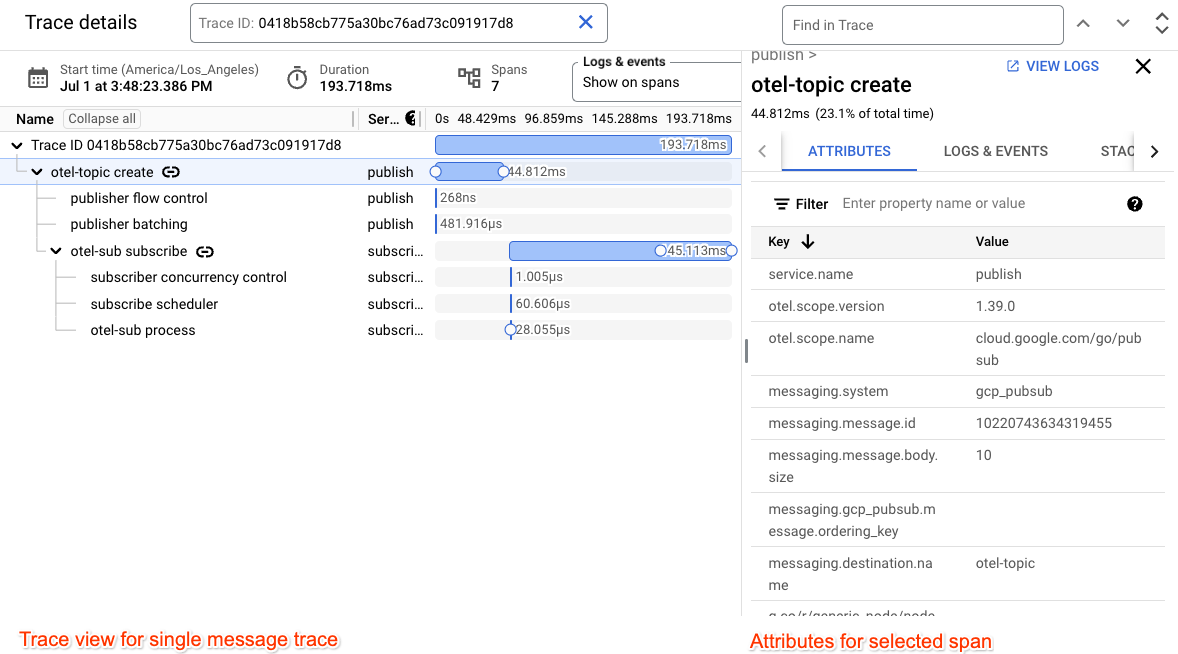
主要发布和订阅 span 会通过 span 事件进行扩充,这些事件与发出网络调用和完成网络调用的时间相对应。

排查常见问题
以下问题可能会导致跟踪记录出现问题:
- 您用于导出跟踪记录的服务帐号没有所需的
roles/cloudtrace.agent角色。 - 已达到 Cloud Trace 中摄取的 span 数量上限配额。
- 您的应用在未调用适当的 flush 函数的情况下终止。