נושאים להודעות ללא מוצא

יכולות להיות סיבות שונות לכך שמנויים לא יכולים לטפל בהודעות. לדוגמה, יכול להיות שיהיו בעיות זמניות באחזור הנתונים שנדרשים לעיבוד הודעה. או שההודעה היא בפורמט שהמנוי לא מצפה לו.

כדי לנהל הודעות שלא ניתן למסור שהאפליקציות הרשומות לא יכולות לאשר את קבלתן, Pub/Sub יכול להעביר אותן אל נושא להודעות ללא מוצא (שנקרא גם תור של הודעות שלא ניתן למסור).

לפני שמתחילים

  • יוצרים נושא להגדרת נושא של הודעות שלא ניתן למסור.

    לחלופין, אם תפעלו לפי כל ההוראות בדף הזה, תוכלו ליצור את הנושא בשלב הבא.

התפקידים הנדרשים

כדי לקבל את ההרשאות שנדרשות לניהול נושאים ומינויים, צריך לבקש מהאדמין להקצות לכם ב-IAM את התפקיד עריכה ב-Pub/Sub (roles/pubsub.editor) בפרויקט. כדי לקרוא הסבר על מתן תפקידים, ראו איך מנהלים את הגישה ברמת הפרויקט, התיקייה והארגון.

יכול להיות שאפשר לקבל את ההרשאות הנדרשות גם באמצעות תפקידים בהתאמה אישית או תפקידים מוגדרים מראש.

אפשר להגדיר בקרת גישה ברמת הפרויקט וברמת המשאב הספציפי. אפשר ליצור מינוי בפרויקט אחד ולצרף אותו לנושא שנמצא בפרויקט אחר. חשוב לוודא שיש לכם את ההרשאות הנדרשות לכל פרויקט.

איך פועלים נושאים להודעות ללא מוצא

אם אפליקציה רשומה לא יכולה לאשר קבלה של הודעה, מערכת Pub/Sub מנסה לשלוח אותה שוב עד שתאריך היעד לאישור הקבלה חלף או שתוקף ההודעה פג. אחרי מספר ניסיונות מסירה שהוגדר מראש, Pub/Sub יכול להעביר את ההודעה שלא ניתן למסור לנושא של הודעות שלא ניתן למסור.

כש-Pub/Sub מעביר הודעה שלא ניתן למסור, הוא עוטף את ההודעה המקורית בהודעה חדשה ומוסיף מאפיינים שמזהים את מינוי המקור. ההודעה נשלחת לנושא להודעות ללא מוצא שצוין. מינוי נפרד שמצורף לנושא להודעות ללא מוצא יכול לקבל את ההודעות המועברות האלה לצורך ניתוח וניפוי באגים אופליין.

איך מחושב מספר הניסיונות המקסימלי למסירה

מערכת Pub/Sub סופרת רק ניסיונות מסירה כשנושא להודעות ללא מוצא מוגדר בצורה נכונה וכולל את הרשאות IAM הנכונות.

מספר הניסיונות המקסימלי למסירה הוא משוער, כי Pub/Sub מעביר הודעות שלא ניתן למסור על בסיס מאמץ מרבי. יכול להיות שהשירות יעביר הודעה אחרי פחות ניסיונות מהמספר שהוגדר, או שהוא ינסה לשלוח אותה עוד כמה פעמים לפני ההעברה.

יכול להיות שמספר הניסיונות למסור הודעה שמתבצע מעקב אחריה יתאפס לאפס, במיוחד אם מדובר במינוי מסוג pull עם מנויים לא פעילים. כתוצאה מכך, יכול להיות שההודעות יימסרו ללקוח המנוי יותר פעמים ממספר הניסיונות המקסימלי שנקבע.

מאפיינים של נושא להודעות ללא מוצא

אפשר להגדיר את מאפייני המינוי הבאים בנושא להודעות ללא מוצא.

  • מספר מקסימלי של ניסיונות מסירה: ערך מספרי שמציין את מספר ניסיונות המסירה ש-Pub/Sub מבצע להודעה ספציפית. אם אפליקציה רשומה לא יכולה לאשר את ההודעה במסגרת מספר ניסיונות המסירה שהוגדר, ההודעה מועברת לנושא להודעות ללא מוצא.

    • ערך ברירת המחדל = 5
    • ערך מקסימלי = 100
    • ערך מינימלי = 5
  • פרויקט עם נושא להודעות ללא מוצא: אם הנושא להודעות ללא מוצא נמצא בפרויקט אחר מהמינוי, צריך לציין את הפרויקט עם הנושא להודעות ללא מוצא. הגדרת נושא להודעות ללא מוצא לנושא אחר מזה שמצורף אליו המינוי.

הגדרה של נושא להודעות ללא מוצא

השלבים הבאים מתארים את תהליך העבודה לשימוש בנושאי הודעות שלא נמסרו.

  1. יוצרים נושא להודעות ללא מוצא (לשימוש כנושא להודעות ללא מוצא).

  2. יוצרים מינוי לנושא להודעות ללא מוצא.

  3. מפעילים את האפשרות Dead lettering במינוי.

  4. מצרפים למינוי את הנושא שיצרתם קודם.

  5. מקצים את התפקידים הנדרשים לחשבון השירות של Pub/Sub כדי להשתמש בנושאי הודעות שלא נקלטו.

יצירת נושא לשימוש בנושאים של הודעות שלא ניתן למסור

אם כבר יצרתם נושא לשימוש במינוי, אתם יכולים לדלג על השלב הזה.

  1. נכנסים לדף Topics במסוף Google Cloud .

    לדף Topics

  2. לוחצים על יצירת נושא.

  3. מזינים מזהה נושא, לדוגמה, my-test-topic.

  4. משאירים את האפשרות של מינוי ברירת המחדל ולוחצים על יצירה.

הגדרת נושא להודעות ללא מוצא במינוי

אפשר להגדיר נושא להודעות ללא מוצא במינוי חדש או במינוי קיים.

הגדרת נושא להודעות ללא מוצא במינוי חדש

אפשר ליצור מינוי ולהגדיר נושא להודעות ללא מוצא באמצעותGoogle Cloud המסוף, Google Cloud CLI, ספריות הלקוח או Pub/Sub API.

המסוף

כדי ליצור מינוי ולהגדיר נושא להודעות ללא מוצא, מבצעים את השלבים הבאים:

  1. נכנסים לדף Subscriptions במסוף Google Cloud .

    אל הדף "מינויים"

  2. לוחצים על יצירת מינוי.

  3. מזינים את מזהה המינוי.

  4. בוחרים את הנושא שרוצים להשתמש בו עם המינוי. המינוי מקבל הודעות מהנושא. זה לא הנושא להודעות ללא מוצא. בוחרים את זה בשלב הבא.

  5. בקטע Dead lettering, בוחרים באפשרות Enable dead lettering.

  6. בוחרים נושא להודעות ללא מוצא מהתפריט הנפתח.

    אם לנושא להודעות ללא מוצא אין מינוי, המערכת תבקש מכם ליצור מינוי.

  7. בשדה Maximum delivery attempts (מספר ניסיונות המסירה המקסימלי), מציינים מספר שלם בין 5 ל-100.

  8. לוחצים על יצירה.

  9. לוחצים על חלונית הפרטים כדי לזהות פעולות לביצוע. אם לצד אחד מהפריטים מופיע סמל שגיאה , לוחצים על הפעולה לביצוע כדי לפתור את הבעיה.
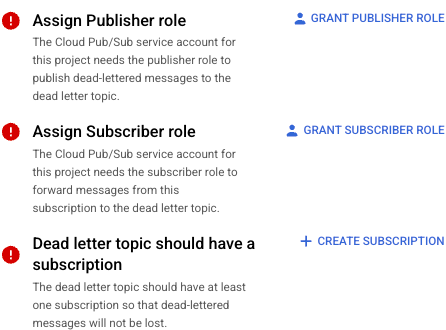
    כרטיסיית Dead Lettering עם כמה פעולות לביצוע.

gcloud

כדי ליצור מינוי ולהגדיר נושא להודעות ללא מוצא, משתמשים בפקודה gcloud pubsub subscriptions create:

gcloud pubsub subscriptions create subscription-id \
  --topic=topic-id \
  --dead-letter-topic=dead-letter-topic-name \
  [--max-delivery-attempts=max-delivery-attempts] \
  [--dead-letter-topic-project=dead-letter-topic-project]

C++‎

לפני שמנסים את הדוגמה הזו, צריך לפעול לפי הוראות ההגדרה של C++‎ במאמר תחילת העבודה: שימוש בספריות לקוח. מידע נוסף זמין במאמרי העזרה של Pub/Sub C++ API.

namespace pubsub = ::google::cloud::pubsub;
namespace pubsub_admin = ::google::cloud::pubsub_admin;
[](pubsub_admin::SubscriptionAdminClient client,
   std::string const& project_id, std::string const& topic_id,
   std::string const& subscription_id,
   std::string const& dead_letter_topic_id,
   int dead_letter_delivery_attempts) {
  google::pubsub::v1::Subscription request;
  request.set_name(
      pubsub::Subscription(project_id, subscription_id).FullName());
  request.set_topic(pubsub::Topic(project_id, topic_id).FullName());
  request.mutable_dead_letter_policy()->set_dead_letter_topic(
      pubsub::Topic(project_id, dead_letter_topic_id).FullName());
  request.mutable_dead_letter_policy()->set_max_delivery_attempts(
      dead_letter_delivery_attempts);
  auto sub = client.CreateSubscription(request);
  if (sub.status().code() == google::cloud::StatusCode::kAlreadyExists) {
    std::cout << "The subscription already exists\n";
    return;
  }
  if (!sub) throw std::move(sub).status();

  std::cout << "The subscription was successfully created: "
            << sub->DebugString() << "\n";

  std::cout << "It will forward dead letter messages to: "
            << sub->dead_letter_policy().dead_letter_topic() << "\n";

  std::cout << "After " << sub->dead_letter_policy().max_delivery_attempts()
            << " delivery attempts.\n";
}

C#‎

לפני שמנסים את הדוגמה הזו, צריך לפעול לפי הוראות ההגדרה של C# ‎ במאמר התחלה מהירה: שימוש בספריות לקוח. מידע נוסף מופיע במאמרי העזרה של Pub/Sub C# API.


using Google.Cloud.PubSub.V1;
using System;

public class CreateSubscriptionWithDeadLetterPolicySample
{
    public Subscription CreateSubscriptionWithDeadLetterPolicy(string projectId, string topicId, string subscriptionId, string deadLetterTopicId)
    {
        SubscriberServiceApiClient subscriber = SubscriberServiceApiClient.Create();
        // This is the subscription you want to create with a dead letter policy.
        var subscriptionName = SubscriptionName.FromProjectSubscription(projectId, subscriptionId);
        // This is an existing topic that you want to attach the subscription with dead letter policy to.
        var topicName = TopicName.FromProjectTopic(projectId, topicId);
        // This is an existing topic that the subscription with dead letter policy forwards dead letter messages to.
        var deadLetterTopic = TopicName.FromProjectTopic(projectId, deadLetterTopicId).ToString();
        var subscriptionRequest = new Subscription
        {
            SubscriptionName = subscriptionName,
            TopicAsTopicName = topicName,
            DeadLetterPolicy = new DeadLetterPolicy
            {
                DeadLetterTopic = deadLetterTopic,
                // The maximum number of times that the service attempts to deliver a
                // message before forwarding it to the dead letter topic. Must be [5-100].
                MaxDeliveryAttempts = 10
            },
            AckDeadlineSeconds = 30
        };

        var subscription = subscriber.CreateSubscription(subscriptionRequest);
        Console.WriteLine("Created subscription: " + subscription.SubscriptionName.SubscriptionId);
        Console.WriteLine($"It will forward dead letter messages to: {subscription.DeadLetterPolicy.DeadLetterTopic}");
        Console.WriteLine($"After {subscription.DeadLetterPolicy.MaxDeliveryAttempts} delivery attempts.");
        // Remember to attach a subscription to the dead letter topic because
        // messages published to a topic with no subscriptions are lost.
        return subscription;
    }
}

המשך

בדוגמה הבאה נעשה שימוש בגרסה הראשית של ספריית הלקוח Go Pub/Sub ‏ (v2). אם אתם עדיין משתמשים בספרייה v1, כדאי לעיין במדריך להעברת נתונים ל-v2. כדי לראות רשימה של דוגמאות קוד מגרסה 1, אפשר לעיין ב דוגמאות הקוד שהוצאו משימוש.

לפני שמנסים את הדוגמה הזו, צריך לפעול לפי הוראות ההגדרה של Go במאמר מדריך למתחילים: שימוש בספריות לקוח. מידע נוסף מופיע במאמרי העזרה של Pub/Sub Go API.

import (
	"context"
	"fmt"
	"io"

	"cloud.google.com/go/pubsub/v2"
	"cloud.google.com/go/pubsub/v2/apiv1/pubsubpb"
)

// createSubWithDeadLetter creates a subscription with a dead letter policy.
func createSubWithDeadLetter(w io.Writer, projectID, topic, subscription, fullyQualifiedDeadLetterTopic string) error {
	// projectID := "my-project-id"
	// topic := "projects/my-project-id/topics/my-topic"
	// subscription := "projects/my-project-id/subscriptions/my-sub"
	// fullyQualifiedDeadLetterTopic := "projects/my-project-id/topics/my-dead-letter-topic"
	ctx := context.Background()
	client, err := pubsub.NewClient(ctx, projectID)
	if err != nil {
		return fmt.Errorf("pubsub.NewClient: %w", err)
	}
	defer client.Close()

	_, err = client.SubscriptionAdminClient.CreateSubscription(ctx, &pubsubpb.Subscription{
		Name:  subscription,
		Topic: topic,
		DeadLetterPolicy: &pubsubpb.DeadLetterPolicy{
			DeadLetterTopic:     fullyQualifiedDeadLetterTopic,
			MaxDeliveryAttempts: 10,
		},
	})
	if err != nil {
		return fmt.Errorf("CreateSubscription: %w", err)
	}
	fmt.Fprintf(w, "Created subscription with dead letter topic: (%s)\n", fullyQualifiedDeadLetterTopic)
	fmt.Fprintln(w, "To process dead letter messages, remember to add a subscription to your dead letter topic.")
	return nil
}

Java

לפני שמנסים את הדוגמה הזו, צריך לפעול לפי הוראות ההגדרה של Java במאמר תחילת העבודה המהירה: שימוש בספריות לקוח. מידע נוסף מופיע במאמרי העזרה של Pub/Sub Java API.

import com.google.cloud.pubsub.v1.SubscriptionAdminClient;
import com.google.pubsub.v1.DeadLetterPolicy;
import com.google.pubsub.v1.ProjectSubscriptionName;
import com.google.pubsub.v1.ProjectTopicName;
import com.google.pubsub.v1.Subscription;
import java.io.IOException;

public class CreateSubscriptionWithDeadLetterPolicyExample {

  public static void main(String... args) throws Exception {
    // TODO(developer): Replace these variables before running the sample.
    String projectId = "your-project-id";
    // This is the subscription you want to create with a dead letter policy.
    String subscriptionId = "your-subscription-id";
    // This is an existing topic that you want to attach the subscription with dead letter policy
    // to.
    String topicId = "your-topic-id";
    // This is an existing topic that the subscription with dead letter policy forwards dead letter
    // messages to.
    String deadLetterTopicId = "your-dead-letter-topic-id";

    CreateSubscriptionWithDeadLetterPolicyExample.createSubscriptionWithDeadLetterPolicyExample(
        projectId, subscriptionId, topicId, deadLetterTopicId);
  }

  public static void createSubscriptionWithDeadLetterPolicyExample(
      String projectId, String subscriptionId, String topicId, String deadLetterTopicId)
      throws IOException {
    try (SubscriptionAdminClient subscriptionAdminClient = SubscriptionAdminClient.create()) {

      ProjectTopicName topicName = ProjectTopicName.of(projectId, topicId);
      ProjectSubscriptionName subscriptionName =
          ProjectSubscriptionName.of(projectId, subscriptionId);
      ProjectTopicName deadLetterTopicName = ProjectTopicName.of(projectId, deadLetterTopicId);

      DeadLetterPolicy deadLetterPolicy =
          DeadLetterPolicy.newBuilder()
              .setDeadLetterTopic(deadLetterTopicName.toString())
              // The maximum number of times that the service attempts to deliver a
              // message before forwarding it to the dead letter topic. Must be [5-100].
              .setMaxDeliveryAttempts(10)
              .build();

      Subscription request =
          Subscription.newBuilder()
              .setName(subscriptionName.toString())
              .setTopic(topicName.toString())
              .setDeadLetterPolicy(deadLetterPolicy)
              .build();

      Subscription subscription = subscriptionAdminClient.createSubscription(request);

      System.out.println("Created subscription: " + subscription.getName());
      System.out.println(
          "It will forward dead letter messages to: "
              + subscription.getDeadLetterPolicy().getDeadLetterTopic());
      System.out.println(
          "After "
              + subscription.getDeadLetterPolicy().getMaxDeliveryAttempts()
              + " delivery attempts.");
      // Remember to attach a subscription to the dead letter topic because
      // messages published to a topic with no subscriptions are lost.
    }
  }
}

Node.js

לפני שמנסים את הדוגמה הזו, צריך לפעול לפי הוראות ההגדרה של Node.js במאמר תחילת העבודה: שימוש בספריות לקוח. מידע נוסף מופיע במאמרי העזרה של Pub/Sub Node.js API.

/**
 * TODO(developer): Uncomment these variables before running the sample.
 */
// const topicNameOrId = 'YOUR_TOPIC_NAME_OR_ID';
// const subscriptionNameOrId = 'YOUR_SUBSCRIPTION_NAME_OR_ID';
// const deadLetterTopicNameOrId = 'YOUR_DEAD_LETTER_TOPIC_NAME_OR_ID';

// Imports the Google Cloud client library
const {PubSub} = require('@google-cloud/pubsub');

// Creates a client; cache this for further use
const pubSubClient = new PubSub();

async function createSubscriptionWithDeadLetterPolicy(
  topicNameOrId,
  subscriptionNameOrId,
  deadLetterTopicNameOrId,
) {
  // Creates a new subscription
  const options = {
    deadLetterPolicy: {
      deadLetterTopic: pubSubClient.topic(deadLetterTopicNameOrId).name,
      maxDeliveryAttempts: 10,
    },
  };
  await pubSubClient
    .topic(topicNameOrId)
    .createSubscription(subscriptionNameOrId, options);
  console.log(
    `Created subscription ${subscriptionNameOrId} with dead letter topic ${deadLetterTopicNameOrId}.`,
  );
  console.log(
    'To process dead letter messages, remember to add a subscription to your dead letter topic.',
  );
}

Node.js

לפני שמנסים את הדוגמה הזו, צריך לפעול לפי הוראות ההגדרה של Node.js במאמר תחילת העבודה: שימוש בספריות לקוח. מידע נוסף מופיע במאמרי העזרה של Pub/Sub Node.js API.

/**
 * TODO(developer): Uncomment these variables before running the sample.
 */
// const topicNameOrId = 'YOUR_TOPIC_NAME_OR_ID';
// const subscriptionNameOrId = 'YOUR_SUBSCRIPTION_NAME_OR_ID';
// const deadLetterTopicNameOrId = 'YOUR_DEAD_LETTER_TOPIC_NAME_OR_ID';

// Imports the Google Cloud client library
import {PubSub, CreateSubscriptionOptions} from '@google-cloud/pubsub';

// Creates a client; cache this for further use
const pubSubClient = new PubSub();

async function createSubscriptionWithDeadLetterPolicy(
  topicNameOrId: string,
  subscriptionNameOrId: string,
  deadLetterTopicNameOrId: string,
) {
  // Creates a new subscription
  const options: CreateSubscriptionOptions = {
    deadLetterPolicy: {
      deadLetterTopic: pubSubClient.topic(deadLetterTopicNameOrId).name,
      maxDeliveryAttempts: 10,
    },
  };
  await pubSubClient
    .topic(topicNameOrId)
    .createSubscription(subscriptionNameOrId, options);
  console.log(
    `Created subscription ${subscriptionNameOrId} with dead letter topic ${deadLetterTopicNameOrId}.`,
  );
  console.log(
    'To process dead letter messages, remember to add a subscription to your dead letter topic.',
  );
}

PHP

לפני שמנסים את הדוגמה הזו, צריך לפעול לפי הוראות ההגדרה של PHP במאמר התחלה מהירה: שימוש בספריות לקוח. מידע נוסף מופיע במאמרי העזרה של Pub/Sub PHP API.

use Google\Cloud\PubSub\PubSubClient;

/**
 * Creates a Pub/Sub subscription with dead letter policy enabled.
 *
 * @param string $projectId  The Google project ID.
 * @param string $topicName  The Pub/Sub topic name.
 * @param string $subscriptionName  The Pub/Sub subscription name.
 * @param string $deadLetterTopicName The Pub/Sub topic to use for dead letter policy.
 */
function dead_letter_create_subscription($projectId, $topicName, $subscriptionName, $deadLetterTopicName)
{
    $pubsub = new PubSubClient([
        'projectId' => $projectId,
    ]);

    $topic = $pubsub->topic($topicName);
    $deadLetterTopic = $pubsub->topic($deadLetterTopicName);

    $subscription = $topic->subscribe($subscriptionName, [
        'deadLetterPolicy' => [
            'deadLetterTopic' => $deadLetterTopic
        ]
    ]);

    printf(
        'Subscription %s created with dead letter topic %s' . PHP_EOL,
        $subscription->name(),
        $deadLetterTopic->name()
    );
}

Python

לפני שמנסים את הדוגמה הזו, צריך לפעול לפי הוראות ההגדרה של Python במאמר מדריך למתחילים: שימוש בספריות לקוח. מידע נוסף מופיע במאמרי העזרה של ה-API בשפת Python של Pub/Sub.

from google.cloud import pubsub_v1
from google.cloud.pubsub_v1.types import DeadLetterPolicy

# TODO(developer)
# project_id = "your-project-id"
# endpoint = "https://my-test-project.appspot.com/push"
# TODO(developer): This is an existing topic that the subscription
# with dead letter policy is attached to.
# topic_id = "your-topic-id"
# TODO(developer): This is an existing subscription with a dead letter policy.
# subscription_id = "your-subscription-id"
# TODO(developer): This is an existing dead letter topic that the subscription
# with dead letter policy will forward dead letter messages to.
# dead_letter_topic_id = "your-dead-letter-topic-id"
# TODO(developer): This is the maximum number of delivery attempts allowed
# for a message before it gets delivered to a dead letter topic.
# max_delivery_attempts = 5

publisher = pubsub_v1.PublisherClient()
subscriber = pubsub_v1.SubscriberClient()

topic_path = publisher.topic_path(project_id, topic_id)
subscription_path = subscriber.subscription_path(project_id, subscription_id)
dead_letter_topic_path = publisher.topic_path(project_id, dead_letter_topic_id)

dead_letter_policy = DeadLetterPolicy(
    dead_letter_topic=dead_letter_topic_path,
    max_delivery_attempts=max_delivery_attempts,
)

with subscriber:
    request = {
        "name": subscription_path,
        "topic": topic_path,
        "dead_letter_policy": dead_letter_policy,
    }
    subscription = subscriber.create_subscription(request)

print(f"Subscription created: {subscription.name}")
print(
    f"It will forward dead letter messages to: {subscription.dead_letter_policy.dead_letter_topic}."
)
print(
    f"After {subscription.dead_letter_policy.max_delivery_attempts} delivery attempts."
)

Ruby

בדוגמה הבאה נעשה שימוש בספריית הלקוח של Ruby Pub/Sub בגרסה 3. אם אתם עדיין משתמשים בספרייה v2, כדאי לעיין במדריך להעברה ל-v3. כדי לראות רשימה של דוגמאות קוד של Ruby v2, אפשר לעיין ב דוגמאות הקוד שהוצאו משימוש.

לפני שמנסים את הדוגמה הזו, צריך לפעול לפי הוראות ההגדרה של Ruby במאמר תחילת העבודה המהירה: שימוש בספריות לקוח. מידע נוסף מופיע במאמרי העזרה של Pub/Sub Ruby API.

Ruby

לפני שמנסים את הדוגמה הזו, צריך לפעול לפי Rubyהוראות ההגדרה במאמר התחלה מהירה של Pub/Sub באמצעות ספריות לקוח. מידע נוסף מופיע במאמרי העזרה של Pub/Sub Ruby API.

כדי לבצע אימות ב-Pub/Sub, צריך להגדיר את Application Default Credentials. מידע נוסף זמין במאמר הגדרת אימות לסביבת פיתוח מקומית.

# topic_id             = "your-topic-id"
# subscription_id      = "your-subscription-id"
# dead_letter_topic_id = "your-dead-letter-topic-id"

pubsub = Google::Cloud::PubSub.new
subscription_admin = pubsub.subscription_admin

subscription = subscription_admin.create_subscription \
  name: pubsub.subscription_path(subscription_id),
  topic: pubsub.topic_path(topic_id),
  dead_letter_policy: {
    dead_letter_topic: pubsub.topic_path(dead_letter_topic_id),
    max_delivery_attempts: 10
  }

puts "Created subscription #{subscription_id} with dead letter topic " \
     "#{dead_letter_topic_id}."
puts "To process dead letter messages, remember to add a subscription to " \
     "your dead letter topic."

הגדרת נושא להודעות ללא מוצא למינוי קיים

אפשר לעדכן מינוי ולהגדיר נושא להודעות ללא מוצא באמצעותGoogle Cloud המסוף, ה-CLI של gcloud, ספריות הלקוח או Pub/Sub API.

המסוף

כדי לעדכן מינוי ולהגדיר נושא להודעות ללא מוצא, מבצעים את השלבים הבאים.

  1. נכנסים לדף Subscriptions במסוף Google Cloud .

    אל הדף "מינויים"

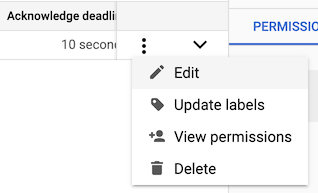
  2. לצד המינוי שרוצים לעדכן, לוחצים על פעולות נוספות.

  3. בתפריט ההקשר, לוחצים על עריכה.

    תפריט ההקשר עם האפשרות 'עריכה' מודגשת.

  4. בקטע Dead lettering, בוחרים באפשרות Enable dead lettering.

  5. בוחרים נושא להודעות ללא מוצא מהתפריט הנפתח.

    אם לנושא להודעות ללא מוצא אין מינוי, המערכת תבקש מכם ליצור מינוי.

  6. בשדה Maximum delivery attempts (מספר ניסיונות המסירה המקסימלי), מציינים מספר שלם בין 5 ל-100.

  7. לוחצים על עדכון.

  8. לוחצים על חלונית הפרטים כדי לזהות פעולות לביצוע. אם לצד אחד מהפריטים מופיע סמל שגיאה , לוחצים על הפעולה לביצוע כדי לפתור את הבעיה.

    כרטיסיית Dead Lettering עם כמה פעולות לביצוע.

gcloud

כדי לעדכן מינוי ולהגדיר נושא להודעות ללא מוצא, משתמשים בפקודה gcloud pubsub subscriptions update:

gcloud pubsub subscriptions update subscription-id \
  --dead-letter-topic=dead-letter-topic-name \
  [--max-delivery-attempts=max-delivery-attempts] \
  [--dead-letter-topic-project=dead-letter-topic-project]

C++‎

לפני שמנסים את הדוגמה הזו, צריך לפעול לפי הוראות ההגדרה של C++‎ במאמר תחילת העבודה: שימוש בספריות לקוח. מידע נוסף זמין במאמרי העזרה של Pub/Sub C++ API.

namespace pubsub_admin = ::google::cloud::pubsub_admin;
namespace pubsub = ::google::cloud::pubsub;
[](pubsub_admin::SubscriptionAdminClient client,
   std::string const& project_id, std::string const& subscription_id,
   std::string const& dead_letter_topic_id,
   int dead_letter_delivery_attempts) {
  google::pubsub::v1::UpdateSubscriptionRequest request;
  request.mutable_subscription()->set_name(
      pubsub::Subscription(project_id, subscription_id).FullName());
  request.mutable_subscription()
      ->mutable_dead_letter_policy()
      ->set_dead_letter_topic(
          pubsub::Topic(project_id, dead_letter_topic_id).FullName());
  request.mutable_subscription()
      ->mutable_dead_letter_policy()
      ->set_max_delivery_attempts(dead_letter_delivery_attempts);
  *request.mutable_update_mask()->add_paths() = "dead_letter_policy";
  auto sub = client.UpdateSubscription(request);
  if (!sub) throw std::move(sub).status();

  std::cout << "The subscription has been updated to: " << sub->DebugString()
            << "\n";

  std::cout << "It will forward dead letter messages to: "
            << sub->dead_letter_policy().dead_letter_topic() << "\n";

  std::cout << "After " << sub->dead_letter_policy().max_delivery_attempts()
            << " delivery attempts.\n";
}

C#‎

לפני שמנסים את הדוגמה הזו, צריך לפעול לפי הוראות ההגדרה של C# ‎ במאמר התחלה מהירה: שימוש בספריות לקוח. מידע נוסף מופיע במאמרי העזרה של Pub/Sub C# API.


using Google.Cloud.PubSub.V1;
using Google.Protobuf.WellKnownTypes;

public class UpdateDeadLetterPolicySample
{
    public Subscription UpdateDeadLetterPolicy(string projectId, string topicId, string subscriptionId, string deadLetterTopicId)
    {
        SubscriberServiceApiClient subscriber = SubscriberServiceApiClient.Create();
        // This is an existing topic that the subscription with dead letter policy is attached to.
        TopicName topicName = TopicName.FromProjectTopic(projectId, topicId);
        // This is an existing subscription with a dead letter policy.
        SubscriptionName subscriptionName = SubscriptionName.FromProjectSubscription(projectId, subscriptionId);
        // This is an existing dead letter topic that the subscription with dead letter policy forwards
        // dead letter messages to.
        var deadLetterTopic = TopicName.FromProjectTopic(projectId, deadLetterTopicId).ToString();


        // Construct the subscription with the dead letter policy you expect to have after the update.
        // Here, values in the required fields (name, topic) help identify the subscription.
        var subscription = new Subscription
        {
            SubscriptionName = subscriptionName,
            TopicAsTopicName = topicName,
            DeadLetterPolicy = new DeadLetterPolicy
            {
                DeadLetterTopic = deadLetterTopic,
                MaxDeliveryAttempts = 20,
            }
        };

        var request = new UpdateSubscriptionRequest
        {
            Subscription = subscription,
            // Construct a field mask to indicate which field to update in the subscription.
            UpdateMask = new FieldMask { Paths = { "dead_letter_policy" } }
        };
        var updatedSubscription = subscriber.UpdateSubscription(request);
        return updatedSubscription;
    }
}

המשך

בדוגמה הבאה נעשה שימוש בגרסה הראשית של ספריית הלקוח Go Pub/Sub ‏ (v2). אם אתם עדיין משתמשים בספרייה v1, כדאי לעיין במדריך להעברת נתונים ל-v2. כדי לראות רשימה של דוגמאות קוד מגרסה 1, אפשר לעיין ב דוגמאות הקוד שהוצאו משימוש.

לפני שמנסים את הדוגמה הזו, צריך לפעול לפי הוראות ההגדרה של Go במאמר מדריך למתחילים: שימוש בספריות לקוח. מידע נוסף מופיע במאמרי העזרה של Pub/Sub Go API.

import (
	"context"
	"fmt"
	"io"

	"cloud.google.com/go/pubsub/v2"
	"cloud.google.com/go/pubsub/v2/apiv1/pubsubpb"
	"google.golang.org/protobuf/types/known/fieldmaskpb"
)

// updateDeadLetter updates an existing subscription with a dead letter policy.
func updateDeadLetter(w io.Writer, projectID, subscription, deadLetterTopic string) error {
	// projectID := "my-project-id"
	// subID := "projects/my-project-id/subscriptions/my-sub"
	// deadLetterTopic := "projects/my-project-id/topics/my-dead-letter-topic"
	ctx := context.Background()
	client, err := pubsub.NewClient(ctx, projectID)
	if err != nil {
		return fmt.Errorf("pubsub.NewClient: %w", err)
	}
	defer client.Close()

	sub, err := client.SubscriptionAdminClient.UpdateSubscription(ctx, &pubsubpb.UpdateSubscriptionRequest{
		Subscription: &pubsubpb.Subscription{
			Name: subscription,
			DeadLetterPolicy: &pubsubpb.DeadLetterPolicy{
				MaxDeliveryAttempts: 20,
				DeadLetterTopic:     deadLetterTopic,
			},
		},
		UpdateMask: &fieldmaskpb.FieldMask{
			Paths: []string{"dead_letter_policy"},
		},
	})
	if err != nil {
		return fmt.Errorf("UpdateSubscription: %w", err)
	}
	fmt.Fprintf(w, "Updated subscription: %+v\n", sub)
	return nil
}

Java

לפני שמנסים את הדוגמה הזו, צריך לפעול לפי הוראות ההגדרה של Java במאמר תחילת העבודה המהירה: שימוש בספריות לקוח. מידע נוסף מופיע במאמרי העזרה של Pub/Sub Java API.


import com.google.cloud.pubsub.v1.SubscriptionAdminClient;
import com.google.protobuf.FieldMask;
import com.google.pubsub.v1.DeadLetterPolicy;
import com.google.pubsub.v1.Subscription;
import com.google.pubsub.v1.SubscriptionName;
import com.google.pubsub.v1.TopicName;
import com.google.pubsub.v1.UpdateSubscriptionRequest;
import java.io.IOException;

public class UpdateDeadLetterPolicyExample {
  public static void main(String... args) throws Exception {
    // TODO(developer): Replace these variables before running the sample.
    String projectId = "your-project-id";
    // This is an existing subscription with a dead letter policy.
    String subscriptionId = "your-subscription-id";
    // This is an existing topic that the subscription with dead letter policy is attached to.
    String topicId = "your-topic-id";
    // This is an existing dead letter topic that the subscription with dead letter policy forwards
    // dead letter messages to.
    String deadLetterTopicId = "your-dead-letter-topic-id";

    UpdateDeadLetterPolicyExample.updateDeadLetterPolicyExample(
        projectId, subscriptionId, topicId, deadLetterTopicId);
  }

  public static void updateDeadLetterPolicyExample(
      String projectId, String subscriptionId, String topicId, String deadLetterTopicId)
      throws IOException {
    try (SubscriptionAdminClient subscriptionAdminClient = SubscriptionAdminClient.create()) {

      SubscriptionName subscriptionName = SubscriptionName.of(projectId, subscriptionId);

      System.out.println(
          "Before: " + subscriptionAdminClient.getSubscription(subscriptionName).getAllFields());

      TopicName topicName = TopicName.of(projectId, topicId);
      TopicName deadLetterTopicName = TopicName.of(projectId, deadLetterTopicId);

      // Construct the dead letter policy you expect to have after the update.
      DeadLetterPolicy deadLetterPolicy =
          DeadLetterPolicy.newBuilder()
              .setDeadLetterTopic(deadLetterTopicName.toString())
              .setMaxDeliveryAttempts(20)
              .build();

      // Construct the subscription with the dead letter policy you expect to have
      // after the update. Here, values in the required fields (name, topic) help
      // identify the subscription.
      Subscription subscription =
          Subscription.newBuilder()
              .setName(subscriptionName.toString())
              .setTopic(topicName.toString())
              .setDeadLetterPolicy(deadLetterPolicy)
              .build();

      // Construct a field mask to indicate which field to update in the subscription.
      FieldMask updateMask =
          FieldMask.newBuilder().addPaths("dead_letter_policy.max_delivery_attempts").build();

      UpdateSubscriptionRequest request =
          UpdateSubscriptionRequest.newBuilder()
              .setSubscription(subscription)
              .setUpdateMask(updateMask)
              .build();

      Subscription response = subscriptionAdminClient.updateSubscription(request);

      System.out.println("After: " + response.getAllFields());
      System.out.println(
          "Max delivery attempts is now "
              + response.getDeadLetterPolicy().getMaxDeliveryAttempts());
    }
  }
}

Node.js

לפני שמנסים את הדוגמה הזו, צריך לפעול לפי הוראות ההגדרה של Node.js במאמר תחילת העבודה: שימוש בספריות לקוח. מידע נוסף מופיע במאמרי העזרה של Pub/Sub Node.js API.

/**
 * TODO(developer): Uncomment these variables before running the sample.
 */
// const topicNameOrId = 'YOUR_TOPIC_NAME_OR_ID';
// const subscriptionNameOrId = 'YOUR_SUBSCRIPTION_NAME_OR_ID';

// Imports the Google Cloud client library
const {PubSub} = require('@google-cloud/pubsub');

// Creates a client; cache this for further use
const pubSubClient = new PubSub();

async function updateDeadLetterPolicy(topicNameOrId, subscriptionNameOrId) {
  const metadata = {
    deadLetterPolicy: {
      deadLetterTopic: pubSubClient.topic(topicNameOrId).name,
      maxDeliveryAttempts: 15,
    },
  };

  await pubSubClient
    .topic(topicNameOrId)
    .subscription(subscriptionNameOrId)
    .setMetadata(metadata);

  console.log('Max delivery attempts updated successfully.');
}

PHP

לפני שמנסים את הדוגמה הזו, צריך לפעול לפי הוראות ההגדרה של PHP במאמר התחלה מהירה: שימוש בספריות לקוח. מידע נוסף מופיע במאמרי העזרה של Pub/Sub PHP API.

use Google\Cloud\PubSub\PubSubClient;

/**
 * Set the dead letter policy on an existing subscription.
 *
 * @param string $projectId  The Google project ID.
 * @param string $topicName  The Pub/Sub topic name.
 * @param string $deadLetterTopicName The Pub/Sub topic to use for dead letter policy.
 */
function dead_letter_update_subscription(
    string $projectId,
    string $topicName,
    string $subscriptionName,
    string $deadLetterTopicName
): void {
    $pubsub = new PubSubClient([
        'projectId' => $projectId,
    ]);

    $topic = $pubsub->topic($topicName);
    $deadLetterTopic = $pubsub->topic($deadLetterTopicName);

    $subscription = $topic->subscription($subscriptionName);
    $subscription->update([
        'deadLetterPolicy' => [
            'deadLetterTopic' => $deadLetterTopic
        ]
    ]);

    printf(
        'Subscription %s updated with dead letter topic %s' . PHP_EOL,
        $subscription->name(),
        $deadLetterTopic->name()
    );
}

Python

לפני שמנסים את הדוגמה הזו, צריך לפעול לפי הוראות ההגדרה של Python במאמר מדריך למתחילים: שימוש בספריות לקוח. מידע נוסף מופיע במאמרי העזרה של ה-API בשפת Python של Pub/Sub.

from google.cloud import pubsub_v1
from google.cloud.pubsub_v1.types import DeadLetterPolicy, FieldMask

# TODO(developer)
# project_id = "your-project-id"
# TODO(developer): This is an existing topic that the subscription
# with dead letter policy is attached to.
# topic_id = "your-topic-id"
# TODO(developer): This is an existing subscription with a dead letter policy.
# subscription_id = "your-subscription-id"
# TODO(developer): This is an existing dead letter topic that the subscription
# with dead letter policy will forward dead letter messages to.
# dead_letter_topic_id = "your-dead-letter-topic-id"
# TODO(developer): This is the maximum number of delivery attempts allowed
# for a message before it gets delivered to a dead letter topic.
# max_delivery_attempts = 5

publisher = pubsub_v1.PublisherClient()
subscriber = pubsub_v1.SubscriberClient()

topic_path = publisher.topic_path(project_id, topic_id)
subscription_path = subscriber.subscription_path(project_id, subscription_id)
dead_letter_topic_path = publisher.topic_path(project_id, dead_letter_topic_id)

subscription_before_update = subscriber.get_subscription(
    request={"subscription": subscription_path}
)
print(f"Before the update: {subscription_before_update}.")

# Indicates which fields in the provided subscription to update.
update_mask = FieldMask(paths=["dead_letter_policy"])

# Construct a dead letter policy you expect to have after the update.
dead_letter_policy = DeadLetterPolicy(
    dead_letter_topic=dead_letter_topic_path,
    max_delivery_attempts=max_delivery_attempts,
)

# Construct the subscription with the dead letter policy you expect to have
# after the update. Here, values in the required fields (name, topic) help
# identify the subscription.
subscription = pubsub_v1.types.Subscription(
    name=subscription_path,
    topic=topic_path,
    dead_letter_policy=dead_letter_policy,
)

with subscriber:
    subscription_after_update: gapic_types.Subscription = (
        subscriber.update_subscription(
            request={"subscription": subscription, "update_mask": update_mask}
        )
    )

print(f"After the update: {subscription_after_update}.")

Ruby

בדוגמה הבאה נעשה שימוש בספריית הלקוח של Ruby Pub/Sub בגרסה 3. אם אתם עדיין משתמשים בספרייה v2, כדאי לעיין במדריך להעברה ל-v3. כדי לראות רשימה של דוגמאות קוד של Ruby v2, אפשר לעיין ב דוגמאות הקוד שהוצאו משימוש.

לפני שמנסים את הדוגמה הזו, צריך לפעול לפי הוראות ההגדרה של Ruby במאמר תחילת העבודה המהירה: שימוש בספריות לקוח. מידע נוסף מופיע במאמרי העזרה של Pub/Sub Ruby API.

Ruby

לפני שמנסים את הדוגמה הזו, צריך לפעול לפי Rubyהוראות ההגדרה במאמר התחלה מהירה של Pub/Sub באמצעות ספריות לקוח. מידע נוסף מופיע במאמרי העזרה של Pub/Sub Ruby API.

כדי לבצע אימות ב-Pub/Sub, צריך להגדיר את Application Default Credentials. מידע נוסף זמין במאמר הגדרת אימות לסביבת פיתוח מקומית.

# subscription_id       = "your-subscription-id"
# role                  = "roles/pubsub.publisher"
# service_account_email =
# "serviceAccount:account_name@project_name.iam.gserviceaccount.com"

pubsub = Google::Cloud::PubSub.new
subscription_admin = pubsub.subscription_admin

subscription = subscription_admin.get_subscription \
  subscription: pubsub.subscription_path(subscription_id)
subscription.dead_letter_policy.max_delivery_attempts = 20

subscription_admin.update_subscription subscription: subscription,
                                       update_mask: {
                                         paths: ["dead_letter_policy"]
                                       }

puts "Max delivery attempts is now " \
     "#{subscription.dead_letter_policy.max_delivery_attempts}."

הקצאת תפקידי IAM לשימוש בנושאי הודעות שלא נקראו

כדי להעביר הודעות שלא ניתן למסור לנושא להודעות ללא מוצא, ל-Pub/Sub צריכות להיות הרשאות לבצע את הפעולות הבאות:

  • פרסום הודעות בנושא.
  • מאשרים את ההודעות, והן מוסרות מהמינוי.

‫Pub/Sub יוצרת ומנהלת חשבון שירות לכל פרויקט: service-project-number@gcp-sa-pubsub.iam.gserviceaccount.com. כדי להעניק הרשאות להעברה, צריך להקצות לחשבון השירות הזה תפקידים של מפרסם ומנוי.

המסוף

כדי להעניק ל-Pub/Sub הרשאה לפרסם הודעות בנושא להודעות ללא מוצא, מבצעים את השלבים הבאים:

  1. נכנסים לדף Subscriptions במסוף Google Cloud .

    אל הדף "מינויים"

  2. לוחצים על שם המינוי שכולל את נושא להודעות ללא מוצא.

  3. לוחצים על הכרטיסייה Dead lettering (העברת מכתבים שלא נמסרו).

  4. כדי להקצות תפקיד של בעל אפליקציה, לוחצים על הענקת תפקיד של בעל אפליקציה. אם תפקיד בעל התוכן הדיגיטלי הוקצה בהצלחה, יופיע סימן וי כחול .

  5. כדי להקצות תפקיד למנוי, לוחצים על הקצאת תפקיד למנוי. אם תפקיד בעל התוכן הדיגיטלי הוקצה בהצלחה, יופיע סימן וי כחול .

gcloud

כדי להעניק ל-Pub/Sub הרשאה לפרסם הודעות בנושא להודעות ללא מוצא, מריצים את הפקודה הבאה:

PUBSUB_SERVICE_ACCOUNT="service-project-number@gcp-sa-pubsub.iam.gserviceaccount.com"

gcloud pubsub topics add-iam-policy-binding dead-letter-topic-name \
  --member="serviceAccount:$PUBSUB_SERVICE_ACCOUNT"\
  --role="roles/pubsub.publisher"

כדי לתת ל-Pub/Sub הרשאה לאשר קבלת הודעות שהועברו ולא ניתן היה למסור אותן, מריצים את הפקודה הבאה:

PUBSUB_SERVICE_ACCOUNT="service-project-number@gcp-sa-pubsub.iam.gserviceaccount.com"

gcloud pubsub subscriptions add-iam-policy-binding subscription-id \
  --member="serviceAccount:$PUBSUB_SERVICE_ACCOUNT"\
  --role="roles/pubsub.subscriber"

מעקב אחרי ניסיונות מסירה

אחרי שמפעילים נושא להודעות ללא מוצא במינוי, לכל הודעה מהמינוי הזה יש שדה שמציין את מספר ניסיונות המסירה:

  • הודעות שמתקבלות ממינוי שליפה כוללות את השדה delivery_attempt.

  • הודעות שמתקבלות ממינוי דחיפה כוללות את השדה deliveryAttempt.

בדוגמאות הבאות אפשר לראות איך מקבלים את מספר הניסיונות למסירה:

C++‎

לפני שמנסים את הדוגמה הזו, צריך לפעול לפי הוראות ההגדרה של C++‎ במאמר תחילת העבודה: שימוש בספריות לקוח. מידע נוסף זמין במאמרי העזרה של Pub/Sub C++ API.

namespace pubsub = ::google::cloud::pubsub;
auto sample = [](pubsub::Subscriber subscriber) {
  return subscriber.Subscribe(
      [&](pubsub::Message const& m, pubsub::AckHandler h) {
        std::cout << "Received message " << m << "\n";
        std::cout << "Delivery attempt: " << h.delivery_attempt() << "\n";
        std::move(h).ack();
        PleaseIgnoreThisSimplifiesTestingTheSamples();
      });
};

C#‎

לפני שמנסים את הדוגמה הזו, צריך לפעול לפי הוראות ההגדרה של C# ‎ במאמר התחלה מהירה: שימוש בספריות לקוח. מידע נוסף מופיע במאמרי העזרה של Pub/Sub C# API.


using Google.Cloud.PubSub.V1;
using System.Threading;
using System.Threading.Tasks;

public class PullMessagesAsyncWithDeliveryAttemptsSample
{
    public async Task<int> PullMessagesAsyncWithDeliveryAttempts(string projectId, string subscriptionId, bool acknowledge)
    {
        // This is an existing subscription with a dead letter policy.
        SubscriptionName subscriptionName = SubscriptionName.FromProjectSubscription(projectId, subscriptionId);

        SubscriberClient subscriber = await SubscriberClient.CreateAsync(subscriptionName);

        int deliveryAttempt = 0;
        Task startTask = subscriber.StartAsync((PubsubMessage message, CancellationToken cancel) =>
        {
            string text = message.Data.ToStringUtf8();
            System.Console.WriteLine($"Delivery Attempt: {message.GetDeliveryAttempt()}");
            if (message.GetDeliveryAttempt() != null)
            {
                deliveryAttempt = message.GetDeliveryAttempt().Value;
            }
            return Task.FromResult(acknowledge ? SubscriberClient.Reply.Ack : SubscriberClient.Reply.Nack);
        });
        // Run for 7 seconds.
        await Task.Delay(7000);
        await subscriber.StopAsync(CancellationToken.None);
        // Lets make sure that the start task finished successfully after the call to stop.
        await startTask;
        return deliveryAttempt;
    }
}

המשך

בדוגמה הבאה נעשה שימוש בגרסה הראשית של ספריית הלקוח Go Pub/Sub ‏ (v2). אם אתם עדיין משתמשים בספרייה v1, כדאי לעיין במדריך להעברת נתונים ל-v2. כדי לראות רשימה של דוגמאות קוד מגרסה 1, אפשר לעיין ב דוגמאות הקוד שהוצאו משימוש.

לפני שמנסים את הדוגמה הזו, צריך לפעול לפי הוראות ההגדרה של Go במאמר מדריך למתחילים: שימוש בספריות לקוח. מידע נוסף מופיע במאמרי העזרה של Pub/Sub Go API.

import (
	"context"
	"fmt"
	"io"
	"time"

	"cloud.google.com/go/pubsub/v2"
)

func pullMsgsDeadLetterDeliveryAttempt(w io.Writer, projectID, subID string) error {
	// projectID := "my-project-id"
	// subID := "my-sub"
	ctx := context.Background()
	client, err := pubsub.NewClient(ctx, projectID)
	if err != nil {
		return fmt.Errorf("pubsub.NewClient: %w", err)
	}
	defer client.Close()

	// Receive messages for 10 seconds, which simplifies testing.
	// Comment this out in production, since `Receive` should
	// be used as a long running operation.
	ctx, cancel := context.WithTimeout(ctx, 10*time.Second)
	defer cancel()

	// client.Subscriber can be passed a subscription ID (e.g. "my-sub") or
	// a fully qualified name (e.g. "projects/my-project/subscriptions/my-sub").
	// If a subscription ID is provided, the project ID from the client is used.
	sub := client.Subscriber(subID)
	err = sub.Receive(ctx, func(_ context.Context, msg *pubsub.Message) {
		// When dead lettering is enabled, the delivery attempt field is a pointer to the
		// the number of times the service has attempted to delivery a message.
		// Otherwise, the field is nil.
		if msg.DeliveryAttempt != nil {
			fmt.Fprintf(w, "message: %s, delivery attempts: %d", msg.Data, *msg.DeliveryAttempt)
		}
		msg.Ack()
	})
	if err != nil {
		return fmt.Errorf("got error in Receive: %w", err)
	}
	return nil
}

Java

לפני שמנסים את הדוגמה הזו, צריך לפעול לפי הוראות ההגדרה של Java במאמר תחילת העבודה המהירה: שימוש בספריות לקוח. מידע נוסף מופיע במאמרי העזרה של Pub/Sub Java API.


import com.google.cloud.pubsub.v1.AckReplyConsumer;
import com.google.cloud.pubsub.v1.MessageReceiver;
import com.google.cloud.pubsub.v1.Subscriber;
import com.google.pubsub.v1.ProjectSubscriptionName;
import com.google.pubsub.v1.PubsubMessage;
import java.util.concurrent.TimeUnit;
import java.util.concurrent.TimeoutException;

public class ReceiveMessagesWithDeliveryAttemptsExample {

  public static void main(String... args) throws Exception {
    // TODO(developer): Replace these variables before running the sample.
    String projectId = "your-project-id";
    // This is an existing subscription with a dead letter policy.
    String subscriptionId = "your-subscription-id";

    ReceiveMessagesWithDeliveryAttemptsExample.receiveMessagesWithDeliveryAttemptsExample(
        projectId, subscriptionId);
  }

  public static void receiveMessagesWithDeliveryAttemptsExample(
      String projectId, String subscriptionId) {

    ProjectSubscriptionName subscriptionName =
        ProjectSubscriptionName.of(projectId, subscriptionId);

    // Instantiate an asynchronous message receiver.
    MessageReceiver receiver =
        new MessageReceiver() {
          @Override
          public void receiveMessage(PubsubMessage message, AckReplyConsumer consumer) {
            // Handle incoming message, then ack the received message.
            System.out.println("Id: " + message.getMessageId());
            System.out.println("Data: " + message.getData().toStringUtf8());
            System.out.println("Delivery Attempt: " + Subscriber.getDeliveryAttempt(message));
            consumer.ack();
          }
        };

    Subscriber subscriber = null;
    try {
      subscriber = Subscriber.newBuilder(subscriptionName, receiver).build();
      // Start the subscriber.
      subscriber.startAsync().awaitRunning();
      System.out.printf("Listening for messages on %s:\n", subscriptionName.toString());
      // Allow the subscriber to run for 30s unless an unrecoverable error occurs.
      subscriber.awaitTerminated(30, TimeUnit.SECONDS);
    } catch (TimeoutException timeoutException) {
      // Shut down the subscriber after 30s. Stop receiving messages.
      subscriber.stopAsync();
    }
  }
}

Node.js

לפני שמנסים את הדוגמה הזו, צריך לפעול לפי הוראות ההגדרה של Node.js במאמר תחילת העבודה: שימוש בספריות לקוח. מידע נוסף מופיע במאמרי העזרה של Pub/Sub Node.js API.

/**
 * TODO(developer): Uncomment these variables before running the sample.
 */
// const projectId = 'YOUR_PROJECT_ID';
// const subscriptionNameOrId = 'YOUR_SUBSCRIPTION_NAME_OR_ID';

// Imports the Google Cloud client library. v1 is for the lower level
// proto access.
const {v1} = require('@google-cloud/pubsub');

// Creates a client; cache this for further use.
const subClient = new v1.SubscriberClient();

async function synchronousPullWithDeliveryAttempts(
  projectId,
  subscriptionNameOrId,
) {
  // The low level API client requires a name only.
  const formattedSubscription =
    subscriptionNameOrId.indexOf('/') >= 0
      ? subscriptionNameOrId
      : subClient.subscriptionPath(projectId, subscriptionNameOrId);

  // The maximum number of messages returned for this request.
  // Pub/Sub may return fewer than the number specified.
  const request = {
    subscription: formattedSubscription,
    maxMessages: 10,
  };

  // The subscriber pulls a specified number of messages.
  const [response] = await subClient.pull(request);

  // Process the messages.
  const ackIds = [];
  for (const message of response.receivedMessages || []) {
    console.log(`Received message: ${message.message.data}`);
    console.log(`Delivery Attempt: ${message.deliveryAttempt}`);
    if (message.ackId) {
      ackIds.push(message.ackId);
    }
  }

  // Acknowledge all of the messages. You could also acknowledge
  // these individually, but this is more efficient.
  const ackRequest = {
    subscription: formattedSubscription,
    ackIds: ackIds,
  };
  await subClient.acknowledge(ackRequest);

  console.log('Done.');
}

PHP

לפני שמנסים את הדוגמה הזו, צריך לפעול לפי הוראות ההגדרה של PHP במאמר התחלה מהירה: שימוש בספריות לקוח. מידע נוסף מופיע במאמרי העזרה של Pub/Sub PHP API.

use Google\Cloud\PubSub\Message;
use Google\Cloud\PubSub\PubSubClient;

/**
 * Get the delivery attempt from a pulled message.
 *
 * @param string $projectId  The Google project ID.
 * @param string $topicName  The Pub/Sub topic name.
 * @param string $subscriptionName  The Pub/Sub subscription name.
 * @param string $message The contents of a pubsub message data field.
 */
function dead_letter_delivery_attempt($projectId, $topicName, $subscriptionName, $message)
{
    $pubsub = new PubSubClient([
        'projectId' => $projectId,
    ]);

    $topic = $pubsub->topic($topicName);

    // publish test message
    $topic->publish(new Message([
        'data' => $message
    ]));

    $subscription = $topic->subscription($subscriptionName);
    $messages = $subscription->pull();

    foreach ($messages as $message) {
        printf('Received message %s' . PHP_EOL, $message->data());
        printf('Delivery attempt %d' . PHP_EOL, $message->deliveryAttempt());
    }
    print('Done' . PHP_EOL);
}

Python

לפני שמנסים את הדוגמה הזו, צריך לפעול לפי הוראות ההגדרה של Python במאמר מדריך למתחילים: שימוש בספריות לקוח. מידע נוסף מופיע במאמרי העזרה של ה-API בשפת Python של Pub/Sub.

from concurrent.futures import TimeoutError
from google.cloud import pubsub_v1

# TODO(developer)
# project_id = "your-project-id"
# subscription_id = "your-subscription-id"

subscriber = pubsub_v1.SubscriberClient()
subscription_path = subscriber.subscription_path(project_id, subscription_id)

def callback(message: pubsub_v1.subscriber.message.Message) -> None:
    print(f"Received {message}.")
    print(f"With delivery attempts: {message.delivery_attempt}.")
    message.ack()

streaming_pull_future = subscriber.subscribe(subscription_path, callback=callback)
print(f"Listening for messages on {subscription_path}..\n")

# Wrap subscriber in a 'with' block to automatically call close() when done.
with subscriber:
    # When `timeout` is not set, result() will block indefinitely,
    # unless an exception is encountered first.
    try:
        streaming_pull_future.result(timeout=timeout)
    except TimeoutError:
        streaming_pull_future.cancel()  # Trigger the shutdown.
        streaming_pull_future.result()  # Block until the shutdown is complete.

Ruby

בדוגמה הבאה נעשה שימוש בספריית הלקוח של Ruby Pub/Sub בגרסה 3. אם אתם עדיין משתמשים בספרייה v2, כדאי לעיין במדריך להעברה ל-v3. כדי לראות רשימה של דוגמאות קוד של Ruby v2, אפשר לעיין ב דוגמאות הקוד שהוצאו משימוש.

לפני שמנסים את הדוגמה הזו, צריך לפעול לפי הוראות ההגדרה של Ruby במאמר תחילת העבודה המהירה: שימוש בספריות לקוח. מידע נוסף מופיע במאמרי העזרה של Pub/Sub Ruby API.

# subscription_id = "your-subscription-id"

pubsub = Google::Cloud::PubSub.new
subscriber = pubsub.subscriber subscription_id

subscriber.pull(immediate: false).each do |message|
  puts "Received message: #{message.data}"
  puts "Delivery Attempt: #{message.delivery_attempt}"
  message.acknowledge!
end

חלודה

לפני שמנסים את הדוגמה הזו, צריך לפעול לפי הוראות ההגדרה של Rust במאמר מדריך מהיר: שימוש בספריות לקוח. מידע נוסף מופיע במאמרי העזרה של Pub/Sub Rust API.

use google_cloud_pubsub::client::Subscriber;
use std::time::Duration;

pub async fn sample(project_id: &str, subscription_id: &str) -> anyhow::Result<()> {
    let subscription_name = format!("projects/{project_id}/subscriptions/{subscription_id}");
    let client = Subscriber::builder().build().await?;
    let mut stream = client.subscribe(subscription_name).build();

    // Terminate the example after 10 seconds.
    let shutdown_token = stream.shutdown_token();
    let shutdown = tokio::spawn(async move {
        tokio::time::sleep(Duration::from_secs(10)).await;
        shutdown_token.shutdown().await;
    });

    println!("listening for messages...");

    while let Some((message, handler)) = stream.next().await.transpose()? {
        println!("received message: {message:?}");
        match handler.delivery_attempt() {
            Some(i) => println!("delivery attempt: {i}"),
            None => println!("delivery attempt: unknown"),
        }
        handler.ack();
    }
    shutdown.await?;

    println!("done listening for messages");
    Ok(())
}

כש-Pub/Sub מעביר הודעה שלא ניתן למסור לנושא להודעות ללא מוצא, הוא מוסיף לה את המאפיינים הבאים:

  • ‫CloudPubSubDeadLetterSourceDeliveryCount: מספר הניסיונות להעביר את הנתונים למנוי של מקור הנתונים.
  • ‫CloudPubSubDeadLetterSourceSubscription: השם של מינוי המקור.
  • ‫CloudPubSubDeadLetterSourceSubscriptionProject: השם של הפרויקט שמכיל את מינוי המקור.
  • ‫CloudPubSubDeadLetterSourceTopicPublishTime: חותמת הזמן שבה ההודעה פורסמה במקור.
  • ‫CloudPubSubDeadLetterSourceDeliveryErrorMessage: הסיבה לכך שההודעה לא נמסרה ליעד המקורי. המאפיין הזה קיים רק במינויים לייצוא.

מעקב אחרי הודעות שהועברו

אחרי העברת הודעה שלא ניתן למסור, שירות Pub/Sub מסיר את ההודעה מהמינוי. אתם יכולים לעקוב אחרי הודעות מועברות באמצעות Cloud Monitoring.

אם מצרפים מינוי לנושא להודעות ללא מוצא, ההודעות משתמשות במדיניות התפוגה של המינוי המצורף ולא בתקופת התפוגה של המינוי עם המאפיין של נושא להודעות ללא מוצא.

subscription/dead_letter_message_count מדד מתעד את מספר ההודעות שלא ניתן למסור ש-Pub/Sub מעביר ממינוי.

מידע נוסף זמין במאמר בנושא מעקב אחרי הודעות שלא נמסרו שהועברו.

הסרת נושא להודעות ללא מוצא

כדי להפסיק להעביר הודעות שלא ניתן למסור, צריך להסיר את נושא ה-dead-letter מהמינוי.

אפשר להסיר נושא להודעות ללא מוצא ממינוי באמצעותGoogle Cloud המסוף, ה-CLI של gcloud או Pub/Sub API.

המסוף

כדי להסיר נושא להודעות ללא מוצא ממינוי:

  1. נכנסים לדף Subscriptions במסוף Google Cloud .

    אל הדף "מינויים"

  2. ברשימת המינויים, לוחצים על לצד המינוי שרוצים לעדכן.

  3. בתפריט ההקשר, לוחצים על עריכה.

    תפריט ההקשר עם האפשרות 'עריכה' מודגשת.

  4. בקטע Dead lettering, מבטלים את הסימון של Enable dead lettering.

  5. לוחצים על עדכון.

gcloud

כדי להסיר נושא להודעות ללא מוצא ממינוי, משתמשים בפקודה gcloud pubsub subscriptions update עם הדגל --clear-dead-letter-policy:

gcloud pubsub subscriptions update subscription-id \
  --clear-dead-letter-policy

C++‎

לפני שמנסים את הדוגמה הזו, צריך לפעול לפי הוראות ההגדרה של C++‎ במאמר תחילת העבודה: שימוש בספריות לקוח. מידע נוסף זמין במאמרי העזרה של Pub/Sub C++ API.

namespace pubsub_admin = ::google::cloud::pubsub_admin;
namespace pubsub = ::google::cloud::pubsub;
[](pubsub_admin::SubscriptionAdminClient client,
   std::string const& project_id, std::string const& subscription_id) {
  google::pubsub::v1::UpdateSubscriptionRequest request;
  request.mutable_subscription()->set_name(
      pubsub::Subscription(project_id, subscription_id).FullName());
  request.mutable_subscription()->clear_dead_letter_policy();
  *request.mutable_update_mask()->add_paths() = "dead_letter_policy";
  auto sub = client.UpdateSubscription(request);
  if (!sub) throw std::move(sub).status();

  std::cout << "The subscription has been updated to: " << sub->DebugString()
            << "\n";
}

C#‎

לפני שמנסים את הדוגמה הזו, צריך לפעול לפי הוראות ההגדרה של C# ‎ במאמר התחלה מהירה: שימוש בספריות לקוח. מידע נוסף מופיע במאמרי העזרה של Pub/Sub C# API.


using Google.Cloud.PubSub.V1;
using Google.Protobuf.WellKnownTypes;

public class RemoveDeadLetterPolicySample
{
    public Subscription RemoveDeadLetterPolicy(string projectId, string topicId, string subscriptionId)
    {
        SubscriberServiceApiClient subscriber = SubscriberServiceApiClient.Create();
        // This is an existing topic that the subscription with dead letter policy is attached to.
        TopicName topicName = TopicName.FromProjectTopic(projectId, topicId);
        // This is an existing subscription with dead letter policy.
        SubscriptionName subscriptionName = SubscriptionName.FromProjectSubscription(projectId, subscriptionId);

        var subscription = new Subscription()
        {
            SubscriptionName = subscriptionName,
            TopicAsTopicName = topicName,
            DeadLetterPolicy = null
        };

        var request = new UpdateSubscriptionRequest
        {
            Subscription = subscription,
            UpdateMask = new FieldMask { Paths = { "dead_letter_policy" } }
        };
        var updatedSubscription = subscriber.UpdateSubscription(request);
        return updatedSubscription;
    }
}

המשך

בדוגמה הבאה נעשה שימוש בגרסה הראשית של ספריית הלקוח Go Pub/Sub ‏ (v2). אם אתם עדיין משתמשים בספרייה v1, כדאי לעיין במדריך להעברת נתונים ל-v2. כדי לראות רשימה של דוגמאות קוד מגרסה 1, אפשר לעיין ב דוגמאות הקוד שהוצאו משימוש.

לפני שמנסים את הדוגמה הזו, צריך לפעול לפי הוראות ההגדרה של Go במאמר מדריך למתחילים: שימוש בספריות לקוח. מידע נוסף מופיע במאמרי העזרה של Pub/Sub Go API.

import (
	"context"
	"fmt"
	"io"

	"cloud.google.com/go/pubsub/v2"
	"cloud.google.com/go/pubsub/v2/apiv1/pubsubpb"
	"google.golang.org/protobuf/types/known/fieldmaskpb"
)

// removeDeadLetterTopic removes the dead letter policy from a subscription.
func removeDeadLetterTopic(w io.Writer, projectID, subscriptionName string) error {
	// projectID := "my-project-id"
	// subscription := "projects/my-project/subscriptions/my-sub"
	ctx := context.Background()
	client, err := pubsub.NewClient(ctx, projectID)
	if err != nil {
		return fmt.Errorf("pubsub.NewClient: %w", err)
	}
	defer client.Close()

	sub, err := client.SubscriptionAdminClient.UpdateSubscription(ctx, &pubsubpb.UpdateSubscriptionRequest{
		Subscription: &pubsubpb.Subscription{
			Name:             subscriptionName,
			DeadLetterPolicy: nil, // alternatively, you can omit this line entirely.
		},
		UpdateMask: &fieldmaskpb.FieldMask{
			Paths: []string{"dead_letter_policy"},
		},
	})
	if err != nil {
		return fmt.Errorf("UpdateSubscription: %w", err)
	}
	fmt.Fprintf(w, "Updated subscription: %+v\n", sub)
	return nil
}

Java

לפני שמנסים את הדוגמה הזו, צריך לפעול לפי הוראות ההגדרה של Java במאמר תחילת העבודה המהירה: שימוש בספריות לקוח. מידע נוסף מופיע במאמרי העזרה של Pub/Sub Java API.


import com.google.cloud.pubsub.v1.SubscriptionAdminClient;
import com.google.protobuf.FieldMask;
import com.google.pubsub.v1.ProjectSubscriptionName;
import com.google.pubsub.v1.Subscription;
import com.google.pubsub.v1.TopicName;
import com.google.pubsub.v1.UpdateSubscriptionRequest;

public class RemoveDeadLetterPolicyExample {

  public static void main(String... args) throws Exception {
    // TODO(developer): Replace these variables before running the sample.
    String projectId = "your-project-id";
    // This is an existing subscription with dead letter policy.
    String subscriptionId = "your-subscription-id";
    // This is an existing topic that the subscription with dead letter policy is attached to.
    String topicId = "your-topic-id";

    RemoveDeadLetterPolicyExample.removeDeadLetterPolicyExample(projectId, subscriptionId, topicId);
  }

  public static void removeDeadLetterPolicyExample(
      String projectId, String subscriptionId, String topicId) throws Exception {
    try (SubscriptionAdminClient subscriptionAdminClient = SubscriptionAdminClient.create()) {

      ProjectSubscriptionName subscriptionName =
          ProjectSubscriptionName.of(projectId, subscriptionId);
      TopicName topicName = TopicName.of(projectId, topicId);

      // Construct the subscription you expect to have after the request. Here,
      // values in the required fields (name, topic) help identify the subscription.
      // No dead letter policy is supplied.
      Subscription expectedSubscription =
          Subscription.newBuilder()
              .setName(subscriptionName.toString())
              .setTopic(topicName.toString())
              .build();

      // Construct a field mask to indicate which field to update in the subscription.
      FieldMask updateMask = FieldMask.newBuilder().addPaths("dead_letter_policy").build();

      UpdateSubscriptionRequest request =
          UpdateSubscriptionRequest.newBuilder()
              .setSubscription(expectedSubscription)
              .setUpdateMask(updateMask)
              .build();

      Subscription response = subscriptionAdminClient.updateSubscription(request);

      // You should see an empty dead letter topic field inside the dead letter policy.
      System.out.println("After: " + response.getAllFields());
    }
  }
}

Node.js

לפני שמנסים את הדוגמה הזו, צריך לפעול לפי הוראות ההגדרה של Node.js במאמר תחילת העבודה: שימוש בספריות לקוח. מידע נוסף מופיע במאמרי העזרה של Pub/Sub Node.js API.

/**
 * TODO(developer): Uncomment these variables before running the sample.
 */
// const topicNameOrId = 'YOUR_TOPIC_NAME_OR_ID';
// const subscriptionNameOrId = 'YOUR_SUBSCRIPTION_NAME_OR_ID';

// Imports the Google Cloud client library
const {PubSub} = require('@google-cloud/pubsub');

// Creates a client; cache this for further use
const pubSubClient = new PubSub();

async function removeDeadLetterPolicy(topicNameOrId, subscriptionNameOrId) {
  const metadata = {
    deadLetterPolicy: null,
  };

  await pubSubClient
    .topic(topicNameOrId)
    .subscription(subscriptionNameOrId)
    .setMetadata(metadata);

  console.log(
    `Removed dead letter topic from ${subscriptionNameOrId} subscription.`,
  );
}

PHP

לפני שמנסים את הדוגמה הזו, צריך לפעול לפי הוראות ההגדרה של PHP במאמר התחלה מהירה: שימוש בספריות לקוח. מידע נוסף מופיע במאמרי העזרה של Pub/Sub PHP API.

use Google\Cloud\PubSub\PubSubClient;

/**
 * Remove dead letter policy from an existing subscription.
 *
 * @param string $projectId  The Google project ID.
 * @param string $topicName  The Pub/Sub topic name.
 * @param string $subscriptionName  The Pub/Sub subscription name.
 */
function dead_letter_remove($projectId, $topicName, $subscriptionName)
{
    $pubsub = new PubSubClient([
        'projectId' => $projectId,
    ]);

    $topic = $pubsub->topic($topicName);

    $subscription = $topic->subscription($subscriptionName);

    // Provide deadLetterPolicy in the update mask, but omit from update fields to unset.
    $subscription->update([], [
        'updateMask' => [
            'deadLetterPolicy'
        ]
    ]);

    printf(
        'Removed dead letter topic from subscription %s' . PHP_EOL,
        $subscription->name()
    );
}

Python

לפני שמנסים את הדוגמה הזו, צריך לפעול לפי הוראות ההגדרה של Python במאמר מדריך למתחילים: שימוש בספריות לקוח. מידע נוסף מופיע במאמרי העזרה של ה-API בשפת Python של Pub/Sub.

from google.cloud import pubsub_v1
from google.cloud.pubsub_v1.types import FieldMask

# TODO(developer)
# project_id = "your-project-id"
# TODO(developer): This is an existing topic that the subscription
# with dead letter policy is attached to.
# topic_id = "your-topic-id"
# TODO(developer): This is an existing subscription with a dead letter policy.
# subscription_id = "your-subscription-id"

publisher = pubsub_v1.PublisherClient()
subscriber = pubsub_v1.SubscriberClient()
topic_path = publisher.topic_path(project_id, topic_id)
subscription_path = subscriber.subscription_path(project_id, subscription_id)

subscription_before_update = subscriber.get_subscription(
    request={"subscription": subscription_path}
)
print(f"Before removing the policy: {subscription_before_update}.")

# Indicates which fields in the provided subscription to update.
update_mask = FieldMask(paths=["dead_letter_policy"])

# Construct the subscription (without any dead letter policy) that you
# expect to have after the update.
subscription = pubsub_v1.types.Subscription(
    name=subscription_path, topic=topic_path
)

with subscriber:
    subscription_after_update: gapic_types.Subscription = (
        subscriber.update_subscription(
            request={"subscription": subscription, "update_mask": update_mask}
        )
    )

print(f"After removing the policy: {subscription_after_update}.")

Ruby

בדוגמה הבאה נעשה שימוש בספריית הלקוח של Ruby Pub/Sub בגרסה 3. אם אתם עדיין משתמשים בספרייה v2, כדאי לעיין במדריך להעברה ל-v3. כדי לראות רשימה של דוגמאות קוד של Ruby v2, אפשר לעיין ב דוגמאות הקוד שהוצאו משימוש.

לפני שמנסים את הדוגמה הזו, צריך לפעול לפי הוראות ההגדרה של Ruby במאמר תחילת העבודה המהירה: שימוש בספריות לקוח. מידע נוסף מופיע במאמרי העזרה של Pub/Sub Ruby API.

Ruby

לפני שמנסים את הדוגמה הזו, צריך לפעול לפי Rubyהוראות ההגדרה במאמר התחלה מהירה של Pub/Sub באמצעות ספריות לקוח. מידע נוסף מופיע במאמרי העזרה של Pub/Sub Ruby API.

כדי לבצע אימות ב-Pub/Sub, צריך להגדיר את Application Default Credentials. מידע נוסף זמין במאמר הגדרת אימות לסביבת פיתוח מקומית.

# subscription_id = "your-subscription-id"

pubsub = Google::Cloud::PubSub.new
subscription_admin = pubsub.subscription_admin

subscription = subscription_admin.get_subscription \
  subscription: pubsub.subscription_path(subscription_id)
subscription.dead_letter_policy = nil

subscription_admin.update_subscription subscription: subscription,
                                       update_mask: {
                                         paths: ["dead_letter_policy"]
                                       }

puts "Removed dead letter topic from #{subscription_id} subscription."

תמחור

כששירות Pub/Sub מעביר הודעות שלא ניתן למסור, חלות העמלות הבאות:

  • עמלות הפרסום מחויבות בחשבון לחיוב שמשויך לפרויקט שמכיל את נושא להודעות ללא מוצא.
  • דמי המינוי על הודעות יוצאות מחויבים בחשבון לחיוב שמשויך לפרויקט שמכיל את המינוי עם המאפיין של נושא להודעות ללא מוצא.

אם מגדירים את המאפיין של נושא ההודעות שלא הועברו (dead-letter) במינוי, אבל המדיניות בנושא מיקום אחסון ההודעות של נושא ההודעות שלא הועברו לא מאפשרת את האזור שמכיל את המינוי, יחולו גם עמלות על פרסום הודעות יוצאות.

החיוב על פרסום הודעות יוצאות מתבצע בפרויקט שמכיל את נושא ההודעות שלא נמסרו. מידע נוסף על תמחור

המאמרים הבאים