套件生命週期
本頁面說明 Manufacturing Data Engine (MDE) 的套件生命週期。
上傳新的設定套件
您可以透過 REST 端點或 MDE 網頁介面,上傳新的 MDE 設定套件,方法是提供單一 *.zip 檔案。
REST
使用下列資訊執行 REST API 要求:
- 方法:POST。
- 端點:
/configuration/v1/configuration-packages。 - 要求主體:
multiform data with key=”packageArchive”, value=configuration-package-zip file。 - 回應代碼:200 OK。
回應主體 (JSON):
{
    "id": "4adaecc2-54b9-482b-90d6-380f5d4b2be6",
    "name": "basic-configuration",
    "provider": "google",
    "latestStatus": "ACTIVATED",
    "status": [
        {
            "code": "NOT_LOADED",
            "updatedTime": "1742566718210",
            "messages": []
        },
        {
            "code": "VALIDATED",
            "updatedTime": "1742566718210",
            "messages": [
                {
                    "severity": "INFO",
                    "message": "Successfully validated all message classes in the package"
                },
                {
                    "severity": "INFO",
                    "message": "Successfully validated all parsers in the package"
                },
                {
                    "severity": "INFO",
                    "message": "Successfully validated all types in the package"
                }
            ]
        },
        {
            "code": "LOADED",
            "updatedTime": "1742566718696",
            "messages": [
                {
                    "severity": "INFO",
                    "message": "Successfully applied all message classes in the package"
                },
                {
                    "severity": "INFO",
                    "message": "Successfully applied all types in the package"
                },
                {
                    "severity": "INFO",
                    "message": "Successfully applied all parsers in the package"
                }
            ]
        },
        {
            "code": "ACTIVATED",
            "updatedTime": "1742566718792",
            "messages": [
                {
                    "severity": "INFO",
                    "message": "Successfully activated all ingestion-specification, if there is any, in the package"
                },
                {
                    "severity": "INFO",
                    "message": "Successfully activated all message classes, if there is any, in the package"
                },
                {
                    "severity": "INFO",
                    "message": "Successfully activated all buckets, if there is any, in the package"
                },
                {
                    "severity": "INFO",
                    "message": "Successfully activated all metadata instance, if there is any, in the package"
                },
                {
                    "severity": "INFO",
                    "message": "Successfully activated all types, if there is any, in the package"
                },
                {
                    "severity": "INFO",
                    "message": "Successfully activated all parsers, if there is any, in the package"
                }
            ]
        }
    ]
}
控制台
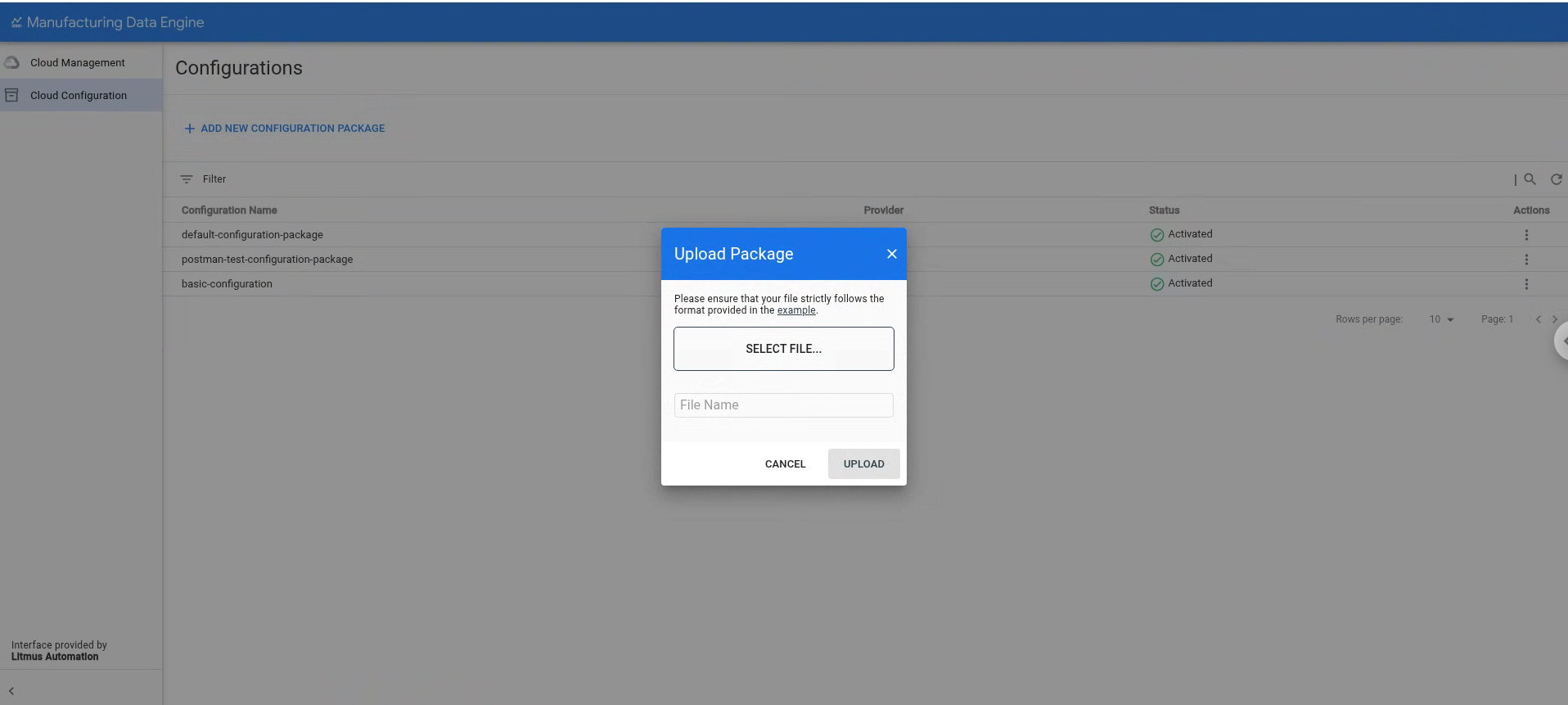
- 按一下「Cloud Configuration」。
- 按一下「新增設定套裝組合」。
- 選取要上傳至控制台的檔案。
- 按一下「上傳」。
上傳套件後,MDE 會執行下列階段來處理套件:
驗證:在此階段,MDE 會驗證套件內容,確保所有檔案的語法正確無誤,且位於正確位置。如果順利完成這個階段,MDE 就會進入下一個階段。
載入:在此階段,MDE 會嘗試載入並合併套件中指定的設定,以及目前的環境設定。這項工具會檢查所有依附元件,確保不會與現有設定發生命名衝突。這個階段是不可分割的,也就是說,套件會成功載入,或完全回溯。如果載入成功,MDE 會繼續下一個階段。
啟用:在此階段,MDE 會啟用設定,並向環境中的其他使用者顯示。此外,這項作業也會觸發建立套件設定中所需的任何基礎架構元素 (例如啟用類型)。
MDE 1.5.0 版不支援更新已部署或啟用的套件。如要修正驗證或載入階段的任何錯誤,只要套件未啟用,即可再次上傳。套件設為有效後,您就無法再次上傳相同套件,也無法上傳含有名稱衝突設定實體的套件。
列出現有設定套件
您可以使用 REST 端點或 MDE 網頁介面,列出現有的 MDE 設定套件。
REST
使用下列資訊執行 REST API 要求:
- 方法:GET。
- 端點:
/configuration/v1/configuration-packages。 - 回應代碼:200 OK。
回應主體 (JSON):
{
    "configurationPackages": [
        {
            "id": "0505ed17-ad20-458d-9128-d44783704acb",
            "name": "default-configuration-package",
            "provider": "google",
            "latestStatus": "ACTIVATED",
            "status": [
                {
                    "code": "NOT_LOADED",
                    "updatedTime": "1742501535249",
                    "messages": []
                },
                {
                    "code": "VALIDATED",
                    "updatedTime": "1742501535249",
                    "messages": [
                        {
                            "severity": "INFO",
                            "message": "Successfully validated all buckets in the package"
                        },
                        {
                            "severity": "INFO",
                            "message": "Successfully validated all message classes in the package"
                        },
                        {
                            "severity": "INFO",
                            "message": "Successfully validated all metadata-instances in the package"
                        },
                        {
                            "severity": "INFO",
                            "message": "Successfully validated all parsers in the package"
                        },
                        {
                            "severity": "INFO",
                            "message": "Successfully validated all types in the package"
                        }
                    ]
                },
                {
                    "code": "LOADED",
                    "updatedTime": "1742501536740",
                    "messages": [
                        {
                            "severity": "INFO",
                            "message": "Successfully applied all message classes in the package"
                        },
                        {
                            "severity": "INFO",
                            "message": "Successfully applied all buckets in the package"
                        },
                        {
                            "severity": "INFO",
                            "message": "Successfully validated all metadata-instances in the package"
                        },
                        {
                            "severity": "INFO",
                            "message": "Successfully applied all types in the package"
                        },
                        {
                            "severity": "INFO",
                            "message": "Successfully applied all parsers in the package"
                        }
                    ]
                },
                {
                    "code": "ACTIVATED",
                    "updatedTime": "1742501537289",
                    "messages": [
                        {
                            "severity": "INFO",
                            "message": "Successfully activated all ingestion-specification, if there is any, in the package"
                        },
                        {
                            "severity": "INFO",
                            "message": "Successfully activated all message classes, if there is any, in the package"
                        },
                        {
                            "severity": "INFO",
                            "message": "Successfully activated all buckets, if there is any, in the package"
                        },
                        {
                            "severity": "INFO",
                            "message": "Successfully activated all metadata instance, if there is any, in the package"
                        },
                        {
                            "severity": "INFO",
                            "message": "Successfully activated all types, if there is any, in the package"
                        },
                        {
                            "severity": "INFO",
                            "message": "Successfully activated all parsers, if there is any, in the package"
                        }
                    ]
                }
            ]
        },
        {
            "id": "4adaecc2-54b9-482b-90d6-380f5d4b2be6",
            "name": "basic-configuration",
            "provider": "google",
            "latestStatus": "ACTIVATED",
            "status": [
                {
                    "code": "NOT_LOADED",
                    "updatedTime": "1742566718210",
                    "messages": []
                },
                {
                    "code": "VALIDATED",
                    "updatedTime": "1742566718210",
                    "messages": [
                        {
                            "severity": "INFO",
                            "message": "Successfully validated all message classes in the package"
                        },
                        {
                            "severity": "INFO",
                            "message": "Successfully validated all parsers in the package"
                        },
                        {
                            "severity": "INFO",
                            "message": "Successfully validated all types in the package"
                        }
                    ]
                },
                {
                    "code": "LOADED",
                    "updatedTime": "1742566718696",
                    "messages": [
                        {
                            "severity": "INFO",
                            "message": "Successfully applied all message classes in the package"
                        },
                        {
                            "severity": "INFO",
                            "message": "Successfully applied all types in the package"
                        },
                        {
                            "severity": "INFO",
                            "message": "Successfully applied all parsers in the package"
                        }
                    ]
                },
                {
                    "code": "ACTIVATED",
                    "updatedTime": "1742566718792",
                    "messages": [
                        {
                            "severity": "INFO",
                            "message": "Successfully activated all ingestion-specification, if there is any, in the package"
                        },
                        {
                            "severity": "INFO",
                            "message": "Successfully activated all message classes, if there is any, in the package"
                        },
                        {
                            "severity": "INFO",
                            "message": "Successfully activated all buckets, if there is any, in the package"
                        },
                        {
                            "severity": "INFO",
                            "message": "Successfully activated all metadata instance, if there is any, in the package"
                        },
                        {
                            "severity": "INFO",
                            "message": "Successfully activated all types, if there is any, in the package"
                        },
                        {
                            "severity": "INFO",
                            "message": "Successfully activated all parsers, if there is any, in the package"
                        }
                    ]
                }
            ]
        }
    ],
    "nextPageToken": ""
}
控制台
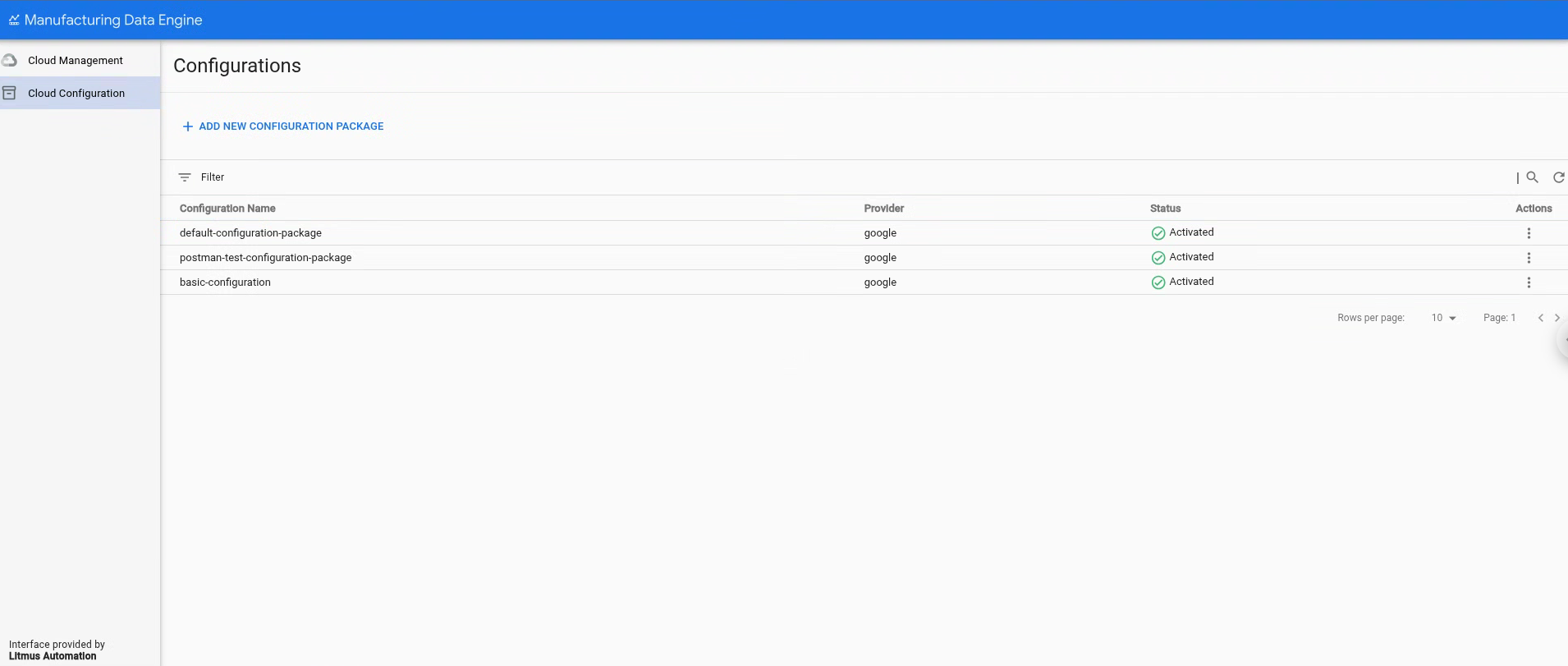
您可以在「設定」頁面的「Cloud Configuration」部分,查看現有設定套件清單。
刪除現有的設定套件
自 1.5.0 版起,MDE 支援環境旗標,可將環境變更為開發模式,讓您刪除設定實體和設定套件。設定這個模式後,您就可以使用 REST 端點或 MDE 網頁介面的刪除按鈕,刪除已啟用的套件。
REST
使用下列資訊執行 REST API 要求:
- 方法:DELETE
- 端點:
/configuration/v1/configuration-packages/$PACKAGE-ID - 回應代碼:200 OK
- 回應主體 (JSON):
{
    "id": "87e160db-8ff9-403a-a873-e6674f6ac3cb",
    "name": "postman-test-configuration-package",
    "provider": "google",
    "latestStatus": "DELETED",
    "status": [
        {
            "code": "NOT_LOADED",
            "updatedTime": "1742550114832",
            "messages": []
        },
        {
            "code": "VALIDATED",
            "updatedTime": "1742550114832",
            "messages": [
                {
                    "severity": "INFO",
                    "message": "Successfully validated all buckets in the package"
                },
                {
                    "severity": "INFO",
                    "message": "Successfully validated all ingestion-specifications in the package"
                },
                {
                    "severity": "INFO",
                    "message": "Successfully validated all message classes in the package"
                },
                {
                    "severity": "INFO",
                    "message": "Successfully validated all metadata-instances in the package"
                },
                {
                    "severity": "INFO",
                    "message": "Successfully validated all parsers in the package"
                },
                {
                    "severity": "INFO",
                    "message": "Successfully validated all types in the package"
                }
            ]
        },
        {
            "code": "LOADED",
            "updatedTime": "1742550115241",
            "messages": [
                {
                    "severity": "INFO",
                    "message": "Successfully applied all ingestion-specification in the package"
                },
                {
                    "severity": "INFO",
                    "message": "Successfully applied all message classes in the package"
                },
                {
                    "severity": "INFO",
                    "message": "Successfully applied all buckets in the package"
                },
                {
                    "severity": "INFO",
                    "message": "Successfully validated all metadata-instances in the package"
                },
                {
                    "severity": "INFO",
                    "message": "Successfully applied all types in the package"
                },
                {
                    "severity": "INFO",
                    "message": "Successfully applied all parsers in the package"
                }
            ]
        },
        {
            "code": "ACTIVATED",
            "updatedTime": "1742550115327",
            "messages": [
                {
                    "severity": "INFO",
                    "message": "Successfully activated all ingestion-specification, if there is any, in the package"
                },
                {
                    "severity": "INFO",
                    "message": "Successfully activated all message classes, if there is any, in the package"
                },
                {
                    "severity": "INFO",
                    "message": "Successfully activated all buckets, if there is any, in the package"
                },
                {
                    "severity": "INFO",
                    "message": "Successfully activated all metadata instance, if there is any, in the package"
                },
                {
                    "severity": "INFO",
                    "message": "Successfully activated all types, if there is any, in the package"
                },
                {
                    "severity": "INFO",
                    "message": "Successfully activated all parsers, if there is any, in the package"
                }
            ]
        },
        {
            "code": "DELETED",
            "updatedTime": "1742567553260",
            "messages": [
                {
                    "severity": "INFO",
                    "message": "Successfully deleted all parsers, if there is any, in the package"
                },
                {
                    "severity": "INFO",
                    "message": "Successfully deleted all message classes, if there is any, in the package"
                },
                {
                    "severity": "INFO",
                    "message": "Successfully deleted all types, if there is any, in the package"
                },
                {
                    "severity": "INFO",
                    "message": "Successfully activated all metadata instance, if there is any, in the package"
                },
                {
                    "severity": "INFO",
                    "message": "Successfully deleted all buckets, if there is any, in the package"
                },
                {
                    "severity": "INFO",
                    "message": "Successfully deleted all ingestion-specification, if there is any, in the package"
                }
            ]
        }
    ]
}
控制台
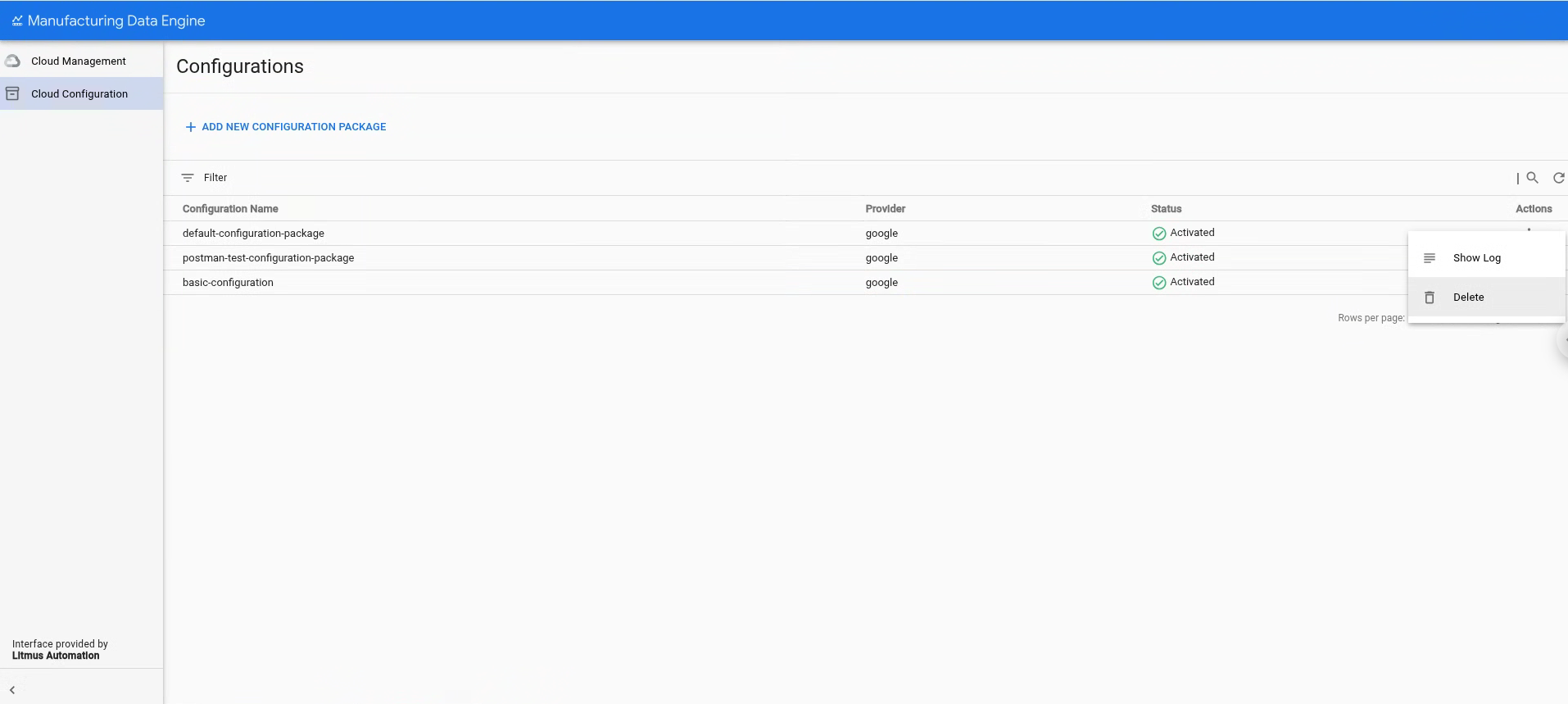
- 按一下「Cloud Configuration」。
- 選取要刪除的設定套件。
- 按一下 [動作]。
點選「刪除」。
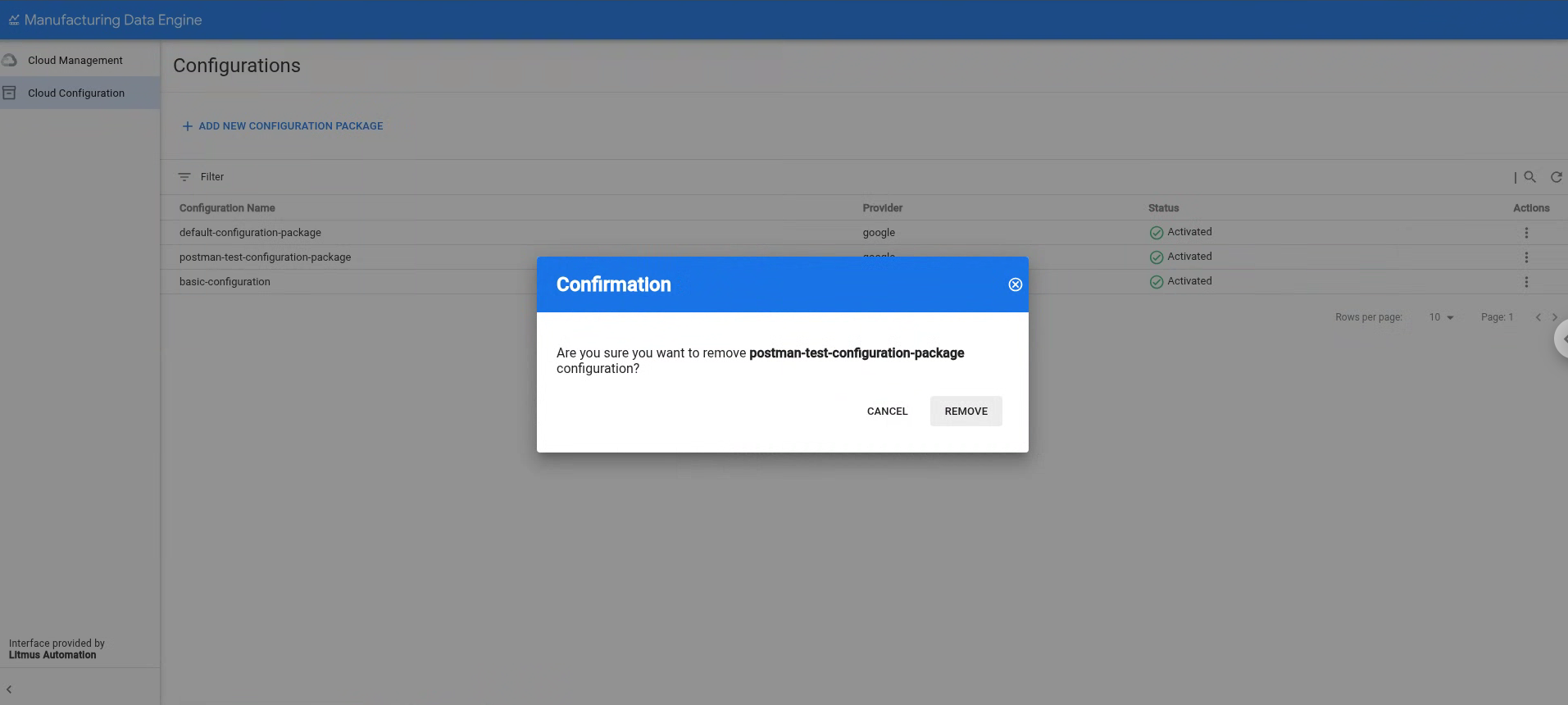
按一下「移除」,確認要刪除所選設定套件。