

Clients can connect to a Managed Service for Apache Kafka cluster from any Virtual Private Cloud (VPC) network in your Google Cloud projects. You can also turn on access from trusted IP ranges over the public internet.
This page explains how networking is configured in Managed Service for Apache Kafka and how to enable connections between Kafka clients and your cluster.
Connected subnets
When you create a Managed Service for Apache Kafka cluster, you specify at least one VPC subnet to connect to the cluster. Later, you can update the cluster to add or remove subnets. You can connect multiple subnets to a cluster, but at most one subnet per VPC network. Client applications can connect to the cluster from any subnet that shares a connected subnet's VPC network, in any region.
When the service provisions a cluster, it places the cluster brokers and network endpoints in a separate VPC network within a Google-managed project. This project is called the tenant project, and the network is called the tenant network. Each Managed Service for Apache Kafka cluster has its own isolated tenant network. You don't need to manage or configure the tenant network.
The Google Cloud resource that represents the cluster resides in your own Google Cloud project. For example, when you run Google Cloud CLI commands, you specify your Google Cloud project, not the tenant project. Similarly, when you connect a subnet to a cluster, the subnet resides in your Google Cloud project.
In the sections that follow, project refers to your own Google Cloud project, unless the Google-managed tenant project is specified.
Cluster DNS entries
When you connect a subnet to a cluster, the service creates DNS entries in the subnet's network for the cluster's bootstrap address and brokers. Kafka clients use the bootstrap address to locate the brokers and establish a connection. When the bootstrap server redirects a client to a particular broker, it uses the broker URL rather than an IP address.
The DNS names for a cluster are the same across all of the cluster's connected subnets, although they correspond to different IP addresses in each subnet. Because the DNS names are consistent, all of your Kafka client applications use the same bootstrap address.
The bootstrap and broker URLs are fixed for the lifetime of a cluster. To get a cluster's bootstrap address, see View a cluster's bootstrap address. The format of the URLs might be different for different clusters.
Subnet sizing
When you add a subnet to a cluster, the subnet must have enough IP addresses. Each subnet requires one IP address for each Kafka broker, plus one IP address for the bootstrap address.
The initial number of brokers is calculated as follows:
number of brokers = max(3, ceiling(vCPUs / 15))
For example, a cluster with 60 vCPUs has four brokers (60/15) and therefore needs at least five usable IP addresses, including the bootstrap address. As you scale up a cluster, the service adds more brokers. When you plan the subnet size, base your calculations on the maximum size that you expect to scale your cluster. Google might change the ratio of brokers to vCPUs, so we recommend allocating 3× the calculated minimum number of IP addresses. For more information, see Plan the size of your Managed Service for Apache Kafka cluster.
If you plan to use Kafka Connect, then also consider the subnet requirements for the Connect cluster. For more information, see Worker (primary) subnet.
Privately used public IP ranges
You can connect your cluster to subnets that use privately used public IP address ranges without additional configuration. Subnets must use a valid IPv4 range that isn't a prohibited IPv4 subnet range.
Connect clusters across projects
To let Kafka clients in a different Google Cloud project connect to your cluster through private IP, you can use one of the following methods:
- Connect a subnet from the Kafka client's project to the cluster.
- Use Shared VPC to connect the projects.
The following sections describe these options.
Connect subnets across projects
To connect a subnet in a different project to your cluster, the Managed Kafka service agent that is associated with your cluster needs permission to access network resources in that subnet's project. Grant the service agent the Managed Kafka Service Agent IAM role on the project that contains the subnet. This role lets the cluster create the necessary network resources and DNS entries.
For example, if you create a cluster in project-1 and want to connect a subnet
in project-2, then grant the Managed Kafka service agent for project-1 the
Managed Kafka Service Agent role on project-2. Then connect a subnet from
project-2 to the cluster, as described in
Connect subnets to the cluster.
To grant the necessary roles, perform the following steps:
Console
In the Google Cloud console, go to the IAM page for the project that contains the subnet.
Click Grant access.
In the New principals field, enter the following:
service-CLUSTER_PROJECT_NUMBER@gcp-sa-managedkafka.iam.gserviceaccount.comReplace
CLUSTER_PROJECT_NUMBERwith the project number of the project that contains the Managed Service for Apache Kafka cluster.Click Add roles.
In the Search for roles field, enter
Managed Kafka Service Agent.In the search results, select Managed Kafka Service Agent.
Click Apply.
Click Save.
gcloud
To grant the IAM role, use the
gcloud projects add-iam-policy-binding
command:
gcloud projects add-iam-policy-binding CLIENT_PROJECT_ID \
  --member=serviceAccount:service-CLUSTER_PROJECT_NUMBER@gcp-sa-managedkafka.iam.gserviceaccount.com \
  --role=roles/managedkafka.serviceAgent
Replace the following:
- CLIENT_PROJECT_ID: the name of the project that contains the subnet to connect
- CLUSTER_PROJECT_NUMBER: the project number of the project that contains the Managed Service for Apache Kafka cluster
Use Shared VPC to connect projects
Shared VPC lets an organization connect resources from multiple projects to a common VPC network. To use Shared VPC with Managed Service for Apache Kafka, perform the following steps:
Create a Managed Service for Apache Kafka cluster.
Grant the Managed Kafka service agent the Managed Kafka Service Agent role on the Shared VPC host project, as described in the previous section.
Connect the cluster to a subnet in the Shared VPC network.
Clients in the Shared VPC host project or in the service projects can connect to the cluster.
For information about when to use Shared VPC, see Best practices and reference architectures for VPC design.
Connect clients over the public internet
If you have client applications outside of your VPC network, you can enable public access to your cluster. A public cluster still requires a connected subnet. However, you don't need to send traffic through it.
When you enable the public cluster feature, the service provisions external IPv4 addresses for the cluster's broker and bootstrap endpoints. The service also makes the cluster DNS entries publicly resolvable to these public IP addresses. External clients can use the cluster's bootstrap address to locate the brokers and establish a connection.
This implementation uses split-horizon DNS. Clients in VPC networks that contain a connected subnet continue to resolve the private endpoints, while clients in other networks resolve the public endpoints. Enabling the public cluster feature doesn't create any additional resources in your project.
Managed Service for Apache Kafka uses Cloud Next Generation Firewall to restrict access to public clusters. When you enable the public cluster feature, you must specify one or more allowed source IP ranges. For more information, see Public clusters.
You can update a cluster to add or remove allowed source IP ranges. If you remove allowed source IP ranges, the change applies only to new connections.
The service takes several precautions to help ensure the security of your public clusters. All connections are encrypted in transit using TLS, and all connections require authentication. You must authenticate using an IAM identity with SASL or a client certificate with mTLS. Anonymous access isn't allowed. For more information, see Authentication types for Kafka brokers.
Security administrators can prohibit public clusters by enabling the
Restrict Managed Kafka Public Clusters (constraints/managedkafka.managed.restrictPublicClusters)
managed organizational policy constraint. For more information about managed constraints,
see Managed constraints.
Configure egress firewalls from external networks
In some scenarios, you might need to determine the external IPv4 addresses of your broker and bootstrap endpoints. To view these addresses, see Public cluster details.
The service also maintains one or more discovery DNS records. These are DNS A
records that contain all of the external IPv4 addresses associated with your
cluster. You can use these records in FQDN-based firewalls, such as
Cloud NGFW, which automatically
update rules when the list of endpoints changes. For more information, see
Map FQDN objects to IP addresses.
Consider the following when you use the public IP addresses associated with your cluster:
The list of public IPv4 addresses might change or grow. For this reason, automate how you consume this information or define a process to account for new discovery DNS records when scaling up your cluster. Changes can occur when:
You scale up your cluster. Scaling up might add one or more external IPv4 addresses as new brokers are added. For more information, see Scaling the cluster.
You turn off and then turn on the public cluster feature. This action assigns a new set of external IPv4 addresses to the cluster.
Each discovery DNS record contains a maximum of 30 IP addresses, a value that's within common limits enforced by FQDN firewalls. Clusters with 29 or fewer brokers have one discovery DNS record that includes the bootstrap address record. The service adds one discovery DNS record for every additional 30 brokers.
The discovery DNS records are intended only for configuring FQDN-based egress firewalls. Don't configure your Kafka clients to connect to discovery DNS records; instead, configure clients to connect to the bootstrap address.
If you use this information to configure egress firewalls, allow connectivity to TCP ports
9092(SASL) and9192(mTLS).
Network architecture of a cluster
This section describes the details of the networking architecture used in Managed Service for Apache Kafka.
A Kafka cluster spans a tenant network and one or more consumer networks.
In the tenant network, the cluster has a single bootstrap IP address and URL. This bootstrap address corresponds to a load balancer connected to all the brokers in the cluster. Each broker individually can also act as a bootstrap server, but we recommend you use the bootstrap address for reliability.
Within each consumer network, the service creates a Private Service Connect endpoint for the bootstrap address and one endpoint for each broker.
The URL for the bootstrap address is the same across the VPC networks to which a cluster is connected. The IP address is local to the consumer network.
Clients connect to Kafka brokers by using DNS names. These names are registered automatically in every VPC network to which a Kafka cluster is connected. The bootstrap address and its port number are available as a property of the cluster.
Clients use the bootstrap address to retrieve broker URLs. These URLs are resolved to IP addresses local to each VPC network. You can find the actual broker IP addresses and URLs in Cloud DNS.
The following diagram shows a sample architecture of a Managed Service for Apache Kafka cluster network.
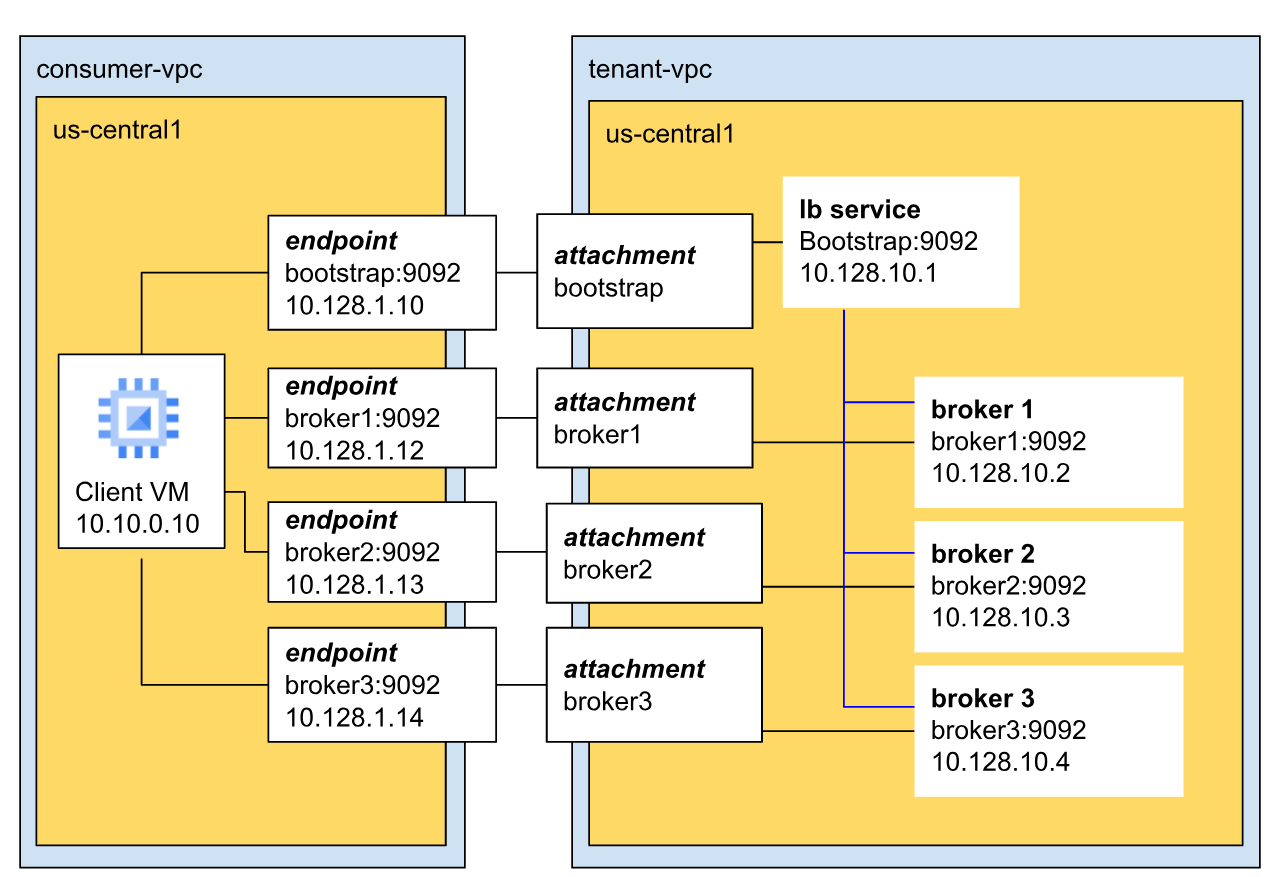 *
In this example, the cluster has three brokers and the cluster is in the tenant
VPC.
Brokers communicate with clients over the default Kafka port (9092) and have unique IP addresses. In this example, the three brokers have IP addresses 10.128.10.2, 10.128.10.3, and 10.128.10.4 respectively.
All three brokers connect to the bootstrap load balancer. This ensures high availability and regional fault tolerance, because the bootstrap address isn't confined to a single broker or zone.
Limitations
The following limitations apply to VPC connections and public clusters:
Subnet region. Connected subnets must be in the same region as your cluster.
Subnet count. You can connect a minimum of one and a maximum of ten subnets to a cluster.
Subnets per network. You can connect at most one subnet per VPC network to a cluster.
Subnet size. Each connected subnet requires at least one IP address for each broker plus one IP address for the bootstrap address. A minimum of four usable IP addresses is required. For more information, see Subnet sizing.
Connected subnets for public clusters. To turn on public access, your cluster must still have at least one connected subnet, although you don't need to send traffic through it.
Allowed source IP ranges. Each allowed source IP range for a public cluster must be specified in IPv4 CIDR notation. Each CIDR subnet size must be between
/16and/32. CIDR ranges must not overlap. IPv6 addresses aren't supported. You can specify a maximum of 500 allowed source IP ranges.Discovery record DNS resolution. Discovery DNS records are designed only to configure FQDN-based egress firewalls. Don't configure your Kafka clients to connect to these discovery records; instead, configure clients to connect to the bootstrap address.
Troubleshoot
For information about how to troubleshoot networking issues, see Networking errors.
What's next?
For more information about how to create a cluster, see Create a Managed Service for Apache Kafka cluster.
For more information about how to update a cluster, see Update a Managed Service for Apache Kafka cluster.
For more information about how to view a cluster's subnetworks and active brokers, see View a cluster.
For more information about how to publish and consume messages, see Publish and consume messages.