

This document describes how to migrate your Apache Kafka workloads to Managed Service for Apache Kafka.
The approach shown in this document uses Kafka Connect with MirrorMaker 2.0. Kafka Connect is a framework for connecting Kafka with external systems, and MirrorMaker 2.0 is a tool for replicating data between Kafka clusters in real time.
Architecture
The following diagram shows the architecture for migrating data to Managed Service for Apache Kafka:
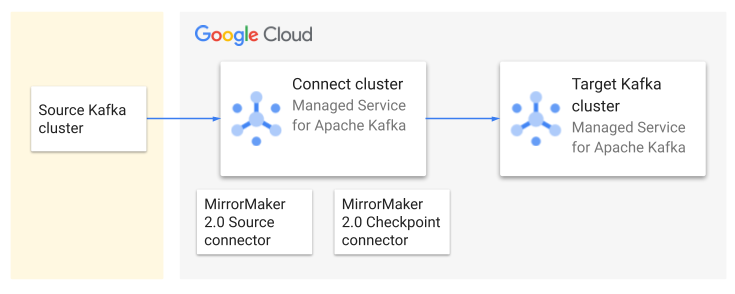
The architecture consists of the following components:
Source Kafka cluster: Your existing Kafka cluster, which can be located on-premises or in another cloud environment. It contains the topics that you want to migrate.
Target Kafka cluster: The Managed Service for Apache Kafka cluster where you will move your Kafka data.
Connect cluster: A distributed deployment of Kafka Connect that is associated with the target Kafka cluster.
MirrorMaker 2.0 Source connector: Replicates topics from the source cluster to the target cluster. It automatically creates the corresponding topics and partitions in the target cluster if they don't exist. It also configures topic ACLs on the target cluster to match the ACLs on the source topics.
MirrorMaker 2.0 Checkpoint connector. Replicates consumer offsets so that consumers can switch over to the secondary Kafka cluster and read from the same point they left off.
High-level workflow
This section describes the high-level workflow for the migration process.
Plan the migration
Document your existing Kafka setup, including cluster size, topics, throughput, and consumer groups.
Plan your migration strategy, including how you will switch active workloads to the new cluster.
Estimate the required cluster size. This calculation gives you an initial size for your Managed Service for Apache Kafka cluster, to help ensure that it has enough resources to run your workloads. Later you can scale up the cluster if needed.
Migrate data
Create Google Cloud resources, including a Managed Service for Apache Kafka cluster, a Connect cluster, and the MirrorMaker 2.0 connectors that replicate your data.
After you confirm that topics and consumer groups are being replicated, migrate consumers and producers to the Managed Service for Apache Kafka cluster.
Switch to the new cluster
Validate data integrity and application functionality with the Managed Service for Apache Kafka cluster.
Perform the final cutover, redirecting traffic to the Managed Service for Apache Kafka cluster.
Decommission your old Kafka cluster.
Monitor
Continuously monitor the performance of your Managed Service for Apache Kafka cluster. For more information, see Monitor a Managed Service for Apache Kafka cluster.
Review and update documentation to reflect the changes.
Document your Kafka setup
Before you start a migration, document your current Kafka setup. Gather the following information:
Check the version of your Apache Kafka cluster. MirrorMaker 2.0 requires the cluster to be version 2.4.0 or higher.
Identify the topics that need to be migrated. Also document the replication factor and partition count of each topic.
Measure message throughput at both the cluster and topic level.
Identify the producers and consumers associated with each topic. For consumers, identify all consumer groups.
Document consumer configurations, especially security protocols and any integration with other Google Cloud services.
With this information, you can calculate the required size of the Managed Service for Apache Kafka cluster and choose configuration settings for the MirrorMaker 2.0 connectors.
To avoid disruptions during the migration, map out all application dependencies related to your source Kafka cluster.
Plan your migration strategy
This section lists some operational considerations for migrating your Kafka data. To minimize downtime during the migration process, consider these strategies:
Parallel deployments: Before switching to the new cluster, run parallel instances of your applications on both the old and new clusters. During this transition period, temporarily disable any actions in your application that must happen only once per message, to prevent unintended consequences from processing the same message twice. After the new instances are fully caught up, redirect all traffic to the new cluster and re-enable all features.
Phased rollouts: Migrate in smaller, manageable phases, starting with less critical applications. This approach helps isolate potential issues and minimizes the impact of any disruptions.
Blue and green deployments: Create a complete replica of your production environment (green) alongside the existing one (blue). Gradually shift traffic from blue to green. Test and validate the new production environment before the final cutover. This approach minimizes downtime but requires more resources during the migration.
Dry run. Before you migrate your production environment, conduct a test migration in a development environment. Validate the process and identify any potential issues.
Here are some additional considerations when planning a migration:
Message processing requirements: Understand your application's tolerance for duplicate or missing messages and configure consumers accordingly.
Communication and coordination: Establish clear communication channels and coordinate switchover timings.
Rollback. Create a rollback plan to revert to your original cluster if necessary.
Estimate the cluster size
To estimate the memory and number of vCPUs needed for your Managed Service for Apache Kafka cluster, first calculate the total write throughput and read throughput of your workloads. You can use the following JMX metrics to measure these values:
kafka.server:type=BrokerTopicMetrics,name=BytesInPerSec: The incoming byte rate from clients across all topics. To get the aggregate rate for all topics, omit thetopic={...}parameter .kafka.server:type=BrokerTopicMetrics,name=BytesOutPerSec: The outgoing byte rate to clients across all topics. To get the overall rate, omit thetopic={...}parameter.
These metrics are reported at the broker level. To calculate the cluster throughput, aggregate the data across all brokers.
By monitoring these JMX metrics over a period of time, you can gather data points to calculate the following metrics:
Average data in, MBps: The average rate at which data is ingested into the Kafka cluster.
Peak data in, MBps: The highest rate at which data is ingested into the Kafka cluster.
Average data out, MBps: The average rate at which data is consumed from the Kafka cluster.
Peak data out, MBps The highest rate at which data is consumed from the Kafka cluster.
Using these calculated values, estimate the write-equivalent rate as follows:
Write-equivalent rate (Avg/Peak) = (total write bandwidth) + (total read bandwidth / 4)
The write-equivalent rate accounts for the fact that read bandwidth is more efficient to process than write bandwidth. Use the write-equivalent rate to choose an appropriate size for your Managed Service for Apache Kafka cluster. For details, see Plan your Kafka cluster size.
Connect on-premises Apache Kafka to Google Cloud
If your source Apache Kafka cluster is located on-premises, you must establish a secure connection between your on-premises network and the Virtual Private Cloud (VPC) where your Managed Service for Apache Kafka cluster resides. Use one of the following options from Google Cloud.
Cloud VPN: A cost-effective solution suitable for lower bandwidth needs or initial migration experiments. It creates an encrypted tunnel over the public internet. For more information about Cloud VPN, see Cloud VPN overview.
Cloud Interconnect: Provides a dedicated, high-bandwidth connection between your on-premises network and Google Cloud. This is ideal for enterprise-grade deployments requiring higher throughput and lower latency. You can choose between Dedicated Interconnect (for direct physical connection) or Partner Interconnect (connection through a supported service provider). For more information, see Cloud Interconnect overview.
When you create a Managed Service for Apache Kafka cluster, you must select at least one subnet in your VPC network. This subnet provides the IP addresses that your cluster uses to communicate with other resources in your VPC network.
To securely connect to your Managed Service for Apache Kafka cluster from on-premises networks or other VPC networks, you can use Private Service Connect over Cloud VPN or Cloud Interconnect. You don't need to explicitly set up Private Service Connect endpoints. When you select a subnet during cluster creation, the Managed Service for Apache Kafka service automatically creates the necessary Private Service Connect endpoints. This simplifies network configuration by letting you access your cluster using internal IP addresses within your VPC network, without needing to manage complex firewall rules or public IP addresses.
For more information, see Networking for Managed Service for Apache Kafka.
Create Google Cloud resources
Create the following resources:
A Managed Service for Apache Kafka cluster. For more information, see Create and view a Managed Service for Apache Kafka cluster.
A Connect cluster whose primary Kafka cluster is the cluster that you created in the previous step. For more information, see Create a Connect cluster.
Place the Connect cluster in the same region as the Managed Service for Apache Kafka cluster.
A MirrorMaker 2.0 Source connector to replicate data. For more information, see Create a MirrorMaker 2.0 Source connector.
A MirrorMaker 2.0 Checkpoint connector to replicate consumer checkpoints. For more information, see Create a MirrorMaker 2.0 Checkpoint connector.
MirrorMaker 2.0 settings
The following settings determine the frequency at which checkpoints are created and replicated, which can affect the precision of consumer offset translation between the clusters.
Consumers:
auto.commit.interval.ms: How frequently a consumer commits offsets.
MirrorMaker 2.0 Source connector:
offset.lag.max: How frequently the Source connector writes offset syncs.
MirrorMaker 2.0 Checkpoint connector:
sync.group.offsets.enabled: Iftrue, the Checkpoint connector copies checkpoints from an internal topic to the__consumer_offsetstopic that consumers use. To enable consumers to failover seamlessly, set this property totrue.emit.checkpoints.interval.seconds: How frequently the Checkpoint connector writes checkpoints.sync.group.offsets.interval.seconds: How frequently the Checkpoint connector copies checkpoints to__consumer_offsets.
For more information, see How the MirrorMaker 2.0 Checkpoint connector works.
Monitor data replication
Monitor the MirrorMaker 2.0 process to ensure it's running correctly and replicating data as expected. For more information, see Monitor a Connect cluster.
After migrating your applications, monitor the following metrics to validate success:
Downstream throughput rates: Make sure there are no significant changes in downstream throughput rates.
CPU and memory utilization: Monitor the CPU and memory utilization of your Managed Service for Apache Kafka cluster. For more information, see Monitor Kafka clusters for reliability.
Error logs: Regularly check Cloud Logging for any error logs related to your Managed Service for Apache Kafka cluster or your applications.
What's next
- Kafka Connect overview
- Replicate Kafka topics with MirrorMaker 2.0
- Monitor a Managed Service for Apache Kafka cluster