

Credential vending for the Lakehouse runtime catalog lets you delegate storage access and apply fine-grained permissions to your data files. As part of borderless Lakehouse, this capability lets you manage Identity and Access Management (IAM) policies at the table level for tables stored in Cloud Storage.
You can use the gcloud CLI to get and set these policies to control access to
your resources.
How credential vending works
When you use credential vending, the sequence of operations changes slightly to enforce policies before storage is accessed. The following diagram illustrates how query engines obtain downscoped storage tokens from the catalog to securely read and write data directly in Cloud Storage:
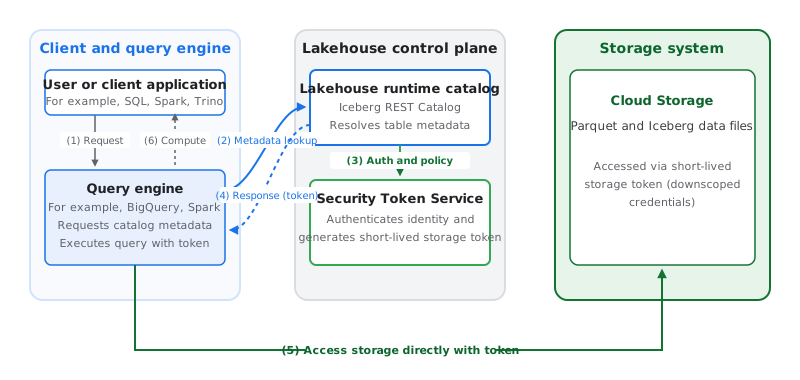
The sequence of operations shown in the preceding diagram is as follows:
- Request: A user submits a SQL statement, such as a query, DML, or DDL operation, to a supported engine. For example, Apache Spark or BigQuery.
- Metadata lookup: The engine sends a request to the Lakehouse runtime catalog to resolve the table.
- Authentication and policy: The catalog authenticates the user and checks their IAM permissions on Google Cloud's Lakehouse resources.
- Response: Because credential vending is enabled, the catalog returns the metadata and a short-lived storage token (downscoped storage credentials) to the engine. The token is scoped to the paths associated with the table and downscoped to the minimum required permissions (for example, read-only access for queries that don't need to write files).
- Access: The engine uses this token to read or write the specific authorized files directly from Cloud Storage.
- Compute: The engine processes the data or executes the operation, and returns the results.
Supported engines
In order to use credential vending with query engines, your Lakehouse Iceberg REST catalog must be configured to support credential vending.
- Open source engines: Supported engines like Apache Spark and
Trino use short-lived storage tokens vended by the catalog. Your client
application must specify support for credential vending in the
X-Iceberg-Access-Delegationheader. - BigQuery: BigQuery uses vended credentials for Cloud Storage access instead of end-user credentials.
Required service account permissions
When credential vending is enabled, ensure the following service accounts have the necessary roles:
- Auto-provisioned Lakehouse runtime catalog service account: You must
grant the Storage Object User role (
roles/storage.objectUser) to this account on all associated Cloud Storage buckets. Without this access, vended credentials can't read or write to storage. If you use the Google Cloud console, clicking Set bucket permissions verifies this role. For the gcloud CLI, Terraform, or the API, you must grant this role manually. - Query engine service accounts: Service accounts running query engine
jobs (such as Managed Service for Apache Spark, Managed Service for Apache Spark, or
Dataflow) require the BigLake Editor role (
roles/biglake.editor) to obtain vended credentials with write scope.
What's next
- Learn how to create a catalog in credential vending mode.
- Learn how to enable credential vending for an existing catalog using the
Google Cloud console.
- Learn how to configure your client application for credential vending.