

Google Cloud 提供两种组织政策限制条件,以帮助确保在整个组织范围内使用 CMEK:
constraints/gcp.restrictNonCmekServices用于要求 CMEK 保护。constraints/gcp.restrictCmekCryptoKeyProjects用于限制哪些 Cloud KMS 密钥可用于 CMEK 保护。
CMEK 组织政策仅适用于支持的 Google Cloud 服务中新创建的资源。
所需的角色
如需确保每位用户都拥有在创建资源时检查组织政策所需的权限,请让您的管理员为每位用户授予您组织的 Organization Policy Viewer (roles/orgpolicy.policyViewer) IAM 角色。如需详细了解如何授予角色,请参阅管理对项目、文件夹和组织的访问权限。
此预定义角色包含在创建资源时检查组织政策所需的权限。如需查看所需的确切权限,请展开所需权限部分:
所需权限
创建资源时,需要以下权限才能检查组织政策:
-
如需查看完整的组织政策详细信息,请执行以下操作:
orgpolicy.policy.get -
在创建资源时检查组织政策:
orgpolicy.policies.check
您的管理员也可以使用自定义角色或其他预定义角色向每位用户授予这些权限。
当组织政策处于有效状态时,创建受 CMEK 密钥保护的资源的 Google Cloud 控制台用户需要拥有 orgpolicy.policies.check 权限。没有此权限的用户可以使用 Google Cloud 控制台创建受 CMEK 保护的资源,但他们可以选择restrictCmekCryptoKeyProjects限制条件不允许的 CMEK 密钥。如果选择的密钥不符合此限制条件,资源创建最终会失败。
要求 CMEK 保护
如需为组织要求 CMEK 保护,请配置 constraints/gcp.restrictNonCmekServices 组织政策。
作为列表限制条件,此限制条件接受的值是 Google Cloud服务名称(例如 bigquery.googleapis.com)。要使用此限制条件,请提供 Google Cloud 服务名称列表并将限制条件设置为拒绝。如果资源未受 CMEK 保护,此配置会阻止在这些服务中创建资源。换句话说,如果不指定 Cloud KMS 密钥,则无法在相应服务中成功创建资源。此外,此限制条件还会阻止从这些服务中的资源移除 CMEK 保护。此限制条件只能应用于支持的服务。
限制使用 Cloud KMS 密钥进行 CMEK 加密
如需限制哪些 Cloud KMS 密钥可用于 CMEK 保护,请配置 constraints/gcp.restrictCmekCryptoKeyProjects 约束条件。
作为列表限制条件,它接受的值是资源层次结构指示符(例如 projects/PROJECT_ID、under:folders/FOLDER_ID 和 under:organizations/ORGANIZATION_ID)。要使用此限制条件,请配置资源层次结构指示符列表并将限制条件设置为允许。此配置会限制支持的服务,以便仅从列出的项目、文件夹和组织中选择 CMEK 密钥。如果没有来自允许资源之一的 Cloud KMS 密钥,则无法在已配置的服务中成功创建受 CMEK 保护的资源。如果已配置,此限制条件将适用于所有支持的服务。
支持的服务
| 服务 | 需要 CMEK 时的限制值 |
|---|---|
| Agent Assist | dialogflow.googleapis.com |
| AlloyDB for PostgreSQL | alloydb.googleapis.com |
| Apigee | apigee.googleapis.com |
| Application Integration | integrations.googleapis.com |
| Artifact Registry | artifactregistry.googleapis.com |
| Backup for GKE | gkebackup.googleapis.com |
| BigQuery | bigquery.googleapis.com |
| Bigtable | bigtable.googleapis.com |
| Cloud Composer | composer.googleapis.com |
| Cloud Data Fusion | datafusion.googleapis.com |
| Cloud Logging | logging.googleapis.com |
| Cloud Run | run.googleapis.com |
| Cloud Run functions | cloudfunctions.googleapis.com |
| Cloud SQL | sqladmin.googleapis.com |
| Cloud Storage | storage.googleapis.com |
| Cloud Tasks | cloudtasks.googleapis.com |
| Cloud Workstations | workstations.googleapis.com |
| Colab Enterprise | aiplatform.googleapis.com |
| Compute Engine | compute.googleapis.com |
| 客户体验分析洞见 | contactcenterinsights.googleapis.com |
| Dataflow | dataflow.googleapis.com |
| Dataform | dataform.googleapis.com |
| Dataplex Universal Catalog | dataplex.googleapis.com |
| Dataproc | dataproc.googleapis.com |
| Dialogflow CX | dialogflow.googleapis.com |
| Document AI | documentai.googleapis.com |
| Eventarc Advanced (预览版) | eventarc.googleapis.com |
| Eventarc Standard | eventarc.googleapis.com |
| Filestore | file.googleapis.com |
| Firestore | firestore.googleapis.com |
| Gemini Enterprise Enterprise | discoveryengine.googleapis.com |
| Google Cloud NetApp Volumes | netapp.googleapis.com |
| Google Kubernetes Engine (预览版) | container.googleapis.com |
| Looker (Google Cloud Core) | looker.googleapis.com |
| Memorystore for Redis | redis.googleapis.com |
| Memorystore for Redis Cluster | redis.googleapis.com |
| Memorystore for Valkey | memorystore.googleapis.com |
| Pub/Sub | pubsub.googleapis.com |
| Secret Manager | secretmanager.googleapis.com |
| Secure Source Manager | securesourcemanager.googleapis.com |
| Security Command Center | securitycenter.googleapis.com |
| Spanner | spanner.googleapis.com |
| Speech-to-Text | speech.googleapis.com |
| Vertex AI | aiplatform.googleapis.com |
| Vertex AI Search | discoveryengine.googleapis.com |
| Vertex AI Workbench 实例 | notebooks.googleapis.com |
CMEK 组织政策和 Storage Transfer Service
Storage Transfer Service 没有 CMEK 集成,但可以与 CMEK 组织政策搭配使用。如果您使用 Storage Transfer Service,并且希望使用 CMEK 来帮助保护存储在 Secret Manager 中的数据库凭据,则必须将 storagetransfer.googleapis.com 和 secretmanager.googleapis.com 都添加到 constraints/gcp.restrictNonCmekServices 限制中。如需了解详情,请参阅 Storage Transfer Service CMEK 文档。
按资源类型划分的强制执行例外情况
在创建新资源或更改现有资源上的 Cloud KMS 密钥(如果支持)时,系统会强制执行 CMEK 组织政策限制条件。一般来说,它们会针对支持 CMEK 的所有服务资源类型强制执行,并且仅基于资源的配置。以下是一些值得注意的例外情况:
| 资源类型 | 强制执行例外情况 |
|---|---|
bigquery.googleapis.com/Dataset |
部分强制执行数据集默认 Cloud KMS 密钥 (gcp.restrictCmekCryptoKeyProjects 仅限)
|
bigquery.googleapis.com/Job |
仅限查询作业:对查询随附的 Cloud KMS 密钥或结算项目的默认 Cloud KMS 密钥强制执行;另请参阅有关项目默认 Cloud KMS 密钥的单独配置 |
bigquerydatatransfer.googleapis.com/TransferConfig |
转移配置使用 Data Transfer Service 的服务名称 (bigquerydatatransfer.googleapis.com) 来实现 CMEK 组织政策限制。 |
container.googleapis.com/Cluster |
(预览版) 仅对节点启动磁盘的 Cloud KMS 密钥强制执行;不对应用层中的 Secret 强制执行 |
logging.googleapis.com/LogBucket |
针对明确创建的日志存储分区强制执行;另请参阅确保内置日志存储分区合规性所需的单独配置 |
storage.googleapis.com/Bucket |
对存储桶默认 Cloud KMS 密钥强制执行 |
storage.googleapis.com/Object |
独立于存储桶强制执行;另请参阅 存储桶默认 Cloud KMS 密钥的单独配置 |
配置示例
在配置示例中,假设示例组织具有以下资源层次结构:
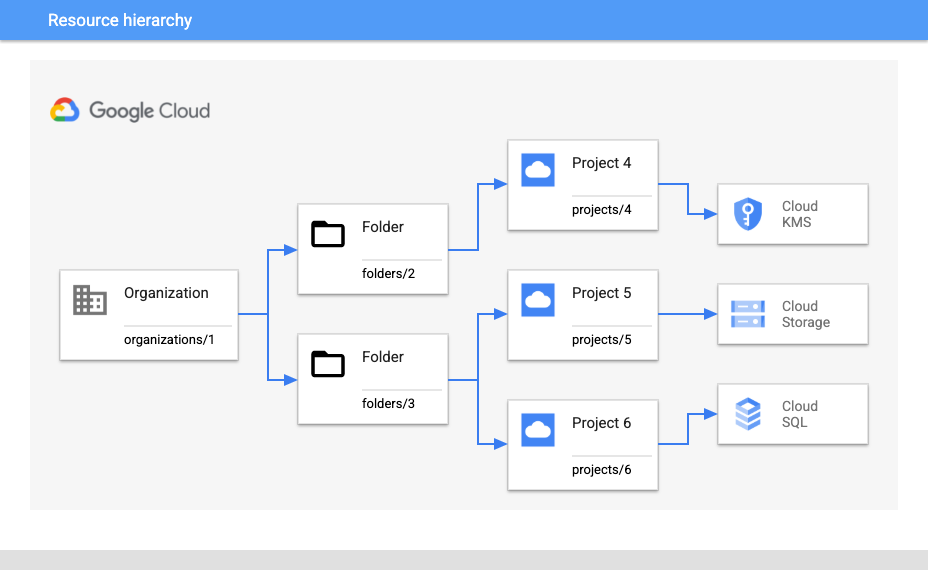
要求为项目使用 CMEK 并限制密钥
假设您希望要求 projects/5 下的所有 Cloud Storage 资源都受到 CMEK 保护,并确保只能使用来自 projects/4 的密钥。
如需要求对所有新的 Cloud Storage 资源进行 CMEK 保护,请使用以下组织政策设置:
- 组织政策:
constraints/gcp.restrictNonCmekServices - 绑定时间:
projects/5 - 政策类型:拒绝
- 政策值:
storage.googleapis.com
为确保仅使用来自 projects/4 的密钥,请使用以下配置:
- 组织政策:
constraints/gcp.restrictCmekCryptoKeyProjects - 绑定时间:
projects/5 - 政策类型:允许
- 政策值:
projects/4
要求使用 CMEK 并将密钥限制在文件夹内
或者,假设您预计将来会在 folders/2 下添加其他 Cloud KMS 项目,并希望在 folders/3 内更广泛地要求使用 CMEK。在这种情况下,您需要进行略有不同的配置。
如需为 folders/3 下的任何新 Cloud SQL 和 Cloud Storage 资源要求额外的 CMEK 保护,请执行以下操作:
- 组织政策:
constraints/gcp.restrictNonCmekServices - 绑定时间:
folders/3 - 政策类型:拒绝
- 政策值:
sqladmin.googleapis.com、storage.googleapis.com
为确保仅使用 folders/2 下 Cloud KMS 项目中的密钥,请执行以下操作:
- 组织政策:
constraints/gcp.restrictCmekCryptoKeyProjects - 绑定时间:
folders/3 - 政策类型:允许
- 政策值:
under:folders/2
为组织强制要求使用 CMEK
如需在组织中的所有位置(在支持的服务中)强制使用 CMEK,请配置 constraints/gcp.restrictNonCmekServices 限制,并采用以下设置:
- 组织政策:
constraints/gcp.restrictNonCmekServices - 绑定时间:
organizations/1 - 政策类型:拒绝
- 政策值:(所有支持的服务)
限制
如果您使用 Google Cloud 控制台创建资源,可能会注意到,当为项目和服务配置 constraints/gcp.restrictNonCmekServices 时,您无法使用 CMEK 以外的任何加密选项。只有在客户账号已获得项目的 orgpolicy.policy.get IAM 权限时,CMEK 组织政策限制条件才会显示。
后续步骤
如需详细了解组织政策的优势和常见应用场景,请参阅组织政策服务简介。
如需查看有关创建具有特定限制条件的组织政策的更多示例,请参阅使用限制条件。