


Google Cloud 提供兩項組織政策限制,有助於確保整個組織都使用 CMEK:
constraints/gcp.restrictNonCmekServices用於要求 CMEK 保護。constraints/gcp.restrictCmekCryptoKeyProjects可限制用於 CMEK 保護措施的 Cloud KMS 金鑰。
CMEK 組織政策僅適用於在支援 Google Cloud 服務新建立的資源。
必要的角色
為確保每位使用者在建立資源時,都有檢查組織政策的必要權限,請要求管理員將組織的組織政策檢視者 (roles/orgpolicy.policyViewer) IAM 角色授予每位使用者。如要進一步瞭解如何授予角色,請參閱「管理專案、資料夾和組織的存取權」。
這個預先定義的角色具備在建立資源時檢查組織政策所需的權限。如要查看確切的必要權限,請展開「Required permissions」(必要權限) 部分:
所需權限
必須具備下列權限,才能在建立資源時檢查組織政策:
-
如要查看完整的組織政策詳細資料,請按照下列步驟操作:
orgpolicy.policy.get -
如要在建立資源時檢查組織政策,請按照下列步驟操作:
orgpolicy.policies.check
管理員或許還可透過自訂角色或其他預先定義的角色,將這些權限授予每位使用者。
組織政策啟用時, Google Cloud 控制台使用者如要建立受 CMEK 金鑰保護的資源,必須具備 orgpolicy.policies.check 權限。沒有這項權限的使用者可以使用 Google Cloud 控制台建立受 CMEK 保護的資源,但可以選取 restrictCmekCryptoKeyProjects 限制不允許的 CMEK 金鑰。如果選取的金鑰不符合這項限制,資源建立作業最終會失敗。
要求使用 CMEK 保護機制
如要強制要求組織使用 CMEK 保護機制,請設定 constraints/gcp.restrictNonCmekServices 組織政策。
這項限制條件為清單限制條件,接受的值為 Google Cloud服務名稱 (例如 bigquery.googleapis.com)。如要使用這項限制條件,請提供 Google Cloud 服務名稱清單,並將限制條件設為「Deny」(拒絕)。如果資源未受 CMEK 保護,這項設定會禁止在這些服務中建立資源。換句話說,如果未指定 Cloud KMS 金鑰,在服務中建立資源的要求就不會成功。此外,這項限制也會禁止移除這些服務中資源的 CMEK 保護。這項限制只能套用至支援的服務。
限制 CMEK 的 Cloud KMS 金鑰使用
如要限制用於 CMEK 保護措施的 Cloud KMS 金鑰,請設定 constraints/gcp.restrictCmekCryptoKeyProjects 限制。
這項清單限制接受的值為資源階層指標 (例如 projects/PROJECT_ID、under:folders/FOLDER_ID 和 under:organizations/ORGANIZATION_ID)。如要使用這項限制,請設定資源階層指標清單,並將限制設為「Allow」(允許)。這項設定會限制支援的服務,因此只能從列出的專案、資料夾和組織中選擇 CMEK 金鑰。如果沒有來自允許資源的 Cloud KMS 金鑰,在設定的服務中建立 CMEK 保護資源的要求就不會成功。設定後,這項限制會套用至所有支援的服務。
支援的服務
| 服務 | 要求 CMEK 時的限制值 |
|---|---|
| Agent Assist | dialogflow.googleapis.com |
| Agent Search | discoveryengine.googleapis.com |
| AlloyDB for PostgreSQL | alloydb.googleapis.com |
| Apigee | apigee.googleapis.com |
| Application Integration | integrations.googleapis.com |
| Artifact Registry | artifactregistry.googleapis.com |
| 備份和災難復原服務 | backupdr.googleapis.com |
| GKE 備份 | gkebackup.googleapis.com |
| BigQuery | bigquery.googleapis.com |
| Bigtable | bigtable.googleapis.com |
| Cloud Data Fusion | datafusion.googleapis.com |
| Cloud Logging | logging.googleapis.com |
| Cloud Run | run.googleapis.com |
| Cloud Run functions | cloudfunctions.googleapis.com |
| Cloud SQL | sqladmin.googleapis.com |
| Cloud Storage | storage.googleapis.com |
| Cloud Tasks | cloudtasks.googleapis.com |
| Cloud TPU | tpu.googleapis.com |
| Cloud Workstations | workstations.googleapis.com |
| Colab Enterprise | aiplatform.googleapis.com |
| Compute Engine | compute.googleapis.com |
| Customer Experience Insights | contactcenterinsights.googleapis.com |
| 數據分析 | datastudio.googleapis.com |
| 資料庫遷移服務 | datamigration.googleapis.com |
| Dataflow | dataflow.googleapis.com |
| Dataform | dataform.googleapis.com |
| Datastream | datastream.googleapis.com |
| Dialogflow CX | dialogflow.googleapis.com |
| Document AI | documentai.googleapis.com |
| Eventarc Advanced (預先發布版) | eventarc.googleapis.com |
| Eventarc Standard | eventarc.googleapis.com |
| Filestore | file.googleapis.com |
| Firestore | firestore.googleapis.com |
| Gemini Enterprise | discoveryengine.googleapis.com |
| Google Cloud Managed Lustre | lustre.googleapis.com |
| Google Cloud Managed Service for Apache Kafka | managedkafka.googleapis.com |
| Google Cloud NetApp Volumes | netapp.googleapis.com |
| Google Cloud Observability (預先發布版) | observability.googleapis.com |
| Google Kubernetes Engine (預先發布版) | container.googleapis.com |
| Google Security Operations | chronicleservicemanager.googleapis.com |
| Knowledge Catalog | dataplex.googleapis.com |
| Looker (Google Cloud Core) | looker.googleapis.com |
| Managed Service for Apache Airflow | composer.googleapis.com |
| Managed Service for Apache Spark | dataproc.googleapis.com |
| Memorystore for Redis | redis.googleapis.com |
| Memorystore for Redis Cluster | redis.googleapis.com |
| Memorystore for Valkey | memorystore.googleapis.com |
| Parameter Manager | parametermanager.googleapis.com |
| Pub/Sub | pubsub.googleapis.com |
| Secret Manager | secretmanager.googleapis.com |
| Secure Source Manager | securesourcemanager.googleapis.com |
| Security Command Center | securitycenter.googleapis.com |
| Spanner | spanner.googleapis.com |
| Speech-to-Text | speech.googleapis.com |
| Vector Search | aiplatform.googleapis.com |
| Vertex AI | aiplatform.googleapis.com |
| Vertex AI Workbench 執行個體 | notebooks.googleapis.com |
CMEK 組織政策和 Storage 移轉服務
Storage 移轉服務未整合 CMEK,但可與 CMEK 組織政策搭配使用。如果您使用 Storage 移轉服務,並想透過 CMEK 保護儲存在 Secret Manager 的資料庫憑證,則必須將 storagetransfer.googleapis.com 和 secretmanager.googleapis.com 新增至 constraints/gcp.restrictNonCmekServices 限制。詳情請參閱 Storage 移轉服務 CMEK 說明文件。
依資源類型區分的強制執行例外狀況
建立新資源或變更現有資源的 Cloud KMS 金鑰 (如支援) 時,系統會強制執行 CMEK 組織政策限制。一般來說,系統會對支援 CMEK 的所有服務資源類型強制執行這些政策,且僅依據資源的設定執行。以下列出一些值得注意的例外狀況:
| 資源類型 | 違規處置例外狀況 |
|---|---|
bigquery.googleapis.com/Dataset |
部分強制執行資料集預設 Cloud KMS 金鑰 (僅限 gcp.restrictCmekCryptoKeyProjects) |
bigquery.googleapis.com/Job |
僅限查詢工作:對查詢提供的 Cloud KMS 金鑰或計費專案的預設金鑰強制執行;另請參閱專案預設 Cloud KMS 金鑰設定 |
bigquerydatatransfer.googleapis.com/TransferConfig |
移轉設定會使用 Data Transfer Service 的服務名稱 (bigquerydatatransfer.googleapis.com),套用 CMEK 組織政策限制。 |
container.googleapis.com/Cluster |
(預先發布版) 僅對節點開機磁碟的 Cloud KMS 金鑰強制執行;不對應用程式層的 Secret 強制執行 |
logging.googleapis.com/LogBucket |
強制執行於明確建立的記錄檔 bucket;另請參閱確保內建記錄檔 bucket 符合法規遵循要求的個別設定 |
storage.googleapis.com/Bucket |
強制執行 bucket 預設 Cloud KMS 金鑰 |
storage.googleapis.com/Object |
強制執行時與 bucket 無關;另請參閱 bucket 預設 Cloud KMS 金鑰的個別設定 |
設定範例
在設定範例中,假設範例組織具有下列資源階層:
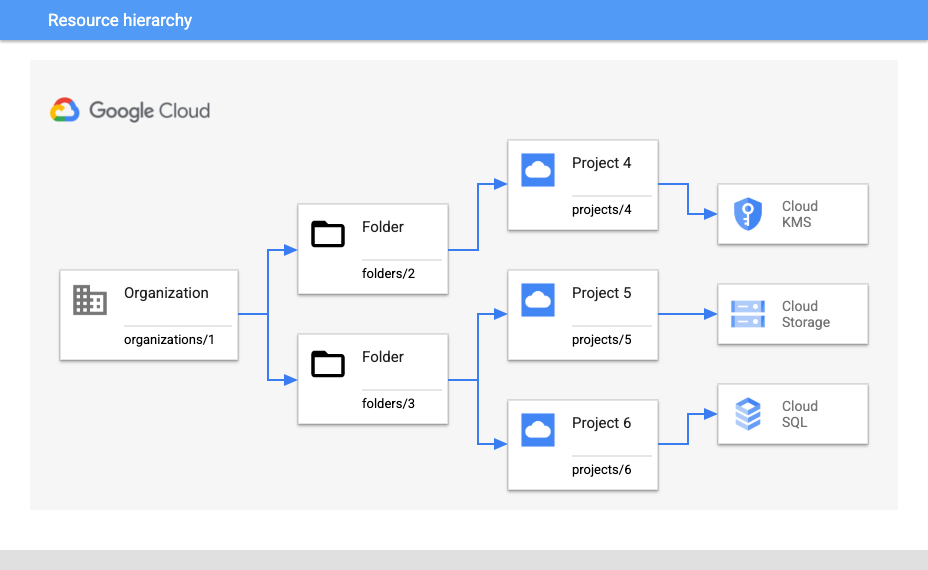
要求使用 CMEK 並限制專案金鑰
假設您想要求 projects/5 下的所有 Cloud Storage 資源都必須受到 CMEK 保護,並確保只能使用來自 projects/4 的金鑰。
如要強制所有新的 Cloud Storage 資源都必須使用 CMEK 保護,請使用下列組織政策設定:
- 組織政策:
constraints/gcp.restrictNonCmekServices - 繫結位置:
projects/5 - 政策類型:拒絕
- 政策值:
storage.googleapis.com
如要確保只使用 projects/4 的金鑰,請使用下列設定:
- 組織政策:
constraints/gcp.restrictCmekCryptoKeyProjects - 繫結位置:
projects/5 - 政策類型:允許
- 政策值:
projects/4
要求使用 CMEK,並限制只能使用資料夾中的金鑰
或者,假設您預計日後會在 folders/2 下新增其他 Cloud KMS 專案,並想在 folders/3 內更廣泛地要求使用 CMEK。在這種情況下,您需要稍微不同的設定。
如要要求 folders/3 下任何位置的新 Cloud SQL 和 Cloud Storage 資源,都必須採用額外的 CMEK 保護措施:
- 組織政策:
constraints/gcp.restrictNonCmekServices - 繫結位置:
folders/3 - 政策類型:拒絕
- 政策值:
sqladmin.googleapis.com、storage.googleapis.com
如要確保只使用 folders/2 下 Cloud KMS 專案的金鑰,請按照下列步驟操作:
- 組織政策:
constraints/gcp.restrictCmekCryptoKeyProjects - 繫結位置:
folders/3 - 政策類型:允許
- 政策值:
under:folders/2
要求組織使用 CMEK
如要強制組織內所有支援的服務都使用 CMEK,請使用下列設定來設定 constraints/gcp.restrictNonCmekServices 限制:
- 組織政策:
constraints/gcp.restrictNonCmekServices - 繫結位置:
organizations/1 - 政策類型:拒絕
- 政策值:(所有支援的服務)
限制
如果您使用 Google Cloud 控制台建立資源,可能會發現當專案和服務設定constraints/gcp.restrictNonCmekServices時,無法使用 CMEK 以外的任何加密選項。只有在客戶帳戶已獲得專案的 orgpolicy.policy.get IAM 權限時,才會顯示 CMEK 組織政策限制。
後續步驟
如要進一步瞭解組織政策的優點和常見用途,請參閱「組織政策服務簡介」。
如需更多建立具有特定限制的組織政策範例,請參閱「使用限制」。