

This document compares four architectural patterns to federate Google Cloud with an external identity provider (IdP). It also provides guidance to help you choose a suitable architecture for your use case.
The four architectural patterns are as follows:
- Cloud Identity or Google Workspace federation
- Workforce Identity Federation, sync-less
- Workforce Identity Federation with SCIM
- Hybrid Cloud Identity and Workforce Identity Federation
Decision factors
To choose an architecture pattern that's suitable for your organization, consider multiple factors, including the following:
- Service portfolio: Your portfolio of Google services, and whether it includes Google Workspace and services beyond Google Cloud, such as Google Ads, Google Maps, or Chrome Enterprise.
- Data residency: Your data residency and sovereignty requirements.
- Gemini Enterprise integration with Microsoft 365: Your use of Gemini Enterprise or Gemini Notebook Enterprise and whether you plan to integrate Gemini Enterprise with Microsoft 365 services.
Service portfolio
Google services manage authentication and authorization differently. This affects how you configure identity federation. Two factors determine these differences: the service model SaaS versus PaaS and IaaS and the authorization model IAM versus service-specific.
Service models
- Software as a Service (SaaS): Google fully manages services like Gmail, Google Ads, or the Gemini Enterprise app. These services require no development effort and are ready to use. Because SaaS services target a large audience, most of your users might require access to them.
- Platform as a Service (PaaS) or Infrastructure as a Service (IaaS): Most Google Cloud services are PaaS or IaaS. These services let technical users develop, deploy, and operate custom workloads. Because these services target a technical audience, only a subset of your users require access.
Authorization models
Google services implement authorization in one of two ways:
- IAM: Most Google Cloud services use IAM to let administrators manage fine-grained access to resources.
- Service-specific authorization: Services such as Google Ads, Looker, or Google Workspace don't use IAM. Instead, administrators manage access using tools specific to each service.
These factors result in the following service groups:
| SaaS | PaaS or IaaS | |
|---|---|---|
| IAM-based authorization | Google Cloud SaaS services such as the Gemini Enterprise app and Gemini Notebook Enterprise | Google Cloud PaaS and IaaS services such as BigQuery or Compute Engine |
| Service-specific authorization | Non-cloud Google services such as Google Ads, Google Workspace, and Google Maps | None |
To choose an architecture pattern that's suitable for your organization, consider which service groups apply to your organization.
Data residency
To authenticate users and manage sessions, Cloud Identity, Google Workspace, and Workforce Identity Federation process personal user information. This user information can include the following:
- User names or email addresses
- User attributes such as first names and last names
- Group names and memberships
Cloud Identity, Google Workspace, and Workforce Identity Federation process this data under the terms for service data and might store it outside your organization's or users' locations:
- Cloud Identity and Google Workspace store service data in Google data centers and might replicate it across all data centers. The stored data might include information that isn't essential for authentication, such as department names, addresses, or phone numbers.
- Workforce Identity Federation stores service data in Google Cloud regions and might replicate it across all regions.
If you grant a user access to a resource, IAM stores their principal identifier in a role binding. Google Cloud processes role bindings under the terms for service data and might store them across all Google Cloud regions.
The architecture patterns described on this page require storage of user information, but they differ in how long they store that user information:
- Workforce Identity Federation without SCIM stores user information only until the user's session expires.
- Workforce Identity Federation with SCIM stores user information until you delete the user account or delete the tenant, and until the retention period elapses.
- Cloud Identity and Google Workspace store user information until you delete the user account and until the retention period elapses.
Many IdPs let you automate suspending or deleting user accounts when the corresponding user account status changes in the IdP. Depending on your IdP and its configuration, the IdP might delay user account deletion until a certain grace period elapses, which can extend how long Google Cloud stores that user information.
Gemini Enterprise integration with Microsoft 365
Gemini Enterprise lets you connect to Microsoft 365 services using two types of connectors:
- Data ingestion-based connectors: These connectors crawl Microsoft 365 to build a search index in Google Cloud. When a user submits a prompt, Gemini Enterprise uses this index to search content, and it performs access checks locally by evaluating the access control lists (ACLs) obtained from Microsoft 365.
- Federated connectors: These connectors query Microsoft 365 for each prompt. They use delegated authorization to let Microsoft 365 perform the access checks directly.
Data ingestion-based connectors introduce specific requirements for user federation:
- Group membership awareness: Microsoft 365 ACLs can include entries for groups as well as users. To evaluate whether a user can access content, connectors must consider all groups the user belongs to. If the connector is aware of only a subset of the user's groups, it might incorrectly allow or deny access.
- Identifier conversion: To evaluate ACLs, the connector must convert between the user and group identifiers used by Microsoft 365 and the identifiers used by Google Cloud.
When you use Workforce Identity Federation, Gemini Enterprise can reliably convert identifiers and evaluate ACLs if you configure attribute mappings to be compatible with Gemini Enterprise.
When you use Cloud Identity or Google Workspace federation, Microsoft Entra ID controls the attribute mappings for user and group provisioning, rather than Google Cloud. Entra determines the conversion rules for user and group identifiers, which might involve complex transformations. To evaluate an ACL, the Gemini Enterprise connector must apply the same conversion rules, but the connector lacks visibility into the Entra configuration. Therefore, when you use Cloud Identity federation or Google Workspace federation, Gemini Enterprise can't reliably convert user and group identifiers and can't reliably evaluate ACLs.
To determine which architecture pattern fits your organization, consider your usage of Gemini Enterprise and whether you plan to use data ingestion-based connectors.
Architecture patterns
The following flowchart shows how these factors determine which pattern meets your organization's requirements:
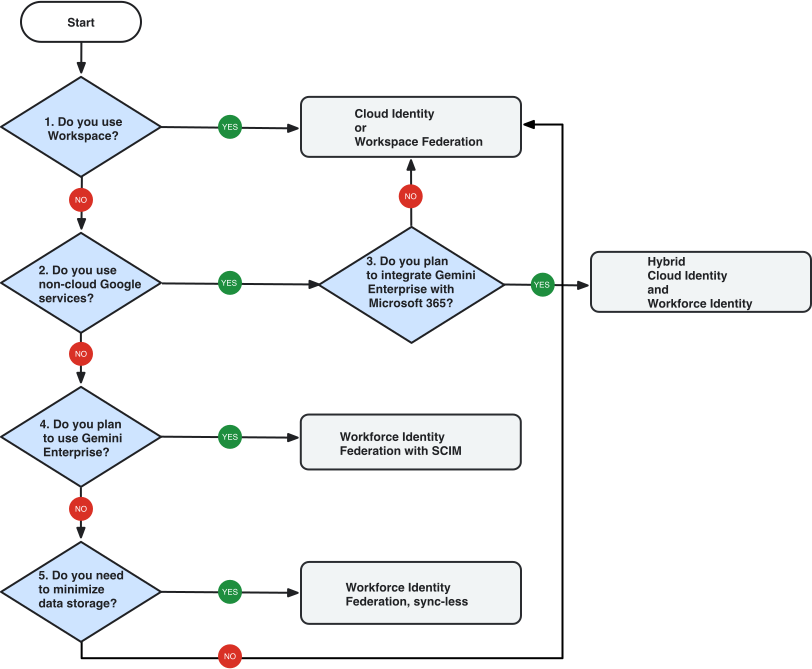
Does a significant share of your organization use Google Workspace?
- If Yes, then use the Cloud Identity or Google Workspace federation pattern.
- If No, then proceed to decision 2.
Do you use services beyond Google Cloud such as Google Ads or Google Maps?
- If Yes, then proceed to decision 3.
- If No, then proceed to decision 4.
Do you plan to use Gemini Enterprise and integrate it with Microsoft 365?
- If Yes, then use the Hybrid Cloud Identity and Workforce Identity Federation pattern.
- If No, then use the Cloud Identity or Google Workspace federation pattern.
Do you plan to use Gemini Enterprise?
- If Yes, then use the Workforce Identity Federation with SCIM pattern.
- If No, then proceed to decision 5.
Do you have data residency requirements that require you to minimize the storage of user information?
- If Yes, then use the Workforce Identity Federation, sync-less pattern.
- If No, then use the Cloud Identity or Google Workspace federation pattern.
Cloud Identity or Google Workspace federation
Select this pattern when your organization meets one of the following criteria:
- A significant share of your organization already uses Google Workspace.
- You use Google services beyond Google Cloud such as Google Ads or Google Maps but don't plan to integrate Gemini Enterprise with Microsoft 365 by using data ingestion-based connectors.
- You only use Google Cloud services, you don't plan to use Gemini Enterprise, and you don't have strict data residency requirements to minimize user data storage.
In this pattern, you don't use Workforce Identity Federation. Instead, you federate your Cloud Identity account or your Google Workspace account with your IdP, and you use ahead-of-time user provisioning and group provisioning.
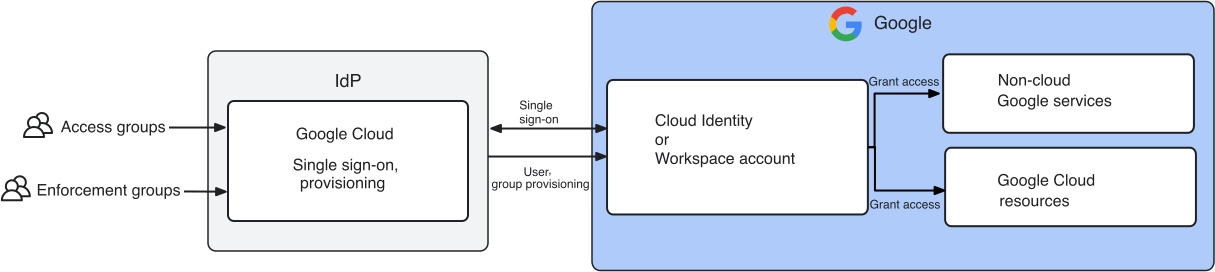
In this pattern, you must provision users and groups before users can sign in; otherwise, their sign-in attempt fails:
- User provisioning: Helps ensure timely onboarding and offboarding of users.
- Group provisioning: Lets you use groups to manage access to Google services and Google Cloud resources.
If only a subset of your organization's users need Google Workspace, add both a Google Workspace subscription and a Cloud Identity subscription to your account, and assign Google Workspace licenses to only those users who need them.
Benefits
- Users can authenticate to Google services, regardless of whether those services use IAM or not. In the Cloud Identity account or in the Google Workspace account, control which Google services users are permitted to use.
- You can limit single sign-on (SSO) and ahead-of-time provisioning to a subset of users, and continue to manage specific users, such as emergency access users, directly in Cloud Identity or in Google Workspace.
- You can provision groups from your external IdP, manage groups locally in your Cloud Identity account or in your Google Workspace account, or combine both approaches.
Limitations
- Provisioning user accounts ahead of time adds overhead, and that provisioning can slow down the onboarding process.
You can't control or restrict the locations that Cloud Identity or Google Workspace uses to store user data and group data. Because Google processes and stores user data and group data under the terms for service data, data region controls don't cover that data, and Google might replicate that data across Google data center locations.
Gemini Enterprise provides limited support for connecting to Microsoft data sources when you use Cloud Identity federation or Google Workspace federation.
Workforce Identity Federation, sync-less
Select this pattern when your organization meets the following criteria:
- You only use Google Cloud services.
- You use Gemini Enterprise, but expect to stay within the group limitations that are imposed by your IdP.
- You have data residency requirements that require minimizing the storage of personal user information.
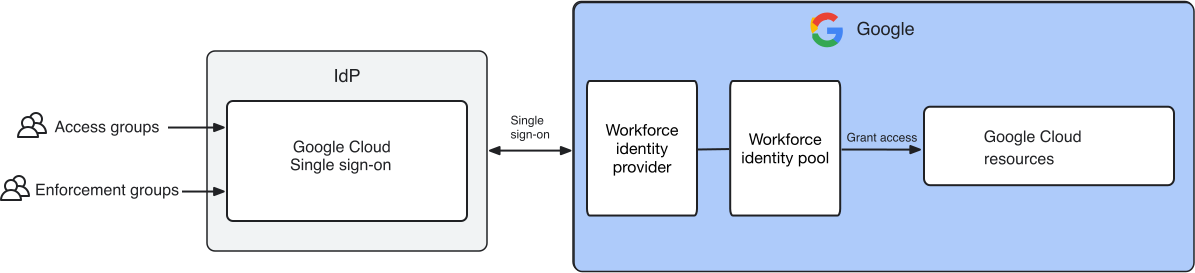
In this pattern, you use Workforce Identity Federation to federate your Google Cloud organization with your external IdP.
This pattern doesn't require user provisioning or group provisioning. Every time a user signs in, the IdP passes the required information about the user—including group memberships and custom attributes—to Google Cloud, and Google Cloud keeps that information only for the duration of the user session.
Benefits
- You don't need to store or manage user accounts or groups in Google Cloud.
- The pattern lets you use data ingestion-based connectors to integrate Gemini Enterprise with Microsoft 365.
Limitations
- Workforce Identity Federation is an IAM feature and only lets users access services that use IAM. Users who authenticate using Workforce Identity Federation can't access Google services such as Google Ads, Looker, or Google Marketing Platform.
- Users who authenticate using Workforce Identity Federation can't access some Google Cloud features. For details, see Identity federation: products and limitations.
- Many IdPs limit the number of group memberships they can pass to Workforce Identity Federation in a SAML assertion or ID token. To stay under these limits, you might need to strengthen group governance and restrict the types of groups to include in assertions or tokens.
- When sharing resources such as a Gemini Notebook Enterprise notebook, you can't look up a group by name. Instead, users must manually enter their identifiers.
If you use Microsoft Entra ID, you can use a variation of this pattern by configuring extra attributes. When you configure extra attributes, Workforce Identity Federation executes a callback to the Microsoft Graph API during user authentication to retrieve group memberships. This configuration lets you overcome Entra's group membership limits for SAML assertion and ID tokens and use up to 999 group memberships per user.
Workforce Identity Federation with SCIM
Select this pattern when your organization meets the following criteria:
- You only use Google Cloud services. That is, you don't use external Google services like Google Ads or Google Maps.
- You plan to use Gemini Enterprise or Gemini Notebook Enterprise, and you need to support up to 2,000 group memberships per user, or the ability to look up groups by name when sharing resources.
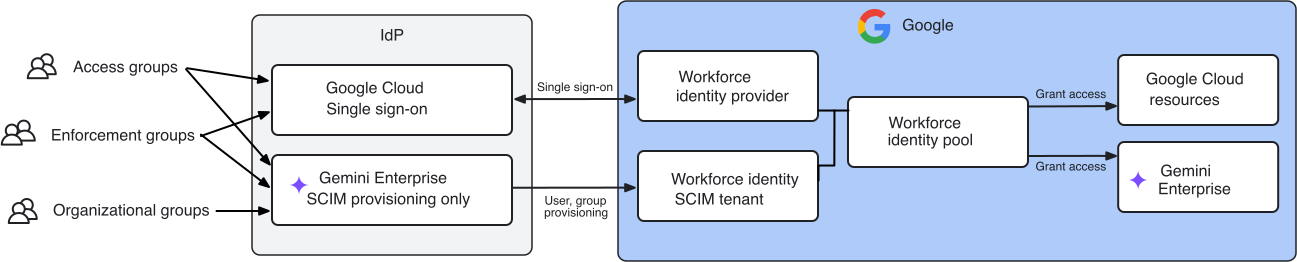
In this pattern, you use Workforce Identity Federation to federate your Google Cloud organization. To increase the number of groups that you can use for Gemini Enterprise, you also configure SCIM to provision group membership information ahead of time.
Benefits
- The pattern lets you use data ingestion-based connectors to integrate Gemini Enterprise with Microsoft 365.
- You can use up to 2,000 group memberships per user to control access to Gemini Enterprise and Gemini Notebook Enterprise, and let Gemini Enterprise data ingestion-based connectors perform access checks.
- When sharing resources such as a Gemini Notebook Enterprise notebook, you can look up groups by name to help improve the overall user experience.
Limitations
- Support for SCIM-provisioned groups is limited to Gemini Enterprise and Gemini Notebook Enterprise. Other services can only consume the group memberships that your IdP passes in the SAML assertion or ID token.
- Workforce Identity Federation is an IAM feature and only lets users access services that use IAM. Users who authenticate using Workforce Identity Federation can't access Google services such as Google Ads, Looker, or Google Marketing Platform.
- Users who authenticate using Workforce Identity Federation can't access some of the Google Cloud features. For details, see Identity federation: products and limitations.
Hybrid Cloud Identity and Workforce Identity Federation
Select this pattern when your organization meets the following criteria:
- You use Google services beyond Google Cloud (such as Google Ads or Google Maps).
- You plan to use Gemini Enterprise and integrate it with Microsoft 365.
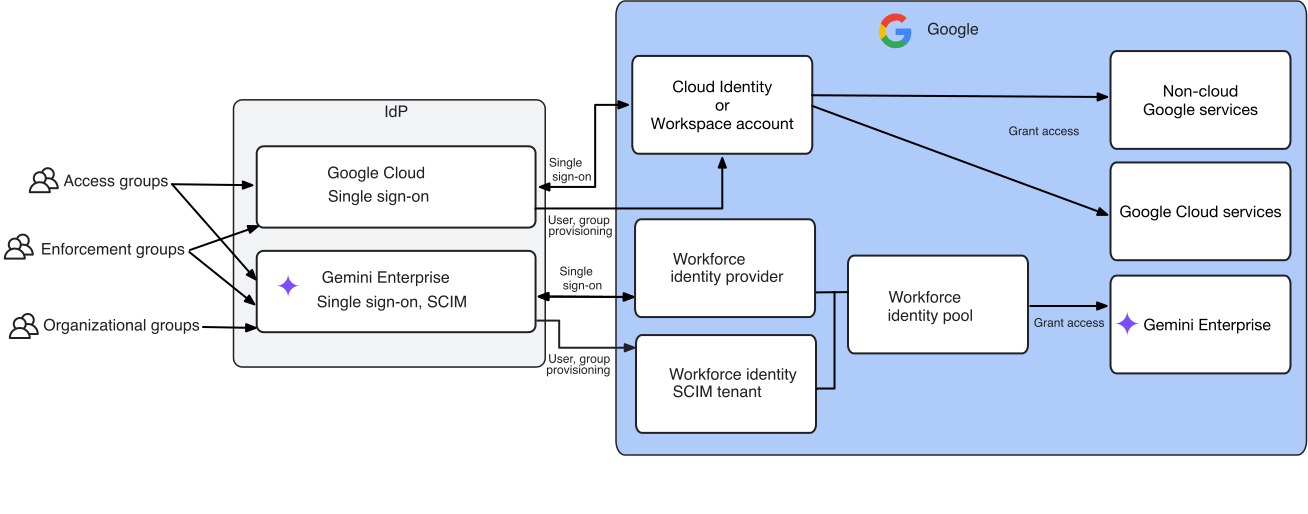
This pattern combines two of the previous patterns:
- You use Workforce Identity Federation (sync-less or with SCIM) to manage access to Gemini Enterprise and Gemini Notebook Enterprise.
- You use Cloud Identity or Google Workspace federation to manage access to other services, including Google Cloud and non-cloud Google services.
Benefits
This pattern lets you combine the benefits of the previous two patterns:
- You can connect Gemini Enterprise to Microsoft data sources without feature limitations.
- Users can authenticate to Google services, regardless of whether those services use IAM or not.
- Use the full set of Google Cloud features.
Limitations
- You must maintain two separate relying party configurations in your external IdP: one for Cloud Identity and one for Workforce Identity Federation.
- Depending on whether you configure a user to use Cloud Identity or Workforce Identity Federation, their sign-in experience might differ.
- When managing IAM allow policies, you must use different principal identifiers
depending on how a user authenticates. For example, a user who is known as
bob@example.comin your external IdP might have the principal identifierbob@example.comorprincipal://iam.googleapis.com/locations/global/workforcePools/POOL_ID//subject/SUBJECT_IDin IAM, depending on whether that user authenticates using Cloud Identity federation or using Workforce Identity Federation. - You can't create groups that contain a mix of Cloud Identity users and Workforce Identity Federation principals. Cloud Identity groups can contain only Cloud Identity users, and workforce identity groups can contain only Workforce Identity Federation principals.
- Extending Workforce Identity Federation use beyond Gemini Enterprise can require users to switch between identities or cause them to be unsure how to authenticate.