

When generative AI agents interact with external tools, APIs, or services (such as BigQuery, Jira, GitHub, or Google Maps), they need a secure mechanism to authenticate outbound requests. The Agent Identity auth manager (auth manager) provides this by acting as a centralized credentials vault and authentication broker that simplifies outbound tool authentication.
Benefits of using the auth manager
The auth manager provides the following benefits for agent development:
- Centralized credential vault: Stores API keys, OAuth client secrets, and user tokens in a Google-managed vault, helping to avoid hardcoded secrets and custom database storage.
- Automated OAuth 2.0: Handles multi-step OAuth 2.0 flows, such as user consent, authorization code exchange, and token refreshes, without custom backend code.
- Seamless ADK integration: Integrates natively with the
Agent Development Kit (ADK) to retrieve and inject outbound
authentication headers, such as
AuthorizationorX-Goog-Api-Key, into tool and Model Context Protocol (MCP) server invocations. - Granular SPIFFE ID access control: Uses SPIFFE-based agent identities to define precise Identity and Access Management (IAM) policies, helping to ensure only authorized agent principals and developers can access specific auth providers.
How the auth manager works
The auth manager acts as a credentials vault between your Agent Runtime on Gemini Enterprise Agent Platform environment and external service endpoints.
When an agent calls an external tool, the ADK intercepts the tool execution, requests the appropriate credential from the auth manager vault, and attaches the required authentication headers before dispatching the request to the target API.
The following flow diagram illustrates the high-level architecture and
credential retrieval lifecycle:
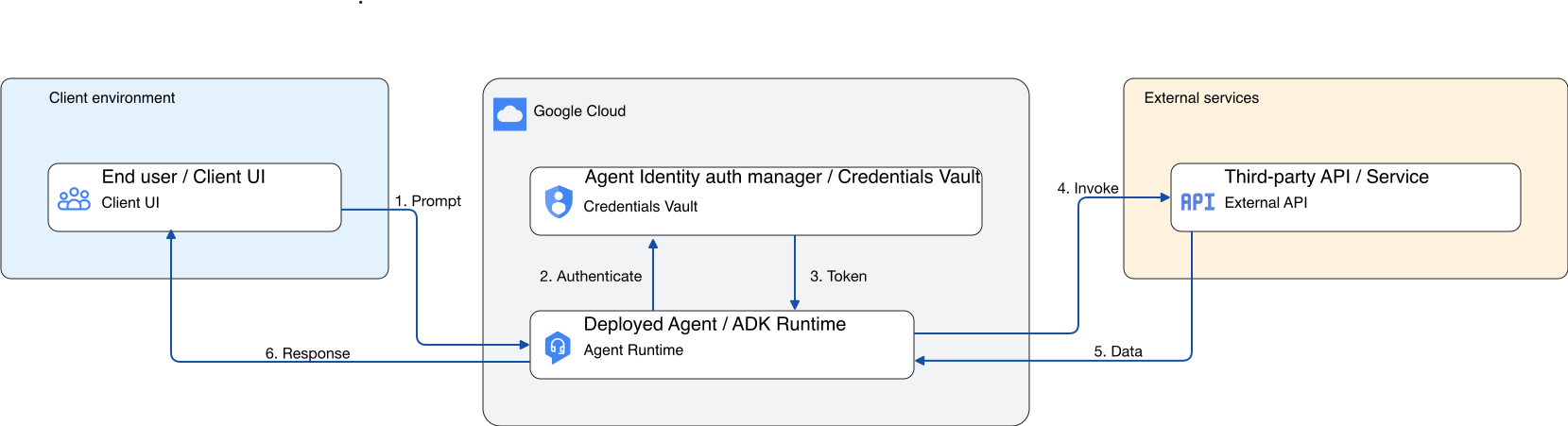
- The end user triggers an event or prompt that requires outbound tool authentication.
- The deployed agent (using the ADK) transparently intercepts the tool request and queries the secure auth manager vault.
- The auth manager returns the secure credential (API key or OAuth token) to the agent.
- The agent invokes the external API or tool with the attached credential.
- The third-party service validates the credential and returns the requested data to the agent.
- The agent uses the returned data to generate and deliver the final response to the user.
Sample third-party integrations
The auth manager supports standard OAuth 2.0 and API key patterns, making it compatible with many third-party services.
The following table lists some verified third-party services, their supported authentication methods, and setup documentation.
| Service | Supported authentication methods | Credential setup documentation |
|---|---|---|
| Atlassian Jira | 3-legged OAuth, API key | Jira OAuth 2.0 guide |
| Dropbox | 3-legged OAuth | Dropbox OAuth guide |
| GitHub | 3-legged OAuth* | GitHub OAuth Apps |
| GitLab | 3-legged OAuth | GitLab OAuth provider |
| Microsoft | 3-legged OAuth* | Microsoft identity platform |
| Salesforce | 3-legged OAuth, 2-legged OAuth | Salesforce Connected Apps |
| ServiceNow | 3-legged OAuth*, 2-legged OAuth | ServiceNow OAuth setup |
* For details on service limitations and requirements, see Service-specific considerations.
Service-specific considerations
- GitHub and Microsoft: The auth manager supports single-scope integrations for GitHub and Microsoft. The auth manager doesn't support requesting multiple scopes. For more information, see GitHub or Microsoft multiple scopes error.
- ServiceNow: In ServiceNow, administrators configure allowed scopes at the application level. Regardless of what an agent requests, ServiceNow grants only these configured scopes. If an agent requires a scope that isn't configured, authentication might fail or enter a request loop. Ensure that the ServiceNow application configuration includes all of the scopes that your agent requires. For more information, see ServiceNow authentication loop or unexpected scopes.
Locations
The Agent Identity auth manager is available in regions across the Americas, Europe, and Asia Pacific. For a list of supported regions, see Agent Identity locations.
What's next
- Authenticate using API key with auth manager
- Authenticate using 2-legged OAuth with auth manager
- Authenticate using 3-legged OAuth with auth manager
- Agent Identity overview
- Manage Agent Identity auth providers
- Agent Identity locations
- Troubleshoot Agent Identity auth manager