

Share the chat agents that you've created and launched using Workflow Builder with other users within your organization. Depending on your web app's feature control configurations, you might need an Gemini Enterprise app administrator to review and approve to share a chat agent.
Share a chat agent
To share a chat agent, do the following:
App
Open your Gemini Enterprise app and go to the Agent Gallery page.
The Agent Gallery page appears displaying all the prebuilt agents and custom-built agents.
In the Your Agents section, find the chat agent that you want to share.
Click Actions menu, and select Share.
In the share dialog, enter the email addresses of the users you want to share the agent with. You can also click Copy link to generate a shareable link.
Click Done.
The chat agent is shared with the users in your access list.
Administrator review control
By default, agent owners can share their agents with any user within their organization without approval from an app administrator. However, app administrators can change the app feature control configurations to require administrator review and approval for sharing agents in the app.
Agent sharing follows a two-step process when administrator review is enabled:
- The agent owner shares the agent with one or more users.
- The app administrator reviews the sharing request and approves or denies it.
Review a share request
App administrators are responsible for reviewing and managing agent sharing requests.
Console
To review a share request as an app administrator, do the following:
In the Google Cloud console, go to the Gemini Enterprise > Apps page.
Click the name of the app containing the agent.
In the app navigation menu, click Agents.
Find the agent with a Review share request action in the User permissions column.
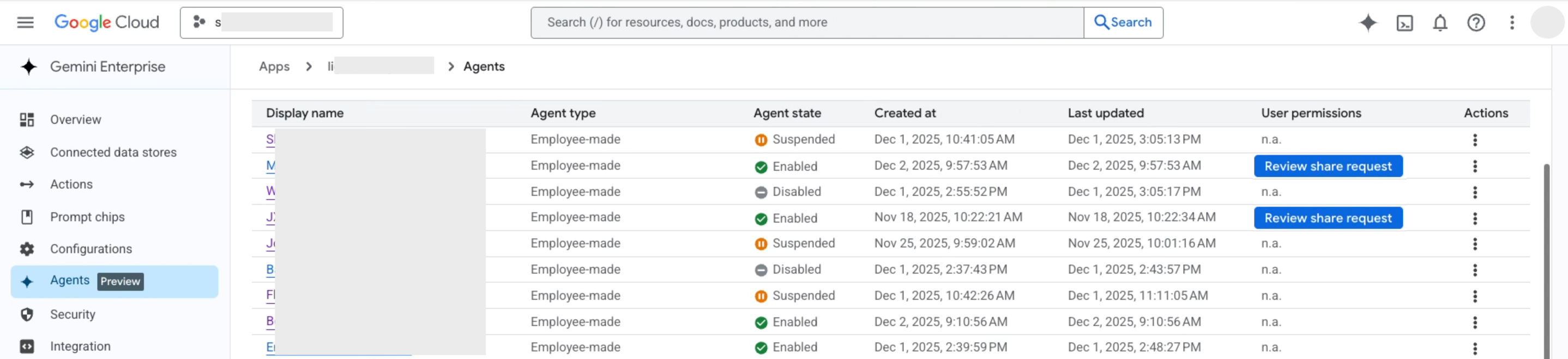
Click Review share request.
In the Share request pane:
- Review the access list under Requested to share with the following users.
- Optional: Modify the access list to add or remove user accounts, Google groups or Workforce Identity Federation (WIF) identity pools.
To approve the request and grant access, click Approve and enable.
To reject the request, click Deny.
Sharing limits
When sharing a chat agent, the following limits apply:
Maximum 1,500 individual accounts: Gemini Enterprise manages agent access using underlying Google Cloud IAM allow policies, which enforce a hard cap of 1,500 members per policy. Sharing an agent with more than 1,500 individual user accounts causes the operation to fail with the following error:
The number of members in the policy (1,501) is larger than the maximum allowed size 1,500.
For a full list of system constraints, see Workflow Builder quotas and limits.
Considerations
- When you share a chat agent, users can query the content of files uploaded to the Knowledge section regardless of direct file access, while data accessed through connectors continues to respect individual user permissions and Access Control Lists (ACLs).
- App administrators can add and remove users from the access list at any time.
- Only app administrators can share the agent with Google groups and Workforce Identity Federation (WIF) identity pools in your organization.
- Agent owners can remove any user from the access list at any time (including those added by the app admin).
- You can also share a chat agent from the chat agent builder canvas.
What's next
- Learn how to use a chat agent.
- Learn how to schedule chat agent runs.
- Learn how to edit a chat agent.
- Learn how to delete a chat agent.
- View Workflow Builder quotas and limits.