


이 페이지에서는 Looker Explore를 기반으로 하는 Looker 데이터 소스를 사용하는 데이터 에이전트에 대한 시스템 요청 사항을 작성하는 방법을 설명합니다.
작성된 컨텍스트는 데이터 에이전트 소유자가 데이터 에이전트의 동작을 형성하고 API의 응답을 미세 조정하기 위해 제공할 수 있는 안내입니다. 효과적으로 작성된 컨텍스트는 Conversational Analytics API 데이터 에이전트가 데이터 소스에 관한 질문에 답변하는 데 유용한 컨텍스트를 제공합니다.
Looker 데이터 소스의 경우 구조화된 컨텍스트와 시스템 요청 사항의 조합을 통해 작성된 컨텍스트를 제공할 수 있습니다. 가능하면 구조화된 컨텍스트 필드를 통해 컨텍스트를 제공하세요. 그런 다음 구조화된 필드에 포함되지 않는 추가 안내에 system_instruction 매개변수를 사용할 수 있습니다. 시스템 요청 사항은 데이터 에이전트 소유자가 에이전트에게 역할, 어조, 전반적인 동작을 알리기 위해 제공할 수 있는 작성된 컨텍스트의 일종입니다. 시스템 요청 사항은 구조화된 컨텍스트보다 자유 형식인 경우가 많습니다.
구조화된 컨텍스트 필드와 시스템 요청 사항은 모두 선택사항이지만, 강력한 컨텍스트를 제공하면 에이전트가 더 정확하고 관련성 높은 대답을 제공할 수 있습니다. 데이터 에이전트를 만드는 동안 제공한 구조화된 컨텍스트 정보는 시스템 안내에 자동으로 추가됩니다.
구조화된 컨텍스트 정의
데이터 에이전트를 위해 구조화된 컨텍스트에서 골드 질문과 답변을 제공할 수 있습니다. 구조화된 컨텍스트를 정의한 후 직접 HTTP 요청을 사용하거나 Python SDK를 사용하여 데이터 에이전트에 제공할 수 있습니다.
Looker 데이터 소스의 경우 표준 쿼리는 자연어 질문과 해당 Looker 쿼리의 쌍을 정의하는 looker_golden_queries 키에 캡처됩니다. 자연어 질문과 해당 Explore 메타데이터를 에이전트에게 제공하면 에이전트가 더 높은 품질의 일관된 결과를 제공하도록 안내할 수 있습니다. 이 페이지에는 Looker 골든 쿼리의 예가 포함되어 있습니다.
각 Looker 표준 쿼리를 정의하려면 다음 두 필드의 값을 모두 제공하세요.
natural_language_questions: 사용자가 질문할 수 있는 자연어 질문looker_query: 자연어 질문에 해당하는 Looker 표준 쿼리
다음은 '공항'이라는 Explore의 natural_language_questions~looker_query 쌍의 예입니다.
  natural_language_questions: ["What are the major airport codes and cities in CA?"]
  looker_query": {
        "model": "airports",
        "explore": "airports",
        "fields": ["airports.city", "airports.code"],
        "filters": [
          {
            "field": "airports.major",
            "value": "Y"
          },
          {
            "field": "airports.state",
            "value": "CA"
          }
        ]
  }
Looker 표준 쿼리 정의
natural_language_questions 및 looker_query 필드의 값을 제공하여 지정된 Explore의 Looker 표준 쿼리를 정의합니다. natural_language_questions 필드의 경우 사용자가 해당 탐색 분석에 대해 질문할 수 있는 내용을 고려하여 해당 질문을 자연어로 작성합니다. 이 입력란의 값에 질문을 두 개 이상 포함할 수 있습니다. Explore의 쿼리 메타데이터에서 looker_query 필드의 값을 가져올 수 있습니다.
Looker 쿼리 객체는 다음 필드를 지원합니다.
model(문자열): 쿼리를 생성하는 데 사용된 LookML 모델입니다. 필수 입력란입니다.explore(문자열): 쿼리를 생성하는 데 사용된 Explore입니다. 필수 입력란입니다.fields[](문자열): 측정기준과 측정값을 비롯해 Explore에서 가져올 필드입니다. 이 필드는 선택 사항입니다.filters[](객체(필터)): Explore에 적용할 필터입니다. 이 필드는 선택 사항입니다.sorts[](문자열): Explore에 적용할 정렬입니다. 이 필드는 선택사항입니다.limit(문자열): Explore에 적용할 데이터 행 한도입니다. 이 필드는 선택사항입니다.
다음과 같은 방법으로 Explore의 쿼리 메타데이터를 가져올 수 있습니다.
Explore 사용자 인터페이스에서 쿼리 메타데이터 가져오기
- Explore에서 Explore 작업 메뉴를 선택한 다음 LookML 가져오기를 선택합니다.
- 대시보드 탭을 선택합니다.
- LookML에서 쿼리 세부정보를 복사합니다. 예를 들어 다음 이미지는 주문 항목이라는 Explore의 LookML을 보여줍니다.
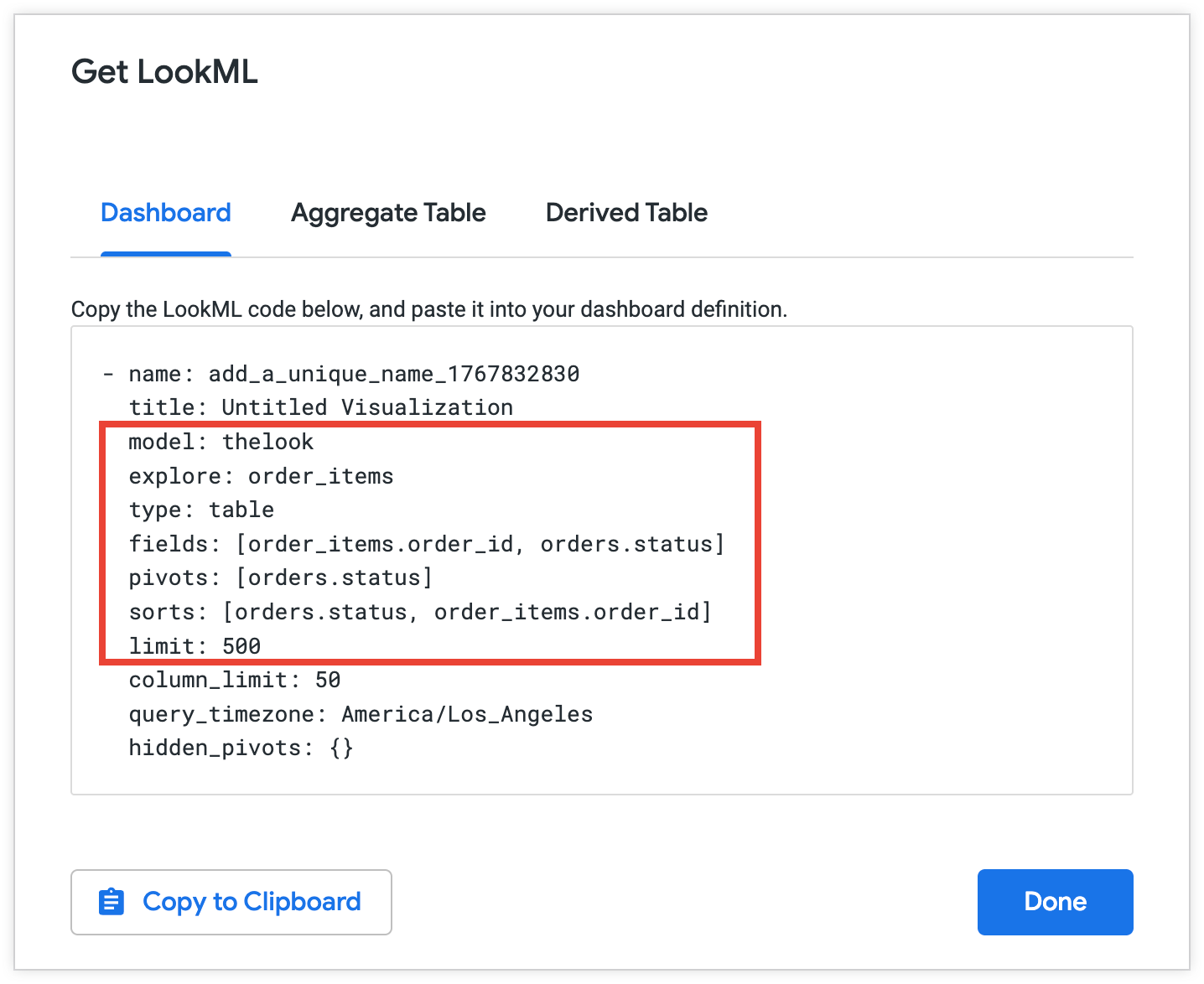
Looker 표준 쿼리에서 사용할 선택한 메타데이터를 복사합니다.
  model: thelook
  explore: order_items
  fields: [order_items.order_id, orders.status]
  sorts: [orders.status, order_items.order_id]
  limit: 500
Looker API를 사용하여 Looker 쿼리 객체 가져오기
Looker API를 사용하여 Explore에 관한 정보를 가져오려면 다음 단계를 따르세요.
- Explore에서 Explore 작업 메뉴를 선택한 다음 공유를 선택합니다. Looker에 Explore를 공유하기 위해 복사할 수 있는 URL이 표시됩니다. 공유 URL은 일반적으로
https://looker.yourcompany/x/vwGSbfc와 같습니다. 공유 URL의 후행vwGSbfc은 공유 슬러그입니다. - 공유 슬러그를 복사합니다.
- Looker API에
GET /queries/slug/Explore_slug요청을 보내Explore_slug에 Explore URL 슬러그를 문자열로 전달합니다. 요청에 반환하려는 탐색 분석 쿼리 메타데이터의 필드를 포함합니다. 자세한 내용은 슬러그 쿼리 가져오기 API 참조 페이지를 참고하세요. - API 응답에서 쿼리 메타데이터를 복사합니다.
Looker 표준 쿼리 예시
다음 예시에서는 직접 HTTP 요청과 Python SDK를 사용하여 airports 탐색을 위한 골든 질문을 제공하는 방법을 보여줍니다.
HTTP
직접 HTTP 요청에서 looker_golden_queries 키에 대한 Looker 골든 쿼리 객체 목록을 제공합니다. 각 객체에는 natural_Language_questions 키와 해당 looker_query 키가 포함되어야 합니다.
looker_golden_queries = [
  {
    "natural_language_questions": ["What is the highest observed positive longitude?"],
    "looker_query": {
      "model": "airports",
      "explore": "airports",
      "fields": ["airports.longitude"],
      "filters": [
        {
          "field": "airports.longitude",
          "value": ">0"
        }
      ],
      "sorts": ["airports.longitude desc"],
      "limit": "1"
    }
  },
 {
    "natural_language_questions": ["What are the major airport codes and cities in CA?", "Can you list the cities and airport codes of airports in CA?"],
    "looker_query": {
      "model": "airports",
      "explore": "airports",
      "fields": ["airports.city", "airports.code"],
      "filters": [
        {
          "field": "airports.major",
          "value": "Y"
        },
        {
          "field": "airports.state",
          "value": "CA"
        }
      ]
    }
  },
]
Python SDK
Python SDK를 사용하는 경우 LookerGoldenQuery 객체 목록을 제공할 수 있습니다. 각 객체에 대해 natural_language_questions 및 looker_query 매개변수 값을 제공합니다.
looker_golden_queries = [geminidataanalytics.LookerGoldenQuery(
      natural_language_questions=[
          "What is the highest observed positive longitude?"
      ],
      looker_query=geminidataanalytics.LookerQuery(
          model="airports",
          explore="airports",
          fields=["airports.longitude"],
          filters=[
              geminidataanalytics.LookerQuery.Filter(
                  field="airports.longitude", value=">0"
              )
          ],
          sorts=["airports.longitude desc"],
          limit="1",
      ),
  ),
  geminidataanalytics.LookerGoldenQuery(
      natural_language_questions=[
          "What are the major airport codes and cities in CA?",
          "Can you list the cities and airport codes of airports in CA?",
      ],
      looker_query=geminidataanalytics.LookerQuery(
          model="airports",
          explore="airports",
          fields=["airports.city", "airports.code"],
          filters=[
              geminidataanalytics.LookerQuery.Filter(
                  field="airports.major", value="Y"
              ),
              geminidataanalytics.LookerQuery.Filter(
                  field="airports.state", value="CA"
              ),
          ],
      ),
  ),
]
시스템 요청 사항에서 추가 컨텍스트 정의
시스템 요청 사항은 데이터 소스에 관한 세부정보와 질문에 답할 때 에이전트의 역할에 관한 안내를 데이터 에이전트에 제공하는 일련의 주요 구성요소와 객체로 구성됩니다. system_instruction 파라미터에서 YAML 형식 문자열로 데이터 에이전트에 시스템 요청 사항을 제공할 수 있습니다.
다음 YAML 템플릿은 Looker 데이터 소스의 시스템 요청 사항을 구성하는 방법을 보여주는 예시입니다.
-   system_instruction: str # Describe the expected behavior of the agent
-   glossaries: # Define business terms, jargon, and abbreviations that are relevant to your use case
    -   glossary:
            -   term: str
            -   description: str
            -   synonyms: list[str]
-   additional_descriptions: # List any additional general instructions
    -   text: str
시스템 요청 사항의 키 구성요소 설명
다음 섹션에는 Looker 시스템 요청 사항의 주요 구성요소 예시가 포함되어 있습니다. 이러한 키에는 다음이 포함됩니다.
system_instruction
system_instruction 키를 사용하여 에이전트의 역할과 페르소나를 정의합니다. 이 초기 명령은 API의 응답에 대한 어조와 스타일을 설정하고 에이전트가 핵심 목적을 이해하는 데 도움이 됩니다.
예를 들어 가상의 전자상거래 매장의 영업 분석가로 에이전트를 다음과 같이 정의할 수 있습니다.
-   system_instruction: You are an expert sales analyst for a fictitious
    ecommerce store. You will answer questions about sales, orders, and customer
    data. Your responses should be concise and data-driven.
glossaries
glossaries 키에는 데이터 및 사용 사례와 관련이 있지만 아직 데이터에 표시되지 않는 비즈니스 용어, 전문 용어, 약어의 정의가 나열됩니다. 예를 들어 다음과 같이 특정 비즈니스 컨텍스트에 따라 일반적인 비즈니스 상태 및 '단골 고객'과 같은 용어를 정의할 수 있습니다.
-   glossaries:
    -   glossary:
            -   term: Loyal Customer
            -   description: A customer who has made more than one purchase.
                Maps to the dimension 'user_order_facts.repeat_customer' being
                'Yes'. High value loyal customers are those with high
                'user_order_facts.lifetime_revenue'.
            -   synonyms:
                -   repeat customer
                -   returning customer
additional_descriptions
additional_descriptions 키는 시스템 요청 사항의 다른 곳에서 다루지 않는 추가적인 일반 요청 사항이나 컨텍스트를 나열합니다. 예를 들어 additional_descriptions 키를 사용하여 다음과 같이 에이전트에 관한 정보를 제공할 수 있습니다.
-   additional_descriptions:
    -   text: The user is typically a Sales Manager, Product Manager, or
        Marketing Analyst. They need to understand performance trends, build
        customer lists for campaigns, and analyze product sales.
예: Looker의 시스템 요청 사항
다음 예시는 가상의 영업 분석가 에이전트의 샘플 시스템 요청 사항을 보여줍니다.
-   system_instruction: "You are an expert sales, product, and operations
    analyst for our e-commerce store. Your primary function is to answer
    questions by querying the 'Order Items' Explore. Always be concise and
    data-driven. When asked about 'revenue' or 'sales', use
    'order_items.total_sale_price'. For 'profit' or 'margin', use
    'order_items.total_gross_margin'. For 'customers' or 'users', use
    'users.count'. The default date for analysis is 'order_items.created_date'
    unless specified otherwise. For advanced statistical questions, such as
    correlation or regression analysis, use the Python tool to fetch the
    necessary data, perform the calculation, and generate a plot (like a scatter
    plot or heatmap)."
-   glossaries:
    -   term: Revenue
    -   description: The total monetary value from items sold. Maps to the
        measure 'order_items.total_sale_price'.
    -   synonyms:
        -   sales
        -   total sales
        -   income
        -   turnover
    -   term: Profit
    -   description: Revenue minus the cost of goods sold. Maps to the measure
        'order_items.total_gross_margin'.
    -   synonyms:
        -   margin
        -   gross margin
        -   contribution
    -   term: Buying Propensity
    -   description: Measures the likelihood of a customer to purchase again
        soon. Primarily maps to the 'order_items.30_day_repeat_purchase_rate'
        measure.
    -   synonyms:
        -   repeat purchase rate
        -   repurchase likelihood
        -   customer velocity
    -   term: Customer Lifetime Value
    -   description: The total revenue a customer has generated over their
        entire history with us. Maps to 'user_order_facts.lifetime_revenue'.
    -   synonyms:
        -   CLV
        -   LTV
        -   lifetime spend
        -   lifetime value
    -   term: Loyal Customer
    -   description: "A customer who has made more than one purchase. Maps to
        the dimension 'user_order_facts.repeat_customer' being 'Yes'. High value
        loyal customers are those with high
        'user_order_facts.lifetime_revenue'."
    -   synonyms:
        -   repeat customer
        -   returning customer
    -   term: Active Customer
    -   description: "A customer who is currently considered active based on
        their recent purchase history. Mapped to
        'user_order_facts.currently_active_customer' being 'Yes'."
    -   synonyms:
        -   current customer
        -   engaged shopper
    -   term: Audience
    -   description: A list of customers, typically identified by their email
        address, for marketing or analysis purposes.
    -   synonyms:
        -   audience list
        -   customer list
        -   segment
    -   term: Return Rate
    -   description: The percentage of items that are returned by customers
        after purchase. Mapped to 'order_items.return_rate'.
    -   synonyms:
        -   returns percentage
        -   RMA rate
    -   term: Processing Time
    -   description: The time it takes to prepare an order for shipment from the
        moment it is created. Maps to 'order_items.average_days_to_process'.
    -   synonyms:
        -   fulfillment time
        -   handling time
    -   term: Inventory Turn
    -   description: "A concept related to how quickly stock is sold. This can
        be analyzed using 'inventory_items.days_in_inventory' (lower days means
        higher turn)."
    -   synonyms:
        -   stock turn
        -   inventory turnover
        -   sell-through
    -   term: New vs Returning Customer
    -   description: "A classification of whether a purchase was a customer's
        first ('order_facts.is_first_purchase' is Yes) or if they are a repeat
        buyer ('user_order_facts.repeat_customer' is Yes)."
    -   synonyms:
        -   customer type
        -   first-time buyer
-   additional_descriptions:
    -   text: The user is typically a Sales Manager, Product Manager, or
        Marketing Analyst. They need to understand performance trends, build
        customer lists for campaigns, and analyze product sales.
    -   text: This agent can answer complex questions by joining data about
        sales line items, products, users, inventory, and distribution centers.
다음 단계
작성된 컨텍스트를 구성하는 구조화된 필드와 시스템 지침을 정의한 후 다음 호출 중 하나에서 컨텍스트를 Conversational Analytics API에 제공할 수 있습니다.
- 영구 데이터 에이전트 만들기: 요청 본문의
published_context객체 내에 작성된 컨텍스트를 포함하여 여러 대화에 걸쳐 지속되는 에이전트 동작을 구성합니다. 자세한 내용은 데이터 에이전트 만들기(HTTP) 또는 스테이트풀(Stateful) 또는 스테이트리스(Stateless) 채팅의 컨텍스트 설정(Python SDK)을 참조하세요. - 스테이트리스(Stateless) 요청 보내기: 채팅 요청의
inline_context객체 내에 작성된 컨텍스트를 제공하여 해당 특정 API 호출에 대한 에이전트의 동작을 정의합니다. 자세한 내용은 스테이트리스(Stateless) 멀티턴 대화 만들기(HTTP) 또는 인라인 컨텍스트를 사용하여 스테이트리스(Stateless) 채팅 요청 보내기(Python SDK)를 참조하세요. - 쿼리 데이터 요청 보내기: 데이터베이스 데이터 소스의 경우 쿼리 데이터 요청의
agent_context_reference객체 내에서 작성된 컨텍스트의 컨텍스트 세트 ID를 제공합니다. 자세한 내용은 데이터베이스 데이터 소스의 데이터 에이전트 컨텍스트 정의를 참고하세요.