

Gemini Enterprise Agent Platform provides a full suite of capabilities for the complete agentic development lifecycle, to help agent developers and enterprises Build, Scale, Govern, and Optimize their agentic applications.
Governance provides the framework for discovering, securing, and auditing AI agents and their underlying infrastructure at scale. As organizations deploy complex agentic workflows, the Govern suite of capabilities serves as the centralized command center for administrators and security teams to maintain oversight.
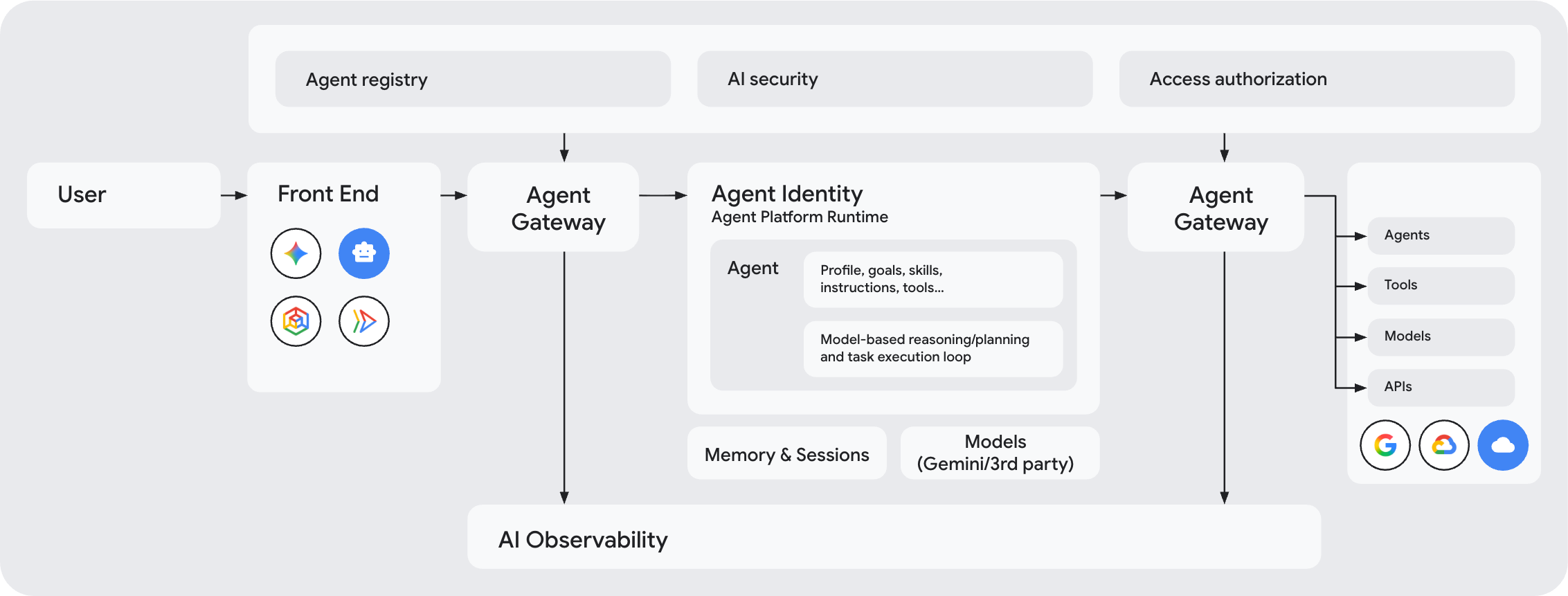
Core governance components
The following Agent Platform components work together to provide a unified governance architecture:
Agent Identity (Who made the request?): Assigns a unique, secure ID (a SPIFFE ID) to each agent. This identity acts as the agent's digital signature for authentication, access control, and auditing.
Agent identities are secured by default with Context-Aware Access which enforces end-to-end cryptographic authentication by using mTLS and DPoP.
Agent Registry (What destinations are approved?): Acts as the central directory for all approved agents, tools, Model Context Protocol (MCP) servers, and endpoints (such as essential Google Cloud APIs) in your organization. Agent Gateway uses this directory to check permissions before allowing connections.
Policies (What actions are permitted?): Lets you implement rich sets of agentic security and governance policies that control which agents can reach specific resources and what content is allowed to pass through:
- IAM Unified Access Policies: Access rules that link an agent's identity to approved tools and endpoints in Agent Registry. By default, all connections are blocked unless an explicit IAM policy grants access.
- Model Armor: Content security filters attached to gateways. Model Armor scans user prompts and tool responses in real time to block prompt injection attacks, sensitive data leaks, and harmful content.
- Semantic Governance Policies: Rules written in plain language that control how agents use tools. They enforce business rules at runtime to prevent agents from taking unintended actions, such as running unsafe combinations of tools.
- Custom authorization engines: Custom authorization extensions that let you delegate authorization decisions to third-party systems by using Service Extensions.
Internally, all of these policy types are enforced by using authorization policies managed through Service Extensions.
Agent Gateway (Where are policies enforced?): Serves as the main entry and exit point for network traffic between clients-to-agents, and agents-to-anywhere. It manages encrypted connections (mTLS), translates protocols (such as MCP, REST, and gRPC), and applies policy checks to all traffic. To learn more, see How Agent Gateway enforces policies.
Agent Observability: Agent Gateway generates observability telemetry for all agent interactions at the network layer and exports it to Agent Observability to provide you with a comprehensive understanding of agent actions.
Recommended order of configuration
To ensure a smooth deployment process, we recommend that you follow this sequence when setting up a governed Agent Platform environment:
Provision Agent Identities: Provision workload identities (SPIFFE IDs) for your agents. For instructions, see Agent identities.
Register destinations in Agent Registry: Register target tools, MCP servers, endpoints, and agents in Agent Registry. For instructions, see Agent Registry.
Configure IAM policies: Define IAM access policies that grant agent identities (SPIFFE IDs) access to essential platform APIs and your registered destinations. For instructions, see Configure IAM access policies.
Configure Model Armor templates: Set up content security templates to inspect prompt payloads and tool responses for prompt injections, jailbreaks, and sensitive data leaks. For instructions, see Configure Model Armor.
Configure Semantic Governance policies: Define natural language constraints that regulate tool usage and prevent unsafe tool combinations at runtime. For instructions, see Configure Semantic Governance policies.
Deploy Agent Gateway and monitor traffic: Deploy Agent Gateway to begin intercepting traffic. If you enabled any of the access control mechanisms in audit mode, check the logs in Cloud Logging to confirm that access is being evaluated as expected before transitioning your policies to active enforcement posture. For instructions, see Set up Agent Gateway.
Agent Registry, safety, and sharing
Agent Registry
Agent Registry is a centralized catalog that lets you store, discover, and govern servers, tools, and AI agents in Google Cloud.
Agent Identity
Agent identity allows agents to securely authenticate to cloud resources, endpoints, and other agents, acting as themselves or on behalf of the end user.
View agent relationships
View real-time relationships and traffic flows across all agents and MCP servers known to Agent Registry.
Policies
Configure semantic governance policies
Semantic Governance policies add an additional security layer to ensure agent actions match user intent and organizational constraints.
Agent Gateway
Route Agent Runtime traffic through Agent Gateway
Learn how to route Agent Runtime traffic through Agent Gateway for secure and governed connectivity.
Codelab: Govern agentic workloads with Agent Platform
Learn how to govern agentic workloads with Agent Gateway on Gemini Enterprise Agent Platform.
Codelab: Agent Gateway egress from Agent Runtime to Google MCP servers
Learn about Agent Gateway egress governance for AI agents accessing Google Cloud Model Context Protocol (MCP) servers.
Codelab: Agent Gateway egress from Agent Runtime to external MCP servers
Learn about Agent Gateway egress governance for AI agents accessing external MCP servers.
Codelab: Agent Gateway egress from Agent Runtime to VPC networks
Learn about Agent Gateway egress governance for AI agents accessing destinations in a VPC network.
Delegate authorization for Agent Gateway
Learn how to delegate authorization for Agent Gateway to IAP, Model Armor, or your own custom authorization service.
Route Gemini Enterprise traffic through Agent Gateway
Learn how to route Gemini Enterprise traffic through Agent Gateway.
Security
Codelab: Secure cross-cloud agentic AI applications
Learn how to secure your agentic applications in the Securing Cross-Cloud Agentic AI Applications codelab.
Whitepaper: Building secure multi-agent systems on Google Cloud
Learn how to build secure multi-agent architectures on Google Cloud's Gemini Enterprise Agent Platform.