הדרכה בנושא זיהוי תווים אופטי (OCR) (דור ראשון)

Google Cloudמידע נוסף על זיהוי תווים אופטי (OCR) במדריך הזה מוסבר איך להעלות קובצי תמונות ל-Cloud Storage, לחלץ טקסט מהתמונות באמצעות Cloud Vision API, לתרגם את הטקסט באמצעות Google Cloud Translation API ולשמור את התרגומים בחזרה ב-Cloud Storage. ‫Pub/Sub משמש להוספת משימות שונות לתור ולהפעלת פונקציות Cloud Run המתאימות לביצוע שלהן.

מידע נוסף על שליחת בקשה לזיהוי טקסט (OCR) זמין במאמרים זיהוי טקסט בתמונות, זיהוי כתב יד בתמונות או זיהוי טקסט בקבצים (PDF/TIFF).

מטרות

  • כתיבה ופריסה של כמה פונקציות Cloud Run ברקע.
  • העלאת תמונות ל-Cloud Storage.
  • חילוץ, תרגום ושמירה של טקסט שמופיע בתמונות שהועלו.

עלויות

במסמך הזה משתמשים ברכיבים הבאים של Google Cloud, והשימוש בהם כרוך בתשלום:

  • Cloud Run functions
  • Pub/Sub
  • Cloud Storage
  • Cloud Translation API
  • Cloud Vision

כדי להעריך את ההוצאות בהתאם לתחזית השימוש שלכם, אתם יכולים להיעזר במחשבון העלויות.

משתמשים חדשים של Google Cloud ? יכול להיות שאתם זכאים לתקופת ניסיון בחינם.

לפני שמתחילים

  1. נכנסים לחשבון Google Cloud . אם אתם משתמשים חדשים ב- Google Cloud, צרו חשבון כדי שתוכלו להעריך את הביצועים של המוצרים שלנו בתרחישים מהעולם האמיתי. לקוחות חדשים מקבלים בחינם גם קרדיט בשווי 300$ להרצה, לבדיקה ולפריסה של עומסי העבודה.
  2. In the Google Cloud console, on the project selector page, select or create a Google Cloud project.

    Roles required to select or create a project

    • Select a project: Selecting a project doesn't require a specific IAM role—you can select any project that you've been granted a role on.
    • Create a project: To create a project, you need the Project Creator role (roles/resourcemanager.projectCreator), which contains the resourcemanager.projects.create permission. Learn how to grant roles.

    Go to project selector

  3. Verify that billing is enabled for your Google Cloud project.

  4. Enable the Cloud Functions, Cloud Build, Cloud Pub/Sub, Cloud Storage, Cloud Translation, and Cloud Vision APIs.

    Roles required to enable APIs

    To enable APIs, you need the serviceusage.services.enable permission. If you created the project, then you likely already have this permission through the Owner role (roles/owner). Otherwise, you can get this permission through the Service Usage Admin role (roles/serviceusage.serviceUsageAdmin). Learn how to grant roles.

    Enable the APIs

  5. התקינו את ה-CLI של Google Cloud.

  6. אם אתם משתמשים בספק זהויות חיצוני (IdP), קודם אתם צריכים להיכנס ל-CLI של gcloud באמצעות המאגר המאוחד לניהול זהויות.

  7. כדי לאתחל את ה-CLI של gcloud, הריצו את הפקודה הבאה:

    gcloud init
  8. In the Google Cloud console, on the project selector page, select or create a Google Cloud project.

    Roles required to select or create a project

    • Select a project: Selecting a project doesn't require a specific IAM role—you can select any project that you've been granted a role on.
    • Create a project: To create a project, you need the Project Creator role (roles/resourcemanager.projectCreator), which contains the resourcemanager.projects.create permission. Learn how to grant roles.

    Go to project selector

  9. Verify that billing is enabled for your Google Cloud project.

  10. Enable the Cloud Functions, Cloud Build, Cloud Pub/Sub, Cloud Storage, Cloud Translation, and Cloud Vision APIs.

    Roles required to enable APIs

    To enable APIs, you need the serviceusage.services.enable permission. If you created the project, then you likely already have this permission through the Owner role (roles/owner). Otherwise, you can get this permission through the Service Usage Admin role (roles/serviceusage.serviceUsageAdmin). Learn how to grant roles.

    Enable the APIs

  11. התקינו את ה-CLI של Google Cloud.

  12. אם אתם משתמשים בספק זהויות חיצוני (IdP), קודם אתם צריכים להיכנס ל-CLI של gcloud באמצעות המאגר המאוחד לניהול זהויות.

  13. כדי לאתחל את ה-CLI של gcloud, הריצו את הפקודה הבאה:

    gcloud init
  14. אם כבר התקנתם את ה-CLI של gcloud, מריצים את הפקודה הבאה כדי לעדכן אותו:

    gcloud components update
  15. מכינים את סביבת הפיתוח.

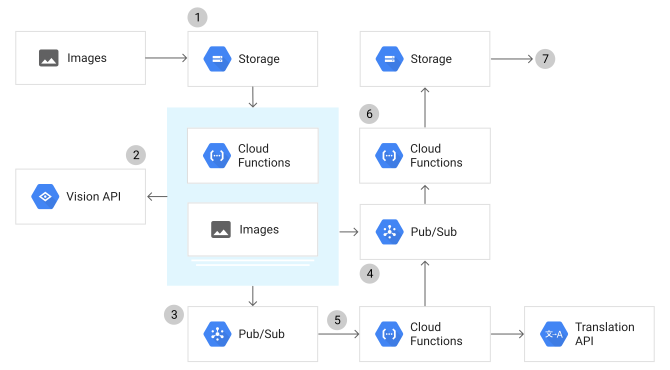
המחשת זרימת הנתונים

תהליך העברת הנתונים באפליקציית ההדרכה ל-OCR כולל כמה שלבים:

  1. תמונה שמכילה טקסט בכל שפה מועלית ל-Cloud Storage.
  2. מופעלת פונקציה של Cloud Run שמשתמשת ב-Vision API כדי לחלץ את הטקסט ולזהות את שפת המקור.
  3. הטקסט מתווסף לתור לתרגום על ידי פרסום הודעה בנושא Pub/Sub. תרגום נכנס לתור לכל שפת יעד ששונה משפת המקור.
  4. אם שפת היעד זהה לשפת המקור, התור של התרגום מדלג על הטקסט והוא נשלח לתור התוצאות, שהוא נושא Pub/Sub אחר.
  5. פונקציית Cloud Run משתמשת ב-Translation API כדי לתרגם את הטקסט בתור התרגום. התוצאה המתורגמת נשלחת לתור התוצאות.
  6. פונקציית Cloud Run נוספת שומרת את הטקסט המתורגם מתור התוצאות ב-Cloud Storage.
  7. התוצאות מאוחסנות ב-Cloud Storage כקובצי טקסט לכל תרגום.

כדאי להסתכל על השלבים הבאים:

הכנת הבקשה

  1. יוצרים קטגוריה ב-Cloud Storage להעלאת תמונות, כאשר YOUR_IMAGE_BUCKET_NAME הוא שם קטגוריה ייחודי גלובלית:

    gcloud storage buckets create gs://YOUR_IMAGE_BUCKET_NAME
  2. יוצרים קטגוריה של Cloud Storage כדי לשמור בה תרגומים של טקסט, כאשר YOUR_RESULT_BUCKET_NAME הוא שם ייחודי גלובלי של קטגוריה:

    gcloud storage buckets create gs://YOUR_RESULT_BUCKET_NAME
  3. יוצרים נושא Pub/Sub לפרסום בקשות תרגום, כאשר YOUR_TRANSLATE_TOPIC_NAME הוא שם הנושא של בקשת התרגום:

    gcloud pubsub topics create YOUR_TRANSLATE_TOPIC_NAME
  4. יוצרים נושא Pub/Sub לפרסום תוצאות התרגום המוגמרות, כאשר YOUR_RESULT_TOPIC_NAME הוא שם הנושא של תוצאות התרגום:

    gcloud pubsub topics create YOUR_RESULT_TOPIC_NAME
  5. משכפלים את מאגר האפליקציה לדוגמה ומעבירים אותו למכונה המקומית:

    Node.js

    git clone https://github.com/GoogleCloudPlatform/nodejs-docs-samples.git

    אפשרות נוספת היא להוריד את הדוגמה כקובץ ZIP ולחלץ אותה.

    Python

    git clone https://github.com/GoogleCloudPlatform/python-docs-samples.git

    אפשרות נוספת היא להוריד את הדוגמה כקובץ ZIP ולחלץ אותה.

    המשך

    git clone https://github.com/GoogleCloudPlatform/golang-samples.git

    אפשרות נוספת היא להוריד את הדוגמה כקובץ ZIP ולחלץ אותה.

    Java

    git clone https://github.com/GoogleCloudPlatform/java-docs-samples.git

    אפשרות נוספת היא להוריד את הדוגמה כקובץ ZIP ולחלץ אותה.

  6. עוברים לספרייה שמכילה את הקוד לדוגמה של פונקציות Cloud Run:

    Node.js

    cd nodejs-docs-samples/functions/ocr/app/

    Python

    cd python-docs-samples/functions/ocr/app/

    Go

    cd golang-samples/functions/ocr/app/

    Java

    cd java-docs-samples/functions/ocr/ocr-process-image/

הסבר על הקוד

ייבוא יחסי תלות

האפליקציה צריכה לייבא כמה תלויות כדי לתקשר עם שירותי Google Cloud Platform:

Node.js

// Get a reference to the Pub/Sub component
const {PubSub} = require('@google-cloud/pubsub');
const pubsub = new PubSub();
// Get a reference to the Cloud Storage component
const {Storage} = require('@google-cloud/storage');
const storage = new Storage();

// Get a reference to the Cloud Vision API component
const Vision = require('@google-cloud/vision');
const vision = new Vision.ImageAnnotatorClient();

// Get a reference to the Translate API component
const {Translate} = require('@google-cloud/translate').v2;
const translate = new Translate();

Python

import base64
import json
import os
from typing import Dict, TypeVar

from google.cloud import pubsub_v1
from google.cloud import storage
from google.cloud import translate_v2 as translate
from google.cloud import vision

vision_client = vision.ImageAnnotatorClient()
translate_client = translate.Client()
publisher = pubsub_v1.PublisherClient()
storage_client = storage.Client()

project_id = os.environ["GCP_PROJECT"]

המשך


// Package ocr contains Go samples for creating OCR
// (Optical Character Recognition) Cloud functions.
package ocr

import (
	"context"
	"fmt"
	"os"
	"strings"
	"time"

	"cloud.google.com/go/pubsub"
	"cloud.google.com/go/storage"
	"cloud.google.com/go/translate"
	vision "cloud.google.com/go/vision/apiv1"
	"golang.org/x/text/language"
)

type ocrMessage struct {
	Text     string       `json:"text"`
	FileName string       `json:"fileName"`
	Lang     language.Tag `json:"lang"`
	SrcLang  language.Tag `json:"srcLang"`
}

// GCSEvent is the payload of a GCS event.
type GCSEvent struct {
	Bucket         string    `json:"bucket"`
	Name           string    `json:"name"`
	Metageneration string    `json:"metageneration"`
	ResourceState  string    `json:"resourceState"`
	TimeCreated    time.Time `json:"timeCreated"`
	Updated        time.Time `json:"updated"`
}

// PubSubMessage is the payload of a Pub/Sub event.
// See the documentation for more details:
// https://cloud.google.com/pubsub/docs/reference/rest/v1/PubsubMessage
type PubSubMessage struct {
	Data []byte `json:"data"`
}

var (
	visionClient    *vision.ImageAnnotatorClient
	translateClient *translate.Client
	pubsubClient    *pubsub.Client
	storageClient   *storage.Client

	projectID      string
	resultBucket   string
	resultTopic    string
	toLang         []string
	translateTopic string
)

func setup(ctx context.Context) error {
	projectID = os.Getenv("GCP_PROJECT")
	resultBucket = os.Getenv("RESULT_BUCKET")
	resultTopic = os.Getenv("RESULT_TOPIC")
	toLang = strings.Split(os.Getenv("TO_LANG"), ",")
	translateTopic = os.Getenv("TRANSLATE_TOPIC")

	var err error // Prevent shadowing clients with :=.

	if visionClient == nil {
		visionClient, err = vision.NewImageAnnotatorClient(ctx)
		if err != nil {
			return fmt.Errorf("vision.NewImageAnnotatorClient: %w", err)
		}
	}

	if translateClient == nil {
		translateClient, err = translate.NewClient(ctx)
		if err != nil {
			return fmt.Errorf("translate.NewClient: %w", err)
		}
	}

	if pubsubClient == nil {
		pubsubClient, err = pubsub.NewClient(ctx, projectID)
		if err != nil {
			return fmt.Errorf("translate.NewClient: %w", err)
		}
	}

	if storageClient == nil {
		storageClient, err = storage.NewClient(ctx)
		if err != nil {
			return fmt.Errorf("storage.NewClient: %w", err)
		}
	}
	return nil
}

Java

public class OcrProcessImage implements BackgroundFunction<GcsEvent> {
  // TODO<developer> set these environment variables
  private static final String PROJECT_ID = System.getenv("GCP_PROJECT");
  private static final String TRANSLATE_TOPIC_NAME = System.getenv("TRANSLATE_TOPIC");
  private static final String[] TO_LANGS = System.getenv("TO_LANG").split(",");

  private static final Logger logger = Logger.getLogger(OcrProcessImage.class.getName());
  private static final String LOCATION_NAME = LocationName.of(PROJECT_ID, "global").toString();
  private Publisher publisher;

  public OcrProcessImage() throws IOException {
    publisher = Publisher.newBuilder(
        ProjectTopicName.of(PROJECT_ID, TRANSLATE_TOPIC_NAME)).build();
  }
}

עיבוד תמונות

הפונקציה הבאה קוראת קובץ תמונה שהועלה מ-Cloud Storage וקוראת לפונקציה כדי לזהות אם התמונה מכילה טקסט:

Node.js

/**
 * This function is exported by index.js, and is executed when
 * a file is uploaded to the Cloud Storage bucket you created
 * for uploading images.
 *
 * @param {object} event A Google Cloud Storage File object.
 */
exports.processImage = async event => {
  const {bucket, name} = event;

  if (!bucket) {
    throw new Error(
      'Bucket not provided. Make sure you have a "bucket" property in your request'
    );
  }
  if (!name) {
    throw new Error(
      'Filename not provided. Make sure you have a "name" property in your request'
    );
  }

  await detectText(bucket, name);
  console.log(`File ${name} processed.`);
};

Python

def process_image(file_info: dict, context: dict) -> None:
    """Cloud Function triggered by Cloud Storage when a file is changed.

    Args:
        file_info: Metadata of the changed file, provided by the
            triggering Cloud Storage event.
        context: a dictionary containing metadata about the event.

    Returns:
        None; the output is written to stdout and Cloud Logging.
    """
    bucket = validate_message(file_info, "bucket")
    name = validate_message(file_info, "name")

    detect_text(bucket, name)

    print(f"File '{file_info['name']}' processed.")

המשך


package ocr

import (
	"context"
	"fmt"
	"log"
)

// ProcessImage is executed when a file is uploaded to the Cloud Storage bucket you
// created for uploading images. It runs detectText, which processes the image for text.
func ProcessImage(ctx context.Context, event GCSEvent) error {
	if err := setup(ctx); err != nil {
		return fmt.Errorf("ProcessImage: %w", err)
	}
	if event.Bucket == "" {
		return fmt.Errorf("empty file.Bucket")
	}
	if event.Name == "" {
		return fmt.Errorf("empty file.Name")
	}
	if err := detectText(ctx, event.Bucket, event.Name); err != nil {
		return fmt.Errorf("detectText: %w", err)
	}
	log.Printf("File %s processed.", event.Name)
	return nil
}

Java


import com.google.cloud.functions.BackgroundFunction;
import com.google.cloud.functions.Context;
import com.google.cloud.pubsub.v1.Publisher;
import com.google.cloud.translate.v3.DetectLanguageRequest;
import com.google.cloud.translate.v3.DetectLanguageResponse;
import com.google.cloud.translate.v3.LocationName;
import com.google.cloud.translate.v3.TranslationServiceClient;
import com.google.cloud.vision.v1.AnnotateImageRequest;
import com.google.cloud.vision.v1.AnnotateImageResponse;
import com.google.cloud.vision.v1.Feature;
import com.google.cloud.vision.v1.Image;
import com.google.cloud.vision.v1.ImageAnnotatorClient;
import com.google.cloud.vision.v1.ImageSource;
import com.google.protobuf.ByteString;
import com.google.pubsub.v1.ProjectTopicName;
import com.google.pubsub.v1.PubsubMessage;
import functions.eventpojos.GcsEvent;
import java.io.IOException;
import java.util.ArrayList;
import java.util.List;
import java.util.concurrent.ExecutionException;
import java.util.logging.Level;
import java.util.logging.Logger;

  @Override
  public void accept(GcsEvent gcsEvent, Context context) {

    // Validate parameters
    String bucket = gcsEvent.getBucket();
    if (bucket == null) {
      throw new IllegalArgumentException("Missing bucket parameter");
    }
    String filename = gcsEvent.getName();
    if (filename == null) {
      throw new IllegalArgumentException("Missing name parameter");
    }

    detectText(bucket, filename);
  }
}

הפונקציה הבאה מחלצת טקסט מהתמונה באמצעות Vision API ומכניסה את הטקסט לתור לתרגום:

Node.js

/**
 * Detects the text in an image using the Google Vision API.
 *
 * @param {string} bucketName Cloud Storage bucket name.
 * @param {string} filename Cloud Storage file name.
 * @returns {Promise}
 */
const detectText = async (bucketName, filename) => {
  console.log(`Looking for text in image ${filename}`);
  const [textDetections] = await vision.textDetection(
    `gs://${bucketName}/${filename}`
  );
  const [annotation] = textDetections.textAnnotations;
  const text = annotation ? annotation.description.trim() : '';
  console.log('Extracted text from image:', text);

  let [translateDetection] = await translate.detect(text);
  if (Array.isArray(translateDetection)) {
    [translateDetection] = translateDetection;
  }
  console.log(
    `Detected language "${translateDetection.language}" for ${filename}`
  );

  // Submit a message to the bus for each language we're going to translate to
  const TO_LANGS = process.env.TO_LANG.split(',');
  const topicName = process.env.TRANSLATE_TOPIC;

  const tasks = TO_LANGS.map(lang => {
    const messageData = {
      text: text,
      filename: filename,
      lang: lang,
    };

    // Helper function that publishes translation result to a Pub/Sub topic
    // For more information on publishing Pub/Sub messages, see this page:
    //   https://cloud.google.com/pubsub/docs/publisher
    return publishResult(topicName, messageData);
  });

  return Promise.all(tasks);
};

Python

def detect_text(bucket: str, filename: str) -> None:
    """
    Extract the text from an image uploaded to Cloud Storage.

    Extract the text from an image uploaded to Cloud Storage, then
    publish messages requesting subscribing services translate the text
    to each target language and save the result.

    Args:
        bucket: name of GCS bucket in which the file is stored.
        filename: name of the file to be read.

    Returns:
        None; the output is written to stdout and Cloud Logging.
    """
    print("Looking for text in image {}".format(filename))

    futures = []

    image = vision.Image(
        source=vision.ImageSource(gcs_image_uri=f"gs://{bucket}/{filename}")
    )
    text_detection_response = vision_client.text_detection(image=image)
    annotations = text_detection_response.text_annotations

    if len(annotations) > 0:
        text = annotations[0].description
    else:
        text = ""

    print(f"Extracted text {text} from image ({len(text)} chars).")

    detect_language_response = translate_client.detect_language(text)
    src_lang = detect_language_response["language"]
    print(f"Detected language {src_lang} for text {text}.")

    # Submit a message to the bus for each target language
    to_langs = os.environ["TO_LANG"].split(",")
    for target_lang in to_langs:
        topic_name = os.environ["TRANSLATE_TOPIC"]
        if src_lang == target_lang or src_lang == "und":
            topic_name = os.environ["RESULT_TOPIC"]
        message = {
            "text": text,
            "filename": filename,
            "lang": target_lang,
            "src_lang": src_lang,
        }
        message_data = json.dumps(message).encode("utf-8")
        topic_path = publisher.topic_path(project_id, topic_name)
        future = publisher.publish(topic_path, data=message_data)
        futures.append(future)
    for future in futures:
        future.result()

המשך


package ocr

import (
	"context"
	"encoding/json"
	"fmt"
	"log"

	"cloud.google.com/go/pubsub"
	"cloud.google.com/go/vision/v2/apiv1/visionpb"
	"golang.org/x/text/language"
)

// detectText detects the text in an image using the Google Vision API.
func detectText(ctx context.Context, bucketName, fileName string) error {
	log.Printf("Looking for text in image %v", fileName)
	maxResults := 1
	image := &visionpb.Image{
		Source: &visionpb.ImageSource{
			GcsImageUri: fmt.Sprintf("gs://%s/%s", bucketName, fileName),
		},
	}
	annotations, err := visionClient.DetectTexts(ctx, image, &visionpb.ImageContext{}, maxResults)
	if err != nil {
		return fmt.Errorf("DetectTexts: %w", err)
	}
	text := ""
	if len(annotations) > 0 {
		text = annotations[0].Description
	}
	if len(annotations) == 0 || len(text) == 0 {
		log.Printf("No text detected in image %q. Returning early.", fileName)
		return nil
	}
	log.Printf("Extracted text %q from image (%d chars).", text, len(text))

	detectResponse, err := translateClient.DetectLanguage(ctx, []string{text})
	if err != nil {
		return fmt.Errorf("DetectLanguage: %w", err)
	}
	if len(detectResponse) == 0 || len(detectResponse[0]) == 0 {
		return fmt.Errorf("DetectLanguage gave empty response")
	}
	srcLang := detectResponse[0][0].Language.String()
	log.Printf("Detected language %q for text %q.", srcLang, text)

	// Submit a message to the bus for each target language
	for _, targetLang := range toLang {
		topicName := translateTopic
		if srcLang == targetLang || srcLang == "und" { // detection returns "und" for undefined language
			topicName = resultTopic
		}
		targetTag, err := language.Parse(targetLang)
		if err != nil {
			return fmt.Errorf("language.Parse: %w", err)
		}
		srcTag, err := language.Parse(srcLang)
		if err != nil {
			return fmt.Errorf("language.Parse: %w", err)
		}
		message, err := json.Marshal(ocrMessage{
			Text:     text,
			FileName: fileName,
			Lang:     targetTag,
			SrcLang:  srcTag,
		})
		if err != nil {
			return fmt.Errorf("json.Marshal: %w", err)
		}
		topic := pubsubClient.Topic(topicName)
		ok, err := topic.Exists(ctx)
		if err != nil {
			return fmt.Errorf("Exists: %w", err)
		}
		if !ok {
			topic, err = pubsubClient.CreateTopic(ctx, topicName)
			if err != nil {
				return fmt.Errorf("CreateTopic: %w", err)
			}
		}
		msg := &pubsub.Message{
			Data: []byte(message),
		}
		if _, err = topic.Publish(ctx, msg).Get(ctx); err != nil {
			return fmt.Errorf("Get: %w", err)
		}
	}
	return nil
}

Java

private void detectText(String bucket, String filename) {
  logger.info("Looking for text in image " + filename);

  List<AnnotateImageRequest> visionRequests = new ArrayList<>();
  String gcsPath = String.format("gs://%s/%s", bucket, filename);

  ImageSource imgSource = ImageSource.newBuilder().setGcsImageUri(gcsPath).build();
  Image img = Image.newBuilder().setSource(imgSource).build();

  Feature textFeature = Feature.newBuilder().setType(Feature.Type.TEXT_DETECTION).build();
  AnnotateImageRequest visionRequest =
      AnnotateImageRequest.newBuilder().addFeatures(textFeature).setImage(img).build();
  visionRequests.add(visionRequest);

  // Detect text in an image using the Cloud Vision API
  AnnotateImageResponse visionResponse;
  try (ImageAnnotatorClient client = ImageAnnotatorClient.create()) {
    visionResponse = client.batchAnnotateImages(visionRequests).getResponses(0);
    if (visionResponse == null || !visionResponse.hasFullTextAnnotation()) {
      logger.info(String.format("Image %s contains no text", filename));
      return;
    }

    if (visionResponse.hasError()) {
      // Log error
      logger.log(
          Level.SEVERE, "Error in vision API call: " + visionResponse.getError().getMessage());
      return;
    }
  } catch (IOException e) {
    // Log error (since IOException cannot be thrown by a Cloud Function)
    logger.log(Level.SEVERE, "Error detecting text: " + e.getMessage(), e);
    return;
  }

  String text = visionResponse.getFullTextAnnotation().getText();
  logger.info("Extracted text from image: " + text);

  // Detect language using the Cloud Translation API
  DetectLanguageRequest languageRequest =
      DetectLanguageRequest.newBuilder()
          .setParent(LOCATION_NAME)
          .setMimeType("text/plain")
          .setContent(text)
          .build();
  DetectLanguageResponse languageResponse;
  try (TranslationServiceClient client = TranslationServiceClient.create()) {
    languageResponse = client.detectLanguage(languageRequest);
  } catch (IOException e) {
    // Log error (since IOException cannot be thrown by a function)
    logger.log(Level.SEVERE, "Error detecting language: " + e.getMessage(), e);
    return;
  }

  if (languageResponse.getLanguagesCount() == 0) {
    logger.info("No languages were detected for text: " + text);
    return;
  }

  String languageCode = languageResponse.getLanguages(0).getLanguageCode();
  logger.info(String.format("Detected language %s for file %s", languageCode, filename));

  // Send a Pub/Sub translation request for every language we're going to translate to
  for (String targetLanguage : TO_LANGS) {
    logger.info("Sending translation request for language " + targetLanguage);
    OcrTranslateApiMessage message = new OcrTranslateApiMessage(text, filename, targetLanguage);
    ByteString byteStr = ByteString.copyFrom(message.toPubsubData());
    PubsubMessage pubsubApiMessage = PubsubMessage.newBuilder().setData(byteStr).build();
    try {
      publisher.publish(pubsubApiMessage).get();
    } catch (InterruptedException | ExecutionException e) {
      // Log error
      logger.log(Level.SEVERE, "Error publishing translation request: " + e.getMessage(), e);
      return;
    }
  }
}

תרגום טקסט

הפונקציה הבאה מתרגמת את הטקסט שחולץ ומכניסה את הטקסט המתורגם לתור כדי לשמור אותו בחזרה ב-Cloud Storage:

Node.js

/**
 * This function is exported by index.js, and is executed when
 * a message is published to the Cloud Pub/Sub topic specified
 * by the TRANSLATE_TOPIC environment variable. The function
 * translates text using the Google Translate API.
 *
 * @param {object} event The Cloud Pub/Sub Message object.
 * @param {string} {messageObject}.data The "data" property of the Cloud Pub/Sub
 * Message. This property will be a base64-encoded string that you must decode.
 */
exports.translateText = async event => {
  const pubsubData = event.data;
  const jsonStr = Buffer.from(pubsubData, 'base64').toString();
  const {text, filename, lang} = JSON.parse(jsonStr);

  if (!text) {
    throw new Error(
      'Text not provided. Make sure you have a "text" property in your request'
    );
  }
  if (!filename) {
    throw new Error(
      'Filename not provided. Make sure you have a "filename" property in your request'
    );
  }
  if (!lang) {
    throw new Error(
      'Language not provided. Make sure you have a "lang" property in your request'
    );
  }

  console.log(`Translating text into ${lang}`);
  const [translation] = await translate.translate(text, lang);

  console.log('Translated text:', translation);

  const messageData = {
    text: translation,
    filename: filename,
    lang: lang,
  };

  await publishResult(process.env.RESULT_TOPIC, messageData);
  console.log(`Text translated to ${lang}`);
};

Python

def translate_text(event: dict, context: dict) -> None:
    """Cloud Function triggered by PubSub when a message is received from
    a subscription.

    Translates the text in the message from the specified source language
    to the requested target language, then sends a message requesting another
    service save the result.

    Args:
        event: dictionary containing the PubSub event.
        context: a dictionary containing metadata about the event.

    Returns:
        None; the output is written to stdout and Cloud Logging.
    """
    if event.get("data"):
        message_data = base64.b64decode(event["data"]).decode("utf-8")
        message = json.loads(message_data)
    else:
        raise ValueError("Data sector is missing in the Pub/Sub message.")

    text = validate_message(message, "text")
    filename = validate_message(message, "filename")
    target_lang = validate_message(message, "lang")
    src_lang = validate_message(message, "src_lang")

    print(f"Translating text into {target_lang}.")
    translated_text = translate_client.translate(
        text, target_language=target_lang, source_language=src_lang
    )
    topic_name = os.environ["RESULT_TOPIC"]
    message = {
        "text": translated_text["translatedText"],
        "filename": filename,
        "lang": target_lang,
    }
    encoded_message = json.dumps(message).encode("utf-8")
    topic_path = publisher.topic_path(project_id, topic_name)
    future = publisher.publish(topic_path, data=encoded_message)
    future.result()

המשך


package ocr

import (
	"context"
	"encoding/json"
	"fmt"
	"log"

	"cloud.google.com/go/pubsub"
	"cloud.google.com/go/translate"
)

// TranslateText is executed when a message is published to the Cloud Pub/Sub
// topic specified by the TRANSLATE_TOPIC environment variable, and translates
// the text using the Google Translate API.
func TranslateText(ctx context.Context, event PubSubMessage) error {
	if err := setup(ctx); err != nil {
		return fmt.Errorf("setup: %w", err)
	}
	if event.Data == nil {
		return fmt.Errorf("empty data")
	}
	var message ocrMessage
	if err := json.Unmarshal(event.Data, &message); err != nil {
		return fmt.Errorf("json.Unmarshal: %w", err)
	}

	log.Printf("Translating text into %s.", message.Lang.String())
	opts := translate.Options{
		Source: message.SrcLang,
	}
	translateResponse, err := translateClient.Translate(ctx, []string{message.Text}, message.Lang, &opts)
	if err != nil {
		return fmt.Errorf("Translate: %w", err)
	}
	if len(translateResponse) == 0 {
		return fmt.Errorf("Empty Translate response")
	}
	translatedText := translateResponse[0]

	messageData, err := json.Marshal(ocrMessage{
		Text:     translatedText.Text,
		FileName: message.FileName,
		Lang:     message.Lang,
		SrcLang:  message.SrcLang,
	})
	if err != nil {
		return fmt.Errorf("json.Marshal: %w", err)
	}

	topic := pubsubClient.Topic(resultTopic)
	ok, err := topic.Exists(ctx)
	if err != nil {
		return fmt.Errorf("Exists: %w", err)
	}
	if !ok {
		topic, err = pubsubClient.CreateTopic(ctx, resultTopic)
		if err != nil {
			return fmt.Errorf("CreateTopic: %w", err)
		}
	}
	msg := &pubsub.Message{
		Data: messageData,
	}
	if _, err = topic.Publish(ctx, msg).Get(ctx); err != nil {
		return fmt.Errorf("Get: %w", err)
	}
	log.Printf("Sent translation: %q", translatedText.Text)
	return nil
}

Java


import com.google.cloud.functions.BackgroundFunction;
import com.google.cloud.functions.Context;
import com.google.cloud.pubsub.v1.Publisher;
import com.google.cloud.translate.v3.LocationName;
import com.google.cloud.translate.v3.TranslateTextRequest;
import com.google.cloud.translate.v3.TranslateTextResponse;
import com.google.cloud.translate.v3.TranslationServiceClient;
import com.google.protobuf.ByteString;
import com.google.pubsub.v1.ProjectTopicName;
import com.google.pubsub.v1.PubsubMessage;
import functions.eventpojos.Message;
import java.io.IOException;
import java.nio.charset.StandardCharsets;
import java.util.concurrent.ExecutionException;
import java.util.logging.Level;
import java.util.logging.Logger;

public class OcrTranslateText implements BackgroundFunction<Message> {
  private static final Logger logger = Logger.getLogger(OcrTranslateText.class.getName());

  // TODO<developer> set these environment variables
  private static final String PROJECT_ID = getenv("GCP_PROJECT");
  private static final String RESULTS_TOPIC_NAME = getenv("RESULT_TOPIC");
  private static final String LOCATION_NAME = LocationName.of(PROJECT_ID, "global").toString();

  private Publisher publisher;

  public OcrTranslateText() throws IOException {
    publisher = Publisher.newBuilder(
        ProjectTopicName.of(PROJECT_ID, RESULTS_TOPIC_NAME)).build();
  }

  @Override
  public void accept(Message pubSubMessage, Context context) {
    OcrTranslateApiMessage ocrMessage = OcrTranslateApiMessage.fromPubsubData(
        pubSubMessage.getData().getBytes(StandardCharsets.UTF_8));

    String targetLang = ocrMessage.getLang();
    logger.info("Translating text into " + targetLang);

    // Translate text to target language
    String text = ocrMessage.getText();
    TranslateTextRequest request =
        TranslateTextRequest.newBuilder()
            .setParent(LOCATION_NAME)
            .setMimeType("text/plain")
            .setTargetLanguageCode(targetLang)
            .addContents(text)
            .build();

    TranslateTextResponse response;
    try (TranslationServiceClient client = TranslationServiceClient.create()) {
      response = client.translateText(request);
    } catch (IOException e) {
      // Log error (since IOException cannot be thrown by a function)
      logger.log(Level.SEVERE, "Error translating text: " + e.getMessage(), e);
      return;
    }
    if (response.getTranslationsCount() == 0) {
      return;
    }

    String translatedText = response.getTranslations(0).getTranslatedText();
    logger.info("Translated text: " + translatedText);

    // Send translated text to (subsequent) Pub/Sub topic
    String filename = ocrMessage.getFilename();
    OcrTranslateApiMessage translateMessage = new OcrTranslateApiMessage(
        translatedText, filename, targetLang);
    try {
      ByteString byteStr = ByteString.copyFrom(translateMessage.toPubsubData());
      PubsubMessage pubsubApiMessage = PubsubMessage.newBuilder().setData(byteStr).build();

      publisher.publish(pubsubApiMessage).get();
      logger.info("Text translated to " + targetLang);
    } catch (InterruptedException | ExecutionException e) {
      // Log error (since these exception types cannot be thrown by a function)
      logger.log(Level.SEVERE, "Error publishing translation save request: " + e.getMessage(), e);
    }
  }

  // Avoid ungraceful deployment failures due to unset environment variables.
  // If you get this warning you should redeploy with the variable set.
  private static String getenv(String name) {
    String value = System.getenv(name);
    if (value == null) {
      logger.warning("Environment variable " + name + " was not set");
      value = "MISSING";
    }
    return value;
  }
}

שמירת התרגומים

לבסוף, הפונקציה הבאה מקבלת את הטקסט המתורגם ושומרת אותו בחזרה ב-Cloud Storage:

Node.js

/**
 * This function is exported by index.js, and is executed when
 * a message is published to the Cloud Pub/Sub topic specified
 * by the RESULT_TOPIC environment variable. The function saves
 * the data packet to a file in GCS.
 *
 * @param {object} event The Cloud Pub/Sub Message object.
 * @param {string} {messageObject}.data The "data" property of the Cloud Pub/Sub
 * Message. This property will be a base64-encoded string that you must decode.
 */
exports.saveResult = async event => {
  const pubsubData = event.data;
  const jsonStr = Buffer.from(pubsubData, 'base64').toString();
  const {text, filename, lang} = JSON.parse(jsonStr);

  if (!text) {
    throw new Error(
      'Text not provided. Make sure you have a "text" property in your request'
    );
  }
  if (!filename) {
    throw new Error(
      'Filename not provided. Make sure you have a "filename" property in your request'
    );
  }
  if (!lang) {
    throw new Error(
      'Language not provided. Make sure you have a "lang" property in your request'
    );
  }

  console.log(`Received request to save file ${filename}`);

  const bucketName = process.env.RESULT_BUCKET;
  const newFilename = renameImageForSave(filename, lang);
  const file = storage.bucket(bucketName).file(newFilename);

  console.log(`Saving result to ${newFilename} in bucket ${bucketName}`);

  await file.save(text);
  console.log('File saved.');
};

Python

def save_result(event: dict, context: dict) -> None:
    """
    Cloud Function triggered by PubSub when a message is received from
    a subscription.

    Args:
        event: dictionary containing the PubSub event.
        context: a dictionary containing metadata about the event.

    Returns:
        None; the output is written to stdout and Cloud Logging.
    """
    if event.get("data"):
        message_data = base64.b64decode(event["data"]).decode("utf-8")
        message = json.loads(message_data)
    else:
        raise ValueError("Data sector is missing in the Pub/Sub message.")

    text = validate_message(message, "text")
    filename = validate_message(message, "filename")
    lang = validate_message(message, "lang")

    print(f"Received request to save file {filename}.")

    bucket_name = os.environ["RESULT_BUCKET"]
    result_filename = f"{filename}_{lang}.txt"
    bucket = storage_client.get_bucket(bucket_name)
    blob = bucket.blob(result_filename)

    print(f"Saving result to {result_filename} in bucket {bucket_name}.")

    blob.upload_from_string(text)

    print("File saved.")

המשך


package ocr

import (
	"context"
	"encoding/json"
	"fmt"
	"log"
)

// SaveResult is executed when a message is published to the Cloud Pub/Sub topic
// specified by the RESULT_TOPIC environment vairable, and saves the data packet
// to a file in GCS.
func SaveResult(ctx context.Context, event PubSubMessage) error {
	if err := setup(ctx); err != nil {
		return fmt.Errorf("ProcessImage: %w", err)
	}
	var message ocrMessage
	if event.Data == nil {
		return fmt.Errorf("Empty data")
	}
	if err := json.Unmarshal(event.Data, &message); err != nil {
		return fmt.Errorf("json.Unmarshal: %w", err)
	}
	log.Printf("Received request to save file %q.", message.FileName)

	resultFilename := fmt.Sprintf("%s_%s.txt", message.FileName, message.Lang)
	bucket := storageClient.Bucket(resultBucket)

	log.Printf("Saving result to %q in bucket %q.", resultFilename, resultBucket)

	w := bucket.Object(resultFilename).NewWriter(ctx)
	defer w.Close()
	fmt.Fprint(w, message.Text)

	log.Printf("File saved.")
	return nil
}

Java


import com.google.cloud.functions.BackgroundFunction;
import com.google.cloud.functions.Context;
import com.google.cloud.storage.BlobId;
import com.google.cloud.storage.BlobInfo;
import com.google.cloud.storage.Storage;
import com.google.cloud.storage.StorageOptions;
import functions.eventpojos.PubsubMessage;
import java.nio.charset.StandardCharsets;
import java.util.logging.Logger;

public class OcrSaveResult implements BackgroundFunction<PubsubMessage> {
  // TODO<developer> set this environment variable
  private static final String RESULT_BUCKET = System.getenv("RESULT_BUCKET");

  private static final Storage STORAGE = StorageOptions.getDefaultInstance().getService();
  private static final Logger logger = Logger.getLogger(OcrSaveResult.class.getName());

  @Override
  public void accept(PubsubMessage pubSubMessage, Context context) {
    OcrTranslateApiMessage ocrMessage = OcrTranslateApiMessage.fromPubsubData(
        pubSubMessage.getData().getBytes(StandardCharsets.UTF_8));

    logger.info("Received request to save file " +  ocrMessage.getFilename());

    String newFileName = String.format(
        "%s_to_%s.txt", ocrMessage.getFilename(), ocrMessage.getLang());

    // Save file to RESULT_BUCKET with name newFileNaem
    logger.info(String.format("Saving result to %s in bucket %s", newFileName, RESULT_BUCKET));
    BlobInfo blobInfo = BlobInfo.newBuilder(BlobId.of(RESULT_BUCKET, newFileName)).build();
    STORAGE.create(blobInfo, ocrMessage.getText().getBytes(StandardCharsets.UTF_8));
    logger.info("File saved");
  }
}

פריסת הפונקציות

  1. כדי לפרוס את הפונקציה לעיבוד תמונות עם טריגר של Cloud Storage, מריצים את הפקודה הבאה בספרייה שמכילה את קוד הדוגמה (או במקרה של Java, את הקובץ pom.xml):

    Node.js

    gcloud functions deploy ocr-extract \
    --runtime nodejs22 \
    --trigger-bucket YOUR_IMAGE_BUCKET_NAME \
    --entry-point processImage \
    --set-env-vars "^:^GCP_PROJECT=YOUR_GCP_PROJECT_ID:TRANSLATE_TOPIC=YOUR_TRANSLATE_TOPIC_NAME:RESULT_TOPIC=YOUR_RESULT_TOPIC_NAME:TO_LANG=es,en,fr,ja"

    משתמשים בדגל --runtime כדי לציין את מזהה סביבת זמן הריצה של גרסת Node.js נתמכת להרצת הפונקציה.

    Python

    gcloud functions deploy ocr-extract \
    --runtime python312 \
    --trigger-bucket YOUR_IMAGE_BUCKET_NAME \
    --entry-point process_image \
    --set-env-vars "^:^GCP_PROJECT=YOUR_GCP_PROJECT_ID:TRANSLATE_TOPIC=YOUR_TRANSLATE_TOPIC_NAME:RESULT_TOPIC=YOUR_RESULT_TOPIC_NAME:TO_LANG=es,en,fr,ja"

    משתמשים בדגל --runtime כדי לציין את מזהה זמן הריצה של גרסת Python נתמכת להרצת הפונקציה.

    המשך

    gcloud functions deploy ocr-extract \
    --runtime go121 \
    --trigger-bucket YOUR_IMAGE_BUCKET_NAME \
    --entry-point ProcessImage \
    --set-env-vars "^:^GCP_PROJECT=YOUR_GCP_PROJECT_ID:TRANSLATE_TOPIC=YOUR_TRANSLATE_TOPIC_NAME:RESULT_TOPIC=YOUR_RESULT_TOPIC_NAME:TO_LANG=es,en,fr,ja"

    כדי לציין את מזהה זמן הריצה של גרסת Go נתמכת להרצת הפונקציה, משתמשים בדגל --runtime.

    Java

    gcloud functions deploy ocr-extract \
    --entry-point functions.OcrProcessImage \
    --runtime java17 \
    --memory 512MB \
    --trigger-bucket YOUR_IMAGE_BUCKET_NAME \
    --set-env-vars "^:^GCP_PROJECT=YOUR_GCP_PROJECT_ID:TRANSLATE_TOPIC=YOUR_TRANSLATE_TOPIC_NAME:RESULT_TOPIC=YOUR_RESULT_TOPIC_NAME:TO_LANG=es,en,fr,ja"

    משתמשים בדגל --runtime כדי לציין את מזהה זמן הריצה של גרסת Java נתמכת להרצת הפונקציה.

    כאשר YOUR_IMAGE_BUCKET_NAME הוא השם של קטגוריית Cloud Storage שאליה תעלו את התמונות.

  2. כדי לפרוס את פונקציית תרגום הטקסט עם טריגר Pub/Sub, מריצים את הפקודה הבאה בספרייה שמכילה את קוד הדוגמה (או במקרה של Java, את הקובץ pom.xml):

    Node.js

    gcloud functions deploy ocr-translate \
    --runtime nodejs22 \
    --trigger-topic YOUR_TRANSLATE_TOPIC_NAME \
    --entry-point translateText \
    --set-env-vars "GCP_PROJECT=YOUR_GCP_PROJECT_ID,RESULT_TOPIC=YOUR_RESULT_TOPIC_NAME"

    משתמשים בדגל --runtime כדי לציין את מזהה סביבת זמן הריצה של גרסת Node.js נתמכת להרצת הפונקציה.

    Python

    gcloud functions deploy ocr-translate \
    --runtime python312 \
    --trigger-topic YOUR_TRANSLATE_TOPIC_NAME \
    --entry-point translate_text \
    --set-env-vars "GCP_PROJECT=YOUR_GCP_PROJECT_ID,RESULT_TOPIC=YOUR_RESULT_TOPIC_NAME"

    משתמשים בדגל --runtime כדי לציין את מזהה זמן הריצה של גרסת Python נתמכת להרצת הפונקציה.

    המשך

    gcloud functions deploy ocr-translate \
    --runtime go121 \
    --trigger-topic YOUR_TRANSLATE_TOPIC_NAME \
    --entry-point TranslateText \
    --set-env-vars "GCP_PROJECT=YOUR_GCP_PROJECT_ID,RESULT_TOPIC=YOUR_RESULT_TOPIC_NAME"

    כדי לציין את מזהה זמן הריצה של גרסת Go נתמכת להרצת הפונקציה, משתמשים בדגל --runtime.

    Java

    gcloud functions deploy ocr-translate \
    --entry-point functions.OcrTranslateText \
    --runtime java17 \
    --memory 512MB \
    --trigger-topic YOUR_TRANSLATE_TOPIC_NAME \
    --set-env-vars "GCP_PROJECT=YOUR_GCP_PROJECT_ID,RESULT_TOPIC=YOUR_RESULT_TOPIC_NAME"

    משתמשים בדגל --runtime כדי לציין את מזהה זמן הריצה של גרסת Java נתמכת להרצת הפונקציה.

  3. כדי לפרוס את הפונקציה ששומרת את התוצאות ב-Cloud Storage באמצעות טריגר של Cloud Pub/Sub, מריצים את הפקודה הבאה בספרייה שמכילה את קוד הדוגמה (או במקרה של Java, את הקובץ pom.xml):

    Node.js

    gcloud functions deploy ocr-save \
    --runtime nodejs22 \
    --trigger-topic YOUR_RESULT_TOPIC_NAME \
    --entry-point saveResult \
    --set-env-vars "GCP_PROJECT=YOUR_GCP_PROJECT_ID,RESULT_BUCKET=YOUR_RESULT_BUCKET_NAME"

    משתמשים בדגל --runtime כדי לציין את מזהה סביבת זמן הריצה של גרסת Node.js נתמכת להרצת הפונקציה.

    Python

    gcloud functions deploy ocr-save \
    --runtime python312 \
    --trigger-topic YOUR_RESULT_TOPIC_NAME \
    --entry-point save_result \
    --set-env-vars "GCP_PROJECT=YOUR_GCP_PROJECT_ID,RESULT_BUCKET=YOUR_RESULT_BUCKET_NAME"

    משתמשים בדגל --runtime כדי לציין את מזהה זמן הריצה של גרסת Python נתמכת להרצת הפונקציה.

    המשך

    gcloud functions deploy ocr-save \
    --runtime go121 \
    --trigger-topic YOUR_RESULT_TOPIC_NAME \
    --entry-point SaveResult \
    --set-env-vars "GCP_PROJECT=YOUR_GCP_PROJECT_ID,RESULT_BUCKET=YOUR_RESULT_BUCKET_NAME"

    כדי לציין את מזהה זמן הריצה של גרסת Go נתמכת להרצת הפונקציה, משתמשים בדגל --runtime.

    Java

    gcloud functions deploy ocr-save \
    --entry-point functions.OcrSaveResult \
    --runtime java17 \
    --memory 512MB \
    --trigger-topic YOUR_RESULT_TOPIC_NAME \
    --set-env-vars "GCP_PROJECT=YOUR_GCP_PROJECT_ID,RESULT_BUCKET=YOUR_RESULT_BUCKET_NAME"

    משתמשים בדגל --runtime כדי לציין את מזהה זמן הריצה של גרסת Java נתמכת להרצת הפונקציה.

העלאת תמונה

  1. מעלים תמונה לקטגוריה של Cloud Storage שבה מאוחסנות התמונות:

    gcloud storage cp PATH_TO_IMAGE gs://YOUR_IMAGE_BUCKET_NAME

    איפה

    • PATH_TO_IMAGE הוא נתיב לקובץ תמונה (שכולל טקסט) במערכת המקומית.
    • YOUR_IMAGE_BUCKET_NAME הוא שם הקטגוריה שאליה מעלים את התמונות.

    אפשר להוריד אחת מהתמונות מפרויקט לדוגמה.

  2. כדי לוודא שההפעלות הסתיימו, בודקים את היומנים:

    gcloud functions logs read --limit 100
  3. אפשר לראות את התרגומים השמורים בקטגוריה של Cloud Storage שבה השתמשתם עבור YOUR_RESULT_BUCKET_NAME.

הסרת המשאבים

כדי להימנע מחיובים בחשבון Google Cloud בגלל השימוש במשאבים שנעשה במסגרת המדריך הזה, אפשר למחוק את הפרויקט שמכיל את המשאבים, או להשאיר את הפרויקט ולמחוק את המשאבים בנפרד.

מחיקת הפרויקט

הדרך הקלה ביותר לבטל את החיוב היא למחוק את הפרויקט שיצרתם בשביל המדריך.

כדי למחוק את הפרויקט:

  1. במסוף Google Cloud , נכנסים לדף Manage resources.

    כניסה לדף Manage resources

  2. ברשימת הפרויקטים, בוחרים את הפרויקט שרוצים למחוק ולוחצים על Delete.
  3. כדי למחוק את הפרויקט, כותבים את מזהה הפרויקט בתיבת הדו-שיח ולוחצים על Shut down.

מחיקת הפונקציה

מחיקה של פונקציות Cloud Run לא מסירה משאבים שמאוחסנים ב-Cloud Storage.

כדי למחוק את פונקציות Cloud Run שיצרתם במדריך הזה, מריצים את הפקודות הבאות:

gcloud functions delete ocr-extract
gcloud functions delete ocr-translate
gcloud functions delete ocr-save

אפשר גם למחוק פונקציות Cloud Run ממסוףGoogle Cloud .