


איך מתחילים לעבוד עם שאילתות של צינורות
רקע
פעולות של צינורות נתונים מספקות ממשק חדש לשאילתות ב-Firestore, שתומך בפונקציונליות מתקדמת של שאילתות ובביטויים מורכבים. הוא כולל הרבה פונקציות חדשות, כולל min(...), max(...), substring(...), regex_match(...) ו-array_contains_all(...), ושלבים שמאפשרים לבצע טרנספורמציות מורכבות.
תחילת העבודה
כדי להתקין ולהפעיל ערכות SDK של לקוח, אפשר לעיין בהוראות במדריכים הבאים:
תחביר
בקטעים הבאים מפורט התחביר של פעולות בצינורות.
מושגים
הבדל משמעותי אחד בפעולות של צינורות הוא ההוספה של סדר 'שלבים' מפורש. כך אפשר להביע שאילתות מורכבות יותר. עם זאת, מדובר בסטייה משמעותית מממשק השאילתות הקיים באמצעות פעולות ליבה, שבהן סדר השלבים היה מרומז. דוגמה לפעולות בצינור:
Node.js
  db.pipeline()
    .collection() // Step 1 (start a query with 'collection' scope)
    .where()      // Step 2 (filter collection)
    .sort()       // Step 3 (order results)
    .limit()      // Step 4 (limit results)

  // Note: Applying a limit before a sort can yield unintended
  // results (as the limit would be applied before sorting).
גרסה 9 לאינטרנט
const pipeline = db.pipeline() // Step 1: Start a query with collection scope .collection("cities") // Step 2: Filter the collection .where(field("population").greaterThan(100000)) // Step 3: Sort the remaining documents .sort(field("name").ascending()) // Step 4: Return the top 10. Note applying the limit earlier in the // pipeline would have unintentional results. .limit(10);
Swift
let pipeline = db.pipeline() // Step 1: Start a query with collection scope .collection("cities") // Step 2: Filter the collection .where(Field("population").greaterThan(100000)) // Step 3: Sort the remaining documents .sort([Field("name").ascending()]) // Step 4: Return the top 10. Note applying the limit earlier in the pipeline would have // unintentional results. .limit(10)
Kotlin
Android
val pipeline = db.pipeline() // Step 1: Start a query with collection scope .collection("cities") // Step 2: Filter the collection .where(field("population").greaterThan(100000)) // Step 3: Sort the remaining documents .sort(field("name").ascending()) // Step 4: Return the top 10. Note applying the limit earlier in the pipeline would have // unintentional results. .limit(10)
Java
Android
Pipeline pipeline = db.pipeline() // Step 1: Start a query with collection scope .collection("cities") // Step 2: Filter the collection .where(field("population").greaterThan(100000)) // Step 3: Sort the remaining documents .sort(field("name").ascending()) // Step 4: Return the top 10. Note applying the limit earlier in the pipeline would have // unintentional results. .limit(10);
Python
from google.cloud.firestore_v1.pipeline_expressions import Field pipeline = ( client.pipeline() .collection("cities") .where(Field.of("population").greater_than(100_000)) .sort(Field.of("name").ascending()) .limit(10) )
המשך
pipeline := client.Pipeline(). Collection("cities"). Where(firestore.FieldOf("population").GreaterThan(100000)). Sort(firestore.Orders(firestore.Ascending(firestore.FieldOf("name")))). Limit(10)
אתחול
לפעולות של צינורות יש תחביר מוכר מאוד שמגיע משאילתות קיימות של Firestore. כדי להתחיל, מאתחלים שאילתה על ידי כתיבת השורה הבאה:
Node.js
const db = new Firestore({ projectId: '' , databaseId: databaseId'}) db.pipeline()
Java
  Firestore db = FirestoreOptions.newBuilder().build().getService();
  db.pipeline()
מבנה
יש כמה מונחים שחשוב להבין כשיוצרים פעולות של צינורות: שלבים, ביטויים, פונקציות ועטיפות של שאילתות משנה.
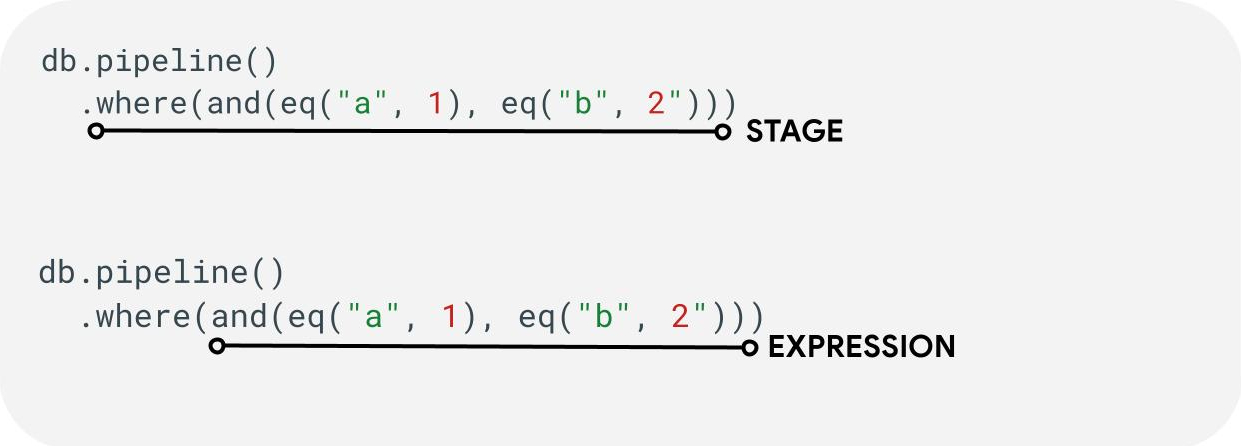
שלבים: צינור מכירות יכול לכלול שלב אחד או יותר. באופן לוגי, הם מייצגים את סדר השלבים (או השלבים) שנדרשים להפעלת השאילתה.
ביטויים: לעיתים קרובות, השלבים יקבלו ביטוי שיאפשר לכם להביע שאילתות מורכבות יותר. הביטוי יכול להיות פשוט ולהכיל פונקציה אחת כמו eq("a", 1). אפשר גם ליצור ביטויים מורכבים יותר על ידי קינון ביטויים כמו and(eq("a", 1), eq("b", 2)).
פונקציות עוטפות של שאילתות משנה: פונקציות כמו array() ו-scalar() מאפשרות להטמיע צינור נתונים מקונן כביטוי בשלב מסוים.
שדות / קבועים / משתנים
פעולות בצינורות תומכות בביטויים מורכבים. לכן חשוב להבחין בין ערך שמייצג שדה, קבוע או משתנה.
שדות מתייחסים לנתונים במסמכים, וקבועים מאפשרים לציין ערך כלשהו כארגומנט לביטוי. משתנים מאפשרים להגדיר ולהשתמש בערכים זמניים שמוגבלים להרצת השאילתה ולא למסמכים שעוברים עיבוד. בהמשך מופיע סקירה כללית של המושגים האלה. בשלב let(...) מוסבר איך לקרוא ולכתוב משתנים במהלך ביצוע השאילתה.
| שדות | קבועים | משתנים | |
|---|---|---|---|
| מטרה | לגשת לשדות או לאחסן אותם במסמכים | מציינים ערך קבוע | שימוש בערכים זמניים במהלך ההפעלה של צינור עיבוד הנתונים |
| שימוש ב-SDK | field("name") |
constant("val") |
variable("name") |
| היקף | מקומי למסמך הנוכחי | גלובלי | גלובלי לצינורות ולצינורות משנה |
| הפניה לא מוגדרת | הערך שמתקבל הוא absent |
לא רלוונטי | יוצר שגיאת זמן ריצה |
לדוגמה:
Node.js
  // Here the two parameters "name" and "toronto" could represent fields or constants.

  db.pipeline()
    .collection("cities")
    .where(eq("name","toronto"))

  // In many cases, it's not necessary to differentiate between the two. In the
  // case of equality, we will implicit treat the first parameter as a field
  // reference and the second as a constant. However if you need to override you
  // can always be explicit with the value types

  db.pipeline()
    .collection("cities")
    .where(eq(Field.of("name"), Constant.of("toronto")))

  // In some cases, being explicit is always required. However, it should be
  // enough to look at the type signature of the expressions to know what
  //parameters can be used with implicit types, and what should be explicitly specified.
גרסה 9 לאינטרנט
const pipeline = db.pipeline() .collection("cities") .where(field("name").equal(constant("Toronto")));
Swift
let pipeline = db.pipeline() .collection("cities") .where(Field("name").equal(Constant("Toronto")))
Kotlin
Android
val pipeline = db.pipeline() .collection("cities") .where(field("name").equal(constant("Toronto")))
Java
Android
Pipeline pipeline = db.pipeline() .collection("cities") .where(field("name").equal(constant("Toronto")));
Python
from google.cloud.firestore_v1.pipeline_expressions import Field, Constant pipeline = ( client.pipeline() .collection("cities") .where(Field.of("name").equal(Constant.of("Toronto"))) )
המשך
pipeline := client.Pipeline().Collection("cities"). Where(firestore.FieldOf("name").Equal(firestore.ConstantOf("Toronto")))
שלבים
שלבי קלט
שלב הקלט מייצג את השלב הראשון של שאילתה. הוא מגדיר את קבוצת המסמכים הראשונית שאתם שולחים לגביה שאילתה. בפעולות של צינורות, רוב השאילתות מתחילות בשלב collection(...) או בשלב collection_group(...). שני שלבי קלט חדשים הם database() ו-documents(...). השלב database() מאפשר להחזיר את כל המסמכים במסד הנתונים, ואילו השלב documents(...) פועל כמו קריאת אצווה.
Node.js
  // Return all restaurants in San Francisco
  const results = await db.pipeline()
    .collection("cities/sf/restaurants")
    .execute();

  // Return all restaurants
  const results = await db.pipeline()
    .collectionGroup("restaurants")
    .execute();

  // Return all documents across all collections in the database (huge result!)
  const results = await db.pipeline()
    .database()
    .execute();

  // Batch read of 3 documents
  const results = await db.pipeline()
    .documents(
      db.collection("cities").doc("SF"),
      db.collection("cities").doc("DC"),
      db.collection("cities").doc("NY"))
    .execute();
גרסה 9 לאינטרנט
let results; // Return all restaurants in San Francisco results = await execute(db.pipeline().collection("cities/sf/restaurants")); // Return all restaurants results = await execute(db.pipeline().collectionGroup("restaurants")); // Return all documents across all collections in the database (the entire database) results = await execute(db.pipeline().database()); // Batch read of 3 documents results = await execute(db.pipeline().documents([ doc(db, "cities", "SF"), doc(db, "cities", "DC"), doc(db, "cities", "NY") ]));
Swift
var results: Pipeline.Snapshot // Return all restaurants in San Francisco results = try await db.pipeline().collection("cities/sf/restaurants").execute() // Return all restaurants results = try await db.pipeline().collectionGroup("restaurants").execute() // Return all documents across all collections in the database (the entire database) results = try await db.pipeline().database().execute() // Batch read of 3 documents results = try await db.pipeline().documents([ db.collection("cities").document("SF"), db.collection("cities").document("DC"), db.collection("cities").document("NY") ]).execute()
Kotlin
Android
var results: Task<Pipeline.Snapshot> // Return all restaurants in San Francisco results = db.pipeline().collection("cities/sf/restaurants").execute() // Return all restaurants results = db.pipeline().collectionGroup("restaurants").execute() // Return all documents across all collections in the database (the entire database) results = db.pipeline().database().execute() // Batch read of 3 documents results = db.pipeline().documents( db.collection("cities").document("SF"), db.collection("cities").document("DC"), db.collection("cities").document("NY") ).execute()
Java
Android
Task<Pipeline.Snapshot> results; // Return all restaurants in San Francisco results = db.pipeline().collection("cities/sf/restaurants").execute(); // Return all restaurants results = db.pipeline().collectionGroup("restaurants").execute(); // Return all documents across all collections in the database (the entire database) results = db.pipeline().database().execute(); // Batch read of 3 documents results = db.pipeline().documents( db.collection("cities").document("SF"), db.collection("cities").document("DC"), db.collection("cities").document("NY") ).execute();
Python
# Return all restaurants in San Francisco results = client.pipeline().collection("cities/sf/restaurants").execute() # Return all restaurants results = client.pipeline().collection_group("restaurants").execute() # Return all documents across all collections in the database (the entire database) results = client.pipeline().database().execute() # Batch read of 3 documents results = ( client.pipeline() .documents( client.collection("cities").document("SF"), client.collection("cities").document("DC"), client.collection("cities").document("NY"), ) .execute() )
המשך
// Return all restaurants in San Francisco results1, err := client.Pipeline().Collection("cities/sf/restaurants").Execute(ctx).Results().GetAll() if err != nil { fmt.Fprintf(w, "GetAll failed: %v", err) return err } // Return all restaurants results2, err := client.Pipeline().CollectionGroup("restaurants").Execute(ctx).Results().GetAll() if err != nil { fmt.Fprintf(w, "GetAll failed: %v", err) return err } // Return all documents across all collections in the database (the entire database) results3, err := client.Pipeline().Database().Execute(ctx).Results().GetAll() if err != nil { fmt.Fprintf(w, "GetAll failed: %v", err) return err } // Batch read of 3 documents results4, err := client.Pipeline(). Documents([]*firestore.DocumentRef{ client.Collection("cities").Doc("SF"), client.Collection("cities").Doc("DC"), client.Collection("cities").Doc("NY"), }). Execute(ctx).Results().GetAll() if err != nil { fmt.Fprintf(w, "GetAll failed: %v", err) return err }
כמו בכל השלבים האחרים, סדר התוצאות משלבי הקלט האלה לא קבוע. תמיד צריך להוסיף אופרטור sort(...) אם נדרש סדר מסוים.
כאשר:
השלב where(...) פועל כמסנן רגיל על מסמכים שנוצרו בשלב הקודם, וברוב המקרים הוא משקף את התחביר הקיים של 'where' בשאילתות קיימות. כל מסמך שבו הערך של ביטוי נתון הוא לא true מסונן מהמסמכים שמוחזרים.
אפשר לשרשר כמה הצהרות where(...) כדי ליצור ביטוי and(...). לדוגמה, שתי השאילתות הבאות שקולות מבחינה לוגית ואפשר להשתמש בהן לסירוגין.
Node.js
  const results = await db.pipeline()
    .collection("books")
    .where(eq("rating", 5.0))
    .where(lt('published', 1900))
    .execute();

  const results = await db.pipeline()
    .collection("books")
    .where(and(
      eq("rating", 5.0),
      lt('published', 1900)))
    .execute();
גרסה 9 לאינטרנט
let results; results = await execute(db.pipeline().collection("books") .where(field("rating").equal(5)) .where(field("published").lessThan(1900)) ); results = await execute(db.pipeline().collection("books") .where(and(field("rating").equal(5), field("published").lessThan(1900))) );
Swift
var results: Pipeline.Snapshot results = try await db.pipeline().collection("books") .where(Field("rating").equal(5)) .where(Field("published").lessThan(1900)) .execute() results = try await db.pipeline().collection("books") .where(Field("rating").equal(5) && Field("published").lessThan(1900)) .execute()
Kotlin
Android
var results: Task<Pipeline.Snapshot> results = db.pipeline().collection("books") .where(field("rating").equal(5)) .where(field("published").lessThan(1900)) .execute() results = db.pipeline().collection("books") .where(Expression.and(field("rating").equal(5), field("published").lessThan(1900))) .execute()
Java
Android
Task<Pipeline.Snapshot> results; results = db.pipeline().collection("books") .where(field("rating").equal(5)) .where(field("published").lessThan(1900)) .execute(); results = db.pipeline().collection("books") .where(Expression.and( field("rating").equal(5), field("published").lessThan(1900) )) .execute();
Python
from google.cloud.firestore_v1.pipeline_expressions import And, Field results = ( client.pipeline() .collection("books") .where(Field.of("rating").equal(5)) .where(Field.of("published").less_than(1900)) .execute() ) results = ( client.pipeline() .collection("books") .where(And(Field.of("rating").equal(5), Field.of("published").less_than(1900))) .execute() )
המשך
results1, err := client.Pipeline(). Collection("books"). Where(firestore.FieldOf("rating").Equal(5)). Where(firestore.FieldOf("published").LessThan(1900)). Execute(ctx).Results().GetAll() if err != nil { fmt.Fprintf(w, "GetAll failed: %v", err) return err } results2, err := client.Pipeline(). Collection("books"). Where(firestore.And( firestore.FieldOf("rating").Equal(5), firestore.FieldOf("published").LessThan(1900), )). Execute(ctx).Results().GetAll() if err != nil { fmt.Fprintf(w, "GetAll failed: %v", err) return err }
בחירה / הוספה והסרה של שדות
הפעולות select(...), add_fields(...) ו-remove_fields(...) מאפשרות לשנות את השדות שמוחזרים משלב קודם. שלושת השלבים האלה נקראים בדרך כלל שלבים בסגנון הקרנה.
הפרמטרים select(...) ו-add_fields(...) מאפשרים לציין את התוצאה של ביטוי לשם שדה שסופק על ידי המשתמש. הפונקציה
select(...) תחזיר רק את המסמכים עם שמות השדות שצוינו, ואילו הפונקציה add_fields(...) תרחיב את הסכימה של השלב הקודם (יכול להיות שהיא תחליף ערכים עם שמות שדות זהים).
התג remove_fields(...) מאפשר לציין קבוצה של שדות להסרה מהשלב הקודם. ציון של שמות שדות שלא קיימים לא משפיע על הפעולה.
אפשר לעיין בקטע הגבלת השדות שיוחזרו בהמשך, אבל באופן כללי, שימוש בשלב כזה כדי להגביל את התוצאה רק לשדות שנדרשים בלקוח עוזר לצמצם את העלות ואת זמן האחזור עבור רוב השאילתות.
צבירה / ייחודי
בשלב aggregate(...) אפשר לבצע סדרה של צבירות על מסמכי הקלט. כברירת מחדל, כל המסמכים מצורפים יחד, אבל אפשר לספק ארגומנט grouping אופציונלי, שיאפשר לצרף את מסמכי הקלט לדליים שונים.
Node.js
  const results = await db.pipeline()
    .collection("books")
    .aggregate({
        accumulators: [avg('rating').as('avg_rating')],
        groups: ['genre'],
      })
    .execute();
גרסה 9 לאינטרנט
const results = await execute(db.pipeline() .collection("books") .aggregate( field("rating").average().as("avg_rating") ) .distinct(field("genre")) );
Swift
let results = try await db.pipeline() .collection("books") .aggregate([ Field("rating").average().as("avg_rating") ], groups: [ Field("genre") ]) .execute()
Kotlin
Android
val results = db.pipeline() .collection("books") .aggregate( AggregateStage .withAccumulators(AggregateFunction.average("rating").alias("avg_rating")) .withGroups(field("genre")) ) .execute()
Java
Android
Task<Pipeline.Snapshot> results = db.pipeline() .collection("books") .aggregate(AggregateStage .withAccumulators( AggregateFunction.average("rating").alias("avg_rating")) .withGroups(field("genre"))) .execute();
Python
from google.cloud.firestore_v1.pipeline_expressions import Field results = ( client.pipeline() .collection("books") .aggregate( Field.of("rating").average().as_("avg_rating"), groups=[Field.of("genre")] ) .execute() )
המשך
snapshot := client.Pipeline(). Collection("books"). Aggregate( firestore.Accumulators(firestore.Average("rating").As("avg_rating")), firestore.WithAggregateGroups("genre"), ). Execute(ctx)
אם לא מציינים את groupings, בשלב הזה יופק רק מסמך אחד. אחרת, יופק מסמך לכל שילוב ייחודי של ערכי groupings.
השלב distinct(...) הוא אופרטור צבירה פשוט שמאפשר ליצור רק את הערכים הייחודיים של groupings בלי צוברים. ההתנהגות שלו זהה לזו של aggregate(...) בכל שאר ההיבטים. בדוגמה הבאה אפשר לראות:
Node.js
  const results = await db.pipeline()
    .collection("books")
    .distinct(toUppercase(Field.of("author")).as("author"), Field.of("genre"))
    .execute();
גרסה 9 לאינטרנט
const results = await execute(db.pipeline() .collection("books") .distinct( field("author").toUpper().as("author"), field("genre") ) );
Swift
let results = try await db.pipeline() .collection("books") .distinct([ Field("author").toUpper().as("author"), Field("genre") ]) .execute()
Kotlin
Android
val results = db.pipeline() .collection("books") .distinct( field("author").toUpper().alias("author"), field("genre") ) .execute()
Java
Android
Task<Pipeline.Snapshot> results = db.pipeline() .collection("books") .distinct( field("author").toUpper().alias("author"), field("genre") ) .execute();
Python
from google.cloud.firestore_v1.pipeline_expressions import Field results = ( client.pipeline() .collection("books") .distinct(Field.of("author").to_upper().as_("author"), "genre") .execute() )
המשך
snapshot := client.Pipeline(). Collection("books"). Distinct(firestore.Fields( firestore.ToUpper(firestore.FieldOf("author")).As("author"), firestore.FieldOf("genre"), )). Execute(ctx)
פונקציות
פונקציות הן אבן בניין ליצירת ביטויים ושאילתות מורכבות. רשימה מלאה של פונקציות עם דוגמאות מופיעה במאמר חומר עזר בנושא פונקציות. תזכורת קצרה: כדאי לשים לב למבנה של שאילתה טיפוסית:

הרבה שלבים מקבלים ביטויים שמכילים פונקציה אחת או יותר. השימוש הנפוץ ביותר בפונקציה יהיה בשלבים where(...) וselect(...). יש שני סוגים עיקריים של פונקציות שחשוב להכיר:
Node.js
  // Type 1: Scalar (for use in non-aggregation stages)
  // Example: Return the min store price for each book.

  const results = await db.pipeline()
    .collection("books")
    .select(logicalMin(Field.of("current"),Field.of("updated")).as("price_min"))
    .execute();

  // Type 2: Aggregation (for use in aggregate stages)
  // Example: Return the min price of all books.

  const results = await db.pipeline()
    .collection("books")
    .aggregate(min(Field.of("price")))
    .execute();
גרסה 9 לאינטרנט
let results; // Type 1: Scalar (for use in non-aggregation stages) // Example: Return the min store price for each book. results = await execute(db.pipeline().collection("books") .select(field("current").logicalMinimum(field("updated")).as("price_min")) ); // Type 2: Aggregation (for use in aggregate stages) // Example: Return the min price of all books. results = await execute(db.pipeline().collection("books") .aggregate(field("price").minimum().as("min_price")) );
Swift
var results: Pipeline.Snapshot // Type 1: Scalar (for use in non-aggregation stages) // Example: Return the min store price for each book. results = try await db.pipeline().collection("books") .select([ Field("current").logicalMinimum(["updated"]).as("price_min") ]) .execute() // Type 2: Aggregation (for use in aggregate stages) // Example: Return the min price of all books. results = try await db.pipeline().collection("books") .aggregate([Field("price").minimum().as("min_price")]) .execute()
Kotlin
Android
var results: Task<Pipeline.Snapshot> // Type 1: Scalar (for use in non-aggregation stages) // Example: Return the min store price for each book. results = db.pipeline().collection("books") .select( field("current").logicalMinimum("updated").alias("price_min") ) .execute() // Type 2: Aggregation (for use in aggregate stages) // Example: Return the min price of all books. results = db.pipeline().collection("books") .aggregate(AggregateFunction.minimum("price").alias("min_price")) .execute()
Java
Android
Task<Pipeline.Snapshot> results; // Type 1: Scalar (for use in non-aggregation stages) // Example: Return the min store price for each book. results = db.pipeline().collection("books") .select( field("current").logicalMinimum("updated").alias("price_min") ) .execute(); // Type 2: Aggregation (for use in aggregate stages) // Example: Return the min price of all books. results = db.pipeline().collection("books") .aggregate(AggregateFunction.minimum("price").alias("min_price")) .execute();
Python
from google.cloud.firestore_v1.pipeline_expressions import Field # Type 1: Scalar (for use in non-aggregation stages) # Example: Return the min store price for each book. results = ( client.pipeline() .collection("books") .select( Field.of("current").logical_minimum(Field.of("updated")).as_("price_min") ) .execute() ) # Type 2: Aggregation (for use in aggregate stages) # Example: Return the min price of all books. results = ( client.pipeline() .collection("books") .aggregate(Field.of("price").minimum().as_("min_price")) .execute() )
המשך
// Type 1: Scalar (for use in non-aggregation stages) // Example: Return the min store price for each book. results1, err := client.Pipeline(). Collection("books"). Select(firestore.Fields( firestore.LogicalMinimum(firestore.FieldOf("current"), firestore.FieldOf("updated")).As("price_min"), )). Execute(ctx).Results().GetAll() if err != nil { fmt.Fprintf(w, "GetAll failed: %v", err) return err } // Type 2: Aggregation (for use in aggregate stages) // Example: Return the min price of all books. results2, err := client.Pipeline(). Collection("books"). Aggregate(firestore.Accumulators( firestore.Minimum("price").As("min_price"), )). Execute(ctx).Results().GetAll() if err != nil { fmt.Fprintf(w, "GetAll failed: %v", err) return err }
מגבלות
ברוב המקרים, מהדורת Enterprise לא מטילה מגבלות על מבנה השאילתה. במילים אחרות, אין הגבלה על מספר הערכים שאפשר להשתמש בהם בשאילתות IN או OR. במקום זאת, יש שתי מגבלות עיקריות שכדאי להכיר:
- זמן תפוגה: 60 שניות (זהה למהדורה הרגילה).
- שימוש בזיכרון: מגבלה של 128MiB על כמות הנתונים שנוצרו במהלך ביצוע השאילתה.
שגיאות
יכולות להיות כמה סיבות לכך ששאילתות נכשלות. כאן מפורטות שגיאות נפוצות והפעולות שאפשר לבצע כדי לפתור אותן:
| קוד שגיאה | פעולה |
DEADLINE_EXCEEDED
|
השאילתה שאתם מריצים חורגת מהמועד האחרון של 60 שניות ודורשת אופטימיזציה נוספת. לקבלת טיפים, אפשר לעיין בקטע 'ביצועים'. אם אתם לא מצליחים למצוא את שורש הבעיה, אתם יכולים לפנות לצוות. |
RESOURCE_EXHAUSTED
|
השאילתה שאתם מריצים חורגת ממגבלות הזיכרון ודורשת אופטימיזציה נוספת. לקבלת טיפים, אפשר לעיין בקטע 'ביצועים'. אם אתם לא מצליחים למצוא את שורש הבעיה, אתם יכולים לפנות לצוות. |
INTERNAL
|
פונים לצוות התמיכה. |
ביצועים
במסדי נתונים של מהדורת Enterprise לא נדרש שיהיה אינדקס תמיד.
המשמעות היא שזמן האחזור של שאילתה יכול להיות ארוך יותר בהשוואה לשאילתות קיימות, שהיו נכשלות באופן מיידי עם השגיאה FAILED_PRECONDITION חסר אינדקס. כדי לשפר את הביצועים של פעולות בצינור, אפשר לבצע כמה פעולות.
יצירת אינדקסים
האינדקס שנעשה בו שימוש
הסבר השאילתה מאפשר לכם לזהות אם השאילתה מוגשת על ידי אינדקס או חוזרת לפעולה פחות יעילה כמו סריקת טבלה. אם השאילתה לא מוגשת במלואה מאינדקס, אפשר ליצור אינדקס לפי ההוראות.
יצירת אינדקסים
כדי ליצור אינדקסים, אפשר לפעול לפי המסמכים הקיימים בנושא ניהול אינדקסים. לפני שיוצרים אינדקס, כדאי לעיין בשיטות המומלצות הכלליות לשימוש באינדקסים ב-Firestore. כדי לוודא שהשאילתה יכולה להשתמש באינדקסים, מומלץ לפעול לפי השיטות המומלצות ליצירת אינדקסים עם שדות בסדר הבא:
- כל השדות שישמשו במסנני שוויון (בכל סדר)
- כל השדות שייכללו במיון (באותו סדר)
- שדות שישמשו במסנני טווח או במסנני אי-שוויון בסדר יורד של סלקטיביות אילוצי השאילתה
לדוגמה, בשאילתה הבאה,
Node.js
const results = await db.pipeline()
  .collection('books')
  .where(lt('published', 1900))
  .where(eq('genre', 'Science Fiction'))
  .where(gt('avg_rating', 4.3))
  .sort(Field.of('published').descending())
  .execute();
גרסה 9 לאינטרנט
const results = await execute(db.pipeline() .collection("books") .where(field("published").lessThan(1900)) .where(field("genre").equal("Science Fiction")) .where(field("rating").greaterThan(4.3)) .sort(field("published").descending()) );
Swift
let results = try await db.pipeline() .collection("books") .where(Field("published").lessThan(1900)) .where(Field("genre").equal("Science Fiction")) .where(Field("rating").greaterThan(4.3)) .sort([Field("published").descending()]) .execute()
Kotlin
Android
val results = db.pipeline() .collection("books") .where(field("published").lessThan(1900)) .where(field("genre").equal("Science Fiction")) .where(field("rating").greaterThan(4.3)) .sort(field("published").descending()) .execute()
Java
Android
Task<Pipeline.Snapshot> results = db.pipeline() .collection("books") .where(field("published").lessThan(1900)) .where(field("genre").equal("Science Fiction")) .where(field("rating").greaterThan(4.3)) .sort(field("published").descending()) .execute();
Python
from google.cloud.firestore_v1.pipeline_expressions import Field results = ( client.pipeline() .collection("books") .where(Field.of("published").less_than(1900)) .where(Field.of("genre").equal("Science Fiction")) .where(Field.of("rating").greater_than(4.3)) .sort(Field.of("published").descending()) .execute() )
המשך
snapshot := client.Pipeline(). Collection("books"). Where(firestore.FieldOf("published").LessThan(1900)). Where(firestore.FieldOf("genre").Equal("Science Fiction")). Where(firestore.FieldOf("rating").GreaterThan(4.3)). Sort(firestore.Orders(firestore.Descending(firestore.FieldOf("published")))). Execute(ctx)
האינדקס המומלץ הוא אינדקס בהיקף אוסף ב-books עבור (genre [...], published DESC, avg_rating DESC).
צפיפות האינדקס
Firestore תומך באינדקסים דלילים ולא דלילים. מידע נוסף מופיע במאמר בנושא צפיפות האינדקס.
שאילתות מכוסות + אינדקסים משניים
אם כל השדות שמוחזרים נמצאים באינדקס משני, Firestore יכול לדלג על אחזור המסמך המלא ולהחזיר רק תוצאות מהאינדקס. בדרך כלל זה מוביל לשיפור משמעותי בזמן האחזור (ובעלות). שימוש בשאילתה לדוגמה שבהמשך:
Node.js
const results = await db.pipeline()
  .collection("books")
  .where(like(Field.of("category"), "%fantasy%"))
  .where(exists("title"))
  .where(exists("author"))
  .select("title", "author")
  .execute();
גרסה 9 לאינטרנט
const results = await execute(db.pipeline() .collection("books") .where(field("category").like("%fantasy%")) .where(field("title").exists()) .where(field("author").exists()) .select(field("title"), field("author")) );
Swift
let results = try await db.pipeline() .collection("books") .where(Field("category").like("%fantasy%")) .where(Field("title").exists()) .where(Field("author").exists()) .select([Field("title"), Field("author")]) .execute()
Kotlin
Android
val results = db.pipeline() .collection("books") .where(field("category").like("%fantasy%")) .where(field("title").exists()) .where(field("author").exists()) .select(field("title"), field("author")) .execute()
Java
Android
Task<Pipeline.Snapshot> results = db.pipeline() .collection("books") .where(field("category").like("%fantasy%")) .where(field("title").exists()) .where(field("author").exists()) .select(field("title"), field("author")) .execute();
Python
from google.cloud.firestore_v1.pipeline_expressions import Field results = ( client.pipeline() .collection("books") .where(Field.of("category").like("%fantasy%")) .where(Field.of("title").exists()) .where(Field.of("author").exists()) .select("title", "author") .execute() )
המשך
snapshot := client.Pipeline(). Collection("books"). Where(firestore.FieldOf("category").Like("%fantasy%")). Where(firestore.FieldOf("title").FieldExists()). Where(firestore.FieldOf("author").FieldExists()). Select(firestore.Fields("title", "author")). Execute(ctx)
אם במסד הנתונים כבר יש אינדקס של היקף האוסף ב-books עבור (category [...], title [...], author [...]), אפשר להימנע מאחזור נתונים מהמסמכים הראשיים עצמם. במקרה הזה, הסדר באינדקס לא משנה, ומשתמשים ב-[...] כדי לציין את זה.
הגבלת השדות שיוחזרו
כברירת מחדל, שאילתת Firestore מחזירה את כל השדות במסמך, בדומה ל-SELECT * במערכות יחסיות. אבל אם האפליקציה שלכם צריכה רק קבוצת משנה של השדות, אפשר להשתמש בשלבים select(...) או restrict(...) כדי להעביר את הסינון הזה לצד השרת. הפעולה הזו תקטין את גודל התגובה (ותפחית את עלות תעבורת הנתונים היוצאת מהרשת) ותשפר את זמן האחזור.
כלים לפתרון בעיות
הסבר על שאילתה
התכונה Query Explain מאפשרת לכם לראות את מדדי הביצוע ואת הפרטים על האינדקסים שבהם נעשה שימוש.
מדדים
פעולות בצינור אם יש שילוב מלא עם מדדים קיימים של Firestore.
בעיות ידועות / מגבלות
מדדים מיוחדים
בשלב הזה, פעולות בצינור לא תומכות בarray-contains ובvector סוגי אינדקסים קיימים. במקום לדחות שאילתות כאלה, Firestore ינסה להשתמש באינדקסים קיימים אחרים של ascending ושל descending. לכן, צפוי שביטויים כאלה של array_contains או find_nearest יהיו איטיים יותר מהמקבילים הקיימים שלהם.
תמיכה בזמן אמת ובמצב אופליין
לפעולות בצינור אין יכולות בזמן אמת ובמצב אופליין.
המאמרים הבאים
- מידע נוסף זמין במאמר הפניה לפונקציות.
- איך מבצעים צירופים באמצעות שאילתות משנה