


您在上一個步驟建立的預先建構代理,無法提供帳戶餘額等動態資料,因為所有內容都已硬式編碼至代理中。在本教學課程的這個步驟中,您將建立 Webhook,為代理提供動態資料。本教學課程使用 Cloud Run functions 託管 Webhook,因為這種方式較為簡單,但您也可以透過許多其他方式託管 Webhook 服務。這個範例也使用 Go 程式設計語言,但您可以使用 Cloud Run functions 支援的任何語言。
建立函式
您可以使用 Google Cloud 控制台建立 Cloud Run 函式 (查看說明文件、開啟控制台)。如要為本教學課程建立函式,請按照下列步驟操作:
請務必將 Dialogflow 代理和函式放在同一個專案中。這是讓 Dialogflow 安全存取函式最簡單的方法。建立函式前,請先在 Google Cloud 控制台選取專案。
開啟 Cloud Run 函式總覽頁面:
按一下「建立函式」,然後設定下列欄位:
- 環境:第 1 代
- 函式名稱:tutorial-banking-webhook
- 區域:如果您已為代理程式指定區域,請使用相同區域。
- HTTP 觸發條件類型:HTTP
- 網址:按一下這裡的複製按鈕,然後儲存值。 設定 Webhook 時會用到這個網址。
- 驗證:需要驗證
- 必須使用 HTTPS:勾選
按一下 [儲存]。
點選「Next」(下一步) (您不需要特殊的執行階段、建構作業、連線或安全性設定)。
設定下列欄位:
- 「Runtime」(執行階段):選取最新的 Go 執行階段。
- 原始碼:內嵌編輯器
- 進入點:HandleWebhookRequest
將程式碼替換為以下內容:
package estwh

import (
	"context"
	"encoding/json"
	"fmt"
	"log"
	"net/http"
	"os"
	"strings"

	"cloud.google.com/go/spanner"
  "google.golang.org/grpc/codes"
)

// client is a Spanner client, created only once to avoid creation
// for every request.
// See: https://cloud.google.com/functions/docs/concepts/go-runtime#one-time_initialization
var client *spanner.Client

func init() {
	// If using a database, these environment variables will be set.
	pid := os.Getenv("PROJECT_ID")
	iid := os.Getenv("SPANNER_INSTANCE_ID")
	did := os.Getenv("SPANNER_DATABASE_ID")
	if pid != "" && iid != "" && did != "" {
		db := fmt.Sprintf("projects/%s/instances/%s/databases/%s",
			pid, iid, did)
		log.Printf("Creating Spanner client for %s", db)
		var err error
		// Use the background context when creating the client,
		// but use the request context for calls to the client.
		// See: https://cloud.google.com/functions/docs/concepts/go-runtime#contextcontext
		client, err = spanner.NewClient(context.Background(), db)
		if err != nil {
			log.Fatalf("spanner.NewClient: %v", err)
		}
	}
}

type queryResult struct {
	Action     string         `json:"action"`
	Parameters map[string]any `json:"parameters"`
}

type text struct {
	Text []string `json:"text"`
}

type message struct {
	Text text `json:"text"`
}

// webhookRequest is used to unmarshal a WebhookRequest JSON object. Note that
// not all members need to be defined--just those that you need to process.
// As an alternative, you could use the types provided by
// the Dialogflow protocol buffers:
// https://godoc.org/google.golang.org/genproto/googleapis/cloud/dialogflow/v2#WebhookRequest
type webhookRequest struct {
	Session     string      `json:"session"`
	ResponseID  string      `json:"responseId"`
	QueryResult queryResult `json:"queryResult"`
}

// webhookResponse is used to marshal a WebhookResponse JSON object. Note that
// not all members need to be defined--just those that you need to process.
// As an alternative, you could use the types provided by
// the Dialogflow protocol buffers:
// https://godoc.org/google.golang.org/genproto/googleapis/cloud/dialogflow/v2#WebhookResponse
type webhookResponse struct {
	FulfillmentMessages []message `json:"fulfillmentMessages"`
}

// accountBalanceCheck handles the similar named action
func accountBalanceCheck(ctx context.Context, request webhookRequest) (
	webhookResponse, error) {
	account := request.QueryResult.Parameters["account"].(string)
	account = strings.ToLower(account)
	var table string
	if account == "savings account" {
		table = "Savings"
	} else {
		table = "Checking"
	}
	s := "Your balance is $0"
	if client != nil {
		// A Spanner client exists, so access the database.
		// See: https://pkg.go.dev/cloud.google.com/go/spanner#ReadOnlyTransaction.ReadRow
		row, err := client.Single().ReadRow(ctx,
			table,
			spanner.Key{1}, // The account ID
			[]string{"Balance"})
		if err != nil {
			if spanner.ErrCode(err) == codes.NotFound {
				log.Printf("Account %d not found", 1)
			} else {
				return webhookResponse{}, err
			}
		} else {
			// A row was returned, so check the value
			var balance int64
			err := row.Column(0, &balance)
			if err != nil {
				return webhookResponse{}, err
			}
			s = fmt.Sprintf("Your balance is $%.2f", float64(balance)/100.0)
		}
	}
	response := webhookResponse{
		FulfillmentMessages: []message{
			{
				Text: text{
					Text: []string{s},
				},
			},
		},
	}
	return response, nil
}

// Define a type for handler functions.
type handlerFn func(ctx context.Context, request webhookRequest) (
	webhookResponse, error)

// Create a map from action to handler function.
var handlers map[string]handlerFn = map[string]handlerFn{
	"account.balance.check": accountBalanceCheck,
}

// handleError handles internal errors.
func handleError(w http.ResponseWriter, err error) {
	log.Printf("ERROR: %v", err)
	http.Error(w,
		fmt.Sprintf("ERROR: %v", err),
		http.StatusInternalServerError)
}

// HandleWebhookRequest handles WebhookRequest and sends the WebhookResponse.
func HandleWebhookRequest(w http.ResponseWriter, r *http.Request) {
	var request webhookRequest
	var response webhookResponse
	var err error

	// Read input JSON
	if err = json.NewDecoder(r.Body).Decode(&request); err != nil {
		handleError(w, err)
		return
	}
	log.Printf("Request: %+v", request)

	// Get the action from the request, and call the corresponding
	// function that handles that action.
	action := request.QueryResult.Action
	if fn, ok := handlers[action]; ok {
		response, err = fn(r.Context(), request)
	} else {
		err = fmt.Errorf("Unknown action: %s", action)
	}
	if err != nil {
		handleError(w, err)
		return
	}
	log.Printf("Response: %+v", response)

	// Send response
	if err = json.NewEncoder(w).Encode(&response); err != nil {
		handleError(w, err)
		return
	}
}
點選「Deploy」(部署)。
等待狀態指標顯示函式已成功部署。等待期間,請檢查剛才部署的程式碼。
設定代理的 Webhook
現在,Webhook 已做為服務存在,您需要將這個 Webhook 與代理建立關聯。這項作業是透過執行要求完成。如要啟用及管理代理的執行要求,請按照下列步驟操作:
- 前往 Dialogflow ES 控制台。
- 選取剛建立的預先建構代理。
- 選取左側欄選單中的「Fulfillment」。
- 將「Webhook」欄位切換為「啟用」。
- 提供您從上方複製的網址。其他欄位則留空。
- 按一下頁面底部的 [Save] (儲存)。
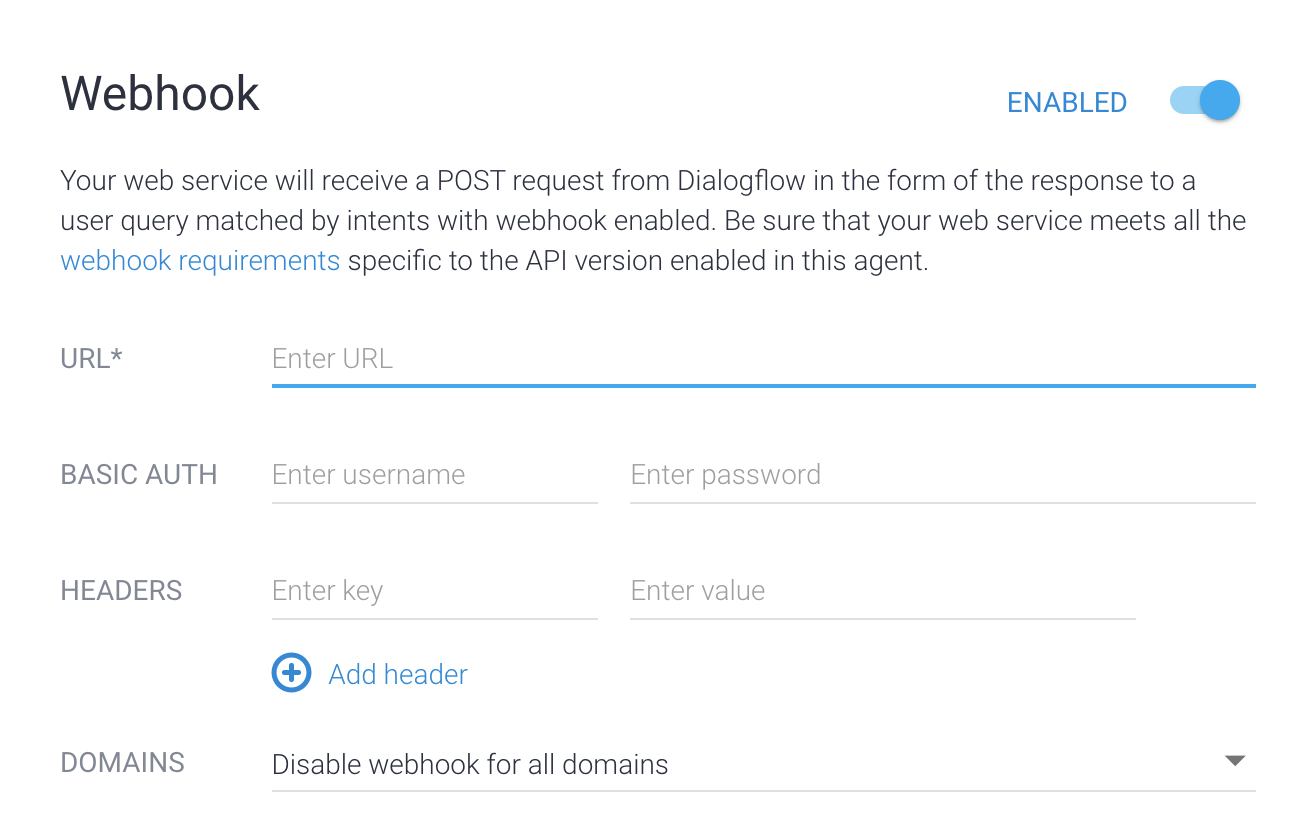
現在,代理已啟用執行要求,您需要為意圖啟用執行要求:
- 選取左側欄選單中的 [Intents] (意圖)。
- 選取 account.balance.check 意圖。
- 向下捲動至「Fulfillment」部分。
- 將「Enable webhook call for this intent」(為這個意圖啟用 Webhook 呼叫) 切換為開啟。
- 按一下 [儲存]。
試用代理
現在可以試用代理了。 點選「Test Agent」按鈕,開啟模擬工具。嘗試與代理進行以下對話:
| 對話回合 | 您 | 代理 |
|---|---|---|
| 1 | 你好 | 你好,感謝你選擇 ACME Bank。 |
| 2 | 我想知道帳戶餘額 | 你想查詢哪個帳戶的餘額:儲蓄帳戶還是支票帳戶? |
| 3 | 檢查中 | 最新餘額:$0.00 美元 |
在第 3 輪對話中,您提供的帳戶類型是「checking」。account.balance.check 意圖有名為 account 的參數。在這個對話中,這項參數會設為「checking」。意圖的動作值為「account.balance.check」。系統會呼叫 Webhook 服務,並傳遞參數和動作值。
如果查看上方的 Webhook 程式碼,會發現這個動作會觸發名稱相似的函式。這個函式會決定帳戶餘額。函式會檢查是否已設定特定環境變數,並提供連線至資料庫的資訊。如未設定這些環境變數,函式會使用硬式編碼的帳戶餘額。在後續步驟中,您將變更函式的環境,以便從資料庫擷取資料。
疑難排解
Webhook 程式碼包含記錄陳述式。如果遇到問題,請嘗試查看函式的記錄。
更多資訊
如要進一步瞭解上述步驟,請參閱: