


Knowledge Catalog 검색 에이전트는 Knowledge Catalog 검색 기능을 기반으로 복잡한 자연어 쿼리의 검색 관련성을 개선하는 AI 기반 어시스턴트입니다. 질문 이해 및 형식을 최적화하여 표준 Knowledge Catalog Search API보다 더 정확한 결과를 제공합니다. 이 기능은 특히 복잡하거나 긴 질문에 중요합니다.
사용 사례
탐색 에이전트는 다음과 같은 시나리오에서 풍부한 대화형 환경을 제공합니다.
- 복잡하거나 결합된 의도 및 제약 조건:
us-central1에서 데이터 세트를 찾되 BigQuery의 리소스는 제외하는 등 여러 기준이 있는 검색 요청을 처리합니다. - 비즈니스 중심 검색: 정확한 기술 용어를 일치시키는 대신 의도와 비즈니스 컨텍스트를 기반으로 데이터 애셋을 검색합니다.
- 멀티턴 탐색: 대화형 대화를 통해 검색을 구체화하여 결과를 좁힙니다.
검색 에이전트는 Knowledge Catalog 시맨틱 검색을 기반으로 구축되며, 이를 통해 기본적으로 하이브리드 검색을 사용할 수 있습니다. 의도가 높은 검색 (특정 리소스 또는 열을 알고 있는 경우), 짧은 지연 시간 요구사항 또는 설정이 필요 없는 하이브리드 검색을 처리해야 하는 경우 Knowledge Catalog 시맨틱 검색을 직접 계속 사용할 수 있습니다.
작동 방식
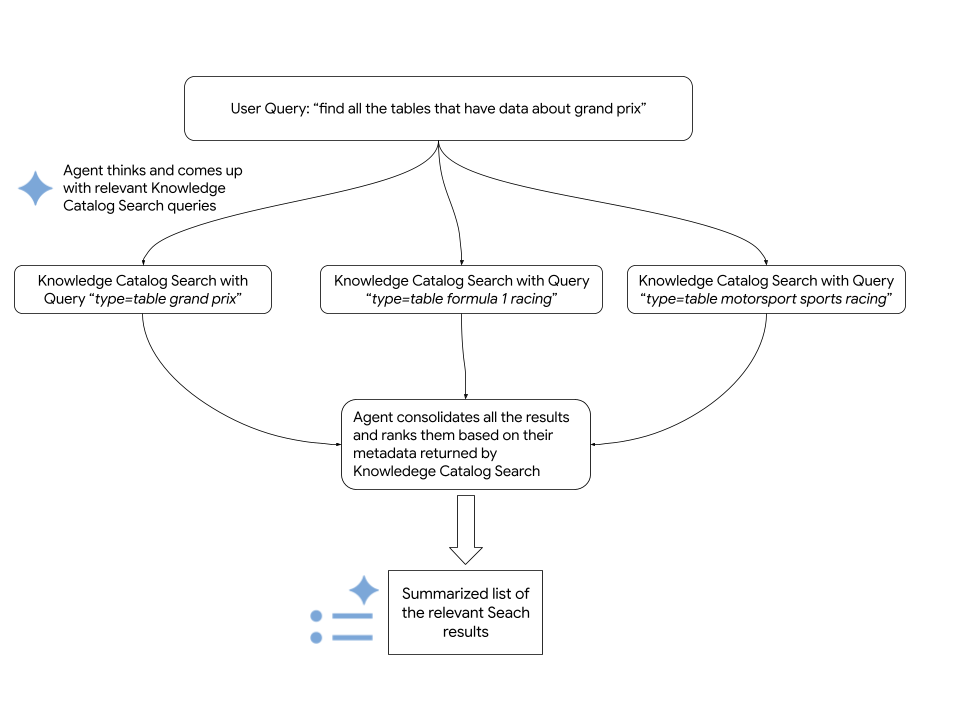
검색 에이전트는 검색어에 응답하기 위해 다음 단계를 실행합니다.
- 의도를 파악하기 위해 입력을 분석하여 쿼리를 이해하고, 여러 검색 변형을 생성하고, 용어를 메타데이터 필터에 매핑합니다.
- Knowledge Catalog 시맨틱 검색을 사용하여 리소스를 검색합니다.
- 병합된 결과를 관련성을 기준으로 순위를 지정합니다.
다음 다이어그램은 프로세스의 세부정보를 보여줍니다.
에이전트는 Knowledge Catalog Search API를 사용하여 관련Google Cloud 리소스를 가져옵니다. 다음 코드 스니펫은 에이전트가 Knowledge Catalog 시맨틱 검색을 호출하는 방법을 보여줍니다.
      # Configure the request parameters for the
      # call to Knowledge Catalog Semantic Search API.
      endpoint = "dataplex.googleapis.com"

      client = dataplex_v1.CatalogServiceClient(
          client_options={"api_endpoint": endpoint}
      )

      location = "global"
      consumer_project_id = "my-gcp-project"
      parent_name = f"projects/{consumer_project_id}/locations/{location}"

      # Call Knowledge Catalog Semantic Search API.
      response = client.search_entries(
          request={
              "name": parent_name,
              "query": query,
              "page_size": 50,
              "semantic_search": True,
          }
      )

      # Call Knowledge Catalog LookupContext for each search result
      # to retrieve rich, LLM-ready metadata.
      entries = []
      for result in response.results:
          entry_name = result.dataplex_entry.name

          # Prepare the LookupContext request for the specific resource
          lookup_request = {
              "name": parent_name,
              "resources": [entry_name]
          }

          # Call the LookupContext API
          lookup_response = client.lookup_context(request=lookup_request)

          # Extract the rich context YAML to share with the agent
          entries.append({
              "entry_name": entry_name,
              "context": lookup_response.context
          })

      return {"results": entries}
시작하기 전에
Knowledge Catalog 검색 에이전트를 실행하려면 다음 요구사항을 충족해야 합니다.
필요한 역할
탐색 에이전트를 사용하는 데 필요한 권한을 얻으려면 관리자에게 Google Cloud 프로젝트 iam.gserviceaccount.com에 대한 다음 IAM 역할을 부여해 달라고 요청하세요.
- Dataplex 뷰어 (
roles/dataplex.viewer) - Vertex AI 사용자 (
roles/aiplatform.user) - 서비스 사용량 소비자(
roles/serviceusage.serviceUsageConsumer)
역할 부여에 대한 자세한 내용은 프로젝트, 폴더, 조직에 대한 액세스 관리를 참조하세요.
이러한 사전 정의된 역할에는 탐색 에이전트를 사용하는 데 필요한 권한이 포함되어 있습니다. 필요한 정확한 권한을 보려면 필수 권한 섹션을 펼치세요.
필수 권한
탐색 에이전트를 사용하려면 다음 권한이 필요합니다.
-
dataplex.projects.search -
aiplatform.endpoints.predict -
serviceusage.services.use
커스텀 역할이나 다른 사전 정의된 역할을 사용하여 이 권한을 부여받을 수도 있습니다.
API 사용 설정
Knowledge Catalog 검색 에이전트를 사용하려면 프로젝트에서 Knowledge Catalog API, Vertex AI API, Service Usage API를 사용 설정하세요.
API 사용 설정에 필요한 역할
API를 사용 설정하려면 serviceusage.services.enable 권한이 필요합니다. 프로젝트를 만든 경우 소유자 역할 (roles/owner)을 통해 이 권한이 이미 있을 수 있습니다. 그렇지 않으면 서비스 사용량 관리자 역할 (roles/serviceusage.serviceUsageAdmin)을 통해 이 권한을 얻을 수 있습니다. 역할을 부여하는 방법 알아보기
환경 설정
검색 에이전트의 개발 환경을 설정하려면 다음 단계를 따르세요.
dataplex-labs저장소를 클론합니다.git clone https://github.com/GoogleCloudPlatform/dataplex-labs.git에이전트 디렉터리로 변경합니다.
cd dataplex-labs/knowledge_catalog_discovery_agentPython 가상 환경을 만들고 활성화한 다음
requirements.txt파일에 나열된 종속 항목을 설치합니다.google-adk(에이전트 개발 키트)google-cloud-dataplex(Knowledge Catalog Python 클라이언트)google-api-core
  python3 -m venv /tmp/kcsearch

  source /tmp/kcsearch/bin/activate

  pip3 install -r requirements.txt
다음 명령어를 사용하여 환경 변수를 설정합니다.
export GOOGLE_CLOUD_PROJECT=PROJECT_ID
export GOOGLE_GENAI_USE_VERTEXAI=True
다음을 바꿉니다.
PROJECT_ID를 프로젝트 ID로 바꿉니다.
검색 에이전트를 루트 에이전트로 실행
검색 에이전트를 루트 에이전트로 직접 실행하려면 다음을 실행하세요.
knowledge_catalog_discovery_agent폴더에 있는agent.py파일에서discovery_agent변수의 이름을root_agent로 바꿉니다.adk run명령어를 사용하여 에이전트를 실행합니다.adk run path/to/agent/parent/folder다음을 바꿉니다.
path/to/agent/parent/folder를 에이전트가 포함된 폴더가 있는 상위 디렉터리로 바꿉니다. 예를 들어 에이전트가knowledge_catalog_discovery_agent/에 있는 경우agents/디렉터리에서adk run를 실행합니다.
검색 에이전트를 에이전트 도구로 실행
탐색 에이전트를 my_custom_agent와 같은 더 큰 맞춤 에이전트에 통합하려면 다음을 실행하세요.
검색 에이전트 모듈을 포함하도록 프로젝트 구조를 설정합니다.
my_custom_agent/
├── agent.py
└── knowledge_catalog_discovery_agent/
    ├── SKILL.md
    ├── agent.py
    ├── tools.py
    └── utils.py
커스텀 에이전트의
agent.py파일에서 검색 에이전트를 가져와 에이전트 도구로 사용합니다. 예를 참고하세요.root_agent = llm_agent.Agent( model=google_llm.Gemini(model=GEMINI_MODEL), name="my_custom_agent", instruction=( "You are a Custom Agent. Your goal is to help users understand" " their data landscape, evaluate data assets, and derive insights" " from available resources. **IMPORTANT**: You should use the" " `knowledge_catalog_discovery_agent` to search for and discover" " data assets. For best results, pass in the Natural Language user'" " query as is to the `knowledge_catalog_discovery_agent`. Once assets" " are found, you should analyze their metadata, compare them, and" " provide recommendations or summaries to the user to help them make" " decisions. Focus on general metadata summary and comparison." ), tools=[ agent_tool.AgentTool(discovery_agent), ], )adk run명령어를 사용하여 에이전트를 실행합니다.adk run path/to/agent/parent/folder다음을 바꿉니다.
path/to/agent/parent/folder를my_custom_agent/폴더가 포함된 상위 디렉터리로 바꿉니다. 예를 들어 에이전트가agents/my_custom_agent/에 있는 경우agents/디렉터리에서adk run를 실행합니다.
다음 단계
- Knowledge Catalog 검색 구문 이해하기
- 에이전트 개발 키트에 대해 자세히 알아보세요.
- 다른 Knowledge Catalog 사용 사례를 사용해 보세요.