

Knowledge Catalog is a Gemini-powered context layer that provides universal business context and active grounding capabilities across your entire data estate. By building a dynamic context graph from structured and unstructured data, it helps data teams and developers discover assets, verify data quality, and securely ground generative AI applications to reduce hallucinations.
For a detailed walkthrough of Knowledge Catalog, see the following video:
Audience and prerequisites
This overview is designed for data and context engineers, data scientists, data stewards, and AI developers. Before using Knowledge Catalog, you must have:
Familiarity with database and storage systems, such as BigQuery or Cloud Storage.
A basic understanding of generative AI concepts, such as retrieval-augmented generation (RAG) or Model Context Protocol (MCP).
Solve for industry-specific data complexity
In modern enterprises, data is complex, highly distributed, and exists in both structured and unstructured formats. Business requests rarely map to a single database schema or document store. Aligning these silos securely while delivering immediate, reliable answers to cross-domain questions is a major operational challenge.
Knowledge Catalog acts as the semantic foundation that bridges this gap, letting AI agents and analytics tools retrieve grounded, relevant context.
Key user roles
Context Engineers (Data Engineers). Automate metadata aggregation across databases and Cloud Storage, trace transformations with lineage, and build enrichment and evaluation workflows.
Data Stewards (Governance Teams). Oversee metadata quality by providing human-in-the-loop reviews of AI-generated descriptions, standardizing business vocabularies with glossaries, and defining custom aspects to attach domain-specific context to catalog entries.
AI Developers. Ground LLMs and AI applications with trusted enterprise data schemas using MCP servers or context retrieval APIs.
Industry use cases
The following table illustrates the complex questions that arise in practice, how they cross technical boundaries, and how Knowledge Catalog helps organizations address them:
| Industry | Data and operational challenges | Business problem to solve | How Knowledge Catalog addresses it |
|---|---|---|---|
| Ecommerce |
|
"Find electronics products with high return rates and customer photos showing signs of damage on arrival." | Semantic grounding across data formats: Automatically discovers metadata from transactional databases and links it to unstructured images in Cloud Storage storage buckets, letting AI tools resolve the query across disparate storage systems. |
| Manufacturing |
|
"Generate summaries for all inspection reports related to machines in the Western region that failed safety checks last quarter." | Regional and unstructured crawling: Crawls and catalogs unstructured PDF inspection reports alongside asset metadata, letting generative AI agents locate, compile, and summarize reports by region. |
| Healthcare |
|
"Which patients are at the highest risk for a 30-day readmission when looking at recent lab vitals and appointment frequency?" | Data quality and lineage: Computes line-level data quality profiling and lineage maps across electronic health record feeds, which helps ensure that clinical predictive models rely only on verified, high-quality patient vitals. |
| Financial services |
|
"Which top 10 revenue customers complained about 'performance issues' and how does that affect Q3 projections?" | Unified context graph: Unifies customer records, support feedback, and financial tables, letting natural language queries join client revenue statistics with unstructured feedback files to forecast financial impact. |
To address these operational challenges, Knowledge Catalog provides key capabilities that help data engineers, data scientists, and AI developers build governed data systems:
Ground AI agents with Model Context Protocol (MCP). Expose metadata, schemas, lineage, and business rules directly to AI agents using local or remote MCP servers. These servers let models verify operational expectations before proposing actions.
Accelerate discovery for AI and analytics. Find relevant data assets using natural language semantic search. Generative summaries and recommendations help users locate data without waiting for manual documentation reviews.
Govern data products at scale. Package collections of assets with service level agreements (SLAs), contracts, ownership details, and usage notes into single, governed units for search and subscription.
How Knowledge Catalog works
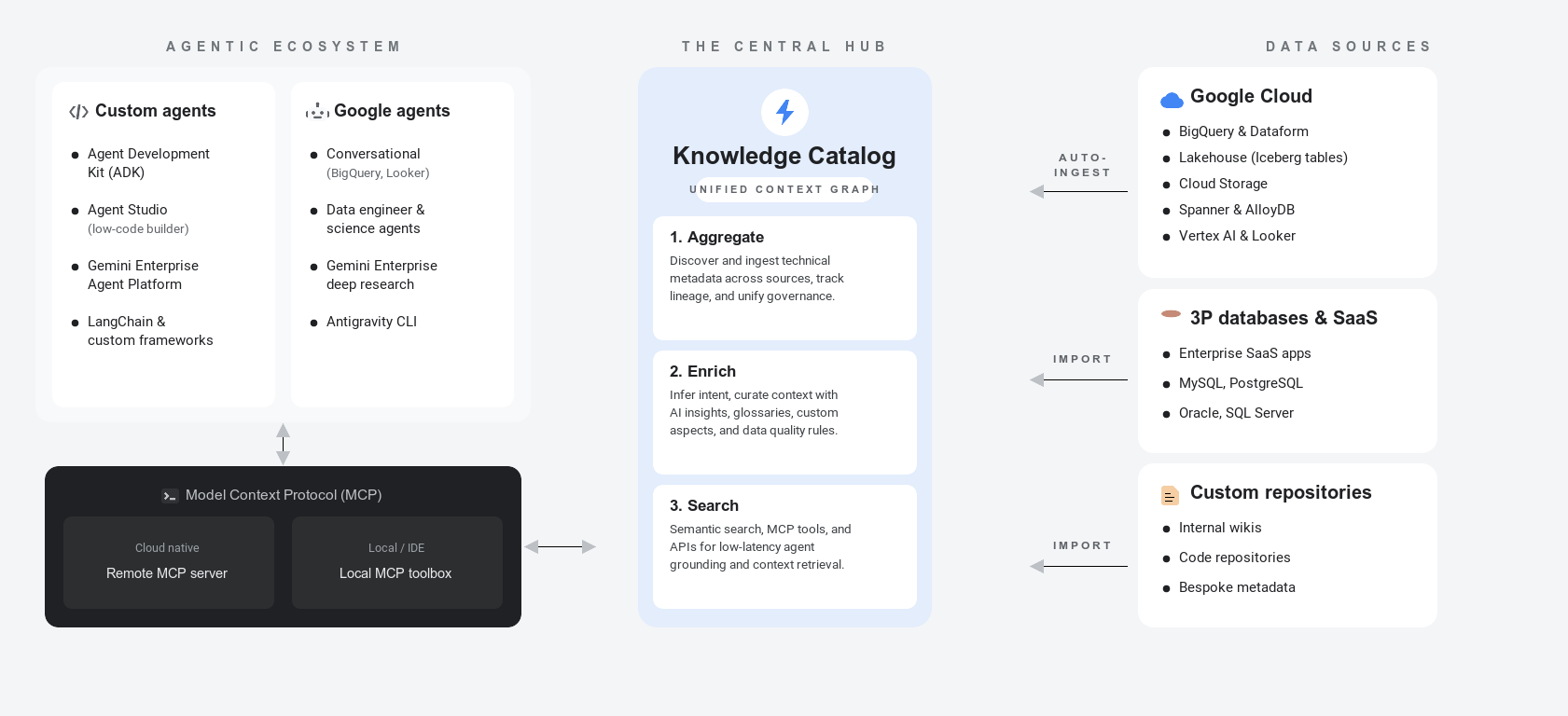
Knowledge Catalog unifies data management and context through a three-pillar lifecycle. The following diagram illustrates how the service maps physical data assets to business semantics for AI agent grounding:
For more information about these metadata concepts, see About metadata.
The following sections describe the three pillars of the metadata lifecycle and illustrate how a retail company applies them to database tables, files, and external catalog entries:
Aggregation (Discover and ingest). Knowledge Catalog automatically crawls and indexes technical metadata across your data estate without moving the underlying data:
- Built-in databases. Automated cataloging captures schemas and attributes across platforms like BigQuery, AlloyDB for PostgreSQL, and Spanner.
- Managed connectivity. Ingest definitions from external systems, such as Oracle or PostgreSQL, or partner registries, such as Collibra, without writing custom pipelines.
- Data lineage. Trace column-level transformations across pipelines to track where your data comes from and how it has changed.
- Example: A retail company automatically ingests transactional
database metadata, such as the
ordersandorder_itemstables, and indexes unstructured product files stored in Cloud Storage buckets. They link external databases to establish a unified metadata index under a discoverable directory.
To learn more about metadata aggregation and data ingestion (click to expand)
- Supported data sources: Lists all supported Google Cloud and external sources for automated ingestion.
- Managed connectivity overview: Explains how to ingest technical schemas from external systems.
- Track data lineage: Describes how to visualize column-level pipeline transformations and data flow.
Enrichment (Curate context and verify trust). Knowledge Catalog attaches business meaning to technical structures and establishes trust signals:
- AI-generated insights. Gemini analyzes query logs to generate column descriptions, table summaries, and recommended joins.
- Glossaries and aspects. Map internal metric names to a shared vocabulary using business terms and logical templates.
- Data quality and anomaly detection. Enforce cleanliness guidelines and run machine learning scans to detect statistical outliers or data freshness issues, generating key trust signals.
- Governance reviews. Manage risk by using workflow review processes to verify metadata updates before publication.
- Example: The retail team enriches assets by triggering data insights to recommend column descriptions and running data quality rules. They map business definitions to active orders by creating glossaries and aspects.
To learn more about metadata enrichment and trust verification (click to expand)
- Configure data insights: Explains how to generate automated dataset descriptions and summaries.
- Manage business glossaries: Describes how to customize standard terms and business vocabularies.
- Enrich metadata with aspects: Shows how to attach structured metadata properties to logical assets.
- Reuse data quality rules: Shows how to establish and reuse database validation rules.
- Data profiling overview: Describes how to configure scans for schema anomalies and statistical drift.
Search and retrieval (Access and ground). AI applications and business users query the unified context graph to access data safely:
- Grounding agents. Connect your LLM-based apps and agents to the catalog.
- Context API. Perform low-latency grounding payload requests.
- Semantic search. Find the right assets using natural-language queries.
- Data packaging. Bundle collections of tables, licensing details, and SLAs into secure, self-service data packages.
- Example: Analysts perform natural-language semantic searches to locate assets. AI applications consume this index securely using MCP servers or the context retrieval API, and high-quality assets are packaged into a secure view.
To learn more about context retrieval and agent grounding (click to expand)
- Model Context Protocol (MCP) overview: Explains how to bridge generative AI agents and application layers to Knowledge Catalog context.
- Retrieve context using LookupContext: Shows how to extract key operational payloads for agent prompting.
- Search for assets: Describes asset lookup capabilities using natural-language semantic query syntax.
Knowledge Catalog in Google Cloud and AI ecosystem
Understanding how Knowledge Catalog integrates with related services is essential when building a data foundation.
Google Cloud databases and models
- BigQuery. Knowledge Catalog automatically crawls and indexes BigQuery datasets, tables, and views. It triggers Gemini-powered data insights to analyze query histories, publish descriptions, and suggest verified example queries.
- Looker (Google Cloud core). Knowledge Catalog ingests Looker Dashboards, Looks, and LookML structures, such as views, explores, dimensions, and measures. This ingestion builds lineage mappings to trace how operational values map to business semantics.
- Lighthouse runtime catalog. Knowledge Catalog integrates with Lighthouse, the runtime metastore for open-source Iceberg workloads. It automatically indexes technical metadata on top of Lighthouse workloads to provide unified Active Context.
AI agent platforms and assistants
- Conversational analytics. Analysis interfaces use catalog terms and lookup tools to let users query business metrics in natural language with verified grounding.
- Gemini for AI agents. High-precision assistant agents use catalog metadata to run database lookups, reducing hallucinations.
- Gemini Enterprise Agent Platform. Knowledge Catalog serves as the central data governance standard within target platform environments. It cross-links with the Gemini Enterprise Agent Platform to feed tools and context to the platform's Agent Registry.
Google Cloud database and AI service integration
Knowledge Catalog works alongside other Google Cloud products to form your data foundation. The following table highlights how Knowledge Catalog integrates with and complements related services:
| Service | Primary role | How it integrates with Knowledge Catalog |
|---|---|---|
| Knowledge Catalog | Governance and agentic context | Serves as the unified semantic context graph, executing data quality check scans and exposing grounded schemas to AI models and applications. |
| BigQuery | Enterprise data warehousing | Stores, queries, and processes datasets; automatically crawls, indexes, and enriches these tables with business classification aspects. |
| Gemini Enterprise Agent Platform | AI model development | Builds, deploys, and hosts foundation models. Custom agents retrieve metadata context to ground logical reasoning. |
| Cloud Storage | Unstructured file storage | Stores raw, unstructured files; automatically runs unstructured discovery scans to parse PDFs and images to build relationship maps. |
Semantics and data formats
To instruct and ground agentic systems effectively, you must distinguish between physical data structure and semantic meaning:
- Semantics. The business meaning, intent, and relationships associated
with your data. Although technical schemas define structural storage
specifications, such as a database type, character length, or integer
constraint, semantics describe what the dataset actually represents. For
example, you can map a column named
txn_qtyto the business definition of "purchased quantity". - Structured data. Information stored in defined schemas and relational formats. Examples include BigQuery tables, Spanner databases, and operational Postgres tables. Knowledge Catalog automatically crawls this metadata and records columns and constraints.
Agentic Data Cloud context orchestration
Within Google's Agentic Data Cloud framework, Knowledge Catalog serves as the semantic orchestration plane. Rather than requiring developers to manually hardcode database schemas and rules into prompts, the context engine dynamically serves the precise semantic context that an agent needs to make intelligent decisions.
The following figure shows how Knowledge Catalog orchestrates and delivers data context:
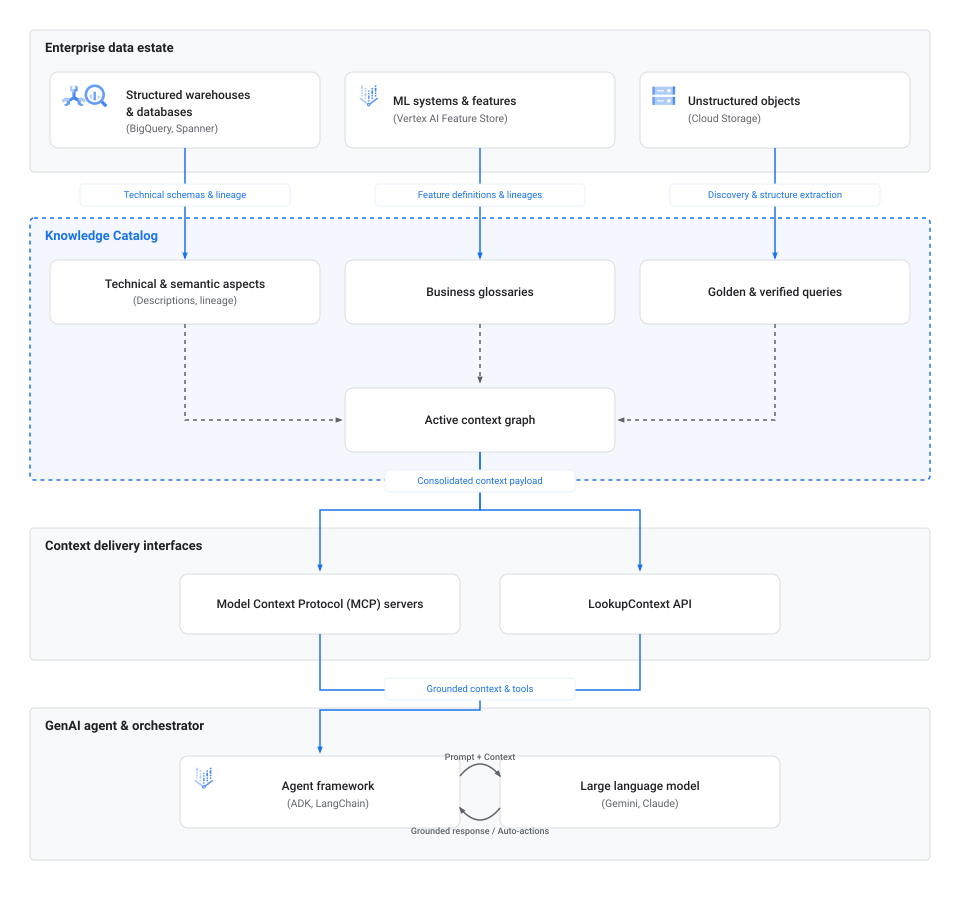
The context orchestration workflow consists of the following phases:
- Ingestion and discovery. Operational databases, warehouses like Spanner and BigQuery, unstructured object stores like Cloud Storage, and runtime metastores like Lighthouse feed technical schemas, lineage maps, and metadata definitions directly into Knowledge Catalog.
- Context mapping. Inside Knowledge Catalog, these metadata properties are linked to semantic elements, including technical aspects, business glossaries, and verified queries, to assemble the active context graph.
- Delivery interfaces. AI applications and orchestrators retrieve this
consolidated context graph programmatically by using standard connectors,
such as MCP or direct
LookupContextAPI endpoints. - Agent grounding. Orchestration frameworks, such as the Agent Development Kit (ADK) (ADK) or LangChain, inject this metadata context directly into LLM prompts. This injection grounds the agent's reasoning in verified organizational rules, which lets them query databases or execute automated actions without hallucinations.
AI agent profiles
Depending on the workflows you want to automate, you can build different classes of agents powered by Knowledge Catalog:
- Data discovery agents. These assistants help users search and navigate the data estate. Instead of using keyword matching, they analyze long-form intent and constraints in natural language to retrieve the most relevant physical assets.
- Metadata enrichment agents. These background agents ingest unstructured text from wikis, README files, or chat logs, parse the text into formal metadata, and write the metadata as aspects in Knowledge Catalog to keep the metadata fresh.
- Data quality and pipeline agents. These autonomous agents evaluate quality rules, detect schema drift, and build or repair data transformation pipelines by querying data lineage and profile statistics.
Orchestration tools
To build and integrate these agents, you can use the following tools:
- Model Context Protocol (MCP). A standardized, open protocol for linking agents to external resources. You can configure agents to connect to the catalog by using either the remote MCP server or the local MCP toolbox. For more information, see About Model Context Protocol (MCP) in Knowledge Catalog.
- Agent Development Kit (ADK). A framework from Google that simplifies building, running, and testing generative AI agents, offering built-in bindings to the Catalog Service API. For more information, see the ADK home page.
- LookupContext API. A REST and gRPC API endpoint that extracts a unified YAML or JSON context payload for data assets, ready to be injected directly into LLM prompts. For more information, see Retrieve context using the LookupContext API.
Access context with MCP
Model Context Protocol (MCP) is a standardized bridge that lets AI agents and tools seamlessly connect to data sources such as Knowledge Catalog. Use the following comparison table to determine the best option for your integration:
| Implementation | Best for | Key details | Endpoint or setup |
|---|---|---|---|
| Remote MCP server | Cloud-first deployments, serverless environments like Cloud Run, and managed external services. | Google-hosted endpoint that requires no local server management. | Endpoint: https://dataplex.googleapis.com/mcpTo set up, see Use a remote MCP server. |
| Local MCP toolbox | Local agent development, rapid prototyping, and desktop IDE integrations like VS Code or Cursor. | Command-line tool acting as a local proxy between your workspace environment and Knowledge Catalog. | Requires binary installation and .mcp.json settings.To set up, see Use a local MCP server. |
Best practices for agentic data context
To build reliable agentic experiences, keep the following best practices in mind when organizing and querying metadata in Knowledge Catalog:
- Add aspects. AI agents can't distinguish between official production tables and temporary sandbox mockups by name alone. Define and apply a custom trust signal aspect to certify authoritative data products, which helps ensure that agents prioritize or restrict queries to these resources.
- Optimize lookups by using context budgets. When you call the
LookupContextAPI, specify thecontext_budgetparameter. The API optimizes and fits the most important metadata first, such as lineage and primary descriptions, within your specified token constraints. - Provide related resources to expose join paths. In your context inquiries, list up to 10 related tables or assets. Providing a group of assets lets the context engine autopopulate join paths and relationships, which helps the agent understand how tables interface.
- Structure semantic glossaries. Standardize terms and abbreviations in business glossaries. This standardization helps conversational tools resolve business-specific synonyms and metrics accurately.
- Publish golden queries. Attach verified natural language queries and their correct SQL equivalents directly to Knowledge Catalog entries. By grounding reasoning in these verified templates, you prevent SQL conversion errors in text-to-SQL agents.
Transition from Dataplex Universal Catalog to Knowledge Catalog
Dataplex Universal Catalog has evolved to Knowledge Catalog. For more information about this transition, see Transition from Dataplex Universal Catalog to Knowledge Catalog.
Limitations
When planning your deployment, consider the following limitations:
Supported integrations. While Knowledge Catalog supports major third-party systems, certain automated semantic extractions might be limited to built-in Google Cloud services.
Quota limits. Standard Google Cloud API quotas apply to context retrieval and metadata extraction operations.
What's next
About data context
Understand how active context transforms passive metadata to ground AI agents and prevent hallucinations.
Establish foundational data context
Build a business glossary, define custom aspect types, and enrich assets in BigQuery.
Ground agents with MCP
Connect AI agents and developer tools to Knowledge Catalog using Model Context Protocol.
Search for resources
Find and explore catalog resources across Google Cloud and third-party systems using natural language.
Automate data quality scans
Define validation rules and monitor data cleanliness across tables with automated quality scans.
Explore interactive use cases
Walk through real-world solutions for context enrichment, data lineage, and agentic workflows.