

Managed I/O enables Dataflow to manage specific I/O connectors used in Apache Beam pipelines. Managed I/O simplifies the management of pipelines that integrate with supported sources and sinks.
Managed I/O consists of two components that work together:
An Apache Beam transform that provides a common API for creating I/O connectors (sources and sinks).
A Dataflow service that manages these I/O connectors on your behalf, including the ability to upgrade them independently of the Apache Beam version.
Advantages of managed I/O include the following:
Automatic upgrades. Dataflow automatically upgrades the managed I/O connectors in your pipeline. That means your pipeline receives security fixes, performance improvements, and bug fixes for these connectors, without requiring any code changes. For more information, see Automatic upgrades.
Consistent API. Traditionally, I/O connectors in Apache Beam have distinct APIs, and each connector is configured in a different way. Managed I/O provides a single configuration API that uses key-value properties, resulting in simpler and more consistent pipeline code. For more information, see Configuration API.
Requirements
The following SDKs support managed I/O:
- Apache Beam SDK for Java version 2.58.0 or later.
- Apache Beam SDK for Python version 2.61.0 or later.
The backend service requires Dataflow Runner v2. If Runner v2 is not enabled, your pipeline still runs, but it doesn't get the benefits of the managed I/O service.
Automatic upgrades
Dataflow pipelines with managed I/O connectors automatically use the latest reliable version of the connector. Automatic upgrades occur at the following points in the job lifecycle:
Job submission. When you submit a batch or streaming job, Dataflow uses the newest version of the Managed I/O connector that has been tested and works well.
Rolling upgrades. For streaming jobs, Dataflow upgrades your Managed I/O connectors in running pipelines as new versions become available. You don't have to worry about manually updating the connector or your pipeline's Apache Beam version.
By default, rolling upgrades happen within a 30-day window — that is, upgrades are performed approximately every 30 days. You can adjust the window or disable rolling upgrades on a per-job basis. For more information, see Set the rolling upgrade window.
A week before the upgrade, Dataflow writes a notification message to the job message logs.
Replacement jobs. For streaming jobs, Dataflow checks for updates whenever you launch a replacement job, and automatically uses the latest known-good version. Dataflow performs this check even if you don't change any code in the replacement job.
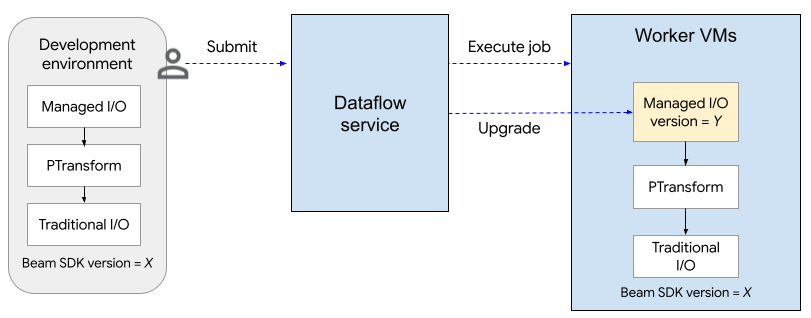
The following diagram shows the upgrade process. The user creates an Apache Beam pipeline using SDK version X. The Dataflow upgrades the Managed I/O version to the latest supported version. The upgrade happens when the user submits the job, after the rolling upgrade window, or when the user submits a replacement job.
The upgrade process adds about two minutes to the startup time for the first
job (per project) that uses managed I/O, and can be about half a minute for
subsequent jobs. For rolling upgrades, the Dataflow service
launches a
replacement job. This can
result in temporary downtime for your pipeline as the existing worker pool is
shut down and a new worker pool starts up. To check the status of managed I/O
operations, look for
log entries that include the string
"Managed Transform(s)".
Set the rolling upgrade window
To specify the upgrade window for a streaming Dataflow job, set
the managed_transforms_rolling_upgrade_window
service option equal to the number
of days. The value must be between 10 and 90 days, inclusive.
Java
--dataflowServiceOptions=managed_transforms_rolling_upgrade_window=DAYS
Python
--dataflow_service_options=managed_transforms_rolling_upgrade_window=DAYS
gcloud
Use the
gcloud dataflow jobs run command
with the additional-experiments option. If you're using a Flex Template that
uses Managed I/O, use the
gcloud dataflow flex-template run
command.
--additional-experiments=managed_transforms_rolling_upgrade_window=DAYS
To disable rolling upgrades, set the managed_transforms_rolling_upgrade_window
service option to never. You can still trigger an update by launching a
replacement job.
Java
--dataflowServiceOptions=managed_transforms_rolling_upgrade_window=never
Python
--dataflow_service_options=managed_transforms_rolling_upgrade_window=never
Go
--dataflow_service_options=managed_transforms_rolling_upgrade_window=never
gcloud
Use the
gcloud dataflow jobs run command
with the additional-experiments option. If you're using Flex Templates, use
the
gcloud dataflow flex-template run
command.
--additional-experiments=managed_transforms_rolling_upgrade_window=never
Configuration API
Managed I/O is a turnkey Apache Beam transform that provides a consistent API to configure sources and sinks.
Java
To create any source or sink supported by Managed I/O, you use the
Managed class. Specify which source or sink to instantiate,
and pass in a set of configuration parameters, similar to the following:
Map config = ImmutableMap.<String, Object>builder()
    .put("config1", "abc")
    .put("config2", 1);

pipeline.apply(Managed.read(/*Which source to read*/).withConfig(config))
    .getSinglePCollection();
You can also pass configuration parameters as a YAML file. For a complete code example, see Read from Apache Iceberg.
Python
Import the apache_beam.transforms.managed module
and call the managed.Read or managed.Write method. Specify which source or
sink to instantiate, and pass in a set of configuration parameters, similar to
the following:
pipeline
| beam.managed.Read(
    beam.managed.SOURCE, # Example: beam.managed.KAFKA
    config={
      "config1": "abc",
      "config2": 1
    }
)
You can also pass configuration parameters as a YAML file. For a complete code example, see Read from Apache Kafka.
Dynamic destinations
For some sinks, the managed I/O connector can dynamically select a destination based on field values in the incoming records.
To use dynamic destinations, provide a template string for the destination. The
template string can include field names within curly brackets, such as
"tables.{field1}". At runtime, the connector substitutes the value of the
field for each incoming record, to determine the destination for that record.
For example, suppose your data has a field named airport. You could set the
destination to "flights.{airport}". If airport=SFO, the record is written
to flights.SFO. For nested fields, use dot-notation. For example:
{top.middle.nested}.
For example code that shows how to use dynamic destinations, see Write with dynamic destinations.
Filtering
You might want to filter out certain fields before they are written to the
destination table. For sinks that support dynamic destinations, you can use
the drop, keep, or only parameter for this purpose. These parameters let
you include destination metadata in the input records, without writing the
metadata to the destination.
You can set at most one of these parameters for a given sink.
| Configuration parameter | Data type | Description |
|---|---|---|
drop |
list of strings | A list of field names to drop before writing to the destination. |
keep |
list of strings | A list of field names to keep when writing to the destination. Other fields are dropped. |
only |
string | The name of exactly one field to use as the top-level record to write when writing to the destination. All other fields are dropped. This field must be of row type. |
Supported sources and sinks
Managed I/O supports the following sources and sinks.
For more information, see Managed I/O Connectors in the Apache Beam documentation.