

Solution overview
Google Cloud Cortex Framework provides solution accelerators that help you build trusted, high-quality data products ready for advanced analytics and agentic use cases. The framework uses Google Cloud's products including BigQuery, Dataform, Knowledge Catalog, and Gemini Enterprise Agent Platform.
Cortex Framework solution accelerators are available as customizable, open-source modules that you deploy securely within your own Google Cloud environment to quickly build, customize and extend data products from enterprise source systems.
By streamlining the way teams build, orchestrate, and deploy, Cortex Framework accelerates time-to-value and provides a high-fidelity foundation of trusted enterprise analytics and agentic use cases.
Supported data sources
Cortex Framework solution accelerators are available for the following data sources:
Key components
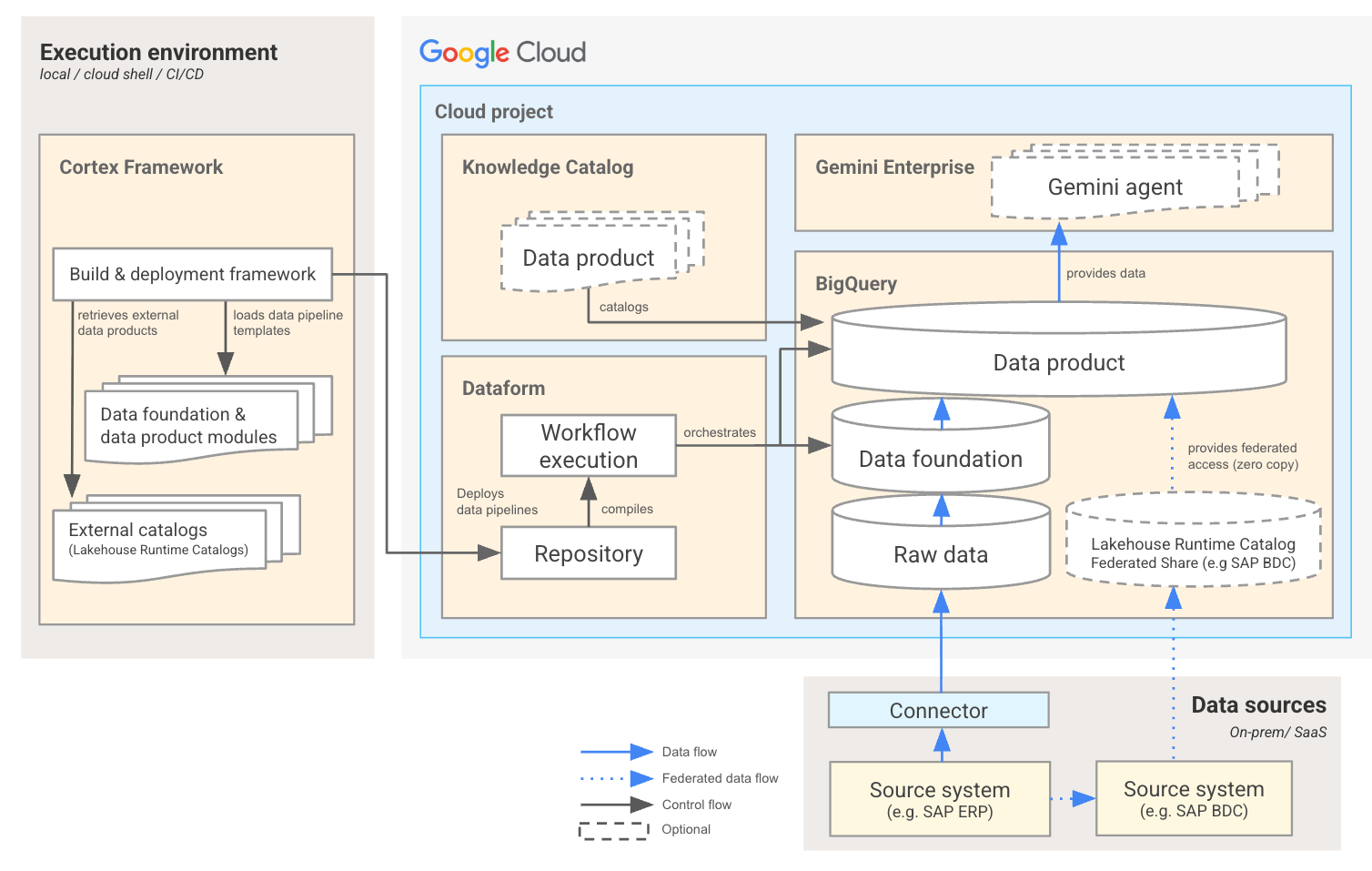
Cortex Framework consists of the following high-level solution components:
Build and deployment framework
The build and deployment framework orchestrates the transition from local configurations to Dataform pipelines, active BigQuery datasets and is executed using command-line interface (CLI) scripts (cortex-build, cortex-deploy, cortex-build-and-deploy) powered by standard Python tools (uv).
You can run these scripts in various environments:
- Local development machines: For initial setup, customization, testing, and debugging.
- Google Cloud Cloud Shell / virtual workstations: Secure, cloud-hosted developer environments.
- CI/CD pipelines: Automating builds and deployments through systems like Cloud Build or GitHub Actions to ensure continuous integration.
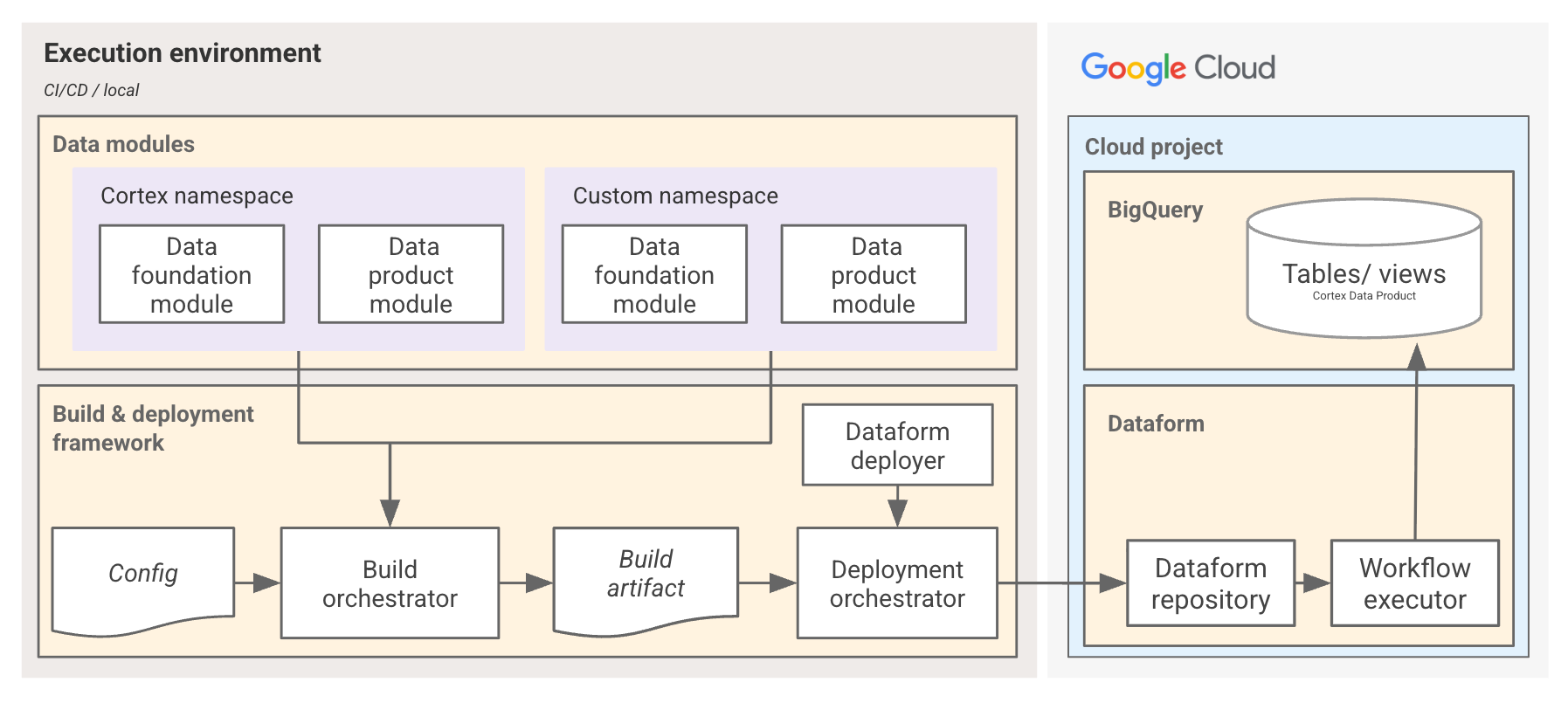
The framework compiles configuration files (such as config.yaml and table_settings.yaml), analyzes the schemas of the source data assets (including custom columns) and dynamically generates Dataform JavaScript and SQLX code. The code is then pushed to a Dataform repository in Google Cloud and is immediately ready for pipeline execution.
Data modules
Data modules provide the build and deployment framework with packaged solution metadata that define the structure and components of the Dataform data pipelines. There are different types of modules:
- Data foundation modules: Define the datasets that represent the latest state of the raw operational tables. They standardize data types, rename data fields into human-readable business terms, handle data changes, and execute time-zone alignments.
- Data product modules: Define the analytical models built on top of the data foundation module content. They implement complex business rules, KPIs, aggregations, and cross-functional joins (for example, combining sales records with currency exchange rates) to expose clean, consumption-ready datasets.
- Data catalog modules: Define the external lakehouse catalogs supported for external table references without physical manifests.
Modules are open-source and customizable, allowing you to adapt them to your unique business requirements.
External data catalogs
Cortex Framework supports direct integration with external data catalogs using the data catalog modules. By using Lakehouse runtime catalog, the framework can query tables managed in external data lakes or delta shares (such as data products sourced using SAP Business Data Cloud Connect for BigQuery) with zero copy overhead.
This allows organizations to combine Cortex Framework delivered content with external data products, creating unified business insights without duplicative storage or pipeline maintenance.
Dataform orchestration
Cortex Framework uses Dataform to manage the lifecycle of data transformations. Dataform provides a serverless environment to build, test, version-control, and schedule complex SQL pipelines inside BigQuery.
Instead of writing static SQL, the framework dynamically generates the Dataform code during the build phase to reflect your specific configuration and customizations. Once staged to your target Dataform repository in Google Cloud, you can execute the generated pipelines to materialize and populate the conformed tables and views.
BigQuery data models
All data processed by Cortex Framework is organized and stored in BigQuery. The framework supports:
- Standard BigQuery tables and views: Fully materialized or virtual BigQuery datasets optimized with partitioning and clustering to improve query performance and control costs.
- Federated data sources: Queries that span external datasets, allowing you to join BigQuery storage with federated external tables.
- Lakehouse runtime catalog: Direct, zero-copy querying of external catalogs (such as delta sharing) exposed as tables in BigQuery, supporting build of data products across data sources.
Knowledge Catalog integration
Knowledge Catalog acts as a unified governance and discovery catalog for all data assets across your enterprise. Cortex Framework integrates natively with Knowledge Catalog using a dedicated synchronization tool cortex-kc-sync.
When executed, this tool automatically registers your deployed data products in the catalog, importing human-readable names, detailed business descriptions, and documentation links. It links physical BigQuery tables to logical business domains, making data assets discoverable to business analysts, data stewards, and AI agents while ensuring robust lineage tracking. For more information see Knowledge Catalog integration.
Data architecture
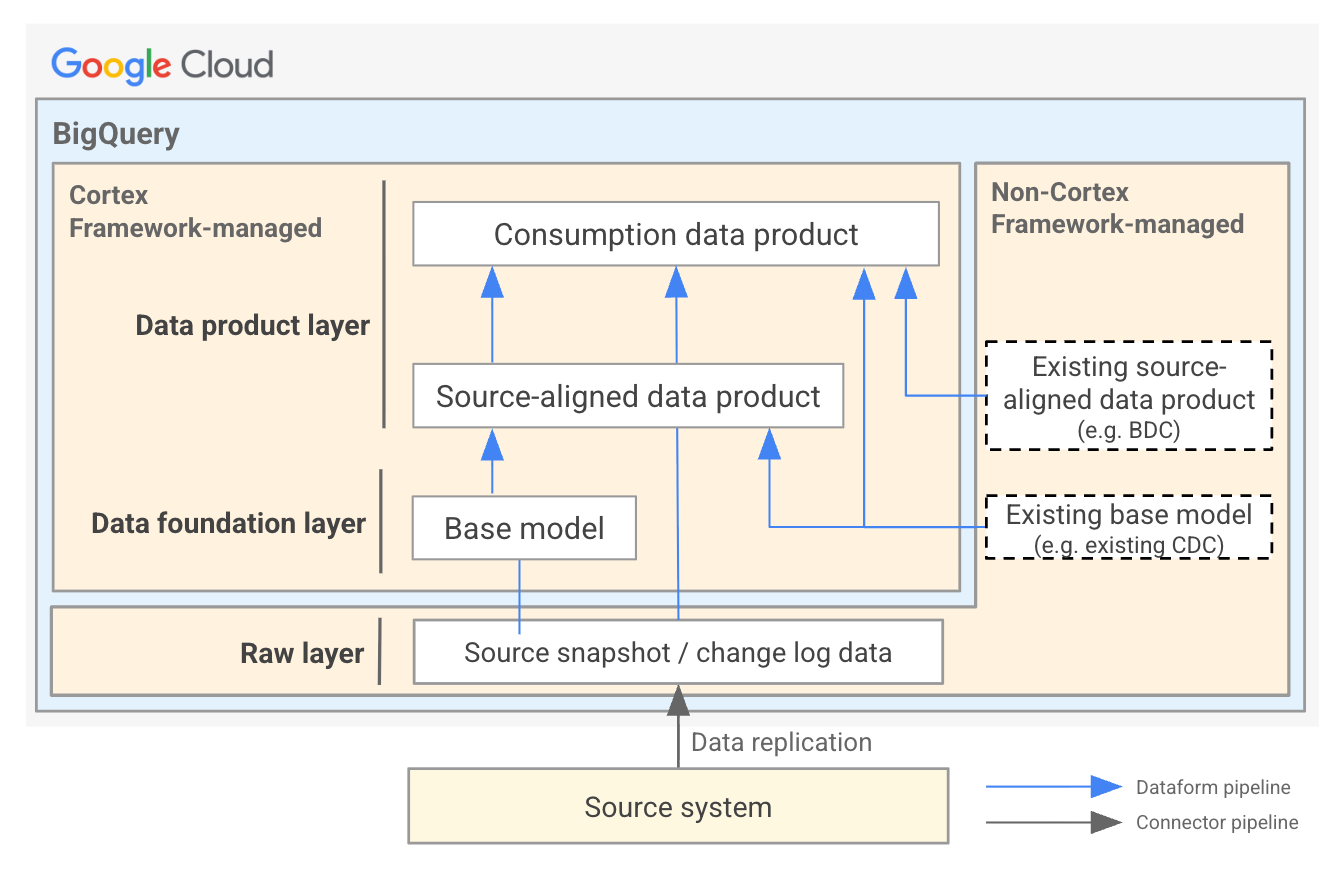
Cortex Framework standardizes data processing within BigQuery. The architecture is organized into three distinct, structured data layers that align with enterprise data mesh principles, promoting clear ownership, high reuse, and strict separation of data layers.
Source system
Source systems are the origins of your business data. These can include various enterprise applications, databases, or platforms from which data is extracted. For a complete list of supported sources, see supported data sources.
Raw layer
The raw layer represents an immutable landing zone dataset in BigQuery for source data, either change data capture (CDC) logs or CDC-processed batches. While it frequently stores CDC logs (for example, from SAP ECC or S/4HANA using replication tools like BigQuery Connector for SAP or BigQuery Toolkit for SAP), it is designed to represent any raw format. For sources that don't provide CDC logs, such as Salesforce or external API feeds, this layer represents the full batch extracts or raw event payloads exactly as they arrive. This layer feeds the data foundation layer.
Data foundation layer
The data foundation layer cleans, standardizes, and conforms raw landing data into a single, reliable representation of the latest source data. It maps raw tables to conformed structures, standardizes data types, optimizes performance with partitioning and clustering, consolidates schemas to ensure consistency and augments the assets with metadata annotations. For change data capture (CDC) sources, this layer merges incoming records incrementally to optimize performance and reduce query costs. For more information, see Data foundation.
Data product layer
The data product layer houses consumption-ready data assets designed for business decision-making. It applies business logic, renames complex system fields into human-readable business terms, translates status codes, performs timezone and currency adjustments, aggregates metrics, and joins data across multiple raw tables. The resulting tables and views are optimized for direct consumption by BI dashboards, reporting tools, machine learning pipelines, and AI platforms such as Gemini Enterprise Agent Platform and BigQuery conversational analytics agents. For more information, see Data products.
Extending the solution
Cortex Framework combines configuration-driven flexibility with AI-assisted automation to simplify how you extend your data landscape. Whether you are using autonomous AI coding assistants to build custom tables or writing custom compilation logic for new data sources, the framework provides the tooling, isolation, and safety gates necessary to scale your data products securely.
Extensibility framework
The extensibility framework provides a structured method to customize the data foundation and build new data products. Key capabilities include:
- Custom namespaces: Isolate your changes in a custom directory (For example,
src/data_modules/custom_namespace/) to protect your customizations from overwrites when core framework packages are updated. - Configuration-as-code: Register new data sources, targets, and custom modules directly in the global
config/config.yamlconfiguration file. - Custom compilation builders: Implement custom Python builder classes (
builder.py) within your modules to automate dynamic SQL generation, custom cleaning rules, or source-specific transformations during the compilation phase.
For more information, see the Extensibility guide.
Agentic data product builder
To help developers and business analysts extend the framework, Cortex Framework provides packaged skills. These skills guide AI coding assistants (such as Antigravity paired with Gemini) to:
- Inspect physical schemas: Retrieve accurate column names, types, and descriptions directly from replicated SAP Data Dictionary (DDIC) tables without hallucination.
- Generate template modules: Automatically generate namespaces, manifests, table settings, SQLX/JS models, and annotations.
- Validate changes: Run linting rules, naming audits, and compilation checks improving code quality before deployment.
For more information, see Agentic capabilities.
Next steps
Ready to build and deploy? Explore the following guides to get your environment up and running:
- Data products: Explore the catalog of available data products.
- Data foundation: Understand the underlying foundational tables and fields.
- Demo deployment: Deploy solution content with demo data in minutes to see Cortex Framework in action quickly.
- Production deployment: Follow step-by-step instructions to configure and deploy Cortex Framework for your enterprise data.