

Knowledge Catalog integration
This document explains how Cortex Framework integrates with Knowledge Catalog, which acts as the governance layer for enterprise data products across your organization. It also explains how the Google Cloud Cortex Framework Knowledge Catalog synchronization tool helps register and synchronize Google Cloud Cortex Framework data products with Knowledge Catalog, simplifying their discovery and secure sharing.
By enabling this integration, your deployed Cortex Framework data products, including their enriched business descriptions, ownership metadata, and underlying physical BigQuery datasets and tables, are automatically cataloged and made discoverable in Knowledge Catalog.
Key benefits
Integrating Cortex Framework with Knowledge Catalog provides the following key benefits:
- Automated data discoverability: Users can browse and search for standardized enterprise data products directly within the Knowledge Catalog user interface without requiring manual catalog entry.
- Enriched business context: Automatically imports display names, detailed business descriptions, and documentation URLs directly from
manifest.yamlfiles into Knowledge Catalog. - Unified asset linking: Connects individual conformed reporting base tables directly to their corresponding Knowledge Catalog data products. This gives data consumers immediate visibility into which physical data objects power specific business domains.
- Automated lifecycle and drift reconciliation: As your enterprise data models evolve, running the synchronization tool automatically reconciles metadata and asset links. It registers new tables, updates modified definitions, and removes obsolete links while protecting unmanaged, user-created catalog items.
- System management safety: Uses dedicated system labels (
cortex-framework-createdandcortex-framework-version) to identify and manage only those resources created by Cortex Framework, preventing accidental overwrites of existing customer-managed Knowledge Catalog assets.
How the integration works
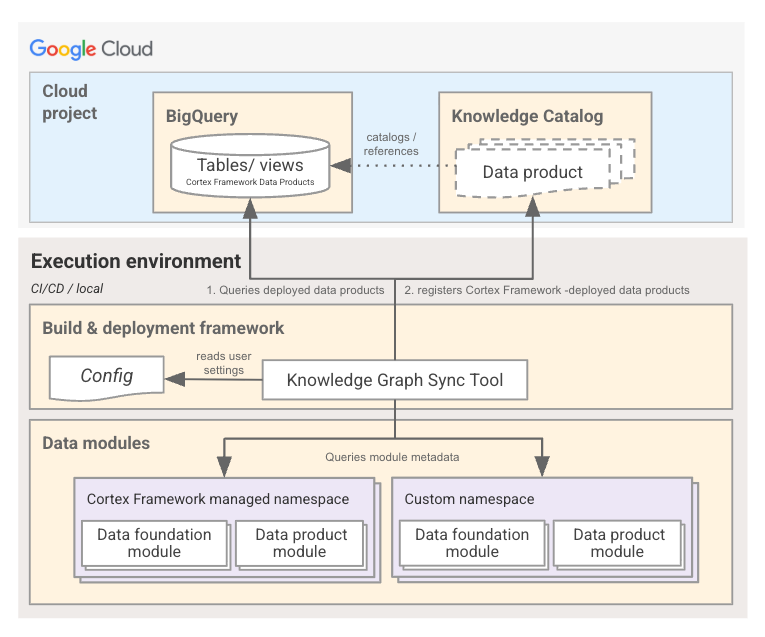
The Knowledge Catalog integration is powered by the cortex-kc-sync (tools.dataplex.kc_sync) synchronization tool. When executed, the syncer performs the following multi-step workflow:
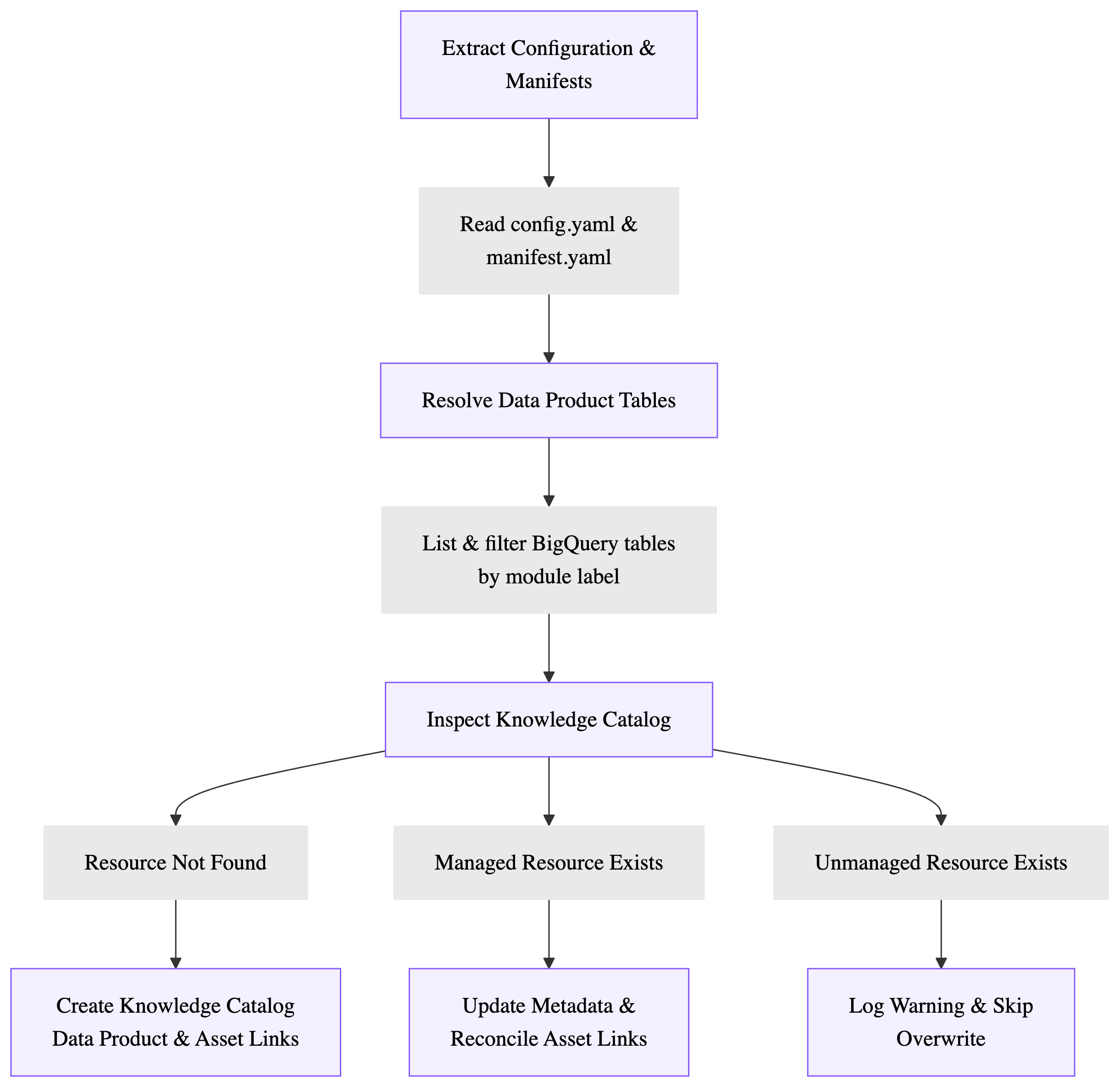
1. Configuration and manifest extraction
The syncer parses your global config/config.yaml configuration file to identify all enabled data product modules (data.modules.products) and their target BigQuery datasets (data.targets).
For each enabled module, the syncer extracts descriptive metadata from the module's manifest.yaml (using the workspace module provider):
displayName: The human-readable title of the data product.description: The business summary of the module.documentation: URL pointing to internal or external module documentation.
2. BigQuery asset discovery
Instead of verifying a static list of table definitions, cortex-kc-sync queries BigQuery (list_dataset_tables) to dynamically discover which tables and views are already deployed in your target dataset.
It resolves and filters tables by looking for specific tracking labels applied during deployment:
cortex-framework-namespaced-module-typematching the fully qualified module path (e.g.cortex.sap.products.sales_performance), orcortex-framework-module-typematching the canonical module type name (e.g.sales_performance).
Only the materialized tables and views that carry these labels in BigQuery will be cataloged and linked as assets under the data product.
3. Managed resource reconciliation and labeling
The syncer communicates with the dataplex_v1 API (DataProductClient) to reconcile each discovered data product in the target Google Cloud location:
Creation (
NEEDS_CREATION): If the data product doesn't exist, the syncer creates a new Knowledge Catalog data product populated with the extracted manifest metadata and links the resolved BigQuery assets. It tags the resource with two system labels:cortex-framework-created: set to"true"cortex-framework-version: set to"7-0-0"
Unmanaged resource protection (
NOT_MANAGED): If a Knowledge Catalog data product with the same ID already exists in the catalog but is missing these system labels (is_managed_data_product == False), the syncer skips it to protect user-created or pre-existing catalog assets.Updates (
NEEDS_UPDATE): If a managed data product exists and has changes in its metadata or table composition, the syncer updates the Knowledge Catalog data product definition and reconciles its linked BigQuery assets (BigQueryAssetLinks). It automatically creates newDataAssetlinks for newly added tables and deletes obsolete ones while leaving unchanged links intact.
Setup and configuration
This section describes the prerequisites, metadata configuration, and execution steps required to set up and run the synchronization between Cortex Framework and Knowledge Catalog.
Prerequisites
Before running the Knowledge Catalog synchronization, ensure that you have met the following requirements:
Enable Google Cloud services
In this section we will enable the following Google Cloud services in your Google Cloud project:
- Cloud Dataplex API (
dataplex.googleapis.com)
Enable this Google Cloud service using Cloud Shell by executing the following command in your terminal:
gcloud config set project PROJECT_ID

gcloud services enable dataplex.googleapis.com \
         --project=PROJECT_ID
Roles for target project
To get the permission that you need to synchronize Knowledge Catalog, ask your administrator to grant you the following IAM roles on your target project:
- Dataplex Editor (
roles/dataplex.editor) - Dataplex Data Product Editor (
roles/dataplex.dataProductsEditor) - Dataplex Entry Owner (
roles/dataplex.entryOwner) - BigQuery Metadata Viewer (
roles/bigquery.metadataViewer) - BigQuery Data Viewer (
roles/bigquery.dataViewer)
For more information about granting roles, see Manage access to projects, folders, and organizations.
This predefined role contains the
dataplex.dataProducts.create, dataplex.dataProducts.update, dataplex.dataAssets.create, dataplex.dataAssets.delete
permission,
which is required to
synchronize Knowledge Catalog.
You might also be able to get this permission with custom roles or other predefined roles.
To grant the requested roles to a user, you can use the script:
gcloud projects add-iam-policy-binding PROJECT_ID --member="user:USER_EMAIL" \
        --role="roles/dataplex.editor"
gcloud projects add-iam-policy-binding PROJECT_ID --member="user:USER_EMAIL" \
        --role="roles/dataplex.dataProductsEditor"
gcloud projects add-iam-policy-binding PROJECT_ID --member="user:USER_EMAIL" \
        --role="roles/dataplex.entryOwner"
gcloud projects add-iam-policy-binding PROJECT_ID --member="user:USER_EMAIL" \
        --role="roles/bigquery.metadataViewer"
gcloud projects add-iam-policy-binding PROJECT_ID --member="user:USER_EMAIL" \
        --role="roles/bigquery.dataViewer"
Executed Dataform pipeline
You must first run cortex-build-and-deploy or cortex-deploy as described in Deplyoment guide and execute your Dataform pipeline actions to materialize the BigQuery tables and views before attempting to synchronize with Knowledge Catalog. For step-by-step instructions on executing transformations, see Post-deployment steps.
Configuring data product metadata
You can customize the business metadata displayed in Knowledge Catalog by modifying the manifest.yaml file located inside each data product module directory (for example, src/data_modules/cortex/sap/products/accounts_payable/manifest.yaml).
The following example demonstrates how to define displayName, description, and documentation in a module manifest:
displayName: "SAP Accounts Payable"
description: >
  SAP Data Product for Accounts Payable containing conformed vendor invoices,
  payment aging schedules, and financial accounting documents.
documentation: "https://docs.cloud.google.com/cortex/docs/data-product"

category: foundational_product
type: accounts_payable
dependencies:
  sapModule:
    supportedVersions:
      - ecc
      - s4
    tables:
      ecc:
        - bsik
        - bsak
      s4:
        - acdoca
        - bseg
      common:
        - bkpf
    modulePath: cortex.sap.foundations.sap
builder: sap_product
Running the synchronization command
After your data products have been deployed and materialized in BigQuery, run the cortex-kc-sync CLI tool using uv:
uv run cortex-kc-sync --config config/config.yaml --owner-email USER_EMAIL
For a complete list of available flags and arguments, see the CLI KC sync (uv run cortex-kc-sync) reference.
Verification of Knowledge Catalog synchronization
To verify the successful synchronization between Google Cloud Cortex Framework assets and Knowledge Catalog follow these steps:
- In Google Cloud console, open Knowledge Catalog
- Optional: In the search dialog you may like to use one of the quick filters like
Data ProductsorTables. - In the search field of the main screen of Knowledge Catalog, click
Filters. - In the opened
Filtersview, select from theProjectdrop-down the project you are using to synchronize the Google Cloud Cortex Framework data products. - Following a successful synchronization, you can now select or search for a data asset exposed by Google Cloud Cortex Framework, including all published metadata.
Automating the workflow
In production environments, we recommend running cortex-kc-sync automatically as a post-processing step inside your CI/CD orchestration pipeline or Knowledge Catalog (Airflow) DAG immediately following successful Dataform pipeline execution:
- Build and deploy: Run
cortex-deploy(uv run cortex-deploy --config config/config.yaml) to compile and stage configurations to Dataform. - Execute transformations: Trigger Dataform execution runs to materialize data foundation layers and conformed reporting tables in BigQuery.
- Catalog synchronization: Run
cortex-kc-sync(uv run cortex-kc-sync --config config/config.yaml) to verify table creation and synchronize all updated data products, descriptions, and lineage links directly into Knowledge Catalog.
Next steps
- Create custom data products: See the Extensibility guide: Data product module creation to create new data products or extend schemas.