

Setting up a custom namespace
Custom namespaces serve as logical environments to package and isolate your data foundation and analytical data product modules. Running inside a dedicated custom namespace lets you manage configuration and deployment options independently, providing isolation for your environment. A key benefit of this separation is that you can seamlessly pull future updates and enhancements from the cortex namespace in Google Cloud Cortex Framework without the risk of overriding or corrupting your custom modules. We highly recommend creating your custom modules within a dedicated namespace.
Custom namespace folder structure
The Cortex Framework namespace folders are used to package and isolate custom module artifacts. The folder structure of a custom namespace is defined in the table:
| Directory path | Purpose and description |
|---|---|
config/ |
Cortex deployment configuration (Required) Creating new namespaces requires their setup within config.yaml.
|
src/data_modules/custom_namespace/data_foundation/data_foundation_module_type |
Data foundation modules Raw-to-foundation datasets transformations. Each data foundation is separated in a subdirectory and consists of:
|
src/data_modules/custom_namespace/data_product/data_product_module_type |
Data product definitions Contains business logic and analytical models. Each product is separated in a subdirectory and consists of:
|
src/data_modules/custom_namespace/includes/ |
JavaScript helpers Any JavaScript files placed here are automatically packaged and made available to your Dataform models during compilation under the namespace path (for example, includes/custom_namespace/).
|
src/data_modules/custom_namespace/common/ |
Namespace shared tools Namespace-scoped custom builders, deployers and other tools. |
Custom namespace configuration
A new namespace: custom_namespace can be defined by extending the corresponding section of the config.yaml file, creating a new directory under src/data_modules/ and adding the new module code assets.
To make the Google Cloud Cortex Framework compiler aware of your custom namespace and modules, you must register them in your global configuration file (e.g., config/config.yaml).
Step A: Register the namespace
Under the data.namespaces block, add your namespace metadata:
data:
  namespaces:
    - name: cortex
      path: ../src/data_modules/cortex
    - name:  custom_namespace    # <-- Name of custom namespace
      path:  ../src/data_modules/custom_namespace  # <-- Points to subdirectory under 'src/data_modules/'
Step B: Configure custom modules
Register your custom modules under data.modules.foundation or data.modules.product. Use the dot-separated format custom_namespace.module_type for the type field:
data:
  modules:
    foundations:
      - moduleId:  custom_namespace_data_foundation_module_type
        modulePath: custom_namespace.sap   # Format: <namespace>.<module_type>
        dataSourceId: sap_raw_s4
        dataTargetId: data_foundation_sap_custom_namespace
        moduleSettings:
          sapVersion: s4
          mandt: "100"
        # Default table settings file, relative to configuration file directory
        # tableSettings: "../src/data_modules/custom_namespace/data_foundation/data_foundation_module_type/table_settings.default.yaml"
        # Custom table settings file, relative to 'config/' directory
        tableSettings: "custom_namespace/data_foundation/data_foundation_module_type/table_settings.yaml"

    products:
      - moduleId: custom_namespace_data_product_module_type
        modulePath: custom_namespace.data_product_module_type # Format: <namespace>.<module_type>
        dependencyBindings:
          sapModule: custom_namespace_data_foundation_module_type # References an existing foundation moduleId
        dataTargetId: product_target
        # Custom table settings file, relative to 'config/' directory
        # tableSettings: "custom_namespace/data_product/data_product_module_type/table_settings.yaml"
        # Default table settings file, relative to configuration file directory
        # tableSettings: "../src/data_modules/custom_namespace/data_product/data_product_module_type/table_settings.default.yaml"
Custom namespace shared code
The custom namespace supports sharing code artifacts between its modules. The supported artifact types are:
- includes - Contains any JavaScript helpers that will be made available to your Dataform artifacts. They can be placed in the folder:
src/data_modules/custom_namespace/includes/. - builders - Any custom generator classes that can compile your module source code into Dataform artifacts. They can be placed in
src/data_modules/custom_namespace/common/.
Understanding and referencing builders
Builders are Python generator classes that compile your module source files into Dataform outputs. Google Cloud Cortex Framework compiles modules using a flexible three-tier builder resolution sequence:
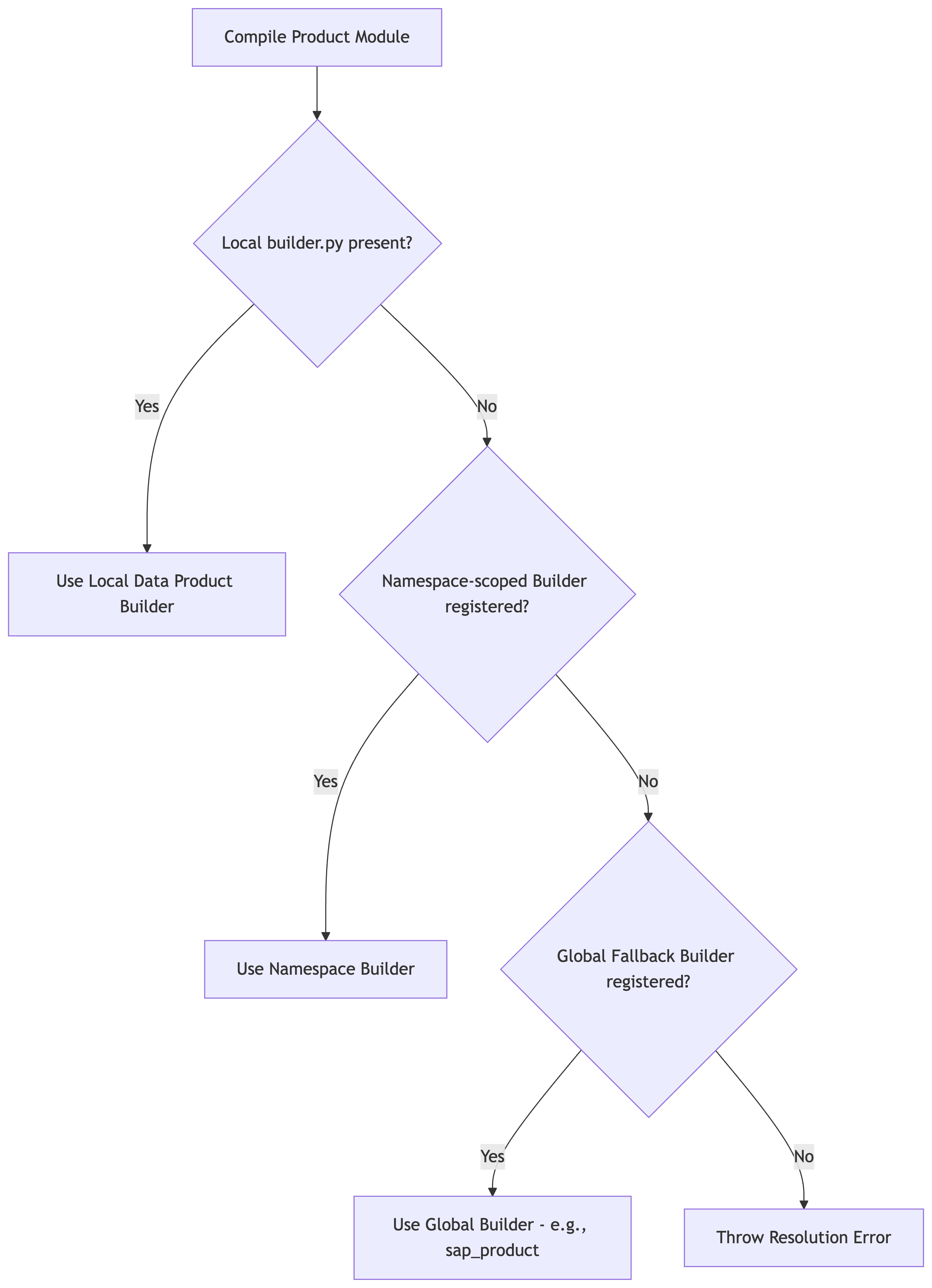
Tier 1: Global fallback builders
The framework includes highly robust builders located in src/common/builders/. These builders are registered globally and can be used by any custom namespace.
For example, to use the standard SAP data product builders for your custom data product, reference sap_product in your manifest.yaml:
# src/data_modules/custom_namespace/data_product/data_product_module_type/manifest.yaml
type: data_product_module_type
builder: sap_product     # Automatically resolves to the global SapProductBuilder fallback
dependencies:
  sapModule:
    type: sap
    supportedVersions:
      - ecc
      - s4
Tier 2: Namespace-scoped builders
If modules inside your custom namespace require a specialized compiler, you can register a custom builder for that namespace.
Create a builder file under
src/data_modules/custom_namespace/common/builders/my_builder.py.Decorate your builder class with
@builder_registry.register("my_builder"):from common.builders.base import ProductBuilder from common.registry import builder_registry @builder_registry.register("my_builder") class MyCustomProductBuilder(ProductBuilder): # Implement build logic here...Reference it in your product's
manifest.yamlusingbuilder: my_builder.
Tier 3: Individual product-level builders
For highly unique pipelines, you can define a builder scoped exclusively to a single data product.
Simply create a file named
builder.pydirectly inside your data product folder (e.g.,src/data_modules/custom_namespace/data_product/data_product_module_type/builder.py).Define a subclass of
BaseBuilderorProductBuilderinside it:from common.builders.base import ProductBuilder class UniqueSalesPerformanceBuilder(ProductBuilder): # Implement unique build logic here...The compiler will automatically dynamically import and execute this class without requiring any registration or decorators.
In the next steps: Data foundation module creation and Data product module creation, you will learn how to add data modules to the namespace.
- Next step: Data foundation module creation
- Back to Overview