


设置自定义命名空间
自定义命名空间充当逻辑环境,用于打包和隔离数据基础和分析型数据产品模块。在专用自定义命名空间内运行可让您独立管理配置和部署选项,从而为您的环境提供隔离。这种分离的主要优势在于,您可以从 Google Cloud Cortex Framework 中的 cortex 命名空间无缝提取未来的更新和增强功能,而不会有覆盖或损坏自定义模块的风险。我们强烈建议您在专用命名空间内创建自定义模块。
自定义命名空间文件夹结构
Cortex Framework 命名空间文件夹用于打包和隔离自定义模块工件。自定义命名空间的文件夹结构在下表中定义:
| 目录路径 | 用途和说明 |
|---|---|
config/ |
Cortex 部署配置 (必需) 创建新命名空间需要在 config.yaml 中进行设置。
|
src/data_modules/custom_namespace/data_foundation/data_foundation_module_type |
数据基础模块 原始数据到基础数据集的转换。 每个数据基础都位于一个子目录中,并且包含:
|
src/data_modules/custom_namespace/data_product/data_product_module_type |
数据产品定义 包含业务逻辑和分析模型。每个产品都位于一个子目录中,并且包含:
|
src/data_modules/custom_namespace/includes/ |
JavaScript 帮助程序 放置在此处的任何 JavaScript 文件都会自动打包,并在编译期间在命名空间路径下(例如 includes/custom_namespace/)提供给 Dataform 模型。
|
src/data_modules/custom_namespace/common/ |
命名空间共享工具 命名空间级自定义构建器、部署器和其他工具。 |
自定义命名空间配置
您可以通过扩展 config.yaml 文件的相应部分、在 src/data_modules/ 下创建新目录并添加新模块代码资产来定义新命名空间:custom_namespace。
如需让 Google Cloud Cortex Framework 编译器识别您的自定义命名空间和模块,您必须在全局配置文件(例如 config/config.yaml)中注册它们。
步骤 A:注册命名空间
在 data.namespaces 块下,添加您的命名空间元数据:
data:
  namespaces:
    - name: cortex
      path: ../src/data_modules/cortex
    - name:  custom_namespace    # <-- Name of custom namespace
      path:  ../src/data_modules/custom_namespace  # <-- Points to subdirectory under 'src/data_modules/'
步骤 B:配置自定义模块
在 data.modules.foundation 或 data.modules.product 下注册您的自定义模块。对于 type 字段,请使用以英文句点分隔的格式 custom_namespace.module_type:
data:
  modules:
    foundations:
      - moduleId:  custom_namespace_data_foundation_module_type
        modulePath: custom_namespace.sap   # Format: <namespace>.<module_type>
        dataSourceId: sap_raw_s4
        dataTargetId: data_foundation_sap_custom_namespace
        moduleSettings:
          sapVersion: s4
          mandt: "100"
        # Default table settings file, relative to configuration file directory
        # tableSettings: "../src/data_modules/custom_namespace/data_foundation/data_foundation_module_type/table_settings.default.yaml"
        # Custom table settings file, relative to 'config/' directory
        tableSettings: "custom_namespace/data_foundation/data_foundation_module_type/table_settings.yaml"

    products:
      - moduleId: custom_namespace_data_product_module_type
        modulePath: custom_namespace.data_product_module_type # Format: <namespace>.<module_type>
        dependencyBindings:
          sapModule: custom_namespace_data_foundation_module_type # References an existing foundation moduleId
        dataTargetId: product_target
        # Custom table settings file, relative to 'config/' directory
        # tableSettings: "custom_namespace/data_product/data_product_module_type/table_settings.yaml"
        # Default table settings file, relative to configuration file directory
        # tableSettings: "../src/data_modules/custom_namespace/data_product/data_product_module_type/table_settings.default.yaml"
自定义命名空间共享代码
自定义命名空间支持在其模块之间共享代码工件。支持的工件类型包括:
- includes - 包含将提供给 Dataform 工件的任何 JavaScript 帮助程序。它们可以放置在以下文件夹中:
src/data_modules/custom_namespace/includes/。 - builders - 任何可将模块源代码编译为 Dataform 工件的自定义生成器类。它们可以放置在
src/data_modules/custom_namespace/common/中。
了解和引用构建器
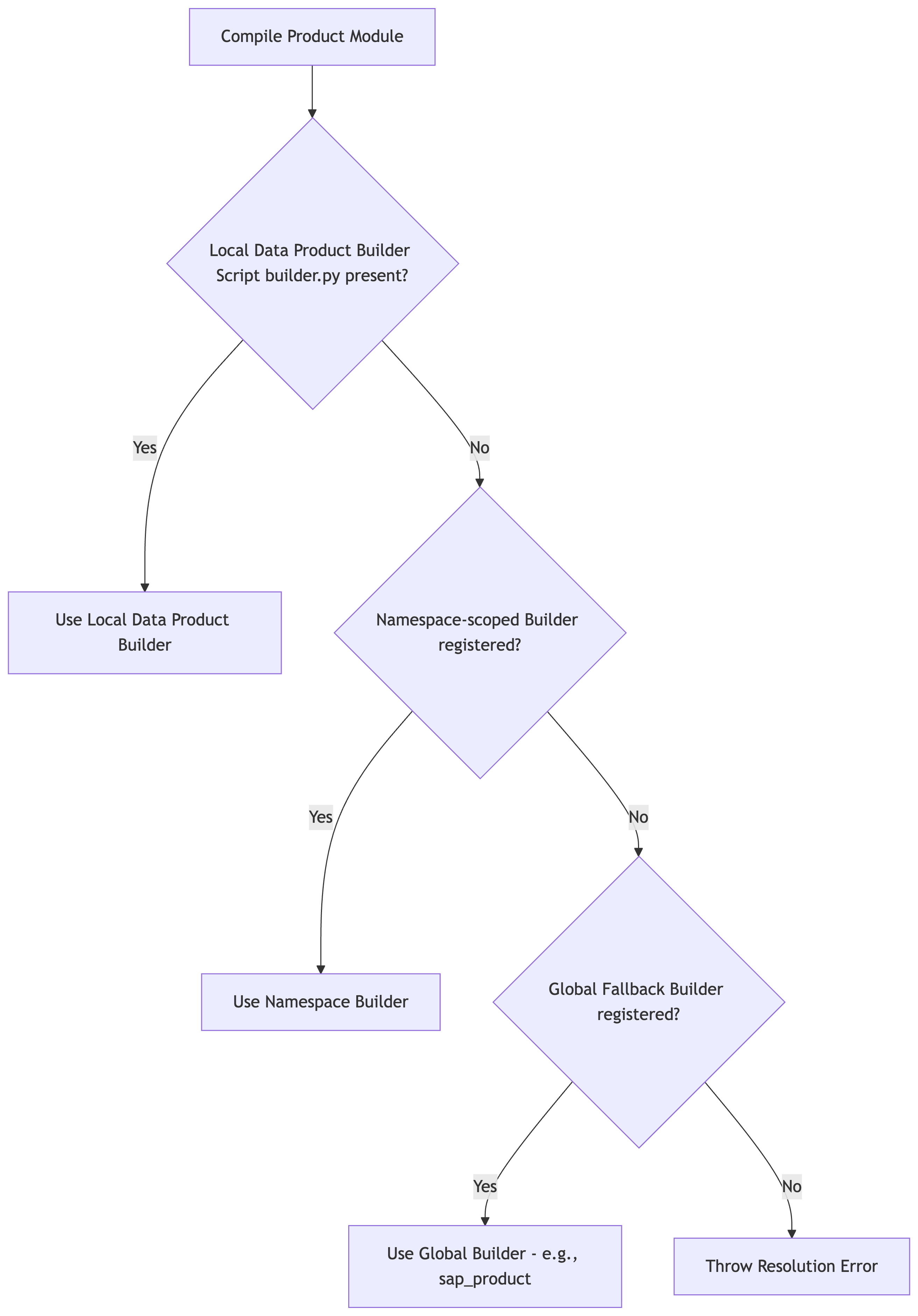
构建器是 Python 生成器类,可将模块源文件编译为 Dataform 输出。Google Cloud Cortex Framework 使用灵活的三层构建器解析序列 编译模块:
第 1 层:全局回退构建器
该框架包含位于 src/common/builders/ 中的高度可靠的构建器。这些构建器是全局注册的,可供任何 自定义命名空间使用。
例如,如需将标准 SAP 数据产品构建器用于自定义数据产品,请在 manifest.yaml 中引用 sap_product:
# src/data_modules/custom_namespace/data_product/data_product_module_type/manifest.yaml
type: data_product_module_type
builder: sap_product     # Automatically resolves to the global SapProductBuilder fallback
dependencies:
  sapModule:
    type: sap
    supportedVersions:
      - ecc
      - s4
第 2 层:命名空间级构建器
如果自定义命名空间内的模块需要专用编译器,您可以为该命名空间注册自定义构建器。
在
src/data_modules/custom_namespace/common/builders/my_builder.py下创建一个构建器文件。使用
@builder_registry.register("my_builder")修饰构建器类:from common.builders.base import ProductBuilder from common.registry import builder_registry @builder_registry.register("my_builder") class MyCustomProductBuilder(ProductBuilder): # Implement build logic here...使用
builder: my_builder在产品的manifest.yaml中引用它。
第 3 层:单个产品级构建器
对于高度独特的流水线,您可以定义一个构建器,其范围仅限于单个数据产品。
只需直接在数据产品文件夹内创建一个名为
builder.py的文件(例如src/data_modules/custom_namespace/data_product/data_product_module_type/builder.py)。在其中定义
BaseBuilder或ProductBuilder的子类:from common.builders.base import ProductBuilder class UniqueSalesPerformanceBuilder(ProductBuilder): # Implement unique build logic here...编译器将自动动态导入并执行此类,而无需任何注册或修饰器。
在接下来的步骤中:创建数据基础模块和创建数据产品模块,您将了解如何向命名空间添加数据模块。