


커스텀 네임스페이스 설정
커스텀 네임스페이스는 데이터 기반 및 분석 데이터 제품 모듈을 패키징하고 격리하는 논리적 환경 역할을 합니다. 전용 커스텀 네임스페이스 내에서 실행하면 구성 및 배포 옵션을 독립적으로 관리하여 환경을 격리할 수 있습니다. 이러한 분리의 주요 이점은 커스텀 모듈을 재정의하거나 손상시킬 위험 없이 Google Cloud Cortex Framework의 cortex 네임스페이스에서 향후 업데이트 및 개선사항을 원활하게 가져올 수 있다는 것입니다. 전용 네임스페이스 내에서 커스텀 모듈을 만드는 것이 좋습니다.
커스텀 네임스페이스 폴더 구조
Cortex Framework 네임스페이스 폴더는 커스텀 모듈 아티팩트를 패키징하고 격리하는 데 사용됩니다. 커스텀 네임스페이스의 폴더 구조는 다음 표에 정의되어 있습니다.
| 디렉터리 경로 | 목적 및 설명 |
|---|---|
config/ |
Cortex 배포 구성 (필수) 새 네임스페이스를 만들려면 config.yaml 내에서 설정해야 합니다.
|
src/data_modules/custom_namespace/data_foundation/data_foundation_module_type |
데이터 기반 모듈 기반 데이터 세트 변환을 위한 원시 데이터입니다. 각 데이터 기반은 하위 디렉터리로 구분되며 다음으로 구성됩니다.
|
src/data_modules/custom_namespace/data_product/data_product_module_type |
데이터 제품 정의 비즈니스 로직 및 분석 모델을 포함합니다. 각 제품은 하위 디렉터리로 구분되며 다음으로 구성됩니다.
|
src/data_modules/custom_namespace/includes/ |
JavaScript 도우미 여기에 배치된 모든 JavaScript 파일은 컴파일 중에 네임스페이스 경로 (예: includes/custom_namespace/) 아래에서 자동으로 패키징되어 Dataform 모델에서 사용할 수 있게 됩니다.
|
src/data_modules/custom_namespace/common/ |
네임스페이스 공유 도구 네임스페이스 범위의 커스텀 빌더, 배포자, 기타 도구입니다. |
커스텀 네임스페이스 구성
새 네임스페이스 custom_namespace는 config.yaml 파일의 해당 섹션을 확장하고 src/data_modules/ 아래에 새 디렉터리를 만들고 새 모듈 코드 애셋을 추가하여 정의할 수 있습니다.
Google Cloud Cortex Framework 컴파일러가 커스텀 네임스페이스 및 모듈을 인식하도록 하려면 전역 구성 파일 (config/config.yaml 등)에 등록해야 합니다.
1단계: 네임스페이스 등록
data.namespaces 블록 아래에 네임스페이스 메타데이터를 추가합니다.
data:
  namespaces:
    - name: cortex
      path: cortex/
    - name:  custom_namespace    # <-- Name of custom namespace
      path:  custom_namespace/  # <-- Folder name that is used for custom namespace, points to subdirectory of 'src/data_modules/'
2단계: 커스텀 모듈 구성
data.modules.foundation 또는 data.modules.product 아래에 커스텀 모듈을 등록합니다. type 필드에 점으로 구분된 형식 custom_namespace.module_type을 사용합니다.
data:
  modules:
    foundation:
      - moduleId:  custom_namespace_data_foundation_module_type
        type: custom_namespace.sap   # Format: <namespace>.<module_type>
        dataSourceId: sap_raw_s4
        dataTargetId: data_foundation_sap_custom_namespace
        moduleSettings:
          sapVersion: s4
          mandt: "100"
        # Default table settings file, relative to configuration file directory
        # tableSettings: "../src/data_modules/custom_namespace/data_foundation/data_foundation_module_type/table_settings.default.yaml"
        # Custom table settings file, relative to 'config/' directory
        tableSettings: "custom_namespace/data_foundation/data_foundation_module_type/table_settings.yaml"

    product:
      - moduleId: custom_namespace_data_product_module_type
        type: custom_namespace.data_product_module_type # Format: <namespace>.<module_type>
        dependsOn:
          sapModule: custom_namespace_data_foundation_module_type # References an existing foundation moduleId
        dataTargetId: product_target
        # Custom table settings file, relative to 'config/' directory
        # tableSettings: "custom_namespace/data_product/data_product_module_type/table_settings.yaml"
        # Default table settings file, relative to configuration file directory
        # tableSettings: "../src/data_modules/custom_namespace/data_product/data_product_module_type/table_settings.default.yaml"
커스텀 네임스페이스 공유 코드
커스텀 네임스페이스는 모듈 간에 코드 아티팩트 공유를 지원합니다. 지원되는 아티팩트 유형은 다음과 같습니다.
- includes - Dataform 아티팩트에서 사용할 수 있는 JavaScript 도우미를 포함합니다. 이러한 도우미는
src/data_modules/custom_namespace/includes/폴더에 배치할 수 있습니다. - builders - 모듈 소스 코드를 Dataform 아티팩트로 컴파일할 수 있는 커스텀 생성기 클래스입니다. 이러한 클래스는
src/data_modules/custom_namespace/common/에 배치할 수 있습니다.
빌더 이해 및 참조
빌더는 모듈 소스 파일을 Dataform 출력으로 컴파일하는 Python 생성기 클래스입니다. Google Cloud Cortex Framework는 유연한 3단계 빌더 확인 시퀀스를 사용하여 모듈을 컴파일합니다.
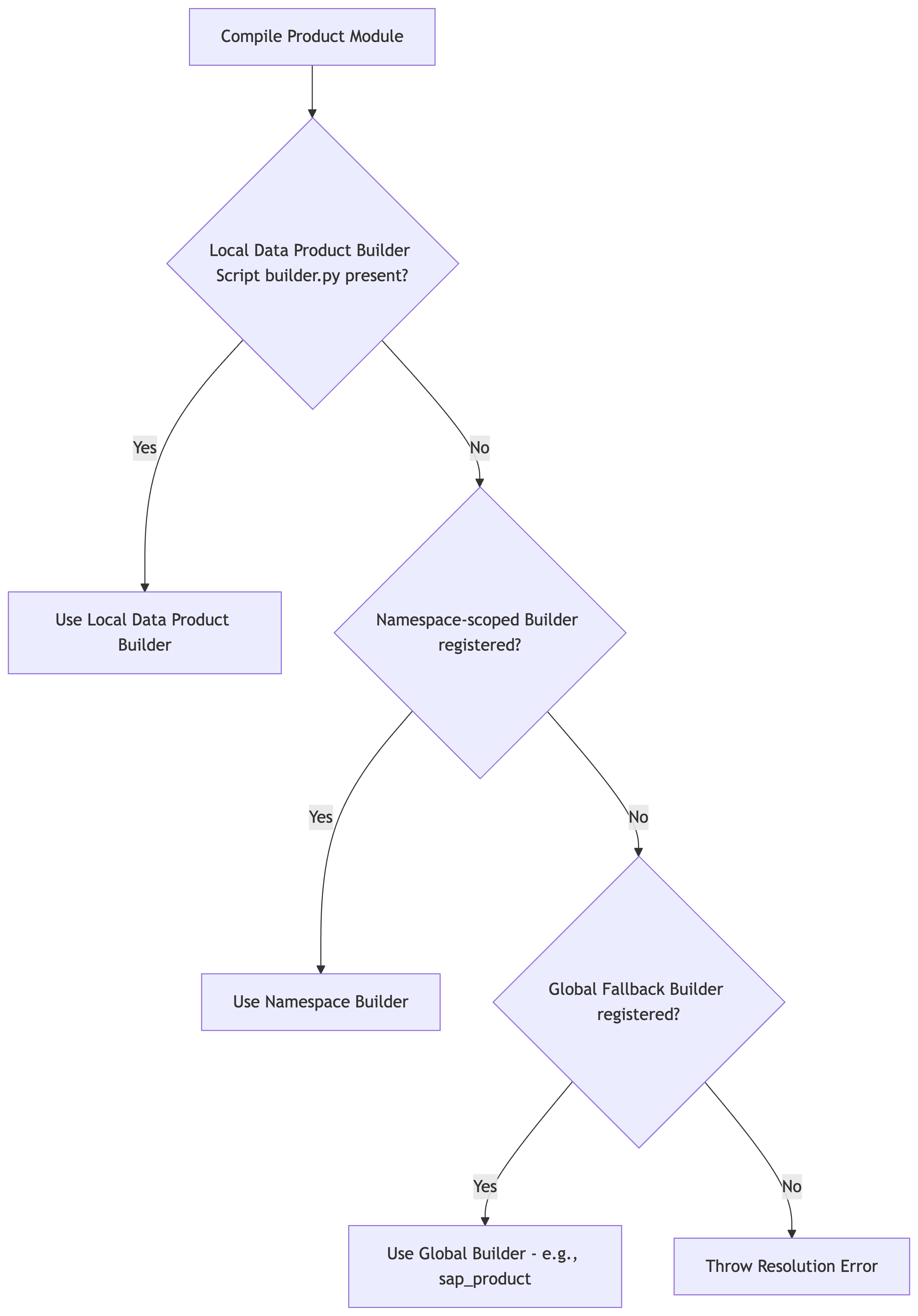
1단계: 전역 대체 빌더
프레임워크에는 src/common/builders/에 있는 매우 강력한 빌더가 포함되어 있습니다. 이러한 빌더는 전역으로 등록되며 모든 커스텀 네임스페이스에서 사용할 수 있습니다.
예를 들어 커스텀 데이터 제품에 표준 SAP 데이터 제품 빌더를 사용하려면 manifest.yaml에서 sap_product를 참조하세요.
# src/data_modules/custom_namespace/data_product/data_product_module_type/manifest.yaml
type: data_product_module_type
builder: sap_product     # Automatically resolves to the global SapProductBuilder fallback
dependencies:
  sapModule:
    type: sap
    supportedVersions:
      - ecc
      - s4
2단계: 네임스페이스 범위의 빌더
커스텀 네임스페이스 내의 모듈에 특수 컴파일러가 필요한 경우 해당 네임스페이스에 커스텀 빌더를 등록할 수 있습니다.
src/data_modules/custom_namespace/common/builders/my_builder.py아래에 빌더 파일을 만듭니다.@builder_registry.register("my_builder")로 빌더 클래스를 데코레이션합니다.from common.builders.base import ProductBuilder from common.registry import builder_registry @builder_registry.register("my_builder") class MyCustomProductBuilder(ProductBuilder): # Implement build logic here...builder: my_builder를 사용하여 제품의manifest.yaml에서 참조합니다.
3단계: 개별 제품 수준 빌더
매우 고유한 파이프라인의 경우 단일 데이터 제품에 독점적으로 범위가 지정된 빌더를 정의할 수 있습니다.
데이터 제품 폴더 (
src/data_modules/custom_namespace/data_product/data_product_module_type/builder.py등) 내에builder.py라는 파일을 직접 만듭니다.내부에
BaseBuilder또는ProductBuilder의 서브클래스를 정의합니다.from common.builders.base import ProductBuilder class UniqueSalesPerformanceBuilder(ProductBuilder): # Implement unique build logic here...컴파일러는 등록 또는 데코레이터 없이 이 클래스를 자동으로 동적으로 가져오고 실행합니다.
다음 단계인 데이터 기반 모듈 만들기 및 데이터 제품 모듈 만들기에서는 네임스페이스에 데이터 모듈을 추가하는 방법을 알아봅니다.
- 다음 단계: 데이터 기반 모듈 만들기
- 개요로 돌아가기