


瞭解如何使用 Cloud Run functions 觸發條件,自動因應Shielded VM 完整性監控事件。
總覽
完整性監控功能會從 Shielded VM 執行個體收集測量資料,然後呈現在 Cloud Logging 中。各個 Shielded VM 執行個體啟動時,如果完整性測量結果有任何變更,完整性驗證就會失敗。系統會擷取這個失敗並將其視為記錄事件,而且也會在 Cloud Monitoring 中提出。
有時候,Shielded VM 完整性測量結果會因為正當理由而變更。舉例來說,系統更新可能就會導致作業系統核心出現預期的變更。因此,完整性監控功能可以讓您在預期完整性驗證會失敗時,先向 Shielded VM 執行個體提示有新的完整性政策基準。
在這個教學課程中,您會先建立一個簡單的自動系統,讓受防護的 VM 執行個體在完整性驗證失敗時可以先關閉:
- 將所有完整性監控事件都匯出到 Pub/Sub 主題。
- 建立 Cloud Run 函式觸發條件,透過觸發條件使用該主題中的事件來找出完整性驗證失敗的 Shielded VM 執行個體,然後予以關機。
接著,您可以選擇是否要擴充系統,提示完整性驗證失敗的受防護 VM 執行個體有新的基準;藉此基準來判斷其符合已知的理想測量結果,否則就予以關閉:
- 建立 Firestore 資料庫來維護一組已知的理想完整性基準測量結果。
- 更新 Cloud Run functions 觸發條件,以便在受防護的 VM 執行個體未通過完整性驗證時收到提示,進一步瞭解新的基準並判斷是否符合資料庫內的測量結果,否則就予以關機。
如果您選擇實作擴充版的解決方案,請按照以下方式使用:
- 只要預期更新會因為正當理由導致驗證失敗,就對執行個體群組中的單一受防護 VM 執行個體執行該項更新。
- 將已更新 VM 執行個體的延後啟動事件做為來源,在 known_good_measurements 集合中建立新文件,將新政策基準測量結果加入資料庫。詳情請參閱「建立資料庫存放已知的理想基準測量結果」。
- 更新剩餘的 Shielded VM 執行個體。觸發條件會提示其餘執行個體使用新的基準,因為該基準已驗證為是已知的理想結果。詳情請參閱「更新 Cloud Run functions 觸發條件以使用已知的理想基準」。
必要條件
- 使用選取做為資料庫服務的原生模式 Firestore;這個服務是您在建立專案時選取的,且無法變更。如果您的專案並非使用原生模式的 Firestore,當您開啟 Firestore 主控台時就會看見「這個專案使用另一個資料庫服務」訊息。
- 將該專案中的一個 Compute Engine Shielded VM 執行個體當做完整性基準測量的來源。Shielded VM 執行個體必須重新啟動至少一次。
- 已安裝
gcloud指令列工具。 按照下列步驟啟用 Cloud Logging 和 Cloud Run functions API:
在 Google Cloud 控制台中,前往「APIs & Services」(API 與服務) 頁面。
查看 Cloud Functions API 和 Stackdriver Logging API 是否已顯示在「已啟用 API 和服務」清單上。
如果有任何一個 API 未顯示,請按一下 [新增 API 和 服務]。
視需要搜尋並啟用 API。
將完整性監控記錄項目匯出到 Pub/Sub 主題
使用 Logging 將 Shielded VM 執行個體產生的所有完整性監控記錄項目都匯出到 Pub/Sub 主題。您可以將這個主題做為 Cloud Run functions 觸發條件的資料來源,自動回覆完整性監控事件。
Logs Explorer
前往 Google Cloud 控制台的「Logs Explorer」頁面。
在「Query Builder」(查詢建立工具) 中輸入下列值。
resource.type="gce_instance"
AND logName:  "projects/YOUR_PROJECT_ID/logs/compute.googleapis.com/shielded_vm_integrity"
按一下「執行篩選器」。
按一下「更多動作」,然後選取「建立接收器」。
在「建立記錄檔轉送接收器」頁面中:
- 在「接收器詳細資料」中,輸入「接收器名稱」
integrity-monitoring,然後按一下「下一步」。 - 在「接收器目標位置」中,展開「接收器服務」,然後選取「Cloud Pub/Sub」。
- 展開「Select a Cloud Pub/Sub topic」(選取 Cloud Pub/Sub 主題),然後選取「Create a topic」(建立主題)。
- 在「建立主題」對話方塊中,為「主題 ID」輸入
integrity-monitoring,然後按一下「建立主題」。 - 依序點選「下一步」和「建立接收器」。
- 在「接收器詳細資料」中,輸入「接收器名稱」
Logs Explorer
前往 Google Cloud 控制台的「Logs Explorer」頁面。
按一下「選項」,然後選取「返回舊版 Logs Explorer」。
展開「按標籤或搜尋字詞篩選」,然後按一下「轉換為進階篩選器」。
輸入下列進階篩選器:
resource.type="gce_instance"
AND logName:  "projects/YOUR_PROJECT_ID/logs/compute.googleapis.com/shielded_vm_integrity"
logName:後面有兩個空格。按一下 [Submit Filter] (提交篩選器)。
按一下 [建立匯出作業]。
在「Sink Name」(接收器名稱) 中輸入
integrity-monitoring。在「接收器服務」選單中選取 [Cloud Pub/Sub]。
展開「接收器目標位置」,然後按一下「新建 Cloud Pub/Sub 主題」。
在「名稱」中輸入
integrity-monitoring,然後按一下「建立」。按一下「建立接收器」。
建立 Cloud Run functions 觸發條件來回應完整性失敗
建立 Cloud Run functions 觸發條件,讀取 Pub/Sub 主題中的資料,並停止所有未通過完整性驗證的 Shielded VM 執行個體。
下列程式碼用來定義 Cloud Run functions 觸發條件,將其複製到名為
main.py的檔案。import base64 import json import googleapiclient.discovery def shutdown_vm(data, context): """A Cloud Function that shuts down a VM on failed integrity check.""" log_entry = json.loads(base64.b64decode(data['data']).decode('utf-8')) payload = log_entry.get('jsonPayload', {}) entry_type = payload.get('@type') if entry_type != 'type.googleapis.com/cloud_integrity.IntegrityEvent': raise TypeError("Unexpected log entry type: %s" % entry_type) report_event = (payload.get('earlyBootReportEvent') or payload.get('lateBootReportEvent')) if report_event is None: # We received a different event type, ignore. return policy_passed = report_event['policyEvaluationPassed'] if not policy_passed: print('Integrity evaluation failed: %s' % report_event) print('Shutting down the VM') instance_id = log_entry['resource']['labels']['instance_id'] project_id = log_entry['resource']['labels']['project_id'] zone = log_entry['resource']['labels']['zone'] # Shut down the instance. compute = googleapiclient.discovery.build( 'compute', 'v1', cache_discovery=False) # Get the instance name from instance id. list_result = compute.instances().list( project=project_id, zone=zone, filter='id eq %s' % instance_id).execute() if len(list_result['items']) != 1: raise KeyError('unexpected number of items: %d' % len(list_result['items'])) instance_name = list_result['items'][0]['name'] result = compute.instances().stop(project=project_id, zone=zone, instance=instance_name).execute() print('Instance %s in project %s has been scheduled for shut down.' % (instance_name, project_id))
在
main.py的同一個所在位置,建立名稱為requirements.txt的檔案,然後複製下列依附元件:google-api-python-client==1.6.6 google-auth==1.4.1 google-auth-httplib2==0.0.3
開啟終端機視窗,然後前往含有
main.py和requirements.txt的目錄。執行
gcloud beta functions deploy指令來部署觸發條件:gcloud beta functions deploy shutdown_vm \ --project PROJECT_ID \ --runtime python37 \ --trigger-resource integrity-monitoring \ --trigger-event google.pubsub.topic.publish
建立資料庫來存放已知的理想基準測量結果
建立 Firestore 資料庫來提供一組已知的理想完整性基準測量結果。您必須手動新增基準測量結果,讓這個資料庫保持在最新狀態。
前往 Google Cloud 控制台的「VM instances」(VM 執行個體) 頁面。
按一下 Shielded VM 執行個體 ID,開啟「VM 執行個體詳細資料」頁面。
按一下「Logs」(記錄) 下的 [Stackdriver Logging]。
找出最近的
lateBootReportEvent記錄項目。展開記錄項目 >
jsonPayload>lateBootReportEvent>policyMeasurements。記下
lateBootReportEvent>policyMeasurements內含元素的值。前往 Google Cloud 控制台的「Firestore」頁面。
選擇 [啟動集合]。
在「集合 ID」 欄位中輸入 known_good_measurements。
在「文件 ID」中輸入 baseline1。
在「欄位名稱」(Field name) 中,輸入從
lateBootReportEvent>policyMeasurements的元素0取得的 pcrNum 欄位值。在「欄位類型」選單中選取 [對應]。
在名稱為「hashAlgo」、「pcrNum」和「value」的對應欄位中個新增三個字串欄位;填入從
lateBootReportEvent>policyMeasurements元素0欄位中取得的值。建立多個對應欄位,
lateBootReportEvent>policyMeasurements中每個額外元素各一個;並為這些元素提供和第一個對應欄位一樣的子欄位。這些子欄位的值應對應於每個額外元素的值。舉例來說,如果您使用 Linux VM,完成之後,集合看起來應該類似於以下架構:

如果您使用 Windows VM,會看到更多測量結果,因此集合看起來應該類似於以下架構:
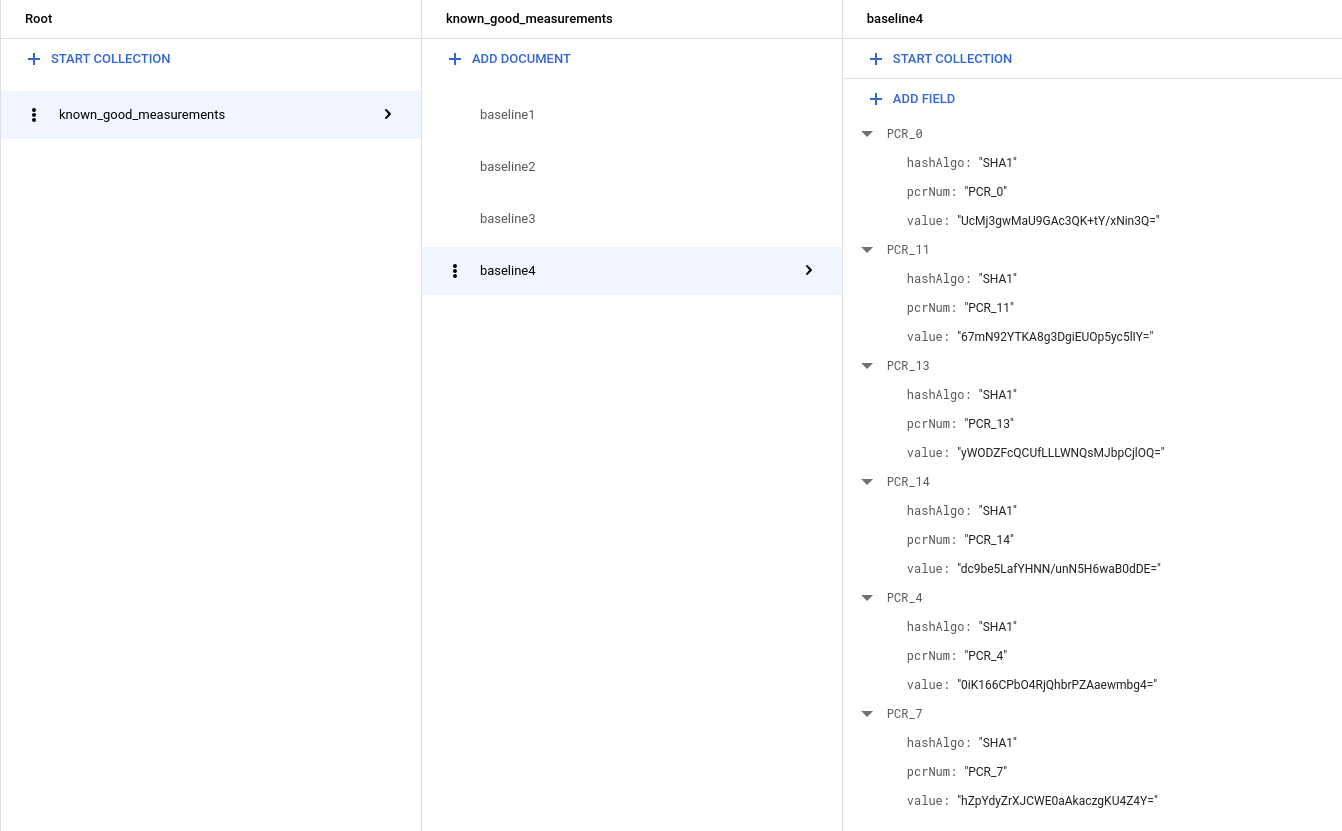
更新 Cloud Run 函式觸發條件以使用已知的理想基準
下列程式碼用於建立 Cloud Run functions 觸發條件,能讓完整性驗證失敗的 Shielded VM 執行個體取得新的基準,並判斷是否符合資料庫內的理想測量結果,否則就予以關機。複製這段程式碼,並用於覆寫
main.py中現有的程式碼。import base64 import json import googleapiclient.discovery import firebase_admin from firebase_admin import credentials from firebase_admin import firestore PROJECT_ID = 'PROJECT_ID' firebase_admin.initialize_app(credentials.ApplicationDefault(), { 'projectId': PROJECT_ID, }) def pcr_values_to_dict(pcr_values): """Converts a list of PCR values to a dict, keyed by PCR num""" result = {} for value in pcr_values: result[value['pcrNum']] = value return result def instance_id_to_instance_name(compute, zone, project_id, instance_id): list_result = compute.instances().list( project=project_id, zone=zone, filter='id eq %s' % instance_id).execute() if len(list_result['items']) != 1: raise KeyError('unexpected number of items: %d' % len(list_result['items'])) return list_result['items'][0]['name'] def relearn_if_known_good(data, context): """A Cloud Function that shuts down a VM on failed integrity check. """ log_entry = json.loads(base64.b64decode(data['data']).decode('utf-8')) payload = log_entry.get('jsonPayload', {}) entry_type = payload.get('@type') if entry_type != 'type.googleapis.com/cloud_integrity.IntegrityEvent': raise TypeError("Unexpected log entry type: %s" % entry_type) # We only send relearn signal upon receiving late boot report event: if # early boot measurements are in a known good database, but late boot # measurements aren't, and we send relearn signal upon receiving early boot # report event, the VM will also relearn late boot policy baseline, which we # don't want, because they aren't known good. report_event = payload.get('lateBootReportEvent') if report_event is None: return evaluation_passed = report_event['policyEvaluationPassed'] if evaluation_passed: # Policy evaluation passed, nothing to do. return # See if the new measurement is known good, and if it is, relearn. measurements = pcr_values_to_dict(report_event['actualMeasurements']) db = firestore.Client() kg_ref = db.collection('known_good_measurements') # Check current measurements against known good database. relearn = False for kg in kg_ref.get(): kg_map = kg.to_dict() # Check PCR values for lateBootReportEvent measurements against the known good # measurements stored in the Firestore table if ('PCR_0' in kg_map and kg_map['PCR_0'] == measurements['PCR_0'] and 'PCR_4' in kg_map and kg_map['PCR_4'] == measurements['PCR_4'] and 'PCR_7' in kg_map and kg_map['PCR_7'] == measurements['PCR_7']): # Linux VM (3 measurements), only need to check above 3 measurements if len(kg_map) == 3: relearn = True # Windows VM (6 measurements), need to check 3 additional measurements elif len(kg_map) == 6: if ('PCR_11' in kg_map and kg_map['PCR_11'] == measurements['PCR_11'] and 'PCR_13' in kg_map and kg_map['PCR_13'] == measurements['PCR_13'] and 'PCR_14' in kg_map and kg_map['PCR_14'] == measurements['PCR_14']): relearn = True compute = googleapiclient.discovery.build('compute', 'beta', cache_discovery=False) instance_id = log_entry['resource']['labels']['instance_id'] project_id = log_entry['resource']['labels']['project_id'] zone = log_entry['resource']['labels']['zone'] instance_name = instance_id_to_instance_name(compute, zone, project_id, instance_id) if not relearn: # Issue shutdown API call. print('New measurement is not known good. Shutting down a VM.') result = compute.instances().stop(project=project_id, zone=zone, instance=instance_name).execute() print('Instance %s in project %s has been scheduled for shut down.' % (instance_name, project_id)) else: # Issue relearn API call. print('New measurement is known good. Relearning...') result = compute.instances().setShieldedInstanceIntegrityPolicy( project=project_id, zone=zone, instance=instance_name, body={'updateAutoLearnPolicy':True}).execute() print('Instance %s in project %s has been scheduled for relearning.' % (instance_name, project_id))
複製下列依附元件,並用來覆寫
requirements.txt中的現有程式碼:google-api-python-client==1.6.6 google-auth==1.4.1 google-auth-httplib2==0.0.3 google-cloud-firestore==0.29.0 firebase-admin==2.13.0
開啟終端機視窗,然後前往含有
main.py和requirements.txt的目錄。執行
gcloud beta functions deploy指令來部署觸發條件:gcloud beta functions deploy relearn_if_known_good \ --project PROJECT_ID \ --runtime python37 \ --trigger-resource integrity-monitoring \ --trigger-event google.pubsub.topic.publish在 Cloud Functions 控制台中,手動刪除先前的
shutdown_vm函式。前往 Google Cloud 控制台的「Cloud Functions」頁面。
選取 shutdown_vm 函式,然後按一下「刪除」。
驗證對失敗完整性驗證作業的自動回應
- 首先,請檢查您是否已啟用「安全啟動」,並以 Shielded VM 選項執行執行個體。如果沒有,您可以建立新的執行個體,並使用 Shielded VM 映像檔 (Ubuntu 18.04LTS) 啟用「安全啟動」選項。系統可能會向您收取幾美分的執行個體費用 (這個步驟可以在一小時內完成)。
- 現在,假設您想手動升級核心。
透過 SSH 連線至執行個體,並使用下列指令檢查目前的核心。
uname -sr畫面應如下所示:
Linux 4.15.0-1028-gcp。從 https://kernel.ubuntu.com/~kernel-ppa/mainline/ 下載一般核心
使用指令安裝。
sudo dpkg -i *.deb重新啟動 VM。
您會發現 VM 無法啟動 (無法透過 SSH 連線至機器)。這是預期行為,因為新核心的簽章不在我們的安全啟動許可清單中。這也說明安全啟動如何防止未經授權/惡意修改核心。
但由於我們知道這次的 Kernel 升級並非惡意行為,而且確實是由我們自己完成,因此可以關閉「安全啟動」,以便啟動新的 Kernel。
關閉 VM 並取消勾選「安全啟動」選項,然後重新啟動 VM。
機器應該會再次無法啟動!但這次是我們建立的雲端函式自動關閉,因為安全啟動選項已變更 (也是因為新的核心映像檔),導致測量結果與基準不同。(我們可以在 Cloud Functions 的 Stackdriver 記錄中檢查這點)。
由於我們知道這不是惡意修改,也知道根本原因,因此可以在已知的良好測量 Firebase 資料表中加入目前的測量結果。
lateBootReportEvent(請注意,有兩項變更:1. 安全啟動選項 2:核心映像檔)。按照上一個步驟「建立資料庫存放已知的理想基準測量結果」操作,使用最新
lateBootReportEvent中的實際測量結果,將新基準附加至 Firestore 資料庫。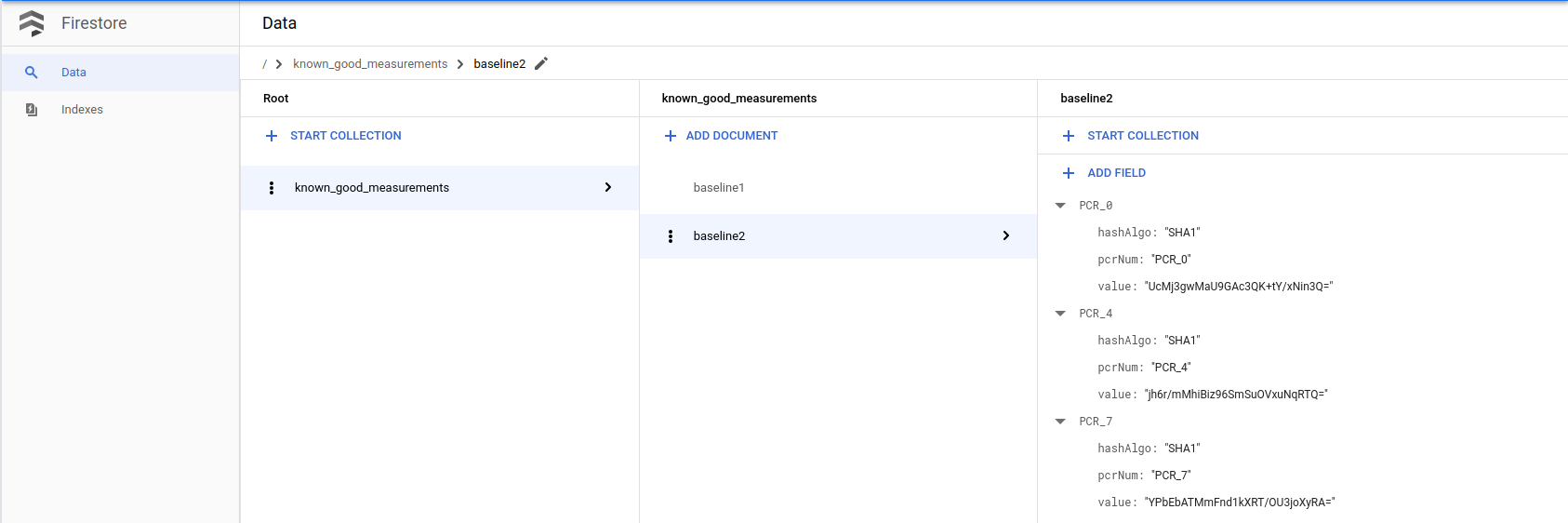
現在請重新啟動電腦。檢查 Stackdriver 記錄時,您會發現
lateBootReportEvent仍顯示為 false,但機器現在應該可以順利啟動,因為 Cloud 函式已信任並重新學習新的測量結果。我們可以檢查雲端函式的 Stackdriver 來驗證。停用「安全啟動」後,我們現在可以啟動核心。 透過 SSH 連線至機器,然後再次檢查核心,您會看到新的核心版本。
uname -sr最後,請清理這個步驟中使用的資源和資料。
如果您為這個步驟建立 VM,請關閉 VM,以免產生額外費用。
前往 Google Cloud 控制台的「VM instances」(VM 執行個體) 頁面。
移除您在此步驟中新增的已知良好測量結果。
前往 Google Cloud 控制台的「Firestore」頁面。